steering wheel Acura RLX HYBRID 2018 Service Manual
[x] Cancel search | Manufacturer: ACURA, Model Year: 2018, Model line: RLX HYBRID, Model: Acura RLX HYBRID 2018Pages: 609, PDF Size: 48.11 MB
Page 355 of 609
uuBluetooth ® HandsFreeLink ®u HFL Menus
354
Features
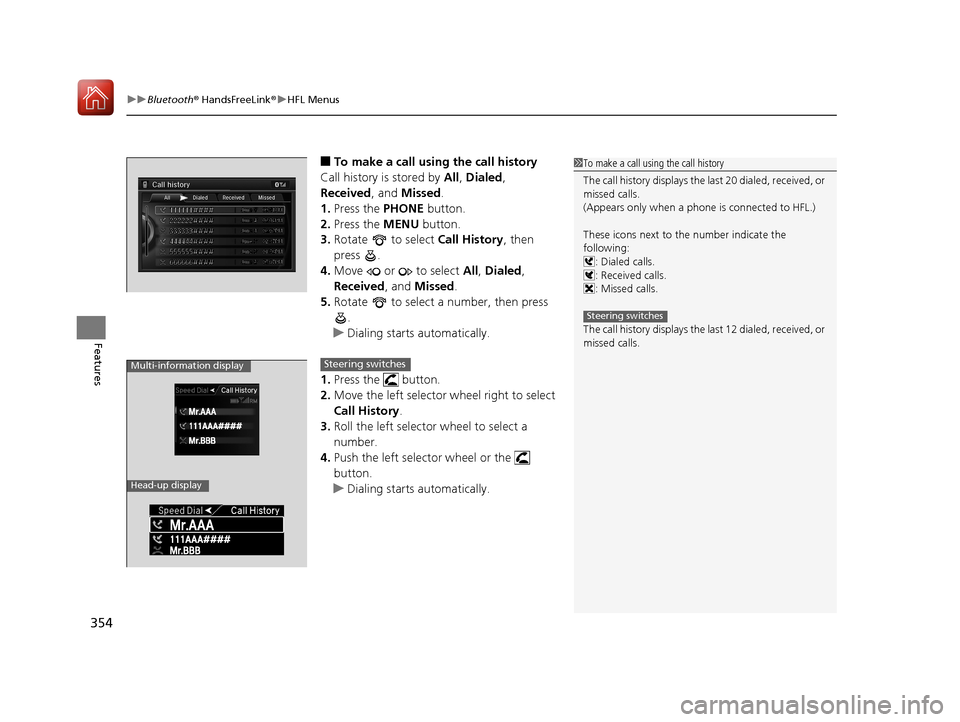
■To make a call using the call history
Call history is stored by All, Dialed ,
Received, and Missed .
1. Press the PHONE button.
2. Press the MENU button.
3. Rotate to select Call History, then
press .
4. Move or to select All, Dialed ,
Received , and Missed .
5. Rotate to select a number, then press
.
u Dialing starts automatically.
1. Press the button.
2. Move the left selector wheel right to select
Call History .
3. Roll the left selector wheel to select a
number.
4. Push the left selector wheel or the
button.
u Dialing starts automatically.1To make a call using the call history
The call history disp lays the last 20 dialed, received, or
missed calls.
(Appears only when a phone is connected to HFL.)
These icons next to the number indicate the
following:
: Dialed calls.
: Received calls.
: Missed calls.
The call history disp lays the last 12 dialed, received, or
missed calls.
Steering switches
111AAA#### Mr.AAA
Mr.BBB
Multi-information display
Head-up display
Steering switches
18 ACURA RLX E-AWD-31TY36400.book 354 ページ 2017年7月20日 木曜日 午後6時 8分
Page 356 of 609
Continued355
uuBluetooth ® HandsFreeLink ®u HFL Menus
Features
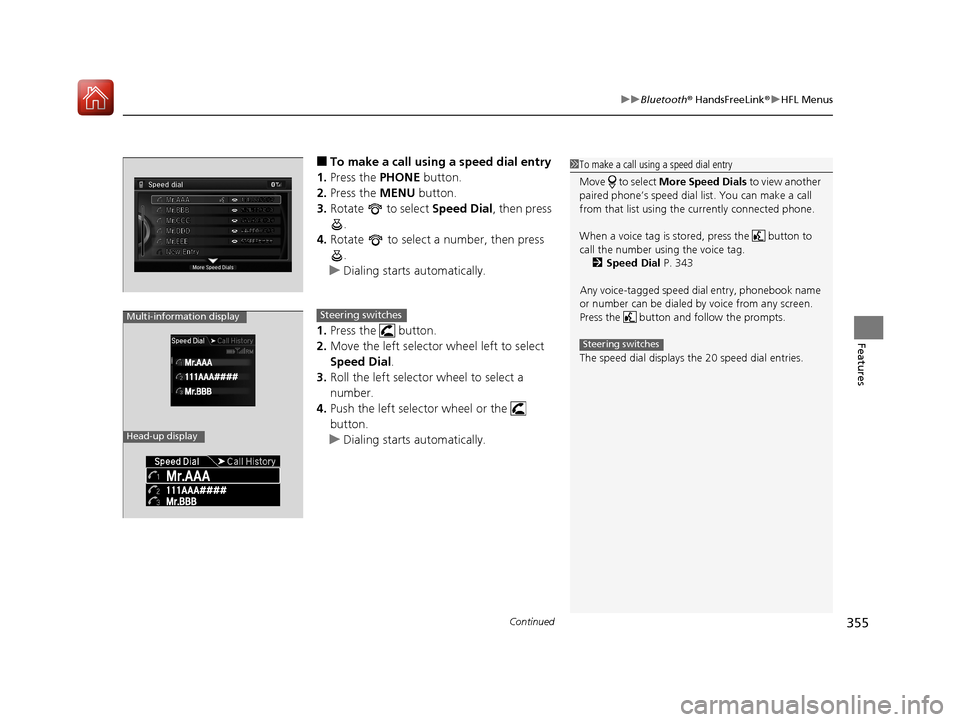
■To make a call using a speed dial entry
1. Press the PHONE button.
2. Press the MENU button.
3. Rotate to select Speed Dial, then press
.
4. Rotate to select a number, then press
.
u Dialing starts automatically.
1. Press the button.
2. Move the left selector wheel left to select
Speed Dial .
3. Roll the left selector wheel to select a
number.
4. Push the left selector wheel or the
button.
u Dialing starts automatically.1To make a call using a speed dial entry
Move to select More Speed Dials to view another
paired phone’s speed dial list. You can make a call
from that list using th e currently connected phone.
When a voice tag is stored, press the button to
call the number using the voice tag. 2 Speed Dial P. 343
Any voice-tagged speed di al entry, phonebook name
or number can be dialed by voice from any screen.
Press the button and follow the prompts.
The speed dial displays the 20 speed dial entries.
Steering switches
111AAA#### Mr.AAA
Mr.BBB
Multi-information display
Head-up display
Steering switches
18 ACURA RLX E-AWD-31TY36400.book 355 ページ 2017年7月20日 木曜日 午後6時 8分
Page 376 of 609
Continued375
uuBefore Driving uDriving Preparation
Driving
• Store or secure all items on board properly.
u Carrying too much cargo, or improperly storing it, can affect your vehicle’s
handling, stability, sto pping distance, and tires, and make it unsafe.
2Maximum Load Limit P. 377
•Do not pile items higher than the seat height.
u They can block your view and may be thrown forward in the event of sudden
braking.
• Do not place anything in the front seat footwells. Make sure to secure the floor
mat.
u An object or unsecured floor mat can in terfere with your brake and accelerator
pedal operation while driving.
• If you have any animals on board, do not let them move around in the vehicle.
u They may interfere with driv ing and a crash could occur.
• Securely close and lock all doors and the trunk.
2 Locking/Unlocking the Doors from the Inside P. 139
•Adjust your seating position properly.
u Adjust the head restraint, too.
2Adjusting the Seats P. 175
2 Adjusting the Front and Rear Outer Head Restraint Positions P. 178
•Adjust the mirrors and steering wh eel properly for your driving.
u Adjust them while sitting in the proper driving position.
2 Adjusting the Mirrors P. 172
2 Adjusting the Steering Wheel P. 171
■Interior Checks1Interior Checks
The headlight aim is set by the factory, and does not
need to be adjusted. Howeve r, if you regularly carry
heavy items in the trunk ha ve the aiming readjusted
at a dealer or by a qualified technician.
18 ACURA RLX E-AWD-31TY36400.book 375 ページ 2017年7月20日 木曜日 午後6時 8分
Page 384 of 609
Continued383
uuWhen Driving uTurning on the Power
Driving
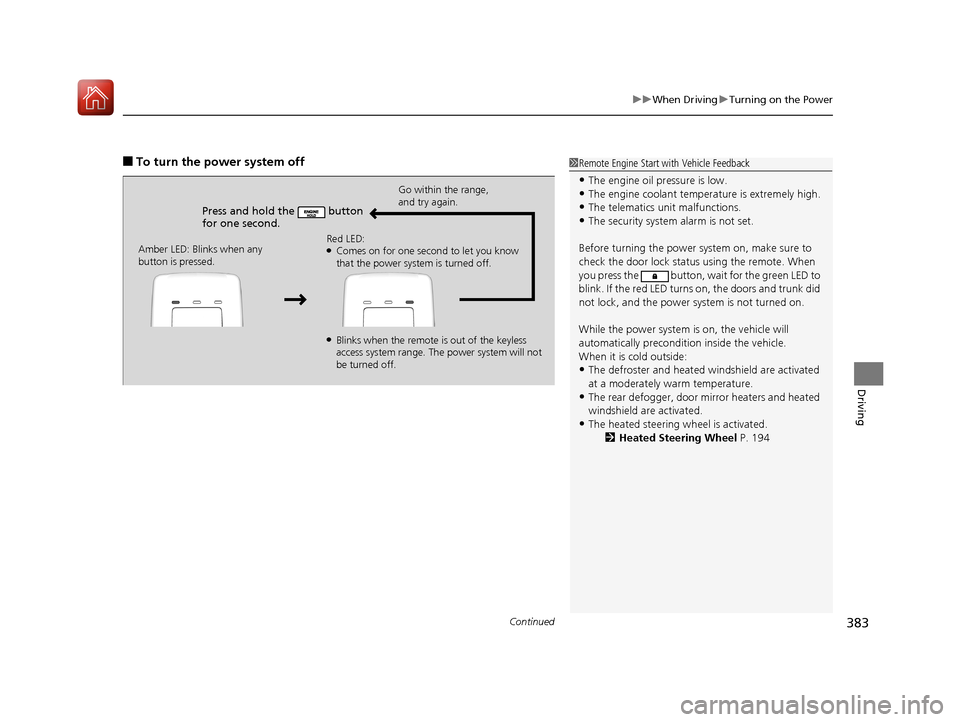
■To turn the power system off1Remote Engine Start with Vehicle Feedback
•The engine oil pressure is low.•The engine coolant temper ature is extremely high.
•The telematics unit malfunctions.
•The security system alarm is not set.
Before turning the power sy stem on, make sure to
check the door lock status using the remote. When
you press the button, wait for the green LED to
blink. If the red LED turns on, the doors and trunk did
not lock, and the power system is not turned on.
While the power system is on, the vehicle will
automatically preconditi on inside the vehicle.
When it is cold outside:
•The defroster and heated windshield are activated
at a moderately warm temperature.
•The rear defogger, door mi rror heaters and heated
windshield are activated.
•The heated steering wheel is activated. 2Heated Steering Wheel P. 194
Press and hold the button
for one second.
Go within the range,
and try again.
Amber LED: Blinks when any
button is pressed. Red LED:
●Comes on for one second to let you know
that the power system is turned off.
●Blinks when the remote is out of the keyless
access system range. The power system will not
be turned off.
18 ACURA RLX E-AWD-31TY36400.book 383 ページ 2017年7月20日 木曜日 午後6時
8分
Page 386 of 609
385
uuWhen Driving uPrecautions While Driving
Continued
Driving
Precautions While Driving
Avoid driving in deep water and on flooded roads. This can damage the power
system or driveline, or caus e electrical component failure.
■In Rain1Precautions While Driving
NOTICE
Do not change the gear position while pressing the
accelerator pedal. You could damage the
transmission.
NOTICE
The following can dama ge the under spoiler:•Parking the vehicle by a parking block
•Parallel parking along the road shoulder
•Driving toward the bottom of a hill•Driving up or down to a different surface level
(such as a road shoulder)
•Driving on a rutted or bumpy road
•Driving on a road with potholes.
NOTICE
If you repeatedly turn the steering wheel at an
extremely low speed, or hold the steering wheel in
the full left or right position for a while, the electric
power steering (EPS) system heats up. The system
goes into a protective mode, and limits its
performance. The steering wheel becomes harder
and harder to operate. Once the system cools down,
the EPS system is restored.
Repeated operation under these conditions can
eventually damage the system.
If the power mode is set to ACCESSORY while
driving, the power system will shut down and all
steering and brake power a ssist functions will stop,
making it difficult to control the vehicle.
18 ACURA RLX E-AWD-31TY36400.book 385 ページ 2017年7月20日 木曜日 午後6時 8分
Page 394 of 609
Continued393
uuWhen Driving uShifting
Driving
Use the paddle shifters to change between 1st and 7th gears without removing your
hands from the steering wheel. The transmission will switch to the sequential mode.
■When the transmission is in (D:
The vehicle will go into th e sequential mode momentarily , and the sequential mode
gear selection indicator will come on.
Once you start traveling at a constant speed, the sequential mode will automatically
switch off, and the sequential mode gear selection indicator will go off.
Hold the
(+ paddle shifter for two seconds to return to normal drive.
■When the transmission is in (D with SPORT mode:
The vehicle will go into th e sequential mode, and the M (sequential mode) indicator
and sequential mode gear selection indicator will come on.
If the vehicle speed increases and the engi ne speed reaches near the tachometer’s
red zone, the transmission automatically shifts up to 6th.
You can cancel this mode by pulling the
(+ paddle shifter for two seconds. When
the sequential mode is canceled, the sequential mode indicator and sequential
mode gear selection indicator will go off.
■Sequential Mode1 Sequential Mode
The vehicle is e ngine operated when SPORT mode is
on.
18 ACURA RLX E-AWD-31TY36400.book 393 ページ 2017年7月20日 木曜日 午後6時 8分
Page 402 of 609
401
uuWhen Driving uAcuraWatchTM
Driving
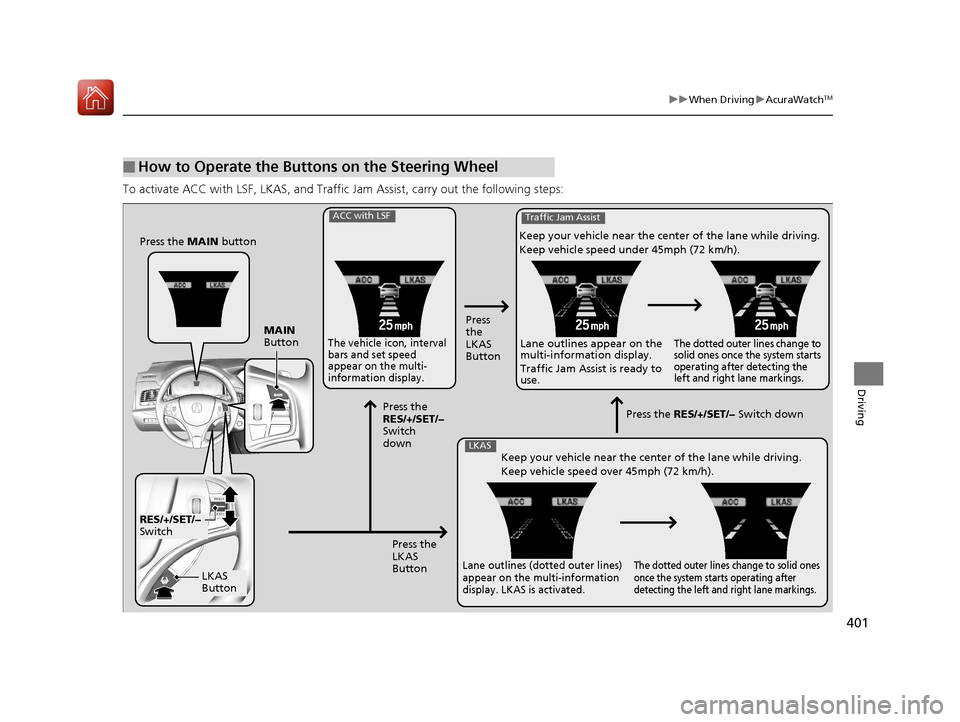
To activate ACC with LSF, LK AS, and Traffic Jam Assist, ca rry out the following steps:
■How to Operate the Buttons on the Steering Wheel
Press the MAIN button
MAIN
Button
RES/+/SET/−
Switch
LKAS
Button
ACC with LSF
The vehicle icon, interval
bars and set speed
appear on the multi-
information display.
Press
the
LKAS
Button
Press the
RES/+/SET/−
Switch
down
Press the
LKAS
Button
Traffic Jam Assist
Keep your vehicle near the center of the lane while driving.
Keep vehicle speed under 45mph (72 km/h).Lane outlines appear on the
multi-information display.
Traffic Jam Assist is ready to
use.
The dotted outer lines change to
solid ones once the system starts
operating after detecting the
left and right lane markings.
LKASKeep your vehicle near the center of the lane while driving.
Keep vehicle speed over 45mph (72 km/h).
Lane outlines (dotted outer lines)
appear on the multi-information
display. LKAS is activated.The dotted outer lines change to solid ones
once the system starts operating after
detecting the left and right lane markings.
Press the RES/+/SET/− Switch down
18 ACURA RLX E-AWD-31TY36400.book 401 ページ 2017年7月20日 木曜日 午後6時 8分
Page 406 of 609
Continued405
uuWhen Driving uAdaptive Cruise Control (ACC) with Low Speed Follow (LSF)
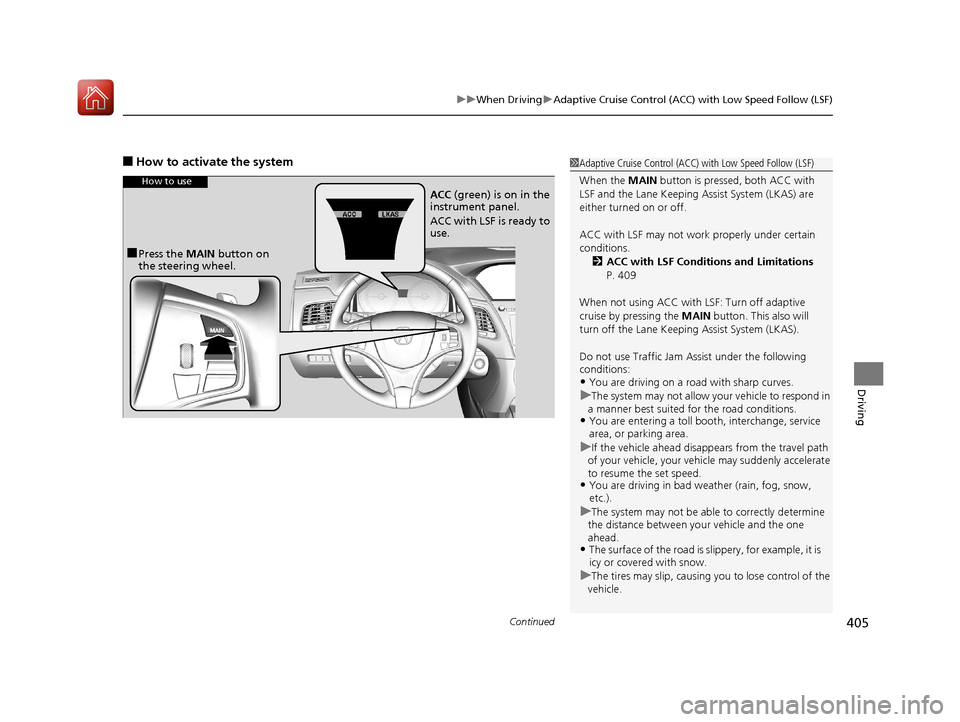
Driving
■How to activate the system1Adaptive Cruise Control (ACC) with Low Speed Follow (LSF)
When the MAIN button is pressed, both ACC with
LSF and the Lane Keeping Assist System (LKAS) are
either turned on or off.
ACC with LSF may not work properly under certain
conditions. 2 ACC with LSF Conditions and Limitations
P. 409
When not using ACC with LSF: Turn off adaptive
cruise by pressing the MAIN button. This also will
turn off the Lane Keeping Assist System (LKAS).
Do not use Traffic Jam Assist under the following
conditions:
•You are driving on a ro ad with sharp curves.
uThe system may not allow your vehicle to respond in
a manner best suited for the road conditions.
•You are entering a toll boot h, interchange, service
area, or parking area.
uIf the vehicle ahead disappe ars from the travel path
of your vehicle, your vehi cle may suddenly accelerate
to resume the set speed.
•You are driving in bad we ather (rain, fog, snow,
etc.).
uThe system may not be able to correctly determine
the distance between yo ur vehicle and the one
ahead.
•The surface of the road is slippery, for example, it is
icy or covered with snow.
uThe tires may slip, causing you to lose control of the
vehicle.
How to use
■Press the MAIN button on
the steering wheel. ACC
(green) is on in the
instrument panel.
ACC with LSF is ready to
use.
18 ACURA RLX E-AWD-31TY36400.book 405 ページ 2017年7月20日 木曜日 午後6時 8分
Page 412 of 609
Continued411
uuWhen Driving uAdaptive Cruise Control (ACC) with Low Speed Follow (LSF)
Driving
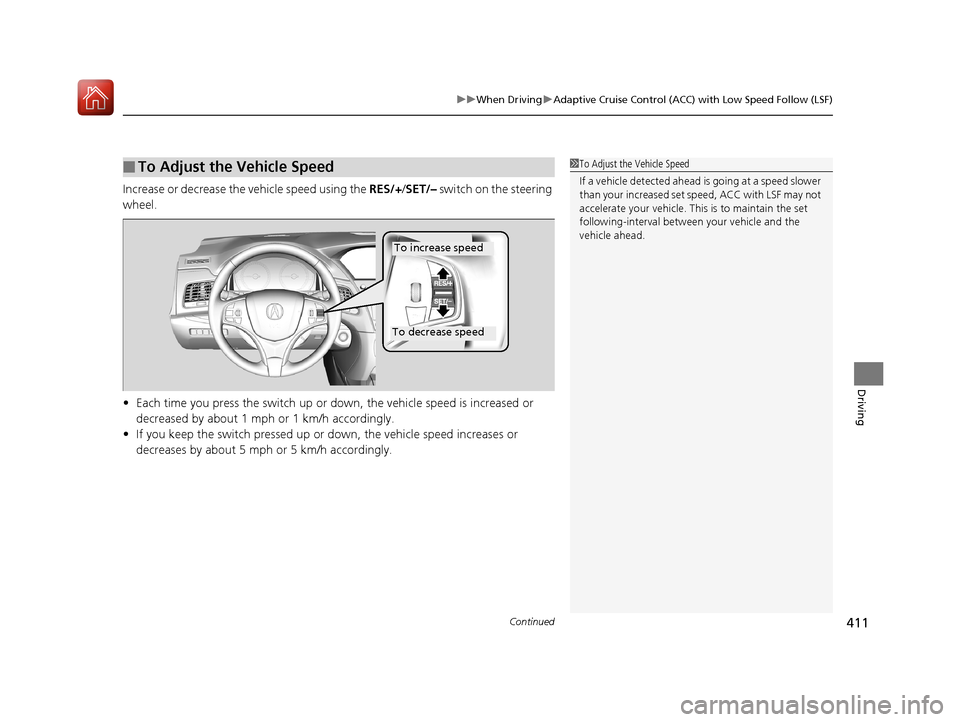
Increase or decrease the vehicle speed using the RES/+/SET/– switch on the steering
wheel.
• Each time you press the switch up or do wn, the vehicle speed is increased or
decreased by about 1 mph or 1 km/h accordingly.
• If you keep the switch pressed up or down, the vehicle speed increases or
decreases by about 5 mph or 5 km/h accordingly.
■To Adjust the Vehicle Speed1To Adjust the Vehicle Speed
If a vehicle detected ahead is going at a speed slower
than your increased set speed, ACC with LSF may not
accelerate your vehicle. This is to maintain the set
following-interval betwee n your vehicle and the
vehicle ahead.
To increase speed
To decrease speed
18 ACURA RLX E-AWD-31TY36400.book 411 ページ 2017年7月20日 木曜日 午後6時 8分
Page 416 of 609
Continued415
uuWhen Driving uAdaptive Cruise Control (ACC) with Low Speed Follow (LSF)
Driving
■Automatic ca ncellation
The beeper sounds and a message appears on the multi-information display when
ACC with LSF is automatically canceled. Any of these conditions may cause the ACC
with LSF to automatically cancel:
• Bad weather (rain, fog, snow, etc.)
• When the radar sensor in the front grille gets dirty.
• The vehicle ahead of yo u cannot be detected.
• An abnormal tire condition is de tected, or the tires are skidding.
• Driving on a mountainous road, or driving off road for extended periods.
• Abrupt steering wheel movement.
• When the ABS, VSA ® or CMBS
TM is activated.
• When the ABS or VSA ® system indicator comes on.
• When the vehicle is stopped on a very steep slope.
• When you manually apply the parking brake.
• When the detected vehicle within the AC C with LSF range is too close to your
vehicle.
• The camera behind the rearview mirror, or the area around the camera, including
the windshield, gets dirty.
The ACC with LSF automatic cancellation ca n be also triggered by the following
causes. In these cases, the parking brake will be automatically applied.
• The driver’s seat belt is unfastened when the vehicle is stationary.
• The vehicle stops for more than 10 minutes.
• The power system is turned off.
1Automatic cancellation
Even though ACC with LSF has been automatically
canceled, you can still resu me the prior set speed.
Wait until the condition that caused ACC with LSF to
cancel improves, then press the RES/+/SET/– switch
up.
18 ACURA RLX E-AWD-31TY36400.book 415 ページ 2017年7月20日 木曜日 午後6時 8分