change wheel Acura RLX HYBRID 2020 Owner's Manual
[x] Cancel search | Manufacturer: ACURA, Model Year: 2020, Model line: RLX HYBRID, Model: Acura RLX HYBRID 2020Pages: 609, PDF Size: 41.93 MB
Page 23 of 609
22
Quick Reference Guide
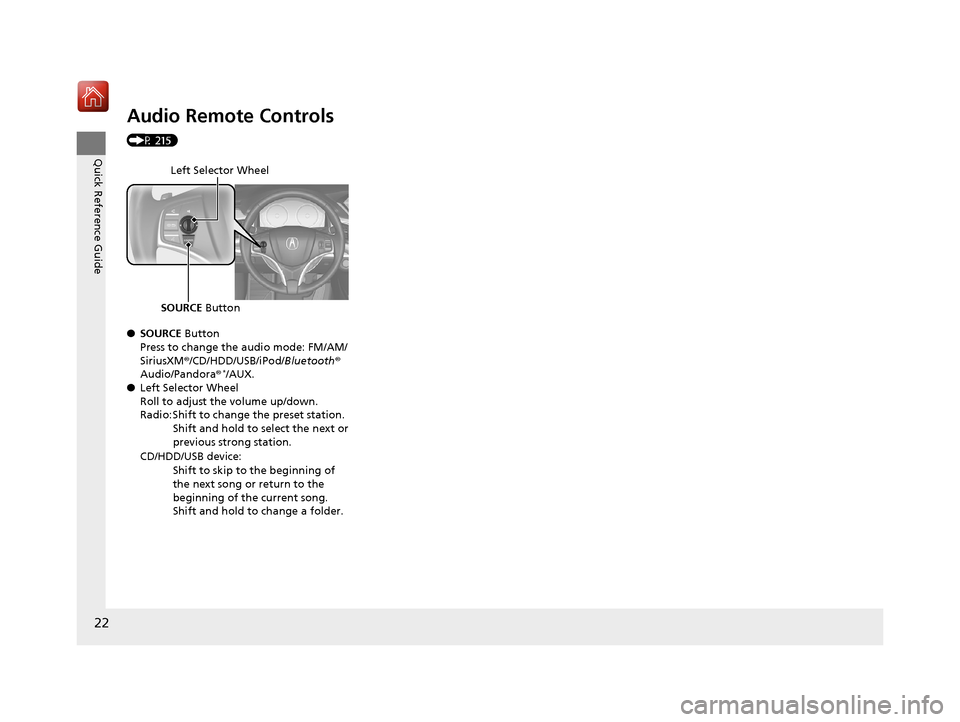
Audio Remote Controls
(P 215)
●SOURCE Button
Press to change the audio mode: FM/AM/
SiriusXM ®/CD/HDD/USB/iPod/ Bluetooth®
Audio/Pandora®
*/AUX.
● Left Selector Wheel
Roll to adjust the volume up/down.
Radio: Shift to change the preset station.
Shift and hold to select the next or
previous strong station.
CD/HDD/USB device: Shift to skip to the beginning of
the next song or return to the
beginning of the current song.
Shift and hold to change a folder.
Left Selector Wheel
SOURCE Button
20 ACURA RLX HYBRID-31TY36601.book 22 ページ 2019年7月23日 火曜日 午後6時25分
Page 110 of 609
109
uuIndicators uMulti-Information Display Warning and Information Messages
Continued
Instrument Panel
MessageConditionExplanation
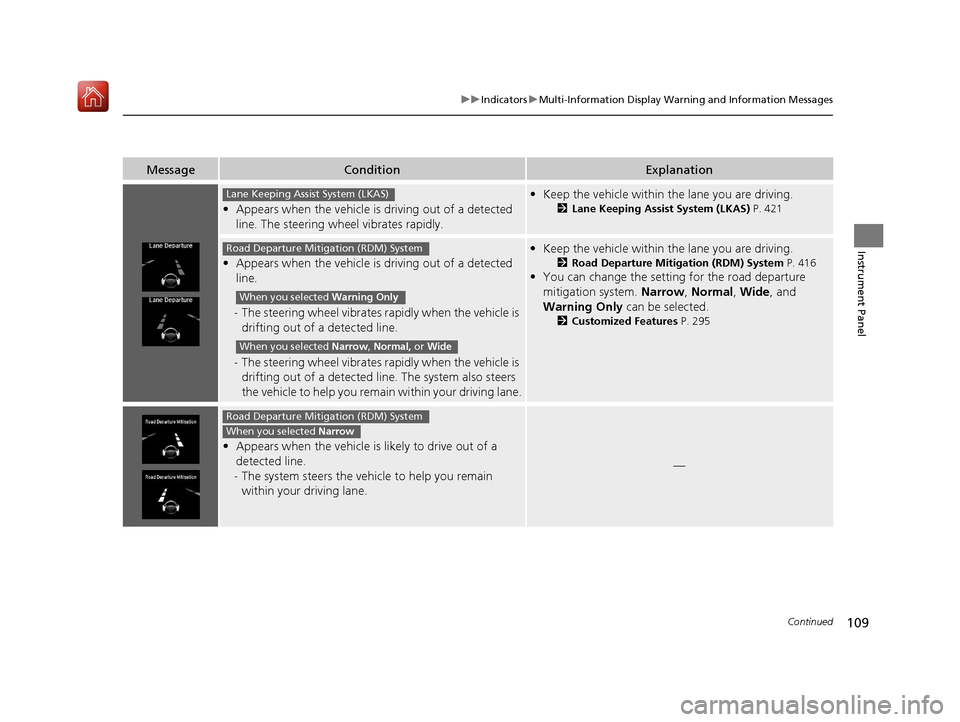
• Appears when the vehicle is driving out of a detected
line. The steering wheel vibrates rapidly.
• Keep the vehicle within the lane you are driving.
2 Lane Keeping Assist System (LKAS) P. 421
•Appears when the vehicle is driving out of a detected
line.
- The steering wheel vibrates ra pidly when the vehicle is
drifting out of a detected line.
- The steering wheel vibrates ra pidly when the vehicle is
drifting out of a detected line. The system also steers
the vehicle to help you remain within your driving lane.
•Keep the vehicle within the lane you are driving.
2 Road Departure Mitigation (RDM) System P. 416
•You can change the setting for the road departure
mitigation system. Narrow, Normal , Wide , and
Warning Only can be selected.
2Customized Features P. 295
•Appears when the vehicle is likely to drive out of a
detected line.
- The system steers the vehicle to help you remain
within your driving lane.
—
Lane Keeping Assist System (LKAS)
Road Departure Mitigation (RDM) System
When you selected Warning Only
When you selected Narrow, Normal, or Wide
Road Departure Mitigation (RDM) System
When you selected Narrow
20 ACURA RLX HYBRID-31TY36601.book 109 ページ 2019年7月23日 火曜日 午後6時25分
Page 115 of 609
114
uuGauges and Displays uMulti-Information Display
Instrument Panel
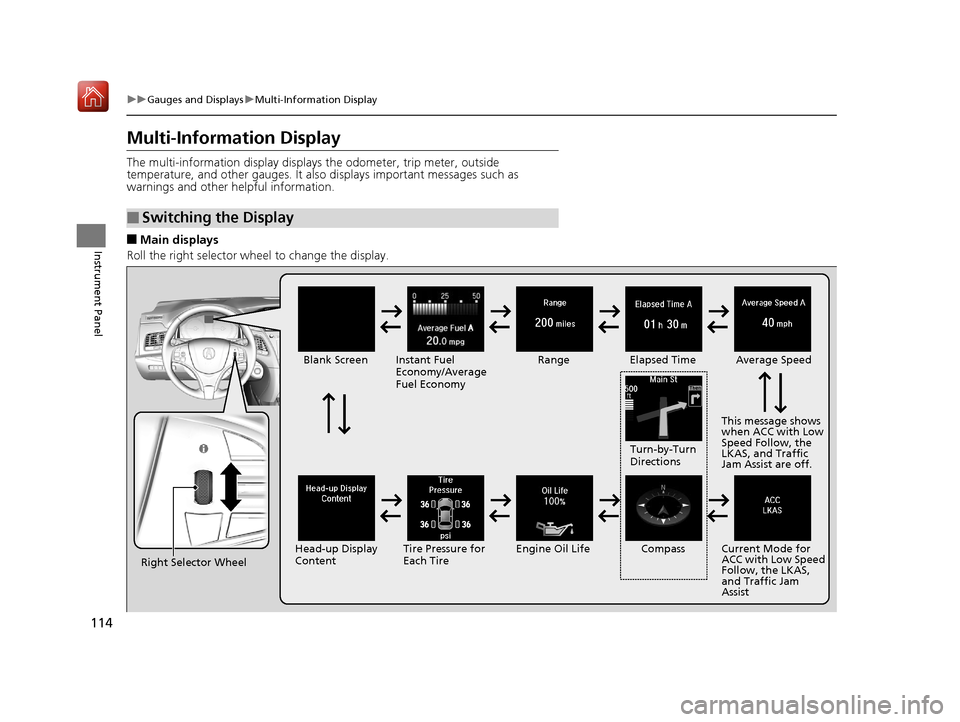
Multi-Information Display
The multi-information display displays the odometer, trip meter, outside
temperature, and other gauges. It also displays important messages such as
warnings and other helpful information.
■Main displays
Roll the right selector wheel to change the display.
■Switching the Display
Right Selector Wheel Engine Oil LifeElapsed Time
Blank Screen
Average Speed
Range
Instant Fuel
Economy/Average
Fuel Economy
Compass
Tire Pressure for
Each Tire Current Mode for
ACC with Low Speed
Follow, the LKAS,
and Traffic Jam
Assist
Head-up Display
Content This message shows
when ACC with Low
Speed Follow, the
LKAS, and Traffic
Jam Assist are off.
Turn-by-Turn
Directions
20 ACURA RLX HYBRID-31TY36601.book 114 ページ 2019年7月23日 火曜日 午後6時25分
Page 122 of 609
Continued121
uuGauges and Displays uHead-Up Display
Instrument Panel
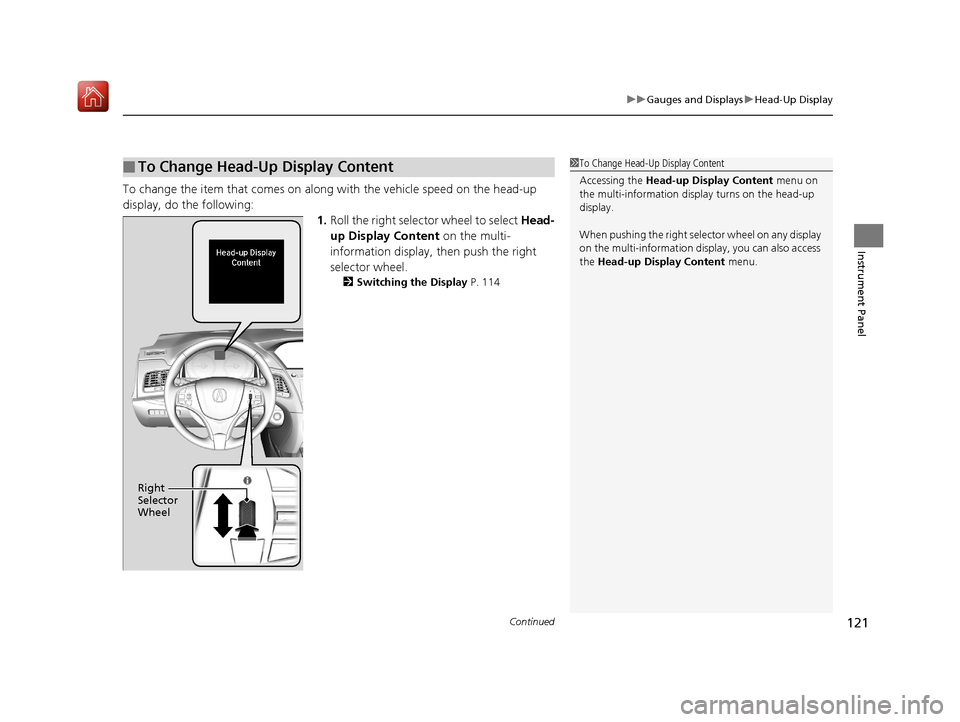
To change the item that comes on along with the vehicle speed on the head-up
display, do the following: 1.Roll the right selector wheel to select Head-
up Display Content on the multi-
information display, then push the right
selector wheel.
2 Switching the Display P. 114
■To Change Head-Up Display Content1To Change Head-Up Display Content
Accessing the Head-up Display Content menu on
the multi-information disp lay turns on the head-up
display.
When pushing the right sele ctor wheel on any display
on the multi-information disp lay, you can also access
the Head-up Display Content menu.
Right
Selector
Wheel
20 ACURA RLX HYBRID-31TY36601.book 121 ページ 2019年7月23日 火曜日 午後6時25分
Page 155 of 609

uuOperating the Switches Around the Steering Wheel uPOWER Button
154
Controls
Warning buzzers may sound from inside and/
or outside the vehicle to remind you that the
keyless access remote is out of the vehicle. If
the buzzer continues even after the remote is
put back inside, place it to be within its
operational range.
■When the power mode is in ON
If the keyless access remote is taken out of the
vehicle, and the driver’s door is closed, a
warning buzzer sounds from both inside and
outside the vehicle. A warning message on
the multi-information display notifies the
driver inside that the remote is outside of the
vehicle.
■When the power mode is in
ACCESSORY
If the keyless access remote is taken out of the
vehicle, and all the doors are closed, a
warning buzzer sounds from outside the
vehicle.
■Keyless Access Remote Reminder1 Keyless Access Remote Reminder
When the keyless access remote is within the
system’s operational range, and the driver’s door is
closed, the warni ng function cancels.
If the keyless access remote is taken out of the vehicle
after the power system has been turned on, you can
no longer change the POWER button mode or
restart the power system. Always make sure if the
remote is in your vehi cle when you operate the
POWER button.
Removing the keyless access remote from the vehicle
through a window does not activate the warning
buzzer.
Do not put the keyless access remote on the
dashboard or in the glove box. It may cause the
warning buzzer to activa te. Under some other
conditions that can prevent the vehicle from locating
the remote, the warning buzzer may also activate
even if the remote is within the system’s operational
range.
20 ACURA RLX HYBRID-31TY36601.book 154 ページ 2019年7月23日 火曜日 午後6時25分
Page 156 of 609

155
uuOperating the Switches Around the Steering Wheel uTurn Signals
Controls
Turn Signals
The turn signals can be used when the power
mode is in ON.
■One-touch turn signal
When you lightly push up or down and release
the turn signal lever, th e exterior turn signals
and turn signal indicator blink three times.
This feature can be used when signaling for a
lane change.
Right Turn
Left Turn
20 ACURA RLX HYBRID-31TY36601.book 155 ページ 2019年7月23日 火曜日 午後6時25分
Page 157 of 609

156
uuOperating the Switches Around the Steering Wheel uLight Switches
Controls
Light Switches
Rotating the light switch turns the lights on
and off, regardless of the power mode
setting.
■High beams
Push the lever forward until you hear a click.
■Low beams
When in high beams, pull the lever back to
return to low beams.
■Flashing the high beams
Pull the lever back, and release it.
■Lights off
Turn the lever to OFF either when:
• The transmission is in
(P.
• The parking brake is applied.
To turn the lights on again, turn the lever to
OFF to cancel the lights off mode. Even if you
do not cancel the lights off mode, the lights
come on automatically when:
• The transmission is taken out of
(P and the
parking brake is released.
• The vehicle starts to move.
■Manual Operation1Light Switches
If you leave the power m ode in VEHICLE OFF while
the lights are on, a chime sounds when the driver’s
door is opened.
When the lights are on, the lights on indicator in the
instrument panel will be on.
2 Lights On Indicator P. 87
Do not leave the lights on when the power system is
off because it wi ll cause the 12-volt battery to
discharge.
Your vehicle is equipped with the automatic
headlight adjusting system that automatically adjusts
the vertical angle of the headlights. If you find a
significant change in th e vertical angle of the
headlights, there may be a problem with the system.
Have your vehicle checked by a dealer.
High Beams
Flashing the high beams
Low Beams
Turns on parking, side marker,
tail, and rear license plate lights
Turns on headlights, parking, side
marker, tail, and rear license plate
lights
20 ACURA RLX HYBRID-31TY36601.book 156 ページ 2019年7月23日 火曜日 午後6時25分
Page 159 of 609

uuOperating the Switches Around the Steering Wheel uLight Switches
158
Controls
The headlights automatically co me on when the wipers are used several times within
a certain intervals with the headlight switch in AUTO.
The headlights automatically go off a few minutes later if the wipers are stopped.
The headlights, all other exterior lights, an d the instrument panel lights turn off 15
seconds after you set the power mode to VE HICLE OFF, take the remote with you,
and close the driver’s door.
If you set the power mode to VEHICLE OFF with the headlight switch on, but do not
open the door, the lights turn off after 10 minutes (three minutes, if the switch is in
the AUTO position).
The lights turn on again when you unlock or open the driver’s door. If you unlock
the door, but do not open it within 15 seconds, the lights go off. If you open the
driver’s door, you will hear a lights on reminder chime.
■Headlight Integration with Wipers*
■Automatic Lighting Off Feature
1Headlight Integration with Wipers*
This feature activates when the headlights are off in
AUTO .
The instrument panel br ightness does not change
when the headlights come on.
At dark ambient light leve ls, the automatic lighting
control feature turns on the headlights, regardless of
the number of wiper sweeps.
1 Automatic Lighting Off Feature
You can change the headli ght auto off timer setting.
2 Customized Features P. 295
* Not available on all models
20 ACURA RLX HYBRID-31TY36601.book 158 ページ 2019年7月23日 火曜日 午後6時25分
Page 161 of 609

160
uuOperating the Switches Around the Steering Wheel uAuto High-Beam
Controls
Auto High-Beam
The front sensor camera detects the light sources ahead of the vehicle such as the
lights of a preceding or oncoming vehicle, or street lights. When you are driving at
night, the system automati cally switches the headlight s between low beam and high
beam depending on the situation.
When all of the following conditions have been met, the auto high-beam indicator
comes on and the auto high-beam is activated. •The power mode is in ON.
• The light switch is in AUTO.
• The lever is in the low beam position.
• The headlights have been automatically
activated.
• It is dark outside the vehicle.
If the auto high-beam indicator does not come on even when all the conditions have
been met, carry out the following procedure and the indicator will come on.
• Pull the lever toward you for flashing the high beams then release it while driving.1Auto High-Beam
The auto high-beam system does not always operate
in every situation. This system is just for assisting the
driver. Always observe your surroundings and switch
the headlights between high beam and low beam
manually if necessary.
If you find the timing of beam changes inconvenient
for driving, change the headlight beams manually.
The range and the distance at which the camera can
recognize varies de pending on conditions
surrounding your vehicle.
For the auto high-beam to work properly:
•Do not place an object that reflects light on the
dashboard.
•Keep the windshield around the camera clean.
When cleaning the windshield, be careful not to
apply the windshield cleanser to the camera lens.
•Do not attach an object, sticker or film to the area
around the camera.
•Do not touch the camera lens.
If the camera receives a st rong impact, or repairing of
the area near the camera is required, consult a dealer.
■How to Use the Auto High-Beam
Front Sensor Camera
Light Switch
Auto High-Beam
Indicator
20 ACURA RLX HYBRID-31TY36601.book 160 ページ 2019年7月23日 火曜日 午後6時25分
Page 162 of 609
Continued161
uuOperating the Switches Around the Steering Wheel uAuto High-Beam
Controls
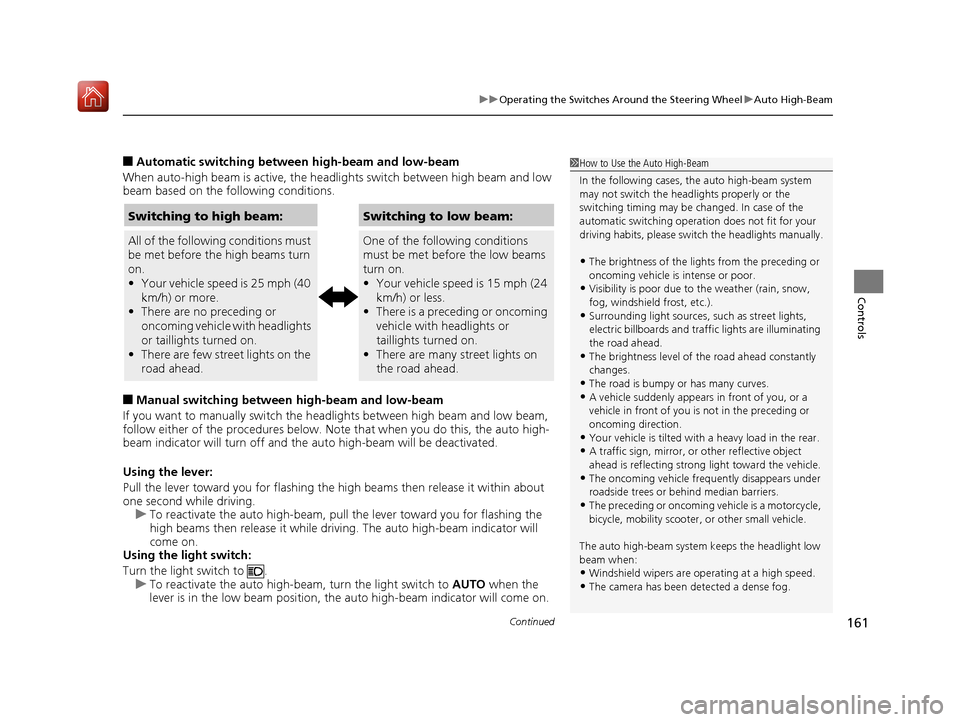
■Automatic switchin g between high-beam and low-beam
When auto-high beam is active, the head lights switch between high beam and low
beam based on the following conditions.
■Manual switching between high-beam and low-beam
If you want to manually switch the h eadlights between high beam and low beam,
follow either of the procedur es below. Note that when you do this, the auto high-
beam indicator will turn off and the auto high-beam will be deactivated.
Using the lever:
Pull the lever toward you for flashing the hi gh beams then release it within about
one second while driving. u To reactivate the auto hi gh-beam, pull the lever toward you for flashing the
high beams then release it while driv ing. The auto high-beam indicator will
come on.
Using the light switch:
Turn the light switch to . u To reactivate the au to high-beam, turn the light switch to AUTO when the
lever is in the low beam position, the auto high-beam indicator will come on.
1How to Use the Auto High-Beam
In the following cases, th e auto high-beam system
may not switch the head lights properly or the
switching timing may be ch anged. In case of the
automatic switching operat ion does not fit for your
driving habits, please swit ch the headlights manually.
•The brightness of the lights from the preceding or
oncoming vehicle is intense or poor.
•Visibility is poor due to the weather (rain, snow,
fog, windshield frost, etc.).
•Surrounding light sources, such as street lights,
electric billboards and traf fic lights are illuminating
the road ahead.
•The brightness le vel of the road ahead constantly
changes.
•The road is bumpy or has many curves.•A vehicle suddenly appears in front of you, or a
vehicle in front of you is not in the preceding or
oncoming direction.
•Your vehicle is tilted with a heavy load in the rear.•A traffic sign, mirror, or other reflective object
ahead is reflecting strong light toward the vehicle.
•The oncoming vehicle freq uently disappears under
roadside trees or be hind median barriers.
•The preceding or oncoming vehicle is a motorcycle,
bicycle, mobility scooter, or other small vehicle.
The auto high-beam system keeps the headlight low
beam when:
•Windshield wipers are op erating at a high speed.
•The camera has been detected a dense fog.
Switching to high beam:
All of the following conditions must
be met before the high beams turn
on.
•Your vehicle speed is 25 mph (40
km/h) or more.
• There are no preceding or
oncoming vehicle with headlights
or taillights turned on.
• There are few street lights on the
road ahead.
Switching to low beam:
One of the following conditions
must be met before the low beams
turn on.
•Your vehicle speed is 15 mph (24
km/h) or less.
• There is a preceding or oncoming
vehicle with headlights or
taillights turned on.
• There are many street lights on
the road ahead.
20 ACURA RLX HYBRID-31TY36601.book 161 ページ 2019年7月23日 火曜日 午後6時25分