fuel Acura TL 2000 3.2 User Guide
[x] Cancel search | Manufacturer: ACURA, Model Year: 2000, Model line: TL, Model: Acura TL 2000Pages: 311, PDF Size: 3.05 MB
Page 150 of 311
Service Station Procedures
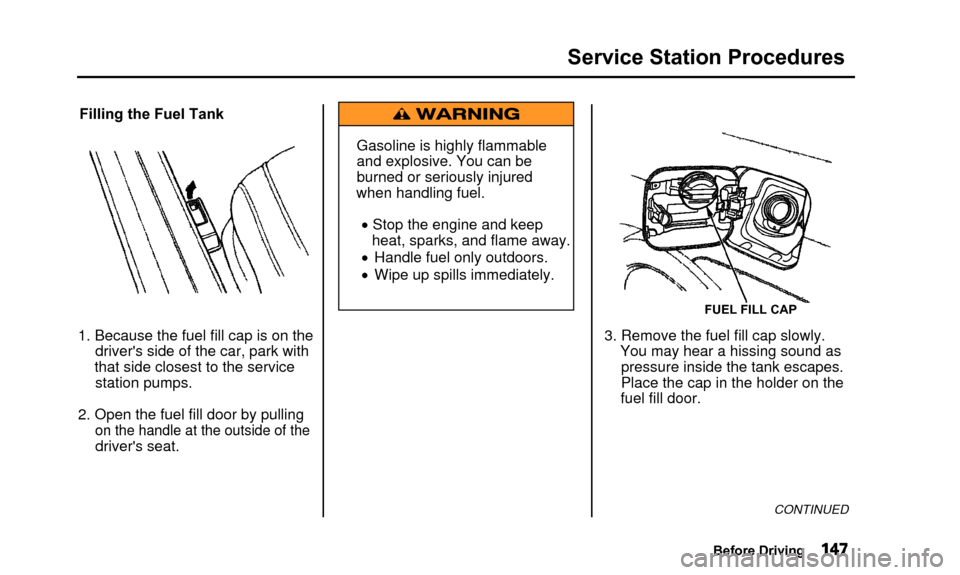
Filling the Fuel Tank
1. Because the fuel fill cap is on the driver's side of the car, park with
that side closest to the service station pumps.
2. Open the fuel fill door by pulling
on the handle at the outside of the
driver's seat. Gasoline is highly flammable
and explosive. You can be
burned or seriously injured
when handling fuel.
• Stop the engine and keep heat, sparks, and flame away.
• Handle fuel only outdoors.
• Wipe up spills immediately.
FUEL FILL CAP
3. Remove the fuel fill cap slowly. You may hear a hissing sound aspressure inside the tank escapes.
Place the cap in the holder on the
fuel fill door.
CONTINUED
Before Driving
Page 151 of 311
Service Station Procedures
4. Stop filling the tank after the fuelnozzle automatically clicks off. Do
not try to "top off' the tank, leavesome room for the fuel to expand
with temperature changes.
Your car has an on-board refueling vapor recovery system to helpkeep fuel vapors from going into
the atmosphere. If the fuel pump
keeps clicking off even though the
tank is not full, there may be aproblem with this system. Consult
your dealer. 5. Screw the fuel fill cap back on,
tighten it until it clicks several
times. If you do not properly
tighten the cap, the MalfunctionIndicator Lamp may come on (see
page 54).
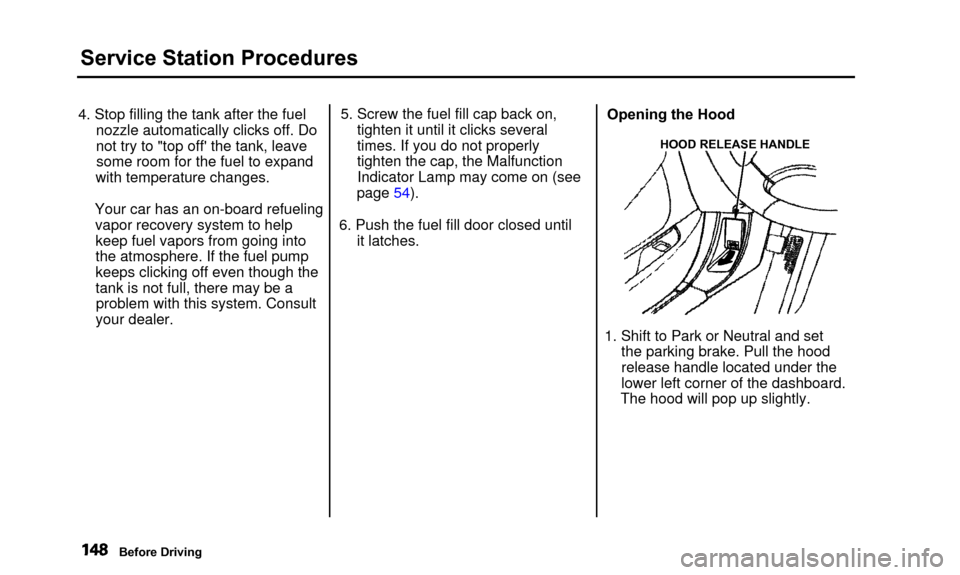
6. Push the fuel fill door closed until it latches. Opening the Hood
HOOD RELEASE HANDLE
1. Shift to Park or Neutral and set
the parking brake. Pull the hood
release handle located under the
lower left corner of the dashboard.
The hood will pop up slightly.
Before Driving
Page 153 of 311
Service Station Procedures
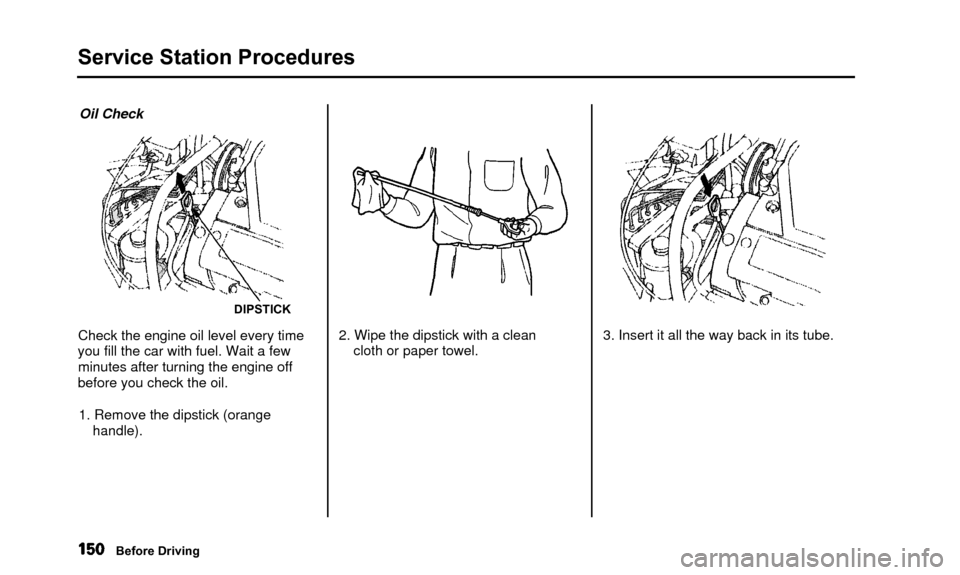
Oil Check
DIPSTICK
Check the engine oil level every time
you fill the car with fuel. Wait a few minutes after turning the engine off
before you check the oil.
1. Remove the dipstick (orange handle). 2. Wipe the dipstick with a clean
cloth or paper towel. 3. Insert it all the way back in its tube.
Before Driving
Page 155 of 311
Fuel Economy
The condition of your car and yourdriving habits are the two most
important things that affect the fuel
mileage you get.
Vehicle Condition Always maintain your car according to the maintenance schedule. This
will keep it in top operating condition.
An important part of that mainte- nance is the Owner MaintenanceChecks (see page 199). For
example, an underinflated tire
causes more "rolling resistance,"
which uses fuel. It also wears out
faster, so check the tire pressure at least monthly.
In winter, the build-up of snow on
your car's underside adds weight and rolling resistance. Frequent cleaning
helps your fuel mileage and reduces
the chance of corrosion. Driving Habits
You can improve fuel economy by driving moderately. Rapid acceler-
ation, abrupt cornering, and hard
braking use more fuel.
Always drive in the highest gear that allows the engine to run and acceler-
ate smoothly.
Depending on traffic conditions, try
to maintain a constant speed. Every
time you slow down and speed up,
your car uses extra fuel. Use the cruise control, when appropriate, to
increase fuel economy. A cold engine uses more fuel than a
warm engine. It is not necessary to
"warm-up" a cold engine by letting it
idle for a long time. You can drive away in about a minute, no matter
how cold it is outside. The engine
will warm up faster, and you get
better fuel economy. To cut down on
the number of "cold starts," try to combine several short trips into one.
The air conditioning puts an extra load on the engine which makes it
use more fuel. Turn off the A/C tocut down on air conditioning use.Use the flow-through ventilation
when the outside air temperature is moderate.
Before Driving
Page 165 of 311

Automatic Transmission
Your Acura's transmission has fiveforward speeds, and is electronically
controlled for smoother shifting. It
also has a "lock-up" torque converter
for better fuel economy. You may feel what seems like another shift
when the converter locks. Shift Lever Position Indicator
This indicator in the tachometer shows which position the shift lever
is in. The illuminated number next to
the "D
5" indicator shows you the
gear you have selected in the Sequential SportShift mode. The "D
5" indicator comes on for a
few seconds when you turn the
ignition switch ON (II). If it flashes
while driving (in any shift position), it indicates a possible problem in thetransmission. Avoid rapid
acceleration and have the
transmission checked by an
authorized Acura dealer as soon as
possible.
Driving
Page 192 of 311

Maintenance Safety
Important Safety Precautions
Before you begin any maintenance,
make sure your car is parked on
level ground and that the parking
brake is set. Also, be sure the engine
is off. This will help to eliminateseveral potential hazards:
• Carbon monoxide poisoning from engine exhaust. Be surethere is adequate ventilation
whenever you operate the engine.
• Burns from hot parts. Let the engine and exhaust system cool
before touching any parts.
• Injury from moving parts. Do
not run the engine unless in-structed to do so. Read the instructions before you
begin, and make sure you have the tools and skills required.
To reduce the possibility of fire or explosion, be careful when working
around gasoline or batteries. Use a
commercially available degreaser or
parts cleaner, not gasoline, to clean
parts. Keep cigarettes, sparks, and
flames away from the battery and all
fuel-related parts.
You should wear eye protection and protective clothing when workingnear the battery or when using
compressed air.
Maintenance
Page 195 of 311
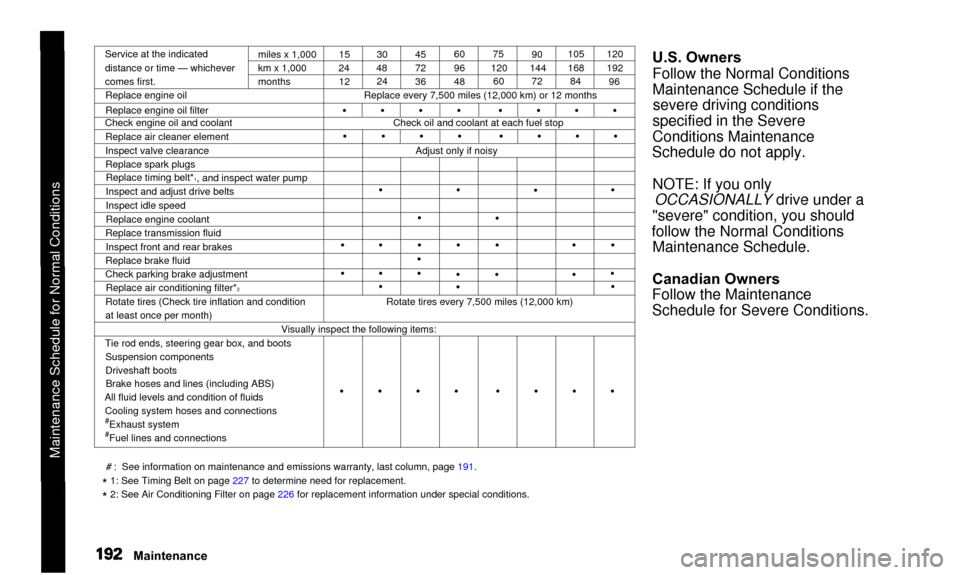
Maintenance Schedule for Normal Conditions
Service at the indicated
distance or time — whichever
comes first.miles x 1,000
km x 1,000
months
Replace engine oil
Replace engine oil filter
Check engine oil and coolant
Replace air cleaner element
Inspect valve clearance
Replace spark plugsReplace timing belt*
1, and inspect water pump
Inspect and adjust drive belts
Inspect idle speed
Replace engine coolant
Replace transmission fluid
Inspect front and rear brakes
Replace brake fluid
Check parking brake adjustment Replace air conditioning filter*
2Rotate tires (Check tire inflation and condition
at least once per month) 15
24
12 30
48 24 45
72
36 60
96
4875
120 60 90
144 72 105
168
84 120
192
96
Replace every 7,500 miles (12,000 km) or 12 months
Check oil and coolant at each fuel stop
•
•
Adjust only if noisy
•
•
•
• •
•
•
• •
•
•
• •
•
• •
•
• •
•
• •
Rotate tires every 7,500 miles (12,000 km)
Visually inspect the following items:
Tie rod ends, steering gear box, and boots Suspension components
Driveshaft bootsBrake hoses and lines (including ABS)
All fluid levels and condition of fluids Cooling system hoses and connections
#Exhaust system#Fuel lines and connections
U.S. Owners
Follow the Normal Conditions
Maintenance Schedule if thesevere driving conditions
specified in the Severe
Conditions Maintenance
Schedule do not apply.
NOTE: If you only OCCASIONALLY drive under a
"severe" condition, you should
follow the Normal Conditions Maintenance Schedule.
Canadian Owners
Follow the Maintenance
Schedule for Severe Conditions.
# : See information on maintenance and emissions warranty, last column, page\
191.
* 1: See Timing Belt on page 227 to determine need for replacement.
* 2: See Air Conditioning Filter on page 226 for replacement information under special conditions.
Maintenance
• • • • • •\
• •
• • • • • •\
• •
• • • • • •\
• •
Page 196 of 311
Service at the indicated distance or time, whichever comes first. Do the\
items in A, B, C as required for each distance/time inter")
Maintenance Schedule for Normal Conditions (listed by distance/time)Service at the indicated distance or time, whichever comes first. Do the\
items in A, B, C as required for each distance/time interval. Follow thisschedule if the severe driving conditions described in the Severe Condit\
ions Schedule on the next page do not apply.
Canadian owners: Follow the schedule for Severe Conditions.
NOTE:• Check engine oil and coolant at each fuel stop.• Check and adjust valve clearance, cold engine, if noisy. # : See information on maintenance and emissions warranty, last
column, page 191.
* 1 : See Timing Belt on page 227 to determine need for replacement.
* 2 : See Air Conditioning Filter on page 226 for replacement information under special conditions.
Maintenance
7,500 mi/12,000 km/1 yr15,000 mi/24,000 km/-
22,500 mi/36,000 km/1½, yrs
30,000 mi/48,000 km/2 yrs
37,500 mi/60,000 km/2½ yrs 45,000 mi/72,000 km/3 yrs
52,500 mi/84,000 km/3½ yrs
60,000 mi/96,000 km/4 yrs
67,500 mi/108,000 km/4½yrs
75,000 mi/120,000 km/5 yrs
82,500 mi/132,000 km/5½ yrs
90,000 mi/144,000 km/6 yrs
97,500 mi/156,000 km/6½ yrs
105,000 mi/168,000 km/7 yrs
112,500 mi/180,000 km/7½ yrs
120,000 mi/192,000 km/8 yrs Do items in A.
Do items in A, B.Do items in A.
Do items in A, B, C.
Do items in A.
Replace coolant. Replace brake fluid.
Do items in A, B.
Do items in A.
Do items in A, B, C.
Do items in A. Replace coolant. Do items in A, B.
Do items in A.
Replace brake fluid. Replace transmissionfluid. Do items in A, B, C.
Do items in A.
Replace timing belt*1, inspect water pump. Replace coolant. lnspect valve clearance. Check idle speed. Replace spark plugs.Do items in A, B.
Do items in A.
Do items in A, B, C.
A Replace engine oil.
Rotate tires (follow pattern on paqe 231 ).
B Replace engine oil filter.
Inspect front and rear brakes.
Check parking brake adjustment.
Inspect tie rod ends, steering gear box and boots.
Inspect suspension components.
Inspect driveshaft boots.
Inspect brake hoses and lines (including ABS).
Check all fluid levels, condition of fluids, and check for leaks.
# Inspect cooling system hoses and connections.
# Inspect exhaust system.
Inspect fuel lines and connections.
C Replace air cleaner element.
Inspect and adjust drive belts.
Replace air conditioning filter.*
2
Page 197 of 311
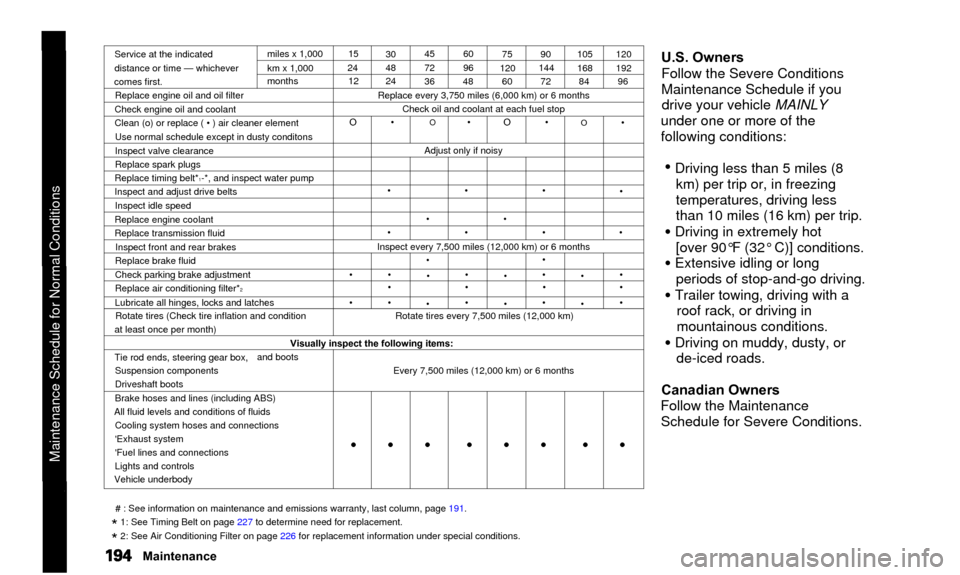
Service at the indicated
distance or time — whichever
comes first. miles x 1,000
km x 1,000
months
Replace engine oil and oil filter
Check engine oil and coolant
Clean (o) or replace ( • ) air cleaner element Use normal schedule except in dusty conditons
Inspect valve clearance
Replace spark plugs
Replace timing belt*
1-*, and inspect water pump
Inspect and adjust drive belts
Inspect idle speed
Replace engine coolant
Replace transmission fluid Inspect front and rear brakes
Replace brake fluid
Check parking brake adjustment
Replace air conditioning filter*
2Lubricate all hinges, locks and latches Rotate tires (Check tire inflation and condition
at least once per month) 15
24 12 30
48
24 45
72
3660
96
48 75
120 60 90
144
72 105
168
84 120
192
96
Replace every 3,750 miles (6,000 km) or 6 months Check oil and coolant at each fuel stop
O •
O • O •
Adjust only if noisy
•
•
•
•
•
•
•
•
O •
•
•
Inspect every 7,500 miles (12,000 km) or 6 months
•
• •
•
•
•
•
••
•
••
•
•
• •
•
•
••
•
•
Rotate tires every 7,500 miles (12,000 km)
Visually inspect the following items:
Tie rod ends, steering gear box, Suspension components
Driveshaft boots and boots
Brake hoses and lines (including ABS)
All fluid levels and conditions of fluids Cooling system hoses and connections
'Exhaust system
'Fuel lines and connections
Lights and controls
Vehicle underbody Every 7,500 miles (12,000 km) or 6 months
U.S. Owners
Follow the Severe Conditions
Maintenance Schedule if you
drive your vehicle MAINLY
under one or more of the
following conditions:
• Driving less than 5 miles (8 km) per trip or, in freezing
temperatures, driving less
than 10 miles (16 km) per trip.
• Driving in extremely hot[over 90°F (32° C)] conditions.
• Extensive idling or long periods of stop-and-go driving.
• Trailer towing, driving with a roof rack, or driving in
mountainous conditions.
• Driving on muddy, dusty, orde-iced roads.
Canadian Owners
Follow the Maintenance Schedule for Severe Conditions.
# : See information on maintenance and emissions warranty, last column, \
page 191.
* 1: See Timing Belt on page 227 to determine need for replacement.
* 2: See Air Conditioning Filter on page 226 for replacement information under special conditions.
Maintenance
Maintenance Schedule for Normal Conditions• • • • • • • \
•
Page 198 of 311

Use this schedule if your vehicle is MAINLY driven in any of the followi\
ng Severe Conditions, or normally driven in Canada; otherwise use the No\
rmalSchedule. Service at the indicated distance or time, whichever comes fir\
st. Do the items in A, B, C, D as required for each distance/time.
3,750 mi/6,000 km/-7,500 mi/12,000 km/6 mos 11,250 mi/18,000 km/-
15,000 mi/24,000 km/1 yr
18,750 mi/30,000 km/-
22,500 mi/36,000 km/1½ yrs
26,250 mi/42,000 km/-
30,000 mi/48,000 km/2 yrs
33,750 mi/54,000 km/-
37,500 mi/60,000 km/2½ yrs
41,250 mi/66,000 km/-
45,000 mi/72,000 km/3 yrs
48,750 mi/78,000 km/-
52,500 mi/84,000 km/3½ yrs
56,250 mi/90,000 km/-
60,000 mi/96,000 km/4 yrs
63,750 mi/102,000 km/-
67,500 mi/108,000 km/4½ yrs
71,250 mi/114,000 km/-
75,000 mi/120,000 km/5 yrs
78,750 mi/126,000 km/- Do items in A.
Do items in A, B. Do items in A.
CIean air cleaner element. Do items in A, B, C.Do items in A. Do items in A, B.Do items in A.
Do items in A, B, C, D.
Do items in A.
Do items in A, B.
Do items in A. Replace coolant. Replace brake fluid.
CIean air cleaner element. Do items in A, B, C.Do items in A.
Do items in A, B.
Do items in A.
'
Replace timing belt*1, inspect water pump.Do items in A, B, C, D.
Do items in A.
Do items in A, B.
Do items in A.
Replace coolant, Clean air cleaner element.Do items in A, B.
Do items in A.
NOTE:• Check engine oil and coolant at each fuel stop.• Check and adjust valve clearance, cold engine, if noisy.
CONTINUED
Maintenance
Severe Conditions:• Driving less than 5 miles (8 km) per trip or, in freezingtemperatures, driving less than 10 miles (16 km) per trip.• Driving in extremely hot (over 90°F/32°C) conditions.
• Extensive idling or long periods of stop-and-go driving.• Trailer towing, driving with a roof rack, or driving in mountainous conditions.
• Driving, on muddy, dusty, or de-iced roads.
A
B• Replace engine oil and filter. Inspect front and rear brakes.
Rotate tires (follow pattern on page 231 ). Inspect tie rod ends, steering gear box and boots.
Inspect suspension components. Inspect driveshaft boots.
# : See information on maintenance and emissions warranty, lastcolumn, page 191.
* 1 : See Timing Belt on page 227 to determine need for replacement.
* 2 : See Air Conditioning Filter on page 226 for replacement
information under special conditions.
Maintenance Schedule for Normal Conditions (listed by distance/time)