lock Acura TL 2001 3.2 User Guide
[x] Cancel search | Manufacturer: ACURA, Model Year: 2001, Model line: TL, Model: Acura TL 2001Pages: 319, PDF Size: 3.85 MB
Page 38 of 319
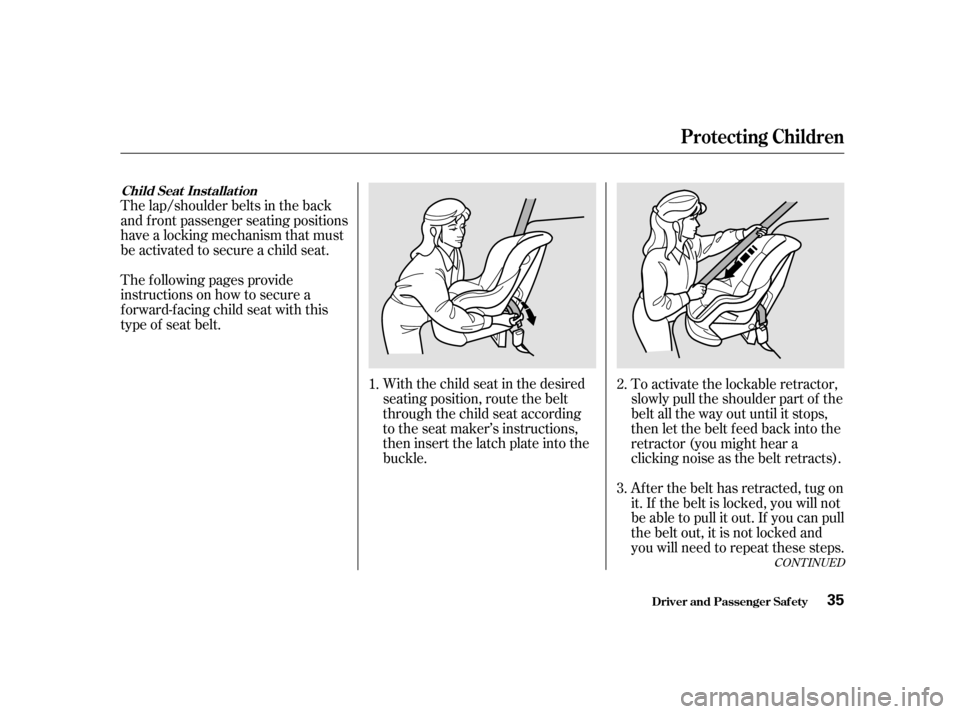
With the child seat in the desired
seating position, route the belt
through the child seat according
to the seat maker’s instructions,
then insert the latch plate into the
buckle.To activate the lockable retractor,
slowly pull the shoulder part of the
belt all the way out until it stops,
then let the belt feed back into the
retractor (you might hear a
clicking noise as the belt retracts).
Af ter the belt has retracted, tug on
it. If the belt is locked, you will not
be able to pull it out. If you can pull
the belt out, it is not locked and
you will need to repeat these steps.
The lap/shoulder belts in the back
and f ront passenger seating positions
have a locking mechanism that must
be activated to secure a child seat.
The f ollowing pages provide
instructions on how to secure a
f orward-f acing child seat with this
type of seat belt.
1.2.
3.
CONT INUED
Child Seat Inst allat ion
Protecting Children
Driver and Passenger Saf ety35
Page 39 of 319
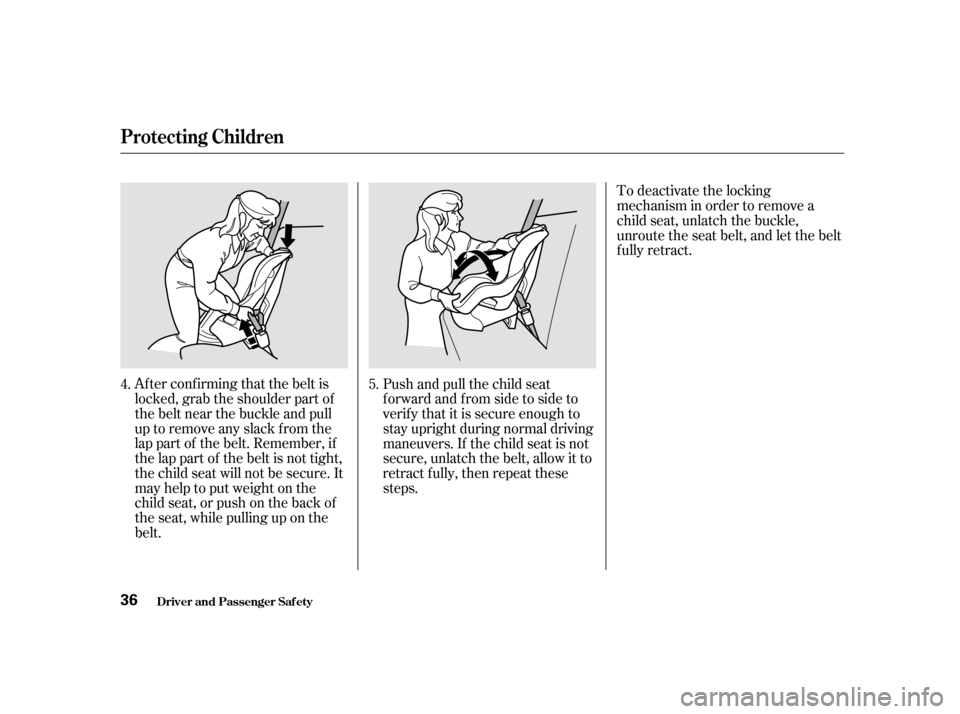
Af ter conf irming that the belt is
locked, grab the shoulder part of
the belt near the buckle and pull
up to remove any slack from the
lap part of the belt. Remember, if
the lap part of the belt is not tight,
the child seat will not be secure. It
mayhelptoputweightonthe
child seat, or push on the back of
the seat, while pulling up on the
belt.Push and pull the child seat
f orward and f rom side to side to
verif y that it is secure enough to
stay upright during normal driving
maneuvers. If the child seat is not
secure, unlatch the belt, allow it to
retract f ully, then repeat these
steps.To deactivate the locking
mechanism in order to remove a
child seat, unlatch the buckle,
unroute the seat belt, and let the belt
fully retract.
4. 5.
Protecting Children
Driver and Passenger Saf ety36
Page 45 of 319

This seat belt has a single belt that
goes over your shoulder, across your
chest and across your hips.To unlock the belt, push the red
PRESSbuttononthebuckle.
To fasten the belt, insert the latch
plate into the buckle, then tug on the
belt to make sure the buckle is
latched.
Your seat belt system includes lap/
shoulder belts in all f ive seating
positions.
The seat belt system also
includes a light on the
instrument panel to remind you and
your passengers to f asten your belts.
If the driver’s seat belt is not
fastened before the ignition is turned
ON (II), the light will come on and a
beeper will also sound. The beeper
will stop af ter a f ew seconds, but the
light will stay on until the driver’s
seat belt is f astened. Guide the belt across your body to
the door pillar. Af ter exiting the car,
be sure the belt is out of the way and
will not get closed in the door.
Driver and Passenger Saf ety
Additional Inf ormation About Your Seat Belts
Seat Belt System Components L ap/Shoulder Belt
42
Page 46 of 319

See page f or instructions on how
to wear the lap/shoulder belt
properly.
If the shoulder part of the belt is
pulled all the way out, the locking
mechanism will activate. The belt
will retract, but it will not allow the
passenger to move f reely.
To deactivate the locking
mechanism, unlatch the buckle and
let the seat belt f ully retract. To
ref asten the belt, pull it out only as
f ar as needed.
All seat belts have an emergency
locking retractor. In normal driving,
the retractor lets you move f reely in
your seat while it keeps some
tension on the belt. During a collision
or sudden stop, the retractor
automatically locks the belt to help
restrain your body.
The seat belts in all seating positions
except the driver’s have an additional
locking mechanism that must be
activated to secure a child seat. (See
pages and f or instructions on
how to secure child seats with this
type of seat belt.) 15
31 35
Driver and Passenger Saf ety
Additional Inf ormation About Your Seat Belts
43
Page 56 of 319

This section gives inf ormation about
the controls and displays that
contribute to the daily operation of
your Acura. All the essential controls
are within easy reach............................
Control Locations .54
...............................
Indicator Lights .55
.............................................
Gauges .60
...............................
Speedometer .60
.................................
Tachometer .60
.....................................
Odometer .61
...................................
Trip Meter .61
Outside Temperature ...................................
Indicator .62
...................
Temperature Gauge . 62
..................................
Fuel Gauge .62
Maintenance Required ...................................
Indicator .63
Controls Near the Steering .......................................
Wheel .64
...................................
Headlights .65
Automatic Lighting Off .....................................
Feature .66 ............
Daytime Running Lights . 66
....
Instrument Panel Brightness . 67
................................
Turn Signals .67
.....................
Windshield Wipers .68
..................
Windshield Washers . 69
..........................
Hazard Warning .69
.............
Rear Window Def ogger . 70
......
Steering Wheel Adjustment . 71
...............
Steering Wheel Controls . 72
.............................
Cruise Control .72
.............
Remote Audio Controls . 75
...............................
Keys and Locks .76
..............................................
Keys .76
....................
Immobilizer System . 77
............................
Ignition Switch .78
......................
Power Door Locks .79
...................
Remote Transmitter . 81
..............
Childproof Door Locks . 84
...........................................
Trunk .84
........
Emergency Trunk Opener . 86
....................................
Glove Box .87
HomeLink Universal .................................
Transmitter .88
............................
Seat Adjustments .93
Driver’s Seat Full Power ............................
Adjustments .93 Front Passenger’s Seat
............................
Adjustments .94
...........
Driver’s Lumbar Support . 95
..........................
Head Restraints .95
............
Center Console Armrest . 96
......................
Rear Seat Armrest .97
........
Trunk Pass-through Cover . 97
....................................
Seat Heaters .98
..............................
Power Windows .99
.......................................
Moonroof .100
...........................................
Mirrors .101
..
Adjusting the Power Mirrors . 102
...............................
Parking Brake .103
..................................
Digital Clock .104
.................
Console Compartment . 105
........................................
Coin Box .105
Armrest Storage ..........................
Compartments .106
...........................
Beverage Holder .107
........................................
Sun Visor .108
................................
Vanity Mirror .108
........................
Sunglasses Holder .109
............
Accessory Power Sockets . 109
...............................
Interior Lights .110
......................................
CD Holder .111
Instruments and Controls
Inst rument s and Cont rols53
Page 60 of 319

This indicator has three f unctions:Itcomesonasareminderthatyou
have turned off the Traction
Control System.
It f lashes when the TCS is
regulating wheelspin.
If itcomesonandstaysonwhen
the Traction Control System is on,
it indicates that there is a problem
in the TCS.
This light also comes on when you
turn the ignition ON (II) and goes off
af ter the engine starts. See page f or more inf ormation on the
TCS.
This indicator lights when you turn
the ignition switch ON (II). If it
comes on at any other time, it
indicates a potential problem with
your f ront airbags. This light will
also alert you to a potential problem
with your side airbags or passenger’s
side airbag automatic cutoff system.
For complete inf ormation, see page
.
This indicator lights when you turn
the ignition switch ON (II). If it
comes on at any other time, it
indicates that the passenger’s side
airbag has automatically shut off.
For complete inf ormation, see page . This light normally comes on f or a
f ew seconds when you turn the
ignition switch ON (II), and when
the ignition switch is turned to
START (III). If this light comes on at
any other time, there is a problem in
theABS.If thishappens,takethe
cartoyourdealertohaveitchecked.
With the light on, your car still has
normal braking ability but no anti-
lock. For complete inf ormation, see
page .
1.
2.
3.
48
49 179
178
Indicator L ights
Inst rument s and Cont rols
Supplemental Restraint
System Indicator
Traction Control System
(T CS) Indicator
Side A irbag Indicator Anti-lock Brake System (ABS)
Indicator
57
U.S. Canada
Page 62 of 319

Canadian models only
This light comes on when the
washer f luid level is low. Add washer
f luid when you see this light come on
(see page ).
This indicator comes on f or a f ew
seconds when you turn the ignition
switch ON (II). It will then go of f if
you have inserted a properly-coded
ignition key. If it is not a properly-
coded key, the indicator will blink
and the engine will not start (see
page ).
This indicator also blinks several
times when you turn the ignition
switch f rom ON (II) to ACCESSORY
(I) or LOCK (0).
This lights when you set the cruise
control. See page f or inf ormation
on operating the cruise control.
This light comes on as a reminder
that you must ref uel soon.
If a brake light does not work, the
indicator comes on
when you push the brake pedal with
the ignition switch ON (II).
A burned out brake light is a hazard
when drivers behind you cannot tell
you are braking. Have your brake
lights repaired right away. 72
77 216
Indicator L ights
Inst rument s and Cont rols
Washer Level Indicator
Immobilizer System
Indicator
Cruise Control Indicator
Low Fuel Indicator
Brake L amp Indicator
59
BRAKE LAMP
Page 68 of 319

If you leave the lights on with the
ignition switch in ACCESSORY (I)
or LOCK (0), you will hear a
reminder chime when you open the
driver’s door.
To change between low beams and
high beams, pull the turn signal lever
until you hear a click, then let go.
The blue high beam indicator will
light (see page ).To f lash the high beams, pull the
turn signal lever back lightly, then
release it. The high beams will come
on and go off.
The high beams will stay on f or as
long as you hold the lever back, no
matter what position the headlight
switch is in.
The rotating switch on the lef t lever
controls the lights. Turning this
switch to the ‘‘ ’’ position turns
on the parking lights, taillights,
instrument panel lights, side-marker
lights, and rear license plate lights.
Turning the switch to the ‘‘ ’’
position turns on the headlights. 58
Headlights
Controls Near the Steering Wheel
Inst rument s and Cont rols65
Page 69 of 319

The Automatic Lighting Of f f eature
turns of f the headlights, parking
lights, taillights, side marker lights,
license plate lights and instrument
panel lights within 15 seconds of
removing the key from the ignition
switch and closing the driver’s door.With the headlight switch off, the
high beam headlights come on with
reduced brightness when you turn
the ignition switch to ON (II) and
release the parking brake. They
remain on until you turn the ignition
of f , even if you set the parking brake.
The headlights revert to normal
operation when you turn them on
with the switch.
The lights will turn on again when
you unlock or open the driver’s door.
If you unlock the door, but do not
open it within 15 seconds, the lights
will go off. With the driver’s door
open, you will hear a lights-on
reminder chime.
This feature activates if you leave
the headlight switch in the ‘‘ ’’
or ‘‘ ’’ position, remove the key,
open, then close the driver’s door.
If you remove the key f rom the
ignition switch with the headlight
switch on, but do not open the door
and get out, the lights will turn of f
af ter ten minutes. Automatic Lighting Of f Feature Daytime Running Lights
(Canadian Models)
Controls Near the Steering Wheel
Inst rument s and Cont rols66
Page 72 of 319
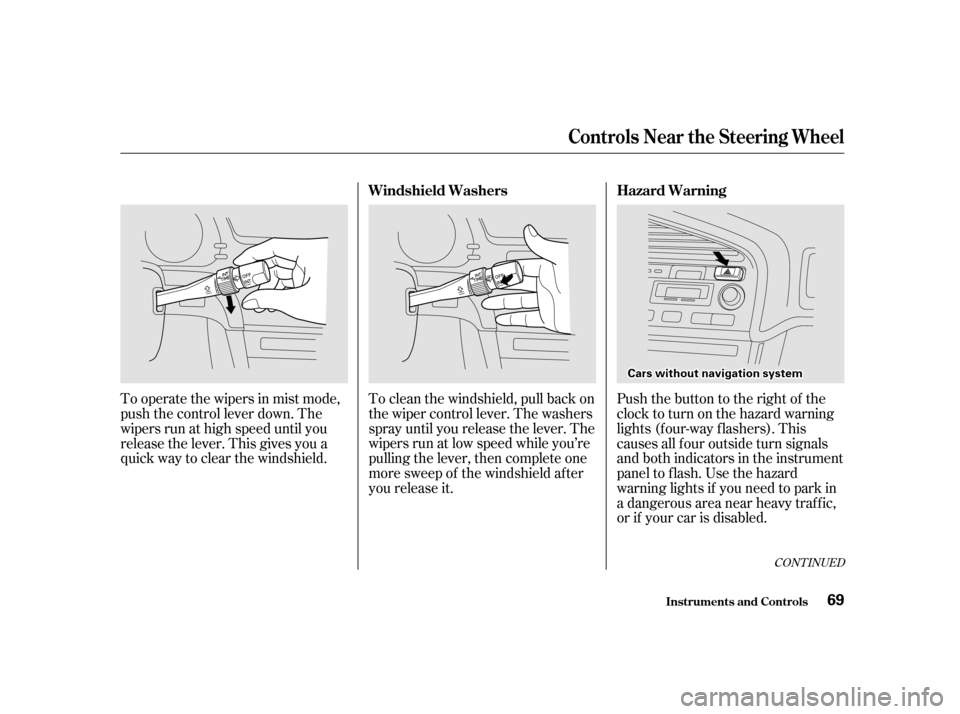
To clean the windshield, pull back on
the wiper control lever. The washers
spray until you release the lever. The
wipers run at low speed while you’re
pulling the lever, then complete one
more sweep of the windshield af ter
you release it.
To operate the wipers in mist mode,
push the control lever down. The
wipers run at high speed until you
release the lever. This gives you a
quick way to clear the windshield.
Push the button to the right of the
clocktoturnonthehazardwarning
lights (f our-way f lashers). This
causes all f our outside turn signals
and both indicators in the instrument
panel to flash. Use the hazard
warning lights if you need to park in
a dangerous area near heavy traffic,
or if your car is disabled.
CONT INUED
Controls Near the Steering Wheel
Inst rument s and Cont rols
Hazard Warning
Windshield Washers
69
C Ca arrss w
wi itth h o
ou
ut
t n
na
avviigg a
attiioo n
n s
syys stteem m