Code Acura TL 2006 User Guide
[x] Cancel search | Manufacturer: ACURA, Model Year: 2006, Model line: TL, Model: Acura TL 2006Pages: 295, PDF Size: 3.89 MB
Page 159 of 295

Press and hold the button on
HomeLink f or 3 to 4 seconds.
Press and hold the HomeLink
button again f or 3 to 4 seconds.
This should turn of f the training
indicator on the garage door
opener unit. (Some systems may
require you to press the button up
to three times.)
Press the HomeLink button again.
It should operate the garage door.
Press the training button on the
garage door opener unit until the
indicator next to the button comes
on. The indicator may blink, or
comeonandstayon.Youthen
have approximately 30 seconds to
complete the f ollowing steps.
For security purposes, newer garage
door opening systems use a ‘‘rolling’’
or variable code. Information from
the remote control and the garage
door opener are needed bef ore
HomeLink can operate the garage
door opener.
The ‘‘Training HomeLink’’
procedure trains HomeLink to the
proper garage door opener code.
The f ollowing procedure
synchronizes HomeLink to the
garage door opener so it sends and
receives the correct codes.
Make sure you have properly
completed the ‘‘Training
HomeLink’’ procedure.
Find the ‘‘training’’ button on your
garage door opener unit. The
location will vary, depending on
the manufacturer. 6.
2. 4.
5.
1. 3.
HomeL ink Universal Transceiver
T raining With a Rolling Code
System
Features
158
TRAINING BUTTON
Page 160 of 295
As required by the FCC:This device complies with Part 15 of theFCC rules. Operation is subject to thef ollowing two conditions: (1) This devicemay not cause harmf ul interf erence, and(2) this device must accept anyinterf erence received, includinginterf erence that may cause undesiredoperation.
Changes or modif ications not expresslyapproved by the party responsible f orcompliance could void the user’sauthority to operate the equipment.
This device complies with IndustryCanada Standard RSS-210.Operation is subject to the f ollowing twoconditions: (1) this device may not causeinterf erence, and (2) this device mustaccept any interf erence that may causeundesired operation of the device.
Toerasethecodesstoredinallthree
buttons, press and hold the two
outside buttons until the red
indicator begins to f lash, then
release the buttons. If a standard transmitter was
programmed, the indicator will
stay on f or about 25 seconds.
Once the HomeLink indicator
begins to f lash slowly, continue to
hold the HomeLink button, and
f ollow steps 3 thru 6 under
‘‘Training HomeLink’’ (see page ).
If you have problems with training
the HomeLink Universal Transceiver,
or would like inf ormation on home
products that can be operated by
HomeLink, call (800) 355-3515. On
the Internet, go to
www.homelink.com.
HomeLink
is a registered
trademark of Johnson Controls, Inc.
Youshoulderaseallthreecodes
bef ore selling the vehicle.
If you want to retrain a programmed
button f or a new device, you do not
have to erase all button memory.
You can replace the existing memory
code using this procedure:
Press and hold the HomeLink
button to be trained until the
HomeLink indicator begins to
flash slowly.If a rolling code transmitter was
previously programmed, the
indicator will f lash rapidly f or 2
seconds, and then stay on f or
about 23 seconds.
1. 2.
157
Erasing Codes
Customer Assistance
Retraining a Button
HomeL ink Universal Transceiver
159
Page 165 of 295
Press and release the Talk button.
After the beep, say the four digit
code you want to set. For example,
say ‘‘9.7.5.3.’’ The HFL response is
‘‘9.7.5.3. Is this correct?’’
Press and release the Talk button.
Af ter the beep, say ‘‘Yes.’’ HFL
response is, ‘‘Security is enabled.
Each time the vehicle is turned on,
the passcode will be required to
use the system. The system set up
is complete. Returning to the main
menu.’’ Press and release the Talk button.
Af ter the beep, say ‘‘Yes.’’ The
HFL response is,‘‘A passcode has
not been set. What is the f our digit
number you would like to set as
your passcode?’’
Press and release the Talk button.
Af ter the beep, say ‘‘Ring tone’’ or
‘‘Prompt.’’ If you choose ‘‘Ring
tone’’ the HFL response is ‘‘A ring
tone will be used’’. ‘‘A security
option is available to lock the
HandsFreeLink system. Each time
the vehicle is turned on, a
passcode would be required to use
this system. Would you like this
security option turned on?’’ Press and release the Talk button.
If you say ‘‘Yes’’ af ter the beep, the
HFL response is, ‘‘Would you like
the notif ication to be a ring tone or
prompt?’’ Press and release the Talk button.
Af ter the beep, say ‘‘Male’’ or
‘‘Female,’’ depending on the
system voice you want. The HFL
response is, ‘‘Male (Female)
prompts have been selected.
Would you like an audible
notif ication of an incoming call?’’
When you f inish a command
sequence, the HFL goes back to
its main menu. For example, when
you store the name, ‘‘Eric,’’ the
HFL response is, ‘‘Eric has been
stored.’’ The next time you press
the Talk button, you will be at the
main menu.
Press and release the Talk button.
Af ter the beep, say ‘‘Setup.’’ The
HFL response is ‘‘Would you like
male or f emale prompts?’’ Press and release the Talk button.
Af ter the beep, say ‘‘System.’’ The
HFL response is, ‘‘System options
are setup and clear.’’
Thevoiceof theHFLcanbesetto
male or f emale (U.S. models only).
Also, the incoming notif ication can
be set to a ring tone, a prompt, or no
notification.
2. 1.
4.
5. 3.
6.
7.
8.
To set up the system, do this:
HandsFreeL ink
Setting Up the System
164
TM
Page 166 of 295
CONT INUED
Press and release the Talk button.
Af ter the beep, say ‘‘Yes.’’ The
HFL response is ‘‘Searching f or a
Bluetooth phone.’’
Follow the prompts on your phone
to get it into its Search mode. The
phone will search f or the HFL.
When it comes up, select
HandsFreeLink f rom the list of
options displayed on your phone.
When asked by the phone, enter
the four-digit code from step 3 into
your phone. The HFL response is
‘‘A new phone has been f ound.
What would you like to name this
phone?’’Steps 5 and 6 show a
common way to get your phone into
its Discovery mode. If these steps do
not work on your phone, ref er to the
phone’s operating manual.
With your phone on and the
ignition in the ACCESSORY (I) or
ON (II) position, press and release
the Talk button. After the beep,
say ‘‘Phone set up.’’ The HFL
response is ‘‘Phone set up options
are status, pair, edit, delete, and
list.’’
Press and release the Talk button.
Af ter the beep, say ‘‘Pair.’’ The
HFL response is ‘‘The pairing
process requires operation of your
mobile phone. For saf ety, only
perf orm this f unction while the
vehicle is stopped. State a f our-
digit code f or pairing. Note this
code. It will be requested by the
phone.’’
Press and release the Talk button.
Af ter the beep, say the f our-digit
code you want to use. For example,
say‘‘1,2,3,4.’’TheHFLresponse
is,‘‘1,2,3,4.Isthiscorrect?’’
Your Bluetooth compatible phone
with HandsFree Prof ile must be
paired to the HFL before you can
make and receive hands-free calls.
HFL does not allow you to pair
your phone if the vehicle is
moving.
For pairing, your phone must be in
its Discovery mode.
The f ollowing procedure works f or
most phones. If you cannot pair
your phone to the HFL with this
procedure, ref er to your phone’s
operating manual, or talk to your
phone retailer. Up to six phones can be paired to
the HFL.
During the pairing process, turn
of f any previously paired phones
bef ore pairing a new phone. 1.
4.
5.
6.
2.
3.
HandsFreeL ink
Pairing Your Phone
Features
165
NOTE:
NOTE:
TM
Page 173 of 295

Press and release the Talk button.
After the beep, say ‘‘Clear.’’ The
HFL response is, ‘‘This process
will clear all paired phones, clear
all entries in the phonebook, and
clear the passcode. Is this what
you would like to do?’’
Press and release the Talk button.
Af ter the beep, say ‘‘List.’’ The
HFL responds by listing the
names in the phonebook. When
the end of the list is reached, the
HFL response is, ‘‘The entire list
has been read. Returning to the
main menu.’’
Press and release the Talk button.
Af ter the beep, say ‘‘Phonebook.’’
The HFL response is ‘‘Phonebook
options are store, edit, delete, and
list.’’
Press and release the Talk button.
Af ter the beep, say ‘‘List.’’ The
HFL responds by listing the
names in the phonebook. When it
saysthenameyouwanttocall,for
example, Eric, press the Talk
button, and then say ‘‘Call.’’ The
HFL response is, ‘‘Would you like
to call Eric?’’ Press and release the Talk button.
Af ter the beep, say ‘‘Yes.’’ The
HFL response is ‘‘Calling.’’ Once
connected, you will hear the
person you called through the
audio speakers. To change the
volume, use the audio system
volume knob.
This operation clears the HFL of
your passcode, your paired phones,
and all names in the HFL phonebook.
Clearing is recommended bef ore you
sell your vehicle. Press and release the Talk button.
Af ter the beep, say ‘‘System.’’ The
HFL response is, ‘‘System options
are setup and clear.’’ Press and release the Talk button.
Af ter the beep, say ‘‘Yes.’’ The
HFL response is ‘‘Preparing to
clear all paired phones, all
phonebook entries, and the
passcode. This may take up to
2
minutes to complete.’’ Press and
release the Talk button. After the
beep, say ‘‘OK’’ to proceed,
otherwise say ‘‘Go back’’ or
‘‘Cancel.’’
If you said ‘‘OK,’’ af ter a short
period of time, the HFL response
is, ‘‘System has been cleared.
Returning to the main menu.’’
2. 3.
4.
1.
1.2.
3.
2.
To call a name f rom the phonebook list,
do this:
To clear the system, do this:
HandsFreeL ink
Clearing the System
172
TM
Page 190 of 295
Apply the parking brake.
In cold weather, turn of f all
electrical accessories to reduce
the drain on the battery.
Push the clutch pedal down all the
way.
Make sure the shif t lever is in
Park. Press on the brake pedal.If the engine still does not start,
press the accelerator pedal all the
way down and hold it there while
starting to clear flooding. If the
engine still does not start, return
to step 5.
If the engine does not start within
15 seconds, or starts but stalls
right away, repeat step 4 with the
accelerator pedal pressed halfway
down. If the engine starts, release
pressure on the accelerator pedal
so the engine does not race.
Without touching the accelerator
pedal, turn the ignition key to the
START (III) position. Do not hold
the key in the START (III)
position f or more than 15 seconds
at a time. If the engine does not
start right away, pause for at least
10 seconds bef ore trying again.
1.
2.
3.
4.
5.6.
Manual Transmission:
Automatic Transmission:
Starting the Engine
Driving
189
The engine is harder to start in cold
weather. Also, the thinner air f ound at
altitudes above 8,000 f eet (2,400
meters) adds to this problem.
T he immobilizer system protects your
vehicle f rom thef t. If an improperly-
coded key (or other device) is used, the
engine’s f uel system is disabled. For
more inf ormation, see page .
91
Page 210 of 295
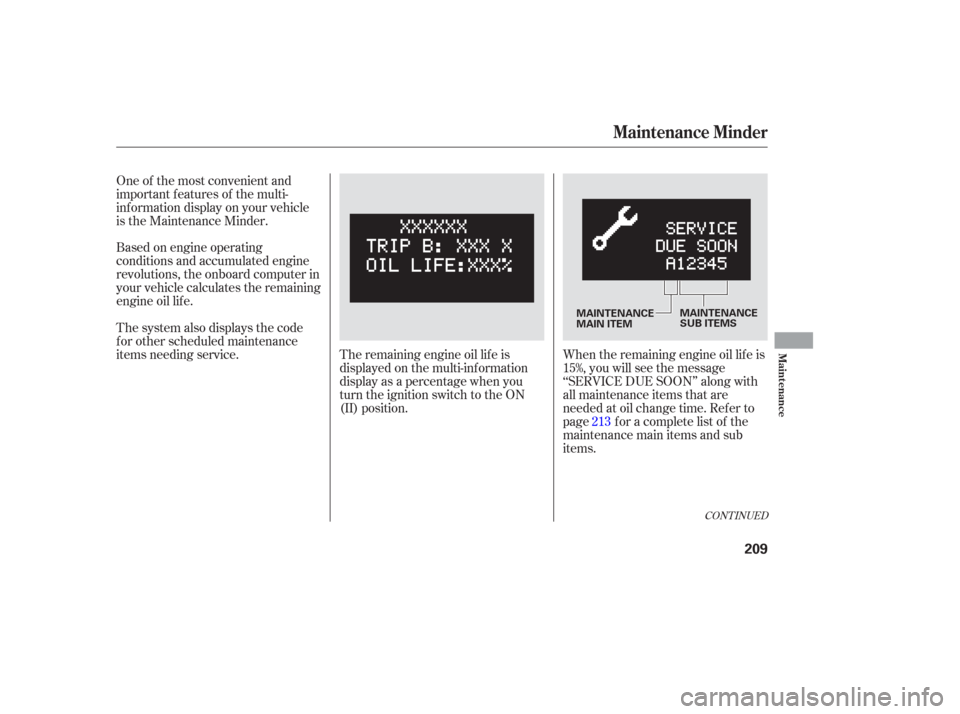
Based on engine operating
conditions and accumulated engine
revolutions, the onboard computer in
your vehicle calculates the remaining
engine oil lif e.When the remaining engine oil lif e is
15%, you will see the message
‘‘SERVICE DUE SOON’’ along with
all maintenance items that are
needed at oil change time. Ref er to
page f or a complete list of the
maintenance main items and sub
items.
The system also displays the code
f or other scheduled maintenance
items needing service. One of the most convenient and
important f eatures of the multi-
inf ormation display on your vehicle
is the Maintenance Minder.
The remaining engine oil lif e is
displayed on the multi-inf ormation
display as a percentage when you
turn the ignition switch to the ON
(II) position. 213
CONT INUED
Maintenance Minder
Maint enance
209
MAINTENANCE
MAIN ITEMMAINTENANCE
SUB ITEMS
Page 215 of 295
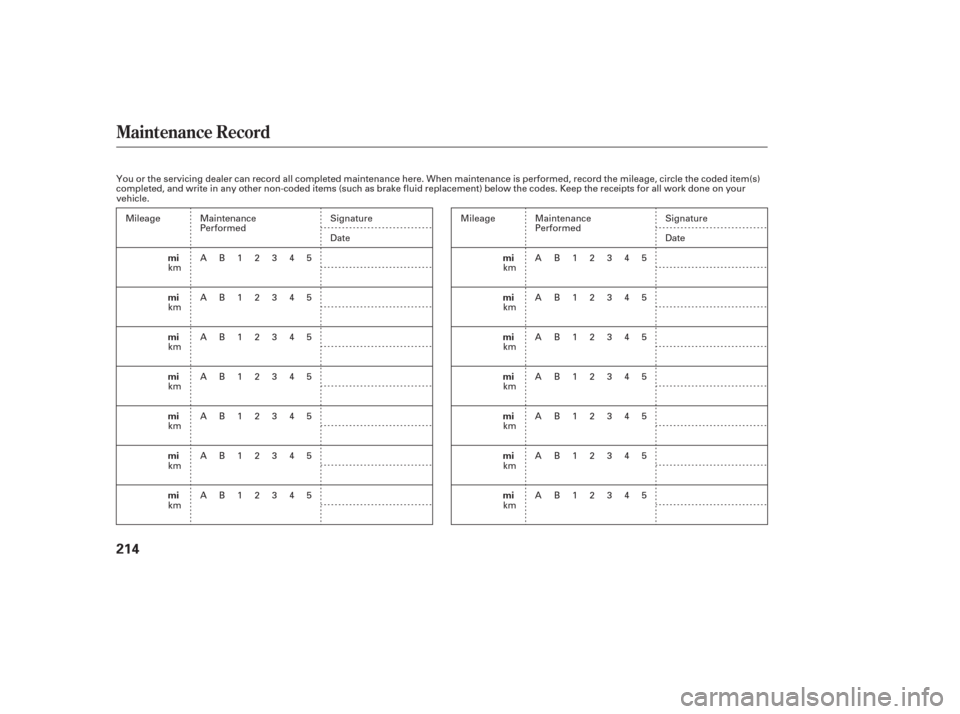
Maintenance Record
214
mi
mi
mi
mi
mi
mi
mimi
mi
mi
mi
mi
mi
mi
You or the servicing dealer can record all completed maintenance here. When maintenance is performed, record the mileage, circle the coded item(s)
completed, and write in any other non-coded items (such as brake fluid replacement) below the codes. Keep the receipts for all work done on your
vehicle.
Maintenance
Performed
AB12345
AB12345
AB12345
AB12345
AB12345
AB12345
AB12345 Signature
Date
Maintenance
Performed
AB12345
AB12345
AB12345
AB12345
AB12345
AB12345
AB12345Signature
Date
Mileage
km
km
km
km
km
km
km Mileage
km
km
km
km
km
km
km
Page 252 of 295

In this case, the starter motor’s
speed sounds normal, or even f aster
than normal, when you turn the
ignition switch to the START (III)
position, but the engine does not run.Are you using a properly coded
key? An improperly coded key will
cause the immobilizer system
indicator in the instrument panel
to blink rapidly (see page ).
Are you using the proper starting
procedure? Ref er to on page . There may be an electrical
problem, such as no power to the
f uel pump. Check all the f uses
(see page ).
If youfindnothingwrong,youwill
need a qualif ied technician to f ind
the problem. See
on page .
Do you have f uel? Check the f uel
gauge; the warning indicator may
not be working.
64
189 259
263
If theEngineWon’tStart
T he Starter Operates Normally
Starting the
Engine Emergency
Towing
T aking Care of t he Unexpect ed
251
Page 258 of 295

If your vehicle battery has been
disconnected or gone dead, these
codes are erased. It takes at least
three days of normal driving to set
the codes again.
If the indicator comes on repeatedly,
even though it may go of f as you
continue driving, have the vehicle
checked by your dealer as soon as
possible.
If this indicator comes on
while driving, it means one
of the engine’s emissions control
systems may have a problem. Even
though you may f eel no dif f erence in
your vehicle’s perf ormance, it can
reduce your f uel economy and cause
increased emissions. Continued
operation may cause serious damage.
Your vehicle has certain ‘‘readiness
codes’’ that are part of the on-board
diagnostics f or the emissions
systems. In some states, part of the
emissions testing is to make sure
these codes are set. If they are not
set, the test cannot be completed.To check if they are set, turn the
ignition switch to the ON (II)
position, without starting the engine.
The malf unction indicator lamp will
come on f or 20 seconds. If it then
goes of f , the readiness codes are set.
If it blinks f ive times, the readiness
codes are not set. If possible, do not
take your vehicle for a state
emissions test until the readiness
codes are set. Ref er to
for more
inf ormation (see page ).
If you have recently ref ueled your
vehicle, the indicator coming on
could be due to a loose or missing
f uel f ill cap. Tighten the cap until it
clicks at least once. Tightening the
cap will not turn the indicator of f
immediately; it takes several days of
normal driving.
277
Malf unction Indicator L amp
Readiness CodeState
Emissions T estingT aking Care of t he Unexpect ed
257
If you keep driving with the
malf unction indicator lamp on, you can
damage your vehicle’s emissions
controls and engine. Those repairs may
not be covered by your vehicle’s
warranties.