service Acura TL 2010 Owner's Guide
[x] Cancel search | Manufacturer: ACURA, Model Year: 2010, Model line: TL, Model: Acura TL 2010Pages: 612, PDF Size: 15.02 MB
Page 446 of 612

Bef ore you begin driving your
vehicle, you should know what
gasoline to use and how to check the
levels of important f luids. You also
need to know how to properly store
luggage or packages. The
inf ormation in this section will help
you. If you plan to add any
accessories to your vehicle, please
read the information in this section
first..............................
Break-in Period .444
.................
Fuel Recommendation . 444
.........
Service Station Procedures . 445
....................................
Ref ueling .445
.....
Tighten Fuel Cap Message . 446
Opening and Closing the .......................................
Hood .447
...................................
Oil Check .448
.............
Engine Coolant Check . 449
...............................
Fuel Economy .450
...
Accessories and Modif ications . 453
.............................
Carrying Cargo .455
Bef ore Driving
Bef ore Driving
443
09/07/29 18:12:15 31TK4610_448
2010 TL
Page 447 of 612
Help assure your vehicle’s f uture
reliability and perf ormance by paying
extra attention to how you drive
during the f irst 600 miles (1,000 km).
During this period:
You should also f ollow these
recommendations with an
overhauled or exchanged engine, or
when the brakes are replaced.Do not change the oil until the
multi-inf ormation display indicates
it is needed. Avoidhardbrakingforthefirst
200 miles (300 km). Avoid full-throttle starts and rapid
acceleration. Your vehicle is designed to operate
on premium unleaded gasoline with a
pump octane of 91 or higher. If this
octane grade is unavailable, regular
unleaded gasoline with a pump
octane of 87 or higher may be used
temporarily. The use of regular
unleaded gasoline can cause metallic
knocking noises in the engine and
will result in decreased engine
perf ormance. The long-term use of
regular-grade gasoline can lead to
engine damage. In addition, in order to maintain good
perf ormance, f uel economy, and
emissions control, we strongly
recommend, in areas where it is
available, the use of gasoline that
does NOT contain manganese-based
f uel additives such as MMT.
Use of gasoline with these additives
may adversely af f ect perf ormance,
and cause the malfunction indicator
lamp on your instrument panel to
come on. If this happens, contact
your dealer f or service. We recommend using quality
gasolines containing detergent
additives that help prevent fuel
system and engine deposits.
You may hear a knocking noise from
the engine if you drive the vehicle at
low engine speed (below about 1,000
rpm) in a higher gear. To stop this,
raise the engine speed by shif ting to
a lower gear.
On vehicles with manual transmission
Break-in Period Fuel Recommendation
Break-in Period, Fuel Recommendation
444
09/07/29 18:12:28 31TK4610_449
2010 TL
Page 448 of 612
CONT INUED
If you notice any undesirable
operating symptoms, try another
service station, or switch to another
brand of gasoline. Some gasoline today is blended with
oxygenates such as ethanol or
MTBE. Your vehicle is designed to
operate on oxygenated gasoline
containing up to 10% ethanol by
volume and up to 15% MTBE by
volume. Do not use gasoline
containing methanol.Park with the driver’s side closest
to the service station pump.
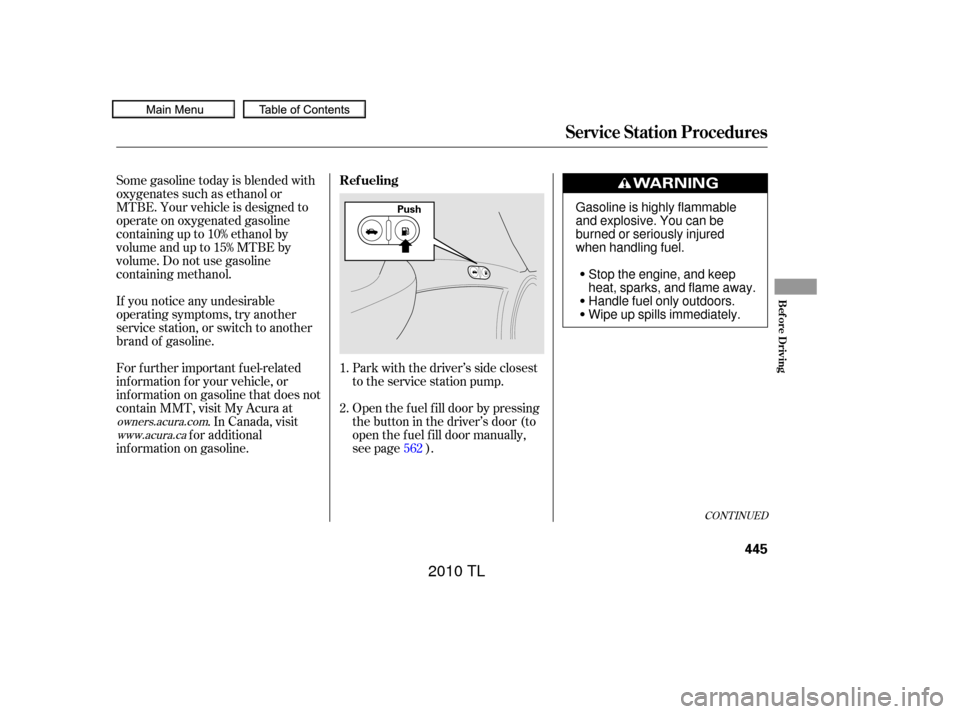
Open the f uel f ill door by pressing
the button in the driver’s door (to
open the f uel f ill door manually,
see page ).
For f urther important f uel-related
inf ormation f or your vehicle, or
inf ormation on gasoline that does not
contain MMT, visit My Acura at
. In Canada, visit
f or additional
inf ormation on gasoline. 1.
2.
562
owners.acura.comwww.acura.ca
Service Station Procedures
Ref ueling
Bef ore Driving
445
PushGasoline is highly flammable
and explosive. You can be
burned or seriously injured
when handling fuel.
Stop the engine, and keep
heat, sparks, and flame away.
Handle fuel only outdoors.
Wipe up spills immediately.
09/07/29 18:12:39 31TK4610_450
2010 TL
Page 449 of 612

Remove the f uel f ill cap slowly.
You may hear a hissing sound as
pressure inside the tank equalizes.
Place the cap in the holder on the
fuel fill door.Your vehicle’s on board diagnostic
system will detect a loose or missing
f uel f ill cap as an evaporative system
leak. The f irst time a leak is detected
a ‘‘TIGHTEN FUEL CAP’’ message
appears on the multi-inf ormation
display.
The fuel fill cap is attached to the
f uel f ill door with a tether to avoid
losing the cap.
Stop f illing the tank af ter the f uel
nozzle automatically clicks of f . Do
not try to ‘‘top off’’ the tank. This leaves some room in the f uel tank
for the fuel to expand with
temperature changes.
even
though the tank is not full, there may
be a problem with your vehicle’s f uel
vapor recovery system. The system
helps keep f uel vapor f rom going
into the atmosphere. Try f illing at
another pump. If this does not f ix the
problem, consult your dealer.
Push the f uel f ill door closed until
it latches. Screw the f uel f ill cap back on
until it clicks at least once. If you
do not properly tighten the cap,
you will see a ‘‘TIGHTEN FUEL
CAP’’ message on the multi-
inf ormation display. If the system
still detects an evaporative system
leak af ter retightening the cap, the
malf unction indicator lamp may
come on (see page ).
3.
4. 5.
6.
560
If the f uel nozzle keeps clicking of f
Service Station Procedures
Tighten Fuel Cap Message
446
TETHER
FUEL FILL CAP
HOLDER
09/07/29 18:12:50 31TK4610_451
2010 TL
Page 450 of 612

Turn the engine of f , and conf irm the
f uel f ill cap is installed. If it is, loosen
it, then retighten it until it clicks at
least once. The message should go
off after several days of normal
driving once you tighten or replace
the f uel f ill cap. To scroll to another
message, press the INFO button.If the system still detects a leak in
your vehicle’s evaporative emissions
system, the malf unction indicator
lamp (MIL) comes on. If the f uel f ill
cap was not already tightened, turn
the engine of f , and check or
retighten the f uel f ill cap until it
clicks at least once. The MIL should
go off after several days of normal
driving once the cap is tightened or
replaced. If the MIL does not go of f ,
have your vehicle inspected by a
dealer. For more inf ormation, see
page .
Park the vehicle, and set the
parking brake. Pull the hood
release handle located under the
lower lef t corner of the dashboard.
The hood will pop up slightly.
The ‘‘TIGHTEN FUEL CAP’’
message will appear each time you
restart the engine until the system
turns the message of f .
1.
560
CONT INUED
Service Station Procedure
Opening and Closing the Hood
Bef ore Driving
447
HOOD RELEASE HANDLE
09/07/29 18:13:00 31TK4610_452
2010 TL
Page 451 of 612

Park the vehicle on a level surf ace.Insert the dipstick all the way back
into its hole. Wipe of f the dipstick with a clean
cloth or paper towel. Remove the dipstick (orange loop).
Wait a f ew minutes af ter turning the
engine of f bef ore you check the oil.
To close the hood, lower it to about a
f oot (30 cm) above the f ender, then
press down f irmly with your hands.
Make sure the hood is securely
latched. Lif t the hood up most of the way.
The hydraulic supports will lif t it
uptherestof thewayandholdit
up.
If the hood latch handle moves
stif f ly, or if you can open the hood
without lifting the handle, the
mechanism should be cleaned and
lubricated. Put your f ingers between the f ront
edge of the hood and the f ront
grille to locate the hood latch
handle. Push this handle up until it
releases the hood. Lif t the hood. 3.
1.
3. 2.
2.
Service Station Procedures
Oil Check
448
LATCH
DIPSTICK
09/07/29 18:13:13 31TK4610_453
2010 TL
Page 452 of 612
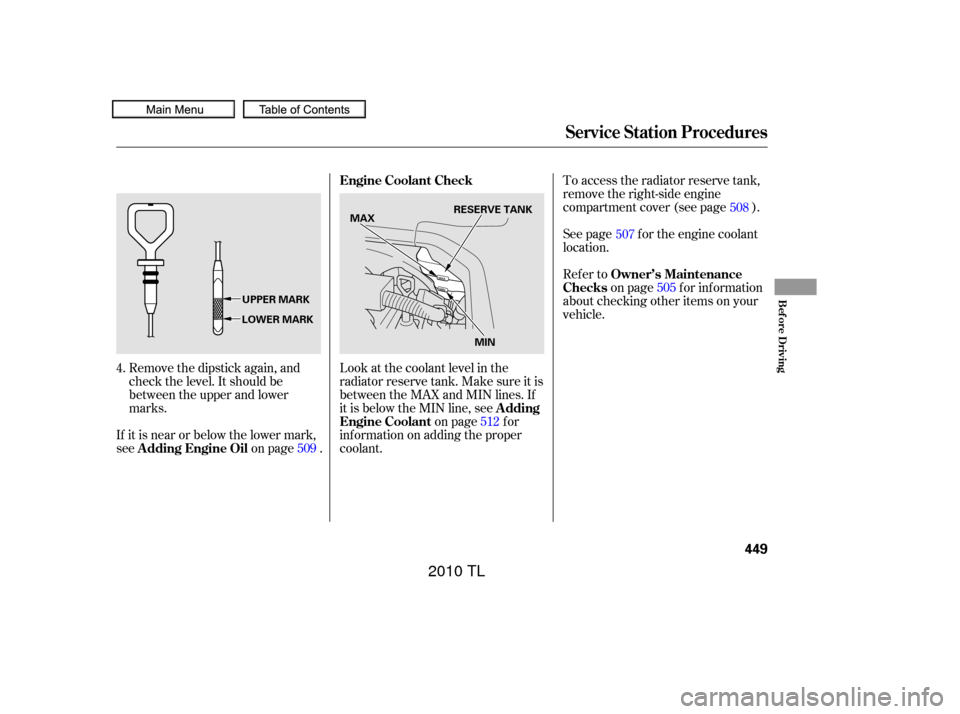
Remove the dipstick again, and
check the level. It should be
between the upper and lower
marks.
If it is near or below the lower mark,
see on page . To access the radiator reserve tank,
remove the right-side engine
compartment cover (see page ).
See page f or the engine coolant
location.
Refer to
on page f or inf ormation
about checking other items on your
vehicle.
Look at the coolant level in the
radiator reserve tank. Make sure it is
between the MAX and MIN lines. If
it is below the MIN line, see on page f or
inf ormation on adding the proper
coolant.
4.
509 512507
505 508
Service Station Procedures
A dding Engine Oil Engine Coolant Check
Owner’s Maintenance
Checks
A dding
Engine Coolant
Bef ore Driving
449
RESERVE TANK
MAX
MIN
UPPER MARK
LOWER MARK
09/07/29 18:14:08 31TK4610_454
2010 TL
Page 491 of 612

Your vehicle is equipped with a tire
pressure monitoring system (TPMS)
that turns on every time you start the
engine and monitors the pressure in
your tires while driving.If you think you can saf ely drive a
short distance to a service station,
proceed slowly to the station, then
inflate the tire to the recommended
pressure shown on the driver’s
doorjamb.
If the tire is f lat, or if the tire
pressure is too low to continue
driving, replace the tire with the
compact spare tire (see page ).
Driving on a signif icantly under-
inf lated tire causes the tire to
overheat and can lead to tire failure.
Under-inf lation also reduces f uel
efficiency and tire tread life, and may
af f ect the vehicle’s handling and
stopping ability.
Becausetirepressurevariesby
temperature and other conditions,
the low tire pressure/TPMS
indicator may come on unexpectedly.
When the low tire pressure/TPMS
indicator is on, one or more of your
tires is signif icantly underinf lated.
Youshouldstopandcheckyourtires
as soon as possible, and inflate them
to the proper pressure as indicated
on the vehicle’s tire inf ormation
placard.
Each tire has its own pressure
sensor. If the air pressure of a tire
becomes signif icantly low, the
sensor in that tire immediately sends
a signal that causes the low tire
pressure/TPMS indicator in the
instrument panel to come on. If this
happens, you will see which tire is
losing pressure on the multi-
inf ormation display along with a
‘‘CHECK TIRE PRESSURE’’
message. It is possible that the pressures
shown on the multi-inf ormation
display and the pressures you
manually measure are slightly
dif f erent.
If the dif f erence is signif icant or you
cannot make the low tire pressure/
TPMS indicator and message on the
multi-inf ormation display go out af ter
inf lating the tires to the specif ied
values, have your dealer check the
system as soon as possible. 547
Low Tire Pressure/
TPMS Indicator
Tire Pressure Monitoring System (TPMS)
488
09/07/29 18:25:05 31TK4610_493
2010 TL
Page 495 of 612

Never use a puncture-repairing agent
in a f lat tire. If used, you will have to
replace the tire pressure sensor.
Havetheflattirerepairedbyyour
dealer as soon as possible.
This indicator and the warning
message on the multi-inf ormation
display will go of f , af ter several miles
(kilometers) driving, when the spare
tire is replaced with the specified
regular tire equipped with the tire
pressure monitor sensor.
Each wheel is equipped with a tire
pressure sensor mounted inside the
tire behind the valve stem. You must
use TPMS specif ic wheels. It is
recommended that you always have
your tires serviced by your dealer or
a qualif ied technician.
If you have a f lat tire, the low tire
pressure/TPMS indicator and tire
monitor indicator will come on.
Replace the indicated f lat tire with
thecompactsparetire(seepage
).
After the flat tire is replaced with the
spare tire, the low tire pressure/
TPMS indicator stays on while
driving. Af ter several miles
(kilometers) driving, this indicator
begins to f lash, then stays on again.
You will also see a ‘‘CHECK TPMS
SYSTEM’’ message on the multi-
inf ormation display. This is normal;
the system cannot monitor the spare
tire pressure. Manually check the
spare tire pressure to be sure it is
correct. If the low tire pressure/TPMS
indicator and the low tire position on
the low tire pressure monitor do not
go out af ter inf lating the tires to the
specified values, have your dealer
check the system as soon as possible.
547
Changing a T ire with T PMS
Tire Pressure Monitoring System (TPMS)
492
09/07/29 18:25:46 31TK4610_497
2010 TL
Page 498 of 612
This section explains why it is
important to keep your vehicle well
maintained and how to f ollow basic
maintenance saf ety precautions.
If you have the skills and tools to
perf orm more complex maintenance
tasks on your vehicle, you may want
to purchase the service manual. See
page f or inf ormation on how to
obtain a copy, or see your dealer. This section also includes
instructions on how to read the
maintenance minder messages on
the multi-information display, and
instructions f or simple maintenance
tasks you may want to take care of
yourself .......................
Maintenance Saf ety .496
....................
Maintenance Minder . 497
..............................
Fluid Locations .507
......
Engine Compartment Covers . 508
........................
Adding Engine Oil .509
Changing the Engine Oil and ...........................................
Filter .510
..............................
Engine Coolant .512
....................
Windshield Washers .514
.......................
Transmission Fluid .515
..........
Automatic Transmission . 515
..............
Manual Transmission . 517
.................
Rear Dif f erential Fluid . 518
.............
Transf er Assembly Fluid . 518
..................
Brake and Cluth Fluid . 519
....................................
Timing Belt .520
.............................................
Lights .521
................
Cleaning the Seat Belts . 530
.....................................
Floor Mats .531
..................
Dust and Pollen Filter . 532
.................................
Exterior Care .532
.................................
Wiper Blades .532
...............................................
Tires .534
...................
Checking the Battery . 542
.............................
Vehicle Storage .544
597
Maintenance
Maint enance
495
09/07/29 18:26:01 31TK4610_500
2010 TL