brake Acura TL 2011 User Guide
[x] Cancel search | Manufacturer: ACURA, Model Year: 2011, Model line: TL, Model: Acura TL 2011Pages: 614, PDF Size: 15.86 MB
Page 181 of 614

The keyless access system has f our
power modes: VEHICLE OFF
(LOCK), ACCESSORY, ON, and
START.
This system uses the engine start/
stop button instead of an ignition
switch to start and stop the engine. If
you are carrying the keyless access
remote, you can start the engine by
pressing the engine start/stop
button with the brake pedal
(automatic transmission) or the
clutch pedal (manual transmission)
depressed. You can also stop the
engine by pushing this button when
the vehicle is stopped. Each time you press the engine
start/stop button without pressing
the brake pedal (automatic
transmission) or the clutch pedal
(manual transmission) while
carrying the keyless access remote,
the power mode switches between
VEHICLE OFF (LOCK),
ACCESSORY, and ON.
You can start the engine at any time
by pressing the engine start/stop
button, while pressing the brake
pedal, with the shift lever in Park or
neutral position.
You can start the engine at any time
by pressing the engine start/stopbutton, while pressing the clutch
pedal f ully, with the shif t lever in any
gear position.
To change the power mode without
turning on the engine, press the
engine start/stop button without
pressing the brake pedal (automatic
transmission) or the clutch pedal
(manual transmission). The power
mode will be changed as shown on
the next page.
Automatic transmission:
Manual transmission:
K eyless A ccess System
Engine Start/
Stop ButtonSwit ching t he Power Modes Changing t he Power Mode wit houtSt art ing t he Engine
178
10/07/29 12:03:04 31TK4620_183
Operation
2011 TL
Page 182 of 614
CONT INUED
K eyless A ccess System
Inst rument s and Cont rols
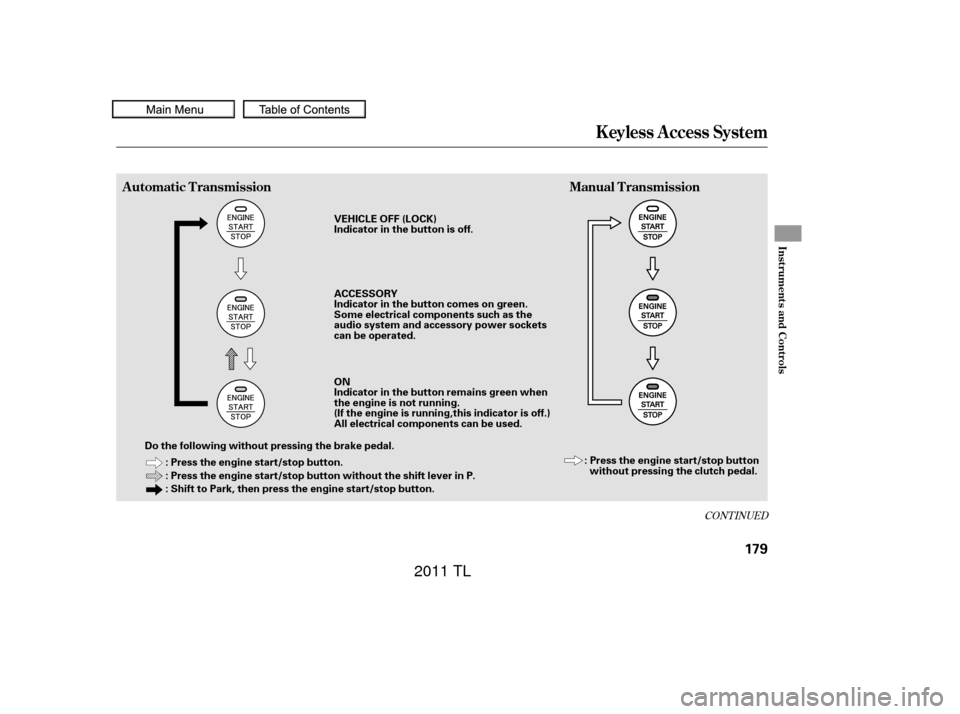
Automatic TransmissionManual Transmission
179
: Press the engine start/stop button.
: Press the engine start/stop button without the shift lever in P.
: Shift to Park, then press the engine start/stop button.
Do the following without pressing the brake pedal. VEHICLE OFF (LOCK)
Indicator in the button is off.
ACCESSORY
Indicator in the button comes on green.
Some electrical components such as the
audio system and accessory power sockets
can be operated.
ON
Indicator in the button remains green when
the engine is not running.
(If the engine is running,this indicator is off.)
All electrical components can be used.
: Press the engine start/stop buttonwithout pressing the clutch pedal.
10/07/29 12:03:12 31TK4620_184
2011 TL
Page 183 of 614

Automatic TransmissionManual Transmission
How the mode is switched depends
on if the shif t lever is in Park or not.Each time you press the engine
start/stop button without pressing
the clutch pedal, the power mode
switches between VEHICLE OFF
(LOCK), ACCESSORY, and ON
modes. To change the mode f rom
ON to ACCESSORY, or
ACCESSORY to VEHICLE OFF
(LOCK), press the engine start/stop
button twice. If the keyless access system
main switch in the glove box is of f ,
make sure to insert the keyless
access remote into the keyless
access slot to turn on your vehicle’s
power mode. For more inf ormation,
ref er to page .
To remove the keyless access
remote from the slot, make sure the
power mode is VEHICLE OFF
(LOCK).
With the shift lever in Park, the
power mode changes f rom ON to
VEHICLE OFF (LOCK) when you
push the engine start/stop button.
TochangethemodefromONto
ACCESSORY with the shift lever
position in Park, take your f oot of f
the brake and press the engine
start/stop button twice.
Tochangethemodefrom
ACCESSORY to VEHICLE OFF
(LOCK),shifttoPark,thenpress
the engine start/stop button twice. 189
K eyless A ccess System
180
NOTE:
10/07/29 12:03:19 31TK4620_185
2011 TL
Page 185 of 614

You can start the engine in any
power mode.
To start the engine:Depress the brake pedal and press
the engine start/stop button. Move the shift lever to Park (P). Af ter you unlock and open the
driver’s door, you will see the ‘‘TO
START ENGINE:’’ message on the
multi-inf ormation display. The ‘‘TO
TURN ACCESSORY ON:’’ message
will be shown af ter three seconds.
The display switches between the
‘‘TO START ENGINE:’’ and ‘‘TO
TURN ACCESSORY ON:’’ messages
every three seconds.
Apply the parking brake.
Press the clutch pedal down all the
way.
The engine does not start unless
the clutch pedal is pressed.
Press the engine start/stop button.
1.
2. 1.
2.
3.
Automatic Transmission
Manual Transmission
K eyless A ccess System
Starting the EngineStarting Guidance
182
ENGINE START/STOP BUTTON
BRAKE PEDAL
AUTOMATIC TRANSMISSION ENGINE START/STOP BUTTON
MANUAL TRANSMISSION CLUTCH PEDAL
M/TTO START ENGINE:
TO TURN
ACCESSORY ON:
A/T
10/07/29 12:03:44 31TK4620_187
2011 TL
Page 187 of 614

To turn the vehicle off, make sure
the vehicle is completely stopped and
do the f ollowing.If the shif t lever is in any gear
other than neutral, depress the
clutch pedal, then press the engine
start/stop button.
The engine stops and the power
mode switches f rom ON to
VEHICLE OFF (LOCK).
Bef ore leaving the vehicle, make
sure it is of f . You can verif y if the
power is of f by checking the engine
start/stop button LED indicator. You can only place the vehicle in the
VEHICLE OFF (LOCK) mode if the
transmission is in Park. You will see
the ‘‘SHIFT TO PARK’’ message on
the multi-information display if you
press the engine start/stop button to
turn the vehicle of f with the shif t
lever in any other position except f or
P(Park).
If the shift lever is in neutral, press
the engine start/stop button.
Press the engine start/stop button
with your f oot on the brake pedal. Shif t to park (P). Make sure to press the brake pedal
or set the parking brake before
turning off the engine. If your foot
is OFF the clutch pedal in any gear
position, pressing the engine start/
stop button turns off the engine,
and the vehicle may move forward
or backward.
1.
2.
Manual Transmission
Automatic Transmission On automatic transmission models
On manual transmission modelsStopping the Engine
K eyless A ccess System
Operat ion Guidance
184
SHIFT TO PARK
A/T model only
A/T model
10/07/29 12:04:01 31TK4620_189
2011 TL
Page 188 of 614

CONT INUED
If the power mode is in ACCESSORY,
you may see the ‘‘ACCESSORY
MODE’’ message on the multi-
inf ormation display.Af ter the driver’s door is opened, you
willseethe‘‘TOTURNVEHICLE
OFF:’’ message on the multi-
inf ormation display. Press the engine
start/stop button twice with your
f oot of f the brake pedal to change
the power mode f rom ACCESSORY
to VEHICLE OFF (LOCK).Press the engine start/stop button
twice with your f oot of f the brake
pedal (automatic transmission) or
the clutch pedal (manual
transmission) to change the power
mode to VEHICLE OFF (LOCK). If you open the driver’s door in the
ACCESSORY mode, a beeper will
sound. You will also see a
‘‘ACCESSORY MODE’’ or ‘‘TO
TURN VEHICLE OFF:’’ message on
the multi-information display.
Bef ore leaving the vehicle, make
sure it is in VEHICLE OFF (LOCK).
All models
K eyless A ccess System
Inst rument s and Cont rols
185
TO TURN VEHICLE OFF
ACCESSORY MODE
10/07/29 12:04:08 31TK4620_190
2011 TL
Page 196 of 614
CONT INUED
The message reminds you that the
keyless access remote is locked in
the keyless access remote slot, and
that the power mode is in the
ACCESSORY or ON position. To
remove the keyless access remote,
turn the power mode of f by pressing
the engine start/stop button twice
(in ACCESSORY mode) or once (in
ON mode) without pressing the
brake pedal.
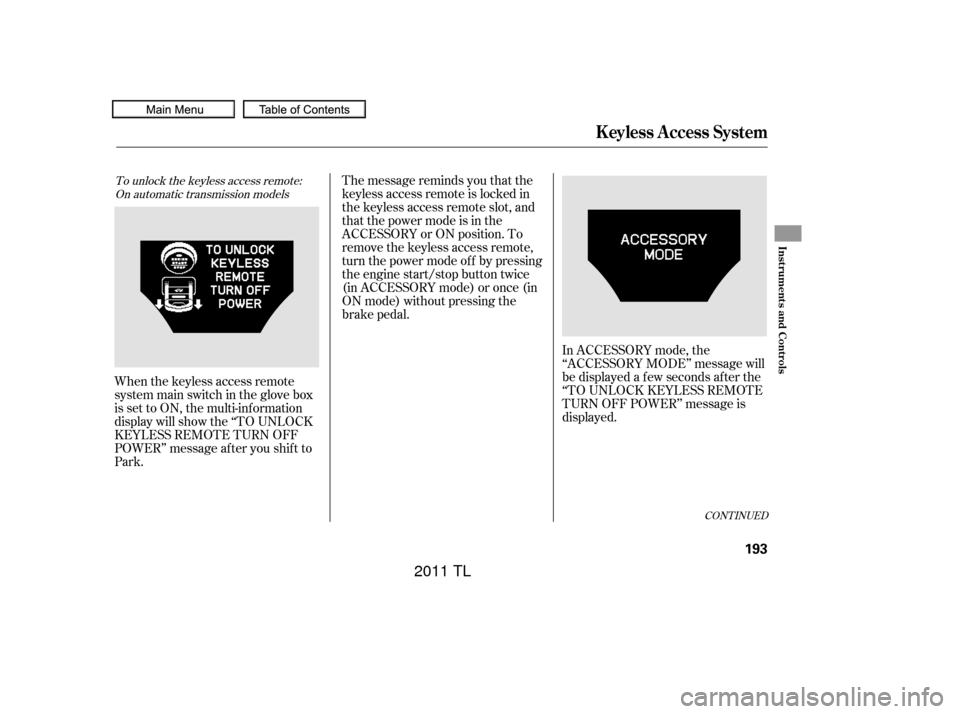
When the keyless access remote
system main switch in the glove box
is set to ON, the multi-information
display will show the ‘‘TO UNLOCK
KEYLESS REMOTE TURN OFF
POWER’’ message af ter you shif t to
Park.To unlock the keyless access remote: On automatic transmission models
K eyless A ccess System
Inst rument s and Cont rols
193
10/07/29 12:05:07 31TK4620_198
In ACCESSORY mode, the
‘‘ACCESSORY MODE’’ message will
be displayed a f ew seconds af ter the
‘‘TO UNLOCK KEYLESS REMOTE
TURN OFF POWER’’ message is
displayed.
2011 TL
Page 197 of 614
TheshiftlevermustbeinPark
bef ore you can press the engine
start/stop button twice without
pressing the brake pedal to set the
vehicle into the VEHICLE OFF
(LOCK) mode.
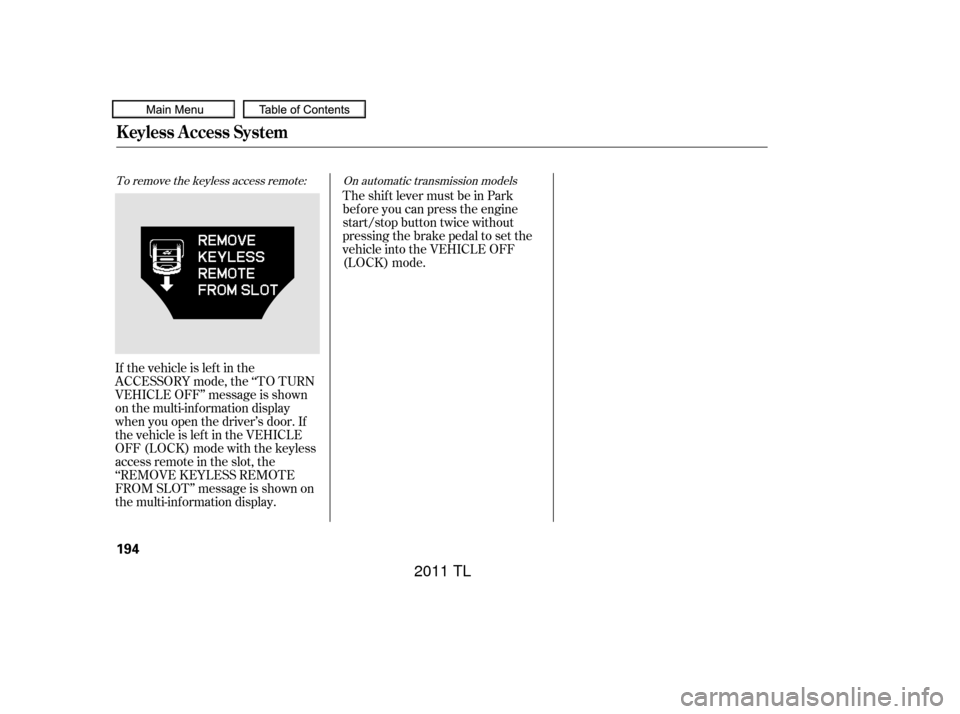
If the vehicle is lef t in the
ACCESSORY mode, the ‘‘TO TURN
VEHICLE OFF’’ message is shown
on the multi-information display
when you open the driver’s door. If
the vehicle is lef t in the VEHICLE
OFF (LOCK) mode with the keyless
access remote in the slot, the
‘‘REMOVE KEYLESS REMOTE
FROM SLOT’’ message is shown on
the multi-information display.
To remove the keyless access remote: On automatic transmission models
K eyless A ccess System
194
10/07/29 12:05:13 31TK4620_199
2011 TL
Page 207 of 614
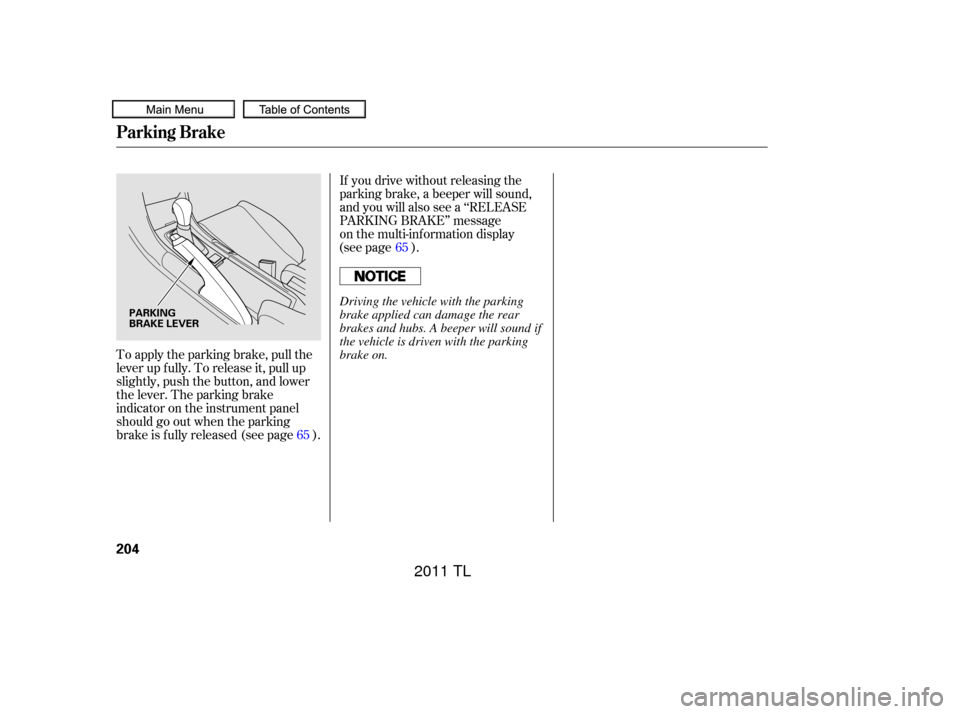
To apply the parking brake, pull the
lever up f ully. To release it, pull up
slightly, push the button, and lower
the lever. The parking brake
indicator on the instrument panel
should go out when the parking
brake is f ully released (see page ).If you drive without releasing the
parking brake, a beeper will sound,
and you will also see a ‘‘RELEASE
PARKING BRAKE’’ message
on the multi-information display
(see page ).
65 65
Parking Brake
204
PARKING
BRAKE LEVERDriving the vehicle with the parking
brake applied can damage the rear
brakes and hubs. A beeper will sound if
the vehicle is driven with the parking
brake on.
10/07/29 12:06:19 31TK4620_209
2011 TL
Page 386 of 614
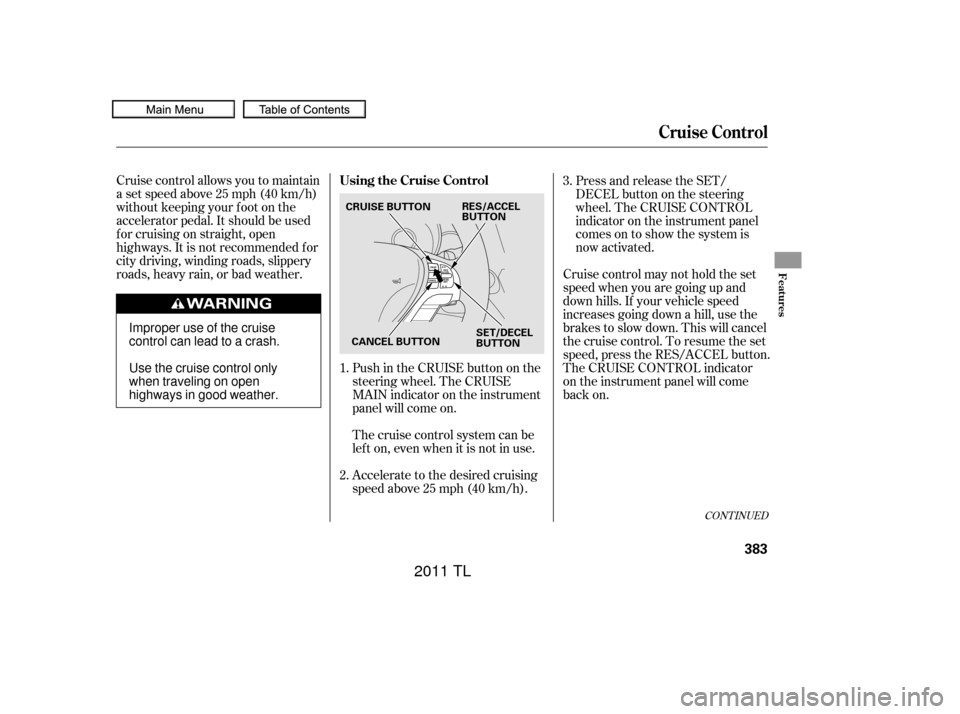
Cruise control allows you to maintain
asetspeedabove25mph(40km/h)
without keeping your f oot on the
accelerator pedal. It should be used
f or cruising on straight, open
highways. It is not recommended f or
city driving, winding roads, slippery
roads, heavy rain, or bad weather.Push in the CRUISE button on the
steering wheel. The CRUISE
MAIN indicator on the instrument
panel will come on.Press and release the SET/
DECELbuttononthesteering
wheel. The CRUISE CONTROL
indicator on the instrument panel
comes on to show the system is
now activated.
Cruise control may not hold the set
speed when you are going up and
down hills. If your vehicle speed
increases going down a hill, use the
brakes to slow down. This will cancel
thecruisecontrol.Toresumetheset
speed, press the RES/ACCEL button.
The CRUISE CONTROL indicator
on the instrument panel will come
back on.
Thecruisecontrolsystemcanbe
lefton,evenwhenitisnotinuse.
Accelerate to the desired cruising
speedabove25mph(40km/h).
1.
2. 3.
CONT INUED
Using the Cruise Control
Cruise Control
Features
383
RES/ACCEL
BUTTON
SET/DECEL
BUTTON
CRUISE BUTTON
CANCEL BUTTON
Improper use of the cruise
control can lead to a crash.
Use the cruise control only
when traveling on open
highways in good weather.
10/07/29 12:29:56 31TK4620_388
2011 TL