ad blue Acura TL 2013 Navigation Manual
[x] Cancel search | Manufacturer: ACURA, Model Year: 2013, Model line: TL, Model: Acura TL 2013Pages: 183, PDF Size: 5.19 MB
Page 52 of 183
Driving to Your Destination
52 Navigation System
Driving to Your Destination
A route typically has three phases.
• Initial route calculation ( Calculate
route to screen) (see next column).
• Change the route while en route (see page 76 ).
• Resume the route when restarting the engine (see Continue Trip to Screen
on page 81 ).
Calculate Route to Screen
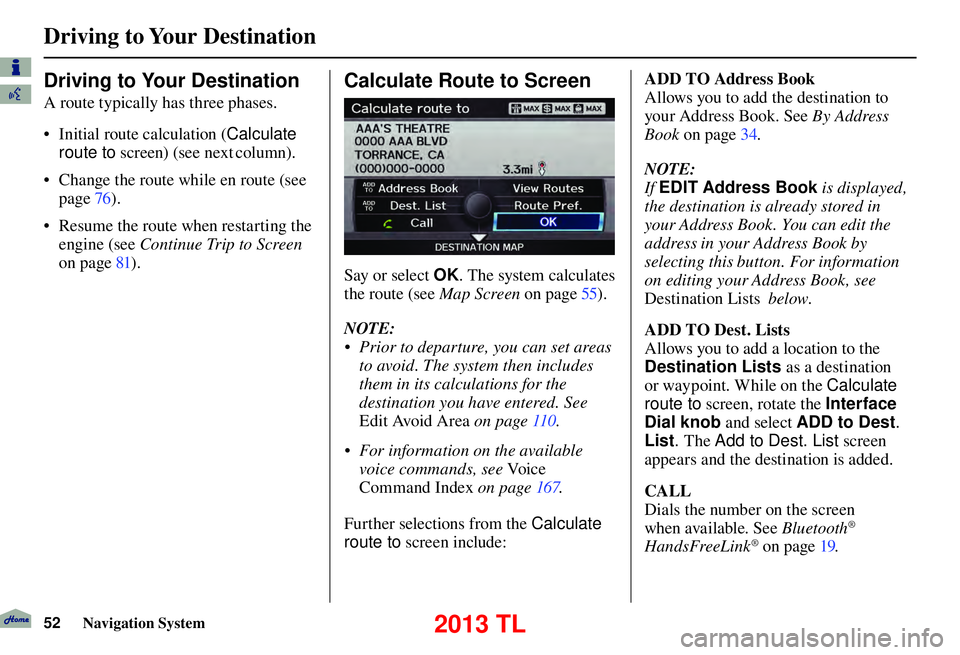
Say or select OK . The system calculates
the route (see Map Screen
on page 55 ).
NOTE:
• Prior to departure, you can set areas to avoid. The system then includes
them in its calculations for the
destination you have entered. See
Edit Avoid Area on page 110 .
• For information on the available voice commands, see Vo i c e
Command Index on page 167 .
Further selections from the Calculate
route to screen include: ADD TO Address Book
Allows you to add the destination to
your Address Book. See
By Address
Book on page 34 .
NOTE:
If EDIT Address Book is displayed,
the destination is already stored in
your Address Book. You can edit the
address in your Address Book by
selecting this button. For information
on editing your Address Book, see
Destination Lists
ADD TO Dest. Lists
Allows you to add a location to the
Destination Lists as a destination
or waypoint . While on the Calculate
route to screen, rotate the Interface
Dial knob and select ADD to Dest .
List . The Add to Dest. List screen
appears and the destination is added.
CALL
Dials the number on the screen
when available. See Bluetooth
®
HandsFreeLink® on page 19 .
below .
2013 TL
Page 54 of 183

Driving to Your Destination
54 Navigation System
NOTE:
• The driving distance and time
estimated for the various routes
is displayed.
• It is not unusual for the different methods to pick the same route.
Voice commands cannot be used
while the system is calculating.
• Zoom IN/OUT to view route details or traffi c conditions is not available
on the View Routes screen. After
moving the Interface Dial and
scrolling through the map, you can
then zoom in or out on the map
screen to view your route in details. Based on the route data, you can change
the routing method by rotating the
Interface Dial knob
.
Once you confi rm your selection, say
the number of the desired routing
method or push in on the Interface
Dial .
The calculated route will be highlighted
as a blue line, and a voice prompt
will tell you how to proceed along the
highlighted route.
Push in on the Interface Dial and select
Voice to have the guidance repeated. Viewing the Destination Map
If you move the Interface Dial down
and select DESTINATION MAP while
on the Calculate route to screen,
a map of the destination vicinity is
displayed. Press the CANCEL or
BACK button, or select Return to
return to the previous screen. You can
view the destination map anytime
while en route by saying “Display
destination map.”
2013 TL
Page 55 of 183
Driving to Your Destination
Navigation System55
Map Screen
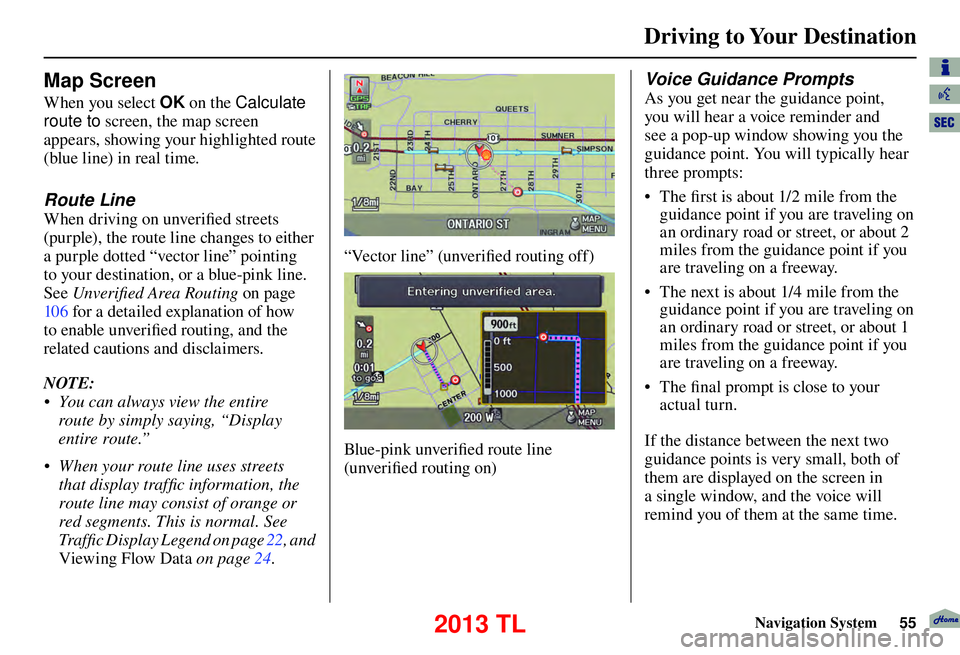
When you select OK on the Calculate
route to screen, the map screen
appears, showing your highlighted route
(blue line) in real time.
Route Line
When driving on unverifi ed streets
(purple), the route line changes to either
a purple dotted “vector line” pointing
to your destination, or a blue-pink line.
See Unverifi ed Area Routing on page
10 6 for a detailed explanation of how
to enable unverifi ed routing, and the
related cautions and disclaimers.
NOTE:
• You can always view the entire route by simply saying, “Display
entire route.”
• When your route line uses streets that display traffi c information, the
route line may consist of orange or
red segments. This is normal. See
Traffi c Display Legend on page 22 , and
Viewing Flow Data
on page 24 .
“Vector line” (unverifi ed routing off)
Blue-pink unverifi ed route line
(unverifi ed routing on)
Voice Guidance Prompts
As you get near the guidance point,
you will hear a voice reminder and
see a pop-up window showing you the
guidance point. You will typically hear
three prompts:
• The fi rst is about 1/2 mile from the
guidance point if you are traveling on
an ordinary road or street, or about 2
miles from the guidance point if you
are traveling on a freeway.
• The next is about 1/4 mile from the guidance point if you are traveling on
an ordinary road or street, or about 1
miles from the guidance point if you
are traveling on a freeway.
• The fi nal prompt is close to your
actual turn.
If the distance between the next two
guidance points is very small, both of
them are displayed on the screen in
a single window, and the voice will
remind you of them at the same time.
2013 TL
Page 57 of 183

Driving to Your Destination
Navigation System57
Map Screen Legend
Map Orientation
(see page 64 )
“Heading Up” “North Up”
Streets
(see Map Overview on page 6 )
: Freeways ( Red)
: State Route ( Pink)
: Veri ed Street ( Gray)
: Unveri ed Street ( Purple)
: One-Way Streets (see page 68
)
(1/20 mile scale only)
Direction of Destination
(when en route)
Distance to Destination
(see page 59 )
Vehicle Position (see page 73
)
Time to Destination (see page 59
)
Current Map Scale (see page 66
)
Message Icon (see page 81 )
Indicates that you have an AcuraLink message.
Map Scale Adjustment
(Mile or km per half-inch appears only when
you zoom in or out by rotating the Interface
Dial knob .) (see page 66
) Waypoint
(see page 77 )
Blue Line Calculated route (see page 55 )
Current Street
(see page 73
)
Warning Icon
Indicates that there are weather warnings.
To check the warning list, see page 87
.
No Entry Icon
Map Menu (see page 59 )
(Push in on the Interface Dial to view.)
“Breadcrumbs”
(see
Off-road Tracking on page 72 )
Landmark Icon - Generic (see page 68
)
Honda Dealer (USA)
Honda Dealer (Canada, Mexico)
HospitalAcura Dealer
Grocery StoreSchool
Gas StationRestaurant
Hotel/LodgingAT M
Parking GarageParking Lot
Freeway Exit
InformationPost Of ce
Map Features
ParkAirport/Business
HospitalBody of Water
Shopping MallCemetery
Golf Course/
StadiumUniversity
NOTE:
If you move the Interface Dial over an
area (map features shown above), the
name is displayed at the top of screen.
NOTE:
See Map Legend in the Map Information on the MAP MENU screen for further explanation.
2013 TL
Page 63 of 183
Driving to Your Destination
Navigation System63
Showing Icons on the Map
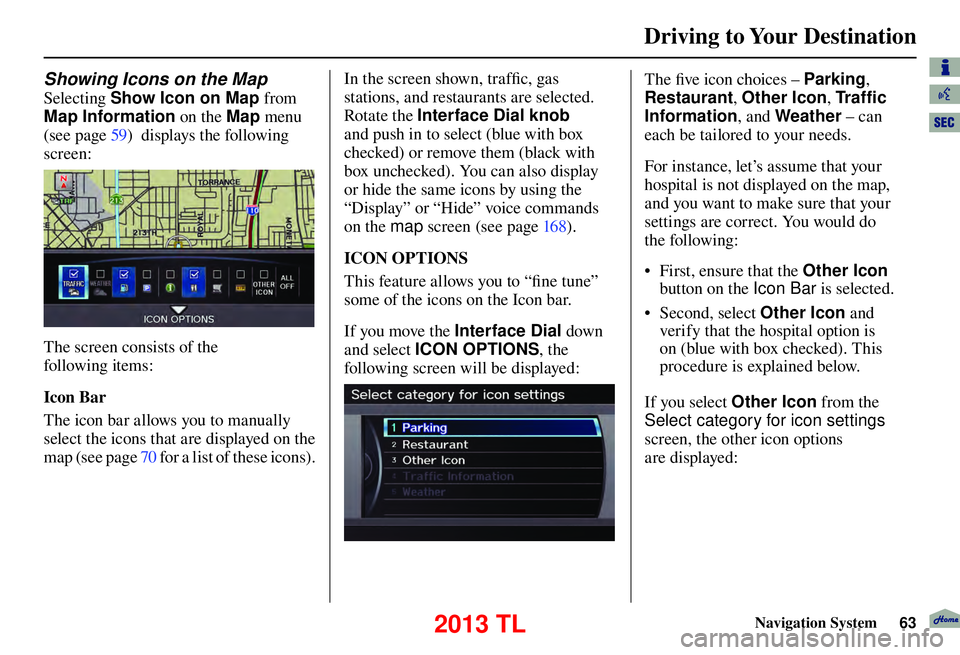
Selecting Show Icon on Map from
Map Information on the Map menu
(see page 59 ) displays the following
screen:
The screen consists of the
following items:
Icon Bar
The icon bar allows you to manually
select the icons that are displayed on the
map (see page 70 for a list of these icons). In the screen shown, traffi
c, gas
stations, and restaurants are selected.
Rotate the Interface Dial knob
and push in to select (blue with box
checked) or remove them (black with
box unchecked). You can also display
or hide the same icons by using the
“Display” or “Hide” voice commands
on the map screen (see page 16 8 ).
ICON OPTIONS
This feature allows you to “fi ne tune”
some of the icons on the Icon bar.
If you move the Interface Dial down
and select ICON OPTIONS , the
following screen will be displayed:
The fi ve icon choices – Parking ,
Restaurant , Other Icon , Tr a f c
Information , and Weather – can
each be tailored to your needs.
For instance, let’s assume that your
hospital is not displayed on the map,
and you want to make sure that your
settings are correct. You would do
the following:
• First, ensure that the Other Icon
button on the Icon Ba r is selected.
• Second, select Other Icon and
verify that the hospital option is
on (blue with box checked). This
procedure is explained below.
If you select Other Icon from the
Select category for icon settings
screen, the other icon options
are displayed:
2013 TL
Page 81 of 183
Driving to Your Destination
Navigation System81
Entering a Destination from the
DEST Screen (while en route)
If you say “Menu”, or press the DEST/
ROUTE button and select the “Dest.
MENU 1” or “Dest. MENU 2” tab,
the system displays the DEST screen.
Follow the procedure described in
Entering a Destination , which begins
on page 28 .
When the Calculate route to screen is
displayed, select OK and push in on the
Interface Dial .
When the pop-up menu is displayed,
select New Dest . to set your location
as a replacement destination, or
Waypoint to set as a waypoint.
The system will return to the map
screen and recalculate the route to your
specifi ed new destination or waypoint.
Continue Trip to Screen
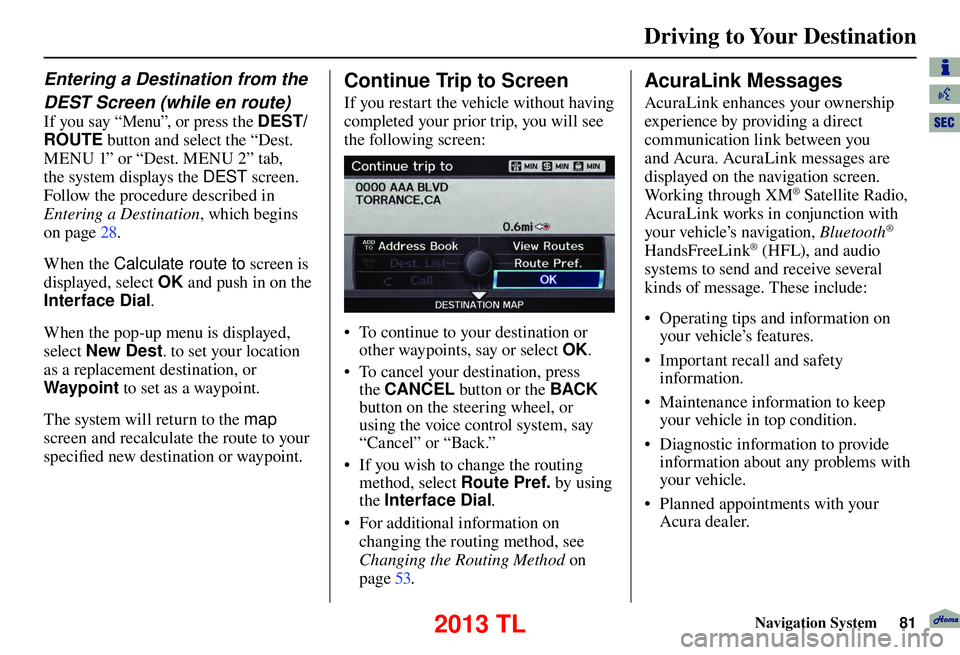
If you restart the vehicle without having
completed your prior trip, you will see
the following screen:
• To continue to your destination or
other waypoints, say or select OK.
• To cancel your destination, press the CANCEL button or the BACK
button on the steering wheel, or
using the voice control system, say
“Cancel” or “Back.”
• If you wish to change the routing method, select Route Pref. by using
the Interface Dial .
• For additional information on changing the routing method, see
Changing the Routing Method on
page 53 .
AcuraLink Messages
AcuraLink enhances your ownership
experience by providing a direct
communication link between you
and Acura. AcuraLink messages are
displayed on the navigation screen.
Working through XM
® Satellite Radio,
AcuraLink works in conjunction with
your vehicle’s navigation, Bluetooth
®
HandsFreeLink® (HFL), and audio
systems to send and receive several
kinds of message. These include:
• Operating tips and information on your vehicle’s features.
• Important recall and safety information.
• Maintenance information to keep your vehicle in top condition.
• Diagnostic information to provide information about any problems with
your veh icle.
• Planned appointments with your Acura dealer.
2013 TL
Page 83 of 183
Information Features
Navigation System83
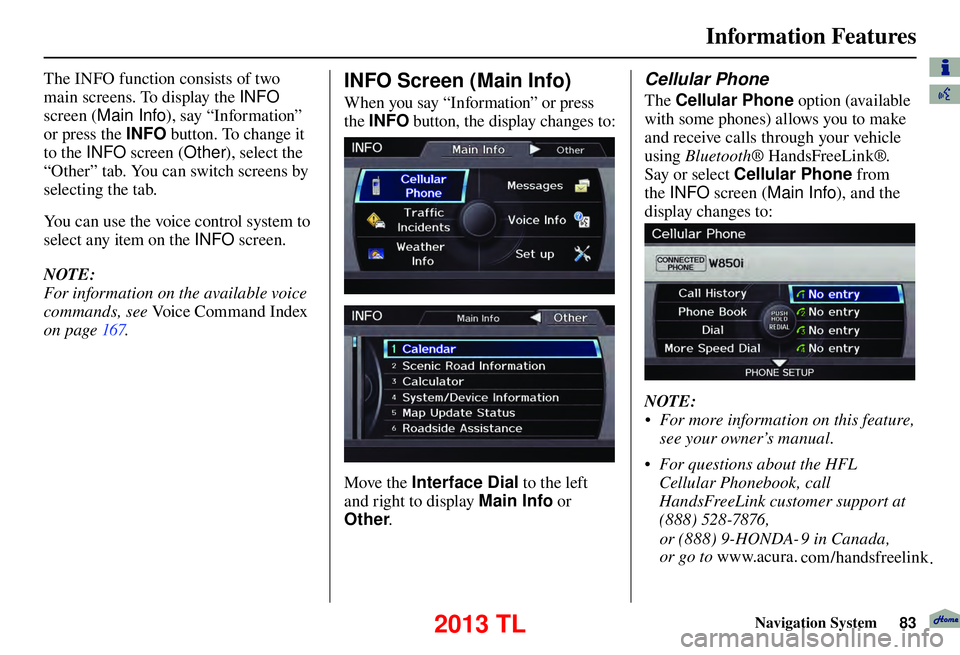
The INFO function consists of two
main screens. To display the INFO
screen ( Main Info ), say “Information”
or press the INFO button. To change it
to the INFO screen ( Other), select the
“Other” tab. You can switch screens by
selecting the tab.
You can use the voice control system to
select any item on the INFO screen.
NOTE:
For information on the available voice
commands, see Voice Command Index
on page 167 . INFO Screen (Main Info)
When you say “Information” or press
the INFO button, the display changes to:
Move the Interface Dial to the left
and right to display Main Info or
Other .
Cellular Phone
The Cellular Phone option (available
with some phones) allows you to make
and receive calls through your vehicle
using Bluetooth ® HandsFreeLink®.
Say or select Cellular Phone from
the INFO screen ( Main Info ), and the
display changes to:
NOTE:
• For more information on this feature, see your owner’s manual.
• For questions about the HFL Cellular Phonebook, call
HandsFreeLink customer support at
(888) 528-7876,
or
(888)
9-HONDA- 9 in Canada,
or
go
to
www.acura. com/handsfreelink .
2013 TL
Page 94 of 183
Information Features
94 Navigation System
Map Update Status
During data updates, you can check
the update status for map data for each
state.
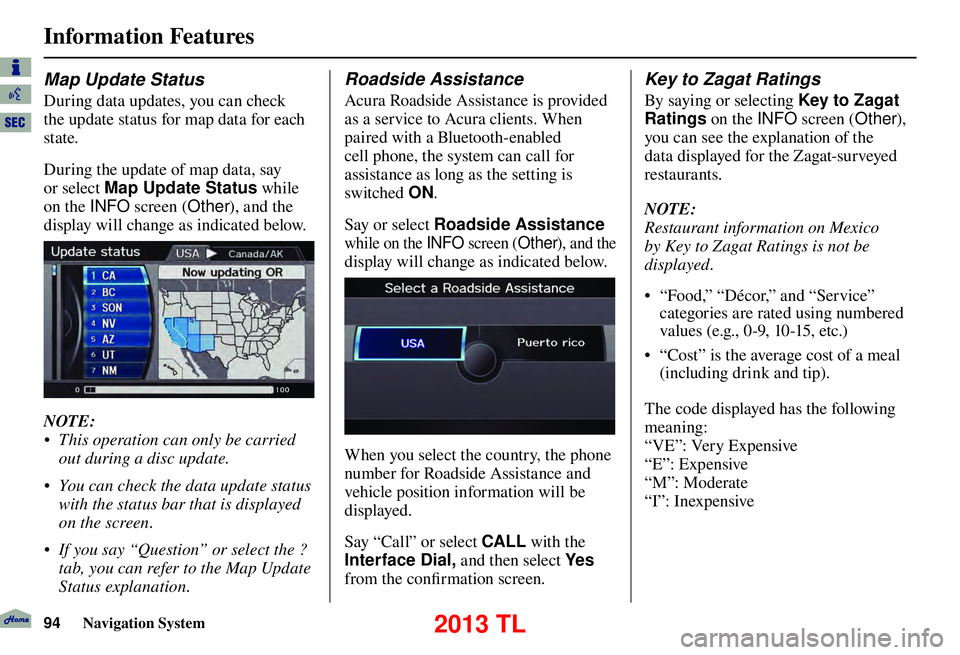
During the update of map data, say
or select Map Update Status while
on the INFO screen (Other), and the
display will change as indicated below.
NOTE:
• This operation can only be carried out during a disc update.
• You can check the data update status with the status bar that is displayed
on the screen.
• If you say “Question” or select the ? tab, you can refer to the Map Update
Status explanation.
Roadside Assistance
Acura Roadside Assistance is provided
as a service to Acura clients. When
paired with a Bluetooth-enabled
cell phone, the system can call for
assistance as long as the setting is
switched ON.
Say or select Roadside Assistance
while on the INFO screen (Other), and the
display will change as indicated below.
When you select the country, the phone
number for Roadside Assistance and
vehicle position information will be
displayed.
Say “Call” or select CALL with the
Interface Dial, and then select Ye s
from the confi rmation screen.
Key to Zagat Ratings
By saying or selecting Key to Zagat
Ratings on the INFO screen (Other),
you can see the explanation of the
data displayed for the Zagat-surveyed
restaurants.
NOTE:
Restaurant information on Mexico
by Key to Zagat Ratings is not be
displayed.
• “Food,” “Décor,” and “Service” categories are rated using numbered
values (e.g., 0-9, 10-15, etc.)
• “Cost” is the average cost of a meal (including drink and tip).
The code displayed has the following
meaning:
“VE”: Very Expensive
“E”: Expensive
“M”: Moderate
“I”: Inexpensive
2013 TL
Page 106 of 183

System Setup
106 Navigation System
Unveri ed Area Routing
Allows you to receive turn-by-turn map and voice guidance in unverifi ed areas when en route to a destination (see Map
Overview on page
6
). The chart below illustrates the routing differences with this setting ON or OFF.
Unverifi ed Area Routing: OFF (factor y default) Unverifi ed Area Routing: ON
Decision:
Why choose
ON or OFF? The driver wishes to navigate manually by using the
navigation map and choosing the streets that lead to the
destination. The driver understands that unverifi
ed roads
may not be accurate, and can contain errors in location,
naming, and address range. The driver chooses to let the navigation system suggest
possible routing. The driver understands that in some cases
guidance may not be appropriate. Unverifi
ed roads may not
be accurate, and can contain errors in location, naming, and
address range.
What you will
see... A blue dotted vector line is displayed on the map that
continually points to your destination. The driver should
stop and then use the map to select streets that lead to the
destination. A blue-pink dashed route line highlights suggested
unverifi
ed streets on the map while traveling to your
destination. This is in sharp contrast to the normal blue
route line displayed in verifi ed areas.
Cautionary
messages There are cautionary pop-up screens and voice
announcements, before and during the route. These serve as
reminders that you should obey all traffi
c restrictions. There are cautionary pop-up screens and voice
announcements, before and during the route. These serve as
reminders that you should exercise additional caution, and
obey all traffi
c restrictions.
Guidance
(map /voice) There is no turn-by-turn map or voice guidance.
Voice guidance commands end with the words “if possible.”
This is to remind the driver to verify all traffi c restrictions
before making a maneuver.
Directions list A direction list is typically not available. However,
depending on your route, directions are provided to help you
reach the fi
rst available verifi ed road. A direction list is provided showing street names and turn
symbols in pink.
2013 TL
Page 108 of 183

System Setup
108 Navigation System
With Unveri ed Area Routing
OFF , before you enter an unverifi ed
street, a caution box appears on the
screen and a voice message is given.
This lets you know that you are about
to enter an unverifi ed area and that you
will be following a dotted “vector line”
that points to your destination.
With Unveri ed Area Routing ON ,
a caution box appears on the screen
and is read by the voice. In this case,
you will be presented with a dashed
blue/ pink line instead of the regular
blue route line. This is your signal to
pay attention to posted traffi c
restrictions. You cannot assume that
all guidance is appropriate.
In both cases, when you actually enter
the unverifi ed street, a short caution
will remind you. You will see and hear
this short caution message whenever
you enter unverifi ed areas.
If you regularly enter and leave
unverifi ed roads for short amounts
of time, there may be cases where no
guidance is provided. Unveri
ed Area Routing “OFF” Unveri ed Area Routing “ON”
2013 TL