door lock Acura TLX 2015 User Guide
[x] Cancel search | Manufacturer: ACURA, Model Year: 2015, Model line: TLX, Model: Acura TLX 2015Pages: 75, PDF Size: 24.55 MB
Page 24 of 75
40 || 41
VEHICLE CONTROLS
VEHICLE CONTROLS
TABLE OF
CONTENTS
INDEX
VISUAL INDEX
VOICE COMMAND INDEX
SAFETY
INFORMATION
CLIENT
INFORMATION
INSTRUMENT PANEL
SPECIFICATIONS
VEHICLE
CONTROLS
MAINTENANCE
AUDIO AND
CONNECTIVITY
HANDLING THE UNEXPECTED
BLUETOOTH®
HANDSFREELINK®
DRIVING
ACURALINK®
NAVIGATION
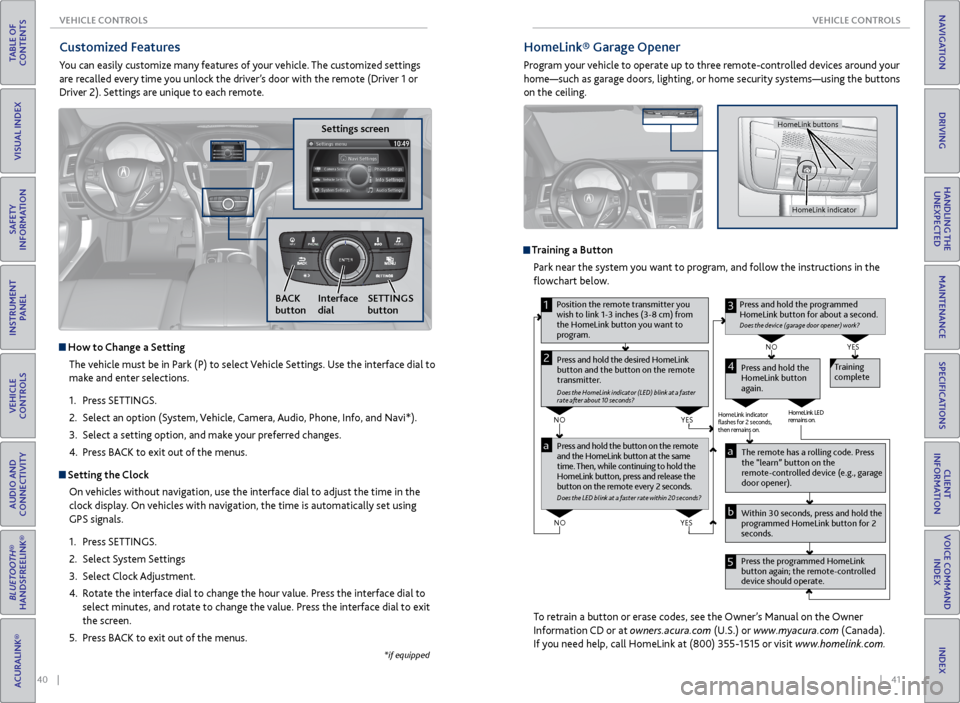
HomeLink® Garage Opener
Program your vehicle to operate up to three remote-controlled devices around your
home—such as garage doors, lighting, or home security systems—using the buttons
on the ceiling.
Training a Button
Park near the system you want to program, and follow the instructions in the
flowchart below.
To retrain a button or erase codes, see the Owner’s Manual on the Owner
Information CD or at owners.acura.com (U.S.) or www.myacura.com (Canada).
If you need help, call HomeLink at (800) 355-1515 or visit www.homelink.com.
Pr ess and hold the button on the r emote
and the HomeLink button at the same
time. Then, while continuing to hold the
HomeLink button, pr ess and release the
button on the r emote every 2 seconds.
Does the LED blink at a f ast er ra te within 20 seconds ?
Press and hold the
HomeLink button
again. T
raining
complete
YES
NO
HomeLink indicator
ashes for 2 seconds,
then rem ains on. HomeLink LED
r
emains on.YES
NO
YES
NO
1
Pr ess and hold the desir ed HomeLink
button and the button on the r emote
transmitter .
Does the HomeLink indicat or (LED) blink at a f ast er
rate after about 10 seconds ?
2
aThe remote has a ro lling code. Press
the “learn” button on the
r emote-contr olled device (e.g., garage
door opener).
Pr ess the pr ogrammed HomeLink
button again; the remote-contr olled
device should operate.
Within 30 seconds, pr
ess and hold the
pr ogrammed HomeLink button for 2
seconds.a
Pr ess and hold the programmed
HomeLink button for about a second.
Does the devic e (garage door opener) work?
3
b
4
5
Position the remote transmitter you
wish to link 1-3 inches (3-8 cm) from
the HomeLink button you want to
pr ogram.
HomeLink indicator
HomeLink buttons
Customized Features
You can easily customize many features of your vehicle. The customized settings
are recalled every time you unlock the driver’s door with the remote (Driver 1 or
Driver 2). Settings are unique to each remote.
Settings screen
NAVAUDI OAUDIONAV
How to Change a Setting
The vehicle must be in Park (P) to select Vehicle Settings. Use the interface dial to
make and enter selections.
1. Press SETTINGS.
2. Select an option (System, Vehicle, Camera, Audio, Phone, Info, and Navi*).
3. Select a setting option, and make your preferred changes.
4. Press BACK to exit out of the menus.
Setting the Clock
On vehicles without navigation, use the interface dial to adjust the time in the
clock display. On vehicles with navigation, the time is automatically set using
GPS signals.
1. Press SETTINGS.
2. Select System Settings
3. Select Clock Adjustment.
4. Rotate the interface dial to change the hour value. Press the interface dial to
select minutes, and rotate to change the value. Press the interface dial to exit
the screen.
5. Press BACK to exit out of the menus.
SETTINGS
button
BACK
button Interface
dial
*if equipped
Page 36 of 75
| 65
NAVIGATION
TABLE OF
CONTENTS
INDEX
VISUAL INDEX
VOICE COMMAND INDEX
SAFETY
INFORMATION
CLIENT
INFORMATION
INSTRUMENT PANEL
SPECIFICATIONS
VEHICLE
CONTROLS
MAINTENANCE
AUDIO AND
CONNECTIVITY
HANDLING THE UNEXPECTED
BLUETOOTH®
HANDSFREELINK®
DRIVING
ACURALINK®
NAVIGATION
64 |
TABLE OF
CONTENTS
INDEX
VISUAL INDEX
VOICE COMMAND INDEX
SAFETY
INFORMATION
CLIENT
INFORMATION
INSTRUMENT PANEL
SPECIFICATIONS
VEHICLE
CONTROLS
MAINTENANCE
AUDIO AND
CONNECTIVITY
HANDLING THE UNEXPECTED
BLUETOOTH®
HANDSFREELINK®
DRIVING
ACURALINK®
NAVIGATION
Security Features
To use security features, you need your user ID and personal identification
number (PIN). Some of these features are also available with the AcuraLink
smartphone app. Visit owners.acura.com/apps to download the app.
• Stolen vehicle tracking: Searches and tracks down your vehicle position.
• Remote door lock/unlock: Remotely lock or unlock doors.
• Vehicle finder: Locate your vehicle in large areas, such as a parking lot.
• Security alarm notification: If your vehicle’s security system detects tampering,
the provider notifies you.
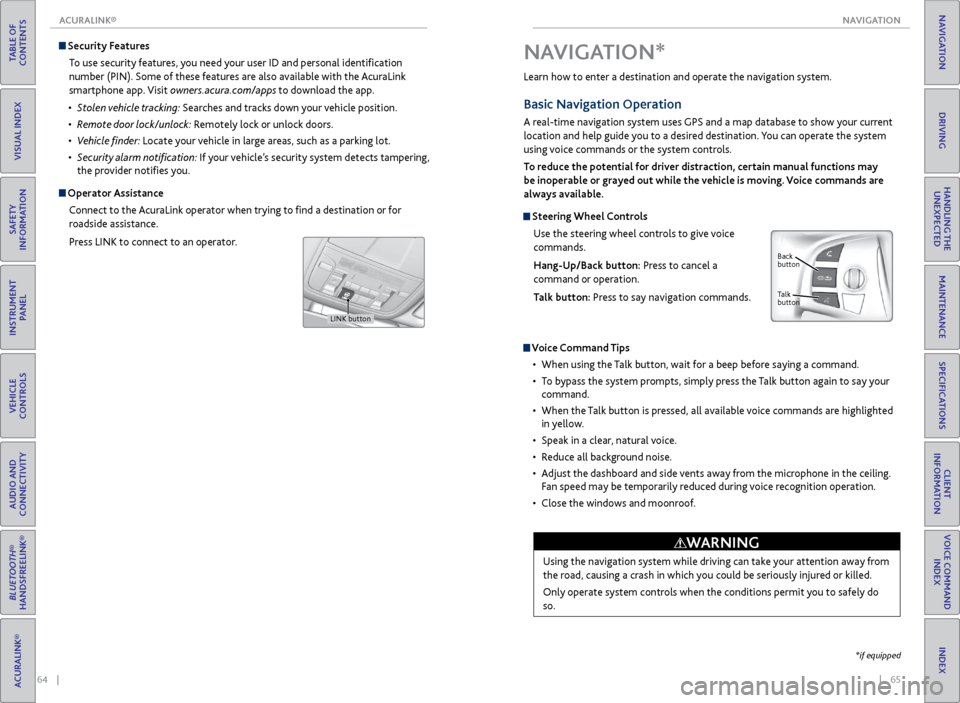
Operator Assistance
Connect to the AcuraLink operator when trying to find a destination or for
roadside assistance.
Press LINK to connect to an operator.
LINK button
Learn how to enter a destination and operate the navigation system.
Basic Navigation Operation
A real-time navigation system uses GPS and a map database to show your current
location and help guide you to a desired destination. You can operate the system
using voice commands or the system controls.
To reduce the potential for driver distraction, certain manual functions may
be inoperable or grayed out while the vehicle is moving. Voice commands are
always available.
Steering Wheel Controls
Use the steering wheel controls to give voice
commands.
Hang-Up/Back button: Press to cancel a
command or operation.
Talk button: Press to say navigation commands.
Voice Command Tips
• When using the Talk button, wait for a beep before saying a command.
• To bypass the system prompts, simply press the Talk button again to say your
command.
• When the Talk button is pressed, all available voice commands are highlighted
in yellow.
• Speak in a clear, natural voice.
• Reduce all background noise.
• Adjust the dashboard and side vents away from the microphone in the ceiling.
Fan speed may be temporarily reduced during voice recognition operation.
• Close the windows and moonroof.
Using the navigation system while driving can take your attention away from
the road, causing a crash in which you could be seriously injured or killed.
Only operate system controls when the conditions permit you to safely do
so.
WARNING
NAVIGATION*
Talk
button Back
button
*if equipped
ACURALINK®
Page 40 of 75
72 || 73
DRIVING
DRIVING
TABLE OF
CONTENTS
INDEX
VISUAL INDEX
VOICE COMMAND INDEX
SAFETY
INFORMATION
CLIENT
INFORMATION
INSTRUMENT PANEL
SPECIFICATIONS
VEHICLE
CONTROLS
MAINTENANCE
AUDIO AND
CONNECTIVITY
HANDLING THE UNEXPECTED
BLUETOOTH®
HANDSFREELINK®
DRIVING
ACURALINK®
NAVIGATION
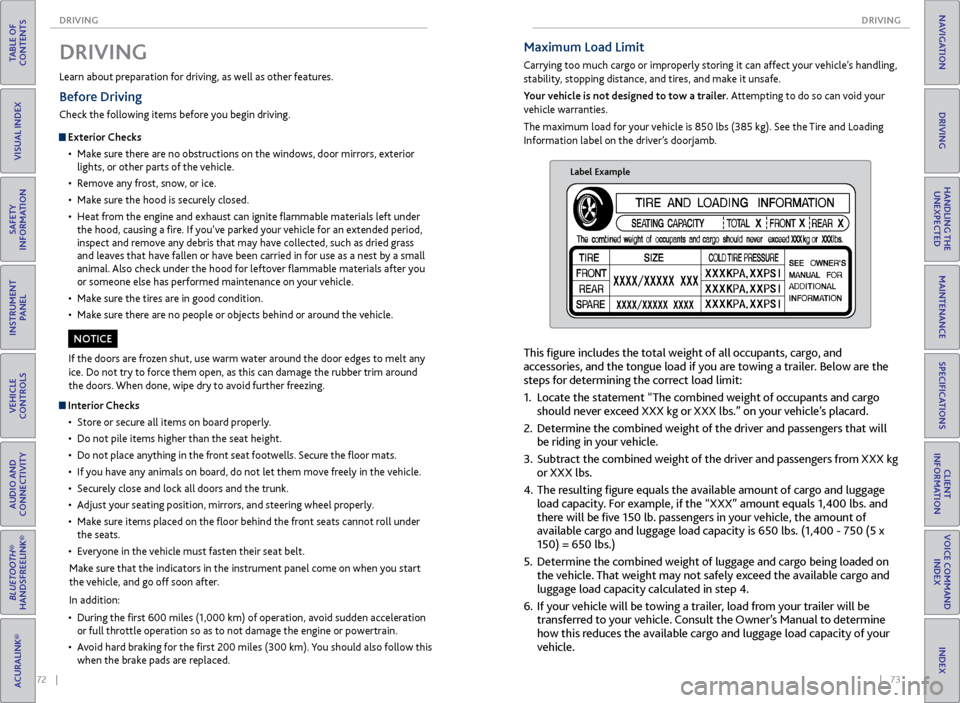
Maximum Load Limit
Carrying too much cargo or improperly storing it can affect your vehicle’s handling,
stability, stopping distance, and tires, and make it unsafe.
Your vehicle is not designed to tow a trailer. Attempting to do so can void your
vehicle warranties.
The maximum load for your vehicle is 850 lbs (385 kg). See the Tire and Loading
Information label on the driver’s doorjamb.
Label Example
This figure includes the total weight of all occupants, cargo, and
accessories, and the tongue load if you are towing a trailer. Below are the
steps for determining the correct load limit:
1. Locate the statement “The combined weight of occupants and cargo
should never exceed XXX kg or XXX lbs.” on your vehicle’s placard.
2. Determine the combined weight of the driver and passengers that will
be riding in your vehicle.
3. Subtract the combined weight of the driver and passengers from XXX kg
or XXX lbs.
4. The resulting figure equals the available amount of cargo and luggage
load capacity. For example, if the “XXX” amount equals 1,400 lbs. and
there will be five 150 lb. passengers in your vehicle, the amount of
available cargo and luggage load capacity is 650 lbs. (1,400 - 750 (5 x
150) = 650 lbs.)
5. Determine the combined weight of luggage and cargo being loaded on
the vehicle. That weight may not safely exceed the available cargo and
luggage load capacity calculated in step 4.
6. If your vehicle will be towing a trailer, load from your trailer will be
transferred to your vehicle. Consult the Owner’s Manual to determine
how this reduces the available cargo and luggage load capacity of your
vehicle.
Learn about preparation for driving, as well as other features.
DRIVING
If the doors are frozen shut, use warm water around the door edges to melt any
ice. Do not try to force them open, as this can damage the rubber trim around
the doors. When done, wipe dry to avoid further freezing.
NOTICE
Interior Checks
• Store or secure all items on board properly.
• Do not pile items higher than the seat height.
• Do not place anything in the front seat footwells. Secure the floor mats.
• If you have any animals on board, do not let them move freely in the vehicle.
• Securely close and lock all doors and the trunk.
• Adjust your seating position, mirrors, and steering wheel properly.
• Make sure items placed on the floor behind the front seats cannot roll under
the seats.
• Everyone in the vehicle must fasten their seat belt.
Make sure that the indicators in the instrument panel come on when you start
the vehicle, and go off soon after.
In addition:
• During the first 600 miles (1,000 km) of operation, avoid sudden acceleration
or full throttle operation so as to not damage the engine or powertrain.
• Avoid hard braking for the first 200 miles (300 km). You should also follow this
when the brake pads are replaced.
Before Driving
Check the following items before you begin driving.
Exterior Checks
• Make sure there are no obstructions on the windows, door mirrors, exterior
lights, or other parts of the vehicle.
• Remove any frost, snow, or ice.
• Make sure the hood is securely closed.
• Heat from the engine and exhaust can ignite flammable materials left under
the hood, causing a fire. If you’ve parked your vehicle for an extended period,
inspect and remove any debris that may have collected, such as dried grass
and leaves that have fallen or have been carried in for use as a nest by a small
animal. Also check under the hood for leftover flammable materials after you
or someone else has performed maintenance on your vehicle.
• Make sure the tires are in good condition.
• Make sure there are no people or objects behind or around the vehicle.
Page 41 of 75
74 || 75
DRIVING
DRIVING
TABLE OF
CONTENTS
INDEX
VISUAL INDEX
VOICE COMMAND INDEX
SAFETY
INFORMATION
CLIENT
INFORMATION
INSTRUMENT PANEL
SPECIFICATIONS
VEHICLE
CONTROLS
MAINTENANCE
AUDIO AND
CONNECTIVITY
HANDLING THE UNEXPECTED
BLUETOOTH®
HANDSFREELINK®
DRIVING
ACURALINK®
NAVIGATION
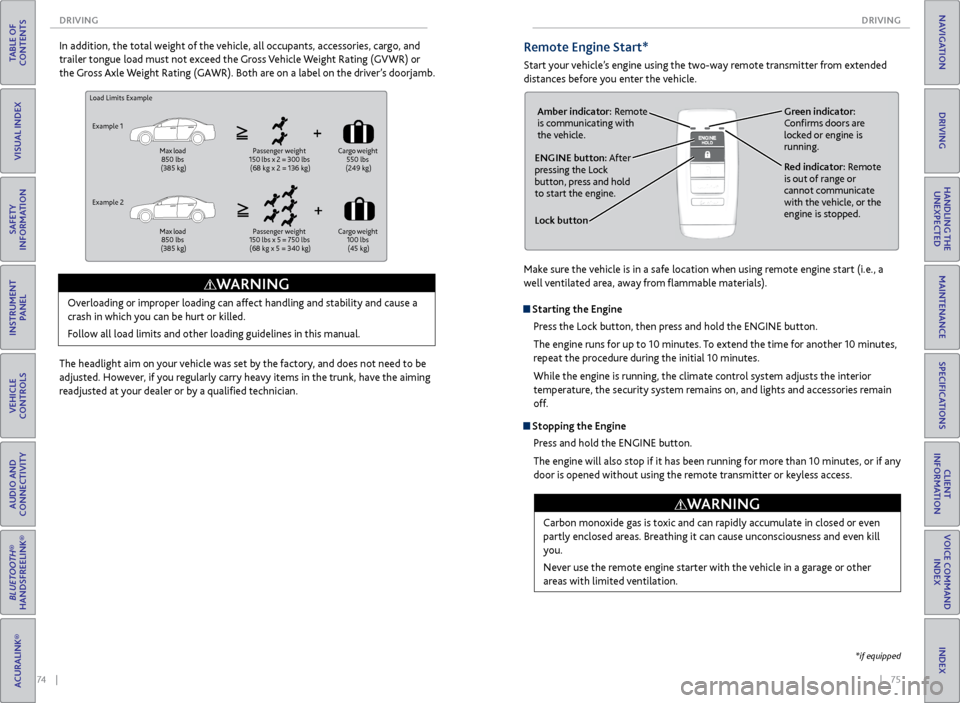
Load Limits Example
Example 1
Max load
850 lbs
(385 kg) Passenger weight
150 lbs x 2 = 300 lbs
(68 kg x 2 = 136 kg) Cargo
weight
550 lbs
(249 kg)
Example 2
Max load
850 lbs
(385 kg) Passenger weight
150 lbs x 5 = 750 lbs
(68 kg x 5 = 340 kg) Cargo
weight
100 lbs (45 kg)
Overloading or improper loading can affect handling and stability and cause a
crash in which you can be hurt or killed.
Follow all load limits and other loading guidelines in this manual.
WARNING
In addition, the total weight of the vehicle, all occupants, accessories, cargo, and
trailer tongue load must not exceed the Gross Vehicle Weight Rating (GVWR) or
the Gross Axle Weight Rating (GAWR). Both are on a label on the driver’s doorjamb.
The headlight aim on your vehicle was set by the factory, and does not need to be
adjusted. However, if you regularly carry heavy items in the trunk, have the aiming
readjusted at your dealer or by a qualified technician.Remote Engine Start*
Start your vehicle’s engine using the two-way remote transmitter from extended
distances before you enter the vehicle.
Lock button
ENGINE button: After
pressing the Lock
button, press and hold
to start the engine.Red indicator: Remote
is out of range or
cannot communicate
with the vehicle, or the
engine is stopped.
Amber indicator: Remote
is communicating with
the vehicle.
Green indicator:
Confirms doors are
locked or engine is
running.
Starting the Engine
Press the Lock button, then press and hold the ENGINE button.
The engine runs for up to 10 minutes. To extend the time for another 10 minutes,
repeat the procedure during the initial 10 minutes.
While the engine is running, the climate control system adjusts the interior
temperature, the security system remains on, and lights and accessories remain
off.
Stopping the EnginePress and hold the ENGINE button.
The engine will also stop if it has been running for more than 10 minutes, or if any
door is opened without using the remote transmitter or keyless access.
Carbon monoxide gas is toxic and can rapidly accumulate in closed or even
partly enclosed areas. Breathing it can cause unconsciousness and even kill
you.
Never use the remote engine starter with the vehicle in a garage or other
areas with limited ventilation.
WARNING
*if equipped
Make sure the vehicle is in a safe location when using remote engine start (i.e., a
well ventilated area, away from flammable materials).
Page 43 of 75
78 || 79
DRIVING
DRIVING
TABLE OF
CONTENTS
INDEX
VISUAL INDEX
VOICE COMMAND INDEX
SAFETY
INFORMATION
CLIENT
INFORMATION
INSTRUMENT PANEL
SPECIFICATIONS
VEHICLE
CONTROLS
MAINTENANCE
AUDIO AND
CONNECTIVITY
HANDLING THE UNEXPECTED
BLUETOOTH®
HANDSFREELINK®
DRIVING
ACURALINK®
NAVIGATION
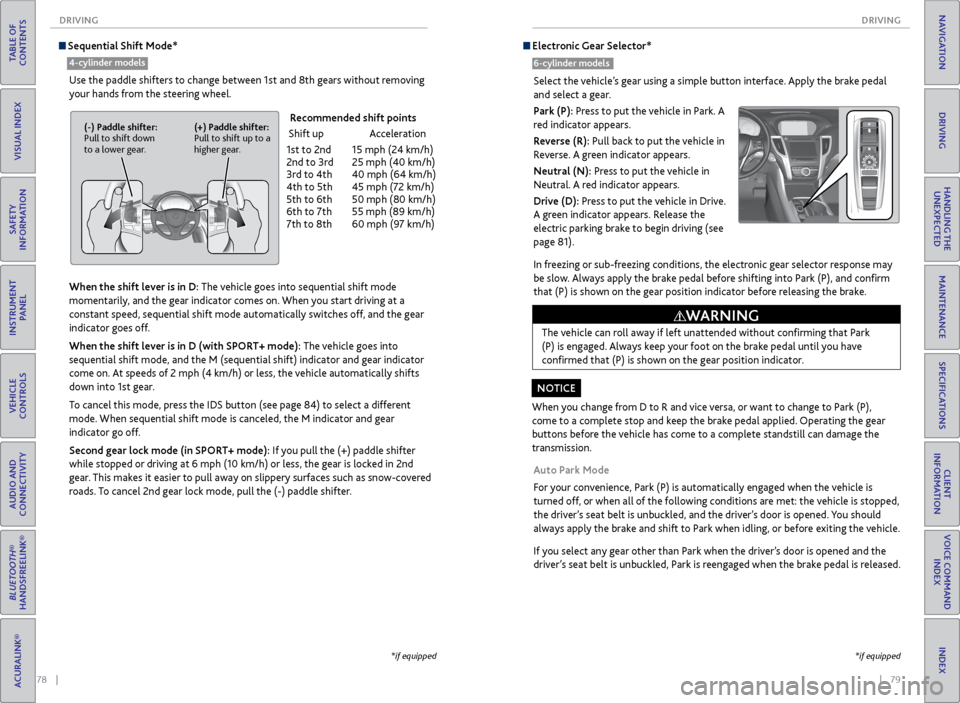
Sequential Shift Mode*
Use the paddle shifters to change between 1st and 8th gears without removing
your hands from the steering wheel.
When the shift lever is in D: The vehicle goes into sequential shift mode
momentarily, and the gear indicator comes on. When you start driving at a
constant speed, sequential shift mode automatically switches off, and the gear
indicator goes off.
When the shift lever is in D (with SPORT+ mode): The vehicle goes into
sequential shift mode, and the M (sequential shift) indicator and gear indicator
come on. At speeds of 2 mph (4 km/h) or less, the vehicle automatically shifts
down into 1st gear.
To cancel this mode, press the IDS button (see page 84) to select a different
mode. When sequential shift mode is canceled, the M indicator and gear
indicator go off.
Second gear lock mode (in SPORT+ mode): If you pull the (+) paddle shifter
while stopped or driving at 6 mph (10 km/h) or less, the gear is locked in 2nd
gear. This makes it easier to pull away on slippery surfaces such as snow-covered
roads. To cancel 2nd gear lock mode, pull the (-) paddle shifter.
(-) Paddle shifter:
Pull to shift down
to a lower gear. (+) Paddle shifter:
Pull to shift up to a
higher gear.
Recommended shift points
Shift up Acceleration
1st to 2nd 15 mph (24 km/h)
2nd to 3rd 25 mph (40 km/h)
3rd to 4th 40 mph (64 km/h)
4th to 5th 45 mph (72 km/h)
5th to 6th 50 mph (80 km/h)
6th to 7th 55 mph (89 km/h)
7th to 8th 60 mph (97 km/h)
*if equipped
4-cylinder models
*if equipped
Electronic Gear Selector*
6-cylinder models
Select the vehicle’s gear using a simple button interface. Apply the brake pedal
and select a gear.
Park (P): Press to put the vehicle in Park. A
red indicator appears.
Reverse (R): Pull back to put the vehicle in
Reverse. A green indicator appears.
Neutral (N): Press to put the vehicle in
Neutral. A red indicator appears.
Drive (D): Press to put the vehicle in Drive.
A green indicator appears. Release the
electric parking brake to begin driving (see
page 81).
In freezing or sub-freezing conditions, the electronic gear selector response may
be slow. Always apply the brake pedal before shifting into Park (P), and confirm
that (P) is shown on the gear position indicator before releasing the brake.
Auto Park Mode
For your convenience, Park (P) is automatically engaged when the vehicle is
turned off, or when all of the following conditions are met: the vehicle is stopped,
the driver’s seat belt is unbuckled, and the driver’s door is opened. You should
always apply the brake and shift to Park when idling, or before exiting the vehicle.
If you select any gear other than Park when the driver’s door is opened and the
driver’s seat belt is unbuckled, Park is reengaged when the brake pedal is released.
When you change from D to R and vice versa, or want to change to Park (P),
come to a complete stop and keep the brake pedal applied. Operating the gear
buttons before the vehicle has come to a complete standstill can damage the
transmission.
NOTICE The vehicle can roll away if left unattended without confirming that Park
(P) is engaged. Always keep your foot on the brake pedal until you have
confirmed that (P) is shown on the gear position indicator.
WARNING
Page 55 of 75
102 || 103
HANDLING THE UNEXPECTED
HANDLING THE UNEXPECTED
TABLE OF
CONTENTS
INDEX
VISUAL INDEX
VOICE COMMAND INDEX
SAFETY
INFORMATION
CLIENT
INFORMATION
INSTRUMENT PANEL
SPECIFICATIONS
VEHICLE
CONTROLS
MAINTENANCE
AUDIO AND
CONNECTIVITY
HANDLING THE UNEXPECTED
BLUETOOTH®
HANDSFREELINK®
DRIVING
ACURALINK®
NAVIGATION
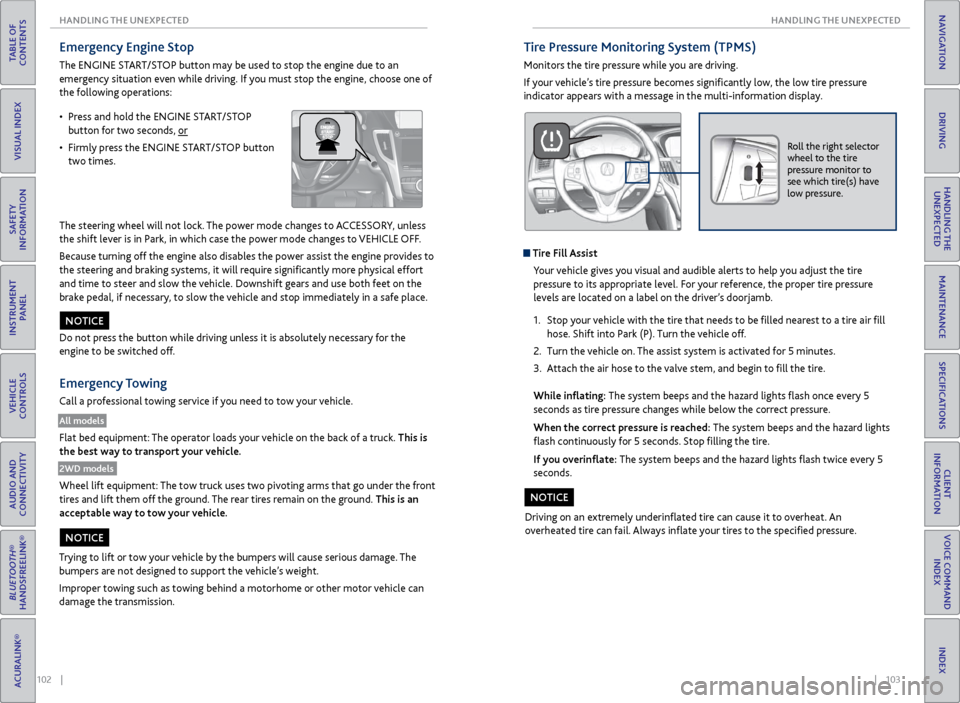
Emergency Engine Stop
The ENGINE START/STOP button may be used to stop the engine due to an
emergency situation even while driving. If you must stop the engine, choose one of
the following operations:
The steering wheel will not lock. The power mode changes to ACCESSORY, unless
the shift lever is in Park, in which case the power mode changes to VEHICLE OFF.
Because turning off the engine also disables the power assist the engine provides to
the steering and braking systems, it will require significantly more physical effort
and time to steer and slow the vehicle. Downshift gears and use both feet on the
brake pedal, if necessary, to slow the vehicle and stop immediately in a safe place.
Do not press the button while driving unless it is absolutely necessary for the
engine to be switched off.
Emergency Towing
Call a professional towing service if you need to tow your vehicle.
All models
Flat bed equipment: The operator loads your vehicle on the back of a truck. This is
the best way to transport your vehicle.
2WD models
Wheel lift equipment: The tow truck uses two pivoting arms that go under the front
tires and lift them off the ground. The rear tires remain on the ground. This is an
acceptable way to tow your vehicle.
NOTICE
Trying to lift or tow your vehicle by the bumpers will cause serious damage. The
bumpers are not designed to support the vehicle’s weight.
Improper towing such as towing behind a motorhome or other motor vehicle can
damage the transmission.
NOTICE
• Press and hold the ENGINE START/STOP
button for two seconds, or
• Firmly press the ENGINE START/STOP button
two times.
Tire Pressure Monitoring System (TPMS)
Monitors the tire pressure while you are driving.
If your vehicle’s tire pressure becomes significantly low, the low tire pressure
indicator appears with a message in the multi-information display.
Roll the right selector
wheel to the tire
pressure monitor to
see which tire(s) have
low pressure.
Tire Fill Assist
Your vehicle gives you visual and audible alerts to help you adjust the tire
pressure to its appropriate level. For your reference, the proper tire pressure
levels are located on a label on the driver’s doorjamb.
1. Stop your vehicle with the tire that needs to be filled nearest to a tire air fill
hose. Shift into Park (P). Turn the vehicle off.
2. Turn the vehicle on. The assist system is activated for 5 minutes.
3. Attach the air hose to the valve stem, and begin to fill the tire.
While inflating: The system beeps and the hazard lights flash once every 5
seconds as tire pressure changes while below the correct pressure.
When the correct pressure is reached: The system beeps and the hazard lights
flash continuously for 5 seconds. Stop filling the tire.
If you overinflate: The system beeps and the hazard lights flash twice every 5
seconds.
Driving on an extremely underinflated tire can cause it to overheat. An
overheated tire can fail. Always inflate your tires to the specified pressure.
NOTICE
Page 58 of 75
108 || 109
HANDLING THE UNEXPECTED
HANDLING THE UNEXPECTED
TABLE OF
CONTENTS
INDEX
VISUAL INDEX
VOICE COMMAND INDEX
SAFETY
INFORMATION
CLIENT
INFORMATION
INSTRUMENT PANEL
SPECIFICATIONS
VEHICLE
CONTROLS
MAINTENANCE
AUDIO AND
CONNECTIVITY
HANDLING THE UNEXPECTED
BLUETOOTH®
HANDSFREELINK®
DRIVING
ACURALINK®
NAVIGATION
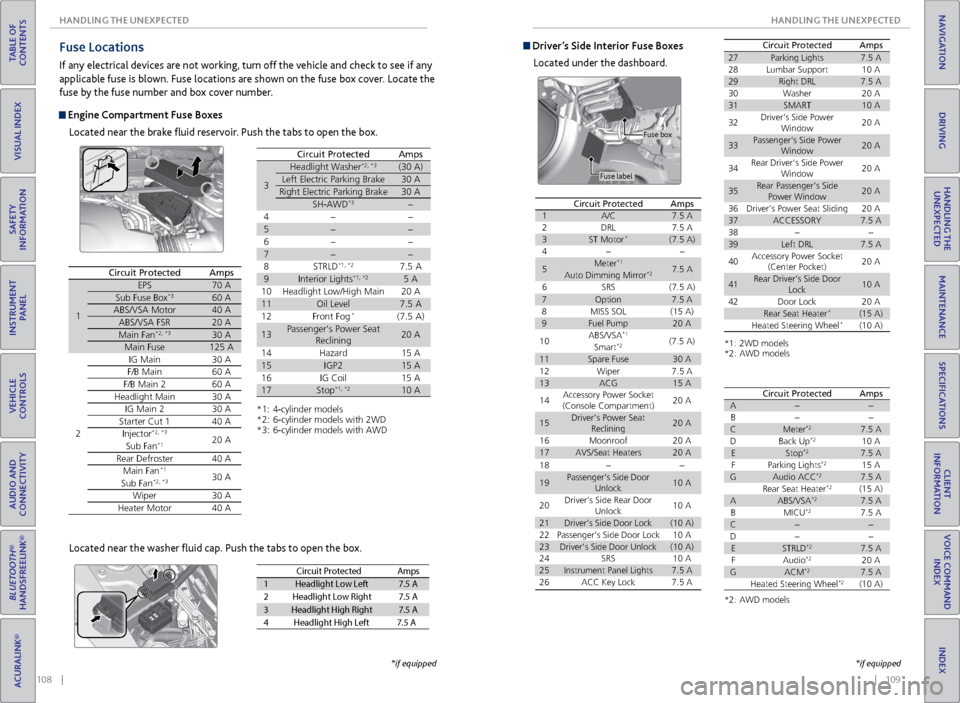
Fuse Locations
If any electrical devices are not working, turn off the vehicle and check to see if any
applicable fuse is blown. Fuse locations are shown on the fuse box cover. Locate the
fuse by the fuse number and box cover number.
Engine Compartment Fuse Boxes
Located near the brake fluid reservoir. Push the tabs to open the box.
Circuit ProtectedAmps
1
EPS70 ASub Fuse Bo x*360 AABS/VSA Motor40 AABS/VSA FSR20 AMain Fa n*2, *330 AMain Fuse125 A
2
IG Mai n30 AF/B Mai n60 AF/B Main 260 AHeadlight Main30 AIG Main 230 AStarter Cut 140 AInjector*2, *320 ASub Fan*1
Rear Defroster40 AMain Fa n*130 ASub Fa n*2, *3
Wiper30 AHeater Motor40 A
*1: 4-cylinder model s*2: 6-cylinder models with 2W D*3: 6-cylinder models with AW D
3
Headlight Washer*2, *3(30 A)
Left Electric Parking Brake30 A
Right Electric Parking Brake30 A
SH-AWD*3
4
5
6
7
8S TRLD*1, *27.5 A
9Interior Lights*1, *25 A
10 Headlight Low/High Main 20 A
11Oil Level7.5 A
12 Front Fog*(7.5 A)
13Passenger’s Power Seat
Reclinin g20 A
14 Hazard 15 A
15IGP215 A
16 IG Coil 15 A
17Stop*1, *210 A
Circuit ProtectedAmps
Located near the washer fluid cap. Push the tabs to open the box.
Circuit Protecte dAmps
1Headlight Low Lef t7.5 A
2Headlight Low Right7.5 A
3Headlight High Right7.5 A
4H eadlight High Left 7.5 A
*if equipped
Driver’s Side Interior Fuse Boxes
Located under the dashboard.
Fuse label Fuse box
Circuit ProtectedAmps1A/C7.5
A2DRL7.5 A3ST Motor*(7.5 A)4
5Meter*17.5 AAuto Dimming Mirror*2
6SRS(7.5 A)7Option7.5 A8MISS SO L(15 A)9Fuel Pump20 A
10ABS/VSA*1(7.5 A)Smart*2
11Spare Fuse30 A
18
19Passenger’s Side Door
Unlock10 A
20Driver’s Side Rear Door
Unlock10 A
21Driver’s Side Door Lock(10 A)22Passenger’s Side Door Lock10 A23Driver’s Side Door Unlock(10 A)24SRS10 A25Instrument Panel Lights7.5 A26ACC Key Lock7.5 A
12Wiper7.5 A13ACG15 A
14Accessory Power Socket
(Console Compartment)20 A
15Driver’s Power Seat
Reclinin g20 A
16Moonroo f20 A17AVS/Seat Heaters20 A
Circuit ProtectedAmps
*1: 2WD models*2: AWD models
27Parking Lights7.5 A28Lumbar Suppor t10 A29Right DRL7.5 A30Washer20 A31SMART10 A
32Driver’s Side Power
Window20 A
33Passenger’s Side Power
Window20 A
34Rear Driver’s Side Power
Window20 A
35Rear Passenger’s Side
Power Window20 A
36Driver’s Power Seat Sliding20 A37ACCESSORY7.5 A3839Left DRL7.5 A
40Accessory Power Socket
(Center Pocket )20 A
41Rear Driver’s Side Door
Lock10 A
42Door Lock20 ARear Seat Heater*(15 A)Heated Steering Wheel*(10 A)
*2: AWD models
Circuit Protecte dAmpsA
B
CMeter*27.5 A
DB ack Up*210 AEStop*27.5 A
F Parking Lights*215 AGAudio ACC*27.5 A
Rear Seat Heater*2(15 A)AABS/VSA*27.5 A
BM ICU*27.5 AC
D
ESTRLD*27.5 A
FA udio*220 AGACM*27.5 A
Heated Steering Wheel*2(10 A)
*if equipped
Page 64 of 75
120 || 121
MAINTENANCE
MAINTENANCE
TABLE OF
CONTENTS
INDEX
VISUAL INDEX
VOICE COMMAND INDEX
SAFETY
INFORMATION
CLIENT
INFORMATION
INSTRUMENT PANEL
SPECIFICATIONS
VEHICLE
CONTROLS
MAINTENANCE
AUDIO AND
CONNECTIVITY
HANDLING THE UNEXPECTED
BLUETOOTH®
HANDSFREELINK®
DRIVING
ACURALINK®
NAVIGATION
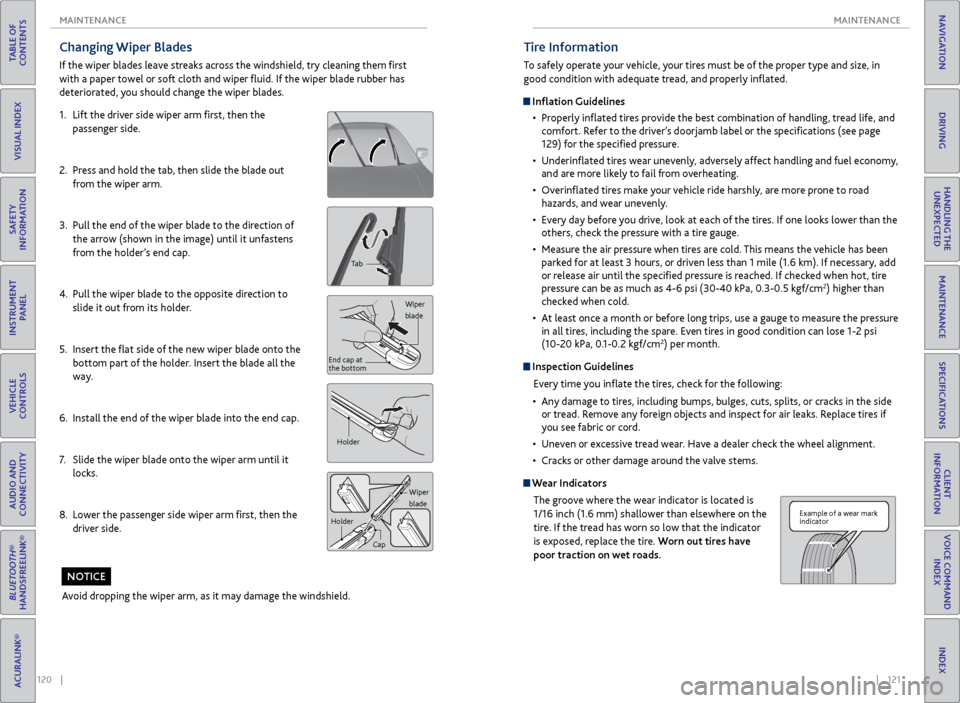
Changing Wiper Blades
If the wiper blades leave streaks across the windshield, try cleaning them first
with a paper towel or soft cloth and wiper fluid. If the wiper blade rubber has
deteriorated, you should change the wiper blades.
1. Lift the driver side wiper arm first, then the
passenger side.
2. Press and hold the tab, then slide the blade out
from the wiper arm.
3. Pull the end of the wiper blade to the direction of
the arrow (shown in the image) until it unfastens
from the holder’s end cap.
4. Pull the wiper blade to the opposite direction to
slide it out from its holder.
5. Insert the flat side of the new wiper blade onto the
bottom part of the holder. Insert the blade all the
way.
6. Install the end of the wiper blade into the end cap.
7. Slide the wiper blade onto the wiper arm until it
locks.
8. Lower the passenger side wiper arm first, then the
driver side.
Tab
Wiper
blade
End cap at
the bottom
Holder
Wiper
blade
Holder
Cap
Avoid dropping the wiper arm, as it may damage the windshield.
NOTICE
Tire Information
To safely operate your vehicle, your tires must be of the proper type and size, in
good condition with adequate tread, and properly inflated.
Inflation Guidelines• Properly inflated tires provide the best combination of handling, tread life, and
comfort. Refer to the driver’s doorjamb label or the specifications (see page
129) for the specified pressure.
• Underinflated tires wear unevenly, adversely affect handling and fuel economy,
and are more likely to fail from overheating.
• Overinflated tires make your vehicle ride harshly, are more prone to road
hazards, and wear unevenly.
• Every day before you drive, look at each of the tires. If one looks lower than the
others, check the pressure with a tire gauge.
• Measure the air pressure when tires are cold. This means the vehicle has been
parked for at least 3 hours, or driven less than 1 mile (1.6 km). If necessary, add
or release air until the specified pressure is reached. If checked when hot, tire
pressure can be as much as 4-6 psi (30-40 kPa, 0.3-0.5 kgf/cm
2) higher than
checked when cold.
• At least once a month or before long trips, use a gauge to measure the pressure
in all tires, including the spare. Even tires in good condition can lose 1-2 psi
(10-20 kPa, 0.1-0.2 kgf/cm
2) per month.
Inspection Guidelines
Every time you inflate the tires, check for the following:
• Any damage to tires, including bumps, bulges, cuts, splits, or cracks in the side
or tread. Remove any foreign objects and inspect for air leaks. Replace tires if
you see fabric or cord.
• Uneven or excessive tread wear. Have a dealer check the wheel alignment.
• Cracks or other damage around the valve stems.
Wear Indicators
The groove where the wear indicator is located is
1/16 inch (1.6 mm) shallower than elsewhere on the
tire. If the tread has worn so low that the indicator
is exposed, replace the tire. Worn out tires have
poor traction on wet roads.
Example of a wear mark
indicator
Page 69 of 75
130 || 131
CLIENT INFORMATION
SPECIFICATIONS
TABLE OF
CONTENTS
INDEX
VISUAL INDEX
VOICE COMMAND INDEX
SAFETY
INFORMATION
CLIENT
INFORMATION
INSTRUMENT PANEL
SPECIFICATIONS
VEHICLE
CONTROLS
MAINTENANCE
AUDIO AND
CONNECTIVITY
HANDLING THE UNEXPECTED
BLUETOOTH®
HANDSFREELINK®
DRIVING
ACURALINK®
NAVIGATION
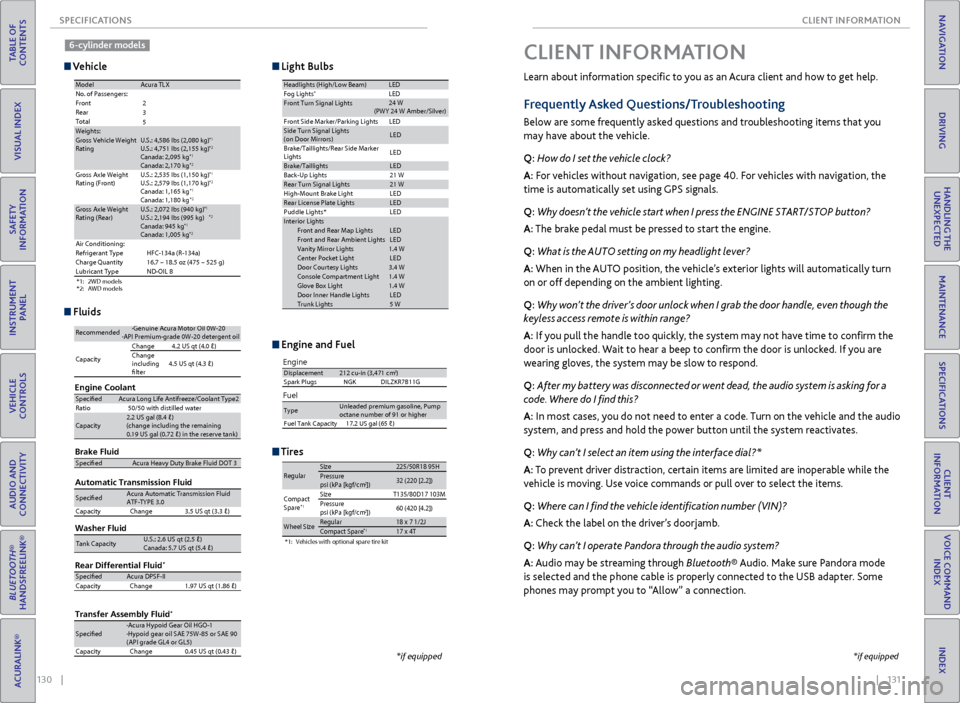
Learn about information specific to you as an Acura client and how to get help.
Frequently Asked Questions/Troubleshooting
Below are some frequently asked questions and troubleshooting items that you
may have about the vehicle.
Q: How do I set the vehicle clock?
A: For vehicles without navigation, see page 40. For vehicles with navigation, the
time is automatically set using GPS signals.
Q: Why doesn’t the vehicle start when I press the ENGINE START/STOP button?
A: The brake pedal must be pressed to start the engine.
Q: What is the AUTO setting on my headlight lever?
A: When in the AUTO position, the vehicle’s exterior lights will automatically turn
on or off depending on the ambient lighting.
Q: Why won’t the driver’s door unlock when I grab the door handle, even though the
keyless access remote is within range?
A: If you pull the handle too quickly, the system may not have time to confirm the
door is unlocked. Wait to hear a beep to confirm the door is unlocked. If you are
wearing gloves, the system may be slow to respond.
Q: After my battery was disconnected or went dead, the audio system is asking for a
code. Where do I find this?
A: In most cases, you do not need to enter a code. Turn on the vehicle and the audio
system, and press and hold the power button until the system reactivates.
Q: Why can’t I select an item using the interface dial?*
A: To prevent driver distraction, certain items are limited are inoperable while the
vehicle is moving. Use voice commands or pull over to select the items.
Q: Where can I find the vehicle identification number (VIN)?
A: Check the label on the driver’s doorjamb.
Q: Why can’t I operate Pandora through the audio system?
A: Audio may be streaming through Bluetooth® Audio. Make sure Pandora mode
is selected and the phone cable is properly connected to the USB adapter. Some
phones may prompt you to “Allow” a connection.
CLIENT INFORMATION
*if equipped
Vehicle
Engine and Fuel
Light Bulbs
Fluids
Tires
*1: 2WD models
*2: AWD models
ModelAcura TL XNo. of Passengers:
Front
Rear
Total
Weights:Gross Vehicle Weight
Rating U.S.: 4,586 lbs (2,080 kg)*1U.S.: 4,751 lbs (2,155 kg)*2Canada: 2,095 kg*1Canada: 2,170 kg*2Gross Axle Weight
Rating (Front )U.S.: 2,535 lbs (1,150 kg)*1U.S.: 2,579 lbs (1,170 kg)*2Canada: 1,165 kg*1Canada: 1,180 kg*2Gross Axle Weight
Rating (Rear)U.S.: 2,072 lbs (940 kg)*1U.S.: 2,194 lbs (995 kg)*2Canada: 945 kg*1Canada: 1,005 kg*2Air Conditioning:
Refrigerant Type HFC-134a (R-134a)
Charge Quantity 16.7 – 18.5 oz (475 – 525 g)
Lubricant Type ND-OIL 8
2
3
5
Headlights (High/Low Beam )LEDFog Lights*LEDFront Turn Signal Lights
Front Side Marker/Parking Lights LEDSide Turn Signal Lights
(on Door Mirrors)LE D
Brake/Taillights/Rear Side Marker
Light s LE
D
Brake/TaillightsLED
Back-Up Lights
Rear Turn Signal Lights21 W
High-M ount Brake Ligh t
Rear License Plate LightsLED
Puddle Lights * LED
In terior Light s
Front and Rear Map Lights LED
Front and Rear Ambient Lights LED
Vanity Mirror Lights 1.4 W
Center Pocket Light LED
Door Courtesy Light s3.4 W
Console Compartment Light 1.4 W
Glove Box Ligh t1 .4 W
Door Inner Handle Lights LED
Trunk Lights 5 W
21 W
LE D
24
W
(PWY 24 W Amber/Silver)
Brake Flui d
Automatic Transmission Flui dSpecifedAcura Heavy Duty B\krake \fluid DOT \b
SpecifedAcura Automatic Tra\knsmission \flui d
AT\f-TYPE \b. 0
Capacity Change \b.5 US qt (\b.\b)
Engine Oil
Engine Coolan t
Recommended·Genuine Acura Mot\kor Oil 0W-2 0·API Premium-grade\k 0W-20 detergent o\ki l
Capacity Change
4.2 US qt (4.0 )
Change
including
flter 4.5 US qt (4.\b
)
SpecifedAcura Long Life An\ktifreeze/Coolant Ty\kpe2
Ratio 50/50 with distill\ked wate r
Capacity2.2 US gal (8.4 )\k
(change including \kthe remaining
0.19 US gal (0.72 \k) in the reserve \ktank )
Washer Fluid
Tank CapacityU.S.: 2.6 US qt (2\k.5 )
Canada: 5.7 US qt \k(5.4 )
Rear Differential Flui d*
Transfer Assembly Flui d*
SpecifedAcura DPS\f-II
Capacity Change 1.97 US qt (1.86 \k)
Specifed·Acura Hypoid Gear\k Oil HGO-1
·Hypoid gear oil S\kAE 75W-85 or SAE 9 0
(API grade GL4 or \kGL5)
Capacity Change 0.45 US qt (0.4\b )
Engine
Fuel
Displacement212 cu-in (3,471 cm3)
Spark Plugs NGKD ILZKR7B11G
TypeUnleaded premium gasoline, Pump
octane number of 91 or higher
Fuel Tank Capacity 17.2 US gal (65 )
*1:Vehicles with optional spare tire kit
RegularSize225/50R 18 95HPressure
psi (kPa [kgf/cm2])32 (220 [2.2])
Compact
Spar e*1SizeT135/80D17 103M
Pressure
psi (kPa [kgf/cm
2]) 60
(420 [4.2])
Wheel SizeRegular18 x 7 1/2 JCompact Spar e*117 x 4T
*if equipped
6-cylinder models
Page 74 of 75
140 || 141
INDEX
INDEX
TABLE OF
CONTENTS
INDEX
VISUAL INDEX
VOICE COMMAND INDEX
SAFETY
INFORMATION
CLIENT
INFORMATION
INSTRUMENT PANEL
SPECIFICATIONS
VEHICLE
CONTROLS
MAINTENANCE
AUDIO AND
CONNECTIVITY
HANDLING THE UNEXPECTED
BLUETOOTH®
HANDSFREELINK®
DRIVING
ACURALINK®
NAVIGATION
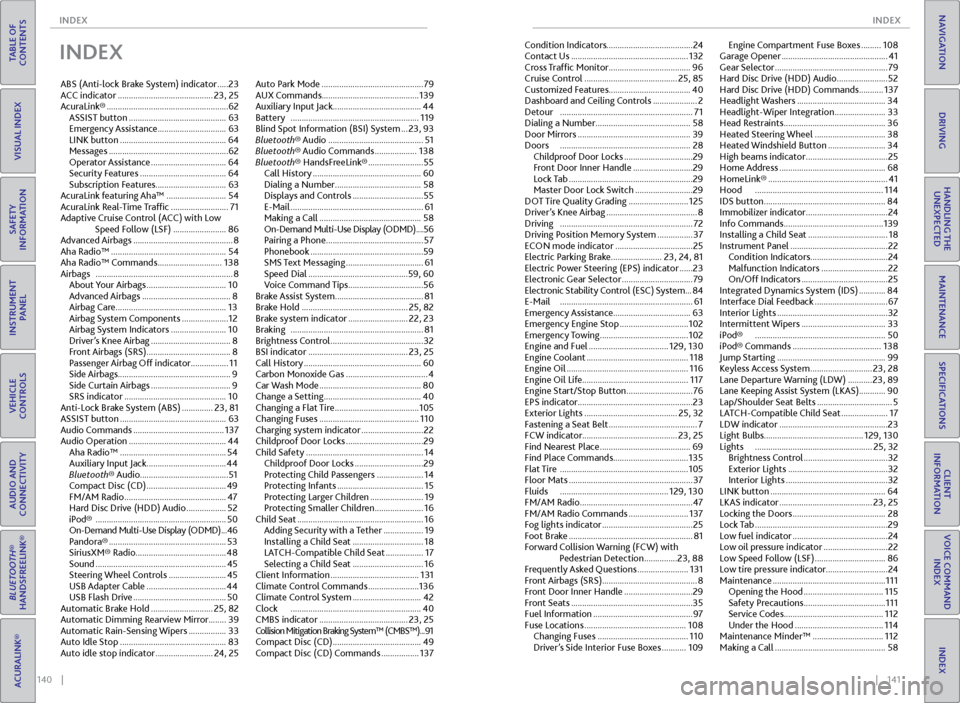
INDEX
ABS (Anti-lock Brake System) indicator ..... 23
ACC indicator ........................................... 23, 25
AcuraLink® ....................................................... 62
ASSIST button ............................................ 63
Emergency Assistance ............................... 63
LINK button ................................................ 64
Messages ...................................................... 62
Operator Assistance .................................. 64
Security Features ....................................... 64
Subscription Features ................................63
AcuraLink featuring Aha™ ........................... 54
AcuraLink Real-Time Traffic .......................... 71
Adaptive Cruise Control (ACC) with Low Speed Follow (LSF) ........................ 86
Advanced Airbags ............................................. 8
Aha Radio™ .................................................... 54
Aha Radio™ Commands ............................. 138
Airbags .............................................................. 8
About Your Airbags .................................... 10
Advanced Airbags ........................................ 8
Airbag Care .................................................. 13
Airbag System Components ..................... 12
Airbag System Indicators ......................... 10
Driver’s Knee Airbag .................................... 8
Front Airbags (SRS) ...................................... 8
Passenger Airbag Off indicator ................. 11
Side Airbags ................................................... 9
Side Curtain Airbags .................................... 9
SRS indicator .............................................. 10
Anti-Lock Brake System (ABS) .............. 23, 81
ASSIST button ................................................ 63
Audio Commands ......................................... 137
Audio Operation ............................................ 44
Aha Radio™ ................................................ 54
Auxiliary Input Jack .................................... 44
Bluetooth® Audio ........................................ 51
Compact Disc (CD) .................................... 49
FM/AM Radio .............................................. 47
Hard Disc Drive (HDD) Audio .................. 52
iPod® ........................................................... 50
On-Demand Multi-Use Display (ODMD) ... 46
Pandora® ..................................................... 53
SiriusXM® Radio......................................... 48
Sound ........................................................... 45
Steering Wheel Controls .......................... 45
USB Adapter Cable .................................... 44
USB Flash Drive .......................................... 50
Automatic Brake Hold ............................ 25, 82
Automatic Dimming Rearview Mirror ........39
Automatic Rain-Sensing Wipers ................. 33
Auto Idle Stop ................................................ 83
Auto idle stop indicator .......................... 24, 25Auto Park Mode ..............................................
79
AUX Commands ............................................ 139
Auxiliary Input Jack ........................................ 44
Battery .......................................................... 119
Blind Spot Information (BSI) System ... 23, 93
Bluetooth® Audio ........................................... 51
Bluetooth® Audio Commands ................... 138
Bluetooth® HandsFreeLink® ......................... 55
Call History ................................................. 60
Dialing a Number ....................................... 58
Displays and Controls ................................ 55
E-Mail ............................................................ 61
Making a Call .............................................. 58
On-Demand Multi-Use Display (ODMD) .... 56
Pairing a Phone ............................................ 57
Phonebook ...................................................59
SMS Text Messaging ................................... 61
Speed Dial ............................................. 59, 60
Voice Command Tips .................................. 56
Brake Assist System ........................................ 81
Brake Hold ................................................ 25, 82
Brake system indicator ........................... 22, 23
Braking ............................................................ 81
Brightness Control .......................................... 32
BSI indicator ............................................. 23, 25
Call History ..................................................... 60
Carbon Monoxide Gas ..................................... 4
Car Wash Mode .............................................. 80
Change a Setting ............................................ 40
Changing a Flat Tire ...................................... 105
Changing Fuses ............................................. 110
Charging system indicator ............................ 22
Childproof Door Locks ................................... 29
Child Safety ..................................................... 14
Childproof Door Locks ............................... 29
Protecting Child Passengers ..................... 14
Protecting Infants ....................................... 15
Protecting Larger Children ........................ 19
Protecting Smaller Children ...................... 16
Child Seat ......................................................... 16
Adding Security with a Tether .................. 19
Installing a Child Seat ................................ 18
LATCH-Compatible Child Seat ................. 17
Selecting a Child Seat ................................ 16
Client Information ........................................ 131
Climate Control Commands ....................... 136
Climate Control System ............................... 42
Clock ........................................................... 40
CMBS indicator ........................................ 23, 25
Collision Mitigation Braking System™ (CMBS™) ...91
Compact Disc (CD) ........................................ 49
Compact Disc (CD) Commands ................. 137Condition Indicators
....................................... 24
Contact Us ..................................................... 132
Cross Traffic Monitor ..................................... 96
Cruise Control .......................................... 25, 85
Customized Features .....................................40
Dashboard and Ceiling Controls .................... 2
Detour ............................................................ 71
Dialing a Number ........................................... 58
Door Mirrors ................................................... 39
Doors ........................................................... 28
Childproof Door Locks ............................... 29
Front Door Inner Handle ........................... 29
Lock Tab ........................................................ 29
Master Door Lock Switch .......................... 29
DOT Tire Quality Grading ........................... 125
Driver’s Knee Airbag ......................................... 8
Driving ............................................................ 72
Driving Position Memory System ................ 37
ECON mode indicator ................................... 25
Electric Parking Brake ....................... 23, 24, 81
Electric Power Steering (EPS) indicator ...... 23
Electronic Gear Selector ................................ 79
Electronic Stability Control (ESC) System ... 84
E-Mail ............................................................ 61
Emergency Assistance ...................................63
Emergency Engine Stop ............................... 102
Emergency Towing ........................................ 102
Engine and Fuel .................................... 129, 130
Engine Coolant
.............................................. 118
Engine Oil ....................................................... 116
Engine Oil Life ................................................ 117
Engine Start/Stop Button .............................. 76
EPS indicator .................................................... 23
Exterior Lights .......................................... 25, 32
Fastening a Seat Belt ........................................ 7
FCW indicator ........................................... 23, 25
Find Nearest Place ......................................... 69
Find Place Commands .................................. 135
Flat Tire .......................................................... 105
Floor Mats ........................................................ 37
Fluids ................................................. 129, 130
FM/AM Radio ................................................... 47
FM/AM Radio Commands ........................... 137
Fog lights indicator ......................................... 25
Foot Brake ........................................................ 81
Forward Collision Warning (FCW) with Pedestrian Detection ............... 23, 88
Frequently Asked Questions ....................... 131
Front Airbags (SRS) ........................................... 8
Front Door Inner Handle ............................... 29
Front Seats ....................................................... 35
Fuel Information ............................................. 97
Fuse Locations .............................................. 108
Changing Fuses ......................................... 110
Driver’s Side Interior Fuse Boxes ........... 109Engine Compartment Fuse Boxes .........
108
Garage Opener ................................................ 41
Gear Selector ................................................... 79
Hard Disc Drive (HDD) Audio ....................... 52
Hard Disc Drive (HDD) Commands ........... 137
Headlight Washers ........................................ 34
Headlight-Wiper Integration ....................... 33
Head Restraints .............................................. 36
Heated Steering Wheel ................................ 38
Heated Windshield Button .......................... 34
High beams indicator ..................................... 25
Home Address ................................................ 68
HomeLink® ...................................................... 41
Hood .......................................................... 114
IDS button ....................................................... 84
Immobilizer indicator ..................................... 24
Info Commands ............................................. 139
Installing a Child Seat .................................... 18
Instrument Panel ............................................ 22
Condition Indicators ................................... 24
Malfunction Indicators .............................. 22
On/Off Indicators ....................................... 25
Integrated Dynamics System (IDS) ............ 84
Interface Dial Feedback ................................. 67
Interior Lights .................................................. 32
Intermittent Wipers ...................................... 33
iPod® ........................................................... 50
iPod® Commands ........................................ 138
Jump Starting ................................................. 99
Keyless Access System ............................ 23, 28
Lane Departure Warning (LDW) ........... 23, 89
Lane Keeping Assist System (LKAS) ............90
Lap/Shoulder Seat Belts .................................. 5
LATCH-Compatible Child Seat ..................... 17
LDW indicator ................................................. 23
Light Bulbs ............................................. 129, 130
Lights ..................................................... 25, 32
Brightness Control ...................................... 32
Exterior Lights ............................................. 32
Interior Lights .............................................. 32
LINK button .................................................... 64
LKAS indicator .......................................... 23, 25
Locking the Doors .......................................... 28
Lock Tab ............................................................ 29
Low fuel indicator ........................................... 24
Low oil pressure indicator ............................. 22
Low Speed Follow (LSF) ................................ 86
Low tire pressure indicator ............................24
Maintenance ................................................... 111
Opening the Hood .................................... 115
Safety Precautions ..................................... 111
Service Codes ............................................. 112
Under the Hood ........................................ 114
Maintenance Minder™ ................................ 112
Making a Call .................................................. 58