wheel Acura TLX 2015 Owner's Manual
[x] Cancel search | Manufacturer: ACURA, Model Year: 2015, Model line: TLX, Model: Acura TLX 2015Pages: 75, PDF Size: 24.55 MB
Page 49 of 75
90 || 91
DRIVING
DRIVING
TABLE OF
CONTENTS
INDEX
VISUAL INDEX
VOICE COMMAND INDEX
SAFETY
INFORMATION
CLIENT
INFORMATION
INSTRUMENT PANEL
SPECIFICATIONS
VEHICLE
CONTROLS
MAINTENANCE
AUDIO AND
CONNECTIVITY
HANDLING THE UNEXPECTED
BLUETOOTH®
HANDSFREELINK®
DRIVING
ACURALINK®
NAVIGATION
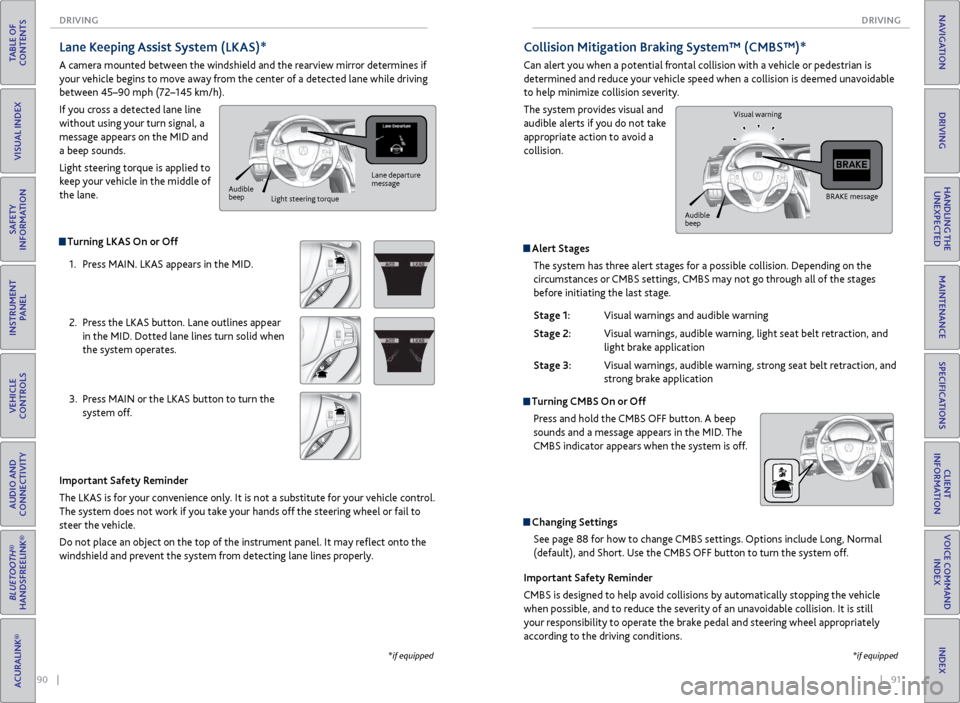
Collision Mitigation Braking System™ (CMBS™)*
Can alert you when a potential frontal collision with a vehicle or pedestrian is
determined and reduce your vehicle speed when a collision is deemed unavoidable
to help minimize collision severity.
The system provides visual and
audible alerts if you do not take
appropriate action to avoid a
collision.
Alert Stages
The system has three alert stages for a possible collision. Depending on the
circumstances or CMBS settings, CMBS may not go through all of the stages
before initiating the last stage.
Stage 1: Visual warnings and audible warning
Stage 2: Visual warnings, audible warning, light seat belt retraction, and
light brake application
Stage 3: Visual warnings, audible warning, strong seat belt retraction, and
strong brake application
Turning CMBS On or Off
Press and hold the CMBS OFF button. A beep
sounds and a message appears in the MID. The
CMBS indicator appears when the system is off.
Changing SettingsSee page 88 for how to change CMBS settings. Options include Long, Normal
(default), and Short. Use the CMBS OFF button to turn the system off.
Important Safety Reminder
CMBS is designed to help avoid collisions by automatically stopping the vehicle
when possible, and to reduce the severity of an unavoidable collision. It is still
your responsibility to operate the brake pedal and steering wheel appropriately
according to the driving conditions.
BRAKE message
Audible
beep Visual warning
*if equipped
Turning LKAS On or Off
1. Press MAIN. LKAS appears in the MID.
2. Press the LKAS button. Lane outlines appear
in the MID. Dotted lane lines turn solid when
the system operates.
3. Press MAIN or the LKAS button to turn the
system off.
Lane Keeping Assist System (LKAS)*
A camera mounted between the windshield and the rearview mirror determines if
your vehicle begins to move away from the center of a detected lane while driving
between 45–90 mph (72–145 km/h).
If you cross a detected lane line
without using your turn signal, a
message appears on the MID and
a beep sounds.
Light steering torque is applied to
keep your vehicle in the middle of
the lane.
Important Safety Reminder
The LKAS is for your convenience only. It is not a substitute for your vehicle control.
The system does not work if you take your hands off the steering wheel or fail to
steer the vehicle.
Do not place an object on the top of the instrument panel. It may reflect onto the
windshield and prevent the system from detecting lane lines properly.
Lane departure
message
Audible
beep Light steering torque
*if equipped
Page 50 of 75
92 || 93
DRIVING
DRIVING
TABLE OF
CONTENTS
INDEX
VISUAL INDEX
VOICE COMMAND INDEX
SAFETY
INFORMATION
CLIENT
INFORMATION
INSTRUMENT PANEL
SPECIFICATIONS
VEHICLE
CONTROLS
MAINTENANCE
AUDIO AND
CONNECTIVITY
HANDLING THE UNEXPECTED
BLUETOOTH®
HANDSFREELINK®
DRIVING
ACURALINK®
NAVIGATION
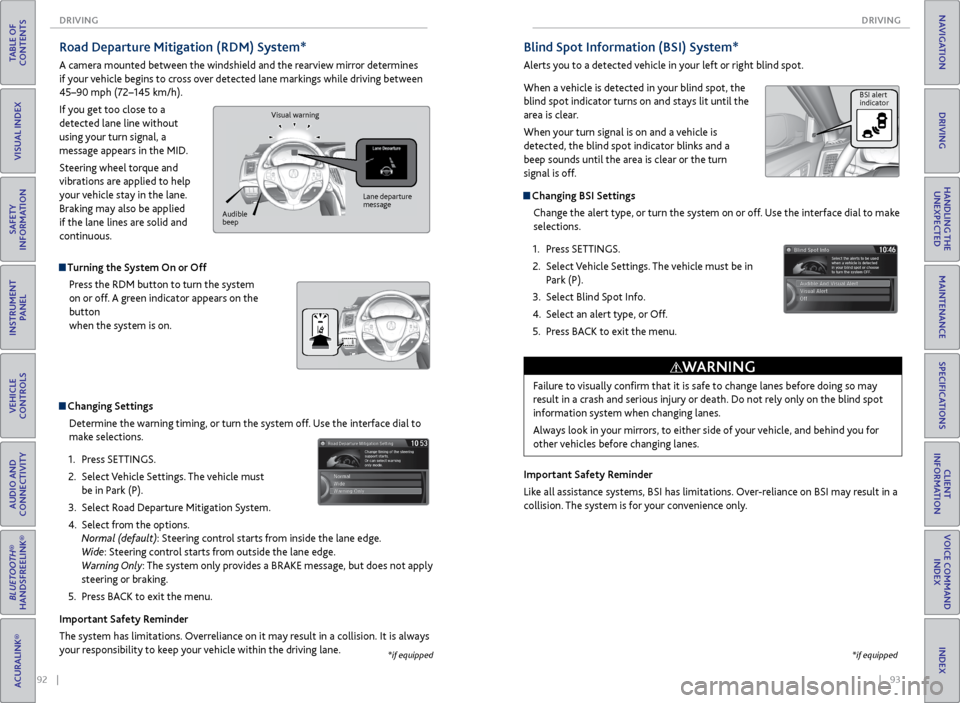
Blind Spot Information (BSI) System*
Alerts you to a detected vehicle in your left or right blind spot.
When a vehicle is detected in your blind spot, the
blind spot indicator turns on and stays lit until the
area is clear.
When your turn signal is on and a vehicle is
detected, the blind spot indicator blinks and a
beep sounds until the area is clear or the turn
signal is off.
Changing BSI Settings
Change the alert type, or turn the system on or off. Use the interface dial to make
selections.
1. Press SETTINGS.
2. Select Vehicle Settings. The vehicle must be in
Park (P).
3. Select Blind Spot Info.
4. Select an alert type, or Off.
5. Press BACK to exit the menu.
Important Safety Reminder
Like all assistance systems, BSI has limitations. Over-reliance on BSI may result in a
collision. The system is for your convenience only.
Failure to visually confirm that it is safe to change lanes before doing so may
result in a crash and serious injury or death. Do not rely only on the blind spot
information system when changing lanes.
Always look in your mirrors, to either side of your vehicle, and behind you for
other vehicles before changing lanes.
WARNING
BSI alert
indicator
*if equipped
Road Departure Mitigation (RDM) System*
A camera mounted between the windshield and the rearview mirror determines
if your vehicle begins to cross over detected lane markings while driving between
45–90 mph (72–145 km/h).
If you get too close to a
detected lane line without
using your turn signal, a
message appears in the MID.
Steering wheel torque and
vibrations are applied to help
your vehicle stay in the lane.
Braking may also be applied
if the lane lines are solid and
continuous.
Turning the System On or Off Press the RDM button to turn the system
on or off. A green indicator appears on the
button
when the system is on.
Changing SettingsDetermine the warning timing, or turn the system off. Use the interface dial to
make selections.
1. Press SETTINGS.
2. Select Vehicle Settings. The vehicle must
be in Park (P).
3. Select Road Departure Mitigation System.
4. Select from the options.
Normal (default): Steering control starts from inside the lane edge.
Wide: Steering control starts from outside the lane edge.
Warning Only: The system only provides a BRAKE message, but does not apply
steering or braking.
5. Press BACK to exit the menu.
Important Safety Reminder
The system has limitations. Overreliance on it may result in a collision. It is always
your responsibility to keep your vehicle within the driving lane.
Lane departure
message
Audible
beep Visual warning
*if equipped
Page 51 of 75
94 || 95
DRIVING
DRIVING
TABLE OF
CONTENTS
INDEX
VISUAL INDEX
VOICE COMMAND INDEX
SAFETY
INFORMATION
CLIENT
INFORMATION
INSTRUMENT PANEL
SPECIFICATIONS
VEHICLE
CONTROLS
MAINTENANCE
AUDIO AND
CONNECTIVITY
HANDLING THE UNEXPECTED
BLUETOOTH®
HANDSFREELINK®
DRIVING
ACURALINK®
NAVIGATION
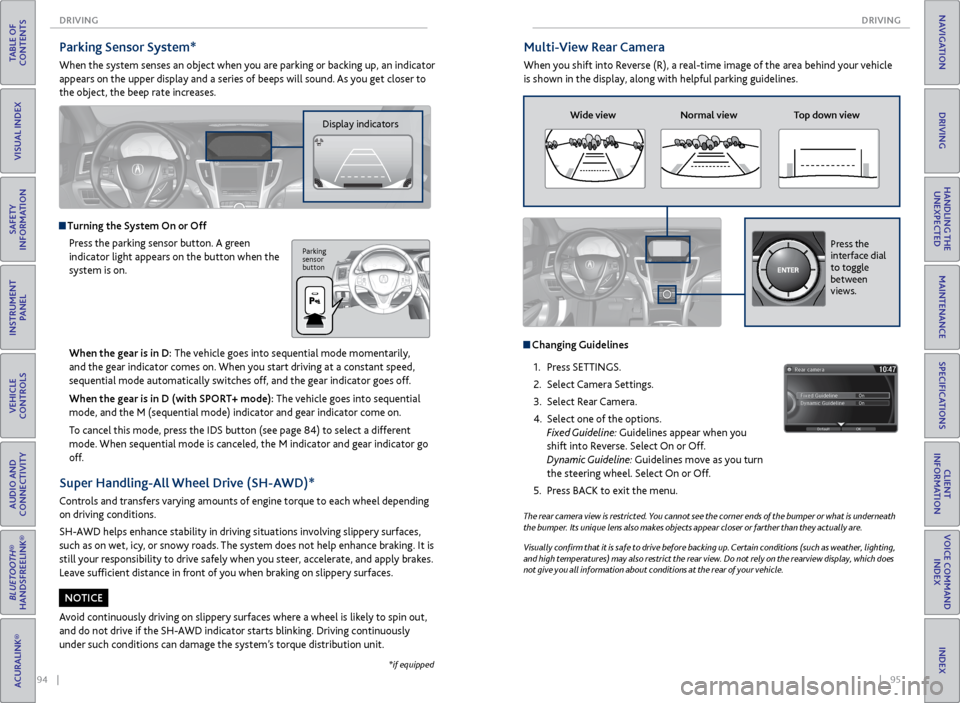
Multi-View Rear Camera
When you shift into Reverse (R), a real-time image of the area behind your vehicle
is shown in the display, along with helpful parking guidelines.
The rear camera view is restricted. You cannot see the corner ends of the bumper or what is underneath
the bumper. Its unique lens also makes objects appear closer or farther than they actually are.
Visually confirm that it is safe to drive before backing up. Certain conditions (such as weather, lighting,
and high temperatures) may also restrict the rear view. Do not rely on the rearview display, which does
not give you all information about conditions at the rear of your vehicle.
Wide view Normal view Top down view
Changing Guidelines
1. Press SETTINGS.
2. Select Camera Settings.
3. Select Rear Camera.
4. Select one of the options.
Fixed Guideline: Guidelines appear when you
shift into Reverse. Select On or Off.
Dynamic Guideline: Guidelines move as you turn
the steering wheel. Select On or Off.
5. Press BACK to exit the menu.
Press the
interface dial
to toggle
between
views.
Parking Sensor System*
When the system senses an object when you are parking or backing up, an indicator
appears on the upper display and a series of beeps will sound. As you get closer to
the object, the beep rate increases.
Display indicators
Turning the System On or Off
Press the parking sensor button. A green
indicator light appears on the button when the
system is on.
Parking
sensor
button
*if equipped
When the gear is in D: The vehicle goes into sequential mode momentarily,
and the gear indicator comes on. When you start driving at a constant speed,
sequential mode automatically switches off, and the gear indicator goes off.
When the gear is in D (with SPORT+ mode): The vehicle goes into sequential
mode, and the M (sequential mode) indicator and gear indicator come on.
To cancel this mode, press the IDS button (see page 84) to select a different
mode. When sequential mode is canceled, the M indicator and gear indicator go
off.
Super Handling-All Wheel Drive (SH-AWD)*
Controls and transfers varying amounts of engine torque to each wheel depending
on driving conditions.
SH-AWD helps enhance stability in driving situations involving slippery surfaces,
such as on wet, icy, or snowy roads. The system does not help enhance braking. It is
still your responsibility to drive safely when you steer, accelerate, and apply brakes.
Leave sufficient distance in front of you when braking on slippery surfaces.
Avoid continuously driving on slippery surfaces where a wheel is likely to spin out,
and do not drive if the SH-AWD indicator starts blinking. Driving continuously
under such conditions can damage the system’s torque distribution unit.
NOTICE
Page 55 of 75
102 || 103
HANDLING THE UNEXPECTED
HANDLING THE UNEXPECTED
TABLE OF
CONTENTS
INDEX
VISUAL INDEX
VOICE COMMAND INDEX
SAFETY
INFORMATION
CLIENT
INFORMATION
INSTRUMENT PANEL
SPECIFICATIONS
VEHICLE
CONTROLS
MAINTENANCE
AUDIO AND
CONNECTIVITY
HANDLING THE UNEXPECTED
BLUETOOTH®
HANDSFREELINK®
DRIVING
ACURALINK®
NAVIGATION
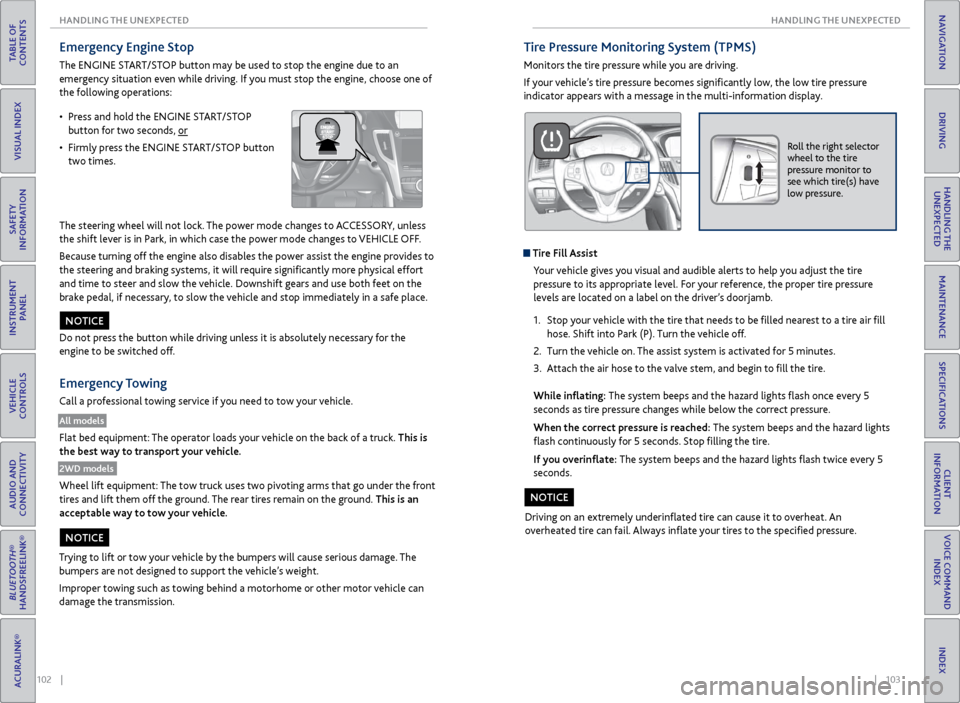
Emergency Engine Stop
The ENGINE START/STOP button may be used to stop the engine due to an
emergency situation even while driving. If you must stop the engine, choose one of
the following operations:
The steering wheel will not lock. The power mode changes to ACCESSORY, unless
the shift lever is in Park, in which case the power mode changes to VEHICLE OFF.
Because turning off the engine also disables the power assist the engine provides to
the steering and braking systems, it will require significantly more physical effort
and time to steer and slow the vehicle. Downshift gears and use both feet on the
brake pedal, if necessary, to slow the vehicle and stop immediately in a safe place.
Do not press the button while driving unless it is absolutely necessary for the
engine to be switched off.
Emergency Towing
Call a professional towing service if you need to tow your vehicle.
All models
Flat bed equipment: The operator loads your vehicle on the back of a truck. This is
the best way to transport your vehicle.
2WD models
Wheel lift equipment: The tow truck uses two pivoting arms that go under the front
tires and lift them off the ground. The rear tires remain on the ground. This is an
acceptable way to tow your vehicle.
NOTICE
Trying to lift or tow your vehicle by the bumpers will cause serious damage. The
bumpers are not designed to support the vehicle’s weight.
Improper towing such as towing behind a motorhome or other motor vehicle can
damage the transmission.
NOTICE
• Press and hold the ENGINE START/STOP
button for two seconds, or
• Firmly press the ENGINE START/STOP button
two times.
Tire Pressure Monitoring System (TPMS)
Monitors the tire pressure while you are driving.
If your vehicle’s tire pressure becomes significantly low, the low tire pressure
indicator appears with a message in the multi-information display.
Roll the right selector
wheel to the tire
pressure monitor to
see which tire(s) have
low pressure.
Tire Fill Assist
Your vehicle gives you visual and audible alerts to help you adjust the tire
pressure to its appropriate level. For your reference, the proper tire pressure
levels are located on a label on the driver’s doorjamb.
1. Stop your vehicle with the tire that needs to be filled nearest to a tire air fill
hose. Shift into Park (P). Turn the vehicle off.
2. Turn the vehicle on. The assist system is activated for 5 minutes.
3. Attach the air hose to the valve stem, and begin to fill the tire.
While inflating: The system beeps and the hazard lights flash once every 5
seconds as tire pressure changes while below the correct pressure.
When the correct pressure is reached: The system beeps and the hazard lights
flash continuously for 5 seconds. Stop filling the tire.
If you overinflate: The system beeps and the hazard lights flash twice every 5
seconds.
Driving on an extremely underinflated tire can cause it to overheat. An
overheated tire can fail. Always inflate your tires to the specified pressure.
NOTICE
Page 56 of 75
104 || 105
HANDLING THE UNEXPECTED
HANDLING THE UNEXPECTED
TABLE OF
CONTENTS
INDEX
VISUAL INDEX
VOICE COMMAND INDEX
SAFETY
INFORMATION
CLIENT
INFORMATION
INSTRUMENT PANEL
SPECIFICATIONS
VEHICLE
CONTROLS
MAINTENANCE
AUDIO AND
CONNECTIVITY
HANDLING THE UNEXPECTED
BLUETOOTH®
HANDSFREELINK®
DRIVING
ACURALINK®
NAVIGATION
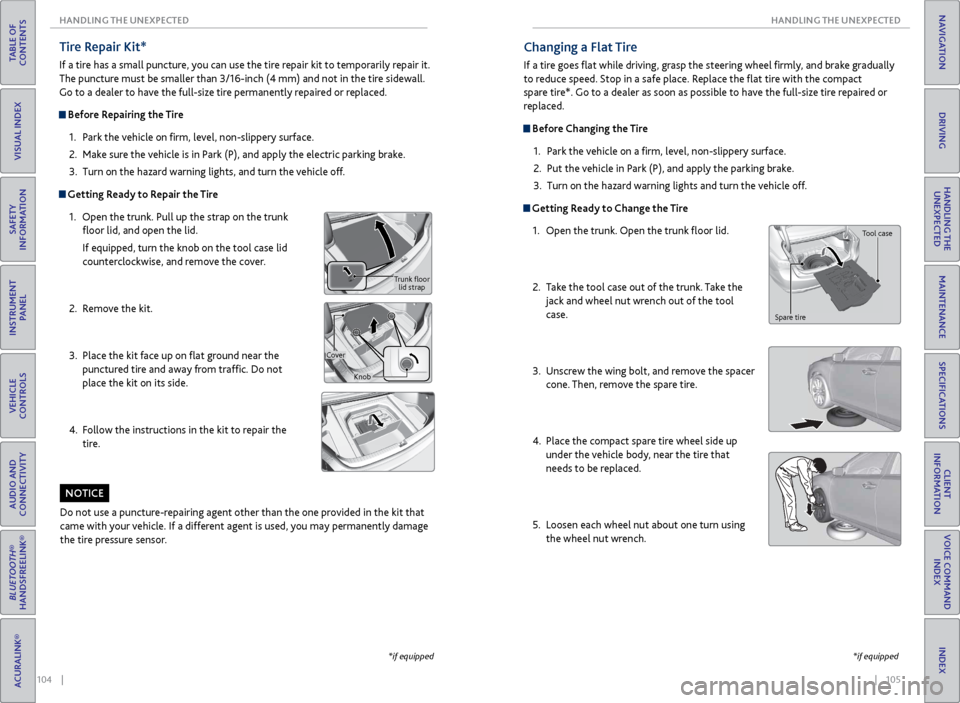
Tire Repair Kit*
If a tire has a small puncture, you can use the tire repair kit to temporarily repair it.
The puncture must be smaller than 3/16-inch (4 mm) and not in the tire sidewall.
Go to a dealer to have the full-size tire permanently repaired or replaced.
Before Repairing the Tire
1. Park the vehicle on firm, level, non-slippery surface.
2. Make sure the vehicle is in Park (P), and apply the electric parking brake.
3. Turn on the hazard warning lights, and turn the vehicle off.
Getting Ready to Repair the Tire
1. Open the trunk. Pull up the strap on the trunk
floor lid, and open the lid.
If equipped, turn the knob on the tool case lid
counterclockwise, and remove the cover.
2. Remove the kit.
3. Place the kit face up on flat ground near the
punctured tire and away from traffic. Do not
place the kit on its side.
4. Follow the instructions in the kit to repair the
tire.
Trunk floor
lid strap
Cover Knob
Do not use a puncture-repairing agent other than the one provided in the kit that
came with your vehicle. If a different agent is used, you may permanently damage
the tire pressure sensor.
NOTICE
*if equipped
Changing a Flat Tire
If a tire goes flat while driving, grasp the steering wheel firmly, and brake gradually
to reduce speed. Stop in a safe place. Replace the flat tire with the compact
spare tire*. Go to a dealer as soon as possible to have the full-size tire repaired or
replaced.
Before Changing the Tire1. Park the vehicle on a firm, level, non-slippery surface.
2. Put the vehicle in Park (P), and apply the parking brake.
3. Turn on the hazard warning lights and turn the vehicle off.
Getting Ready to Change the Tire
1. Open the trunk. Open the trunk floor lid.
2. Take the tool case out of the trunk. Take the
jack and wheel nut wrench out of the tool
case.
3. Unscrew the wing bolt, and remove the spacer
cone. Then, remove the spare tire.
4. Place the compact spare tire wheel side up
under the vehicle body, near the tire that
needs to be replaced.
5. Loosen each wheel nut about one turn using
the wheel nut wrench.
Tool case
Spare tire
*if equipped
Page 57 of 75
106 || 107
HANDLING THE UNEXPECTED
HANDLING THE UNEXPECTED
TABLE OF
CONTENTS
INDEX
VISUAL INDEX
VOICE COMMAND INDEX
SAFETY
INFORMATION
CLIENT
INFORMATION
INSTRUMENT PANEL
SPECIFICATIONS
VEHICLE
CONTROLS
MAINTENANCE
AUDIO AND
CONNECTIVITY
HANDLING THE UNEXPECTED
BLUETOOTH®
HANDSFREELINK®
DRIVING
ACURALINK®
NAVIGATION
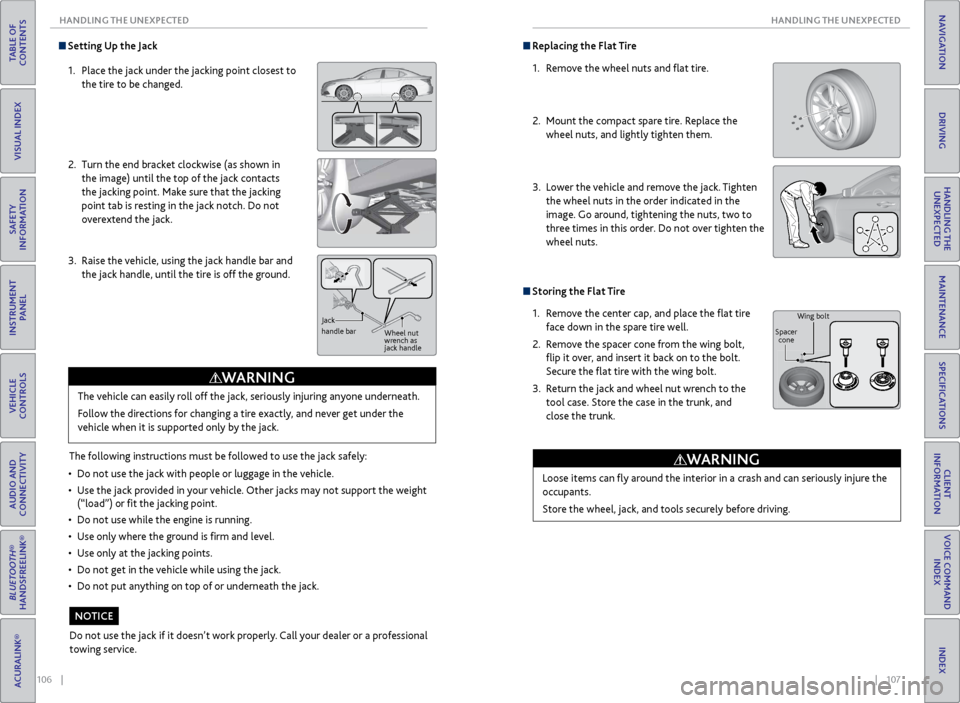
Setting Up the Jack
1. Place the jack under the jacking point closest to
the tire to be changed.
2. Turn the end bracket clockwise (as shown in
the image) until the top of the jack contacts
the jacking point. Make sure that the jacking
point tab is resting in the jack notch. Do not
overextend the jack.
3. Raise the vehicle, using the jack handle bar and
the jack handle, until the tire is off the ground.
The following instructions must be followed to use the jack safely:
• Do not use the jack with people or luggage in the vehicle.
• Use the jack provided in your vehicle. Other jacks may not support the weight
(“load”) or fit the jacking point.
• Do not use while the engine is running.
• Use only where the ground is firm and level.
• Use only at the jacking points.
• Do not get in the vehicle while using the jack.
• Do not put anything on top of or underneath the jack.The vehicle can easily roll off the jack, seriously injuring anyone underneath.
Follow the directions for changing a tire exactly, and never get under the
vehicle when it is supported only by the jack.
WARNING
Jack
handle bar
Wheel nut
wrench as
jack handle
Do not use the jack if it doesn’t work properly. Call your dealer or a professional
towing service.
NOTICE
Replacing the Flat Tire
1. Remove the wheel nuts and flat tire.
2. Mount the compact spare tire. Replace the
wheel nuts, and lightly tighten them.
3. Lower the vehicle and remove the jack. Tighten
the wheel nuts in the order indicated in the
image. Go around, tightening the nuts, two to
three times in this order. Do not over tighten the
wheel nuts.
Storing the Flat Tire
1. Remove the center cap, and place the flat tire
face down in the spare tire well.
2. Remove the spacer cone from the wing bolt,
flip it over, and insert it back on to the bolt.
Secure the flat tire with the wing bolt.
3. Return the jack and wheel nut wrench to the
tool case. Store the case in the trunk, and
close the trunk.
Loose items can fly around the interior in a crash and can seriously injure the
occupants.
Store the wheel, jack, and tools securely before driving.
WARNING
Wing bolt
Spacer cone
Page 58 of 75
108 || 109
HANDLING THE UNEXPECTED
HANDLING THE UNEXPECTED
TABLE OF
CONTENTS
INDEX
VISUAL INDEX
VOICE COMMAND INDEX
SAFETY
INFORMATION
CLIENT
INFORMATION
INSTRUMENT PANEL
SPECIFICATIONS
VEHICLE
CONTROLS
MAINTENANCE
AUDIO AND
CONNECTIVITY
HANDLING THE UNEXPECTED
BLUETOOTH®
HANDSFREELINK®
DRIVING
ACURALINK®
NAVIGATION
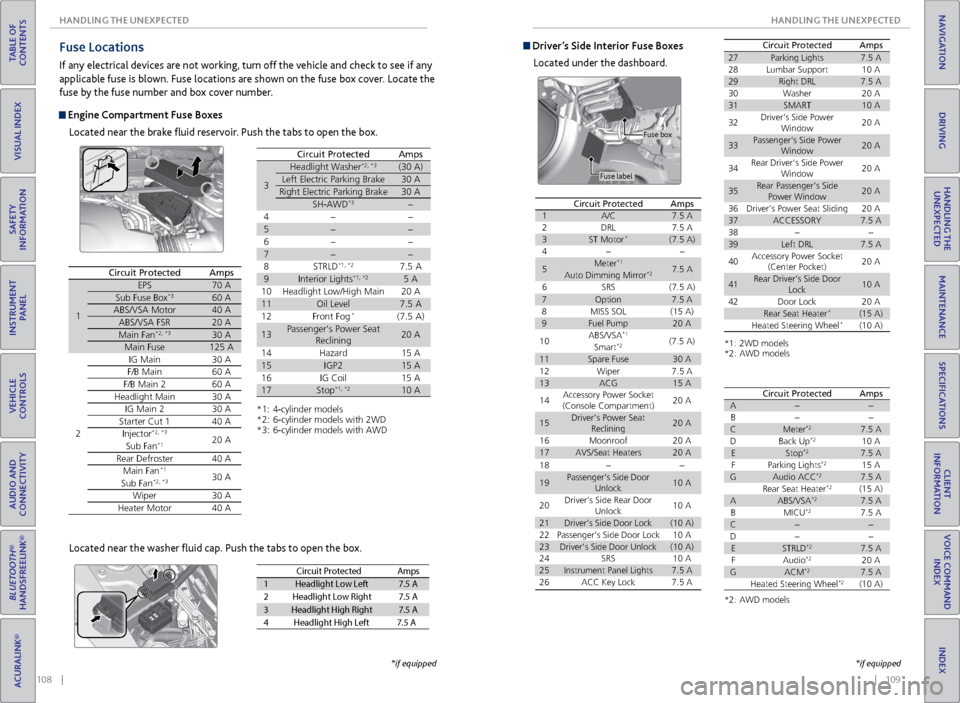
Fuse Locations
If any electrical devices are not working, turn off the vehicle and check to see if any
applicable fuse is blown. Fuse locations are shown on the fuse box cover. Locate the
fuse by the fuse number and box cover number.
Engine Compartment Fuse Boxes
Located near the brake fluid reservoir. Push the tabs to open the box.
Circuit ProtectedAmps
1
EPS70 ASub Fuse Bo x*360 AABS/VSA Motor40 AABS/VSA FSR20 AMain Fa n*2, *330 AMain Fuse125 A
2
IG Mai n30 AF/B Mai n60 AF/B Main 260 AHeadlight Main30 AIG Main 230 AStarter Cut 140 AInjector*2, *320 ASub Fan*1
Rear Defroster40 AMain Fa n*130 ASub Fa n*2, *3
Wiper30 AHeater Motor40 A
*1: 4-cylinder model s*2: 6-cylinder models with 2W D*3: 6-cylinder models with AW D
3
Headlight Washer*2, *3(30 A)
Left Electric Parking Brake30 A
Right Electric Parking Brake30 A
SH-AWD*3
4
5
6
7
8S TRLD*1, *27.5 A
9Interior Lights*1, *25 A
10 Headlight Low/High Main 20 A
11Oil Level7.5 A
12 Front Fog*(7.5 A)
13Passenger’s Power Seat
Reclinin g20 A
14 Hazard 15 A
15IGP215 A
16 IG Coil 15 A
17Stop*1, *210 A
Circuit ProtectedAmps
Located near the washer fluid cap. Push the tabs to open the box.
Circuit Protecte dAmps
1Headlight Low Lef t7.5 A
2Headlight Low Right7.5 A
3Headlight High Right7.5 A
4H eadlight High Left 7.5 A
*if equipped
Driver’s Side Interior Fuse Boxes
Located under the dashboard.
Fuse label Fuse box
Circuit ProtectedAmps1A/C7.5
A2DRL7.5 A3ST Motor*(7.5 A)4
5Meter*17.5 AAuto Dimming Mirror*2
6SRS(7.5 A)7Option7.5 A8MISS SO L(15 A)9Fuel Pump20 A
10ABS/VSA*1(7.5 A)Smart*2
11Spare Fuse30 A
18
19Passenger’s Side Door
Unlock10 A
20Driver’s Side Rear Door
Unlock10 A
21Driver’s Side Door Lock(10 A)22Passenger’s Side Door Lock10 A23Driver’s Side Door Unlock(10 A)24SRS10 A25Instrument Panel Lights7.5 A26ACC Key Lock7.5 A
12Wiper7.5 A13ACG15 A
14Accessory Power Socket
(Console Compartment)20 A
15Driver’s Power Seat
Reclinin g20 A
16Moonroo f20 A17AVS/Seat Heaters20 A
Circuit ProtectedAmps
*1: 2WD models*2: AWD models
27Parking Lights7.5 A28Lumbar Suppor t10 A29Right DRL7.5 A30Washer20 A31SMART10 A
32Driver’s Side Power
Window20 A
33Passenger’s Side Power
Window20 A
34Rear Driver’s Side Power
Window20 A
35Rear Passenger’s Side
Power Window20 A
36Driver’s Power Seat Sliding20 A37ACCESSORY7.5 A3839Left DRL7.5 A
40Accessory Power Socket
(Center Pocket )20 A
41Rear Driver’s Side Door
Lock10 A
42Door Lock20 ARear Seat Heater*(15 A)Heated Steering Wheel*(10 A)
*2: AWD models
Circuit Protecte dAmpsA
B
CMeter*27.5 A
DB ack Up*210 AEStop*27.5 A
F Parking Lights*215 AGAudio ACC*27.5 A
Rear Seat Heater*2(15 A)AABS/VSA*27.5 A
BM ICU*27.5 AC
D
ESTRLD*27.5 A
FA udio*220 AGACM*27.5 A
Heated Steering Wheel*2(10 A)
*if equipped
Page 60 of 75
112 || 113
MAINTENANCE
MAINTENANCE
TABLE OF
CONTENTS
INDEX
VISUAL INDEX
VOICE COMMAND INDEX
SAFETY
INFORMATION
CLIENT
INFORMATION
INSTRUMENT PANEL
SPECIFICATIONS
VEHICLE
CONTROLS
MAINTENANCE
AUDIO AND
CONNECTIVITY
HANDLING THE UNEXPECTED
BLUETOOTH®
HANDSFREELINK®
DRIVING
ACURALINK®
NAVIGATION
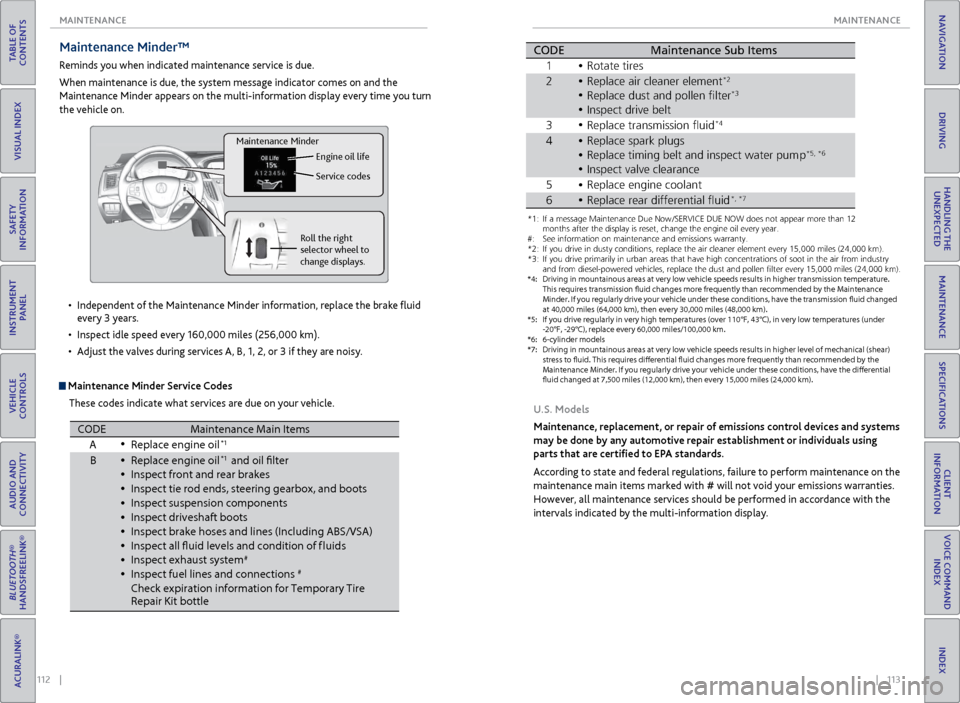
Maintenance Minder™
Reminds you when indicated maintenance service is due.
When maintenance is due, the system message indicator comes on and the
Maintenance Minder appears on the multi-information display every time you turn
the vehicle on.
Maintenance Minder Service Codes
These codes indicate what services are due on your vehicle.
•
Independent of the Maintenance Minder information, replace the brake fluid
every 3 years.
• Inspect idle speed every 160,000 miles (256,000 km).
• Adjust the valves during services A, B, 1, 2, or 3 if they are noisy.
Roll the right
selector wheel to
change displays. Engine oil life
Service codes
Maintenance Minder
CODEMaintenance Main Items
A Replace engine oi l*1
BReplace engine oi l*1 and oil flter
\fnspect front and re\rar bra\bes
\fnspect tie rod end\rs, steering gearbox,\r and boots
\fnspect suspension \rcomponent s
\fnspect driveshaft b\root s
\fnspect bra\be hoses \rand lines (\fncludin\rg ABS/VSA)
\fnspect all fuid le\rvels and condition\r of f luids
\fnspect exhaust sys\rte m
#
\fnspect fuel lines \rand connections#
Chec\b expiration in\rformation for Tempora\rry Tire
Repair Kit bottl e
*1:I f a message Maintenance Due Now /SERVICE DUE NOW does not appear m\hore than 1\f months
after the display is\h reset\b change the e\hngine oil every year\h.
*\f: If you drive in dus\hty conditions\b repla\hce the air cleaner \helement every 15\b000\h miles (\f4\b000 km) .
*3: If you drive primar\hily in urban areas \hthat have high conce\hntrations of soot \hin the air from ind\hustry and
from diesel-powered\h vehicles\b replace t\hhe dust and pollen f\hlter every 15\b000 mi\hles (\f4\b000 km) .
*4: Driving in mountai\hnous areas at very \hlow vehicle speeds r\hesults in higher tra\hnsmission temperat\hure.
This requires trans\hmission fuid change\hs more frequently t\hhan recommended by \hthe Maintenance
Minder. If you regularly drive your vehicle under these conditions\b have the transmission fuid changed
at 40\b000 miles (64\b0\h00 km)\b then every 3\h0\b000 miles (48\b000 k\hm) .
*5: If you drive regula\hrly in very high temp\heratures (over 110\h°F\b 43°C)\b in very lo\hw temperatures (un\hder
-\f0°F\b -\f9°C)\b replac\he every 60\b000 miles\h/100\b000 km.
*6: 6-cylinder models
CODE Maintenance Sub Items
1 Rotate tires
2 Replace air cleaner\r element
*2
Replace dust and p\rollen flter*3
3Replace transmissio\rn fui d*4
4Replace spar\b plugs\r
Replace timing belt\r and inspect water \rpump*5 *6
\fnspect valve clear\rance
5 Replace engine coo\rlan t
•
•
•
•
•
•
•
•
•
•
•
•
•
\fnspect drive belt•
•
•
•
•
•
*1: If a message Maint\Nenance Due N\fw /SE\bVICE DUE NOW d\fes n\N\ft appear m\fre than 1\N2 m\fnths after the disp\Nlay is reset, chang\Ne the engine \fil ev\Nery year .
#: See inf\frmati\fn \fn ma\Nintenance and emis\Nsi\fns warranty.
*2: If y\fu drive in dust\Ny c\fnditi\fns, replac\Ne the air cleaner el\Nement every 15,000 \Nmiles (24,000 km) .
*3: If y\fu drive primaril\Ny in urban areas tha\Nt have high c\fncent\Nrati\fns \ff s\f\ft in th\Ne air fr\fm industr y
and fr\fm diesel-p\fwe\Nred vehicles, replac\Ne the dust and p\fll\Nen flter every 15,00\N0 miles (24,000 km\N).
*4: Driving in mountai\ynous areas at very \y\fow vehic\fe s\beeds re\ysu\fts in higher tran\ysmission tem\beratur\ye.
This requires trans\ymission fuid change\ys more frequent\fy t\yhan recommended by t\yhe Maintenance
M inder. If you regu\far\fy drive your vehic\fe under these conditions, have the transmission fuid changed
at 40,000 mi\fes (64\y,000 km), then ever\yy 30,000 mi\fes (48,\y000 km).
*5: If you drive regu\fa\yr\fy in very high tem\b\yeratures (over 110\y°F, 43°C), in very \y\fow tem\beratures (u\ynder
-20°F, -29°C), re\b\f\yace every 60,000 mi\y\fes/100,000 km.
*6: 6-cy\finder mode\fs
*7: Driving in mountai\ynous areas at very \y\fow vehic\fe s\beeds re\ysu\fts in higher \feve\y\f of mechanica\f (shea\yr)
stress to fuid. Thi\ys requires diferen\ytia\f fuid changes mo\yre frequent\fy than r\yecommended by th e
M aintenance Minder. I\yf you regu\far\fy driv\ye your vehic\fe under\y these conditions, \yhave the diferentia\y\f
fuid changed at 7,5\y00 mi\fes (12,000 km\y), then every 15,00\y0 mi\fes (24,000 km)\y.
CODEMaintenance Sub Item s
1 \b\ftate tires
2\beplace air cleaner \Nelement*2
\beplace dust and p\f\Nllen flte r*3
Inspect drive belt
3 \beplace transmissi\fn\N fuid*4
4\beplace spark plugs
\beplace timing belt\N and inspect water \Npum p*5, *6
Inspect valve clea\Nrance
5 \beplace engine c\f\fla\Nnt
6\beplace rear differen\Ntial fui d*, *7
U.S. Models
Maintenance, replacement, or repair of emissions control devices and systems
may be done by any automotive repair establishment or individuals using
parts that are certified to EPA standards.
According to state and federal regulations, failure to perform maintenance on the
maintenance main items marked with # will not void your emissions warranties.
However, all maintenance services should be performed in accordance with the
intervals indicated by the multi-information display.
Page 62 of 75
116 || 117
MAINTENANCE
MAINTENANCE
TABLE OF
CONTENTS
INDEX
VISUAL INDEX
VOICE COMMAND INDEX
SAFETY
INFORMATION
CLIENT
INFORMATION
INSTRUMENT PANEL
SPECIFICATIONS
VEHICLE
CONTROLS
MAINTENANCE
AUDIO AND
CONNECTIVITY
HANDLING THE UNEXPECTED
BLUETOOTH®
HANDSFREELINK®
DRIVING
ACURALINK®
NAVIGATION
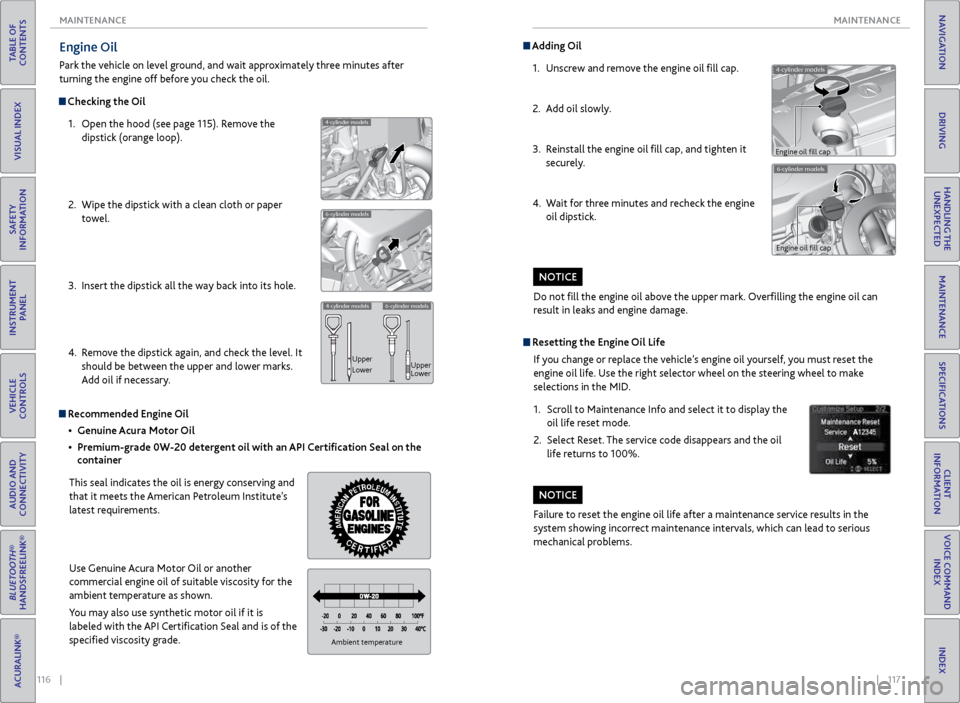
Engine Oil
Park the vehicle on level ground, and wait approximately three minutes after
turning the engine off before you check the oil.
Checking the Oil
1. Open the hood (see page 115). Remove the
dipstick (orange loop).
2. Wipe the dipstick with a clean cloth or paper
towel.
3. Insert the dipstick all the way back into its hole.
4. Remove the dipstick again, and check the level. It
should be between the upper and lower marks.
Add oil if necessary.
4-cylinder models
6-cylinder models
4-cylinder models6-cylinder models
Upper
Lower Upper
Lower
Recommended Engine Oil
• Genuine Acura Motor Oil
• Premium-grade 0W-20 detergent oil with an API Certification Seal on the
container
This seal indicates the oil is energy conserving and
that it meets the American Petroleum Institute’s
latest requirements.
Use Genuine Acura Motor Oil or another
commercial engine oil of suitable viscosity for the
ambient temperature as shown.
You may also use synthetic motor oil if it is
labeled with the API Certification Seal and is of the
specified viscosity grade.
Ambient temperature
Do not fill the engine oil above the upper mark. Overfilling the engine oil can
result in leaks and engine damage.
NOTICE
4-cylinder models
Adding Oil 1. Unscrew and remove the engine oil fill cap.
2. Add oil slowly.
3. Reinstall the engine oil fill cap, and tighten it
securely.
4. Wait for three minutes and recheck the engine
oil dipstick.
6-cylinder models
Engine oil fill cap
Engine oil fill cap
Resetting the Engine Oil Life
If you change or replace the vehicle’s engine oil yourself, you must reset the
engine oil life. Use the right selector wheel on the steering wheel to make
selections in the MID.
1. Scroll to Maintenance Info and select it to display the
oil life reset mode.
2. Select Reset. The service code disappears and the oil
life returns to 100%.
Failure to reset the engine oil life after a maintenance service results in the
system showing incorrect maintenance intervals, which can lead to serious
mechanical problems.
NOTICE
Page 64 of 75
120 || 121
MAINTENANCE
MAINTENANCE
TABLE OF
CONTENTS
INDEX
VISUAL INDEX
VOICE COMMAND INDEX
SAFETY
INFORMATION
CLIENT
INFORMATION
INSTRUMENT PANEL
SPECIFICATIONS
VEHICLE
CONTROLS
MAINTENANCE
AUDIO AND
CONNECTIVITY
HANDLING THE UNEXPECTED
BLUETOOTH®
HANDSFREELINK®
DRIVING
ACURALINK®
NAVIGATION
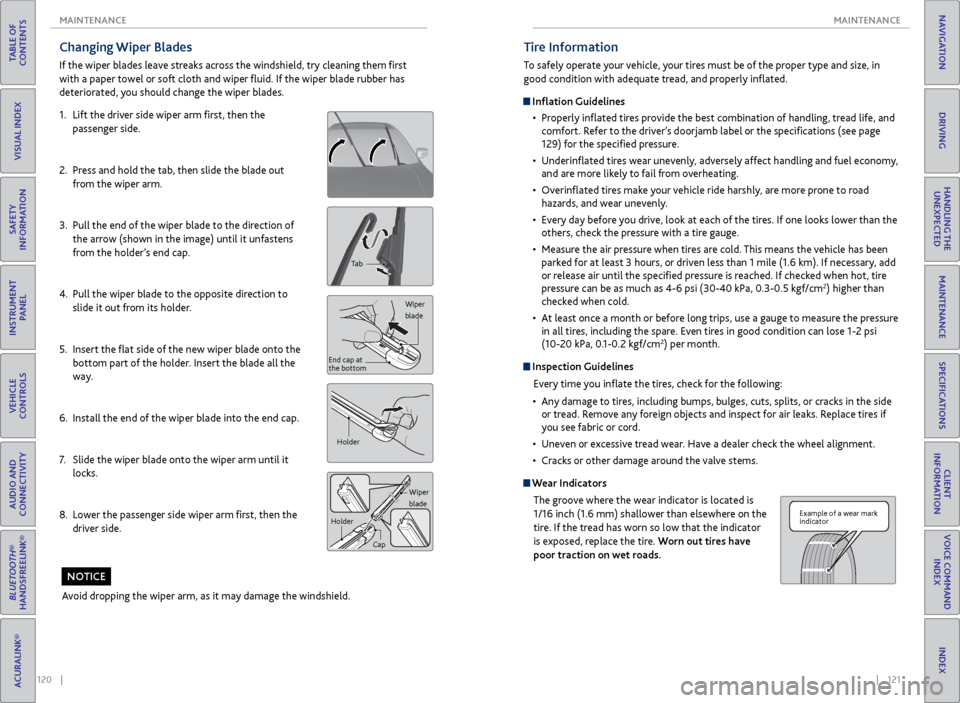
Changing Wiper Blades
If the wiper blades leave streaks across the windshield, try cleaning them first
with a paper towel or soft cloth and wiper fluid. If the wiper blade rubber has
deteriorated, you should change the wiper blades.
1. Lift the driver side wiper arm first, then the
passenger side.
2. Press and hold the tab, then slide the blade out
from the wiper arm.
3. Pull the end of the wiper blade to the direction of
the arrow (shown in the image) until it unfastens
from the holder’s end cap.
4. Pull the wiper blade to the opposite direction to
slide it out from its holder.
5. Insert the flat side of the new wiper blade onto the
bottom part of the holder. Insert the blade all the
way.
6. Install the end of the wiper blade into the end cap.
7. Slide the wiper blade onto the wiper arm until it
locks.
8. Lower the passenger side wiper arm first, then the
driver side.
Tab
Wiper
blade
End cap at
the bottom
Holder
Wiper
blade
Holder
Cap
Avoid dropping the wiper arm, as it may damage the windshield.
NOTICE
Tire Information
To safely operate your vehicle, your tires must be of the proper type and size, in
good condition with adequate tread, and properly inflated.
Inflation Guidelines• Properly inflated tires provide the best combination of handling, tread life, and
comfort. Refer to the driver’s doorjamb label or the specifications (see page
129) for the specified pressure.
• Underinflated tires wear unevenly, adversely affect handling and fuel economy,
and are more likely to fail from overheating.
• Overinflated tires make your vehicle ride harshly, are more prone to road
hazards, and wear unevenly.
• Every day before you drive, look at each of the tires. If one looks lower than the
others, check the pressure with a tire gauge.
• Measure the air pressure when tires are cold. This means the vehicle has been
parked for at least 3 hours, or driven less than 1 mile (1.6 km). If necessary, add
or release air until the specified pressure is reached. If checked when hot, tire
pressure can be as much as 4-6 psi (30-40 kPa, 0.3-0.5 kgf/cm
2) higher than
checked when cold.
• At least once a month or before long trips, use a gauge to measure the pressure
in all tires, including the spare. Even tires in good condition can lose 1-2 psi
(10-20 kPa, 0.1-0.2 kgf/cm
2) per month.
Inspection Guidelines
Every time you inflate the tires, check for the following:
• Any damage to tires, including bumps, bulges, cuts, splits, or cracks in the side
or tread. Remove any foreign objects and inspect for air leaks. Replace tires if
you see fabric or cord.
• Uneven or excessive tread wear. Have a dealer check the wheel alignment.
• Cracks or other damage around the valve stems.
Wear Indicators
The groove where the wear indicator is located is
1/16 inch (1.6 mm) shallower than elsewhere on the
tire. If the tread has worn so low that the indicator
is exposed, replace the tire. Worn out tires have
poor traction on wet roads.
Example of a wear mark
indicator