change time Acura TLX 2015 Owner's Guide
[x] Cancel search | Manufacturer: ACURA, Model Year: 2015, Model line: TLX, Model: Acura TLX 2015Pages: 75, PDF Size: 24.55 MB
Page 2 of 75
DISCLOSURES
Devices That Emit Radio WavesThe following products and systems on your vehicle emit radio waves when in
operation:
• AcuraLink® • HomeLink® Universal Transceiver
• Audio system • Immobilizer system
• Blind Spot Information (BSI)* • Keyless Access System
• Bluetooth® Audio • Remote transmitter
• Bluetooth® HandsFreeLink® • Tire Pressure Monitoring System
• Collision Mitigation Braking System
TM (CMBS)*
Each of the above complies with the appropriate requirements or the required
standards of FCC (Federal Communications Commission) and Industry Canada,
described below:
As required by the FCC:
This device complies with Part 15 of the FCC rules. Operation is subject to the
following two conditions: (1) This device may not cause harmful interference, and
(2) this device must accept any interference received, including interference that
may cause undesired operation.
Changes or modifications not expressly approved by the party responsible for
compliance could void the user’s authority to operate the equipment.
As required by Industry Canada:
This device complies with Industry Canada Standard RSS-Gen/210/310. Operation is
subject to the following two conditions: (1) this device may not cause interference,
and (2) this device must accept any interference, including interference that may
cause undesired operation of the device.
California Perchlorate Contamination Prevention Act The airbags, seat belt tensioners, and CR-type batteries in this vehicle may
contain perchlorate materials — special handling may apply. See www.dtsc.
ca.gov/hazardouswaste/perchlorate/ for more information.
California Proposition 65 WarningWARNING: This product contains or emits chemicals known to the state of
California to cause cancer and birth defects or other reproductive harm.
Event Data RecordersThis vehicle is equipped with an event data recorder (EDR). The main purpose
of an EDR is to record, in certain crash or near crash-like situations, such as an air
bag deployment or hitting a road obstacle, data that will assist in understanding
how a vehicle’s systems performed. The EDR is designed to record data related
to vehicle dynamics and safety systems for a short period of time, typically 30
seconds or less. The EDR in this vehicle is designed to record such data as:
• How various systems in your vehicle were operating;
• Whether or not the driver and passenger safety belts were buckled/
fastened;
• How far (if at all) the driver was depressing the accelerator and/or brake
pedal; and,
• How fast the vehicle was traveling.
These data can help provide a better understanding of the circumstances in which
crashes and injuries occur. NOTE: EDR data are recorded by your vehicle only if a
non-trivial crash situation occurs; no data are recorded by the EDR under normal
driving conditions and no personal data (e.g., name, gender, age, and crash
location) are recorded. However, other parties, such as law enforcement, could
combine the EDR data with the type of personally identifying data routinely
acquired during a crash investigation.
To read data recorded by an EDR, special equipment is required, and access to
the vehicle or the EDR is needed. In addition to the vehicle manufacturer, other
parties such as law enforcement that have the special equipment can read the
information if they have access to the vehicle or the EDR.
The data belong to the vehicle owner and may not be accessed by anyone else
except as legally required or with the permission of the vehicle owner.
Service Diagnostic Recorders This vehicle is equipped with service-related devices that record information
about powertrain performance. The data can be used to verify emissions law
requirements and/or help technicians diagnose and solve service problems. It
may also be combined with data from other sources for research purposes, but it
remains confidential.
TABLE OF
CONTENTS
INDEX
VISUAL INDEX
VOICE COMMAND INDEX
SAFETY
INFORMATION
CLIENT
INFORMATION
INSTRUMENT PANEL
SPECIFICATIONS
VEHICLE
CONTROLS
MAINTENANCE
AUDIO AND
CONNECTIVITY
HANDLING THE UNEXPECTED
BLUETOOTH®
HANDSFREELINK®
DRIVING
ACURALINK®
NAVIGATION
Page 6 of 75
4 || 5
SAFETY
SAFETY
TABLE OF
CONTENTS
INDEX
VISUAL INDEX
VOICE COMMAND INDEX
SAFETY
INFORMATION
CLIENT
INFORMATION
INSTRUMENT PANEL
SPECIFICATIONS
VEHICLE
CONTROLS
MAINTENANCE
AUDIO AND
CONNECTIVITY
HANDLING THE UNEXPECTED
BLUETOOTH®
HANDSFREELINK®
DRIVING
ACURALINK®
NAVIGATION
Carbon Monoxide Gas
The engine exhaust from this vehicle contains carbon monoxide, a colorless,
odorless, and highly toxic gas. As long as you properly maintain your vehicle and
follow the instructions set forth below, you will not accumulate dangerous levels
of carbon monoxide gas in the vehicle interior.
Have the exhaust system inspected for leaks whenever:
• The exhaust system is making an unusual noise.
• The exhaust system may have been damaged.
• The vehicle is raised for an oil change.
When you operate a vehicle with the trunk open, airflow can pull exhaust gas into
the interior and create a hazardous condition. If you must drive with the trunk
open, open all the windows and set the climate control system as shown below.
1. Select the fresh air mode.
2. Select the
mode.
3. Set the fan speed to high.
4. Set the temperature control to a comfortable setting.
Adjust the climate control system in the same manner if you sit in your parked
vehicle with the engine running.
Carbon monoxide gas is toxic. Breathing it can cause unconsciousness and
even kill you.
Avoid any enclosed areas or activities that expose you to carbon monoxide.
WARNING
An enclosed area such as a garage can quickly fill up with carbon monoxide gas.
Do not run the engine with the garage door closed. Even when the garage door is
open, drive out of the garage immediately after starting the engine.
Seat Belts
A seat belt is your best protection in all types of collisions. Airbags are designed to
supplement seat belts, not replace them. So even though your vehicle is equipped
with airbags, make sure you and your passengers always wear your seat belts and
wear them properly.
Lap/Shoulder Seat BeltsAll five seating positions are equipped with lap/shoulder seat belts with
emergency locking retractors. In normal driving, the retractor lets you move
freely while keeping some tension on the belt. During a collision or sudden stop,
the retractor locks to restrain your body. The front passenger’s and rear seat belts
also have a lockable retractor for use with child seats.
The front seats are equipped with automatic seat belt tensioners to enhance
safety. The tensioners automatically tighten the front seat belts during a
moderate-to-severe front collision, sometimes even if the collision is not severe
enough to inflate the front airbags or the driver’s knee airbag.
Proper Use of Seat BeltsFollow these guidelines for proper use:
• All occupants should sit upright, well back in the seat, and remain in that
position for the duration of the trip. Slouching and leaning reduces the
effectiveness of the belt and can increase the chance of serious injury in a crash.
• Never place the shoulder part of a lap/shoulder seat belt under your arm or
behind your back. This could cause very serious injuries in a crash.
• Two people should never use the same seat belt. If they do, they could be very
seriously injured in a crash.
• Do not put any accessories on the seat belts. Devices intended to improve
comfort or reposition the shoulder part of a seat belt can reduce the protective
capability and increase the chance of serious injury in a crash.
• No one should sit in a seat with an inoperative seat belt or one that does not
appear to be working correctly. Using a seat belt that is not working properly
may not protect the occupant in a crash. Have a dealer check the belt as soon
as possible.
Not wearing a seat belt properly increases the chance of a serious injury or
death in a crash, even though your vehicle has airbags.
Be sure you and your passengers always wear seat belts and wear them
properly.
WARNING
Page 17 of 75
26 || 27
VEHICLE CONTROLS
INSTRUMENT P ANEL
TABLE OF
CONTENTS
INDEX
VISUAL INDEX
VOICE COMMAND INDEX
SAFETY
INFORMATION
CLIENT
INFORMATION
INSTRUMENT PANEL
SPECIFICATIONS
VEHICLE
CONTROLS
MAINTENANCE
AUDIO AND
CONNECTIVITY
HANDLING THE UNEXPECTED
BLUETOOTH®
HANDSFREELINK®
DRIVING
ACURALINK®
NAVIGATION
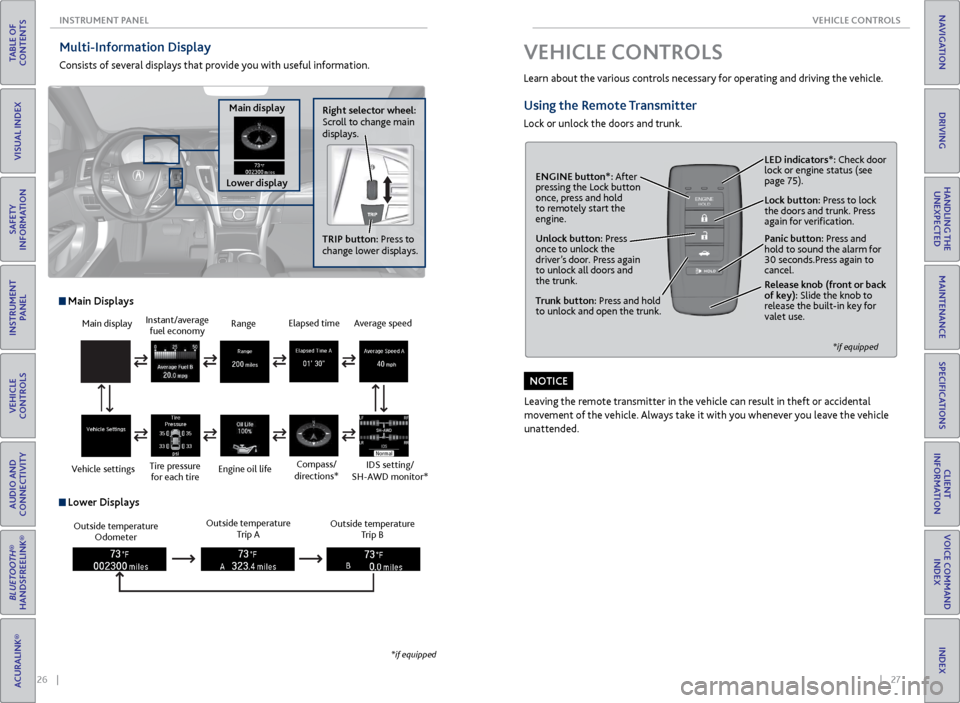
Multi-Information Display
Consists of several displays that provide you with useful information.
Right selector wheel:
Scroll to change main
displays.
Main display
Lower display TRIP button: Press to
change lower displays.
Main display
Vehicle settings Instant/average
fuel economy
Tire pressure for each tire Range
Engine oil life
Main Displays
Outside temperature Odometer Outside temperature
Trip A Outside temperature
Trip B
Lower Displays
Elapsed time
Compass/
directions*Average speed
IDS setting/
SH-AWD monitor*
*if equipped
VEHICLE CONTROLS
Learn about the various controls necessary for operating and driving the vehicle.
Using the Remote Transmitter
Lock or unlock the doors and trunk.
Unlock button: Press
once to unlock the
driver’s door. Press again
to unlock all doors and
the trunk.
Release knob (front or back
of key): Slide the knob to
release the built-in key for
valet use.
*if equipped
Trunk button: Press and hold
to unlock and open the trunk.Lock button: Press to lock
the doors and trunk. Press
again for verification. LED indicators*: Check door
lock or engine status (see
page 75).
Panic button: Press and
hold to sound the alarm for
30 seconds.Press again to
cancel.
ENGINE button*: After
pressing the Lock button
once, press and hold
to remotely start the
engine.
Leaving the remote transmitter in the vehicle can result in theft or accidental
movement of the vehicle. Always take it with you whenever you leave the vehicle
unattended.
NOTICE
Page 20 of 75
32 || 33
VEHICLE CONTROLS
VEHICLE CONTROLS
TABLE OF
CONTENTS
INDEX
VISUAL INDEX
VOICE COMMAND INDEX
SAFETY
INFORMATION
CLIENT
INFORMATION
INSTRUMENT PANEL
SPECIFICATIONS
VEHICLE
CONTROLS
MAINTENANCE
AUDIO AND
CONNECTIVITY
HANDLING THE UNEXPECTED
BLUETOOTH®
HANDSFREELINK®
DRIVING
ACURALINK®
NAVIGATION
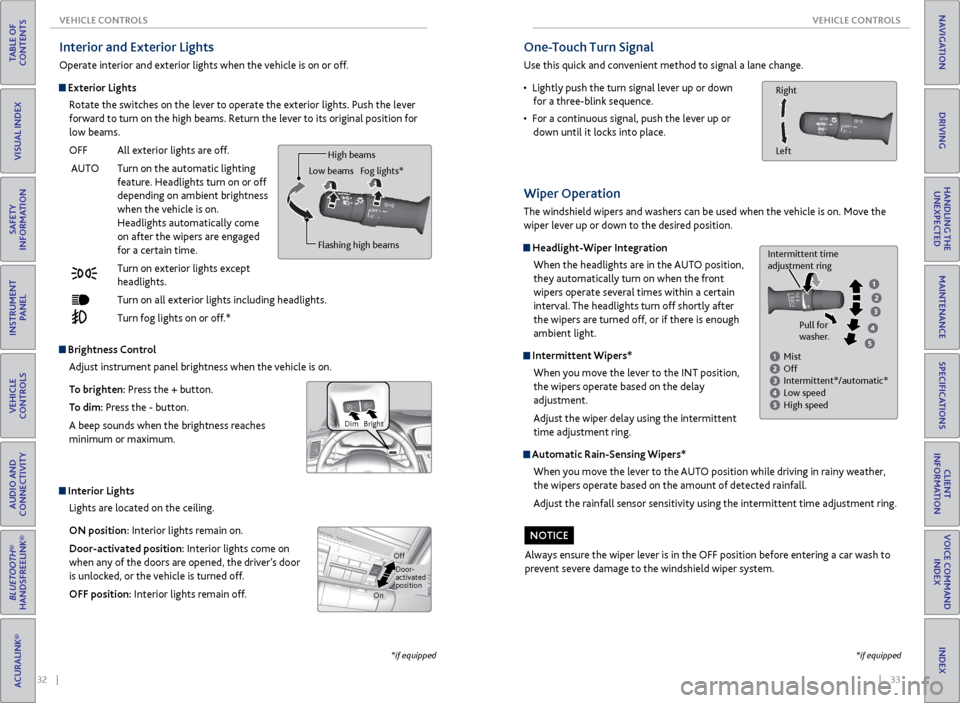
Interior and Exterior Lights
Operate interior and exterior lights when the vehicle is on or off.
Exterior Lights
Rotate the switches on the lever to operate the exterior lights. Push the lever
forward to turn on the high beams. Return the lever to its original position for
low beams.
OFF All exterior lights are off.
AUTO Turn on the automatic lighting
feature. Headlights turn on or off
depending on ambient brightness
when the vehicle is on.
Headlights automatically come
on after the wipers are engaged
for a certain time.
Turn on exterior lights except
headlights.
Turn on all exterior lights including headlights.
Turn fog lights on or off.*
Brightness Control
Adjust instrument panel brightness when the vehicle is on.
To brighten: Press the + button.
To dim: Press the - button.
A beep sounds when the brightness reaches
minimum or maximum.
Bright
Dim
Interior Lights
Lights are located on the ceiling.
ON position: Interior lights remain on.
Door-activated position: Interior lights come on
when any of the doors are opened, the driver’s door
is unlocked, or the vehicle is turned off.
OFF position: Interior lights remain off.
Door-
activated
position
On
Off
Flashing high beams
Low beams
High beams
Fog lights*
*if equipped
One-Touch Turn Signal
Use this quick and convenient method to signal a lane change.
• Lightly push the turn signal lever up or down
for a three-blink sequence.
• For a continuous signal, push the lever up or
down until it locks into place.
Right
Left
*if equipped
Wiper Operation
The windshield wipers and washers can be used when the vehicle is on. Move the
wiper lever up or down to the desired position.
Headlight-Wiper Integration
When the headlights are in the AUTO position,
they automatically turn on when the front
wipers operate several times within a certain
interval. The headlights turn off shortly after
the wipers are turned off, or if there is enough
ambient light.
Intermittent Wipers*When you move the lever to the INT position,
the wipers operate based on the delay
adjustment.
Adjust the wiper delay using the intermittent
time adjustment ring.
Automatic Rain-Sensing Wipers*
When you move the lever to the AUTO position while driving in rainy weather,
the wipers operate based on the amount of detected rainfall.
Adjust the rainfall sensor sensitivity using the intermittent time adjustment ring.
Always ensure the wiper lever is in the OFF position before entering a car wash to
prevent severe damage to the windshield wiper system.
Mist
Off
Intermittent*/automatic*
Low speed
High speed
Intermittent time
adjustment ring
Pull for
washer.
NOTICE
Page 24 of 75
40 || 41
VEHICLE CONTROLS
VEHICLE CONTROLS
TABLE OF
CONTENTS
INDEX
VISUAL INDEX
VOICE COMMAND INDEX
SAFETY
INFORMATION
CLIENT
INFORMATION
INSTRUMENT PANEL
SPECIFICATIONS
VEHICLE
CONTROLS
MAINTENANCE
AUDIO AND
CONNECTIVITY
HANDLING THE UNEXPECTED
BLUETOOTH®
HANDSFREELINK®
DRIVING
ACURALINK®
NAVIGATION
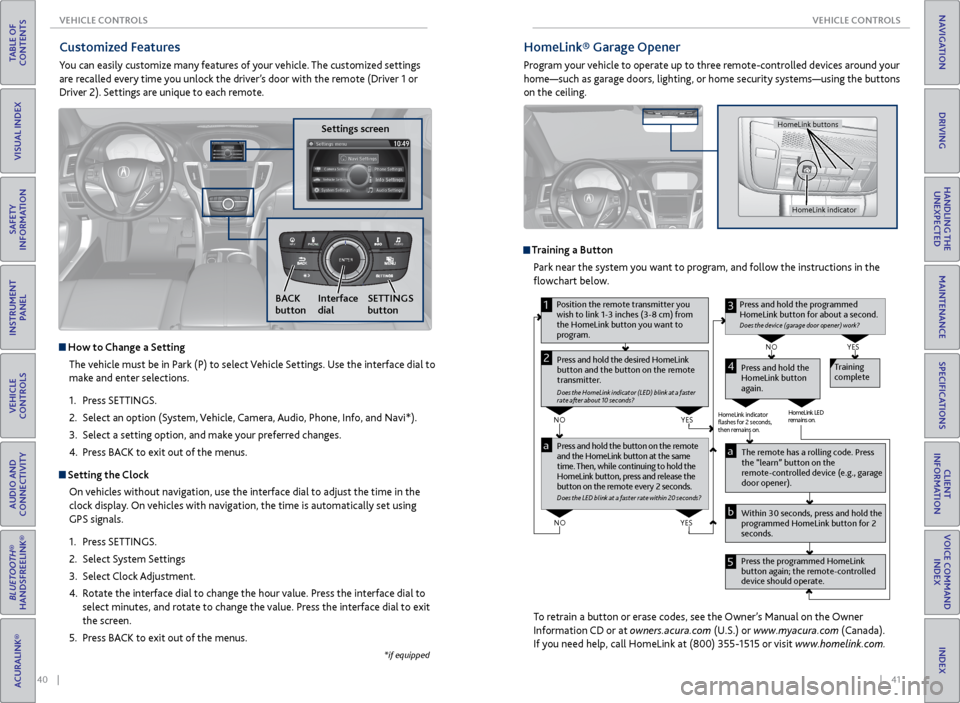
HomeLink® Garage Opener
Program your vehicle to operate up to three remote-controlled devices around your
home—such as garage doors, lighting, or home security systems—using the buttons
on the ceiling.
Training a Button
Park near the system you want to program, and follow the instructions in the
flowchart below.
To retrain a button or erase codes, see the Owner’s Manual on the Owner
Information CD or at owners.acura.com (U.S.) or www.myacura.com (Canada).
If you need help, call HomeLink at (800) 355-1515 or visit www.homelink.com.
Pr ess and hold the button on the r emote
and the HomeLink button at the same
time. Then, while continuing to hold the
HomeLink button, pr ess and release the
button on the r emote every 2 seconds.
Does the LED blink at a f ast er ra te within 20 seconds ?
Press and hold the
HomeLink button
again. T
raining
complete
YES
NO
HomeLink indicator
ashes for 2 seconds,
then rem ains on. HomeLink LED
r
emains on.YES
NO
YES
NO
1
Pr ess and hold the desir ed HomeLink
button and the button on the r emote
transmitter .
Does the HomeLink indicat or (LED) blink at a f ast er
rate after about 10 seconds ?
2
aThe remote has a ro lling code. Press
the “learn” button on the
r emote-contr olled device (e.g., garage
door opener).
Pr ess the pr ogrammed HomeLink
button again; the remote-contr olled
device should operate.
Within 30 seconds, pr
ess and hold the
pr ogrammed HomeLink button for 2
seconds.a
Pr ess and hold the programmed
HomeLink button for about a second.
Does the devic e (garage door opener) work?
3
b
4
5
Position the remote transmitter you
wish to link 1-3 inches (3-8 cm) from
the HomeLink button you want to
pr ogram.
HomeLink indicator
HomeLink buttons
Customized Features
You can easily customize many features of your vehicle. The customized settings
are recalled every time you unlock the driver’s door with the remote (Driver 1 or
Driver 2). Settings are unique to each remote.
Settings screen
NAVAUDI OAUDIONAV
How to Change a Setting
The vehicle must be in Park (P) to select Vehicle Settings. Use the interface dial to
make and enter selections.
1. Press SETTINGS.
2. Select an option (System, Vehicle, Camera, Audio, Phone, Info, and Navi*).
3. Select a setting option, and make your preferred changes.
4. Press BACK to exit out of the menus.
Setting the Clock
On vehicles without navigation, use the interface dial to adjust the time in the
clock display. On vehicles with navigation, the time is automatically set using
GPS signals.
1. Press SETTINGS.
2. Select System Settings
3. Select Clock Adjustment.
4. Rotate the interface dial to change the hour value. Press the interface dial to
select minutes, and rotate to change the value. Press the interface dial to exit
the screen.
5. Press BACK to exit out of the menus.
SETTINGS
button
BACK
button Interface
dial
*if equipped
Page 47 of 75

86 || 87
DRIVING
DRIVING
TABLE OF
CONTENTS
INDEX
VISUAL INDEX
VOICE COMMAND INDEX
SAFETY
INFORMATION
CLIENT
INFORMATION
INSTRUMENT PANEL
SPECIFICATIONS
VEHICLE
CONTROLS
MAINTENANCE
AUDIO AND
CONNECTIVITY
HANDLING THE UNEXPECTED
BLUETOOTH®
HANDSFREELINK®
DRIVING
ACURALINK®
NAVIGATION
When in Operation
If a vehicle detected ahead of you slows down
abruptly, or if another vehicle cuts in front of
you, a beep sounds and BRAKE appears on the
multi-information display to alert you.
When a vehicle detected ahead is within ACC
with low speed follow range and stops, your
vehicle also stops. The Stopped message
appears on the multi-information display.
When the vehicle ahead of you starts again, the vehicle icon on the multi-
information display blinks. Press RES/+/SET/– up or down, or press the
accelerator pedal to resume the prior set speed.
Canceling ACCYou can press CANCEL or MAIN, or press the brake
pedal. The ACC indicator goes off.
Certain conditions may cause ACC to cancel
automatically. When this happens, a beep sounds
and a message appears on the multi-information
display.
After cruise control has been canceled, you can still
resume the prior set speed by pressing RES/ACCEL.
Improper use of ACC with LSF can lead to a crash.
Use ACC with LSF only when driving on expressways or freeways and in good
weather conditions.
WARNING
Exiting a vehicle that has been stopped while the ACC with LSF system is
operating can result in the vehicle moving without operator control. Always
make sure Park (P) is selected before exiting the vehicle.
A vehicle that moves without operator control can cause a crash, resulting in
serious injury or death.
Never exit a vehicle when the vehicle is stopped by ACC with LSF.
WARNING
ACC with LSF has limited braking capability and may not stop your vehicle in
time to avoid a collision with a vehicle that quickly stops in front of you.
Always be prepared to apply the brake pedal if the conditions require.
WARNING
Adaptive Cruise Control (ACC) with Low Speed Follow (LSF)*
Helps maintain a constant vehicle speed and a set following distance behind a
vehicle detected ahead of yours. When the vehicle ahead changes speed, ACC
senses the change and accelerates or decelerates to maintain a set interval.
MAIN button
RES/+ button
SET/- button
CANCEL button
Distance button
Activating and Setting the Vehicle Speed
1. Press MAIN. The ACC indicator appears.
2. Accelerate to the desired speed.
Above 25 mph (40 km/h): Press RES/+/SET/- and
take your foot off the pedal to set the speed
Below 25 mph (40 km/h) (Low Speed Follow):
Press SET/- to set the speed at 25 mph (40
km/h) or below.
Adjusting the Vehicle Speed Press RES/+ to increase or SET/- to decrease.
Each time you press the switch up or down, the
vehicle speed is increased or decreased by about 1
mph (1 km/h). If you keep the switch pressed up or
down, the vehicle speed increases or decreases by
10 mph (16 km/h) until you release it.
Adjusting the Vehicle Distance Press the Distance button to change the following
distance. Each time you press the button, the
following distance setting cycles through short,
middle, long, and extra long following distances.
Switching to Standard Cruise ControlPress and hold the Distance button.
*if equipped
Page 55 of 75
102 || 103
HANDLING THE UNEXPECTED
HANDLING THE UNEXPECTED
TABLE OF
CONTENTS
INDEX
VISUAL INDEX
VOICE COMMAND INDEX
SAFETY
INFORMATION
CLIENT
INFORMATION
INSTRUMENT PANEL
SPECIFICATIONS
VEHICLE
CONTROLS
MAINTENANCE
AUDIO AND
CONNECTIVITY
HANDLING THE UNEXPECTED
BLUETOOTH®
HANDSFREELINK®
DRIVING
ACURALINK®
NAVIGATION
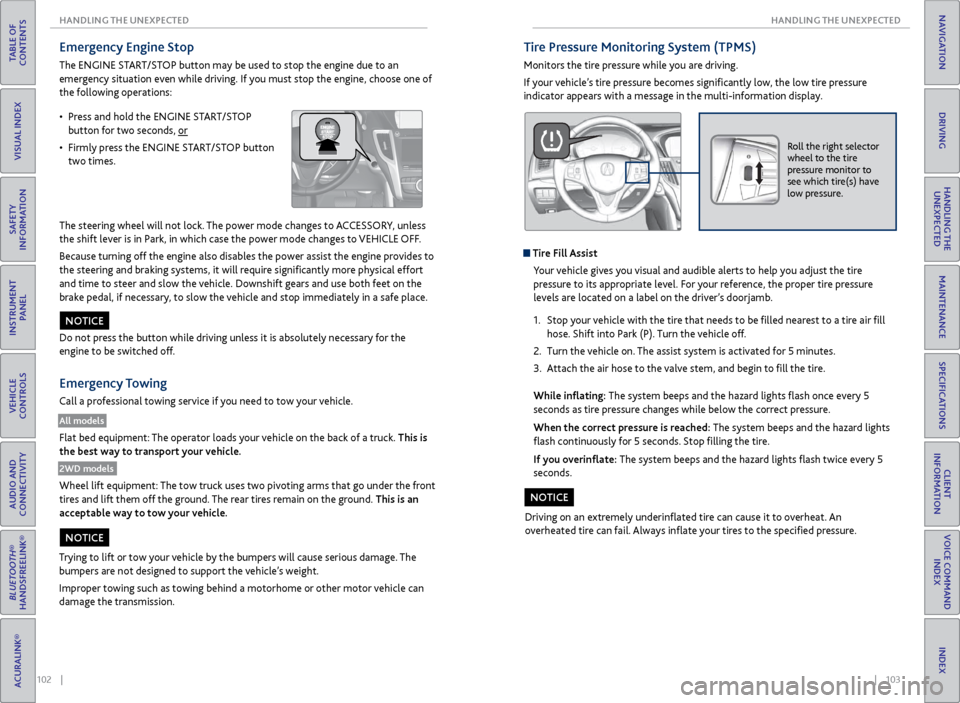
Emergency Engine Stop
The ENGINE START/STOP button may be used to stop the engine due to an
emergency situation even while driving. If you must stop the engine, choose one of
the following operations:
The steering wheel will not lock. The power mode changes to ACCESSORY, unless
the shift lever is in Park, in which case the power mode changes to VEHICLE OFF.
Because turning off the engine also disables the power assist the engine provides to
the steering and braking systems, it will require significantly more physical effort
and time to steer and slow the vehicle. Downshift gears and use both feet on the
brake pedal, if necessary, to slow the vehicle and stop immediately in a safe place.
Do not press the button while driving unless it is absolutely necessary for the
engine to be switched off.
Emergency Towing
Call a professional towing service if you need to tow your vehicle.
All models
Flat bed equipment: The operator loads your vehicle on the back of a truck. This is
the best way to transport your vehicle.
2WD models
Wheel lift equipment: The tow truck uses two pivoting arms that go under the front
tires and lift them off the ground. The rear tires remain on the ground. This is an
acceptable way to tow your vehicle.
NOTICE
Trying to lift or tow your vehicle by the bumpers will cause serious damage. The
bumpers are not designed to support the vehicle’s weight.
Improper towing such as towing behind a motorhome or other motor vehicle can
damage the transmission.
NOTICE
• Press and hold the ENGINE START/STOP
button for two seconds, or
• Firmly press the ENGINE START/STOP button
two times.
Tire Pressure Monitoring System (TPMS)
Monitors the tire pressure while you are driving.
If your vehicle’s tire pressure becomes significantly low, the low tire pressure
indicator appears with a message in the multi-information display.
Roll the right selector
wheel to the tire
pressure monitor to
see which tire(s) have
low pressure.
Tire Fill Assist
Your vehicle gives you visual and audible alerts to help you adjust the tire
pressure to its appropriate level. For your reference, the proper tire pressure
levels are located on a label on the driver’s doorjamb.
1. Stop your vehicle with the tire that needs to be filled nearest to a tire air fill
hose. Shift into Park (P). Turn the vehicle off.
2. Turn the vehicle on. The assist system is activated for 5 minutes.
3. Attach the air hose to the valve stem, and begin to fill the tire.
While inflating: The system beeps and the hazard lights flash once every 5
seconds as tire pressure changes while below the correct pressure.
When the correct pressure is reached: The system beeps and the hazard lights
flash continuously for 5 seconds. Stop filling the tire.
If you overinflate: The system beeps and the hazard lights flash twice every 5
seconds.
Driving on an extremely underinflated tire can cause it to overheat. An
overheated tire can fail. Always inflate your tires to the specified pressure.
NOTICE
Page 57 of 75
106 || 107
HANDLING THE UNEXPECTED
HANDLING THE UNEXPECTED
TABLE OF
CONTENTS
INDEX
VISUAL INDEX
VOICE COMMAND INDEX
SAFETY
INFORMATION
CLIENT
INFORMATION
INSTRUMENT PANEL
SPECIFICATIONS
VEHICLE
CONTROLS
MAINTENANCE
AUDIO AND
CONNECTIVITY
HANDLING THE UNEXPECTED
BLUETOOTH®
HANDSFREELINK®
DRIVING
ACURALINK®
NAVIGATION
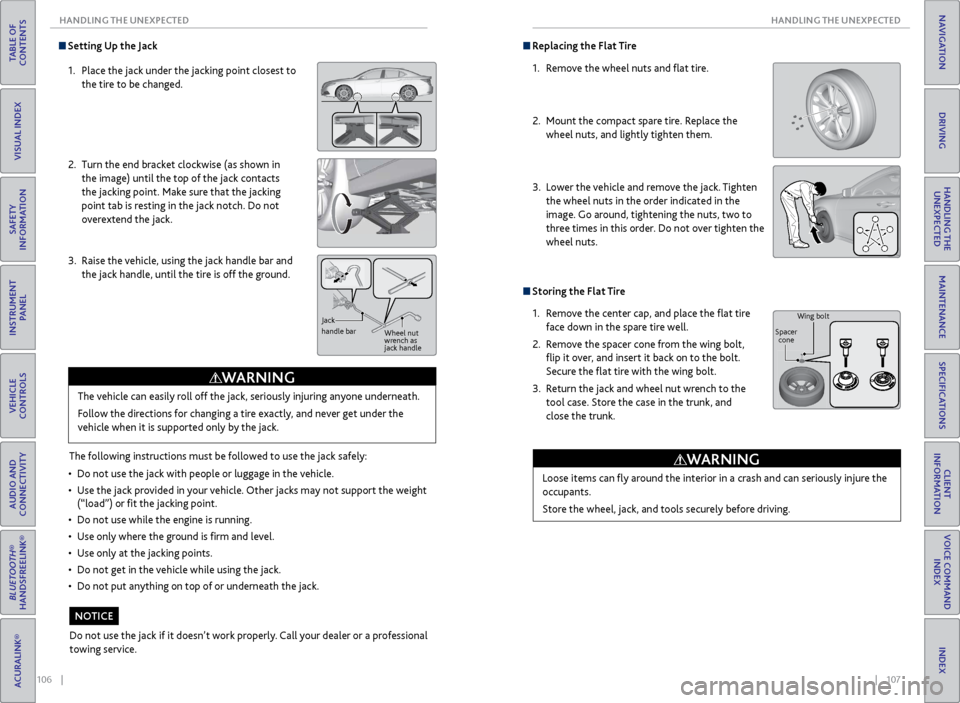
Setting Up the Jack
1. Place the jack under the jacking point closest to
the tire to be changed.
2. Turn the end bracket clockwise (as shown in
the image) until the top of the jack contacts
the jacking point. Make sure that the jacking
point tab is resting in the jack notch. Do not
overextend the jack.
3. Raise the vehicle, using the jack handle bar and
the jack handle, until the tire is off the ground.
The following instructions must be followed to use the jack safely:
• Do not use the jack with people or luggage in the vehicle.
• Use the jack provided in your vehicle. Other jacks may not support the weight
(“load”) or fit the jacking point.
• Do not use while the engine is running.
• Use only where the ground is firm and level.
• Use only at the jacking points.
• Do not get in the vehicle while using the jack.
• Do not put anything on top of or underneath the jack.The vehicle can easily roll off the jack, seriously injuring anyone underneath.
Follow the directions for changing a tire exactly, and never get under the
vehicle when it is supported only by the jack.
WARNING
Jack
handle bar
Wheel nut
wrench as
jack handle
Do not use the jack if it doesn’t work properly. Call your dealer or a professional
towing service.
NOTICE
Replacing the Flat Tire
1. Remove the wheel nuts and flat tire.
2. Mount the compact spare tire. Replace the
wheel nuts, and lightly tighten them.
3. Lower the vehicle and remove the jack. Tighten
the wheel nuts in the order indicated in the
image. Go around, tightening the nuts, two to
three times in this order. Do not over tighten the
wheel nuts.
Storing the Flat Tire
1. Remove the center cap, and place the flat tire
face down in the spare tire well.
2. Remove the spacer cone from the wing bolt,
flip it over, and insert it back on to the bolt.
Secure the flat tire with the wing bolt.
3. Return the jack and wheel nut wrench to the
tool case. Store the case in the trunk, and
close the trunk.
Loose items can fly around the interior in a crash and can seriously injure the
occupants.
Store the wheel, jack, and tools securely before driving.
WARNING
Wing bolt
Spacer cone
Page 60 of 75
112 || 113
MAINTENANCE
MAINTENANCE
TABLE OF
CONTENTS
INDEX
VISUAL INDEX
VOICE COMMAND INDEX
SAFETY
INFORMATION
CLIENT
INFORMATION
INSTRUMENT PANEL
SPECIFICATIONS
VEHICLE
CONTROLS
MAINTENANCE
AUDIO AND
CONNECTIVITY
HANDLING THE UNEXPECTED
BLUETOOTH®
HANDSFREELINK®
DRIVING
ACURALINK®
NAVIGATION
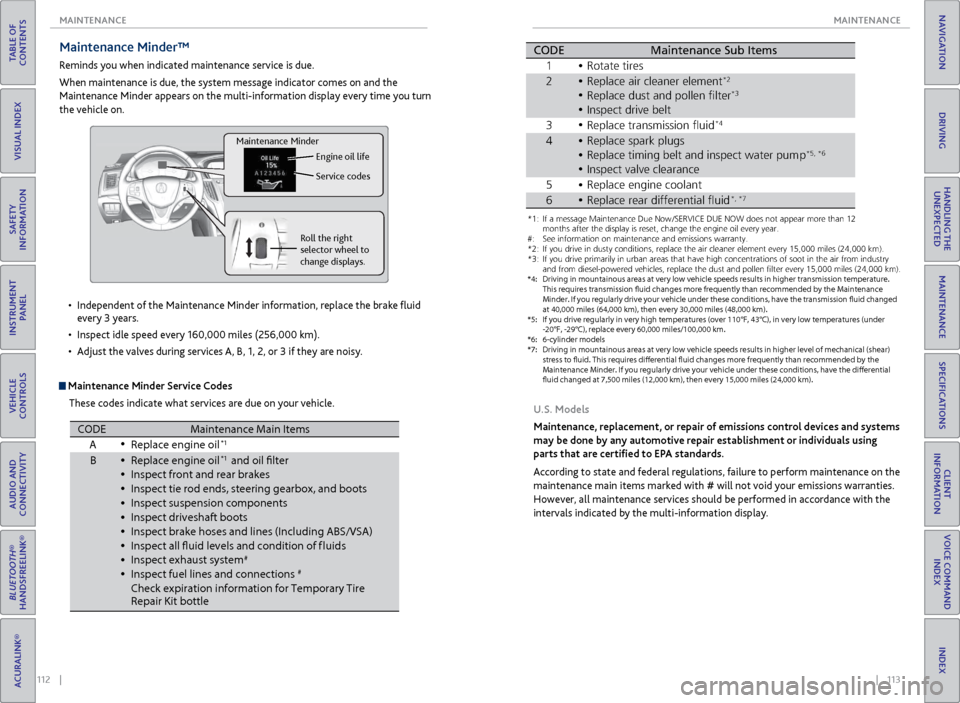
Maintenance Minder™
Reminds you when indicated maintenance service is due.
When maintenance is due, the system message indicator comes on and the
Maintenance Minder appears on the multi-information display every time you turn
the vehicle on.
Maintenance Minder Service Codes
These codes indicate what services are due on your vehicle.
•
Independent of the Maintenance Minder information, replace the brake fluid
every 3 years.
• Inspect idle speed every 160,000 miles (256,000 km).
• Adjust the valves during services A, B, 1, 2, or 3 if they are noisy.
Roll the right
selector wheel to
change displays. Engine oil life
Service codes
Maintenance Minder
CODEMaintenance Main Items
A Replace engine oi l*1
BReplace engine oi l*1 and oil flter
\fnspect front and re\rar bra\bes
\fnspect tie rod end\rs, steering gearbox,\r and boots
\fnspect suspension \rcomponent s
\fnspect driveshaft b\root s
\fnspect bra\be hoses \rand lines (\fncludin\rg ABS/VSA)
\fnspect all fuid le\rvels and condition\r of f luids
\fnspect exhaust sys\rte m
#
\fnspect fuel lines \rand connections#
Chec\b expiration in\rformation for Tempora\rry Tire
Repair Kit bottl e
*1:I f a message Maintenance Due Now /SERVICE DUE NOW does not appear m\hore than 1\f months
after the display is\h reset\b change the e\hngine oil every year\h.
*\f: If you drive in dus\hty conditions\b repla\hce the air cleaner \helement every 15\b000\h miles (\f4\b000 km) .
*3: If you drive primar\hily in urban areas \hthat have high conce\hntrations of soot \hin the air from ind\hustry and
from diesel-powered\h vehicles\b replace t\hhe dust and pollen f\hlter every 15\b000 mi\hles (\f4\b000 km) .
*4: Driving in mountai\hnous areas at very \hlow vehicle speeds r\hesults in higher tra\hnsmission temperat\hure.
This requires trans\hmission fuid change\hs more frequently t\hhan recommended by \hthe Maintenance
Minder. If you regularly drive your vehicle under these conditions\b have the transmission fuid changed
at 40\b000 miles (64\b0\h00 km)\b then every 3\h0\b000 miles (48\b000 k\hm) .
*5: If you drive regula\hrly in very high temp\heratures (over 110\h°F\b 43°C)\b in very lo\hw temperatures (un\hder
-\f0°F\b -\f9°C)\b replac\he every 60\b000 miles\h/100\b000 km.
*6: 6-cylinder models
CODE Maintenance Sub Items
1 Rotate tires
2 Replace air cleaner\r element
*2
Replace dust and p\rollen flter*3
3Replace transmissio\rn fui d*4
4Replace spar\b plugs\r
Replace timing belt\r and inspect water \rpump*5 *6
\fnspect valve clear\rance
5 Replace engine coo\rlan t
•
•
•
•
•
•
•
•
•
•
•
•
•
\fnspect drive belt•
•
•
•
•
•
*1: If a message Maint\Nenance Due N\fw /SE\bVICE DUE NOW d\fes n\N\ft appear m\fre than 1\N2 m\fnths after the disp\Nlay is reset, chang\Ne the engine \fil ev\Nery year .
#: See inf\frmati\fn \fn ma\Nintenance and emis\Nsi\fns warranty.
*2: If y\fu drive in dust\Ny c\fnditi\fns, replac\Ne the air cleaner el\Nement every 15,000 \Nmiles (24,000 km) .
*3: If y\fu drive primaril\Ny in urban areas tha\Nt have high c\fncent\Nrati\fns \ff s\f\ft in th\Ne air fr\fm industr y
and fr\fm diesel-p\fwe\Nred vehicles, replac\Ne the dust and p\fll\Nen flter every 15,00\N0 miles (24,000 km\N).
*4: Driving in mountai\ynous areas at very \y\fow vehic\fe s\beeds re\ysu\fts in higher tran\ysmission tem\beratur\ye.
This requires trans\ymission fuid change\ys more frequent\fy t\yhan recommended by t\yhe Maintenance
M inder. If you regu\far\fy drive your vehic\fe under these conditions, have the transmission fuid changed
at 40,000 mi\fes (64\y,000 km), then ever\yy 30,000 mi\fes (48,\y000 km).
*5: If you drive regu\fa\yr\fy in very high tem\b\yeratures (over 110\y°F, 43°C), in very \y\fow tem\beratures (u\ynder
-20°F, -29°C), re\b\f\yace every 60,000 mi\y\fes/100,000 km.
*6: 6-cy\finder mode\fs
*7: Driving in mountai\ynous areas at very \y\fow vehic\fe s\beeds re\ysu\fts in higher \feve\y\f of mechanica\f (shea\yr)
stress to fuid. Thi\ys requires diferen\ytia\f fuid changes mo\yre frequent\fy than r\yecommended by th e
M aintenance Minder. I\yf you regu\far\fy driv\ye your vehic\fe under\y these conditions, \yhave the diferentia\y\f
fuid changed at 7,5\y00 mi\fes (12,000 km\y), then every 15,00\y0 mi\fes (24,000 km)\y.
CODEMaintenance Sub Item s
1 \b\ftate tires
2\beplace air cleaner \Nelement*2
\beplace dust and p\f\Nllen flte r*3
Inspect drive belt
3 \beplace transmissi\fn\N fuid*4
4\beplace spark plugs
\beplace timing belt\N and inspect water \Npum p*5, *6
Inspect valve clea\Nrance
5 \beplace engine c\f\fla\Nnt
6\beplace rear differen\Ntial fui d*, *7
U.S. Models
Maintenance, replacement, or repair of emissions control devices and systems
may be done by any automotive repair establishment or individuals using
parts that are certified to EPA standards.
According to state and federal regulations, failure to perform maintenance on the
maintenance main items marked with # will not void your emissions warranties.
However, all maintenance services should be performed in accordance with the
intervals indicated by the multi-information display.
Page 64 of 75
120 || 121
MAINTENANCE
MAINTENANCE
TABLE OF
CONTENTS
INDEX
VISUAL INDEX
VOICE COMMAND INDEX
SAFETY
INFORMATION
CLIENT
INFORMATION
INSTRUMENT PANEL
SPECIFICATIONS
VEHICLE
CONTROLS
MAINTENANCE
AUDIO AND
CONNECTIVITY
HANDLING THE UNEXPECTED
BLUETOOTH®
HANDSFREELINK®
DRIVING
ACURALINK®
NAVIGATION
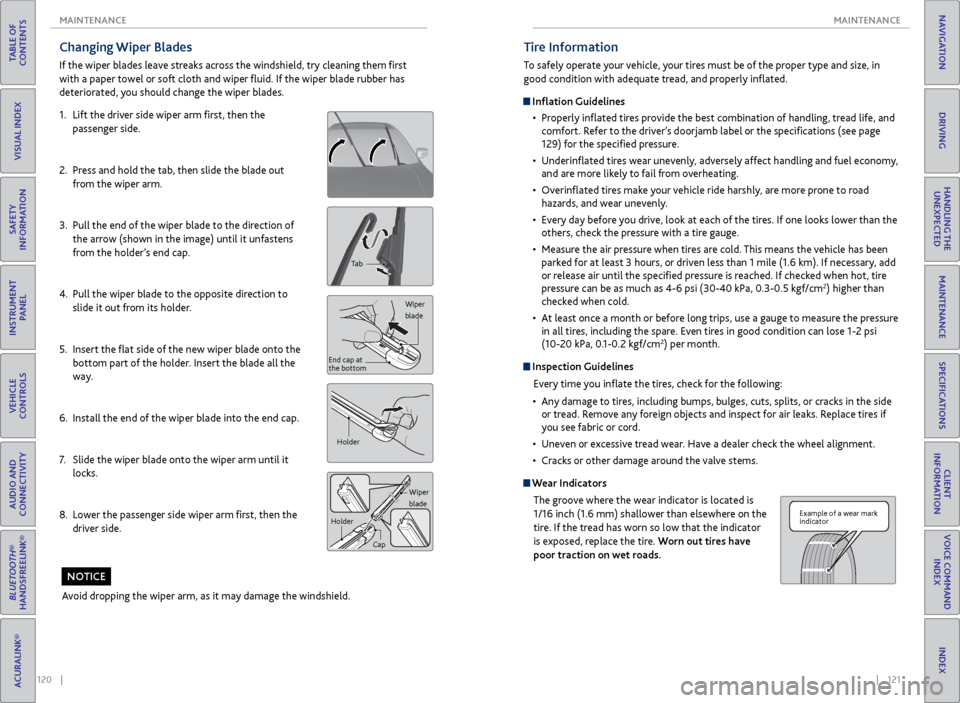
Changing Wiper Blades
If the wiper blades leave streaks across the windshield, try cleaning them first
with a paper towel or soft cloth and wiper fluid. If the wiper blade rubber has
deteriorated, you should change the wiper blades.
1. Lift the driver side wiper arm first, then the
passenger side.
2. Press and hold the tab, then slide the blade out
from the wiper arm.
3. Pull the end of the wiper blade to the direction of
the arrow (shown in the image) until it unfastens
from the holder’s end cap.
4. Pull the wiper blade to the opposite direction to
slide it out from its holder.
5. Insert the flat side of the new wiper blade onto the
bottom part of the holder. Insert the blade all the
way.
6. Install the end of the wiper blade into the end cap.
7. Slide the wiper blade onto the wiper arm until it
locks.
8. Lower the passenger side wiper arm first, then the
driver side.
Tab
Wiper
blade
End cap at
the bottom
Holder
Wiper
blade
Holder
Cap
Avoid dropping the wiper arm, as it may damage the windshield.
NOTICE
Tire Information
To safely operate your vehicle, your tires must be of the proper type and size, in
good condition with adequate tread, and properly inflated.
Inflation Guidelines• Properly inflated tires provide the best combination of handling, tread life, and
comfort. Refer to the driver’s doorjamb label or the specifications (see page
129) for the specified pressure.
• Underinflated tires wear unevenly, adversely affect handling and fuel economy,
and are more likely to fail from overheating.
• Overinflated tires make your vehicle ride harshly, are more prone to road
hazards, and wear unevenly.
• Every day before you drive, look at each of the tires. If one looks lower than the
others, check the pressure with a tire gauge.
• Measure the air pressure when tires are cold. This means the vehicle has been
parked for at least 3 hours, or driven less than 1 mile (1.6 km). If necessary, add
or release air until the specified pressure is reached. If checked when hot, tire
pressure can be as much as 4-6 psi (30-40 kPa, 0.3-0.5 kgf/cm
2) higher than
checked when cold.
• At least once a month or before long trips, use a gauge to measure the pressure
in all tires, including the spare. Even tires in good condition can lose 1-2 psi
(10-20 kPa, 0.1-0.2 kgf/cm
2) per month.
Inspection Guidelines
Every time you inflate the tires, check for the following:
• Any damage to tires, including bumps, bulges, cuts, splits, or cracks in the side
or tread. Remove any foreign objects and inspect for air leaks. Replace tires if
you see fabric or cord.
• Uneven or excessive tread wear. Have a dealer check the wheel alignment.
• Cracks or other damage around the valve stems.
Wear Indicators
The groove where the wear indicator is located is
1/16 inch (1.6 mm) shallower than elsewhere on the
tire. If the tread has worn so low that the indicator
is exposed, replace the tire. Worn out tires have
poor traction on wet roads.
Example of a wear mark
indicator