roof Acura TLX 2015 Owner's Guide
[x] Cancel search | Manufacturer: ACURA, Model Year: 2015, Model line: TLX, Model: Acura TLX 2015Pages: 75, PDF Size: 24.55 MB
Page 3 of 75
TABLE OF CONTENTS
Acura Total Luxury Care Roadside AssistanceYour Acura TLC Roadside Assistance representative is here to help you 24 hours
a day, 7 days a week. Under your 4-year/50,000-mile (80,000 km) warranty, the
following benefits are available:
• Towing services — full cost of towing to the closest Acura dealer
• Roadside assistance — jump starting, fuel delivery, lockout, and flat tire
• Trip planning — detailed trip routing, emergency services, and more
Call (800) 594-8500 (U.S.) or (800) 565-7587 (Canada)
Acura Client RelationsYour authorized Acura dealer should be able to answer any questions you have
about your vehicle. However, if you are dissatisfied with the information you
receive, you can call Acura Client Relations (see page 132).
Call (800) 382-2238 (U.S.) or (888) 922-8729 (Canada)
INTRODUCTION
This Owner’s Guide is intended to help you quickly get acquainted with your
2015 Acura TLX. It provides basic information and instructions on technology and
convenience features, as well as emergency procedures and how to get assistance.
This guide is for vehicles sold in the United States and Canada. It covers all TLX
models, so you may find descriptions of features and equipment that are not in
your vehicle.
Images throughout this guide are from U.S. vehicles and represent features and
equipment that are available on some, but not all, models. Images shown in this
guide should be considered examples and used for demonstration purposes only.
This guide is not intended to be a substitute for the Owner’s Manual. The Owner
Information CD enclosed in your glove box kit includes the Owner’s Manual,
Navigation Manual, Consumer Information Book, and vehicle and tire warranties
in electronic format. This information can be viewed on a computer (PC or Mac
platform) and saved or printed for your reference. You can also visit owners.acura.
com to view the complete and most current information.
If you are the first registered owner of your vehicle, you may request a
complimentary printed copy of the Owner’s Manual, Navigation Manual, Vehicle
Warranty, or Consumer Information Book. To request a copy, visit owners.acura.
com and create or log in to your account. In Canada, please request a copy from
your Acura dealer.
American Honda Motor Company strives to be proactive in protecting our
environment and natural resources. By using electronic delivery for a considerable
portion of the information typically found in a vehicle owner’s manual, we are
further reducing our impact on the environment. VISUAL INDEX ...................................
1
Steering Wheel and Nearby
Controls .............................................. 1
Dashboard and Ceiling Controls ..... 2
SAFETY INFORMATION .................. 3
Important Safety Information ....... 3
Seat Belts ........................................... 5
Airbags ............................................... 8
Child Safety .................................... 14
Safety Label Locations .................. 20
Reporting Safety Defects ............... 21
INSTRUMENT P ANEL .................... 22
Malfunction Indicators .................. 22
Condition Indicators ...................... 24
On/Off Indicators .......................... 25
Multi-Information Display ........... 26
VEHICLE CONTROLS ..................... 27
Using the Remote Transmitter ..... 27
Keyless Access System .................. 28
Door Operation from Inside the
Vehicle ............................................. 29
Power Window Operation ............ 30
Power Moonroof Operation .........31
Interior and Exterior Lights ...........32
One-Touch Turn Signal .................. 33
Wiper Operation ............................ 33
Adjusting the Seats ........................ 35
Driving Position Memory System ... 37
Adjusting the Steering Wheel ...... 38
Adjusting the Mirrors .....................39
Customized Features ..................... 40
HomeLink® Garage Opener .......... 41
Climate Control System ................42
Seat Heaters and Ventilation* ..... 43AUDIO AND CONNECTIVITY ......
44
Basic Audio Operation ................... 44
FM/AM Radio .................................. 47
SiriusXM® Radio ............................. 48
Compact Disc (CD) ........................ 49
iPod® or USB Flash Drive .............. 50
Bluetooth® Audio ............................ 51
Hard Disc Drive (HDD) Audio* .... 52
Pandora® ......................................... 53
AcuraLink featuring Aha™ ............ 54
BLUETOOTH® HANDSFREELINK ® ... 55
Basic HFL Operation ...................... 55
Pairing a Phone ............................... 57
Making a Call .................................. 58
SMS Text Messaging and E-Mail ... 61
A CURALINK
®* ................................. 62
AcuraLink Messages ....................... 62
Subscription Features .................... 63
NAVIGATION* ............................... 65
Basic Navigation Operation ......... 65
Entering a Destination .................. 68
Routing ............................................ 70
DRIVING .......................................... 72
Before Driving ................................. 72
Maximum Load Limit ..................... 73
Remote Engine Start* .................... 75
Starting to Drive ............................. 76
Shifting ............................................. 77
Braking ............................................. 81
Auto Idle Stop* ............................... 83
Integrated Dynamics System (IDS) ... 84
Vehicle Stability Assist (VSA®), aka
Electronic Stability Control (ESC)
System ............................................. 84
*if equipped
TABLE OF
CONTENTS
INDEX
VISUAL INDEX
VOICE COMMAND INDEX
SAFETY
INFORMATION
CLIENT
INFORMATION
INSTRUMENT PANEL
SPECIFICATIONS
VEHICLE
CONTROLS
MAINTENANCE
AUDIO AND
CONNECTIVITY
HANDLING THE UNEXPECTED
BLUETOOTH®
HANDSFREELINK®
DRIVING
ACURALINK®
NAVIGATION
Page 5 of 75
2 || 3
SAFETY
VISUAL INDEX
TABLE OF
CONTENTS
INDEX
VISUAL INDEX
VOICE COMMAND INDEX
SAFETY
INFORMATION
CLIENT
INFORMATION
INSTRUMENT PANEL
SPECIFICATIONS
VEHICLE
CONTROLS
MAINTENANCE
AUDIO AND
CONNECTIVITY
HANDLING THE UNEXPECTED
BLUETOOTH®
HANDSFREELINK®
DRIVING
ACURALINK®
NAVIGATION
99
97910911959894
93969192
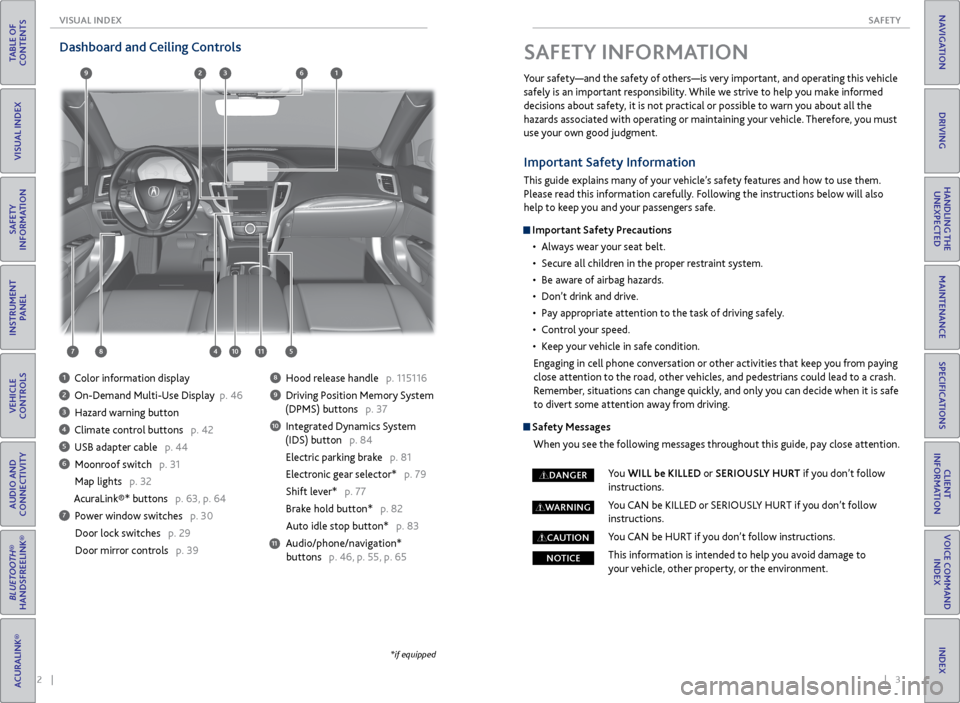
Dashboard and Ceiling Controls
1 Color information display
2 On-Demand Multi-Use Display p. 46
3 Hazard warning button
4 Climate control buttons p. 42
5 USB adapter cable p. 44
6 Moonroof switch p. 31
Map lights p. 32
AcuraLink®* buttons p. 63, p. 64
7 Power window switches p. 30
Door lock switches p. 29
Door mirror controls p. 39
8 Hood release handle p. 115116
9 Driving Position Memory System
(DPMS) buttons p. 37
10 Integrated Dynamics System
(IDS) button p. 84
Electric parking brake p. 81
Electronic gear selector* p. 79
Shift lever* p. 77
Brake hold button* p. 82
Auto idle stop button* p. 83
Audio/phone/navigation* buttons p. 46, p. 55, p. 65
11
*if equipped
SAFETY INFORMATION
Your safety—and the safety of others—is very important, and operating this vehicle
safely is an important responsibility. While we strive to help you make informed
decisions about safety, it is not practical or possible to warn you about all the
hazards associated with operating or maintaining your vehicle. Therefore, you must
use your own good judgment.
Important Safety Information
This guide explains many of your vehicle’s safety features and how to use them.
Please read this information carefully. Following the instructions below will also
help to keep you and your passengers safe.
Important Safety Precautions • Always wear your seat belt.
• Secure all children in the proper restraint system.
• Be aware of airbag hazards.
• Don’t drink and drive.
• Pay appropriate attention to the task of driving safely.
• Control your speed.
• Keep your vehicle in safe condition.
Engaging in cell phone conversation or other activities that keep you from paying
close attention to the road, other vehicles, and pedestrians could lead to a crash.
Remember, situations can change quickly, and only you can decide when it is safe
to divert some attention away from driving.
Safety Messages
When you see the following messages throughout this guide, pay close attention.
You WILL be KILLED or SERIOUSLY HURT if you don’t follow
instructions.
You CAN be KILLED or SERIOUSLY HURT if you don’t follow
instructions.
You CAN be HURT if you don’t follow instructions.
This information is intended to help you avoid damage to
your vehicle, other property, or the environment.
DANGER
WARNING
CAUTION
NOTICE
Page 8 of 75
8 || 9
SAFETY
SAFETY
TABLE OF
CONTENTS
INDEX
VISUAL INDEX
VOICE COMMAND INDEX
SAFETY
INFORMATION
CLIENT
INFORMATION
INSTRUMENT PANEL
SPECIFICATIONS
VEHICLE
CONTROLS
MAINTENANCE
AUDIO AND
CONNECTIVITY
HANDLING THE UNEXPECTED
BLUETOOTH®
HANDSFREELINK®
DRIVING
ACURALINK®
NAVIGATION
Side Airbags
The side airbags help protect the upper torso and pelvis of the driver or a front
passenger during a moderate-to-severe side impact. They are housed in the
outside edge of the driver’s and front passenger’s seat-backs. Both are marked
SIDE AIRBAG.
Side Curtain Airbags
Side curtain airbags help protect the head and torso of the driver and passengers
in outer seating positions during a moderate-to-severe side impact. The side
curtain airbags equipped in this vehicle are also designed to help reduce the
likelihood of partial and complete ejection of vehicle occupants through side
windows in crashes, particularly rollover crashes.
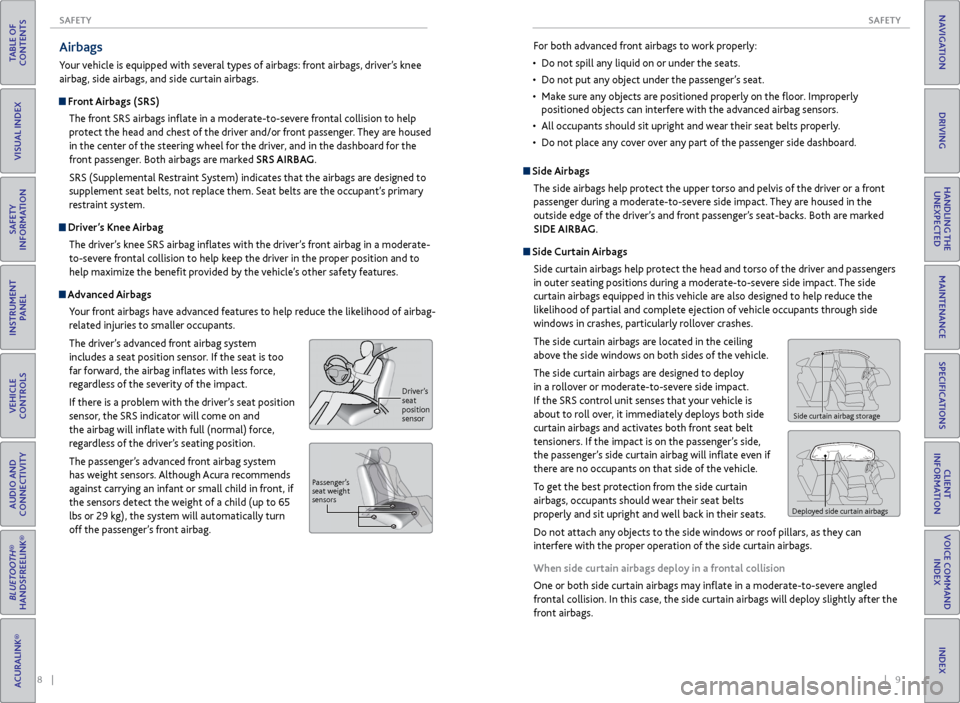
The side curtain airbags are located in the ceiling
above the side windows on both sides of the vehicle.
The side curtain airbags are designed to deploy
in a rollover or moderate-to-severe side impact.
If the SRS control unit senses that your vehicle is
about to roll over, it immediately deploys both side
curtain airbags and activates both front seat belt
tensioners. If the impact is on the passenger’s side,
the passenger’s side curtain airbag will inflate even if
there are no occupants on that side of the vehicle.
To get the best protection from the side curtain
airbags, occupants should wear their seat belts
properly and sit upright and well back in their seats.
Do not attach any objects to the side windows or roof pillars, as they can
interfere with the proper operation of the side curtain airbags.
When side curtain airbags deploy in a frontal collision
One or both side curtain airbags may inflate in a moderate-to-severe angled
frontal collision. In this case, the side curtain airbags will deploy slightly after the
front airbags.
Side curtain airbag storage
Deployed side curtain airbags
For both advanced front airbags to work properly:
• Do not spill any liquid on or under the seats.
• Do not put any object under the passenger’s seat.
• Make sure any objects are positioned properly on the floor. Improperly
positioned objects can interfere with the advanced airbag sensors.
• All occupants should sit upright and wear their seat belts properly.
• Do not place any cover over any part of the passenger side dashboard.Airbags
Your vehicle is equipped with several types of airbags: front airbags, driver’s knee
airbag, side airbags, and side curtain airbags.
Front Airbags (SRS)
The front SRS airbags inflate in a moderate-to-severe frontal collision to help
protect the head and chest of the driver and/or front passenger. They are housed
in the center of the steering wheel for the driver, and in the dashboard for the
front passenger. Both airbags are marked SRS AIRBAG.
SRS (Supplemental Restraint System) indicates that the airbags are designed to
supplement seat belts, not replace them. Seat belts are the occupant’s primary
restraint system.
Driver’s Knee AirbagThe driver’s knee SRS airbag inflates with the driver’s front airbag in a moderate-
to-severe frontal collision to help keep the driver in the proper position and to
help maximize the benefit provided by the vehicle’s other safety features.
Advanced Airbags
Your front airbags have advanced features to help reduce the likelihood of airbag-
related injuries to smaller occupants.
The driver’s advanced front airbag system
includes a seat position sensor. If the seat is too
far forward, the airbag inflates with less force,
regardless of the severity of the impact.
If there is a problem with the driver’s seat position
sensor, the SRS indicator will come on and
the airbag will inflate with full (normal) force,
regardless of the driver’s seating position.
The passenger’s advanced front airbag system
has weight sensors. Although Acura recommends
against carrying an infant or small child in front, if
the sensors detect the weight of a child (up to 65
lbs or 29 kg), the system will automatically turn
off the passenger’s front airbag.
Driver ’s
seat
position
sensor
P assenger’ s
seat weight
sensors
Page 9 of 75
10 || 11
SAFETY
SAFETY
TABLE OF
CONTENTS
INDEX
VISUAL INDEX
VOICE COMMAND INDEX
SAFETY
INFORMATION
CLIENT
INFORMATION
INSTRUMENT PANEL
SPECIFICATIONS
VEHICLE
CONTROLS
MAINTENANCE
AUDIO AND
CONNECTIVITY
HANDLING THE UNEXPECTED
BLUETOOTH®
HANDSFREELINK®
DRIVING
ACURALINK®
NAVIGATION
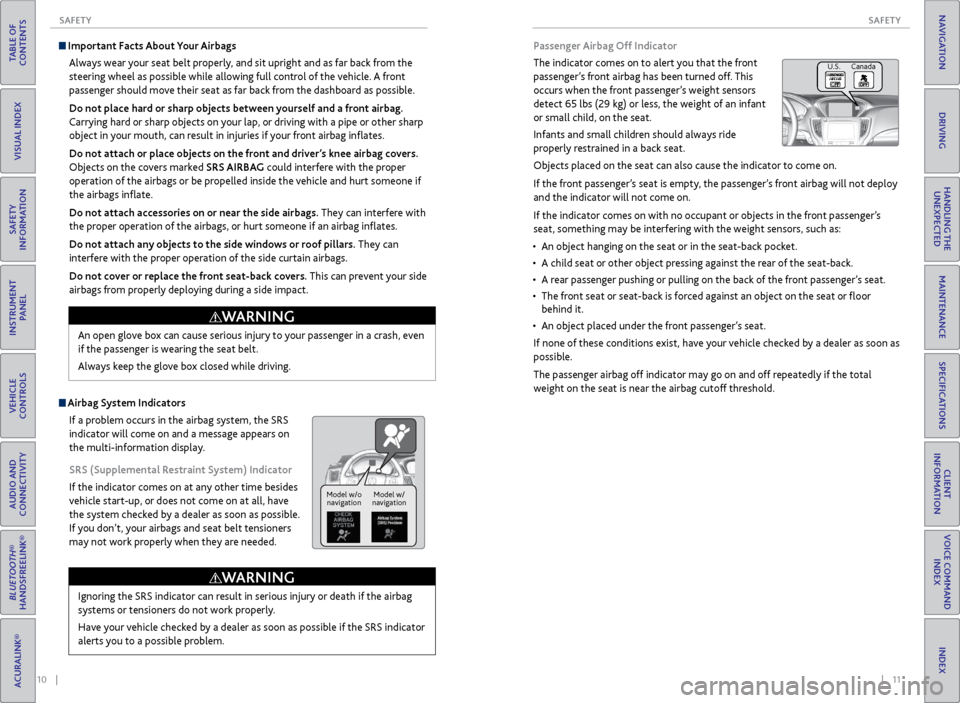
Passenger Airbag Off Indicator
The indicator comes on to alert you that the front
passenger’s front airbag has been turned off. This
occurs when the front passenger’s weight sensors
detect 65 lbs (29 kg) or less, the weight of an infant
or small child, on the seat.
Infants and small children should always ride
properly restrained in a back seat.
Objects placed on the seat can also cause the indicator to come on.
If the front passenger’s seat is empty, the passenger’s front airbag will not deploy
and the indicator will not come on.
If the indicator comes on with no occupant or objects in the front passenger’s
seat, something may be interfering with the weight sensors, such as:
• An object hanging on the seat or in the seat-back pocket.
• A child seat or other object pressing against the rear of the seat-back.
• A rear passenger pushing or pulling on the back of the front passenger’s seat.
• The front seat or seat-back is forced against an object on the seat or floor
behind it.
• An object placed under the front passenger’s seat.
If none of these conditions exist, have your vehicle checked by a dealer as soon as
possible.
The passenger airbag off indicator may go on and off repeatedly if the total
weight on the seat is near the airbag cutoff threshold.
U.S. Canada
Important Facts About Your Airbags Always wear your seat belt properly, and sit upright and as far back from the
steering wheel as possible while allowing full control of the vehicle. A front
passenger should move their seat as far back from the dashboard as possible.
Do not place hard or sharp objects between yourself and a front airbag.
Carrying hard or sharp objects on your lap, or driving with a pipe or other sharp
object in your mouth, can result in injuries if your front airbag inflates.
Do not attach or place objects on the front and driver’s knee airbag covers.
Objects on the covers marked SRS AIRBAG could interfere with the proper
operation of the airbags or be propelled inside the vehicle and hurt someone if
the airbags inflate.
Do not attach accessories on or near the side airbags. They can interfere with
the proper operation of the airbags, or hurt someone if an airbag inflates.
Do not attach any objects to the side windows or roof pillars. They can
interfere with the proper operation of the side curtain airbags.
Do not cover or replace the front seat-back covers. This can prevent your side
airbags from properly deploying during a side impact.
Ignoring the SRS indicator can result in serious injury or death if the airbag
systems or tensioners do not work properly.
Have your vehicle checked by a dealer as soon as possible if the SRS indicator
alerts you to a possible problem.
WARNING
Model w/o navigation Model w/
navigation
Airbag System Indicators
If a problem occurs in the airbag system, the SRS
indicator will come on and a message appears on
the multi-information display.
SRS (Supplemental Restraint System) Indicator
If the indicator comes on at any other time besides
vehicle start-up, or does not come on at all, have
the system checked by a dealer as soon as possible.
If you don’t, your airbags and seat belt tensioners
may not work properly when they are needed. An open glove box can cause serious injury to your passenger in a crash, even
if the passenger is wearing the seat belt.
Always keep the glove box closed while driving.
WARNING
Page 18 of 75
28 || 29
VEHICLE CONTROLS
VEHICLE CONTROLS
TABLE OF
CONTENTS
INDEX
VISUAL INDEX
VOICE COMMAND INDEX
SAFETY
INFORMATION
CLIENT
INFORMATION
INSTRUMENT PANEL
SPECIFICATIONS
VEHICLE
CONTROLS
MAINTENANCE
AUDIO AND
CONNECTIVITY
HANDLING THE UNEXPECTED
BLUETOOTH®
HANDSFREELINK®
DRIVING
ACURALINK®
NAVIGATION
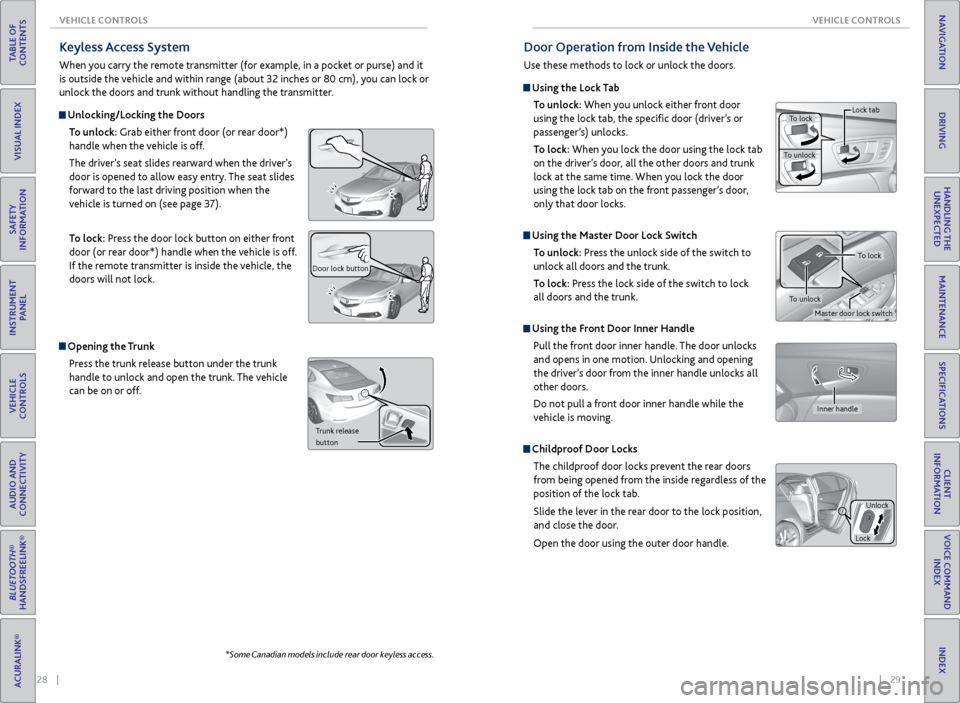
Keyless Access System
When you carry the remote transmitter (for example, in a pocket or purse) and it
is outside the vehicle and within range (about 32 inches or 80 cm), you can lock or
unlock the doors and trunk without handling the transmitter.
Unlocking/Locking the Doors
To unlock: Grab either front door (or rear door*)
handle when the vehicle is off.
The driver’s seat slides rearward when the driver’s
door is opened to allow easy entry. The seat slides
forward to the last driving position when the
vehicle is turned on (see page 37).
To lock: Press the door lock button on either front
door (or rear door*) handle when the vehicle is off.
If the remote transmitter is inside the vehicle, the
doors will not lock.
Door lock button
Opening the Trunk
Press the trunk release button under the trunk
handle to unlock and open the trunk. The vehicle
can be on or off.
Trunk release
button
*Some Canadian models include rear door keyless access.
Door Operation from Inside the Vehicle
Use these methods to lock or unlock the doors.
Using the Lock Tab
To unlock: When you unlock either front door
using the lock tab, the specific door (driver’s or
passenger’s) unlocks.
To lock: When you lock the door using the lock tab
on the driver’s door, all the other doors and trunk
lock at the same time. When you lock the door
using the lock tab on the front passenger’s door,
only that door locks.
Using the Master Door Lock Switch
To unlock: Press the unlock side of the switch to
unlock all doors and the trunk.
To lock: Press the lock side of the switch to lock
all doors and the trunk.
Using the Front Door Inner Handle
Pull the front door inner handle. The door unlocks
and opens in one motion. Unlocking and opening
the driver’s door from the inner handle unlocks all
other doors.
Do not pull a front door inner handle while the
vehicle is moving.
Childproof Door Locks
The childproof door locks prevent the rear doors
from being opened from the inside regardless of the
position of the lock tab.
Slide the lever in the rear door to the lock position,
and close the door.
Open the door using the outer door handle.
To lock
To unlock Lock tab
Inner handle
Unlock
Lock
Master door lock switch
To lock
To unlock
Page 19 of 75
30 || 31
VEHICLE CONTROLS
VEHICLE CONTROLS
TABLE OF
CONTENTS
INDEX
VISUAL INDEX
VOICE COMMAND INDEX
SAFETY
INFORMATION
CLIENT
INFORMATION
INSTRUMENT PANEL
SPECIFICATIONS
VEHICLE
CONTROLS
MAINTENANCE
AUDIO AND
CONNECTIVITY
HANDLING THE UNEXPECTED
BLUETOOTH®
HANDSFREELINK®
DRIVING
ACURALINK®
NAVIGATION
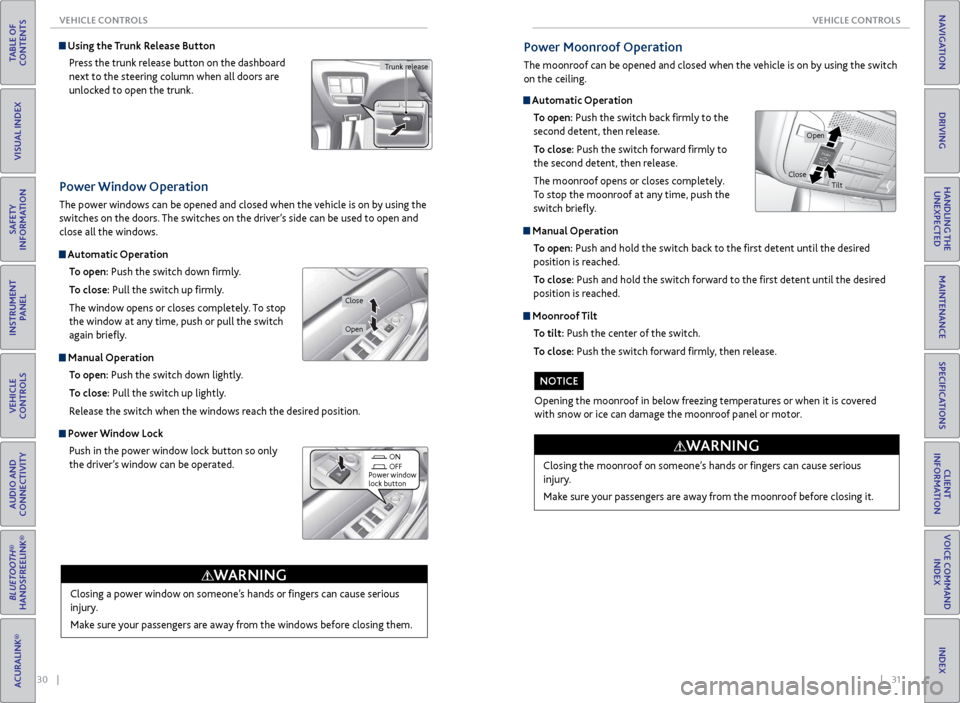
Power Window Operation
The power windows can be opened and closed when the vehicle is on by using the
switches on the doors. The switches on the driver’s side can be used to open and
close all the windows.
Automatic Operation
To open: Push the switch down firmly.
To close: Pull the switch up firmly.
The window opens or closes completely. To stop
the window at any time, push or pull the switch
again briefly.
Manual Operation To open: Push the switch down lightly.
To close: Pull the switch up lightly.
Release the switch when the windows reach the desired position.
Power Window Lock Push in the power window lock button so only
the driver’s window can be operated.
Closing a power window on someone’s hands or fingers can cause serious
injury.
Make sure your passengers are away from the windows before closing them.
WARNING
ON
OFF
Power window
lock button
Open
Close
Using the Trunk Release Button
Press the trunk release button on the dashboard
next to the steering column when all doors are
unlocked to open the trunk.
Trunk release
Automatic Operation To open: Push the switch back firmly to the
second detent, then release.
To close: Push the switch forward firmly to
the second detent, then release.
The moonroof opens or closes completely.
To stop the moonroof at any time, push the
switch briefly.
Manual Operation
To open: Push and hold the switch back to the first detent until the desired
position is reached.
To close: Push and hold the switch forward to the first detent until the desired
position is reached.
Moonroof Tilt
To tilt: Push the center of the switch.
To close: Push the switch forward firmly, then release.
Power Moonroof Operation
The moonroof can be opened and closed when the vehicle is on by using the switch
on the ceiling.
Closing the moonroof on someone’s hands or fingers can cause serious
injury.
Make sure your passengers are away from the moonroof before closing it.
WARNING
Opening the moonroof in below freezing temperatures or when it is covered
with snow or ice can damage the moonroof panel or motor.
NOTICE
Open
CloseTilt
Page 32 of 75
56 || 57
TABLE OF
CONTENTS
INDEX
VISUAL INDEX
VOICE COMMAND INDEX
SAFETY
INFORMATION
CLIENT
INFORMATION
INSTRUMENT PANEL
SPECIFICATIONS
VEHICLE
CONTROLS
MAINTENANCE
AUDIO AND
CONNECTIVITY
HANDLING THE UNEXPECTED
BLUETOOTH®
HANDSFREELINK®
DRIVING
ACURALINK®
NAVIGATION
Voice Command Tips
• When using the Talk button, wait for a beep before saying a command.
• To bypass the system prompts, simply press the Talk button again to say your
command.
• When the Talk button is pressed, all available voice commands are highlighted
in yellow.
• Speak in a clear, natural voice.
• Reduce all background noise.
• Adjust the dashboard and side vents away from the microphone in the ceiling.
Fan speed may be temporarily reduced during voice recognition operation.
• Close the windows and moonroof.
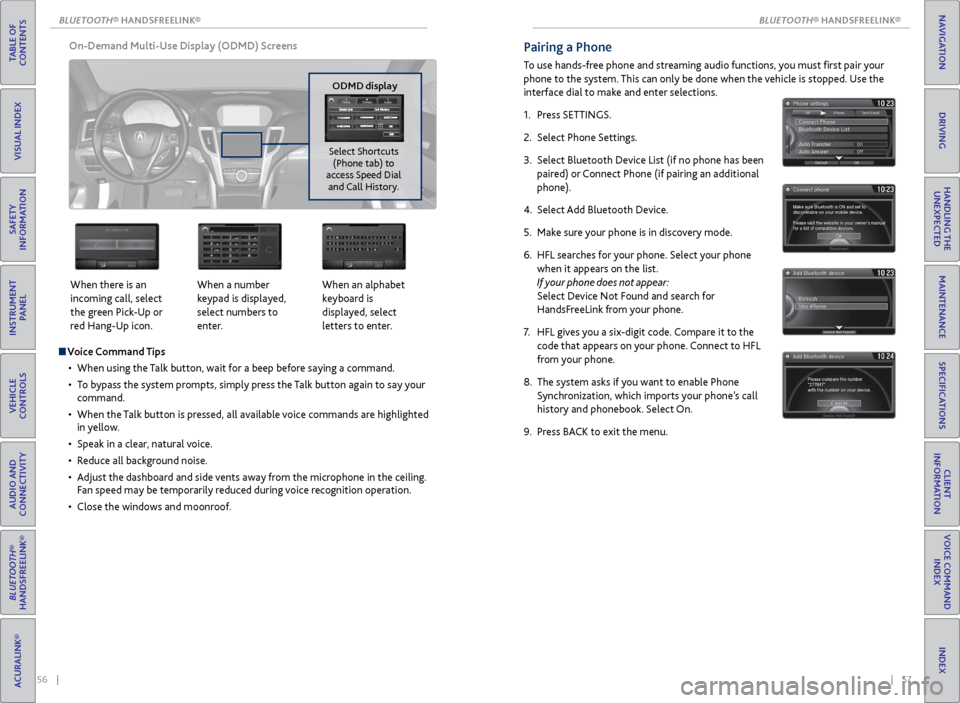
On-Demand Multi-Use Display (ODMD) Screens
When there is an
incoming call, select
the green Pick-Up or
red Hang-Up icon. When a number
keypad is displayed,
select numbers to
enter.When an alphabet
keyboard is
displayed, select
letters to enter.
ODMD display
Select Shortcuts (Phone tab) to
access Speed Dial and Call History.
Pairing a Phone
To use hands-free phone and streaming audio functions, you must first pair your
phone to the system. This can only be done when the vehicle is stopped. Use the
interface dial to make and enter selections.
1. Press SETTINGS.
2. Select Phone Settings.
3. Select Bluetooth Device List (if no phone has been
paired) or Connect Phone (if pairing an additional
phone).
4. Select Add Bluetooth Device.
5. Make sure your phone is in discovery mode.
6. HFL searches for your phone. Select your phone
when it appears on the list.
If your phone does not appear:
Select Device Not Found and search for
HandsFreeLink from your phone.
7. HFL gives you a six-digit code. Compare it to the
code that appears on your phone. Connect to HFL
from your phone.
8. The system asks if you want to enable Phone
Synchronization, which imports your phone’s call
history and phonebook. Select On.
9. Press BACK to exit the menu.
BLUETOOTH
Page 36 of 75
| 65
NAVIGATION
TABLE OF
CONTENTS
INDEX
VISUAL INDEX
VOICE COMMAND INDEX
SAFETY
INFORMATION
CLIENT
INFORMATION
INSTRUMENT PANEL
SPECIFICATIONS
VEHICLE
CONTROLS
MAINTENANCE
AUDIO AND
CONNECTIVITY
HANDLING THE UNEXPECTED
BLUETOOTH®
HANDSFREELINK®
DRIVING
ACURALINK®
NAVIGATION
64 |
TABLE OF
CONTENTS
INDEX
VISUAL INDEX
VOICE COMMAND INDEX
SAFETY
INFORMATION
CLIENT
INFORMATION
INSTRUMENT PANEL
SPECIFICATIONS
VEHICLE
CONTROLS
MAINTENANCE
AUDIO AND
CONNECTIVITY
HANDLING THE UNEXPECTED
BLUETOOTH®
HANDSFREELINK®
DRIVING
ACURALINK®
NAVIGATION
Security Features
To use security features, you need your user ID and personal identification
number (PIN). Some of these features are also available with the AcuraLink
smartphone app. Visit owners.acura.com/apps to download the app.
• Stolen vehicle tracking: Searches and tracks down your vehicle position.
• Remote door lock/unlock: Remotely lock or unlock doors.
• Vehicle finder: Locate your vehicle in large areas, such as a parking lot.
• Security alarm notification: If your vehicle’s security system detects tampering,
the provider notifies you.
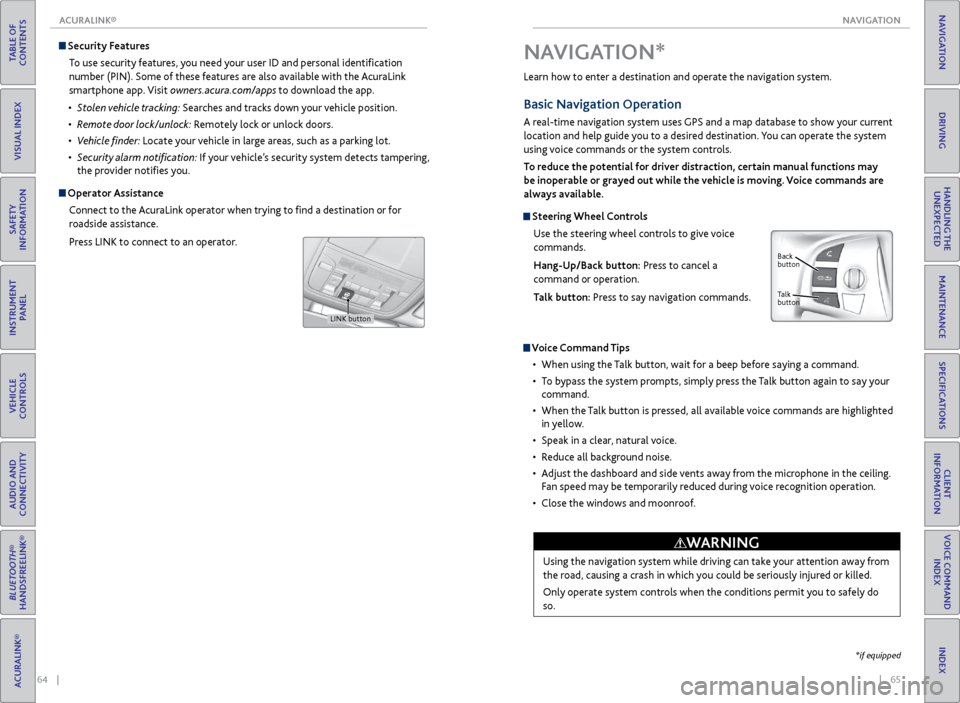
Operator Assistance
Connect to the AcuraLink operator when trying to find a destination or for
roadside assistance.
Press LINK to connect to an operator.
LINK button
Learn how to enter a destination and operate the navigation system.
Basic Navigation Operation
A real-time navigation system uses GPS and a map database to show your current
location and help guide you to a desired destination. You can operate the system
using voice commands or the system controls.
To reduce the potential for driver distraction, certain manual functions may
be inoperable or grayed out while the vehicle is moving. Voice commands are
always available.
Steering Wheel Controls
Use the steering wheel controls to give voice
commands.
Hang-Up/Back button: Press to cancel a
command or operation.
Talk button: Press to say navigation commands.
Voice Command Tips
• When using the Talk button, wait for a beep before saying a command.
• To bypass the system prompts, simply press the Talk button again to say your
command.
• When the Talk button is pressed, all available voice commands are highlighted
in yellow.
• Speak in a clear, natural voice.
• Reduce all background noise.
• Adjust the dashboard and side vents away from the microphone in the ceiling.
Fan speed may be temporarily reduced during voice recognition operation.
• Close the windows and moonroof.
Using the navigation system while driving can take your attention away from
the road, causing a crash in which you could be seriously injured or killed.
Only operate system controls when the conditions permit you to safely do
so.
WARNING
NAVIGATION*
Talk
button Back
button
*if equipped
ACURALINK®
Page 74 of 75
140 || 141
INDEX
INDEX
TABLE OF
CONTENTS
INDEX
VISUAL INDEX
VOICE COMMAND INDEX
SAFETY
INFORMATION
CLIENT
INFORMATION
INSTRUMENT PANEL
SPECIFICATIONS
VEHICLE
CONTROLS
MAINTENANCE
AUDIO AND
CONNECTIVITY
HANDLING THE UNEXPECTED
BLUETOOTH®
HANDSFREELINK®
DRIVING
ACURALINK®
NAVIGATION
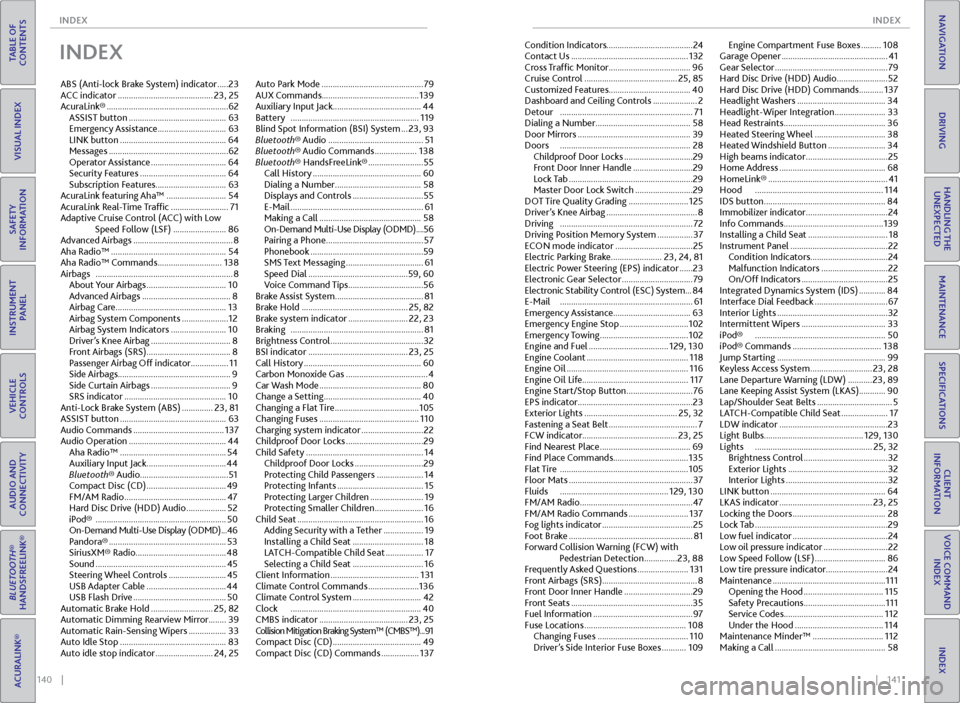
INDEX
ABS (Anti-lock Brake System) indicator ..... 23
ACC indicator ........................................... 23, 25
AcuraLink® ....................................................... 62
ASSIST button ............................................ 63
Emergency Assistance ............................... 63
LINK button ................................................ 64
Messages ...................................................... 62
Operator Assistance .................................. 64
Security Features ....................................... 64
Subscription Features ................................63
AcuraLink featuring Aha™ ........................... 54
AcuraLink Real-Time Traffic .......................... 71
Adaptive Cruise Control (ACC) with Low Speed Follow (LSF) ........................ 86
Advanced Airbags ............................................. 8
Aha Radio™ .................................................... 54
Aha Radio™ Commands ............................. 138
Airbags .............................................................. 8
About Your Airbags .................................... 10
Advanced Airbags ........................................ 8
Airbag Care .................................................. 13
Airbag System Components ..................... 12
Airbag System Indicators ......................... 10
Driver’s Knee Airbag .................................... 8
Front Airbags (SRS) ...................................... 8
Passenger Airbag Off indicator ................. 11
Side Airbags ................................................... 9
Side Curtain Airbags .................................... 9
SRS indicator .............................................. 10
Anti-Lock Brake System (ABS) .............. 23, 81
ASSIST button ................................................ 63
Audio Commands ......................................... 137
Audio Operation ............................................ 44
Aha Radio™ ................................................ 54
Auxiliary Input Jack .................................... 44
Bluetooth® Audio ........................................ 51
Compact Disc (CD) .................................... 49
FM/AM Radio .............................................. 47
Hard Disc Drive (HDD) Audio .................. 52
iPod® ........................................................... 50
On-Demand Multi-Use Display (ODMD) ... 46
Pandora® ..................................................... 53
SiriusXM® Radio......................................... 48
Sound ........................................................... 45
Steering Wheel Controls .......................... 45
USB Adapter Cable .................................... 44
USB Flash Drive .......................................... 50
Automatic Brake Hold ............................ 25, 82
Automatic Dimming Rearview Mirror ........39
Automatic Rain-Sensing Wipers ................. 33
Auto Idle Stop ................................................ 83
Auto idle stop indicator .......................... 24, 25Auto Park Mode ..............................................
79
AUX Commands ............................................ 139
Auxiliary Input Jack ........................................ 44
Battery .......................................................... 119
Blind Spot Information (BSI) System ... 23, 93
Bluetooth® Audio ........................................... 51
Bluetooth® Audio Commands ................... 138
Bluetooth® HandsFreeLink® ......................... 55
Call History ................................................. 60
Dialing a Number ....................................... 58
Displays and Controls ................................ 55
E-Mail ............................................................ 61
Making a Call .............................................. 58
On-Demand Multi-Use Display (ODMD) .... 56
Pairing a Phone ............................................ 57
Phonebook ...................................................59
SMS Text Messaging ................................... 61
Speed Dial ............................................. 59, 60
Voice Command Tips .................................. 56
Brake Assist System ........................................ 81
Brake Hold ................................................ 25, 82
Brake system indicator ........................... 22, 23
Braking ............................................................ 81
Brightness Control .......................................... 32
BSI indicator ............................................. 23, 25
Call History ..................................................... 60
Carbon Monoxide Gas ..................................... 4
Car Wash Mode .............................................. 80
Change a Setting ............................................ 40
Changing a Flat Tire ...................................... 105
Changing Fuses ............................................. 110
Charging system indicator ............................ 22
Childproof Door Locks ................................... 29
Child Safety ..................................................... 14
Childproof Door Locks ............................... 29
Protecting Child Passengers ..................... 14
Protecting Infants ....................................... 15
Protecting Larger Children ........................ 19
Protecting Smaller Children ...................... 16
Child Seat ......................................................... 16
Adding Security with a Tether .................. 19
Installing a Child Seat ................................ 18
LATCH-Compatible Child Seat ................. 17
Selecting a Child Seat ................................ 16
Client Information ........................................ 131
Climate Control Commands ....................... 136
Climate Control System ............................... 42
Clock ........................................................... 40
CMBS indicator ........................................ 23, 25
Collision Mitigation Braking System™ (CMBS™) ...91
Compact Disc (CD) ........................................ 49
Compact Disc (CD) Commands ................. 137Condition Indicators
....................................... 24
Contact Us ..................................................... 132
Cross Traffic Monitor ..................................... 96
Cruise Control .......................................... 25, 85
Customized Features .....................................40
Dashboard and Ceiling Controls .................... 2
Detour ............................................................ 71
Dialing a Number ........................................... 58
Door Mirrors ................................................... 39
Doors ........................................................... 28
Childproof Door Locks ............................... 29
Front Door Inner Handle ........................... 29
Lock Tab ........................................................ 29
Master Door Lock Switch .......................... 29
DOT Tire Quality Grading ........................... 125
Driver’s Knee Airbag ......................................... 8
Driving ............................................................ 72
Driving Position Memory System ................ 37
ECON mode indicator ................................... 25
Electric Parking Brake ....................... 23, 24, 81
Electric Power Steering (EPS) indicator ...... 23
Electronic Gear Selector ................................ 79
Electronic Stability Control (ESC) System ... 84
E-Mail ............................................................ 61
Emergency Assistance ...................................63
Emergency Engine Stop ............................... 102
Emergency Towing ........................................ 102
Engine and Fuel .................................... 129, 130
Engine Coolant
.............................................. 118
Engine Oil ....................................................... 116
Engine Oil Life ................................................ 117
Engine Start/Stop Button .............................. 76
EPS indicator .................................................... 23
Exterior Lights .......................................... 25, 32
Fastening a Seat Belt ........................................ 7
FCW indicator ........................................... 23, 25
Find Nearest Place ......................................... 69
Find Place Commands .................................. 135
Flat Tire .......................................................... 105
Floor Mats ........................................................ 37
Fluids ................................................. 129, 130
FM/AM Radio ................................................... 47
FM/AM Radio Commands ........................... 137
Fog lights indicator ......................................... 25
Foot Brake ........................................................ 81
Forward Collision Warning (FCW) with Pedestrian Detection ............... 23, 88
Frequently Asked Questions ....................... 131
Front Airbags (SRS) ........................................... 8
Front Door Inner Handle ............................... 29
Front Seats ....................................................... 35
Fuel Information ............................................. 97
Fuse Locations .............................................. 108
Changing Fuses ......................................... 110
Driver’s Side Interior Fuse Boxes ........... 109Engine Compartment Fuse Boxes .........
108
Garage Opener ................................................ 41
Gear Selector ................................................... 79
Hard Disc Drive (HDD) Audio ....................... 52
Hard Disc Drive (HDD) Commands ........... 137
Headlight Washers ........................................ 34
Headlight-Wiper Integration ....................... 33
Head Restraints .............................................. 36
Heated Steering Wheel ................................ 38
Heated Windshield Button .......................... 34
High beams indicator ..................................... 25
Home Address ................................................ 68
HomeLink® ...................................................... 41
Hood .......................................................... 114
IDS button ....................................................... 84
Immobilizer indicator ..................................... 24
Info Commands ............................................. 139
Installing a Child Seat .................................... 18
Instrument Panel ............................................ 22
Condition Indicators ................................... 24
Malfunction Indicators .............................. 22
On/Off Indicators ....................................... 25
Integrated Dynamics System (IDS) ............ 84
Interface Dial Feedback ................................. 67
Interior Lights .................................................. 32
Intermittent Wipers ...................................... 33
iPod® ........................................................... 50
iPod® Commands ........................................ 138
Jump Starting ................................................. 99
Keyless Access System ............................ 23, 28
Lane Departure Warning (LDW) ........... 23, 89
Lane Keeping Assist System (LKAS) ............90
Lap/Shoulder Seat Belts .................................. 5
LATCH-Compatible Child Seat ..................... 17
LDW indicator ................................................. 23
Light Bulbs ............................................. 129, 130
Lights ..................................................... 25, 32
Brightness Control ...................................... 32
Exterior Lights ............................................. 32
Interior Lights .............................................. 32
LINK button .................................................... 64
LKAS indicator .......................................... 23, 25
Locking the Doors .......................................... 28
Lock Tab ............................................................ 29
Low fuel indicator ........................................... 24
Low oil pressure indicator ............................. 22
Low Speed Follow (LSF) ................................ 86
Low tire pressure indicator ............................24
Maintenance ................................................... 111
Opening the Hood .................................... 115
Safety Precautions ..................................... 111
Service Codes ............................................. 112
Under the Hood ........................................ 114
Maintenance Minder™ ................................ 112
Making a Call .................................................. 58
Page 75 of 75
142 || 143
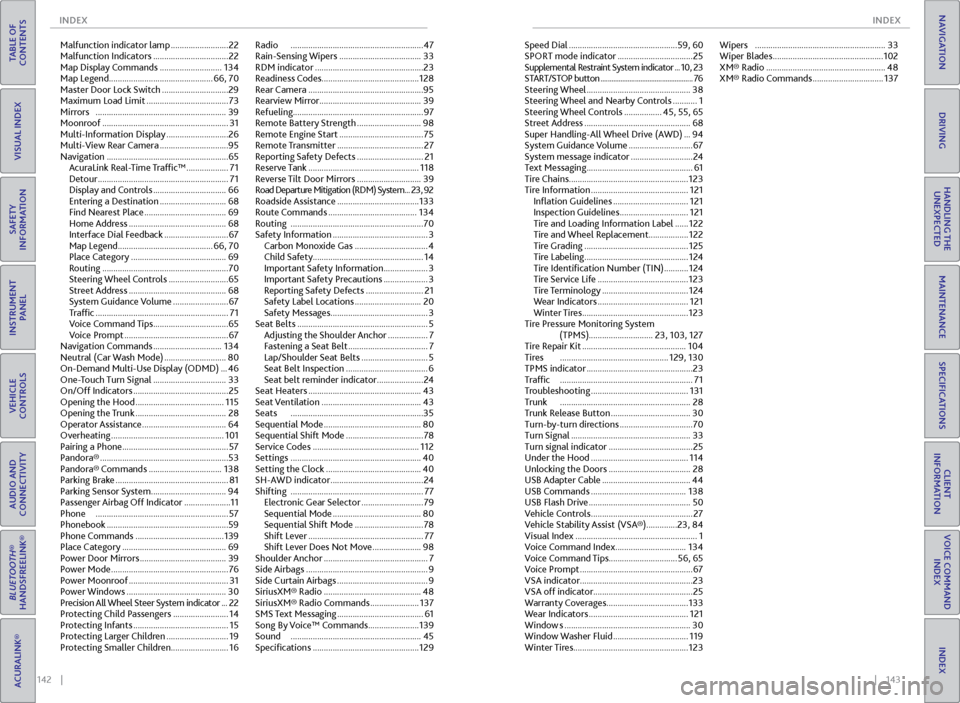
INDEX
INDEX
TABLE OF
CONTENTS
INDEX
VISUAL INDEX
VOICE COMMAND INDEX
SAFETY
INFORMATION
CLIENT
INFORMATION
INSTRUMENT PANEL
SPECIFICATIONS
VEHICLE
CONTROLS
MAINTENANCE
AUDIO AND
CONNECTIVITY
HANDLING THE UNEXPECTED
BLUETOOTH®
HANDSFREELINK®
DRIVING
ACURALINK®
NAVIGATION
Malfunction indicator lamp .......................... 22
Malfunction Indicators .................................. 22
Map Display Commands ............................ 134
Map Legend ............................................... 66, 70
Master Door Lock Switch .............................. 29
Maximum Load Limit ..................................... 73
Mirrors ........................................................... 39
Moonroof ......................................................... 31
Multi-Information Display ............................ 26
Multi-View Rear Camera ...............................95
Navigation ....................................................... 65
AcuraLink Real-Time Traffic™ ................... 71
Detour ........................................................... 71
Display and Controls ................................. 66
Entering a Destination .............................. 68
Find Nearest Place ..................................... 69
Home Address ............................................ 68
Interface Dial Feedback ............................. 67
Map Legend ........................................... 66, 70
Place Category ........................................... 69
Routing ......................................................... 70
Steering Wheel Controls ........................... 65
Street Address ............................................ 68
System Guidance Volume ......................... 67
Traffic ............................................................ 71
Voice Command Tips .................................. 65
Voice Prompt ............................................... 67
Navigation Commands ............................... 134
Neutral (Car Wash Mode) ............................ 80
On-Demand Multi-Use Display (ODMD) ... 46
One-Touch Turn Signal ................................. 33
On/Off Indicators ........................................... 25
Opening the Hood ........................................ 115
Opening the Trunk ......................................... 28
Operator Assistance ...................................... 64
Overheating ................................................... 101
Pairing a Phone ................................................ 57
Pandora® .......................................................... 53
Pandora® Commands ................................. 138
Parking Brake ................................................... 81
Parking Sensor System .................................. 94
Passenger Airbag Off Indicator ..................... 11
Phone ............................................................ 57
Phonebook .......................................................59
Phone Commands ........................................ 139
Place Category ............................................... 69
Power Door Mirrors ....................................... 39
Power Mode ..................................................... 76
Power Moonroof ............................................. 31
Power Windows ............................................. 30
Precision All Wheel Steer System indicator ... 22
Protecting Child Passengers ......................... 14
Protecting Infants ........................................... 15
Protecting Larger Children ............................ 19
Protecting Smaller Children .......................... 16Radio
............................................................ 47
Rain-Sensing Wipers ..................................... 33
RDM indicator ................................................. 23
Readiness Codes ............................................ 128
Rear Camera ....................................................95
Rearview Mirror .............................................. 39
Refueling ........................................................... 97
Remote Battery Strength ............................. 98
Remote Engine Start ...................................... 75
Remote Transmitter ....................................... 27
Reporting Safety Defects .............................. 21
Reserve Tank .................................................. 118
Reverse Tilt Door Mirrors ............................. 39
Road Departure Mitigation (RDM) System ...23, 92
Roadside Assistance ..................................... 133
Route Commands ........................................ 134
Routing ............................................................ 70
Safety Information ........................................... 3
Carbon Monoxide Gas ................................. 4
Child Safety .................................................. 14
Important Safety Information .................... 3
Important Safety Precautions .................... 3
Reporting Safety Defects .......................... 21
Safety Label Locations .............................. 20
Safety Messages ............................................ 3
Seat Belts ........................................................... 5
Adjusting the Shoulder Anchor .................. 7
Fastening a Seat Belt .................................... 7
Lap/Shoulder Seat Belts .............................. 5
Seat Belt Inspection ..................................... 6
Seat belt reminder indicator ..................... 24
Seat Heaters ................................................... 43
Seat Ventilation ............................................. 43
Seats ............................................................ 35
Sequential Mode ............................................ 80
Sequential Shift Mode ................................... 78
Service Codes ................................................ 112
Settings ........................................................... 40
Setting the Clock ........................................... 40
SH-AWD indicator .......................................... 24
Shifting ............................................................ 77
Electronic Gear Selector ............................ 79
Sequential Mode ........................................ 80
Sequential Shift Mode ............................... 78
Shift Lever .................................................... 77
Shift Lever Does Not Move ...................... 98
Shoulder Anchor ............................................... 7
Side Airbags ....................................................... 9
Side Curtain Airbags ......................................... 9
SiriusXM® Radio ............................................ 48
SiriusXM® Radio Commands ...................... 137
SMS Text Messaging ....................................... 61
Song By Voice™ Commands ....................... 139
Sound ........................................................... 45
Specifications ................................................ 129Speed Dial .................................................
59, 60
SPORT mode indicator .................................. 25
Supplemental Restraint System indicator ... 10, 23
START/STOP button ................................................... 76
Steering Wheel ............................................... 38
Steering Wheel and Nearby Controls ........... 1
Steering Wheel Controls ................. 45, 55, 65
Street Address ................................................ 68
Super Handling-All Wheel Drive (AWD) ... 94
System Guidance Volume ............................. 67
System message indicator ............................ 24
Text Messaging ................................................ 61
Tire Chains ...................................................... 123
Tire Information ............................................ 121
Inflation Guidelines .................................. 121
Inspection Guidelines ............................... 121
Tire and Loading Information Label ...... 122
Tire and Wheel Replacement.................. 122
Tire Grading ............................................... 125
Tire Labeling ............................................... 124
Tire Identification Number (TIN) ........... 124
Tire Service Life ......................................... 123
Tire Terminology ....................................... 124
Wear Indicators
......................................... 121
Winter Tires ................................................ 123
Tire Pressure Monitoring System (TPMS)............................. 23, 103, 127
Tire Repair Kit ............................................... 104
Tires ................................................. 129, 130
TPMS indicator ................................................ 23
Traffic ............................................................ 71
Troubleshooting ............................................ 131
Trunk ........................................................... 28
Trunk Release Button .................................... 30
Turn-by-turn directions ................................. 70
Turn Signal ...................................................... 33
Turn signal indicator ...................................... 25
Under the Hood ............................................ 114
Unlocking the Doors ..................................... 28
USB Adapter Cable ........................................ 44
USB Commands ........................................... 138
USB Flash Drive .............................................. 50
Vehicle Controls .............................................. 27
Vehicle Stability Assist (VSA®) .............. 23, 84
Visual Index ....................................................... 1
Voice Command Index ................................ 134
Voice Command Tips ...............................56, 65
Voice Prompt ................................................... 67
VSA indicator ................................................... 23
VSA off indicator ............................................. 25
Warranty Coverages ..................................... 133
Wear Indicators ............................................. 121
Window s ......................................................... 30
Window Washer Fluid .................................. 119
Winter Tires .................................................... 123Wipers
........................................................... 33
Wiper Blades .................................................. 102
XM® Radio ...................................................... 48
XM® Radio Commands ................................ 137