under car Acura TLX 2015 Owner's Guide
[x] Cancel search | Manufacturer: ACURA, Model Year: 2015, Model line: TLX, Model: Acura TLX 2015Pages: 75, PDF Size: 24.55 MB
Page 3 of 75
TABLE OF CONTENTS
Acura Total Luxury Care Roadside AssistanceYour Acura TLC Roadside Assistance representative is here to help you 24 hours
a day, 7 days a week. Under your 4-year/50,000-mile (80,000 km) warranty, the
following benefits are available:
• Towing services — full cost of towing to the closest Acura dealer
• Roadside assistance — jump starting, fuel delivery, lockout, and flat tire
• Trip planning — detailed trip routing, emergency services, and more
Call (800) 594-8500 (U.S.) or (800) 565-7587 (Canada)
Acura Client RelationsYour authorized Acura dealer should be able to answer any questions you have
about your vehicle. However, if you are dissatisfied with the information you
receive, you can call Acura Client Relations (see page 132).
Call (800) 382-2238 (U.S.) or (888) 922-8729 (Canada)
INTRODUCTION
This Owner’s Guide is intended to help you quickly get acquainted with your
2015 Acura TLX. It provides basic information and instructions on technology and
convenience features, as well as emergency procedures and how to get assistance.
This guide is for vehicles sold in the United States and Canada. It covers all TLX
models, so you may find descriptions of features and equipment that are not in
your vehicle.
Images throughout this guide are from U.S. vehicles and represent features and
equipment that are available on some, but not all, models. Images shown in this
guide should be considered examples and used for demonstration purposes only.
This guide is not intended to be a substitute for the Owner’s Manual. The Owner
Information CD enclosed in your glove box kit includes the Owner’s Manual,
Navigation Manual, Consumer Information Book, and vehicle and tire warranties
in electronic format. This information can be viewed on a computer (PC or Mac
platform) and saved or printed for your reference. You can also visit owners.acura.
com to view the complete and most current information.
If you are the first registered owner of your vehicle, you may request a
complimentary printed copy of the Owner’s Manual, Navigation Manual, Vehicle
Warranty, or Consumer Information Book. To request a copy, visit owners.acura.
com and create or log in to your account. In Canada, please request a copy from
your Acura dealer.
American Honda Motor Company strives to be proactive in protecting our
environment and natural resources. By using electronic delivery for a considerable
portion of the information typically found in a vehicle owner’s manual, we are
further reducing our impact on the environment. VISUAL INDEX ...................................
1
Steering Wheel and Nearby
Controls .............................................. 1
Dashboard and Ceiling Controls ..... 2
SAFETY INFORMATION .................. 3
Important Safety Information ....... 3
Seat Belts ........................................... 5
Airbags ............................................... 8
Child Safety .................................... 14
Safety Label Locations .................. 20
Reporting Safety Defects ............... 21
INSTRUMENT P ANEL .................... 22
Malfunction Indicators .................. 22
Condition Indicators ...................... 24
On/Off Indicators .......................... 25
Multi-Information Display ........... 26
VEHICLE CONTROLS ..................... 27
Using the Remote Transmitter ..... 27
Keyless Access System .................. 28
Door Operation from Inside the
Vehicle ............................................. 29
Power Window Operation ............ 30
Power Moonroof Operation .........31
Interior and Exterior Lights ...........32
One-Touch Turn Signal .................. 33
Wiper Operation ............................ 33
Adjusting the Seats ........................ 35
Driving Position Memory System ... 37
Adjusting the Steering Wheel ...... 38
Adjusting the Mirrors .....................39
Customized Features ..................... 40
HomeLink® Garage Opener .......... 41
Climate Control System ................42
Seat Heaters and Ventilation* ..... 43AUDIO AND CONNECTIVITY ......
44
Basic Audio Operation ................... 44
FM/AM Radio .................................. 47
SiriusXM® Radio ............................. 48
Compact Disc (CD) ........................ 49
iPod® or USB Flash Drive .............. 50
Bluetooth® Audio ............................ 51
Hard Disc Drive (HDD) Audio* .... 52
Pandora® ......................................... 53
AcuraLink featuring Aha™ ............ 54
BLUETOOTH® HANDSFREELINK ® ... 55
Basic HFL Operation ...................... 55
Pairing a Phone ............................... 57
Making a Call .................................. 58
SMS Text Messaging and E-Mail ... 61
A CURALINK
®* ................................. 62
AcuraLink Messages ....................... 62
Subscription Features .................... 63
NAVIGATION* ............................... 65
Basic Navigation Operation ......... 65
Entering a Destination .................. 68
Routing ............................................ 70
DRIVING .......................................... 72
Before Driving ................................. 72
Maximum Load Limit ..................... 73
Remote Engine Start* .................... 75
Starting to Drive ............................. 76
Shifting ............................................. 77
Braking ............................................. 81
Auto Idle Stop* ............................... 83
Integrated Dynamics System (IDS) ... 84
Vehicle Stability Assist (VSA®), aka
Electronic Stability Control (ESC)
System ............................................. 84
*if equipped
TABLE OF
CONTENTS
INDEX
VISUAL INDEX
VOICE COMMAND INDEX
SAFETY
INFORMATION
CLIENT
INFORMATION
INSTRUMENT PANEL
SPECIFICATIONS
VEHICLE
CONTROLS
MAINTENANCE
AUDIO AND
CONNECTIVITY
HANDLING THE UNEXPECTED
BLUETOOTH®
HANDSFREELINK®
DRIVING
ACURALINK®
NAVIGATION
Page 4 of 75
| 1
VISUAL INDEX
TABLE OF
CONTENTS
INDEX
VISUAL INDEX
VOICE COMMAND INDEX
SAFETY
INFORMATION
CLIENT
INFORMATION
INSTRUMENT PANEL
SPECIFICATIONS
VEHICLE
CONTROLS
MAINTENANCE
AUDIO AND
CONNECTIVITY
HANDLING THE UNEXPECTED
BLUETOOTH®
HANDSFREELINK®
DRIVING
ACURALINK®
NAVIGATION
Cruise Control ................................ 85
Adaptive Cruise Control (ACC) with
Low Speed Follow (LSF)* .............. 86
Forward Collision Warning (FCW)
with Pedestrian Detection* .......... 88
Lane Departure Warning (LDW)* ... 89
Lane Keeping Assist System
(LKAS)* ............................................ 90
Collision Mitigation Braking
System™ (CMBS™)* ...................... 91
Road Departure Mitigation (RDM)
System* ........................................... 92
Blind Spot Information (BSI)
System* ........................................... 93
Parking Sensor System* ................ 94
Super Handling-All Wheel Drive
(AWD)* ............................................ 94
Multi-View Rear Camera ............... 95
Cross Traffic Monitor* ................... 96
Refueling ......................................... 97
HANDLING THE UNEXPECTED ...98
Keyless Access Remote Battery
Strength ........................................... 98
Shift Lever Does Not Move* ........ 98
Jump Starting .................................. 99
Overheating ................................... 101
Emergency Engine Stop ............... 102
Emergency Towing ....................... 102
Tire Pressure Monitoring System
(TPMS) ........................................... 103
Tire Repair Kit* ............................. 104Changing a Flat Tire .....................
105
Fuse Locations .............................. 108
MAINTENANCE ............................. 111
Safety Precautions ........................ 111
Maintenance Minder™ ................. 112
Under the Hood ............................. 114
Engine Oil ....................................... 116
Engine Coolant .............................. 118
Window Washer Fluid .................. 119
Checking the Battery .................... 119
Changing Wiper Blades ............... 120
Tire Information ............................ 121
Tire Labeling .................................. 124
DOT Tire Quality Grading ........... 125
Tire Pressure Monitoring System
(TPMS) - Required Federal
Explanation .................................... 127
Testing of Readiness Codes ........ 128
SPECIFICATIONS ......................... 129
CLIENT INFORMATION ............... 131
Frequently Asked Questions/
Troubleshooting ............................ 131
Contact Us .................................... 132
Acura Total Luxury Care Roadside
Assistance ..................................... 133
Warranty Coverages .................... 133
V OICE COMMAND INDEX ......... 134
INDEX ............................................ 140
*if equipped
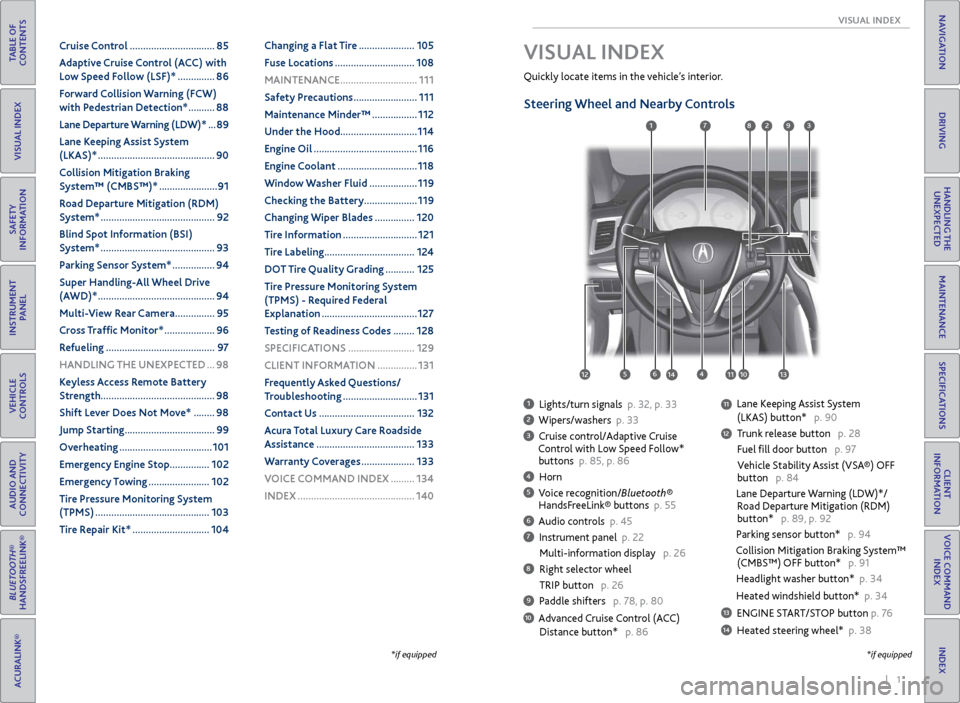
1 Lights/turn signals p. 32, p. 33
2 Wipers/washers p. 33
3 Cruise control/Adaptive Cruise
Control with Low Speed Follow*
buttons p. 85, p. 86
4 Horn
5 Voice recognition/Bluetooth®
HandsFreeLink® buttons p. 55
6 Audio controls p. 45
7 Instrument panel p. 22
Multi-information display p. 26
8 Right selector wheel
TRIP button p. 26
9 Paddle shifters p. 78, p. 80
10 Advanced Cruise Control (ACC)
Distance button* p. 86
Quickly locate items in the vehicle’s interior.
Steering Wheel and Nearby Controls
Lane Keeping Assist System
(LKAS) button* p. 90
Trunk release button p. 28
Fuel fill door button p. 97
Vehicle Stability Assist (VSA®) OFF
button p. 84
Lane Departure Warning (LDW)*/
Road Departure Mitigation (RDM)
button* p. 89, p. 92
Parking sensor button* p. 94
Collision Mitigation Braking System™
(CMBS™) OFF button* p. 91
Headlight washer button* p. 34
Heated windshield button* p. 34
13 ENGINE START/STOP button p. 76
14 Heated steering wheel* p. 38
VISUAL INDEX
*if equipped
1
1011
27
4
8
13
12
125614
93
11
Page 6 of 75
4 || 5
SAFETY
SAFETY
TABLE OF
CONTENTS
INDEX
VISUAL INDEX
VOICE COMMAND INDEX
SAFETY
INFORMATION
CLIENT
INFORMATION
INSTRUMENT PANEL
SPECIFICATIONS
VEHICLE
CONTROLS
MAINTENANCE
AUDIO AND
CONNECTIVITY
HANDLING THE UNEXPECTED
BLUETOOTH®
HANDSFREELINK®
DRIVING
ACURALINK®
NAVIGATION
Carbon Monoxide Gas
The engine exhaust from this vehicle contains carbon monoxide, a colorless,
odorless, and highly toxic gas. As long as you properly maintain your vehicle and
follow the instructions set forth below, you will not accumulate dangerous levels
of carbon monoxide gas in the vehicle interior.
Have the exhaust system inspected for leaks whenever:
• The exhaust system is making an unusual noise.
• The exhaust system may have been damaged.
• The vehicle is raised for an oil change.
When you operate a vehicle with the trunk open, airflow can pull exhaust gas into
the interior and create a hazardous condition. If you must drive with the trunk
open, open all the windows and set the climate control system as shown below.
1. Select the fresh air mode.
2. Select the
mode.
3. Set the fan speed to high.
4. Set the temperature control to a comfortable setting.
Adjust the climate control system in the same manner if you sit in your parked
vehicle with the engine running.
Carbon monoxide gas is toxic. Breathing it can cause unconsciousness and
even kill you.
Avoid any enclosed areas or activities that expose you to carbon monoxide.
WARNING
An enclosed area such as a garage can quickly fill up with carbon monoxide gas.
Do not run the engine with the garage door closed. Even when the garage door is
open, drive out of the garage immediately after starting the engine.
Seat Belts
A seat belt is your best protection in all types of collisions. Airbags are designed to
supplement seat belts, not replace them. So even though your vehicle is equipped
with airbags, make sure you and your passengers always wear your seat belts and
wear them properly.
Lap/Shoulder Seat BeltsAll five seating positions are equipped with lap/shoulder seat belts with
emergency locking retractors. In normal driving, the retractor lets you move
freely while keeping some tension on the belt. During a collision or sudden stop,
the retractor locks to restrain your body. The front passenger’s and rear seat belts
also have a lockable retractor for use with child seats.
The front seats are equipped with automatic seat belt tensioners to enhance
safety. The tensioners automatically tighten the front seat belts during a
moderate-to-severe front collision, sometimes even if the collision is not severe
enough to inflate the front airbags or the driver’s knee airbag.
Proper Use of Seat BeltsFollow these guidelines for proper use:
• All occupants should sit upright, well back in the seat, and remain in that
position for the duration of the trip. Slouching and leaning reduces the
effectiveness of the belt and can increase the chance of serious injury in a crash.
• Never place the shoulder part of a lap/shoulder seat belt under your arm or
behind your back. This could cause very serious injuries in a crash.
• Two people should never use the same seat belt. If they do, they could be very
seriously injured in a crash.
• Do not put any accessories on the seat belts. Devices intended to improve
comfort or reposition the shoulder part of a seat belt can reduce the protective
capability and increase the chance of serious injury in a crash.
• No one should sit in a seat with an inoperative seat belt or one that does not
appear to be working correctly. Using a seat belt that is not working properly
may not protect the occupant in a crash. Have a dealer check the belt as soon
as possible.
Not wearing a seat belt properly increases the chance of a serious injury or
death in a crash, even though your vehicle has airbags.
Be sure you and your passengers always wear seat belts and wear them
properly.
WARNING
Page 8 of 75
8 || 9
SAFETY
SAFETY
TABLE OF
CONTENTS
INDEX
VISUAL INDEX
VOICE COMMAND INDEX
SAFETY
INFORMATION
CLIENT
INFORMATION
INSTRUMENT PANEL
SPECIFICATIONS
VEHICLE
CONTROLS
MAINTENANCE
AUDIO AND
CONNECTIVITY
HANDLING THE UNEXPECTED
BLUETOOTH®
HANDSFREELINK®
DRIVING
ACURALINK®
NAVIGATION
Side Airbags
The side airbags help protect the upper torso and pelvis of the driver or a front
passenger during a moderate-to-severe side impact. They are housed in the
outside edge of the driver’s and front passenger’s seat-backs. Both are marked
SIDE AIRBAG.
Side Curtain Airbags
Side curtain airbags help protect the head and torso of the driver and passengers
in outer seating positions during a moderate-to-severe side impact. The side
curtain airbags equipped in this vehicle are also designed to help reduce the
likelihood of partial and complete ejection of vehicle occupants through side
windows in crashes, particularly rollover crashes.
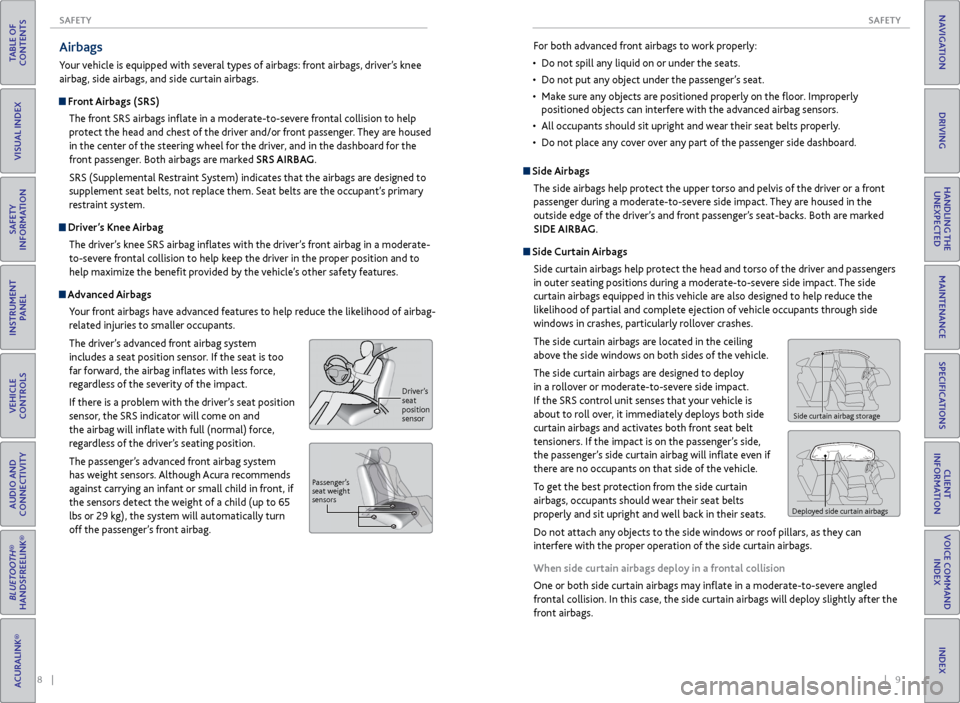
The side curtain airbags are located in the ceiling
above the side windows on both sides of the vehicle.
The side curtain airbags are designed to deploy
in a rollover or moderate-to-severe side impact.
If the SRS control unit senses that your vehicle is
about to roll over, it immediately deploys both side
curtain airbags and activates both front seat belt
tensioners. If the impact is on the passenger’s side,
the passenger’s side curtain airbag will inflate even if
there are no occupants on that side of the vehicle.
To get the best protection from the side curtain
airbags, occupants should wear their seat belts
properly and sit upright and well back in their seats.
Do not attach any objects to the side windows or roof pillars, as they can
interfere with the proper operation of the side curtain airbags.
When side curtain airbags deploy in a frontal collision
One or both side curtain airbags may inflate in a moderate-to-severe angled
frontal collision. In this case, the side curtain airbags will deploy slightly after the
front airbags.
Side curtain airbag storage
Deployed side curtain airbags
For both advanced front airbags to work properly:
• Do not spill any liquid on or under the seats.
• Do not put any object under the passenger’s seat.
• Make sure any objects are positioned properly on the floor. Improperly
positioned objects can interfere with the advanced airbag sensors.
• All occupants should sit upright and wear their seat belts properly.
• Do not place any cover over any part of the passenger side dashboard.Airbags
Your vehicle is equipped with several types of airbags: front airbags, driver’s knee
airbag, side airbags, and side curtain airbags.
Front Airbags (SRS)
The front SRS airbags inflate in a moderate-to-severe frontal collision to help
protect the head and chest of the driver and/or front passenger. They are housed
in the center of the steering wheel for the driver, and in the dashboard for the
front passenger. Both airbags are marked SRS AIRBAG.
SRS (Supplemental Restraint System) indicates that the airbags are designed to
supplement seat belts, not replace them. Seat belts are the occupant’s primary
restraint system.
Driver’s Knee AirbagThe driver’s knee SRS airbag inflates with the driver’s front airbag in a moderate-
to-severe frontal collision to help keep the driver in the proper position and to
help maximize the benefit provided by the vehicle’s other safety features.
Advanced Airbags
Your front airbags have advanced features to help reduce the likelihood of airbag-
related injuries to smaller occupants.
The driver’s advanced front airbag system
includes a seat position sensor. If the seat is too
far forward, the airbag inflates with less force,
regardless of the severity of the impact.
If there is a problem with the driver’s seat position
sensor, the SRS indicator will come on and
the airbag will inflate with full (normal) force,
regardless of the driver’s seating position.
The passenger’s advanced front airbag system
has weight sensors. Although Acura recommends
against carrying an infant or small child in front, if
the sensors detect the weight of a child (up to 65
lbs or 29 kg), the system will automatically turn
off the passenger’s front airbag.
Driver ’s
seat
position
sensor
P assenger’ s
seat weight
sensors
Page 9 of 75
10 || 11
SAFETY
SAFETY
TABLE OF
CONTENTS
INDEX
VISUAL INDEX
VOICE COMMAND INDEX
SAFETY
INFORMATION
CLIENT
INFORMATION
INSTRUMENT PANEL
SPECIFICATIONS
VEHICLE
CONTROLS
MAINTENANCE
AUDIO AND
CONNECTIVITY
HANDLING THE UNEXPECTED
BLUETOOTH®
HANDSFREELINK®
DRIVING
ACURALINK®
NAVIGATION
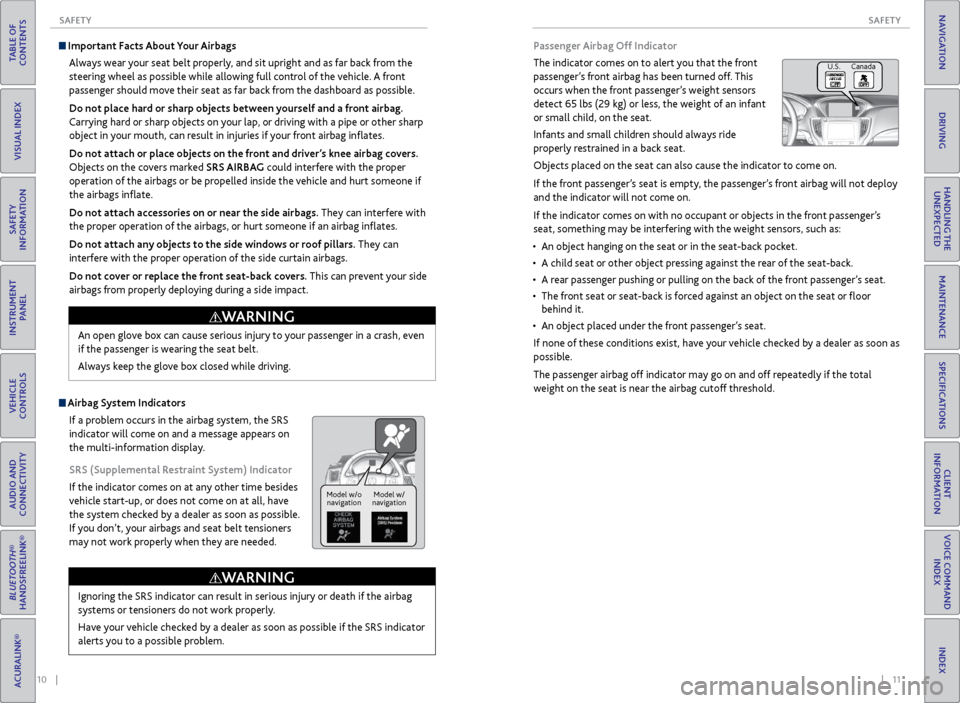
Passenger Airbag Off Indicator
The indicator comes on to alert you that the front
passenger’s front airbag has been turned off. This
occurs when the front passenger’s weight sensors
detect 65 lbs (29 kg) or less, the weight of an infant
or small child, on the seat.
Infants and small children should always ride
properly restrained in a back seat.
Objects placed on the seat can also cause the indicator to come on.
If the front passenger’s seat is empty, the passenger’s front airbag will not deploy
and the indicator will not come on.
If the indicator comes on with no occupant or objects in the front passenger’s
seat, something may be interfering with the weight sensors, such as:
• An object hanging on the seat or in the seat-back pocket.
• A child seat or other object pressing against the rear of the seat-back.
• A rear passenger pushing or pulling on the back of the front passenger’s seat.
• The front seat or seat-back is forced against an object on the seat or floor
behind it.
• An object placed under the front passenger’s seat.
If none of these conditions exist, have your vehicle checked by a dealer as soon as
possible.
The passenger airbag off indicator may go on and off repeatedly if the total
weight on the seat is near the airbag cutoff threshold.
U.S. Canada
Important Facts About Your Airbags Always wear your seat belt properly, and sit upright and as far back from the
steering wheel as possible while allowing full control of the vehicle. A front
passenger should move their seat as far back from the dashboard as possible.
Do not place hard or sharp objects between yourself and a front airbag.
Carrying hard or sharp objects on your lap, or driving with a pipe or other sharp
object in your mouth, can result in injuries if your front airbag inflates.
Do not attach or place objects on the front and driver’s knee airbag covers.
Objects on the covers marked SRS AIRBAG could interfere with the proper
operation of the airbags or be propelled inside the vehicle and hurt someone if
the airbags inflate.
Do not attach accessories on or near the side airbags. They can interfere with
the proper operation of the airbags, or hurt someone if an airbag inflates.
Do not attach any objects to the side windows or roof pillars. They can
interfere with the proper operation of the side curtain airbags.
Do not cover or replace the front seat-back covers. This can prevent your side
airbags from properly deploying during a side impact.
Ignoring the SRS indicator can result in serious injury or death if the airbag
systems or tensioners do not work properly.
Have your vehicle checked by a dealer as soon as possible if the SRS indicator
alerts you to a possible problem.
WARNING
Model w/o navigation Model w/
navigation
Airbag System Indicators
If a problem occurs in the airbag system, the SRS
indicator will come on and a message appears on
the multi-information display.
SRS (Supplemental Restraint System) Indicator
If the indicator comes on at any other time besides
vehicle start-up, or does not come on at all, have
the system checked by a dealer as soon as possible.
If you don’t, your airbags and seat belt tensioners
may not work properly when they are needed. An open glove box can cause serious injury to your passenger in a crash, even
if the passenger is wearing the seat belt.
Always keep the glove box closed while driving.
WARNING
Page 10 of 75
12 || 13
SAFETY
SAFETY
TABLE OF
CONTENTS
INDEX
VISUAL INDEX
VOICE COMMAND INDEX
SAFETY
INFORMATION
CLIENT
INFORMATION
INSTRUMENT PANEL
SPECIFICATIONS
VEHICLE
CONTROLS
MAINTENANCE
AUDIO AND
CONNECTIVITY
HANDLING THE UNEXPECTED
BLUETOOTH®
HANDSFREELINK®
DRIVING
ACURALINK®
NAVIGATION
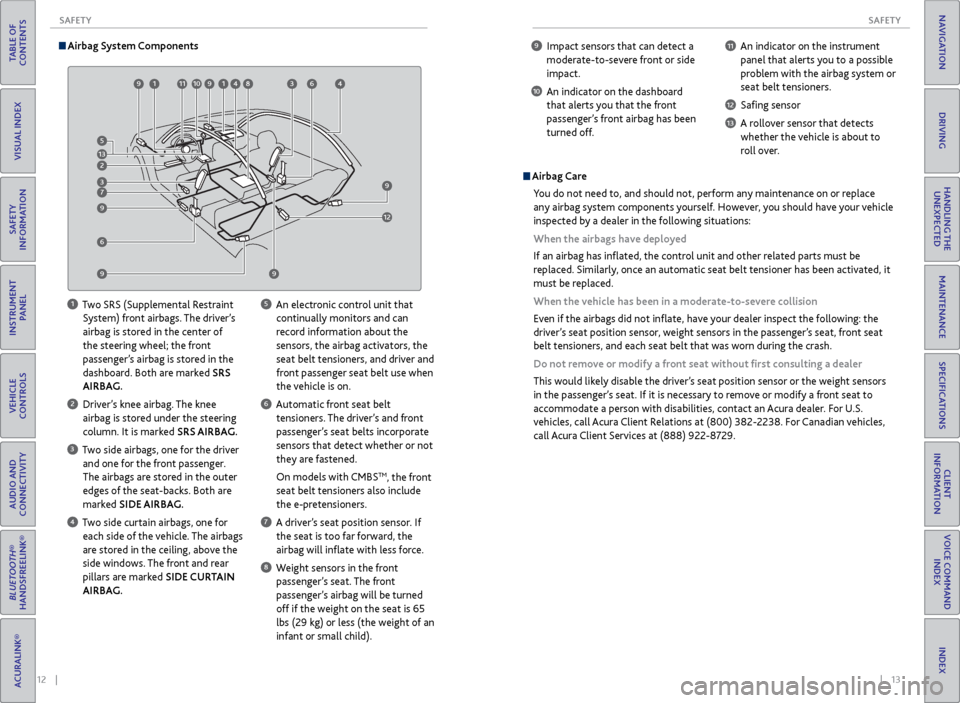
9 Impact sensors that can detect a
moderate-to-severe front or side
impact.
10 An indicator on the dashboard that alerts you that the front
passenger’s front airbag has been
turned off.
11 An indicator on the instrument panel that alerts you to a possible
problem with the airbag system or
seat belt tensioners.
12 Safing sensor
13 A rollover sensor that detects whether the vehicle is about to
roll over.
Airbag Care
You do not need to, and should not, perform any maintenance on or replace
any airbag system components yourself. However, you should have your vehicle
inspected by a dealer in the following situations:
When the airbags have deployed
If an airbag has inflated, the control unit and other related parts must be
replaced. Similarly, once an automatic seat belt tensioner has been activated, it
must be replaced.
When the vehicle has been in a moderate-to-severe collision
Even if the airbags did not inflate, have your dealer inspect the following: the
driver’s seat position sensor, weight sensors in the passenger’s seat, front seat
belt tensioners, and each seat belt that was worn during the crash.
Do not remove or modify a front seat without first consulting a dealer
This would likely disable the driver’s seat position sensor or the weight sensors
in the passenger’s seat. If it is necessary to remove or modify a front seat to
accommodate a person with disabilities, contact an Acura dealer. For U.S.
vehicles, call Acura Client Relations at (800) 382-2238. For Canadian vehicles,
call Acura Client Services at (888) 922-8729.
Airbag System Components
1 Two SRS (Supplemental Restraint
System) front airbags. The driver’s
airbag is stored in the center of
the steering wheel; the front
passenger’s airbag is stored in the
dashboard. Both are marked SRS
AIRBAG.
2 Driver’s knee airbag. The knee airbag is stored under the steering
column. It is marked SRS AIRBAG.
3 Two side airbags, one for the driver and one for the front passenger.
The airbags are stored in the outer
edges of the seat-backs. Both are
marked SIDE AIRBAG.
4 Two side curtain airbags, one for each side of the vehicle. The airbags
are stored in the ceiling, above the
side windows. The front and rear
pillars are marked SIDE CURTAIN
AIRBAG.
5 An electronic control unit that continually monitors and can
record information about the
sensors, the airbag activators, the
seat belt tensioners, and driver and
front passenger seat belt use when
the vehicle is on.
6 Automatic front seat belt tensioners. The driver’s and front
passenger’s seat belts incorporate
sensors that detect whether or not
they are fastened.
On models with CMBS
TM, the front
seat belt tensioners also include
the e-pretensioners.
7 A driver’s seat position sensor. If the seat is too far forward, the
airbag will inflate with less force.
8 Weight sensors in the front passenger’s seat. The front
passenger’s airbag will be turned
off if the weight on the seat is 65
lbs (29 kg) or less (the weight of an
infant or small child).
99 99
911 9194 98 93 94
96
91 910
9129
9
9
9
99 9
6 9
9
9
7
93 9
2
913 9
5
Page 12 of 75
16 || 17
SAFETY
SAFETY
TABLE OF
CONTENTS
INDEX
VISUAL INDEX
VOICE COMMAND INDEX
SAFETY
INFORMATION
CLIENT
INFORMATION
INSTRUMENT PANEL
SPECIFICATIONS
VEHICLE
CONTROLS
MAINTENANCE
AUDIO AND
CONNECTIVITY
HANDLING THE UNEXPECTED
BLUETOOTH®
HANDSFREELINK®
DRIVING
ACURALINK®
NAVIGATION
Protecting Smaller Children
If a child is at least one year old and within the weight range indicated by the
child seat manufacturer, the child should be properly restrained in a firmly
secured forward-facing child seat.
We strongly recommend placing a forward-facing child
seat in a rear seating position.
Placing a forward-facing child seat in the front seat can
be hazardous, even with advanced front airbags that
automatically turn the passenger’s front airbag off. A
rear seat is the safest place for a child.
Placing a forward-facing child seat in the front seat can result in serious
injury or death if the front airbag inflates.
If you must place a forward-facing child seat in front, move the vehicle seat
as far back as possible, and properly restrain the child.
WARNING
Selecting a Child Seat
Most child seats are LATCH-compatible (Lower Anchors and Tethers for
CHildren). Some have a rigid-type connector, while others have a flexible-type
connector. Both are equally easy to use. Some existing and previously owned
child seats can only be installed using the seat belt. Whichever type you choose,
follow the child seat manufacturer’s use and care instructions as well as the
instructions in this guide. Proper installation is key to maximizing your child’s
safety.
In seating positions and vehicles not equipped with LATCH, a LATCH compatible
child seat can be installed using the seat belt and a top tether for added security.
This is because all child seats are required to be designed so that they can be
secured with a lap belt or the lap part of a lap/shoulder belt. In addition, the
child seat manufacturer may advise that a seat belt be used to attach a LATCH-
compatible seat once a child reaches a specified weight. Please read the child
seat owner’s manual for proper installation instructions.
Important considerations when selecting a child seat
Make sure the child seat meets the following three requirements:
• The child seat is the correct type and size for the child.
• The child seat is the correct type for the seating position.
• The child seat is compliant with Federal Motor Vehicle Safety Standard 213 or
Canadian Motor Vehicle Safety Standard 213.
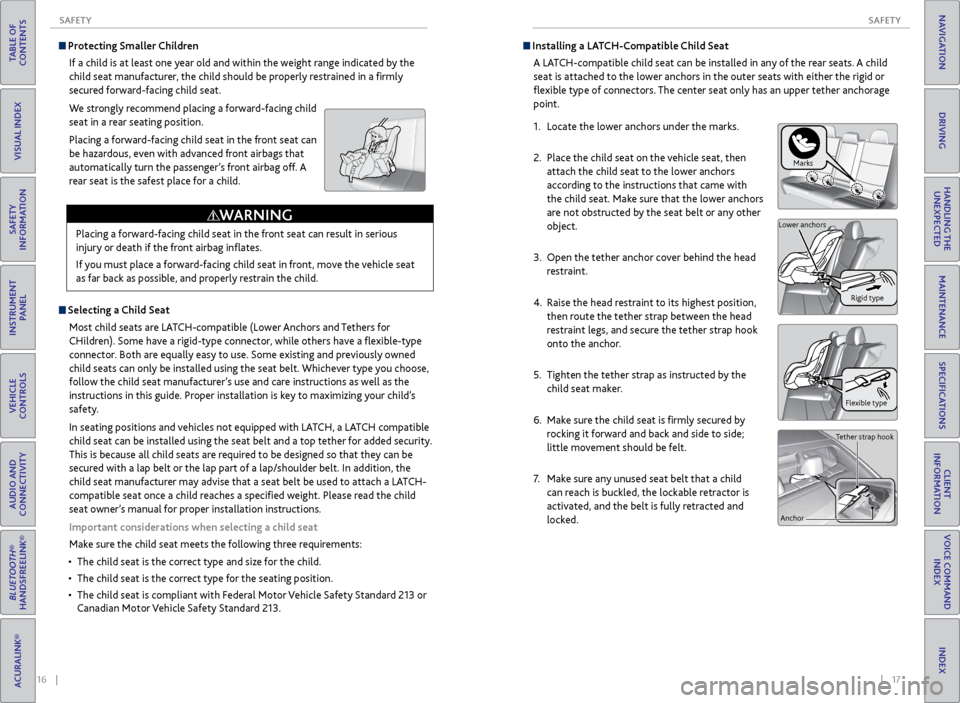
Installing a LATCH-Compatible Child Seat
A LATCH-compatible child seat can be installed in any of the rear seats. A child
seat is attached to the lower anchors in the outer seats with either the rigid or
flexible type of connectors. The center seat only has an upper tether anchorage
point.
1. Locate the lower anchors under the marks.
2. Place the child seat on the vehicle seat, then
attach the child seat to the lower anchors
according to the instructions that came with
the child seat. Make sure that the lower anchors
are not obstructed by the seat belt or any other
object.
3. Open the tether anchor cover behind the head
restraint.
4. Raise the head restraint to its highest position,
then route the tether strap between the head
restraint legs, and secure the tether strap hook
onto the anchor.
5. Tighten the tether strap as instructed by the
child seat maker.
6. Make sure the child seat is firmly secured by
rocking it forward and back and side to side;
little movement should be felt.
7. Make sure any unused seat belt that a child
can reach is buckled, the lockable retractor is
activated, and the belt is fully retracted and
locked.
Marks
Flexible type
Lower anchors
Rigid type
Tether strap hook
Anchor
Page 14 of 75

20 || 21
SAFETY
SAFETY
TABLE OF
CONTENTS
INDEX
VISUAL INDEX
VOICE COMMAND INDEX
SAFETY
INFORMATION
CLIENT
INFORMATION
INSTRUMENT PANEL
SPECIFICATIONS
VEHICLE
CONTROLS
MAINTENANCE
AUDIO AND
CONNECTIVITY
HANDLING THE UNEXPECTED
BLUETOOTH®
HANDSFREELINK®
DRIVING
ACURALINK®
NAVIGATION
Reporting Safety Defects
In the U.S.
If you believe that your vehicle has a defect which could cause a crash or could
cause injury or death, you should immediately inform the National Highway Traffic
Safety Administration (NHTSA) in addition to notifying American Honda Motor
Co., Inc.
If NHTSA receives similar complaints, it may open an investigation, and if it finds
that a safety defect exists in a group of vehicles, it may order a recall and remedy
campaign. However, NHTSA cannot become involved in individual problems
between you, your dealer, or American Honda Motor Co., Inc.
To contact NHTSA, you may call the Vehicle Safety Hotline toll-free at 1-888-
327-4236 (TTY: 1-800-424-9153); go to http://www.safercar.gov; or write to:
Administrator, NHTSA, 1200 New Jersey Avenue, SE., Washington, DC 20590. You
can also obtain other information about motor vehicle safety from http://www.
safercar.gov.
In Canada
If you believe that your vehicle has a defect which could cause a crash or could
cause injury or death, you should immediately inform Honda Canada, Inc., and you
may also inform Transport Canada.
If Transport Canada receives similar complaints, it may open an investigation, and
if it finds that a safety defect exists in a group of vehicles, it may lead to a recall
and remedy campaign. However, Transport Canada cannot become involved in
individual problems between you, your dealer, or Honda Canada, Inc.
To contact Transport Canada’s Defect Investigations and Recalls Division, you may
call 1-800-333-0510. For more information on reporting safety defects or about
motor vehicle safety, go to http://www.tc.gc.ca/roadsafety.
Allowing a child age 12 or under to sit in the front can result in injury or
death if the passenger’s front airbag inflates.
If a larger child must ride in front, move the vehicle seat as far to the rear as
possible, have the child sit up properly and wear the seat belt properly, using
a booster seat if needed.
WARNING
Safety Label Locations
Safety labels are in the locations shown. They warn you of potential hazards that
can cause serious injury or death. Read these labels carefully. If a lap/shoulder belt cannot be used properly, position the child in a booster seat
in a rear seating position. For the child’s safety, check that the child meets the
booster seat manufacturer’s recommendations.
Some U.S. states and Canadian provinces/territories require children to use a
booster seat until they reach a given age or weight (e.g., 6 years or 60 lbs). Be
sure to check current laws in the state or province/territory where you intend to
drive.
Radiator cap
Doorjambs
Sun visors
U.S. models
Canadian models
Dashboard
(U.S. models)
Page 18 of 75
28 || 29
VEHICLE CONTROLS
VEHICLE CONTROLS
TABLE OF
CONTENTS
INDEX
VISUAL INDEX
VOICE COMMAND INDEX
SAFETY
INFORMATION
CLIENT
INFORMATION
INSTRUMENT PANEL
SPECIFICATIONS
VEHICLE
CONTROLS
MAINTENANCE
AUDIO AND
CONNECTIVITY
HANDLING THE UNEXPECTED
BLUETOOTH®
HANDSFREELINK®
DRIVING
ACURALINK®
NAVIGATION
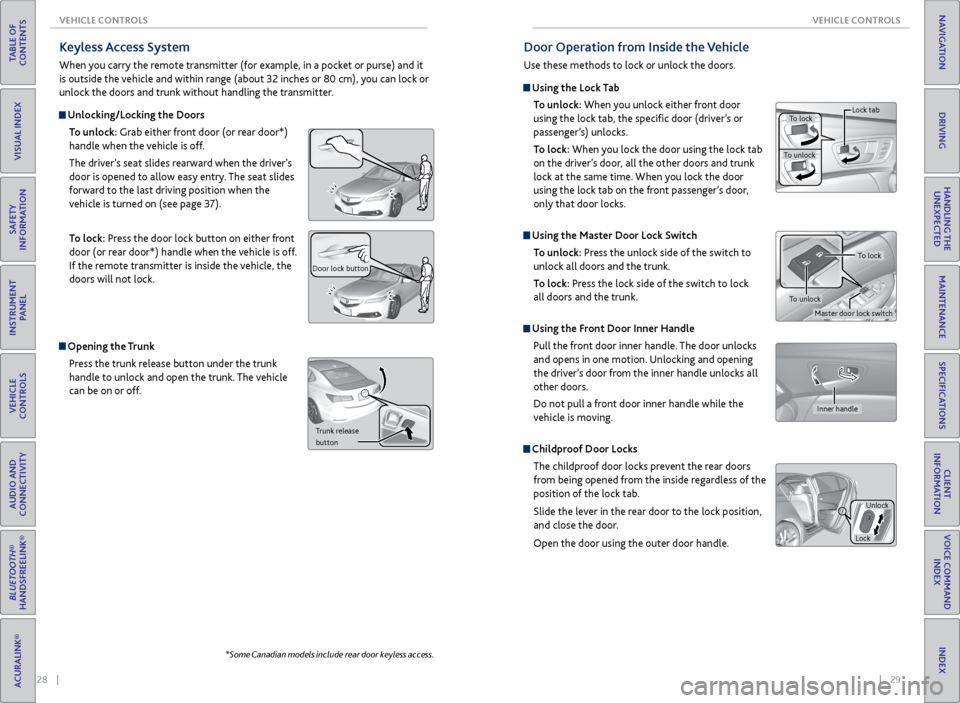
Keyless Access System
When you carry the remote transmitter (for example, in a pocket or purse) and it
is outside the vehicle and within range (about 32 inches or 80 cm), you can lock or
unlock the doors and trunk without handling the transmitter.
Unlocking/Locking the Doors
To unlock: Grab either front door (or rear door*)
handle when the vehicle is off.
The driver’s seat slides rearward when the driver’s
door is opened to allow easy entry. The seat slides
forward to the last driving position when the
vehicle is turned on (see page 37).
To lock: Press the door lock button on either front
door (or rear door*) handle when the vehicle is off.
If the remote transmitter is inside the vehicle, the
doors will not lock.
Door lock button
Opening the Trunk
Press the trunk release button under the trunk
handle to unlock and open the trunk. The vehicle
can be on or off.
Trunk release
button
*Some Canadian models include rear door keyless access.
Door Operation from Inside the Vehicle
Use these methods to lock or unlock the doors.
Using the Lock Tab
To unlock: When you unlock either front door
using the lock tab, the specific door (driver’s or
passenger’s) unlocks.
To lock: When you lock the door using the lock tab
on the driver’s door, all the other doors and trunk
lock at the same time. When you lock the door
using the lock tab on the front passenger’s door,
only that door locks.
Using the Master Door Lock Switch
To unlock: Press the unlock side of the switch to
unlock all doors and the trunk.
To lock: Press the lock side of the switch to lock
all doors and the trunk.
Using the Front Door Inner Handle
Pull the front door inner handle. The door unlocks
and opens in one motion. Unlocking and opening
the driver’s door from the inner handle unlocks all
other doors.
Do not pull a front door inner handle while the
vehicle is moving.
Childproof Door Locks
The childproof door locks prevent the rear doors
from being opened from the inside regardless of the
position of the lock tab.
Slide the lever in the rear door to the lock position,
and close the door.
Open the door using the outer door handle.
To lock
To unlock Lock tab
Inner handle
Unlock
Lock
Master door lock switch
To lock
To unlock
Page 40 of 75
72 || 73
DRIVING
DRIVING
TABLE OF
CONTENTS
INDEX
VISUAL INDEX
VOICE COMMAND INDEX
SAFETY
INFORMATION
CLIENT
INFORMATION
INSTRUMENT PANEL
SPECIFICATIONS
VEHICLE
CONTROLS
MAINTENANCE
AUDIO AND
CONNECTIVITY
HANDLING THE UNEXPECTED
BLUETOOTH®
HANDSFREELINK®
DRIVING
ACURALINK®
NAVIGATION
Maximum Load Limit
Carrying too much cargo or improperly storing it can affect your vehicle’s handling,
stability, stopping distance, and tires, and make it unsafe.
Your vehicle is not designed to tow a trailer. Attempting to do so can void your
vehicle warranties.
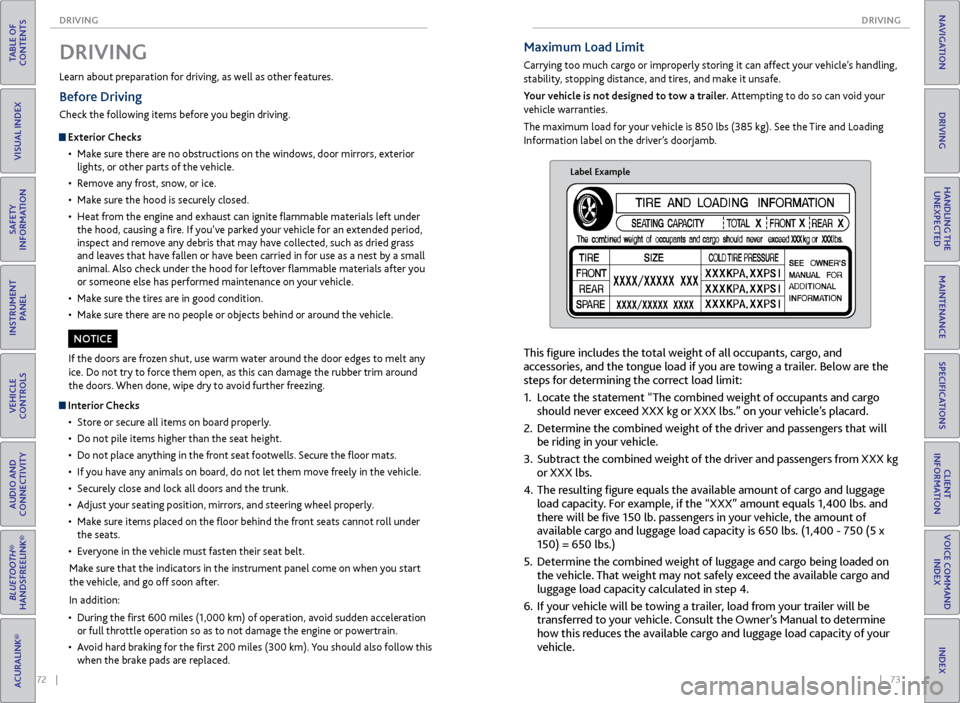
The maximum load for your vehicle is 850 lbs (385 kg). See the Tire and Loading
Information label on the driver’s doorjamb.
Label Example
This figure includes the total weight of all occupants, cargo, and
accessories, and the tongue load if you are towing a trailer. Below are the
steps for determining the correct load limit:
1. Locate the statement “The combined weight of occupants and cargo
should never exceed XXX kg or XXX lbs.” on your vehicle’s placard.
2. Determine the combined weight of the driver and passengers that will
be riding in your vehicle.
3. Subtract the combined weight of the driver and passengers from XXX kg
or XXX lbs.
4. The resulting figure equals the available amount of cargo and luggage
load capacity. For example, if the “XXX” amount equals 1,400 lbs. and
there will be five 150 lb. passengers in your vehicle, the amount of
available cargo and luggage load capacity is 650 lbs. (1,400 - 750 (5 x
150) = 650 lbs.)
5. Determine the combined weight of luggage and cargo being loaded on
the vehicle. That weight may not safely exceed the available cargo and
luggage load capacity calculated in step 4.
6. If your vehicle will be towing a trailer, load from your trailer will be
transferred to your vehicle. Consult the Owner’s Manual to determine
how this reduces the available cargo and luggage load capacity of your
vehicle.
Learn about preparation for driving, as well as other features.
DRIVING
If the doors are frozen shut, use warm water around the door edges to melt any
ice. Do not try to force them open, as this can damage the rubber trim around
the doors. When done, wipe dry to avoid further freezing.
NOTICE
Interior Checks
• Store or secure all items on board properly.
• Do not pile items higher than the seat height.
• Do not place anything in the front seat footwells. Secure the floor mats.
• If you have any animals on board, do not let them move freely in the vehicle.
• Securely close and lock all doors and the trunk.
• Adjust your seating position, mirrors, and steering wheel properly.
• Make sure items placed on the floor behind the front seats cannot roll under
the seats.
• Everyone in the vehicle must fasten their seat belt.
Make sure that the indicators in the instrument panel come on when you start
the vehicle, and go off soon after.
In addition:
• During the first 600 miles (1,000 km) of operation, avoid sudden acceleration
or full throttle operation so as to not damage the engine or powertrain.
• Avoid hard braking for the first 200 miles (300 km). You should also follow this
when the brake pads are replaced.
Before Driving
Check the following items before you begin driving.
Exterior Checks
• Make sure there are no obstructions on the windows, door mirrors, exterior
lights, or other parts of the vehicle.
• Remove any frost, snow, or ice.
• Make sure the hood is securely closed.
• Heat from the engine and exhaust can ignite flammable materials left under
the hood, causing a fire. If you’ve parked your vehicle for an extended period,
inspect and remove any debris that may have collected, such as dried grass
and leaves that have fallen or have been carried in for use as a nest by a small
animal. Also check under the hood for leftover flammable materials after you
or someone else has performed maintenance on your vehicle.
• Make sure the tires are in good condition.
• Make sure there are no people or objects behind or around the vehicle.