wiper blades Acura TLX 2015 Owner's Guide
[x] Cancel search | Manufacturer: ACURA, Model Year: 2015, Model line: TLX, Model: Acura TLX 2015Pages: 75, PDF Size: 24.55 MB
Page 4 of 75
| 1
VISUAL INDEX
TABLE OF
CONTENTS
INDEX
VISUAL INDEX
VOICE COMMAND INDEX
SAFETY
INFORMATION
CLIENT
INFORMATION
INSTRUMENT PANEL
SPECIFICATIONS
VEHICLE
CONTROLS
MAINTENANCE
AUDIO AND
CONNECTIVITY
HANDLING THE UNEXPECTED
BLUETOOTH®
HANDSFREELINK®
DRIVING
ACURALINK®
NAVIGATION
Cruise Control ................................ 85
Adaptive Cruise Control (ACC) with
Low Speed Follow (LSF)* .............. 86
Forward Collision Warning (FCW)
with Pedestrian Detection* .......... 88
Lane Departure Warning (LDW)* ... 89
Lane Keeping Assist System
(LKAS)* ............................................ 90
Collision Mitigation Braking
System™ (CMBS™)* ...................... 91
Road Departure Mitigation (RDM)
System* ........................................... 92
Blind Spot Information (BSI)
System* ........................................... 93
Parking Sensor System* ................ 94
Super Handling-All Wheel Drive
(AWD)* ............................................ 94
Multi-View Rear Camera ............... 95
Cross Traffic Monitor* ................... 96
Refueling ......................................... 97
HANDLING THE UNEXPECTED ...98
Keyless Access Remote Battery
Strength ........................................... 98
Shift Lever Does Not Move* ........ 98
Jump Starting .................................. 99
Overheating ................................... 101
Emergency Engine Stop ............... 102
Emergency Towing ....................... 102
Tire Pressure Monitoring System
(TPMS) ........................................... 103
Tire Repair Kit* ............................. 104Changing a Flat Tire .....................
105
Fuse Locations .............................. 108
MAINTENANCE ............................. 111
Safety Precautions ........................ 111
Maintenance Minder™ ................. 112
Under the Hood ............................. 114
Engine Oil ....................................... 116
Engine Coolant .............................. 118
Window Washer Fluid .................. 119
Checking the Battery .................... 119
Changing Wiper Blades ............... 120
Tire Information ............................ 121
Tire Labeling .................................. 124
DOT Tire Quality Grading ........... 125
Tire Pressure Monitoring System
(TPMS) - Required Federal
Explanation .................................... 127
Testing of Readiness Codes ........ 128
SPECIFICATIONS ......................... 129
CLIENT INFORMATION ............... 131
Frequently Asked Questions/
Troubleshooting ............................ 131
Contact Us .................................... 132
Acura Total Luxury Care Roadside
Assistance ..................................... 133
Warranty Coverages .................... 133
V OICE COMMAND INDEX ......... 134
INDEX ............................................ 140
*if equipped
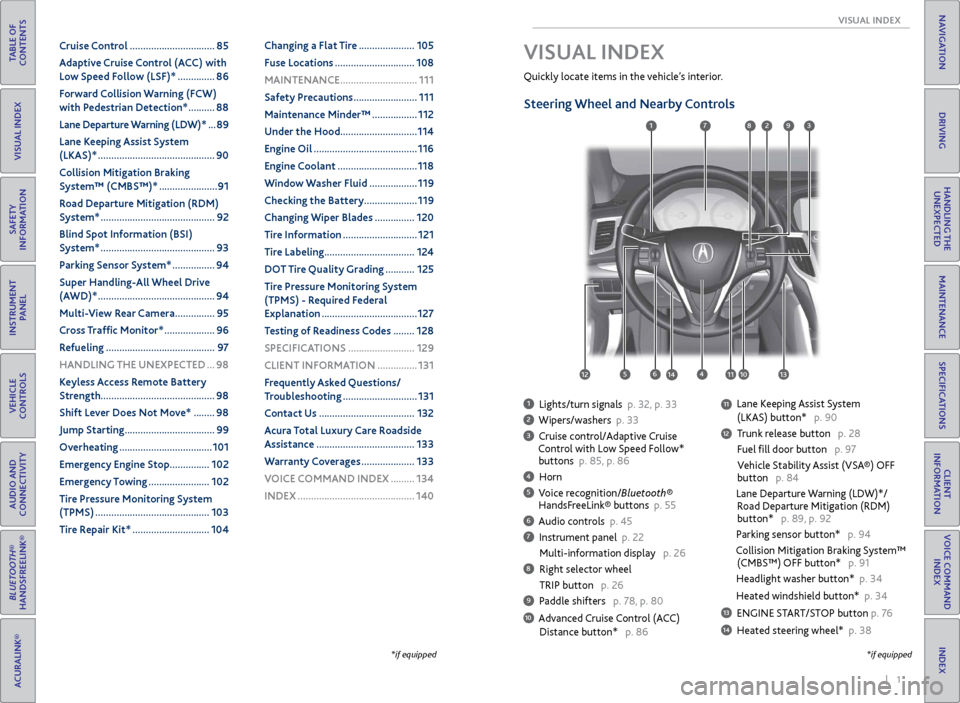
1 Lights/turn signals p. 32, p. 33
2 Wipers/washers p. 33
3 Cruise control/Adaptive Cruise
Control with Low Speed Follow*
buttons p. 85, p. 86
4 Horn
5 Voice recognition/Bluetooth®
HandsFreeLink® buttons p. 55
6 Audio controls p. 45
7 Instrument panel p. 22
Multi-information display p. 26
8 Right selector wheel
TRIP button p. 26
9 Paddle shifters p. 78, p. 80
10 Advanced Cruise Control (ACC)
Distance button* p. 86
Quickly locate items in the vehicle’s interior.
Steering Wheel and Nearby Controls
Lane Keeping Assist System
(LKAS) button* p. 90
Trunk release button p. 28
Fuel fill door button p. 97
Vehicle Stability Assist (VSA®) OFF
button p. 84
Lane Departure Warning (LDW)*/
Road Departure Mitigation (RDM)
button* p. 89, p. 92
Parking sensor button* p. 94
Collision Mitigation Braking System™
(CMBS™) OFF button* p. 91
Headlight washer button* p. 34
Heated windshield button* p. 34
13 ENGINE START/STOP button p. 76
14 Heated steering wheel* p. 38
VISUAL INDEX
*if equipped
1
1011
27
4
8
13
12
125614
93
11
Page 21 of 75
34 || 35
VEHICLE CONTROLS
VEHICLE CONTROLS
TABLE OF
CONTENTS
INDEX
VISUAL INDEX
VOICE COMMAND INDEX
SAFETY
INFORMATION
CLIENT
INFORMATION
INSTRUMENT PANEL
SPECIFICATIONS
VEHICLE
CONTROLS
MAINTENANCE
AUDIO AND
CONNECTIVITY
HANDLING THE UNEXPECTED
BLUETOOTH®
HANDSFREELINK®
DRIVING
ACURALINK®
NAVIGATION
Do not use the wipers when the windshield is dry. The windshield will get
scratched, or the rubber blades will get damaged.
In cold weather, the blades may freeze to the windshield, becoming stuck.
Operating the wipers in this condition may damage the wipers. Use the defroster
to warm the windshield, or manually clear the windshield of ice and snow before
turning on the wipers.
NOTICE
Headlight Washers*
Canadian models
Heated Windshield Button*
Canadian models
Turn the headlights on. Press the
headlight washer button to operate the
washers.
The headlight washers also operate
when you first turn on the windshield
wipers.
Turn the vehicle on. Press the heated
windshield button to de-ice the
windshield.
The heated windshield may
automatically activate when the
outside temperature is below 4°C,
and deactivate when the temperature
reaches 6°C.
*if equipped
Adjusting the Seats
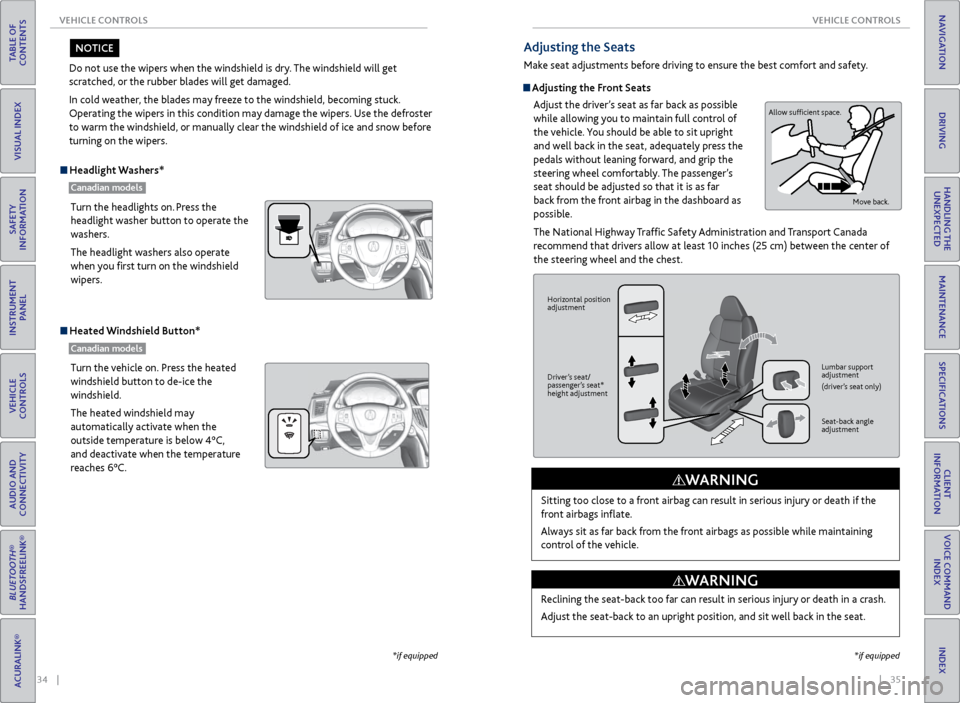
Make seat adjustments before driving to ensure the best comfort and safety.
Adjusting the Front Seats
Adjust the driver’s seat as far back as possible
while allowing you to maintain full control of
the vehicle. You should be able to sit upright
and well back in the seat, adequately press the
pedals without leaning forward, and grip the
steering wheel comfortably. The passenger’s
seat should be adjusted so that it is as far
back from the front airbag in the dashboard as
possible.
The National Highway Traffic Safety Administration and Transport Canada
recommend that drivers allow at least 10 inches (25 cm) between the center of
the steering wheel and the chest.
Sitting too close to a front airbag can result in serious injury or death if the
front airbags inflate.
Always sit as far back from the front airbags as possible while maintaining
control of the vehicle.
WARNING
Allow sufficient space. Move back.
Horizontal position
adjustment
Driver’s seat/
passenger’s seat*
height adjustment Lumbar support
adjustment
(driver’s seat only)
Seat-back angle
adjustment
Reclining the seat-back too far can result in serious injury or death in a crash.
Adjust the seat-back to an upright position, and sit well back in the seat.
WARNING
*if equipped
Page 64 of 75
120 || 121
MAINTENANCE
MAINTENANCE
TABLE OF
CONTENTS
INDEX
VISUAL INDEX
VOICE COMMAND INDEX
SAFETY
INFORMATION
CLIENT
INFORMATION
INSTRUMENT PANEL
SPECIFICATIONS
VEHICLE
CONTROLS
MAINTENANCE
AUDIO AND
CONNECTIVITY
HANDLING THE UNEXPECTED
BLUETOOTH®
HANDSFREELINK®
DRIVING
ACURALINK®
NAVIGATION
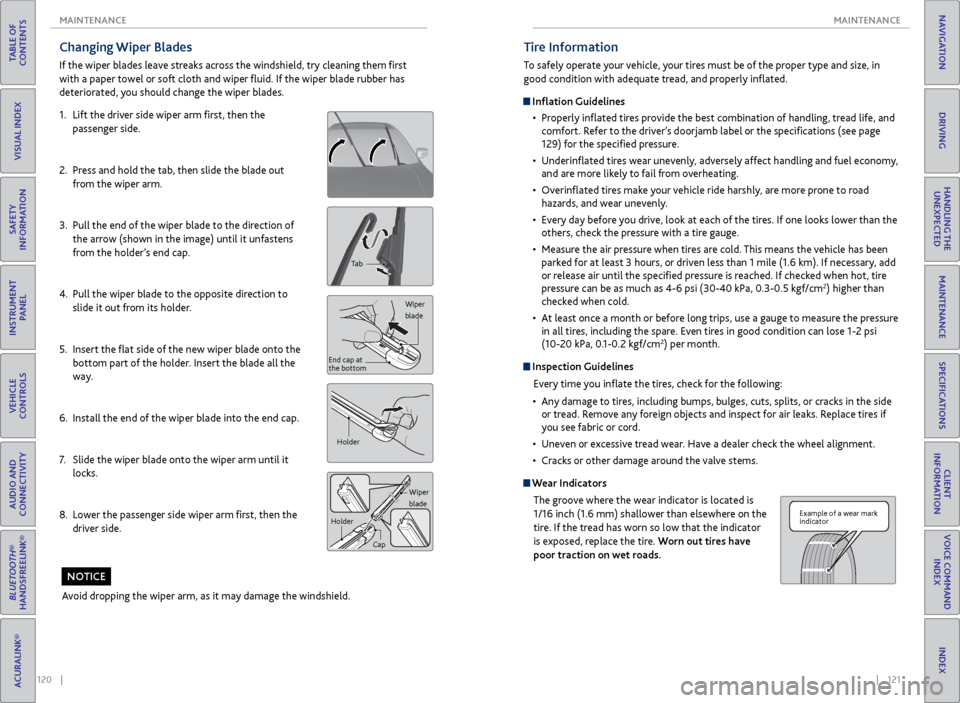
Changing Wiper Blades
If the wiper blades leave streaks across the windshield, try cleaning them first
with a paper towel or soft cloth and wiper fluid. If the wiper blade rubber has
deteriorated, you should change the wiper blades.
1. Lift the driver side wiper arm first, then the
passenger side.
2. Press and hold the tab, then slide the blade out
from the wiper arm.
3. Pull the end of the wiper blade to the direction of
the arrow (shown in the image) until it unfastens
from the holder’s end cap.
4. Pull the wiper blade to the opposite direction to
slide it out from its holder.
5. Insert the flat side of the new wiper blade onto the
bottom part of the holder. Insert the blade all the
way.
6. Install the end of the wiper blade into the end cap.
7. Slide the wiper blade onto the wiper arm until it
locks.
8. Lower the passenger side wiper arm first, then the
driver side.
Tab
Wiper
blade
End cap at
the bottom
Holder
Wiper
blade
Holder
Cap
Avoid dropping the wiper arm, as it may damage the windshield.
NOTICE
Tire Information
To safely operate your vehicle, your tires must be of the proper type and size, in
good condition with adequate tread, and properly inflated.
Inflation Guidelines• Properly inflated tires provide the best combination of handling, tread life, and
comfort. Refer to the driver’s doorjamb label or the specifications (see page
129) for the specified pressure.
• Underinflated tires wear unevenly, adversely affect handling and fuel economy,
and are more likely to fail from overheating.
• Overinflated tires make your vehicle ride harshly, are more prone to road
hazards, and wear unevenly.
• Every day before you drive, look at each of the tires. If one looks lower than the
others, check the pressure with a tire gauge.
• Measure the air pressure when tires are cold. This means the vehicle has been
parked for at least 3 hours, or driven less than 1 mile (1.6 km). If necessary, add
or release air until the specified pressure is reached. If checked when hot, tire
pressure can be as much as 4-6 psi (30-40 kPa, 0.3-0.5 kgf/cm
2) higher than
checked when cold.
• At least once a month or before long trips, use a gauge to measure the pressure
in all tires, including the spare. Even tires in good condition can lose 1-2 psi
(10-20 kPa, 0.1-0.2 kgf/cm
2) per month.
Inspection Guidelines
Every time you inflate the tires, check for the following:
• Any damage to tires, including bumps, bulges, cuts, splits, or cracks in the side
or tread. Remove any foreign objects and inspect for air leaks. Replace tires if
you see fabric or cord.
• Uneven or excessive tread wear. Have a dealer check the wheel alignment.
• Cracks or other damage around the valve stems.
Wear Indicators
The groove where the wear indicator is located is
1/16 inch (1.6 mm) shallower than elsewhere on the
tire. If the tread has worn so low that the indicator
is exposed, replace the tire. Worn out tires have
poor traction on wet roads.
Example of a wear mark
indicator
Page 75 of 75
142 || 143
INDEX
INDEX
TABLE OF
CONTENTS
INDEX
VISUAL INDEX
VOICE COMMAND INDEX
SAFETY
INFORMATION
CLIENT
INFORMATION
INSTRUMENT PANEL
SPECIFICATIONS
VEHICLE
CONTROLS
MAINTENANCE
AUDIO AND
CONNECTIVITY
HANDLING THE UNEXPECTED
BLUETOOTH®
HANDSFREELINK®
DRIVING
ACURALINK®
NAVIGATION
Malfunction indicator lamp .......................... 22
Malfunction Indicators .................................. 22
Map Display Commands ............................ 134
Map Legend ............................................... 66, 70
Master Door Lock Switch .............................. 29
Maximum Load Limit ..................................... 73
Mirrors ........................................................... 39
Moonroof ......................................................... 31
Multi-Information Display ............................ 26
Multi-View Rear Camera ...............................95
Navigation ....................................................... 65
AcuraLink Real-Time Traffic™ ................... 71
Detour ........................................................... 71
Display and Controls ................................. 66
Entering a Destination .............................. 68
Find Nearest Place ..................................... 69
Home Address ............................................ 68
Interface Dial Feedback ............................. 67
Map Legend ........................................... 66, 70
Place Category ........................................... 69
Routing ......................................................... 70
Steering Wheel Controls ........................... 65
Street Address ............................................ 68
System Guidance Volume ......................... 67
Traffic ............................................................ 71
Voice Command Tips .................................. 65
Voice Prompt ............................................... 67
Navigation Commands ............................... 134
Neutral (Car Wash Mode) ............................ 80
On-Demand Multi-Use Display (ODMD) ... 46
One-Touch Turn Signal ................................. 33
On/Off Indicators ........................................... 25
Opening the Hood ........................................ 115
Opening the Trunk ......................................... 28
Operator Assistance ...................................... 64
Overheating ................................................... 101
Pairing a Phone ................................................ 57
Pandora® .......................................................... 53
Pandora® Commands ................................. 138
Parking Brake ................................................... 81
Parking Sensor System .................................. 94
Passenger Airbag Off Indicator ..................... 11
Phone ............................................................ 57
Phonebook .......................................................59
Phone Commands ........................................ 139
Place Category ............................................... 69
Power Door Mirrors ....................................... 39
Power Mode ..................................................... 76
Power Moonroof ............................................. 31
Power Windows ............................................. 30
Precision All Wheel Steer System indicator ... 22
Protecting Child Passengers ......................... 14
Protecting Infants ........................................... 15
Protecting Larger Children ............................ 19
Protecting Smaller Children .......................... 16Radio
............................................................ 47
Rain-Sensing Wipers ..................................... 33
RDM indicator ................................................. 23
Readiness Codes ............................................ 128
Rear Camera ....................................................95
Rearview Mirror .............................................. 39
Refueling ........................................................... 97
Remote Battery Strength ............................. 98
Remote Engine Start ...................................... 75
Remote Transmitter ....................................... 27
Reporting Safety Defects .............................. 21
Reserve Tank .................................................. 118
Reverse Tilt Door Mirrors ............................. 39
Road Departure Mitigation (RDM) System ...23, 92
Roadside Assistance ..................................... 133
Route Commands ........................................ 134
Routing ............................................................ 70
Safety Information ........................................... 3
Carbon Monoxide Gas ................................. 4
Child Safety .................................................. 14
Important Safety Information .................... 3
Important Safety Precautions .................... 3
Reporting Safety Defects .......................... 21
Safety Label Locations .............................. 20
Safety Messages ............................................ 3
Seat Belts ........................................................... 5
Adjusting the Shoulder Anchor .................. 7
Fastening a Seat Belt .................................... 7
Lap/Shoulder Seat Belts .............................. 5
Seat Belt Inspection ..................................... 6
Seat belt reminder indicator ..................... 24
Seat Heaters ................................................... 43
Seat Ventilation ............................................. 43
Seats ............................................................ 35
Sequential Mode ............................................ 80
Sequential Shift Mode ................................... 78
Service Codes ................................................ 112
Settings ........................................................... 40
Setting the Clock ........................................... 40
SH-AWD indicator .......................................... 24
Shifting ............................................................ 77
Electronic Gear Selector ............................ 79
Sequential Mode ........................................ 80
Sequential Shift Mode ............................... 78
Shift Lever .................................................... 77
Shift Lever Does Not Move ...................... 98
Shoulder Anchor ............................................... 7
Side Airbags ....................................................... 9
Side Curtain Airbags ......................................... 9
SiriusXM® Radio ............................................ 48
SiriusXM® Radio Commands ...................... 137
SMS Text Messaging ....................................... 61
Song By Voice™ Commands ....................... 139
Sound ........................................................... 45
Specifications ................................................ 129Speed Dial .................................................
59, 60
SPORT mode indicator .................................. 25
Supplemental Restraint System indicator ... 10, 23
START/STOP button ................................................... 76
Steering Wheel ............................................... 38
Steering Wheel and Nearby Controls ........... 1
Steering Wheel Controls ................. 45, 55, 65
Street Address ................................................ 68
Super Handling-All Wheel Drive (AWD) ... 94
System Guidance Volume ............................. 67
System message indicator ............................ 24
Text Messaging ................................................ 61
Tire Chains ...................................................... 123
Tire Information ............................................ 121
Inflation Guidelines .................................. 121
Inspection Guidelines ............................... 121
Tire and Loading Information Label ...... 122
Tire and Wheel Replacement.................. 122
Tire Grading ............................................... 125
Tire Labeling ............................................... 124
Tire Identification Number (TIN) ........... 124
Tire Service Life ......................................... 123
Tire Terminology ....................................... 124
Wear Indicators
......................................... 121
Winter Tires ................................................ 123
Tire Pressure Monitoring System (TPMS)............................. 23, 103, 127
Tire Repair Kit ............................................... 104
Tires ................................................. 129, 130
TPMS indicator ................................................ 23
Traffic ............................................................ 71
Troubleshooting ............................................ 131
Trunk ........................................................... 28
Trunk Release Button .................................... 30
Turn-by-turn directions ................................. 70
Turn Signal ...................................................... 33
Turn signal indicator ...................................... 25
Under the Hood ............................................ 114
Unlocking the Doors ..................................... 28
USB Adapter Cable ........................................ 44
USB Commands ........................................... 138
USB Flash Drive .............................................. 50
Vehicle Controls .............................................. 27
Vehicle Stability Assist (VSA®) .............. 23, 84
Visual Index ....................................................... 1
Voice Command Index ................................ 134
Voice Command Tips ...............................56, 65
Voice Prompt ................................................... 67
VSA indicator ................................................... 23
VSA off indicator ............................................. 25
Warranty Coverages ..................................... 133
Wear Indicators ............................................. 121
Window s ......................................................... 30
Window Washer Fluid .................................. 119
Winter Tires .................................................... 123Wipers
........................................................... 33
Wiper Blades .................................................. 102
XM® Radio ...................................................... 48
XM® Radio Commands ................................ 137