ESP Acura TLX 2015 User Guide
[x] Cancel search | Manufacturer: ACURA, Model Year: 2015, Model line: TLX, Model: Acura TLX 2015Pages: 545, PDF Size: 19.64 MB
Page 223 of 545
222
uuAudio System Basic Operation uAudio/Information Screen
Features
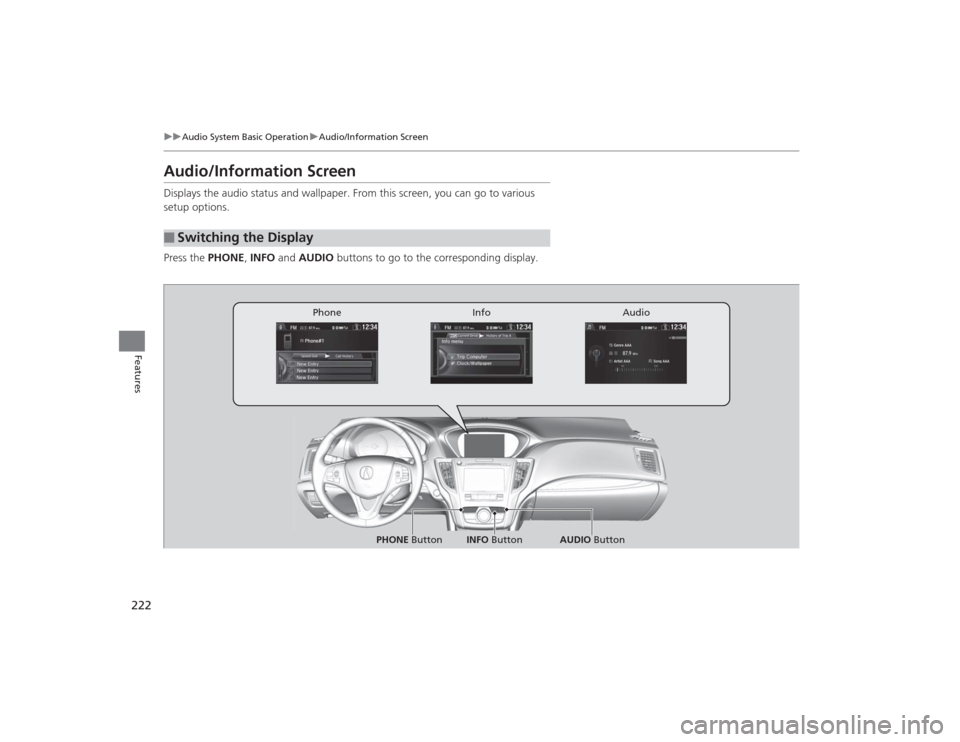
Audio/Information ScreenDisplays the audio status and wallpaper. From this screen, you can go to various
setup options.
Press the PHONE, INFO and AUDIO buttons to go to the corresponding display.■
Switching the Display
Audio
Info
Phone
AUDIO Button
PHONE Button INFO Button
Page 267 of 545
266
uuCustomized Features u
Features
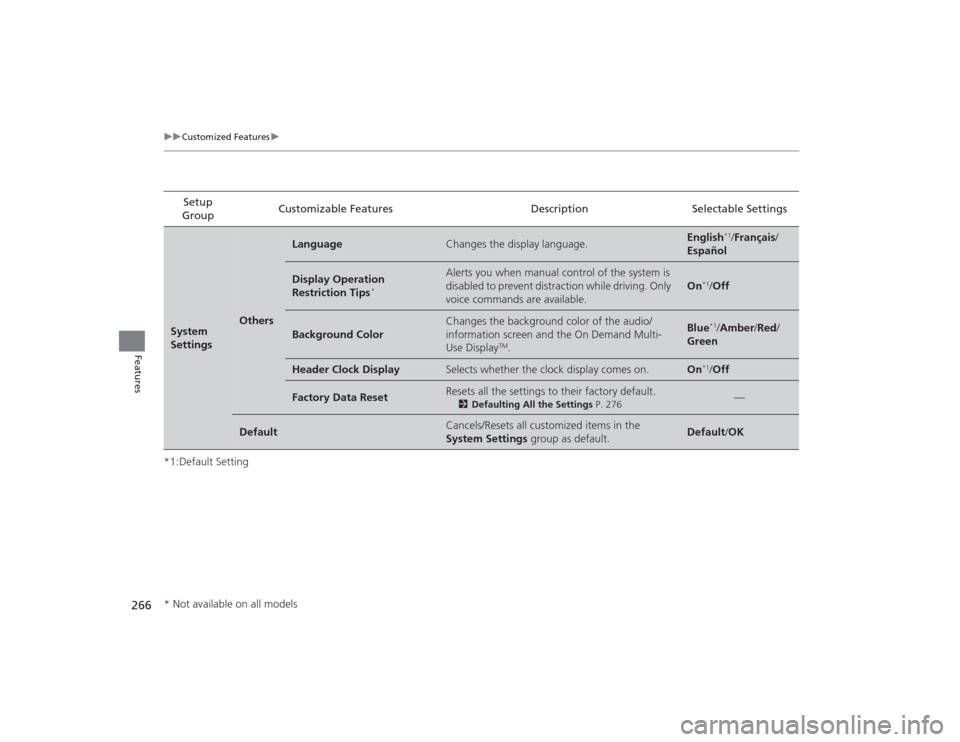
*1:Default SettingSetup
Group Customizable Features Description Selectable SettingsSystem
Settings
Others
Language
Changes the display language.
English
*1/
Français /
Español
Display Operation
Restriction Tips
*
Alerts you when manual control of the system is
disabled to prevent distraction while driving. Only
voice commands are available.
On
*1/ Off
Background Color
Changes the background color of the audio/
information screen and the On Demand Multi-
Use Display
TM.
Blue
*1/Amber /Red/
Green
Header Clock Display
Selects whether the clock display comes on.
On
*1/ Off
Factory Data Reset
Resets all the settings to their factory default.
2 Defaulting All the Settings P. 276
—
Default
Cancels/Resets all customized items in the
System Settings group as default.
Default/OK
* Not available on all models
Page 269 of 545
268
uuCustomized Features u
Features
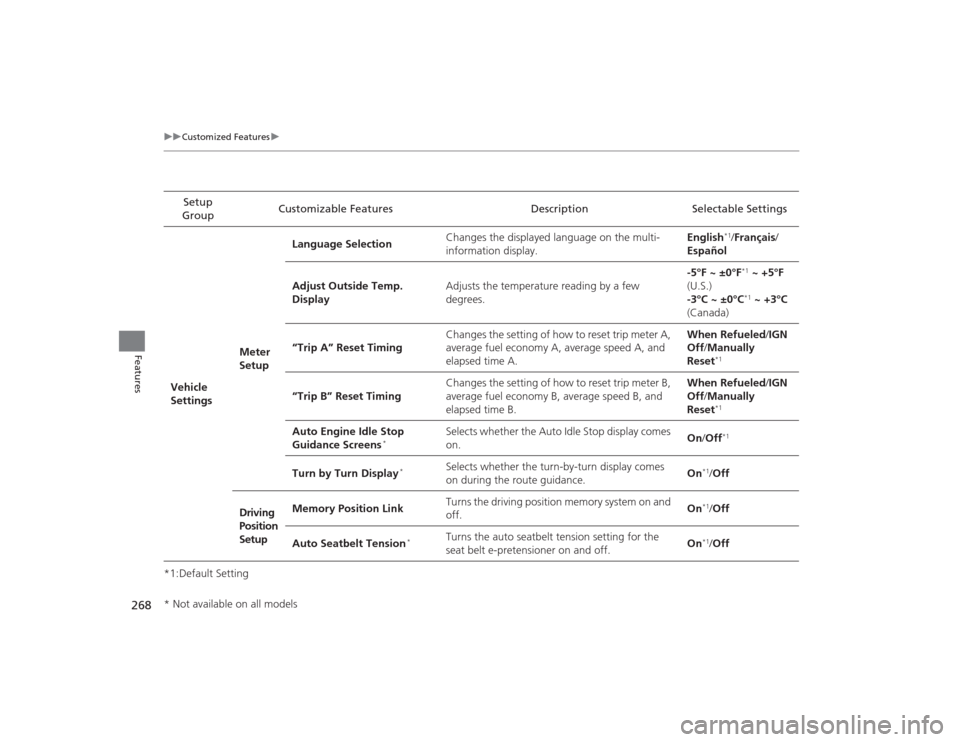
*1:Default SettingSetup
Group Customizable Features Description Selectable Settings
Vehicle
Settings Meter
SetupLanguage Selection
Changes the displayed language on the multi-
information display. English
*1/
Français /
Español
Adjust Outside Temp.
Display Adjusts the temperature reading by a few
degrees. -5°F ~ ±0°F*1
~ +5°F
(U.S.)
-3°C ~ ±0°C*1 ~ +3°C
(Canada)
“Trip A” Reset Timing Changes the setting of how to reset trip meter A,
average fuel economy A, average speed A, and
elapsed time A. When Refueled
/IGN
Off /Manually
Reset
*1
“Trip B” Reset Timing Changes the setting of how to reset trip meter B,
average fuel economy B, average speed B, and
elapsed time B. When Refueled
/IGN
Off /Manually
Reset
*1
Auto Engine Idle Stop
Guidance Screens
*
Selects whether the Auto Idle Stop display comes
on. On
/Off
*1
Turn by Turn Display
*
Selects whether the turn-by-turn display comes
on during the route guidance. On
*1/
Off
Driving
Position
Setup Memory Position Link
Turns the driving position memory system on and
off.
On*1/
Off
Auto Seatbelt Tension
*
Turns the auto seatbelt tension setting for the
seat belt e-pretensioner on and off. On
*1/
Off
* Not available on all models
Page 281 of 545
uuBluetooth ® HandsFreeLink ®u Using HFL
280Features
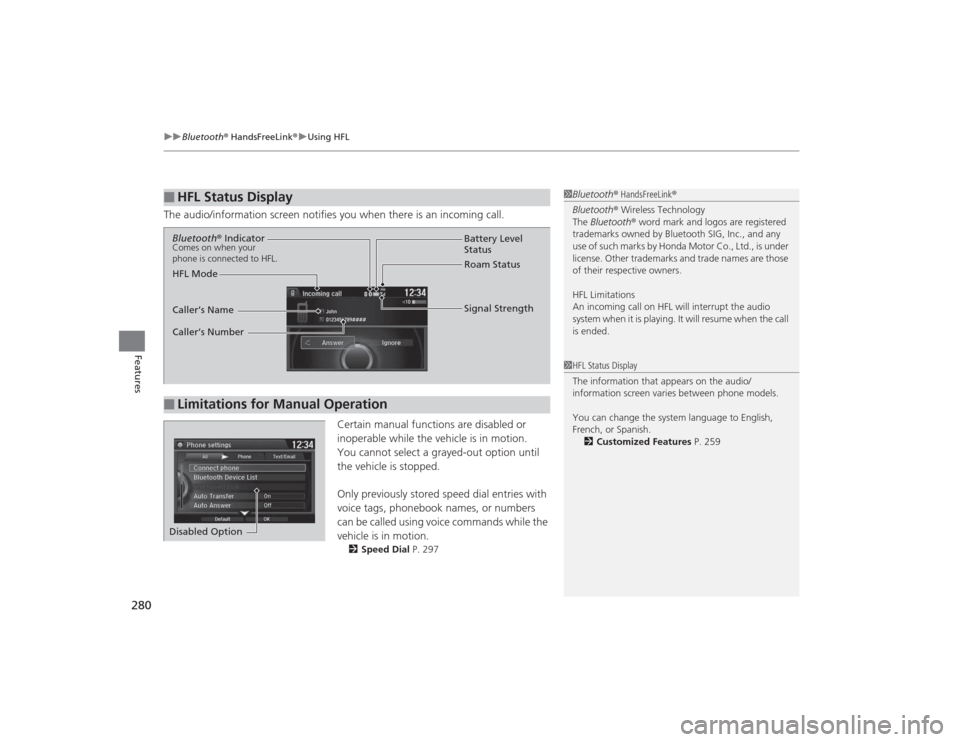
The audio/information screen notifies you when there is an incoming call.
Certain manual functions are disabled or
inoperable while the vehicle is in motion.
You cannot select a grayed-out option until
the vehicle is stopped.
Only previously stored speed dial entries with
voice tags, phonebook names, or numbers
can be called using voice commands while the
vehicle is in motion.
2 Speed Dial P. 297
■
HFL Status Display
1Bluetooth ® HandsFreeLink ®
Bluetooth ® Wireless Technology
The Bluetooth ® word mark and logos are registered
trademarks owned by Bluetooth SIG, Inc., and any
use of such marks by Honda Motor Co., Ltd., is under
license. Other trademarks and trade names are those
of their respective owners.
HFL Limitations
An incoming call on HFL will interrupt the audio
s y s te m wh e n it is p la y i n g . It wi ll re s u m e w h en t h e c a l l
is ended.1 HFL Status Display
The information that appears on the audio/
information screen varies between phone models.
You can change the system language to English,
French, or Spanish.
2 Customized Features P. 259
■
Limitations for Manual OperationBluetooth ® IndicatorComes on when your
phone is connected to HFL.
Signal Strength
HFL Mode Battery Level
Status
Roam Status
Caller’s Name
Caller’s Number
Disabled Option
Page 331 of 545
uuWhen Driving uAutomatic Transmission
*
330Driving
If there is a strong impact with something under the vehicle, stop in a safe location.
Check the underside of the vehicle for damage or any fluid leaks.Automatic Transmission
*
The engine runs at a higher idle speed and creeping increases.
Keep the brake pedal firmly depressed when stopped.
Quickly depressing the accelerator pedal while driving uphill may cause the
transmission to drop to a lower gear, unexpectedly increasing vehicle speed. Depress
the accelerator pedal carefully, especially on slippery roads and curves.Dual Clutch Transmission
*
As with a conventional automatic transmission, this vehicle will creep.
Keep the brake pedal firmly depressed when stopped.
Quickly depressing the accelerator pedal while driving uphill may cause the
transmission to drop to a lower gear, unexpectedly increasing vehicle speed. Depress
the accelerator pedal carefully, especially on slippery roads and curves.■
Other Precautions
■
Creeping
■
Kickdown
■
Creeping
■
Kickdown
1Precautions While Driving
Do not change the gear position to
(N, as you will
lose engine braking (and acceleration) performance.
During the first 600 miles (1,000 km) of operation,
avoid sudden acceleration or full throttle operation so
as to not damage the engine or powertrain.
Avoid hard braking for the first 200 miles (300 km).
You should also follow this when the brake pads are
replaced.
* Not available on all models
Page 334 of 545
Continued
333
uuWhen Driving uShifting
Driving
In freezing or sub-freezing conditions, the electronic gear selector response may be
slow.
Always depress the brake pedal before changing the gear position to
(P
, and
confirm that
(P
is shown on the gear position indicator before releasing the brake.
■When opening the driver’s door
If you open the driver’s door under the following conditions, the gear position
automatically changes to
(P
.
• The vehicle is stationary with the engine running, or moving at 1 mph (2 km/h) or
slower.
• The transmission is in other than
(P
.
• You have unfastened the driver side seat belt.
u If you manually change the gear position from
(P
with the brake pedal
depressed, the gear position will automatically return to
(P
once you release
the brake pedal.
■When turning off the power mode
If you turn the engine off while the vehicle is stationary, and the transmission is in
other than
(P
, the gear position automatically changes to
(P
.
1 When opening the driver’s door
You should always select
(P before opening the
driver’s door.
Make sure to park the vehicle in a safe place. 2 When Stopped P. 411
If you want to drive the vehicle after the gear position
has automatically changed to ( P under the described
conditions, close the door, fasten the seat belt,
depress the brake pedal, then change the gear
position.
If you leave the vehicle, turn off the engine and lock
the doors.
Page 347 of 545

346
uuWhen Driving uIntegrated Dynamics System (IDS)
Driving
Integrated Dynamics System (IDS)Modifies the dynamic character of the vehicle. There are four IDS modes to select
from: Econ, Normal , Sport , and Sport+ .
Press the IDS button to select a mode. The mode you have selected appears on the
multi-information display.
You can customize the IDS mode default setting using the multi-information display.2 Customized Features P. 126, 259
IDS Button
Models with full color display
Econ (Econ mode)
Maximizes fuel economy.
Normal (Normal mode)
Provides the best balance of fuel economy and sportiness for
everyday driving.
Sport (Sport mode)
Enhances vehicle response and feel with decreased steering
assist. Also increases throttle response and SH-AWD
* control.
Sport+ (Sport+ mode)
Adds to Sport mode to allow for increase performance when
using the steering wheel paddle shifters.
* Not available on all models
Page 348 of 545

347
uuWhen Driving uIntegrated Dynamics System (IDS)
Driving
IDS Button
Models without full color display
ECON (Econ mode)
Maximizes fuel economy.
NORMAL (Normal mode)
Provides the best balance of fuel economy and sportiness for
everyday driving.
SPORT (Sport mode)
Enhances vehicle response and feel with decreased steering
assist. Also increases throttle response.
SPORT+ (Sport+ mode)
Adds to Sport mode to allow for increase performance when
using the steering wheel paddle shifters.
Page 366 of 545
365
uuWhen Driving uForward Collision Warning (FCW) with Pedestrian Detection
*
Continued
Driving
Forward Collision Warning (FCW) with Pedestrian Detection
*
Alerts you when it determines the possibility of your vehicle colliding with a vehicle
or pedestrian detected in front of you.
If the system determines a collision is possible, it gives visual and audible alerts.
u Take appropriate action to prevent a collision (apply the brakes, change lanes,
etc.).■How the system works
For a possible collision with a vehicle: Warnings may be given when your vehicle
speed is about 10 mph (15 km/h) and above.
For a possible collision with a pedestrian: Warnings may be given when your vehicle
speed is between about 10 and 62 mph (15 and 100 km/h).
1 Forward Collision Warning (FCW) with Pedestrian Detection
*
Important Safety Reminder
FCW with Pe destrian Detection cannot detect all
objects ahead and may not detect a given object;
accuracy of the system will vary based on weather,
speed and other factors. FCW with Pedestrian
Detection does not include a braking function. It is
always your responsibility to safely operate the
vehicle and avoid collisions.
You can change the Forward Collision Warning
Distance setting or turn the system on and off.
2 Customized Features P. 126, 259
You can read about handling information for the
camera equipped with this system. 2 Front Sensor Camera
* P. 351
Long
Normal Short
Your Vehicle Vehicle Ahead
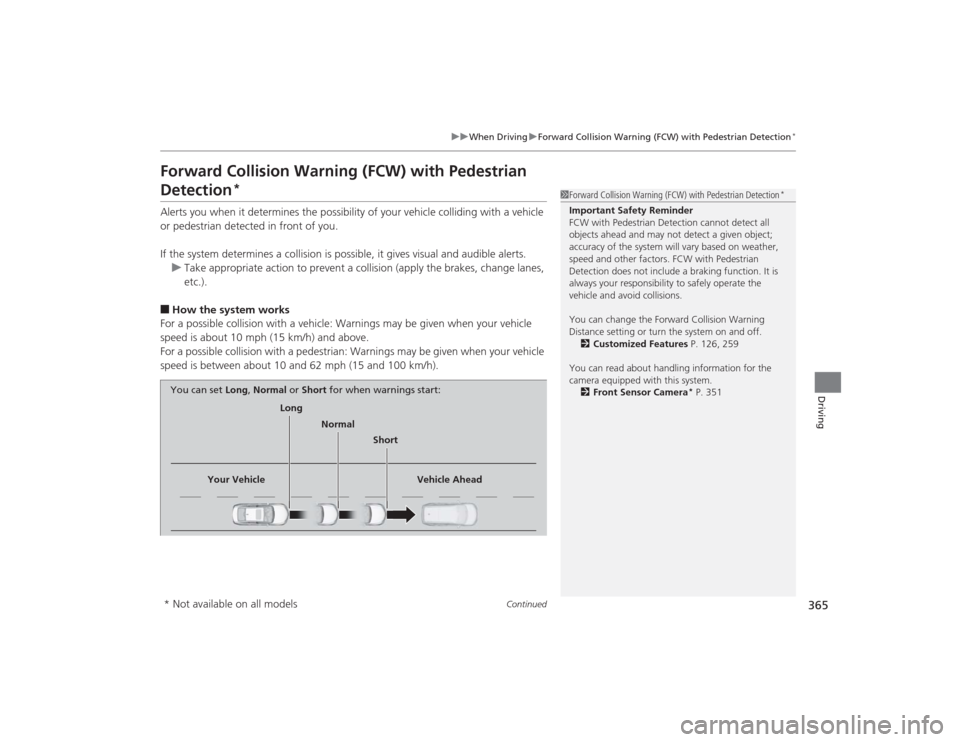
You can set
Long, Normal or Short for when warnings start:
* Not available on all models
Page 372 of 545
371
uuWhen Driving uLane Departure Warning (LDW)
*
Continued
Driving
Lane Departure Warning (LDW)
*
Alerts you when the system determines a possibility of your vehicle unintentionally
crossing over detected lane markings.
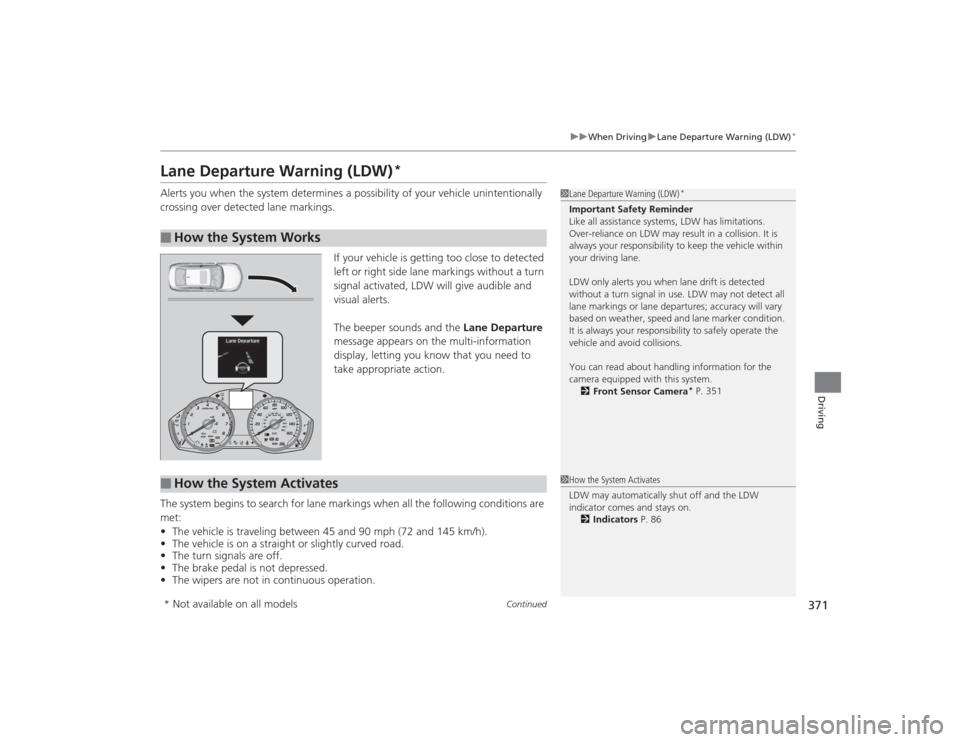
If your vehicle is getting too close to detected
left or right side lane markings without a turn
signal activated, LDW will give audible and
visual alerts.
The beeper sounds and the Lane Departure
message appears on the multi-information
display, letting you know that you need to
take appropriate action.
The system begins to search for lane markings when all the following conditions are
met:
• The vehicle is traveling between 45 and 90 mph (72 and 145 km/h).
• The vehicle is on a straight or slightly curved road.
• The turn signals are off.
• The brake pedal is not depressed.
• The wipers are not in continuous operation.■
How the System Works
1Lane Departure Warning (LDW)
*
Important Safety Reminder
Like all assistance systems, LDW has limitations.
Over-reliance on LDW may result in a collision. It is
always your responsibility to keep the vehicle within
your driving lane.
LDW only alerts you when lane drift is detected
without a turn signal in use. LDW may not detect all
lane markings or lane departures; accuracy will vary
based on weather, speed and lane marker condition.
It is always your responsibility to safely operate the
vehicle and avoid collisions.
You can read about handling information for the
camera equipped with this system.
2 Front Sensor Camera
* P. 351
■
How the System Activates
1How the System Activates
LDW may auto matically shut off and the LDW
indicator comes and stays on. 2 Indicators P. 86
* Not available on all models