Mud Acura TLX 2015 User Guide
[x] Cancel search | Manufacturer: ACURA, Model Year: 2015, Model line: TLX, Model: Acura TLX 2015Pages: 545, PDF Size: 19.64 MB
Page 380 of 545
379
uuWhen Driving uRoad Departure Mitigation (RDM) System
*
Driving
■Vehicle conditions
• Headlight lenses are dirty or the headlights are not properly adjusted.
• The outside of the windshield is blocked by dirt, mud, leaves, wet snow, etc.
• The inside of the windshield is fogged.
• The camera temperature gets too hot.
• An abnormal tire or wheel condition (wrong sized, varied size or construction,
improperly inflated, compact spare tire
*, etc.).
• The vehicle is tilted due to a heavy load or suspension modifications.
* Not available on all models
Page 386 of 545
385
uuWhen Driving uLane Keeping Assist System (LKAS)
*
Driving
■Vehicle conditions
• Headlight lenses are dirty or the headlights are not properly adjusted.
• The outside of the windshield is blocked by dirt, mud, leaves, wet snow, etc.
• The inside of the windshield is fogged.
• The camera temperature gets too hot.
• An abnormal tire or wheel condition (wrong sized, varied size or construction,
improperly inflated, compact spare tire
*, etc.).
• The vehicle is tilted due to a heavy load or suspension modifications.
* Not available on all models
Page 388 of 545
387
uuWhen Driving uVehicle Stability Assist (VSA ®), aka Electronic Stability Control (ESC), System
Driving
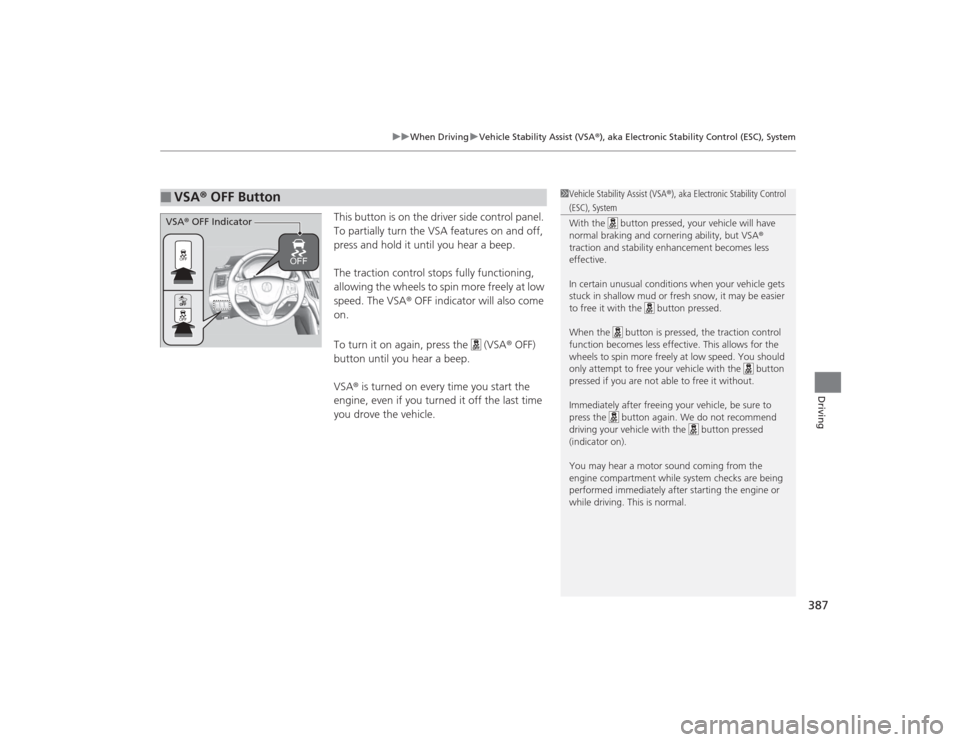
This button is on the driver side control panel.
To partially turn the VSA features on and off,
press and hold it until you hear a beep.
The traction control stops fully functioning,
allowing the wheels to spin more freely at low
speed. The VSA ® OFF indicator will also come
on.
To turn it on again, press the (VSA ® OFF)
button until you hear a beep.
VSA ® is turned on every time you start the
engine, even if you turned it off the last time
you drove the vehicle.
■
VSA ® OFF Button
1 Vehicle Stability Assist (VSA ®), aka Electronic Stability Control (ESC), System
With the button pressed, your vehicle will have
normal braking and cornering ability, but VSA ®
traction and stability enhancement becomes less
effective.
In certain unusual conditions when your vehicle gets
stuck in shallow mud or fresh snow, it may be easier
to free it with the button pressed.
When the button is pressed, the traction control
function becomes less effective. This allows for the
wheels to spin more freely at low speed. You should
only attempt to free your vehicle with the button
pressed if you are not able to free it without.
Immediately after freeing your vehicle, be sure to
press the button again. We do not recommend
driving your vehicle with the button pressed
(indicator on).
You may hear a motor sound coming from the
engine compartment while system checks are being
performed immediatel y after starting the engine or
while driving. This is normal.
VSA ® OFF Indicator
Page 410 of 545
409
uuBraking uCollision Mitigation Braking System
TM (CMBS
TM)*
Continued
Driving
■Vehicle conditions
• Headlight lenses are dirty or the headlights are not properly adjusted.
• The outside of the windshield is blocked by dirt, mud, leaves, wet snow, etc.
• The inside of the windshield is fogged.
• An abnormal tire or wheel condition (wrong sized, varied size or construction,
improperly inflated, compact spare tire
*, etc.).
• The vehicle is tilted due to a heavy load or suspension modifications.
• The camera temperature gets too hot.
• Driving with the parking brake applied.
• When the radar sensor in the front grille gets dirty.
■Detection limitations
• A vehicle or pedestrian suddenly crosses in front of you.
• The distance between your vehicle and the vehicle or pedestrian ahead of you is
too short.
• A vehicle cuts in front of you at a slow speed, and it brakes suddenly.
• When you accelerate rapidly and approach the vehicle or pedestrian ahead of you
at high speed.
• The vehicle ahead of you is a motorcycle, bicycle, mobility scooter or other small
vehicle.
• When there are animals in front of your vehicle.
• When you drive on a curved, winding or undulating road that makes it difficult for
the sensor to properly detect a vehicle in front of you.
• The speed difference between your vehicle and a vehicle in front of you is
significantly large.
• An oncoming vehicle suddenly comes in front of you.
• You vehicle abruptly crosses over in front of an oncoming vehicle.
• When driving through a narrow iron bridge.* Not available on all models
Page 413 of 545

412
uuParking Your Vehicle uParking Sensor System
*
Driving
Parking Sensor System
*
The corner and center sensors monitor obstacles around your vehicle. The beeper
and audio/information screen lets you know the approximate distance between your
vehicle and the obstacle.■The sensor location and range
1Parking Sensor System
*
Even when the system is on, always confirm if there is
no obstacle near your vehicle before parking.
The system may not work properly when:•The sensors are covered with snow, ice, mud or
dirt.•The vehicle is on uneven surface, such as grass,
bumps, or a hill.•The vehicle has been out in hot or cold weather.•The system is affected by some electronic devices
that generate ul trasonic wave.•Driving in bad weather.
The system may not sense:•Thin or low objects.•Sonic-absorptive materials, such as snow, cotton,
or sponge.•Objects directly under the bumper.
Do not put any accessories on or around the sensors.
Within about 24 in (60 cm) or less
Front Corner Sensors
Rear Corner Sensors
Rear Center Sensors
Within about 43 in (110 cm) or less
* Not available on all models
Page 418 of 545

Continued
417
uuParking Your Vehicle uCross Traffic Monitor
*
Driving
The system activates when:
• The power mode is in ON.
• The Cross Traffic Monitor system is turned
on.
2 Cross Traffic Monitor On and Off P. 418
2 Customized Features P. 259
•The transmission is in
(R
.
• Your vehicle is moving at 3 mph (5 km/h) or
lower.
When a vehicle is detected approaching from a rear corner, Cross Traffic Monitor
alerts you with a buzzer and a displayed warning.
The system will not detect a vehicle that approaches from directly behind your
vehicle, nor will it provide alerts about a detected vehicle when it moves directly
behind your vehicle.
The system does not detect or provide alerts for a vehicle that is moving away from
your vehicle, and it may not detect or alert for pedestrians, bicycles, or stationary
objects.
■
How the System Works
1 Cross Traffic Monitor
*
Cross Traffic Monitor may not detect an approaching
vehicle, or may delay alerting you under the following
conditions:•A vehicle, which is parked adjacent to your vehicle,
is blocking the radar sensor’s scope.•Your vehicle is moving at the speed of about 3 mph
(5 km/h) or higher.•A vehicle is approaching at the speed other than
between about 6 and 16 mph (10 and 25 km/h).•The system picks up external interference such as
other radar sensors from another vehicle or strong
radio wave transmitted from a facility nearby.•Either corner of the rear bumper is covered with
snow, ice, mud or dirt.•When there is bad weather.•Your vehicle is on an incline.•Your vehicle is tilted due to a heavy load in the rear.•The rear bumper or the sensors have been
improperly repaired or the rear bumper has been
deformed. Have a vehicl e checked by a dealer.
For proper operation, always keep the rear bumper
corner area clean.
Do not cover the rear bumper corner area with labels
or stickers of any kind.
Radar sensors:
Underneath the rear bumper
corners* Not available on all models
Page 419 of 545

uuParking Your Vehicle uCross Traffic Monitor
*
418Driving
An arrow icon appears on the side a vehicle is approaching on the audio/information
screen.
You can switch on and off the system using
the audio/information screen.
2Customized Features P. 259
■
When the System Detects a Vehicle
1When the System Detects a Vehicle
If the on the lower right changes to when the
transmission is in
(R, mud snow or ice may have
accumulated in the vicinity of the sensor. Check the
bumper corners for any obstructions, and thoroughly
clean the area if necessary.
If the comes on when the transmission is in
( R,
there may be a problem with the Cross Traffic
Monitor system. Do not use the system and have your
vehicle checked by a dealer.
■
Cross Traffic Monitor On and Off
Rear Wide View Rear Normal View
Arrow Icon
Icon
Page 423 of 545
422Driving
Fuel EconomyImproving Fuel EconomyFuel economy depends on several conditions, including driving conditions, your
driving habits, the condition of your vehicle, and loading. Depending on these and
other conditions, you may or may not achieve the rated fuel economy of this vehicle.
You can optimize your fuel economy with proper maintenance of your vehicle.
Always maintain your vehicle in accordance with the messages displayed on the
multi-information display.
•Use the recommended viscosity engine oil, displaying the API Certification Seal.
• Maintain the specified tire pressure.
• Do not load the vehicle with excess cargo.
• Keep your vehicle clean. A buildup of snow or mud on your vehicle’s underside
adds weight and increases wind resistance.■
Maintenance and Fuel Economy
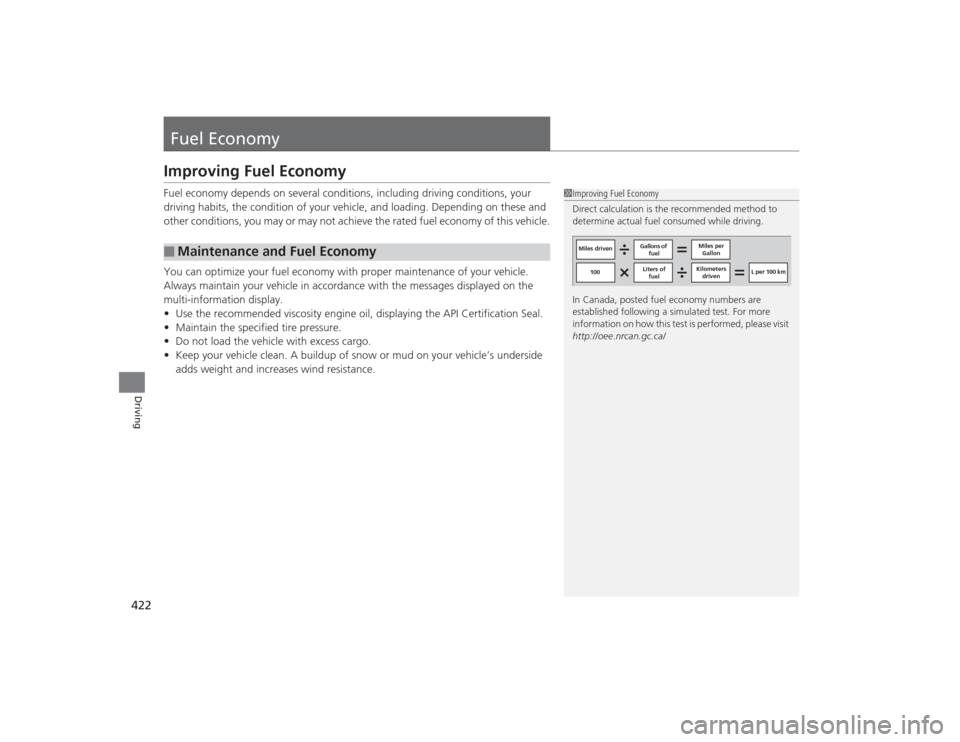
1Improving Fuel Economy
Direct calculation is the recommended method to
determine actual fuel consumed while driving.
In Canada, posted fuel economy numbers are
established following a simulated test. For more
information on how this test is pe rformed, please visit
http://oee.nrcan.gc.ca/
Miles driven Gallons of
fuel Miles per
Gallon
100 L per 100 km
Liters of
fuel Kilometers
driven