Transmission Acura TLX 2015 User Guide
[x] Cancel search | Manufacturer: ACURA, Model Year: 2015, Model line: TLX, Model: Acura TLX 2015Pages: 545, PDF Size: 19.64 MB
Page 101 of 545
100
uuIndicators uMulti-Information Display Warn ing and Information Messages
Instrument Panel
*1:On the left: Models with full color display
On the right: Models without full color display
Message
*1
Condition
Explanation
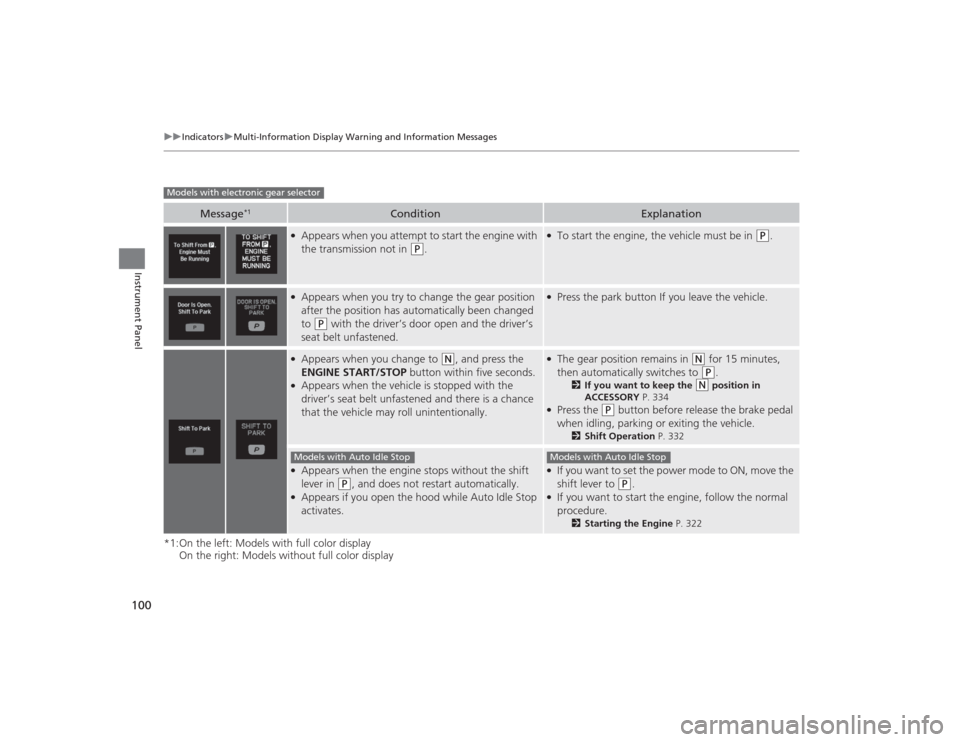
●Appears when you attempt to start the engine with
the transmission not in
(P
.
●To start the engine, the vehicle must be in
(P
.
●Appears when you try to change the gear position
after the position has automatically been changed
to
(P
with the driver’s door open and the driver’s
seat belt unfastened.
●Press the park button If you leave the vehicle.
●Appears when you change to
(N
, and press the
ENGINE START/STOP button within five seconds.
●Appears when the vehicle is stopped with the
driver’s seat belt unfastened and there is a chance
that the vehicle may roll unintentionally.
●The gear position remains in
(N
for 15 minutes,
then automatically switches to (P
.
2 If you want to keep the
(N
position in
ACCESSORY P. 334
●Press the
(P
button before release the brake pedal
when idling, parking or exiting the vehicle.
2 Shift Operation P. 332
●Appears when the engine stops without the shift
lever in
(P
, and does not restart automatically.
●Appears if you open the hood while Auto Idle Stop
activates.
●If you want to set the power mode to ON, move the
shift lever to
(P
.
●If you want to start the engine, follow the normal
procedure.
2Starting the Engine P. 322
Models with electronic gear selector
Models with Auto Idle Stop
Models with Auto Idle Stop
Page 110 of 545
109
uuIndicators uMulti-Information Display Warning and Information Messages
Continued
Instrument Panel
Message
Condition
Explanation
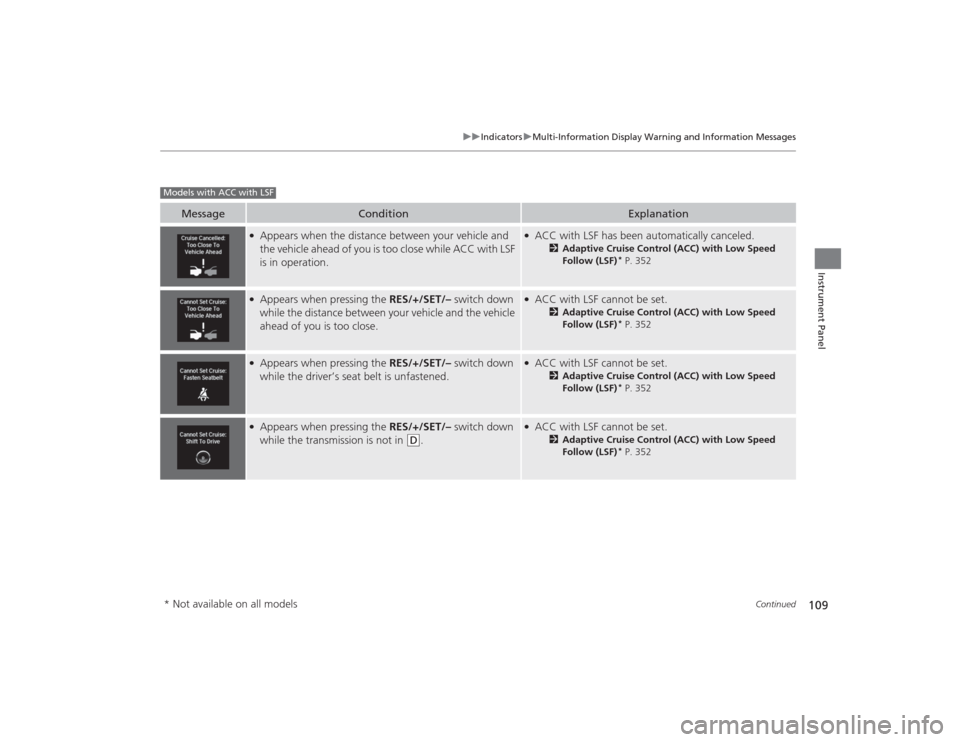
●Appears when the distance between your vehicle and
the vehicle ahead of you is too close while ACC with LSF
is in operation.
●ACC with LSF has been automatically canceled.
2 Adaptive Cruise Control (ACC) with Low Speed
Follow (LSF)
* P. 352
●Appears when pressing the RES/+/SET/– switch down
while the distance between your vehicle and the vehicle
ahead of you is too close.
●ACC with LSF cannot be set.
2 Adaptive Cruise Control (ACC) with Low Speed
Follow (LSF)
* P. 352
●Appears when pressing the RES/+/SET/– switch down
while the driver’s seat belt is unfastened.
●ACC with LSF cannot be set.
2 Adaptive Cruise Control (ACC) with Low Speed
Follow (LSF)
* P. 352
●Appears when pressing the RES/+/SET/– switch down
while the transmission is not in
(D
.
●ACC with LSF cannot be set.
2 Adaptive Cruise Control (ACC) with Low Speed
Follow (LSF)
* P. 352
Models with ACC with LSF* Not available on all models
Page 163 of 545
uuOperating the Switches Around the Steering Wheel uENGINE START/STOP Button
162Controls
If you leave the vehicle for 30 to 60 minutes with the transmission in
(P
and the
power mode in ACCESSORY, the vehicle automatically goes into the mode similar to
VEHICLE OFF (LOCK) to avoid the battery drain.
When in this mode:
The steering wheel does not lock.
You cannot lock or unlock doors with the remote transmitter or the keyless access
system.
Press the ENGINE START/STOP button three times to switch the mode to VEHICLE
OFF (LOCK).
If you open the driver’s door when the power mode is set to ACCESSORY, a warning
buzzer sounds.
■
Automatic Power Off
■
Power Mode Reminder
1 Changing the Power Mode
If the power mode does not change from VEHICLE
OFF to ACCESSORY, press the ENGINE START/STOP
button while moving the steering wheel left and
right. The steering wheel will unlock, allowing the
mode to change.Canadian models
Canadian models
Page 166 of 545
165
uuOperating the Switches Around the Steering Wheel uLight Switches
Continued
Controls
Light Switches
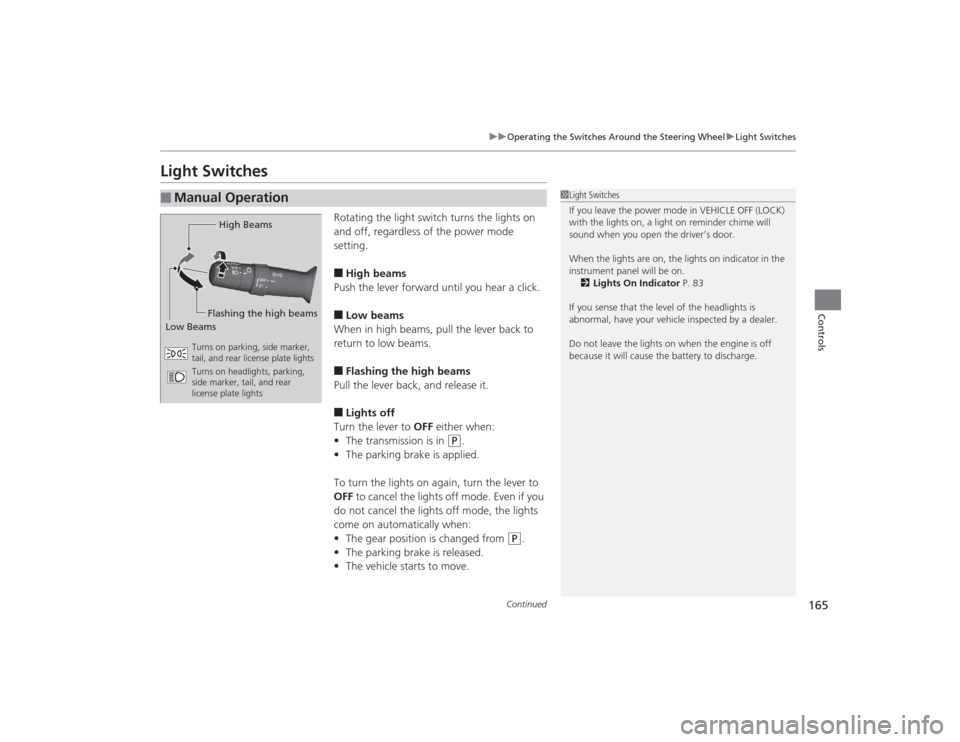
Rotating the light switch turns the lights on
and off, regardless of the power mode
setting.■High beams
Push the lever forward until you hear a click.■Low beams
When in high beams, pull the lever back to
return to low beams.■Flashing the high beams
Pull the lever back, and release it.■Lights off
Turn the lever to OFF either when:
• The transmission is in
(P
.
• The parking brake is applied.
To turn the lights on again, turn the lever to
OFF to cancel the lights off mode. Even if you
do not cancel the lights off mode, the lights
come on automatically when:
• The gear position is changed from
(P
.
• The parking brake is released.
• The vehicle starts to move.
■
Manual Operation
1Light Switches
If you leave the power mode in VEHICLE OFF (LOCK)
with the lights on, a light on reminder chime will
sound when you open the driver’s door.
When the lights are on, the lights on indicator in the
instrument panel will be on. 2 Lights On Indicator P. 83
If you sense that the level of the headlights is
abnormal, have your vehicle inspected by a dealer.
Do not leave the lights on when the engine is off
because it will cause the battery to discharge.
High Beams
Flashing the high beams
Low Beams
Turns on parking, side marker,
tail, and rear license plate lights
Turns on headlights, parking,
side marker, tail, and rear
license plate lights
Page 175 of 545
174
uuOperating the Switches Around the Steering Wheel uDriving Position Memory System
Controls
Driving Position Memory SystemYou can store two driver’s seat (except for power lumbar) and door mirror positions
with the driving position memory system.
When you unlock and open the driver’s door with a remote transmitter, or keyless
access system, the seat and door mirrors adjust automatically to one of the two
preset positions.
The multi-information display shows you which remote transmitter you used to
unlock the vehicle when you enter.
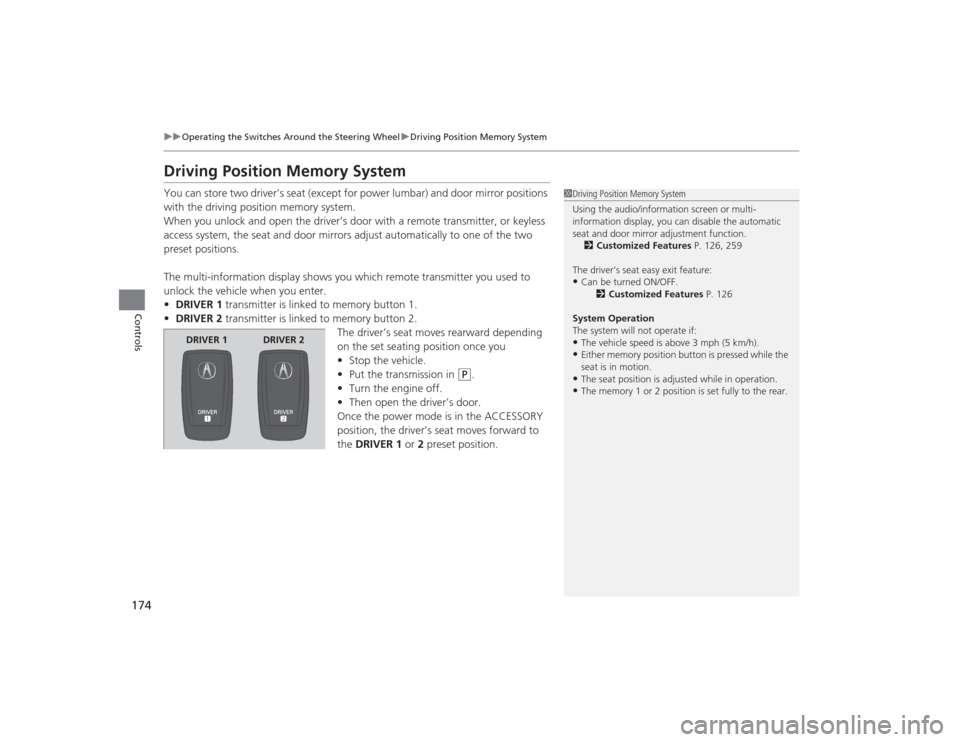
• DRIVER 1 transmitter is linked to memory button 1.
• DRIVER 2 transmitter is linked to memory button 2.
The driver’s seat moves rearward depending
on the set seating position once you
•Stop the vehicle.
• Put the transmission in
(P
.
• Turn the engine off.
• Then open the driver’s door.
Once the power mode is in the ACCESSORY
position, the driver’s seat moves forward to
the DRIVER 1 or 2 preset position.
1 Driving Position Memory System
Using the audio/information screen or multi-
information display, you can disable the automatic
seat and door mirror adjustment function.
2 Customized Features P. 126, 259
The driver’s seat easy exit feature:•Can be turned ON/OFF. 2Customized Features P. 126
System Operation
The system will not operate if:•The vehicle speed is above 3 mph (5 km/h).•Either memory position button is pressed while the
seat is in motion.•The seat position is adjusted while in operation.•The memory 1 or 2 position is set fully to the rear.
DRIVER 1 DRIVER 2
Page 178 of 545
177Controls
Adjusting the MirrorsInterior Rearview MirrorAdjust the angle of the rearview mirror when you are sitting in the correct driving
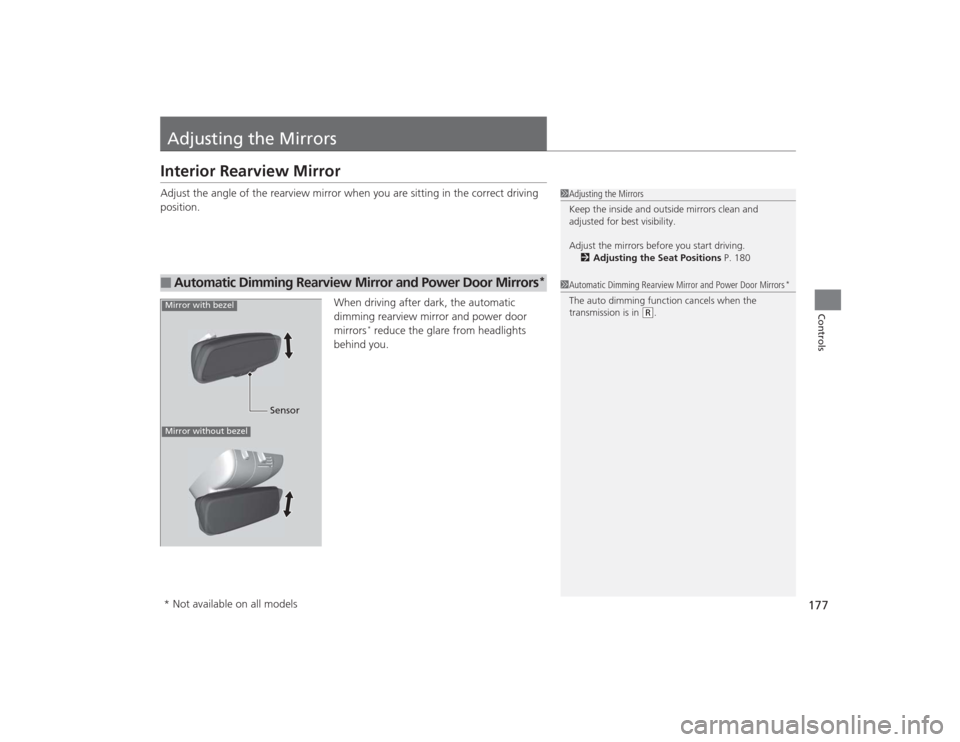
position.When driving after dark, the automatic
dimming rearview mirror and power door
mirrors
* reduce the glare from headlights
behind you.
■
Automatic Dimming Rearview Mirror and Power Door Mirrors
*
1Adjusting the Mirrors
Keep the inside and outside mirrors clean and
adjusted for best visibility.
Adjust the mirrors before you start driving.
2 Adjusting the Seat Positions P. 1801Automatic Dimming Rearview Mirror and Power Door Mirrors
*
The auto dimming function cancels when the
transmission is in
(R.
Sensor
Mirror with bezelMirror without bezel* Not available on all models
Page 316 of 545
315
Driving
This chapter discusses driving, refueling, and information on items such as accessories.
Before Driving................................... 316
Towing a Trailer ................................ 321
When Driving
Starting the Engine .......................... 322
Precautions While Driving................. 329
Automatic Transmission
*................. 330
Dual Clutch Transmission*............... 330
Shifting ............................................ 331
Shifting ............................................ 338
Auto Idle Stop
*................................ 342
Integrated Dynamics System (IDS)..... 346
Models with electronic gear selectorModels with shift lever
Cruise Control
*............................... 348
Front Sensor Camera
*..................... 351
Adaptive Cruise Control (ACC) with Low Speed Follow (LSF)
*....................... 352
Forward Collision Warning (FCW) with Pedestrian Detection*.................... 365
Lane Departure Warning (LDW)
*..... 371
Road Departure Mitigation (RDM) System
*... 375
Lane Keeping Assist System (LKAS)
*.. 380
Vehicle Stability Assist (VSA
®), aka Electronic
Stability Control (ESC), System ............... 386
Agile Handling Assist System............ 388
Precision All Wheel Steer System
*.... 388
Blind Spot Information (BSI) System
*.... 389
Super Handling-All Wheel Drive
TM (SH-
AWD® )
*......................................... 391
Tire Pressure Monitoring System (TPMS) ... 392Tire Pressure Monitoring System (TPMS) -
Required Federal Explanation ......... 394
Braking .............................................. 396
Parking Your Vehicle ........................ 411
Multi-View Rear Camera .................. 419
Refueling ........................................... 420
Fuel Economy .................................... 422
Accessories and Modifications ........ 423
* Not available on all models
Page 323 of 545
322Driving
When DrivingStarting the Engine
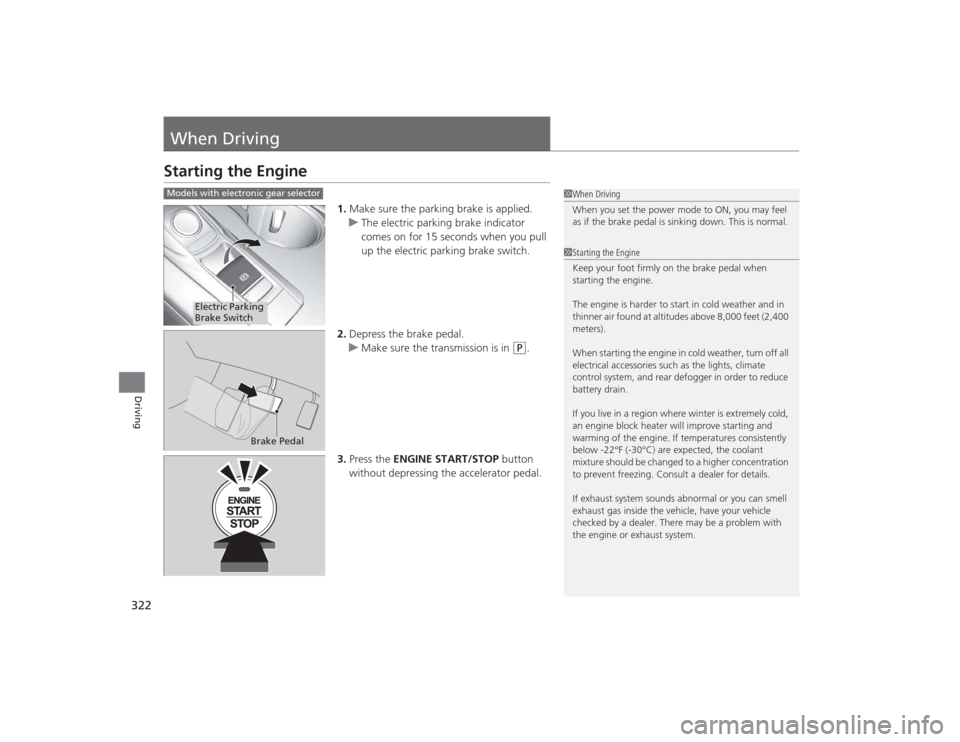
1.Make sure the parking brake is applied.
u The electric parking brake indicator
comes on for 15 seconds when you pull
up the electric parking brake switch.
2. Depress the brake pedal.
u Make sure the transmission is in
(P
.
3. Press the ENGINE START/STOP button
without depressing the accelerator pedal.
1 When Driving
When you set the power mode to ON, you may feel
as if the brake pedal is sinking down. This is normal.1Starting the Engine
Keep your foot firmly on the brake pedal when
starting the engine.
The engine is harder to start in cold weather and in
thinner air found at altitudes above 8,000 feet (2,400
meters).
When starting the engine in cold weather, turn off all
electrical accessories such as the lights, climate
control system, and rear defogger in order to reduce
battery drain.
If you live in a region where winter is extremely cold,
an engine block heater will improve starting and
warming of the engine. If temperatures consistently
below -22°F (-30°C) are expected, the coolant
mixture should be changed to a higher concentration
to prevent freezing. Consult a dealer for details.
If exhaust system sounds abnormal or you can smell
exhaust gas inside the vehicle, have your vehicle
checked by a dealer. There may be a problem with
the engine or exhaust system.
Models with electronic gear selector
Electric Parking
Brake Switch
Brake Pedal
Page 330 of 545
329
uuWhen Driving uPrecautions While Driving
Continued
Driving
Precautions While DrivingAvoid driving in deep water and on flooded roads. This can damage the engine,
driveline, or cause electrical component failure.■
In Rain
1Precautions While DrivingNOTICEDo not change the gear position while pressing the
accelerator pedal. You could damage the
transmission.NOTICEThe following can damage the under spoiler:•Parking the vehicle by a parking block•Parallel parking along the road shoulder•Driving toward the bottom of a hill•Driving up or down to a different surface level
(such as a road shoulder)•Driving on a rutted or bumpy road•Driving on a road with potholes.NOTICEIf you repeatedly turn the steering wheel at an
extremely low speed, or hold the steering wheel on
the full left or right position for a while, the electric
power steering (EPS) system heats up. The system
goes into a protective mode, and limits its
performance. The steering wheel becomes harder
and harder to operate. Once the system cools down,
the EPS system is restored.
Repeated operation under these conditions can
eventually damage the system.
If the power mode is set to ACCESSORY or VEHICLE
OFF (LOCK) while driving, the engine will shut down
and all steering and brake power assist functions will
stop, making it difficult to control the vehicle.
Page 331 of 545
uuWhen Driving uAutomatic Transmission
*
330Driving
If there is a strong impact with something under the vehicle, stop in a safe location.
Check the underside of the vehicle for damage or any fluid leaks.Automatic Transmission
*
The engine runs at a higher idle speed and creeping increases.
Keep the brake pedal firmly depressed when stopped.
Quickly depressing the accelerator pedal while driving uphill may cause the
transmission to drop to a lower gear, unexpectedly increasing vehicle speed. Depress
the accelerator pedal carefully, especially on slippery roads and curves.Dual Clutch Transmission
*
As with a conventional automatic transmission, this vehicle will creep.
Keep the brake pedal firmly depressed when stopped.
Quickly depressing the accelerator pedal while driving uphill may cause the
transmission to drop to a lower gear, unexpectedly increasing vehicle speed. Depress
the accelerator pedal carefully, especially on slippery roads and curves.■
Other Precautions
■
Creeping
■
Kickdown
■
Creeping
■
Kickdown
1Precautions While Driving
Do not change the gear position to
(N, as you will
lose engine braking (and acceleration) performance.
During the first 600 miles (1,000 km) of operation,
avoid sudden acceleration or full throttle operation so
as to not damage the engine or powertrain.
Avoid hard braking for the first 200 miles (300 km).
You should also follow this when the brake pads are
replaced.
* Not available on all models