ECU Acura TLX 2015 Owner's Guide
[x] Cancel search | Manufacturer: ACURA, Model Year: 2015, Model line: TLX, Model: Acura TLX 2015Pages: 545, PDF Size: 19.64 MB
Page 143 of 545
142
uuLocking and Unlocking the Doors uLocking/Unlocking the Doors from the Outside
Controls
Locking/Unlocking the Doors from the Outside
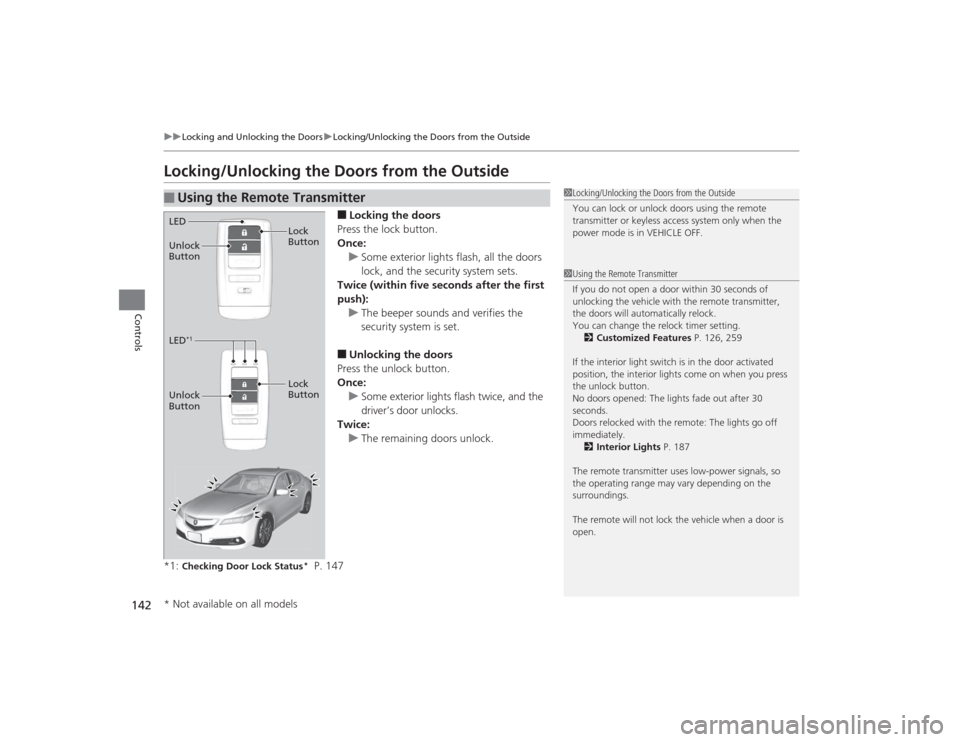
■Locking the doors
Press the lock button.
Once: u Some exterior lights flash, all the doors
lock, and the security system sets.
Twice (within five seconds after the first
push):
u The beeper sounds and verifies the
security system is set.■Unlocking the doors
Press the unlock button.
Once:
u Some exterior lights flash twice, and the
driver’s door unlocks.
Twice:
u The remaining doors unlock.
*1:
Checking Door Lock Status
* P. 147
■
Using the Remote Transmitter
1 Locking/Unlocking the Doors from the Outside
You can lock or unlock doors using the remote
transmitter or keyless access system only when the
power mode is in VEHICLE OFF.1Using the Remote Transmitter
If you do not open a door within 30 seconds of
unlocking the vehicle with the remote transmitter,
the doors will automatically relock.
You can change the relock timer setting.
2 Customized Features P. 126, 259
If the interior light switch is in the door activated
position, the interior lights come on when you press
the unlock button.
No doors opened: The lights fade out after 30
seconds.
Doors relocked with the remote: The lights go off
immediately. 2 Interior Lights P. 187
The remote transmitter uses low-power signals, so
the operating range may vary depending on the
surroundings.
The remote will not lock the vehicle when a door is
open.
LED
Unlock
Button Lock
ButtonLED
*1
Unlock
Button
Lock
Button* Not available on all models
Page 145 of 545

uuLocking and Unlocking the Doors uLocking/Unlocking the Doors from the Outside
144Controls
■Locking the doors and the trunk
Press the door lock button on the front or
rear
* door.
u Some exterior lights flash; the beeper
sounds; all the doors lock; and the
security system sets.
1Using the Keyless Access System•Do not leave the keyless access remote in the
vehicle when you get out. Carry it with you.•Even if you are not carrying the keyless access
remote, you can lock/unlock the doors while
someone else with the re mote is within range.•The door may be unlocked if the door handle is
covered with water in heavy rain or in a car wash if
the keyless access remote is within range.•If you grip a front or rear
* door handle wearing
gloves, the door sensor may be slow to respond or
may not respond by unlocking the doors.
•The door may not open if you pull it immediately
after gripping the door handle. Grip the handle
again and confirm that the door is unlocked before
pulling the handle.•Even within the 32 inches (80 cm) radius, you may
not be able to lock/unlock the doors with the
keyless access remote if it is above or below the
outside handle.•The keyless access remote may not operate if it is
too close to the door and door glass.
Door Lock Button
* Not available on all models
Page 156 of 545
155
Continued
Controls
Security SystemImmobilizer SystemThe immobilizer system prevents a key that has not been pre-registered from
starting the engine. Each key contains electronic transmitters that use electronic
signals to verify the key.
Pay attention to the following when pressing the ENGINE START/STOP button:
• Do not allow objects that emit strong radio waves near the ENGINE START/
STOP button.
• Make sure the key is not covered by or touching a metal object.
• Do not bring a key from another vehicle’s immobilizer system with the keyless
access remote.Security System AlarmThe security system alarm activates when the trunk, hood or doors are forcibly
opened. The alarm does not go off if the trunk or doors are opened with the key,
remote transmitter or keyless access system.
However, the alarm goes off when a door is opened with the key, then the shift
lever
* is moved out of
(P
or the hood is opened before the power mode is set to
ON.
■When the security system alarm activates
The horn sounds intermittently and all of the exterior lights flash.■To deactivate the security system alarm
Unlock the vehicle using the remote transmitter or keyless access system. The
system, along with the horn and flashing lights, is deactivated.
1 Immobilizer SystemNOTICELeaving the keyless access remote in the vehicle can
result in theft or accidental movement of the vehicle.
Always take the key with you whenever you leave the
vehicle unattended.
Do not alter the system or add other devices to it.
Doing so may damage the system and make your
vehicle inoperable.1Security System Alarm
The security alarm continues for a maximum of two
minutes until the security system deactivates.
* Not available on all models
Page 157 of 545
uuSecurity System uSecurity System Alarm
156Controls
■Setting the security system alarm
The security system alarm automatically sets when the following conditions have
been met:
• The power mode is set to VEHICLE OFF (LOCK).
• The hood and trunk are closed.
• All doors are locked from outside with the key, remote transmitter or keyless
access system.■When the security system alarm sets
The security system indicator in the instrument panel blinks. When the blinking
interval changes after about 15 seconds, the security system is set.■To cancel the security system alarm
The security system is canceled when the vehicle is unlocked using the remote
transmitter, or you grab any door handle while carrying the keyless access remote,
or the power mode is set to ON. The security system indicator goes off at the same
time.
1 Security System Alarm
Do not set the security system alarm when someone
is in the vehicle or a window is open. The system can
accidentally activate when:•Unlocking the door with the lock tab.•Opening the trunk with the trunk release or the
emergency trunk opener.•Moving the shift lever
* out of
(P.
•Opening the hood with the hood release.
If the battery goes dead after you have set the
security system alarm, the security alarm may go off
once the battery is recharged or replaced.
If this occurs, deactivate the security system alarm by
unlocking a door using the remote transmitter or
keyless access system.
Do not attempt to alter this system or add another
device to it.
* Not available on all models
Page 158 of 545
157
uuSecurity System uSecurity System Alarm
Controls
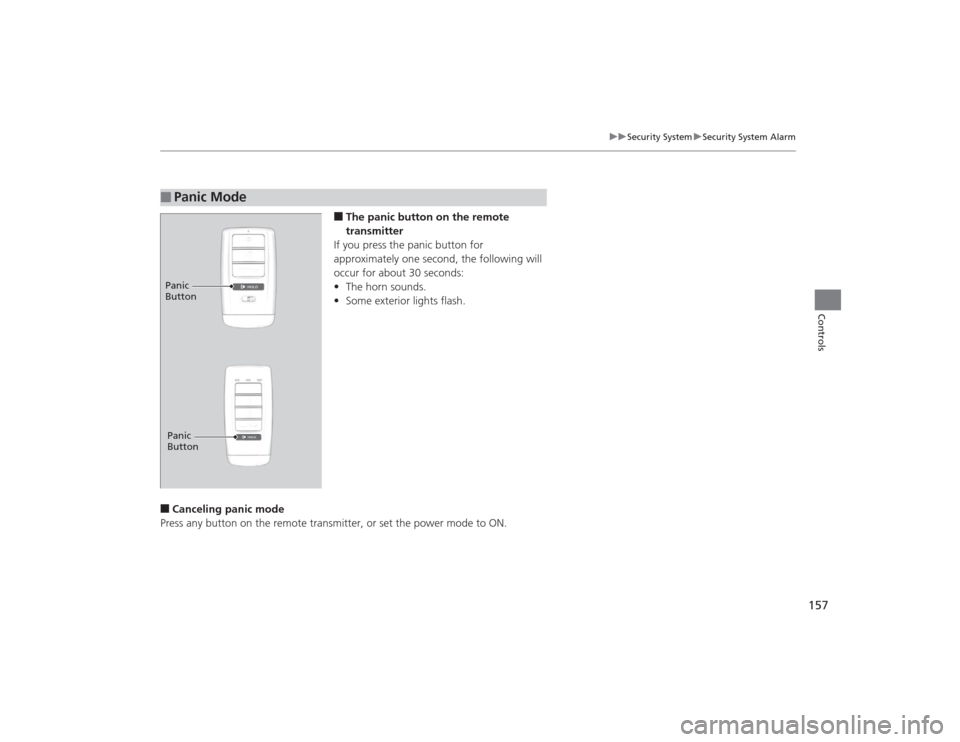
■The panic button on the remote
transmitter
If you press the panic button for
approximately one second, the following will
occur for about 30 seconds:
• The horn sounds.
• Some exterior lights flash.
■Canceling panic mode
Press any button on the remote transmitter, or set the power mode to ON.■
Panic ModePanic
ButtonPanic
Button
Page 177 of 545
176
uuOperating the Switches Around the Steering Wheel uAdjusting the Steering Wheel
Controls
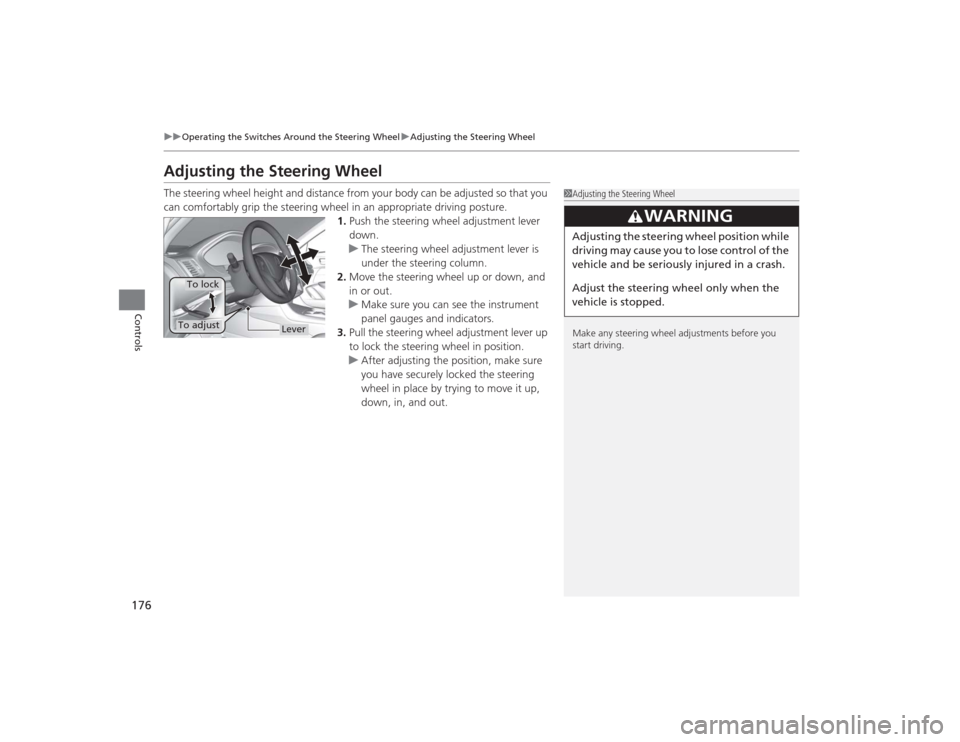
Adjusting the Steering WheelThe steering wheel height and distance from your body can be adjusted so that you
can comfortably grip the steering wheel in an appropriate driving posture.
1.Push the steering wheel adjustment lever
down.
u The steering wheel adjustment lever is
under the steering column.
2. Move the steering wheel up or down, and
in or out.
u Make sure you can see the instrument
panel gauges and indicators.
3. Pull the steering wheel adjustment lever up
to lock the steering wheel in position.
u After adjusting the position, make sure
you have securely locked the steering
wheel in place by trying to move it up,
down, in, and out.
1Adjusting the Steering Wheel
Make any steering wheel adjustments before you
start driving.
3
WARNING
Adjusting the steering wheel po sition while
driving may cause you to lose control of the
vehicle and be seriously injured in a crash.
Adjust the steering wheel only when the
vehicle is stopped.
Lever
To adjustTo lock
Page 186 of 545
185
uuAdjusting the Seats uRear Seats
Controls
Rear Seats
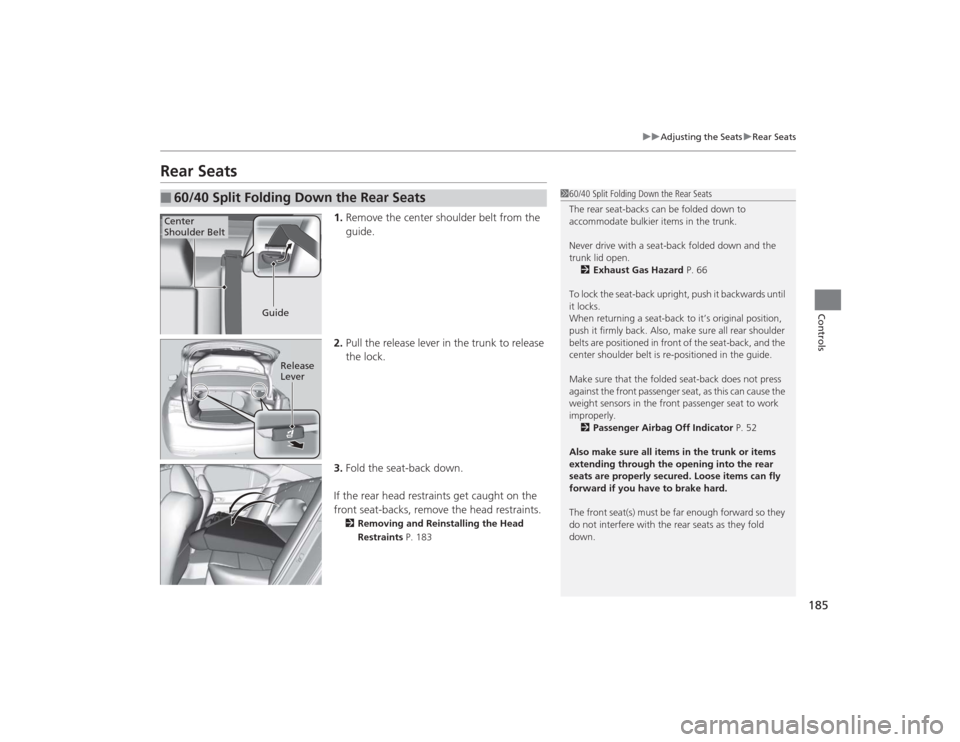
1. Remove the center shoulder belt from the
guide.
2. Pull the release lever in the trunk to release
the lock.
3. Fold the seat-back down.
If the rear head restraints get caught on the
front seat-backs, remove the head restraints.2 Removing and Reinstalling the Head
Restraints P. 183
■
60/40 Split Folding Down the Rear Seats
160/40 Split Folding Down the Rear Seats
The rear seat-backs can be folded down to
accommodate bulkier items in the trunk.
Never drive with a seat-back folded down and the
trunk lid open.
2 Exhaust Gas Hazard P. 66
To lock the seat-back upright, push it backwards until
it locks.
When returning a seat-back to it’s original position,
push it firmly back. Also, make sure all rear shoulder
belts are positioned in front of the seat-back, and the
center shoulder belt is re-positioned in the guide.
Make sure that the folded seat-back does not press
against the front passenger seat, as this can cause the
weight sensors in the front passenger seat to work
improperly. 2 Passenger Airbag Off Indicator P. 52
Also make sure all items in the trunk or items
extending through the opening into the rear
seats are properly secured. Loose items can fly
forward if you have to brake hard.
The front seat(s) must be far enough forward so they
do not interfere with the rear seats as they fold
down.
Center
Shoulder Belt
Guide
Release
Lever
Page 259 of 545
258
uuGeneral Information on the Audio System uCompatible iPod, iPhone, and USB Flash Drives
Features
Compatible iPod, iPhone, and USB Flash Drives•Use a recommended USB flash drive of 256 MB or higher.
• Some digital audio players may not be compatible.
• Some USB flash drives (e.g., a device with security lockout) may not work.
• Some software files may not allow for audio play or text data display.
• Some versions of MP3, WMA, or AAC formats may be unsupported.■
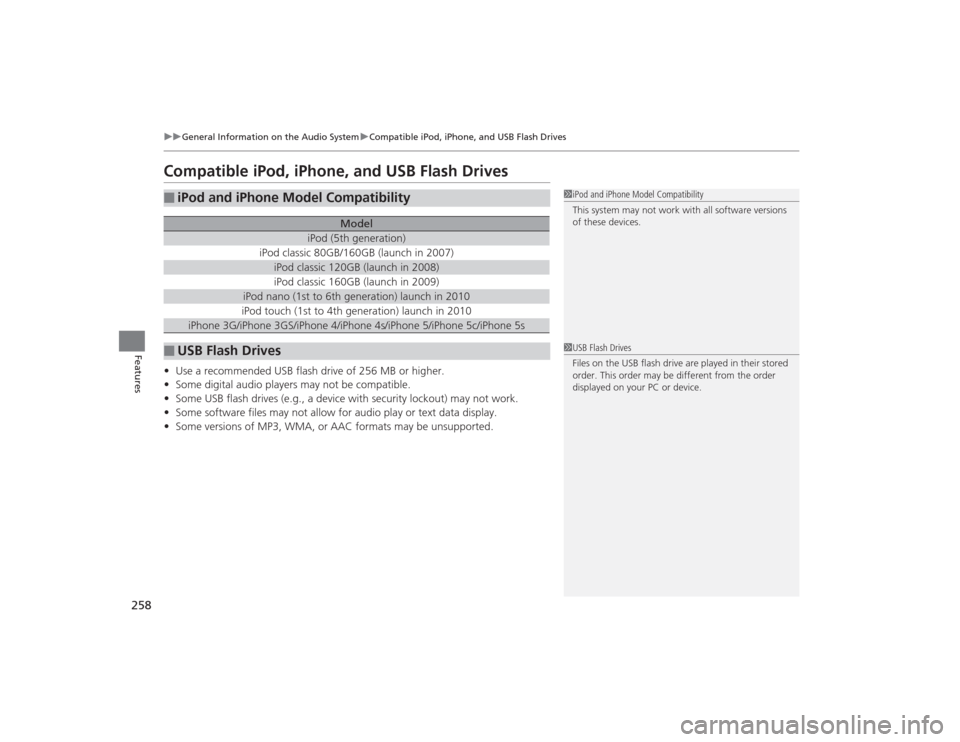
iPod and iPhone Model Compatibility
Model
iPod (5th generation)
iPod classic 80GB/160GB (launch in 2007)
iPod classic 120GB (launch in 2008)iPod classic 160GB (launch in 2009)
iPod nano (1st to 6th generation) launch in 2010iPod touch (1st to 4th generation) launch in 2010
iPhone 3G/iPhone 3GS/iPhone 4/iPhone 4s/iPhone 5/iPhone 5c/iPhone 5s
■
USB Flash Drives
1iPod and iPhone Model Compatibility
This system may not work with all software versions
of these devices.1USB Flash Drives
Files on the USB flash drive are played in their stored
order. This order may be different from the order
displayed on your PC or device.
Page 263 of 545
262
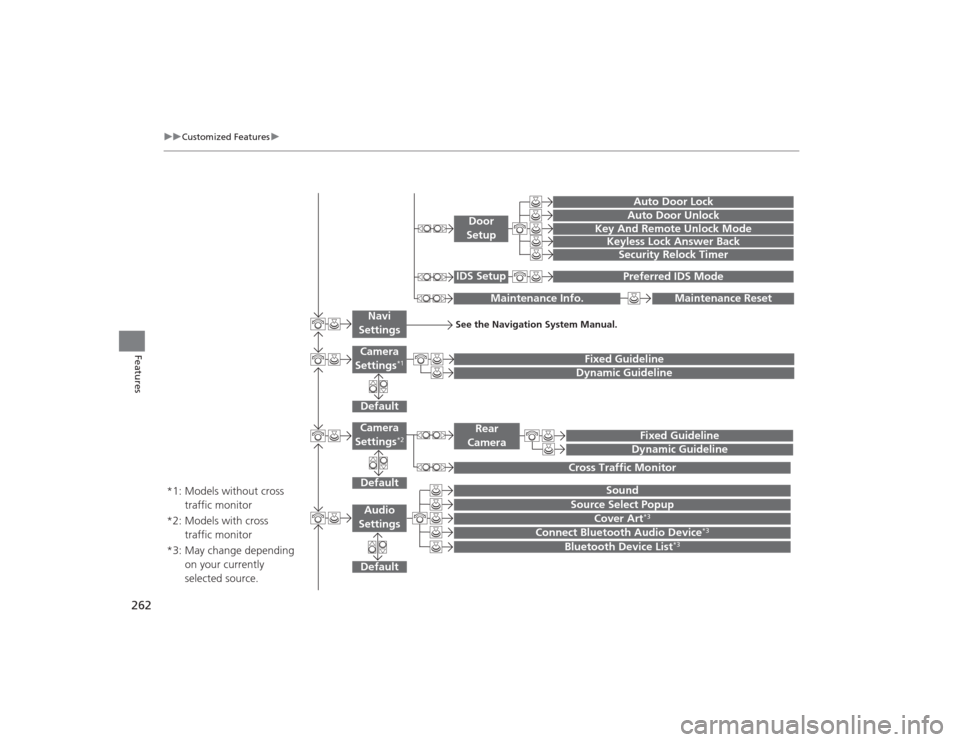
uuCustomized Features u
Features
Default
Fixed GuidelineDynamic Guideline
Default
Sound
Source Select Popup
Audio
Settings
Maintenance Reset
Maintenance Info.
Preferred IDS Mode
IDS Setup
Camera
Settings
*1
DefaultCamera
Settings
*2
Fixed GuidelineDynamic Guideline
Rear
Camera
Cross Traffic Monitor
*1: Models without cross traffic monitor
*2: Models with cross traffic monitor
See the Navigation System Manual.
Navi
Settings
Key And Remote Unlock ModeKeyless Lock Answer BackSecurity Relock Timer
Auto Door LockAuto Door Unlock
Door
Setup
Cover Art
*3
Connect Bluetooth Audio Device
*3
Bluetooth Device List
*3
*3: May change depending on your currently
selected source.
Page 265 of 545
264
uuCustomized Features u
Features
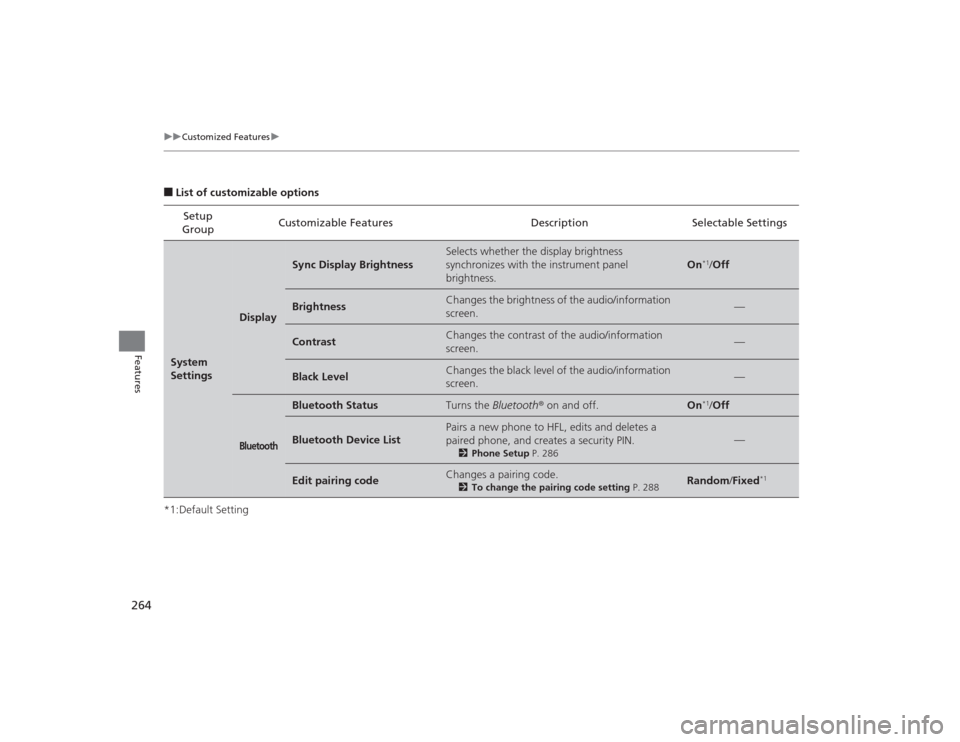
■List of customizable options
*1:Default Setting Setup
Group Customizable Features Description Selectable SettingsSystem
Settings
Display
Sync Display Brightness
Selects whether the display brightness
synchronizes with the instrument panel
brightness.
On
*1/
Off
Brightness
Changes the brightness of the audio/information
screen.
—
Contrast
Changes the contrast of the audio/information
screen.
—
Black Level
Changes the black level of the audio/information
screen.
—
Bluetooth
Bluetooth Status
Turns the Bluetooth ® on and off.
On
*1/Off
Bluetooth Device List
Pairs a new phone to HFL, edits and deletes a
paired phone, and creates a security PIN.
2 Phone Setup P. 286
—
Edit pairing code
Changes a pairing code.
2To change the pairing code setting P. 288
Random/Fixed
*1