buttons Acura TLX 2016 User Guide
[x] Cancel search | Manufacturer: ACURA, Model Year: 2016, Model line: TLX, Model: Acura TLX 2016Pages: 553, PDF Size: 31.29 MB
Page 307 of 553
uuBluetooth ® HandsFreeLink ®u HFL Menus
306
Features
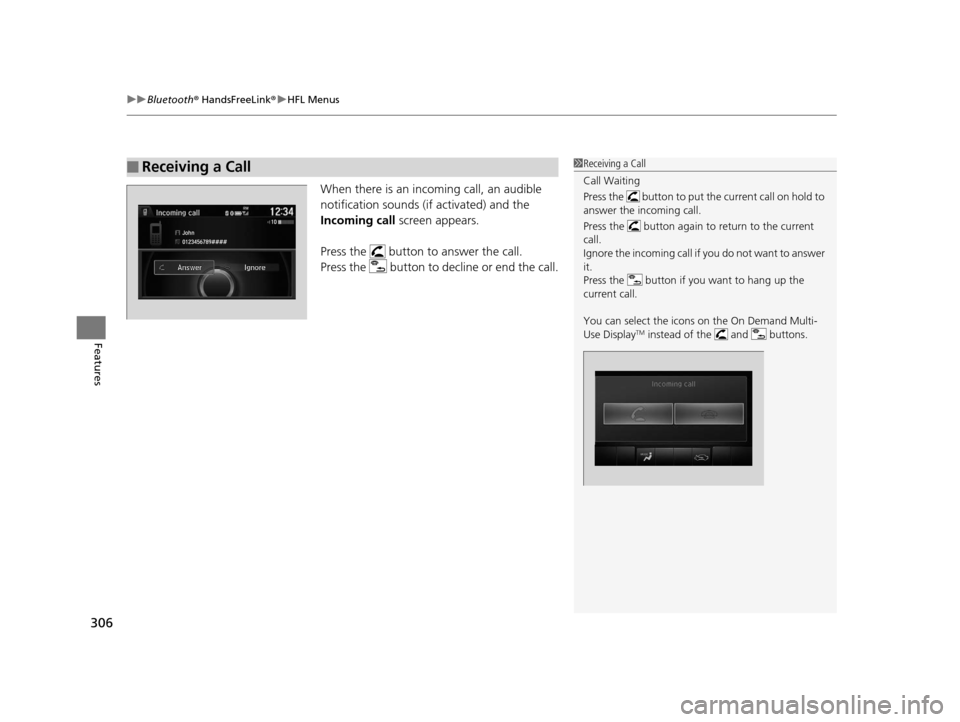
When there is an incoming call, an audible
notification sounds (i f activated) and the
Incoming call screen appears.
Press the button to answer the call.
Press the button to decline or end the call.
■Receiving a Call1 Receiving a Call
Call Waiting
Press the button to put the current call on hold to
answer the incoming call.
Press the button again to return to the current
call.
Ignore the incoming call if you do not want to answer
it.
Press the button if you want to hang up the
current call.
You can select the icons on the On Demand Multi-
Use Display
TM instead of the and buttons.
16 ACURA TLX-31TZ36100.book 306 ページ 2015年8月26日 水曜日 午後1時54分
Page 334 of 553
333
uuWhen Driving uShifting
Continued
Driving
Shifting
Change the gear position in accordance with your driving needs.
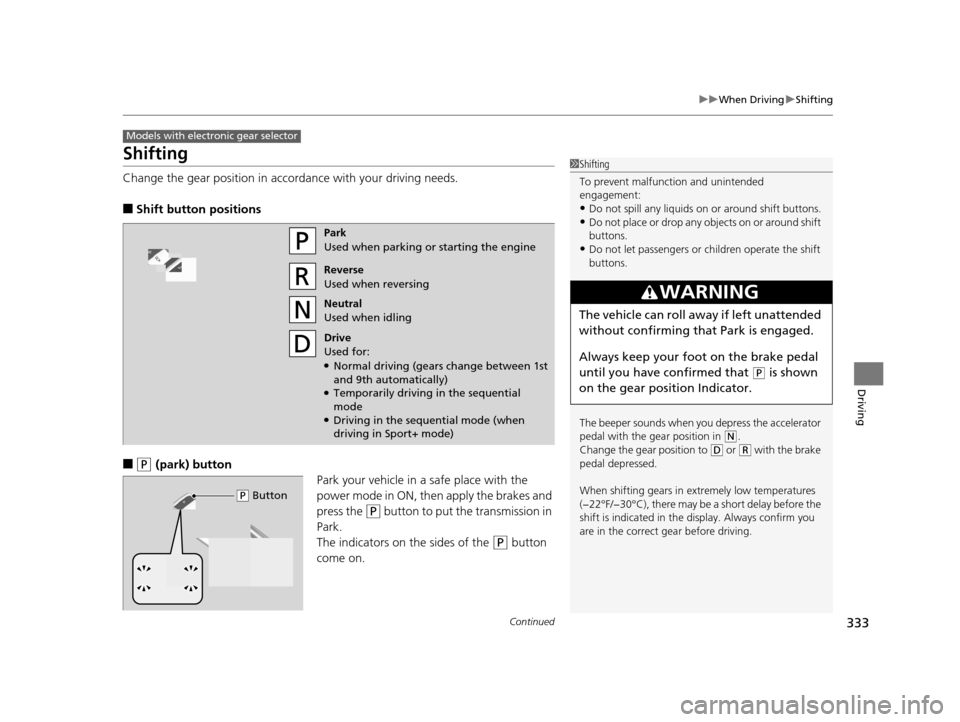
■Shift button positions
■(P (park) button
Park your vehicle in a safe place with the
power mode in ON, then apply the brakes and
press the
(P button to put the transmission in
Park.
The indicators on the sides of the
(P button
come on.
Models with electronic gear selector
1 Shifting
To prevent malfunc tion and unintended
engagement:
•Do not spill any liquids on or around shift buttons.
•Do not place or drop any objects on or around shift
buttons.
•Do not let passengers or ch ildren operate the shift
buttons.
The beeper sounds when you depress the accelerator
pedal with the gear position in
( N.
Change the gear position to ( D or (R with the brake
pedal depressed.
When shifting gears in extremely low temperatures
(−22°F/−30°C), there may be a short delay before the
shift is indicated in the di splay. Always confirm you
are in the correct gear before driving.
3WARNING
The vehicle can roll aw ay if left unattended
without confirming th at Park is engaged.
Always keep your foot on the brake pedal
until you have confirmed that
( P is shown
on the gear position Indicator.
Park
Used when parking or starting the engine
Reverse
Used when reversing
Neutral
Used when idling
Drive
Used for:
●Normal driving (gears change between 1st
and 9th automatically)
●Temporarily driving in the sequential
mode
●Driving in the sequential mode (when
driving in Sport+ mode)
( P Button
16 ACURA TLX-31TZ36100.book 333 ページ 2015年8月26日 水曜日 午後1時54分
Page 474 of 553
473Continued
Maintenance
Remote Transmitter Care
Replacing the Button Battery
If the indicator does not come on when the button is pressed, replace the battery.
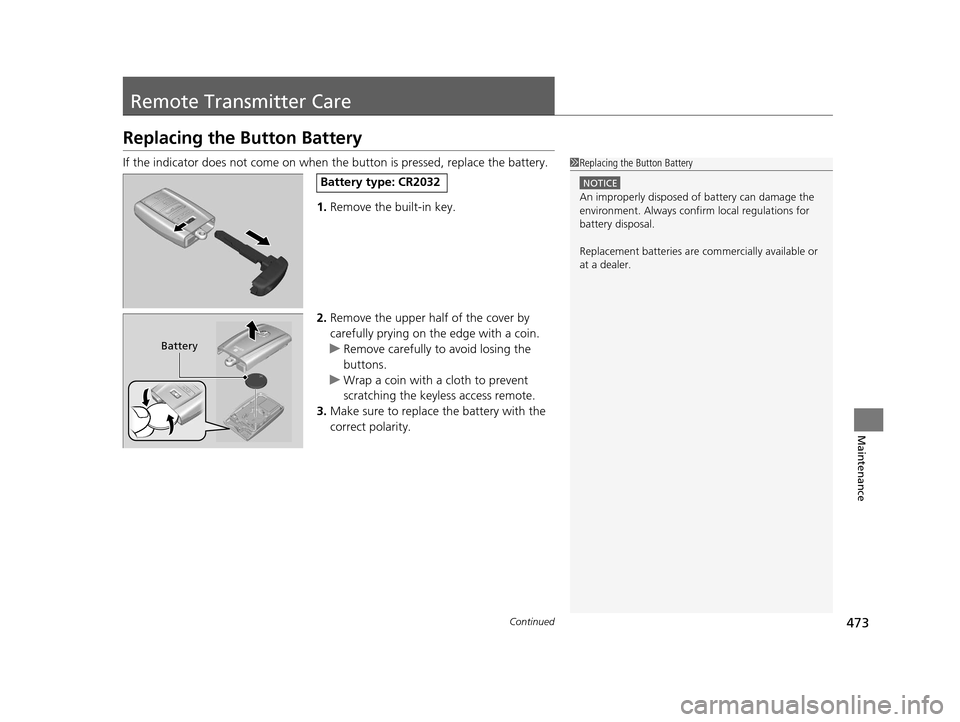
1. Remove the built-in key.
2. Remove the upper half of the cover by
carefully prying on the edge with a coin.
u Remove carefully to avoid losing the
buttons.
u Wrap a coin with a cloth to prevent
scratching the keyless access remote.
3. Make sure to replace the battery with the
correct polarity.1Replacing the Button Battery
NOTICE
An improperly disposed of battery can damage the
environment. Always conf irm local regulations for
battery disposal.
Replacement batteries are commercially available or
at a dealer.
Battery type: CR2032
Battery
16 ACURA TLX-31TZ36100.book 473 ページ 2015年8月26日 水曜日 午後1時54分
Page 475 of 553
uuRemote Transmitter Care uReplacing the Button Battery
474
Maintenance
If the indicator does not come on when the button is pressed, replace the battery.
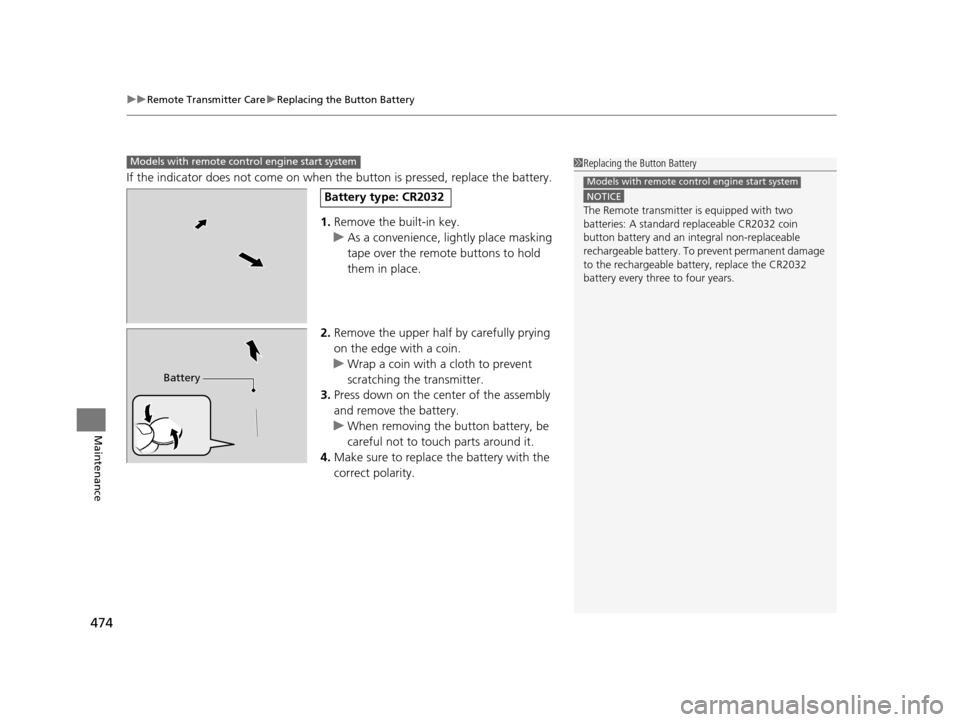
1. Remove the built-in key.
u As a convenience, lightly place masking
tape over the remote buttons to hold
them in place.
2. Remove the upper half by carefully prying
on the edge with a coin.
u Wrap a coin with a cloth to prevent
scratching the transmitter.
3. Press down on the center of the assembly
and remove the battery.
u When removing the button battery, be
careful not to touch parts around it.
4. Make sure to replace the battery with the
correct polarity.
Models with remote control engine start system1 Replacing the Button Battery
NOTICE
The Remote transmitter is equipped with two
batteries: A standard replaceable CR2032 coin
button battery and an in tegral non-replaceable
rechargeable battery. To prevent permanent damage
to the rechargeable battery, replace the CR2032
battery every three to four years.
Models with remote control engine start system
Battery type: CR2032
Battery
16 ACURA TLX-31TZ36100.book 474 ページ 2015年8月26日 水曜日 午後1時54分
Page 504 of 553
503
uuEngine Does Not Start uIf the Keyless Access Remote Battery is Weak
Handling the Unexpected
If the Keyless Access Re mote Battery is Weak
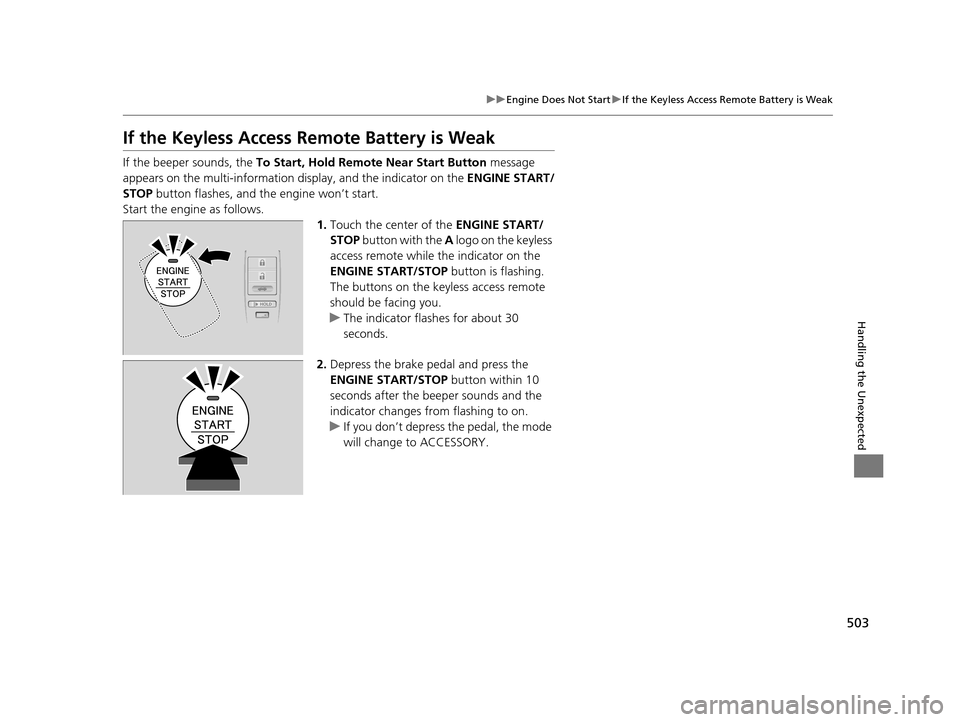
If the beeper sounds, the To Start, Hold Remote Near Start Button message
appears on the multi-information di splay, and the indicator on the ENGINE START/
STOP button flashes, and th e engine won’t start.
Start the engine as follows. 1.Touch the center of the ENGINE START/
STOP button with the A logo on the keyless
access remote while the indicator on the
ENGINE START/STOP button is flashing.
The buttons on the keyless access remote
should be facing you.
u The indicator flashes for about 30
seconds.
2. Depress the brake pedal and press the
ENGINE START/STOP button within 10
seconds after the beeper sounds and the
indicator changes from flashing to on.
u If you don’t depress the pedal, the mode
will change to ACCESSORY.
16 ACURA TLX-31TZ36100.book 503 ページ 2015年8月26日 水曜日 午後1時54分
Page 546 of 553
545
Index
FiltersDust and Pollen....................................... 475
Oil .......................................................... 447
Flat Tire ..................................................... 483
Floor Mats ................................................ 477
Fluids Automatic Transmission .......................... 451
Brake ...................................................... 452
Dual Clutch Transmission ........................ 451
Engine Coolant ....................................... 449
Windshield Washer ................................. 452
Fog Lights ................................................. 168
Foot Brake ................................................ 404
Forward Collision Warning (FCW) with
Pedestrian Detection ............................. 368
Front Airbags (SRS) .................................... 42
Front Seat Heaters and Ventilation ........ 197
Front Seats ................................................ 180
Adjusting ................................................ 180
Front Sensor Camera ............................... 353
Fuel ..................................................... 21, 426
Economy................................................. 429
Gauge .................................................... 117
Instant Fuel Economy .............................. 124
Low Fuel Indicator..................................... 79
Range ..................................................... 124
Recommendation.................... 426, 528, 530
Refueling ................................................ 426
Fuel Economy ........................................... 429
Fuel Fill Door ...................................... 21, 427 Fuses
.......................................................... 517
Inspecting and Changing ......................... 521
Locations ......................... 517, 518, 519, 520
G
Gasoline (Fuel)
Economy ................................................. 429
Gauge ..................................................... 117
Information ............................................. 426
Instant Fuel Economy ............................... 124
Low Fuel Indicator ..................................... 79
Refueling ................................................. 426
Gauges ...................................................... 117
Gear Position Indicator ...................... 75, 334
Gear Shift Lever Positions
Dual Clutch Transmission ......................... 340
Gear Shift Positions
Automatic Transmission ........................... 333
Glass (care) ........................................ 476, 479
Glove Box .................................................. 189
H
Handling the Unexpected ........................ 481
HandsFreeLink ® (HFL) ............................... 280
Auto Answer ........................................... 295
Automatic Import of Cellular Phonebook
and Call History ..................................... 297
Automatic Transferring ............................ 295
Displaying Messages ................................ 310 HFL Buttons............................................. 280
HFL Menus .............................................. 282
HFL Status Display ................................... 281
Limitations for Manual Operation ............ 281
Making a Call .......................................... 301
Options During a Call .............................. 307
Phone Setup............................................ 287
Receiving a Call ....................................... 306
Receiving a Text/E-m
ail Message.............. 308
Ring Tone................................................ 296
Selecting a Mail Account ......................... 309
Speed Dial ............................................... 298
To Create a Security PIN .......................... 294
To Set Up a Text/E-mail Message
Option................................................... 292
Use Contact Photo .................................. 296
Hazard Warning Button .............................. 4
Head Restraints ........................................ 182
Headlight Washers ................................... 171
Headlights ................................................. 165
Aiming .................................................... 453
Automatic Operation............................... 166
Dimming ......................................... 165, 168
Operating................................................ 165
Heated Steering Wheel ............................ 196
Heated Windshield Button ...................... 173
Heaters (Seat) ................................... 197, 198
HFL (HandsFreeLink ®)............................... 280
High Beam Indicator .................................. 83
Hill Start Assist System ............................. 330
HomeLink ® Universal Transceiver ............ 277
16 ACURA TLX-31TZ36100.book 545 ページ 2015年8月26日 水曜日 午後1時54分