change time Acura TLX 2016 User Guide
[x] Cancel search | Manufacturer: ACURA, Model Year: 2016, Model line: TLX, Model: Acura TLX 2016Pages: 553, PDF Size: 31.29 MB
Page 157 of 553

uuSecurity System uSecurity System Alarm
156
Controls
■Setting the security system alarm
The security system alarm automatically sets when the following conditions have
been met:
• The power mode is set to VEHICLE OFF (LOCK).
• The hood and trunk are closed.
• All doors are locked from ou tside with the key, remote transmitter or keyless
access system.
■When the security system alarm sets
The security system indicator in the in strument panel blinks. When the blinking
interval changes after about 15 sec onds, the security system is set.
■To cancel the security system alarm
The security system is canceled when th e vehicle is unlocked using the remote
transmitter, or you grab any door handle while carrying the keyless access remote,
or the power mode is set to ON. The securi ty system indicator goes off at the same
time.
1 Security System Alarm
Do not set the security system alarm when someone
is in the vehicle or a window is open. The system can
accidentally activate when:
•Unlocking the door with the lock tab.•Opening the trunk with the trunk release or the
emergency trunk opener.
•Moving the shift lever* out of ( P.•Opening the hood with the hood release.
If the battery goes dead after you have set the
security system alarm, the security alarm may go off
once the battery is re charged or replaced.
If this occurs, deactivate the security system alarm by
unlocking a door using the remote transmitter or
keyless access system.
Do not attempt to alter th is system or add another
device to it.
* Not available on all models
16 ACURA TLX-31TZ36100.book 156 ページ 2015年8月26日 水曜日 午後1時54分
Page 163 of 553
uuOperating the Switches Around the Steering Wheel uENGINE START/STOP Button
162
Controls
If you leave the vehicle for 30 to 60 minutes with the transmission in (P and the
power mode in ACCESSORY, the vehicle automa tically goes into the mode similar to
VEHICLE OFF (LOCK) to avoid the battery drain.
When in this mode:
The steering wheel does not lock.
You cannot lock or unlock doors with th e remote transmitter or the keyless access
system.
Press the ENGINE START/STOP button three times to swit ch the mode to VEHICLE
OFF (LOCK).
If you open the driver’s doo r when the power mode is set to ACCESSORY, a warning
buzzer sounds.
■Automatic Power Off
■Power Mode Reminder
1 Changing the Power Mode
If the power mode does not change from VEHICLE
OFF to ACCESSORY, press the ENGINE START/STOP
button while moving the st eering wheel left and
right. The steering wheel will unlock, allowing the
mode to change.
Canadian models
Canadian models
16 ACURA TLX-31TZ36100.book 162 ページ 2015年8月26日 水曜日 午後1時54分
Page 165 of 553
164
uuOperating the Switches Around the Steering Wheel uTurn Signals
Controls
Turn Signals
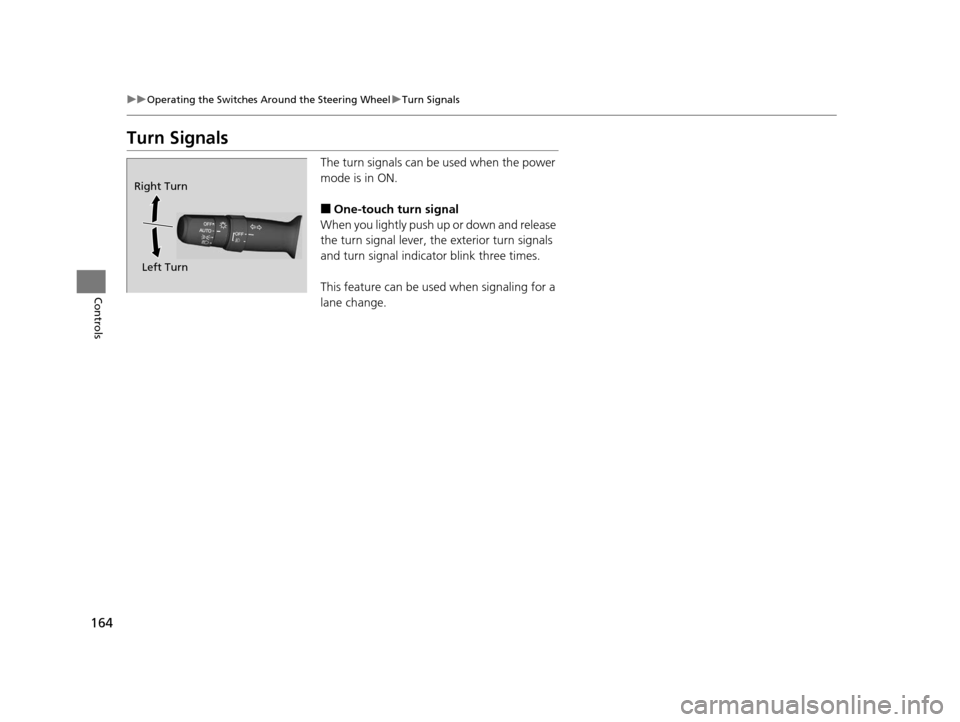
The turn signals can be used when the power
mode is in ON.
■One-touch turn signal
When you lightly push up or down and release
the turn signal lever, th e exterior turn signals
and turn signal indicator blink three times.
This feature can be used when signaling for a
lane change.
Right Turn
Left Turn
16 ACURA TLX-31TZ36100.book 164 ページ 2015年8月26日 水曜日 午後1時54分
Page 168 of 553
167
uuOperating the Switches Around the Steering Wheel uLight Switches
Controls
The headlights automatically come on when the wipers are used several times within
a certain interval with the headlight switch in AUTO.
The headlights automatically go off a few minutes later if the wipers are stopped.
The headlights, all other exterior lights, a nd the instrument panel lights turn off 15
seconds after you set the po wer mode to VEHICLE OFF (LOCK), take the remote with
you, and close the driver's door.
If you set the power mode to VEHICLE OFF (LOCK) with the headlight switch on, but
do not open the door, the lights turn off after 10 minutes (three minutes, if the
switch is in the AUTO position).
The lights turn on again when you unlock or open the driver’s door. If you unlock
the door, but do not open it within 15 seconds, the lights go off. If you open the
driver’s door, you will hear a lights on reminder chime.
■Headlight Integration with Wipers
■Automatic Lighting Off Feature
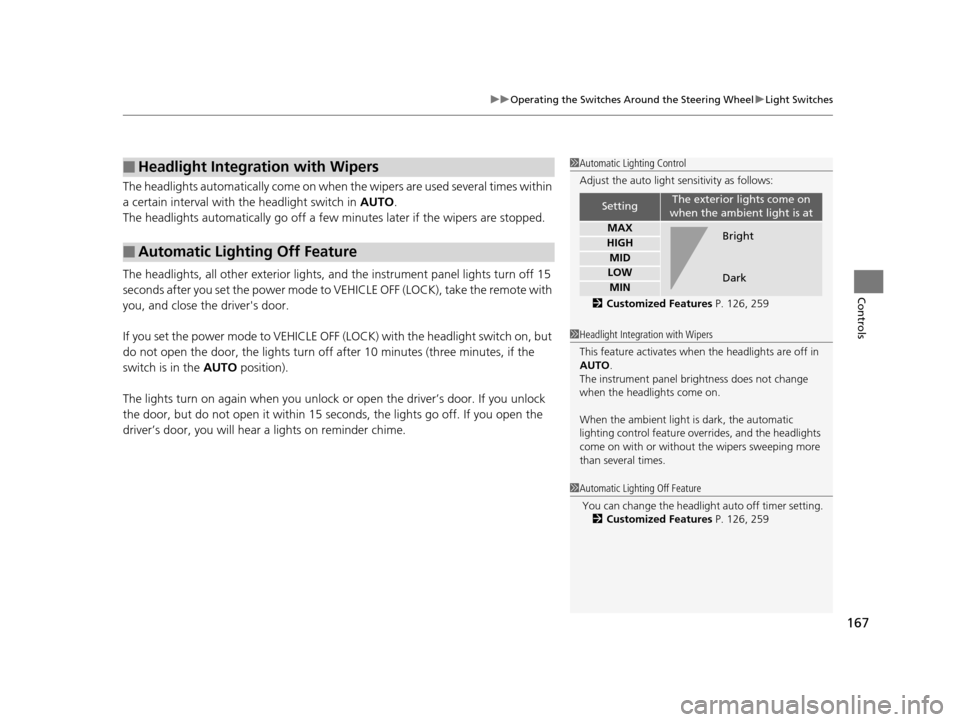
1 Automatic Lighting Control
Adjust the auto light sensitivity as follows:
2 Customized Features P. 126, 259
SettingThe exterior lights come on
when the ambient light is at
MAX
HIGH
MID
LOW
MIN
Bright
Dark
1 Headlight Integration with Wipers
This feature activates when the headlights are off in
AUTO .
The instrument panel br ightness does not change
when the headlights come on.
When the ambient light is dark, the automatic
lighting control feature over rides, and the headlights
come on with or without the wipers sweeping more
than several times.
1 Automatic Lighting Off Feature
You can change the headli ght auto off timer setting.
2 Customized Features P. 126, 259
16 ACURA TLX-31TZ36100.book 167 ページ 2015年8月26日 水曜日 午後1時54分
Page 170 of 553
169
uuOperating the Switches Around the Steering Wheel uWipers and Washers
Continued
Controls
Wipers and Washers
The windshield wipers and washers can be
used when the power mode is in ON.
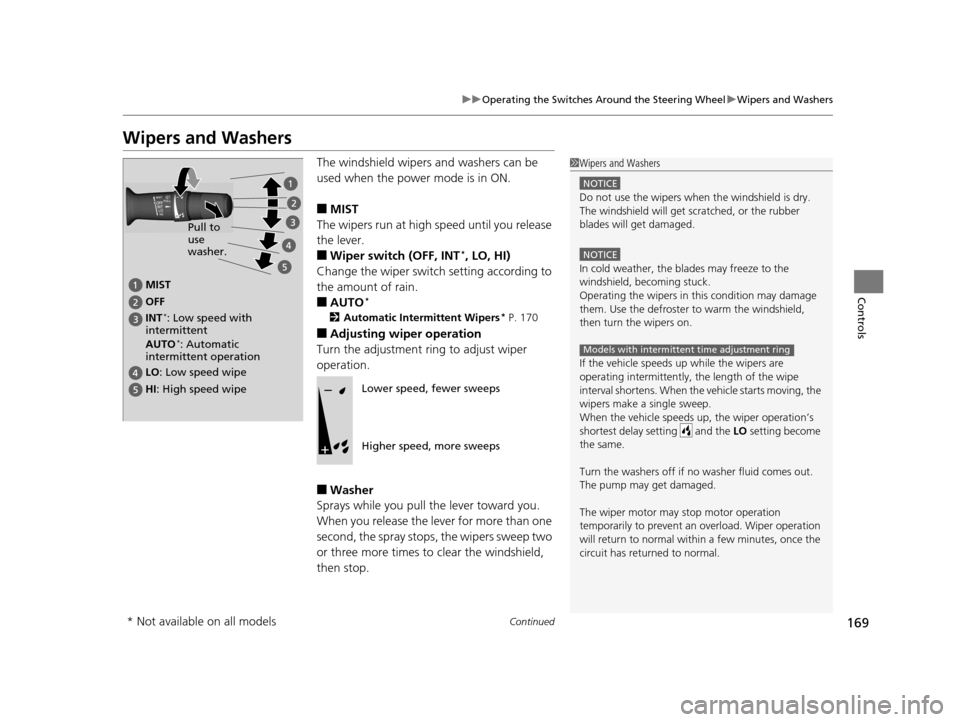
■MIST
The wipers run at high speed until you release
the lever.
■Wiper switch (OFF, INT*, LO, HI)
Change the wiper switch setting according to
the amount of rain.
■AUTO*
2 Automatic Intermittent Wipers* P. 170
■Adjusting wiper operation
Turn the adjustment ring to adjust wiper
operation.
■Washer
Sprays while you pull the lever toward you.
When you release the le ver for more than one
second, the spray stops, the wipers sweep two
or three more times to clear the windshield,
then stop.
1 Wipers and Washers
NOTICE
Do not use the wipers when the windshield is dry.
The windshield will get sc ratched, or the rubber
blades will get damaged.
NOTICE
In cold weather, the blades may freeze to the
windshield, becoming stuck.
Operating the wipers in th is condition may damage
them. Use the defroster to warm the windshield,
then turn the wipers on.
If the vehicle speeds up while the wipers are
operating intermittently, the length of the wipe
interval shortens. When the vehicle starts moving, the
wipers make a single sweep.
When the vehicle speeds up, the wiper operation’s
shortest delay setting and the LO setting become
the same.
Turn the washers off if no washer fluid comes out.
The pump may get damaged.
The wiper motor may stop motor operation
temporarily to prevent an overload. Wiper operation
will return to normal within a few minutes, once the
circuit has returned to normal.
Models with intermittent time adjustment ring
MIST
OFF
LO : Low speed wipe
HI: High speed wipe Pull to
use
washer.
INT
*: Low speed with
intermittent
AUTO
*: Automatic
intermittent operation
Lower speed, fewer sweeps
Higher speed, more sweeps
* Not available on all models
16 ACURA TLX-31TZ36100.book 169 ページ 2015年8月26日 水曜日 午後1時54分
Page 188 of 553
187Continued
Controls
Interior Lights/Interior Convenience Items
Interior Lights
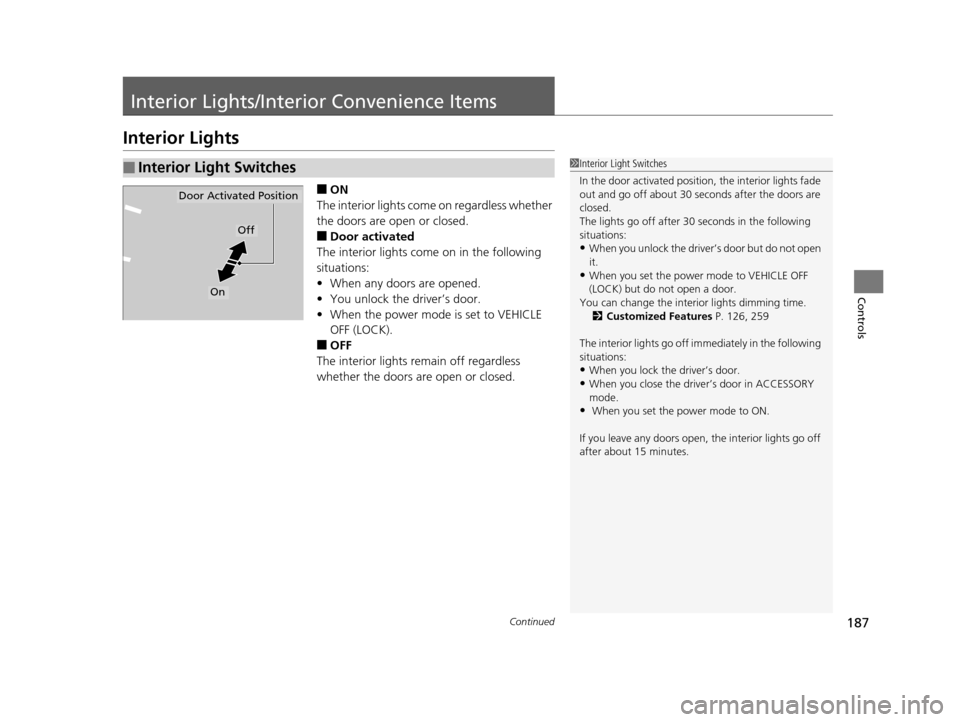
■ON
The interior lights come on regardless whether
the doors are open or closed.
■Door activated
The interior lights come on in the following
situations:
• When any doors are opened.
• You unlock the driver’s door.
• When the power mode is set to VEHICLE
OFF (LOCK).
■OFF
The interior lights remain off regardless
whether the doors are open or closed.
■Interior Light Switches1 Interior Light Switches
In the door activated position, the interior lights fade
out and go off about 30 se conds after the doors are
closed.
The lights go off after 30 seconds in the following
situations:
•When you unlock the driver’s door but do not open
it.
•When you set the power mode to VEHICLE OFF
(LOCK) but do not open a door.
You can change the interi or lights dimming time.
2 Customized Features P. 126, 259
The interior lights go off i mmediately in the following
situations:
•When you lock the driver’s door.
•When you close the driver’s door in ACCESSORY
mode.
• When you set the power mode to ON.
If you leave any doors open, the interior lights go off
after about 15 minutes.
Door Activated Position
Off
On
16 ACURA TLX-31TZ36100.book 187 ページ 2015年8月26日 水曜日 午後1時54分
Page 198 of 553
Continued197
uuInterior Lights/Interior Convenience Items uInterior Convenience Items
Controls
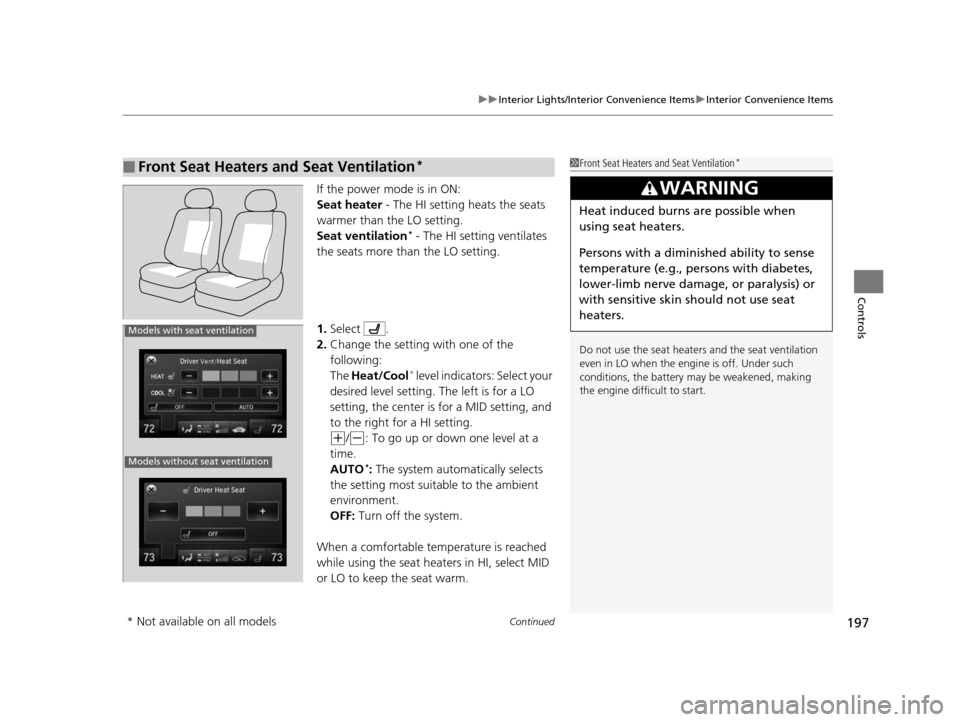
If the power mode is in ON:
Seat heater - The HI setting heats the seats
warmer than the LO setting.
Seat ventilation
* - The HI setting ventilates
the seats more than the LO setting.
1. Select .
2. Change the setting with one of the
following:
The Heat/Cool
* level indicators: Select your
desired level setting. The left is for a LO
setting, the center is for a MID setting, and
to the right for a HI setting.
(+/(-: To go up or down one level at a
time.
AUTO
*: The system automatically selects
the setting most suitable to the ambient
environment.
OFF: Turn off the system.
When a comfortable temperature is reached
while using the seat heaters in HI, select MID
or LO to keep the seat warm.
■Front Seat Heaters and Seat Ventilation*1 Front Seat Heaters and Seat Ventilation*
Do not use the seat heater s and the seat ventilation
even in LO when the engine is off. Under such
conditions, the battery ma y be weakened, making
the engine difficult to start.
3WARNING
Heat induced burns are possible when
using seat heaters.
Persons with a diminished ability to sense
temperature (e.g., persons with diabetes,
lower-limb nerve damage, or paralysis) or
with sensitive skin should not use seat
heaters.
Models without seat ventilation
Models with seat ventilation
* Not available on all models
16 ACURA TLX-31TZ36100.book 197 ページ 2015年8月26日 水曜日 午後1時54分
Page 202 of 553
Continued201
uuClimate Control System uUsing Automatic Climate Control
Controls
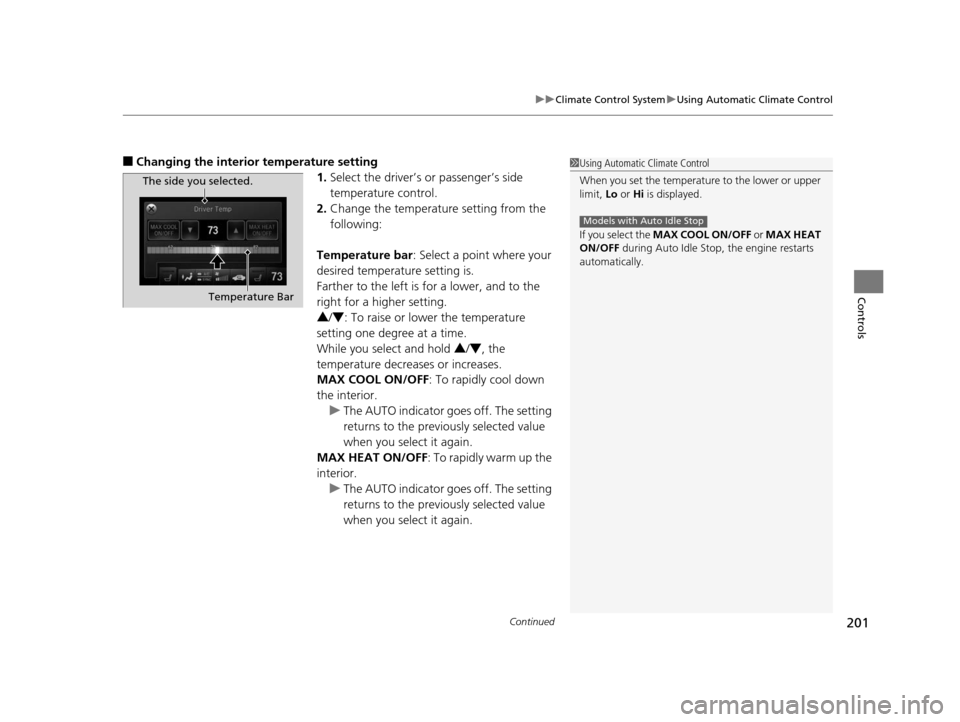
■Changing the interior temperature setting
1.Select the driver’s or passenger’s side
temperature control.
2. Change the temperature setting from the
following:
Temperature bar : Select a point where your
desired temperature setting is.
Farther to the left is for a lower, and to the
right for a higher setting.
3 /4 : To raise or lower the temperature
setting one degree at a time.
While you select and hold 3 /4 , the
temperature decreases or increases.
MAX COOL ON/OFF : To rapidly cool down
the interior. u The AUTO indicator goes off. The setting
returns to the previously selected value
when you select it again.
MAX HEAT ON/OFF : To rapidly warm up the
interior.
u The AUTO indicator goes off. The setting
returns to the previously selected value
when you select it again.1Using Automatic Climate Control
When you set the temperature to the lower or upper
limit, Lo or Hi is displayed.
If you select the MAX COOL ON/OFF or MAX HEAT
ON/OFF during Auto Idle Stop , the engine restarts
automatically.
Models with Auto Idle Stop
The side you selected.
Temperature Bar
16 ACURA TLX-31TZ36100.book 201 ページ 2015年8月26日 水曜日 午後1時54分
Page 204 of 553
Continued203
uuClimate Control System uUsing Automatic Climate Control
Controls
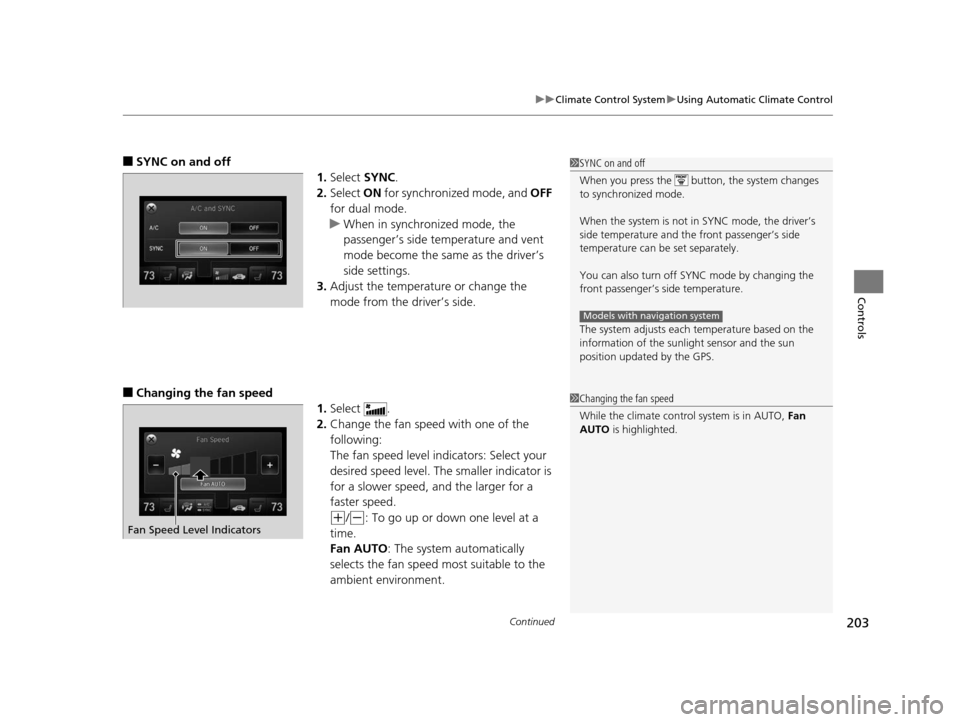
■SYNC on and off
1.Select SYNC.
2. Select ON for synchronized mode, and OFF
for dual mode.
u When in synchronized mode, the
passenger’s side temperature and vent
mode become the same as the driver’s
side settings.
3. Adjust the temperature or change the
mode from the driver’s side.
■Changing the fan speed
1.Select .
2. Change the fan speed with one of the
following:
The fan speed level indicators: Select your
desired speed level. The smaller indicator is
for a slower speed, and the larger for a
faster speed.
(+/(-: To go up or down one level at a
time.
Fan AUTO : The system automatically
selects the fan speed most suitable to the
ambient environment.
1 SYNC on and off
When you press the button, the system changes
to synchronized mode.
When the system is not in SYNC mode, the driver’s
side temperature and th e front passenger’s side
temperature can be set separately.
You can also turn off SYNC mode by changing the
front passenger’s si de temperature.
The system adjusts each temperature based on the
information of the sunli ght sensor and the sun
position updated by the GPS.
Models with navigation system
1 Changing the fan speed
While the climate control system is in AUTO, Fan
AUTO is highlighted.
Fan Speed Level Indicators
16 ACURA TLX-31TZ36100.book 203 ページ 2015年8月26日 水曜日 午後1時54分
Page 216 of 553
215
Features
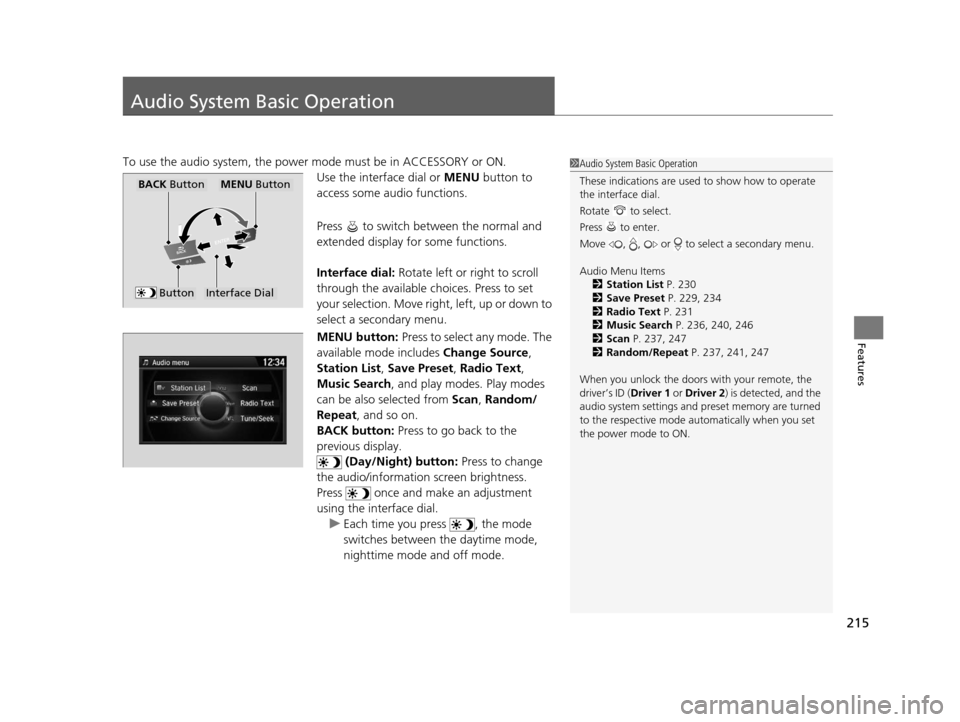
Audio System Basic Operation
To use the audio system, the power mode must be in ACCESSORY or ON.Use the interface dial or MENU button to
access some audio functions.
Press to switch between the normal and
extended display fo r some functions.
Interface dial: Rotate left or right to scroll
through the available ch oices. Press to set
your selection. Move right, left, up or down to
select a secondary menu.
MENU button: Press to select any mode. The
available mode includes Change Source,
Station List , Save Preset , Radio Text,
Music Search , and play mode s. Play modes
can be also selected from Scan, Random/
Repeat , and so on.
BACK button: Press to go back to the
previous display. (Day/Night) button: Press to change
the audio/information screen brightness.
Press once and make an adjustment
using the interface dial. u Each time you press , the mode
switches between the daytime mode,
nighttime mode and off mode.1Audio System Basic Operation
These indications are used to show how to operate
the interface dial.
Rotate to select.
Press to enter.
Move , , or to se lect a secondary menu.
Audio Menu Items 2 Station List P. 230
2 Save Preset P. 229, 234
2 Radio Text P. 231
2 Music Search P. 236, 240, 246
2 Scan P. 237, 247
2 Random/Repeat P. 237, 241, 247
When you unlock the doors with your remote, the
driver’s ID ( Driver 1 or Driver 2) is detected, and the
audio system settings and pr eset memory are turned
to the respective mode automatically when you set
the power mode to ON.
Interface Dial
MENU ButtonBACK Button
Button
16 ACURA TLX-31TZ36100.book 215 ページ 2015年8月26日 水曜日 午後1時54分