Fuel Acura TLX 2016 Owner's Guide
[x] Cancel search | Manufacturer: ACURA, Model Year: 2016, Model line: TLX, Model: Acura TLX 2016Pages: 553, PDF Size: 31.29 MB
Page 335 of 553
uuWhen Driving uShifting
334
Driving
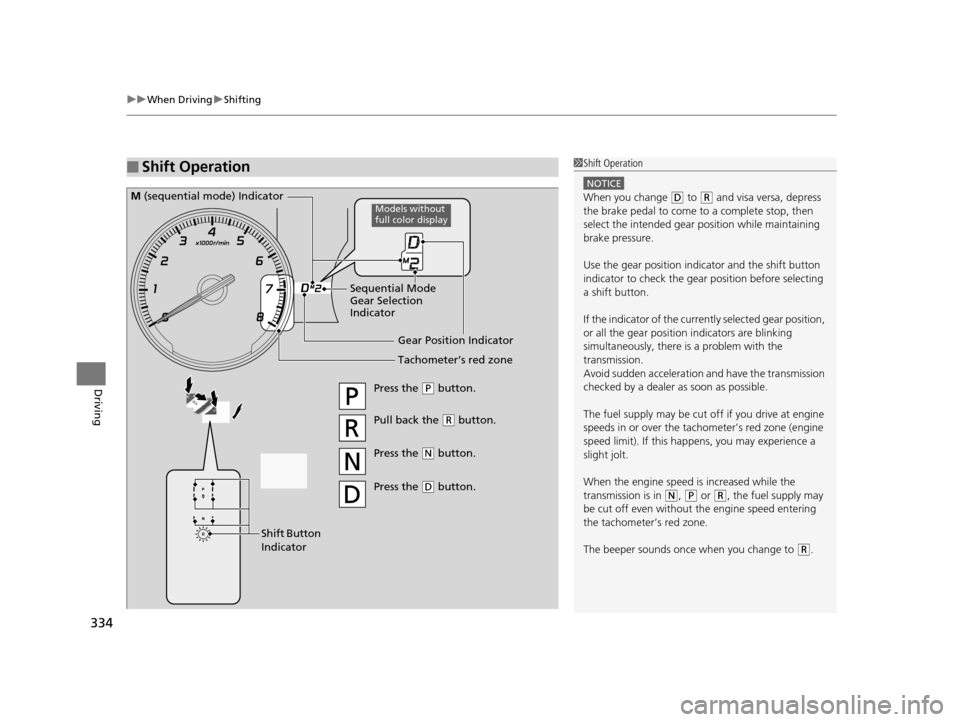
■Shift Operation1Shift Operation
NOTICE
When you change (D to (R and visa versa, depress
the brake pedal to come to a complete stop, then
select the intended gear position while maintaining
brake pressure.
Use the gear position indicator and the shift button
indicator to check the gear position before selecting
a shift button.
If the indicator of the curren tly selected gear position,
or all the gear position indicators are blinking
simultaneously, there is a problem with the
transmission.
Avoid sudden acceleration and have the transmission
checked by a dealer as soon as possible.
The fuel supply may be cut of f if you drive at engine
speeds in or over the tachometer’s red zone (engine
speed limit). If this happe ns, you may experience a
slight jolt.
When the engine speed is increased while the
transmission is in
( N, (P or (R, the fuel supply may
be cut off even without the engine speed entering
the tachometer’s red zone.
The beeper sounds once when you change to
( R.
Gear Position Indicator
Tachometer’s red zone
Press the (P button.
Pull back the (R button.
Press the
( N button.
Press the
( D button.
Shift Button
Indicator
M (sequential mode) Indicator
Sequential Mode
Gear Selection
IndicatorModels without
full color display
16 ACURA TLX-31TZ36100.book 334 ページ 2015年8月26日 水曜日 午後1時54分
Page 340 of 553
339
uuWhen Driving uShifting
Driving
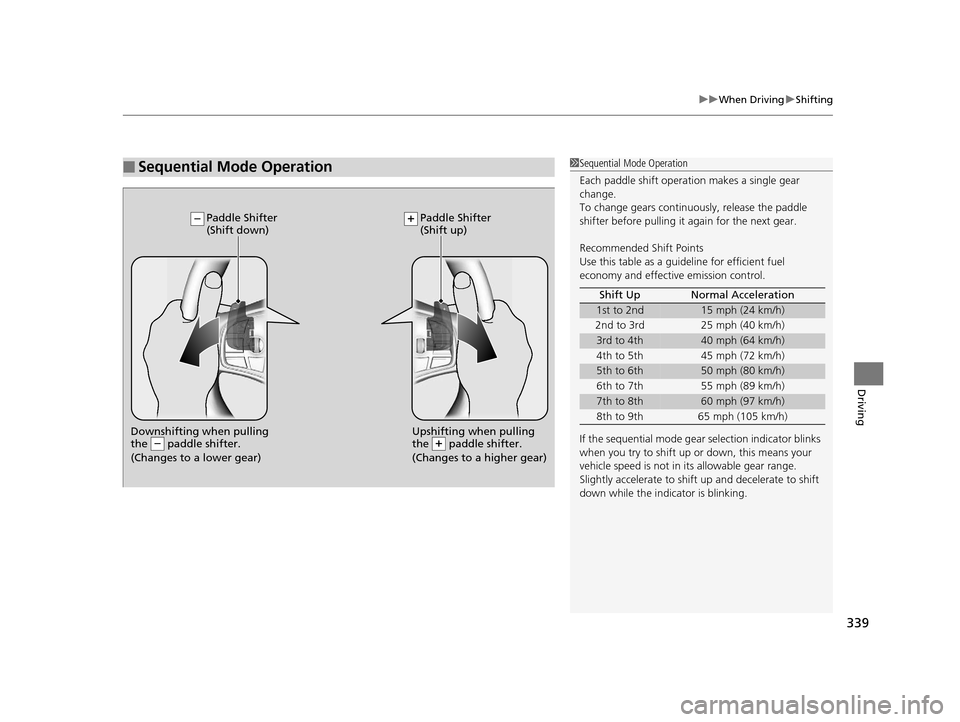
■Sequential Mode Operation1Sequential Mode Operation
Each paddle shift operation makes a single gear
change.
To change gears continuously, release the paddle
shifter before pulling it again for the next gear.
Recommended Shift Points
Use this table as a guideline for efficient fuel
economy and effectiv e emission control.
If the sequential mode gear selection indicator blinks
when you try to shift up or down, this means your
vehicle speed is not in its allowable gear range.
Slightly accelerate to shift up and decelerate to shift
down while the indi cator is blinking.
Shift Up Normal Acceleration
1st to 2nd15 mph (24 km/h)
2nd to 3rd 25 mph (40 km/h)
3rd to 4th40 mph (64 km/h)
4th to 5th 45 mph (72 km/h)
5th to 6th50 mph (80 km/h)
6th to 7th 55 mph (89 km/h)
7th to 8th60 mph (97 km/h)
8th to 9th 65 mph (105 km/h)
Downshifting when pulling
the paddle shifter.
(Changes to a lower gear)Upshifting when pulling
the paddle shifter.
(Changes to a higher gear)
Paddle Shifter
(Shift down) Paddle Shifter
(Shift up)
16 ACURA TLX-31TZ36100.book 339 ページ 2015年8月26日 水曜日 午後1時54分
Page 342 of 553

Continued341
uuWhen Driving uShifting
Driving
■Shift Lever Operation1Shift Lever Operation
NOTICE
When you change the shift lever from (D to ( R and
vice versa, come to a complete stop and keep the
brake pedal depressed.
Operating the shift lever be fore the vehicle has come
to a complete standstill can damage the transmission.
Use the shift lever position indicator to check the
lever position befo re pulling away.
Whichever position the shift lever is in when driving,
a blinking transmission indicator indicates a
transmission problem.
Avoid sudden acceleration and have the transmission
checked by a dealer as soon as possible.
The fuel supply may be cut of f if you drive at engine
speeds in or over the tachometer’s red zone (engine
speed limit). If this happe ns, you may experience a
slight jolt.
When the engine speed is increased while the shift
lever is in
( N, (P or (R, the fuel supply may be cut
off even without the engine speed entering the
tachometer’s red zone.
It may not be possible to operate the shift lever if the
brake pedal is applied while the shift lever release
button is held down.
Depress the brake pedal first.
Shift Lever Position Indicator
Depress the brake pedal
and press the shift lever
release button to shift.
Shift without pressing the
shift lever release button.
Press the shift lever
release button and
shift.
Tachometer’s red zone
M
(sequential mode) Indicator
Sequential Mode
Gear Selection
Indicator
Models without
full color display
16 ACURA TLX-31TZ36100.book 341 ページ 2015年8月26日 水曜日 午後1時54分
Page 344 of 553
343
uuWhen Driving uShifting
Driving
■Second gear lock mode
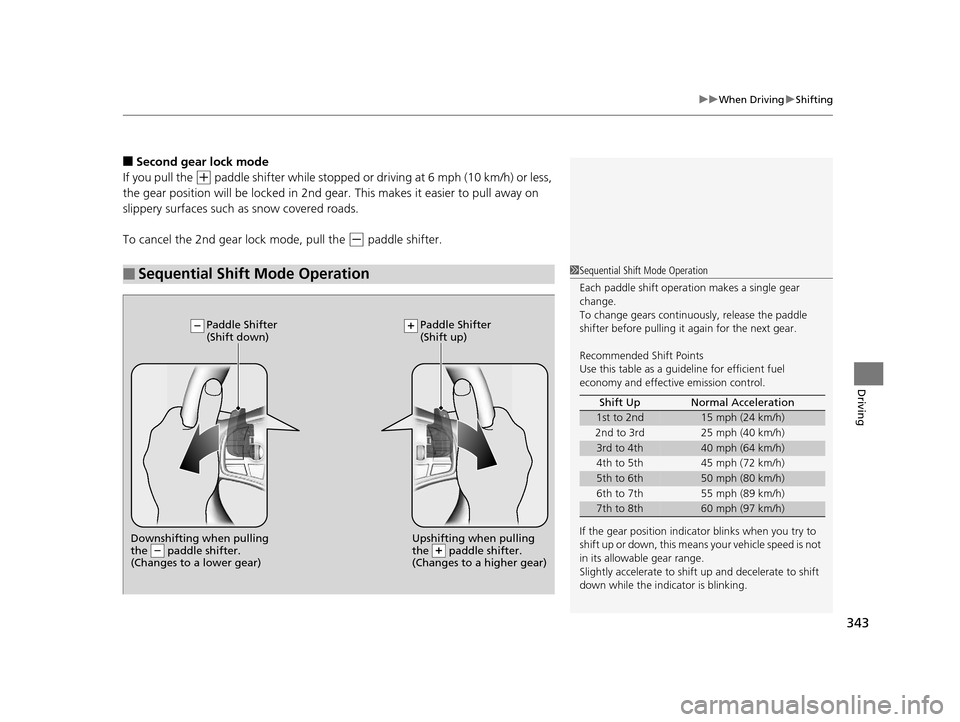
If you pull the
(+ paddle shifter while stopped or dr iving at 6 mph (10 km/h) or less,
the gear position will be lo cked in 2nd gear. This makes it easier to pull away on
slippery surfaces such as snow covered roads.
To cancel the 2nd gear lock mode, pull the
(- paddle shifter.
■Sequential Shift Mode Operation1 Sequential Shift Mode Operation
Each paddle shift operation makes a single gear
change.
To change gears continuously, release the paddle
shifter before pulling it again for the next gear.
Recommended Shift Points
Use this table as a guideline for efficient fuel
economy and effectiv e emission control.
If the gear position indicator blinks when you try to
shift up or down, this means your vehicle speed is not
in its allowabl e gear range.
Slightly accelerate to shift up and decelerate to shift
down while the indi cator is blinking.
Shift Up Normal Acceleration
1st to 2nd15 mph (24 km/h)
2nd to 3rd 25 mph (40 km/h)
3rd to 4th40 mph (64 km/h)
4th to 5th 45 mph (72 km/h)
5th to 6th50 mph (80 km/h)
6th to 7th 55 mph (89 km/h)
7th to 8th60 mph (97 km/h)
Downshifting when pulling
the paddle shifter.
(Changes to a lower gear)Upshifting when pulling
the paddle shifter.
(Changes to a higher gear)
Paddle Shifter
(Shift down) Paddle Shifter
(Shift up)
16 ACURA TLX-31TZ36100.book 343 ページ 2015年8月26日 水曜日 午後1時54分
Page 345 of 553
344
uuWhen Driving uAuto Idle Stop*
Driving
Auto Idle Stop*
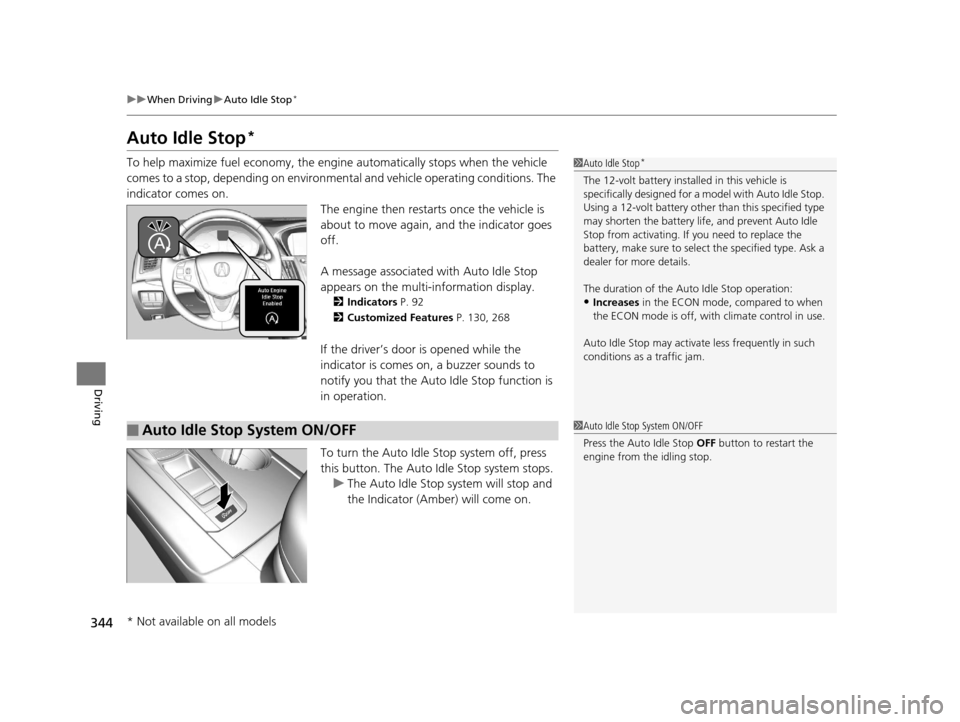
To help maximize fuel econ omy, the engine automatica lly stops when the vehicle
comes to a stop, depending on environmental and vehicle operating conditions. The
indicator comes on. The engine then restarts once the vehicle is
about to move again, and the indicator goes
off.
A message associated with Auto Idle Stop
appears on the multi-information display.
2 Indicators P. 92
2 Customized Features P. 130, 268
If the driver’s door is opened while the
indicator is comes on, a buzzer sounds to
notify you that the Auto Idle Stop function is
in operation.
To turn the Auto Idle Stop system off, press
this button. The Auto Idle Stop system stops.
u The Auto Idle Stop system will stop and
the Indicator (Amber) will come on.
1Auto Idle Stop*
The 12-volt battery insta lled in this vehicle is
specifically designed for a m odel with Auto Idle Stop.
Using a 12-volt battery other than this specified type
may shorten the battery life , and prevent Auto Idle
Stop from activati ng. If you need to replace the
battery, make sure to select the specified type. Ask a
dealer for more details.
The duration of the Au to Idle Stop operation:
•Increases in the ECON mode, compared to when
the ECON mode is off, with climate control in use.
Auto Idle Stop may activate less frequently in such
conditions as a traffic jam.
■Auto Idle Stop System ON/OFF1 Auto Idle Stop System ON/OFF
Press the Auto Idle Stop OFF button to restart the
engine from the idling stop.
* Not available on all models
16 ACURA TLX-31TZ36100.book 344 ページ 2015年8月26日 水曜日 午後1時54分
Page 349 of 553
348
uuWhen Driving uIntegrated Dynamics System (IDS)
Driving
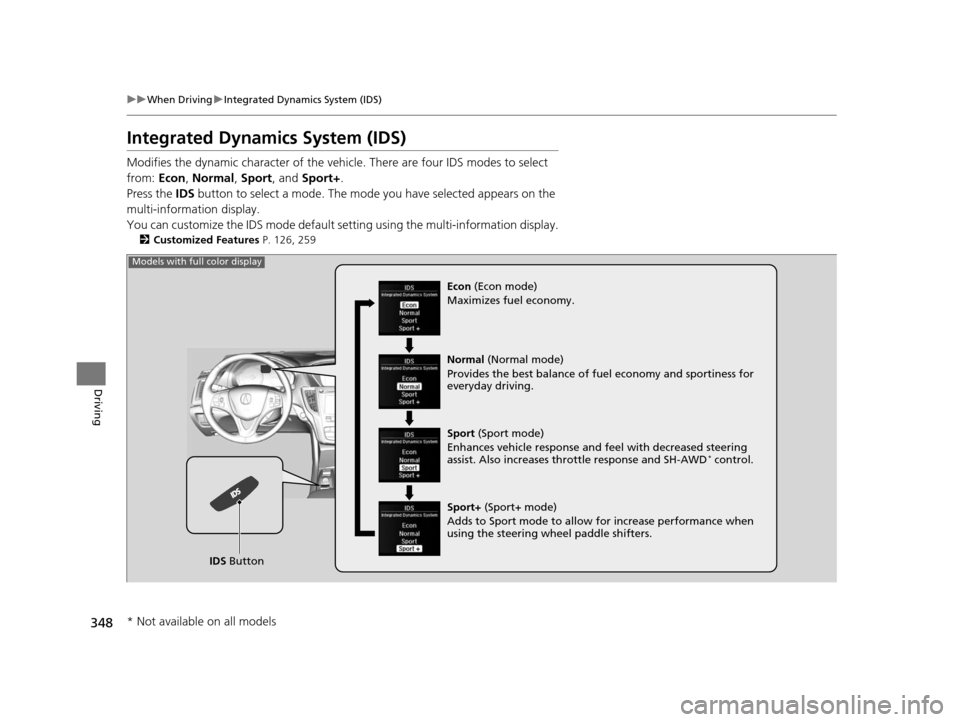
Integrated Dynamics System (IDS)
Modifies the dynamic character of the vehi cle. There are four IDS modes to select
from: Econ, Normal , Sport , and Sport+ .
Press the IDS button to select a mode. The mode you have selected appears on the
multi-information display.
You can customize the IDS mode default se tting using the multi-information display.
2Customized Features P. 126, 259
IDS Button
Models with full color display
Econ (Econ mode)
Maximizes fuel economy.
Normal (Normal mode)
Provides the best balance of fu el economy and sportiness for
everyday driving.
Sport (Sport mode)
Enhances vehicle response and feel with decreased steering
assist. Also increases th rottle response and SH-AWD
* control.
Sport+ (Sport+ mode)
Adds to Sport mode to allow for increase performance when
using the steering wheel paddle shifters.
* Not available on all models
16 ACURA TLX-31TZ36100.book 348 ページ 2015年8月26日 水曜日 午後1時54分
Page 350 of 553
349
uuWhen Driving uIntegrated Dynamics System (IDS)
Driving
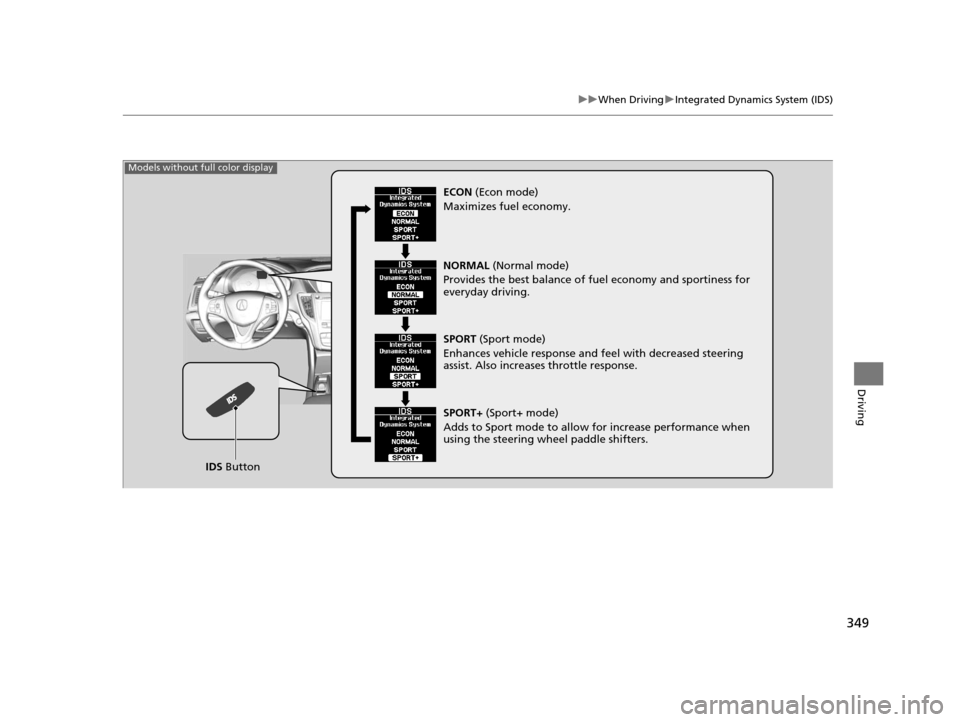
IDS Button
Models without full color display
ECON (Econ mode)
Maximizes fuel economy.
NORMAL (Normal mode)
Provides the best balance of fu el economy and sportiness for
everyday driving.
SPORT (Sport mode)
Enhances vehicle response and feel with decreased steering
assist. Also increases throttle response.
SPORT+ (Sport+ mode)
Adds to Sport mode to allow for increase performance when
using the steering wheel paddle shifters.
16 ACURA TLX-31TZ36100.book 349 ページ 2015年8月26日 水曜日 午後1時54分
Page 400 of 553
399
uuWhen Driving uTire Pressure Monitoring System (TPMS) - Required Federal Explanation
Continued
Driving
Tire Pressure Monitoring System (TPMS) - Required
Federal Explanation
Each tire, including the spare (if provided), should be checked
monthly when cold and inflated to the inflation pressure
recommended by the vehicle manufa cturer on the vehicle placard
or tire inflation pressure label.
(If your vehicle has tires of a diff erent size than the size indicated
on the vehicle placard or tire inflation pressure label, you should
determine the proper tire inflat ion pressure for those tires.)
As an added safety feature, your vehicle has been equipped with
a tire pressure monitoring system (TPMS) that illuminates a low
tire pressure telltale
when one or more of your tires is significantly under-inflated.
Accordingly, when the low tire pressure telltale illuminates, you
should stop and check your tires as soon as possible, and inflate
them to the proper pressure.
Driving on a significantly under-inf lated tire causes the tire to
overheat and can lead to tire fail ure. Under-inflation also reduces
fuel efficiency and tire tread life, and may affect the vehicle’s
handling and stopping ability.
16 ACURA TLX-31TZ36100.book 399 ページ 2015年8月26日 水曜日 午後1時54分
Page 427 of 553
426
Driving
Refueling
Fuel Information
■Fuel recommendation
Use of lower octane gasoline can cause occasional metallic knocking noise in the
engine and will result in decreased engine performance.
Use of gasoline with a pump octane less than 87 can lead to engine damage.
■Top tier detergent gasoline
Because the level of detergency and additives in gasoline vary in the market, Acura
endorses the use of “TOP TIER Deterg ent Gasoline” where available to help
maintain the performance and reliability of your vehicle. TOP TIER Detergent
Gasoline meets a new gasoline standard join tly established by leading automotive
manufacturers to meet the need s of today’s advanced engines.
Qualifying gasoline retailers will, in most ca ses, identify their gasoline as having met
“TOP TIER Detergent Gasoline” standards at the retail location. This fuel is
guaranteed to contain the proper level of detergent additives and be free of metallic
additives. The proper level of detergent additives, and absence of harmful metallic
additives in gasoline, help avoid build-up of deposits in your engine and emission
control system.
For further important fuel-rel ated information for your vehicle, or on information on
gasoline that does not contain MMT, visit Acura Owners at owners.acura.com. In
Canada, visit www.acura.ca for additional informatio n on gasoline. For more
information on top tier gasoline, visit www.toptiergas.com.
■Fuel tank capacity: 17.2 US gal (65 liters)
Unleaded premium gasoline, pump octane number 91 or higher
1Fuel Information
NOTICE
We recommend quality ga soline containing
detergent additives that help prevent fuel system and
engine deposits. In addition, in order to maintain
good performance, fuel economy, and emissions
control, we strongly reco mmend the use of gasoline
that does NOT contain harmful manganese-based
fuel additives such as MMT, if such gasoline is
available.
Use of gasoline with these additives may adversely
affect performance, a nd cause the malfunction
indicator lamp on your inst rument panel to come on.
If this happens, contact a dealer for service.
Some gasoline today is ble nded with oxygenates such
as ethanol. Your vehicle is designed to operate on
oxygenated gasoline containing up to 15% ethanol
by volume. Do not use gaso line containing methanol.
If you notice any undesira ble operating symptoms, try
another service station or sw itch to another brand of
gasoline.
16 ACURA TLX-31TZ36100.book 426 ページ 2015年8月26日 水曜日 午後1時54分
Page 428 of 553
427
uuRefueling uHow to Refuel
Continued
Driving
How to Refuel
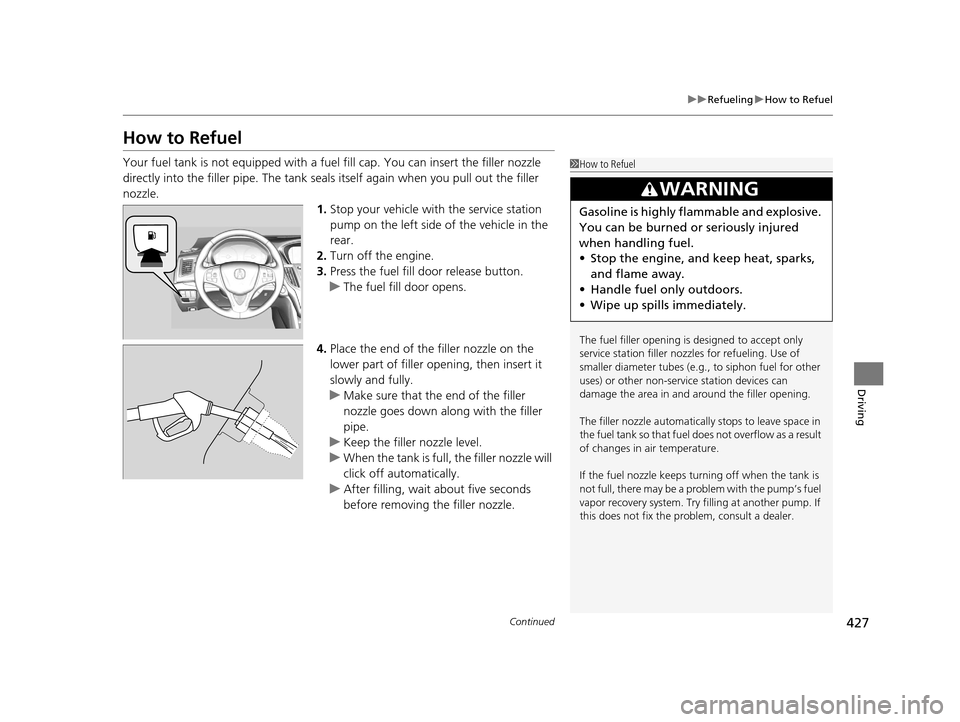
Your fuel tank is not equipped with a fu el fill cap. You can insert the filler nozzle
directly into the filler pipe. The tank seals itself again when you pull out the filler
nozzle. 1.Stop your vehicle with the service station
pump on the left side of the vehicle in the
rear.
2. Turn off the engine.
3. Press the fuel fill door release button.
u The fuel fill door opens.
4. Place the end of the filler nozzle on the
lower part of filler opening, then insert it
slowly and fully.
u Make sure that the end of the filler
nozzle goes down along with the filler
pipe.
u Keep the filler nozzle level.
u When the tank is full, the filler nozzle will
click off automatically.
u After filling, wait about five seconds
before removing the filler nozzle.1How to Refuel
The fuel filler opening is designed to accept only
service station filler nozzles for refueling. Use of
smaller diameter tubes (e.g ., to siphon fuel for other
uses) or other non-service station devices can
damage the area in and around the filler opening.
The filler nozzle automatically stops to leave space in
the fuel tank so that fuel does not overflow as a result
of changes in air temperature.
If the fuel nozzle keeps turning off when the tank is
not full, there may be a problem with the pump’s fuel
vapor recovery system. Try fi lling at another pump. If
this does not fix the problem, consult a dealer.
3WARNING
Gasoline is highly flammable and explosive.
You can be burned or seriously injured
when handling fuel.
• Stop the engine, and keep heat, sparks,
and flame away.
• Handle fuel only outdoors.
• Wipe up spills immediately.
16 ACURA TLX-31TZ36100.book 427 ページ 2015年8月26日 水曜日 午後1時54分