change wheel Acura TLX 2016 Owner's Guide
[x] Cancel search | Manufacturer: ACURA, Model Year: 2016, Model line: TLX, Model: Acura TLX 2016Pages: 553, PDF Size: 31.29 MB
Page 384 of 553

383
uuWhen Driving uLane Keeping Assist System (LKAS)*
Continued
Driving
Lane Keeping Assist System (LKAS)*
Provides steering input to help keep the vehicle in the middle of a detected lane and
provides audible and visual alerts if the vehicle is detected drifting out of its lane.1Lane Keeping Assist System (LKAS)*
Important Safety Reminders
The LKAS is for your convenience only. It is not a
substitute for your vehicl e control. The system does
not work if you take y our hands off the steering
wheel or fail to steer the vehicle.
2 Multi-Information Display Warning and
Information Messages P. 113
Do not place objects on the instrument panel.
Objects may reflect on th e front windshield and
prevent correct detectio n of the traffic lanes.
LKAS only alerts you when lane drift is detected
without a turn signal in use. LKAS may not detect all
lane markings or lane departures; a ccuracy will vary
based on weather, speed, an d lane marker condition.
It is always your responsibility to safely operate the
vehicle and avoid collisions.
The LKAS is convenient when it is used on freeways.
The LKAS may not work properly or may work
improperly under the certain conditions: 2 LKAS Conditions and Limitations P. 389
LKAS may not function as designed on while driving
in frequent stop and go traf fic, or on roads with
sharp curves.
You can read about handling information for the
camera equipped with this system. 2 Front Sensor Camera
* P. 353
Normal or Wide selected.
Rapid vibrations on the steering
wheel and a warning display alert
you that the vehicle is drifting out
of a detected lane.
Models with RDM
Warning Only selected.
Beeps and a warning display alert you
that the vehicle is drifting out of a
detected lane.
Models with LDW
Models with RDM
When you operate the turn signals to chan ge lanes, the system is suspended, and
resumes after the signals are off.
If you make a lane change without operat ing the turn signals, the LKAS alerts
activate, and torque is applied to the steering.
■LKAS camera
Monitors the lane
lines
* Not available on all models
16 ACURA TLX-31TZ36100.book 383 ページ 2015年8月26日 水曜日 午後1時54分
Page 397 of 553
396
uuWhen Driving uSuper Handling-All Wheel DriveTM (SH-AWD ®)*
Driving
Super Handling-All Wheel DriveTM (SH-AWD® )*
The system controls and transfers varying amounts of engine torque to each wheel
in accordance with the driving conditions.
SH-AWD helps to enhance driving stability, and lets you handle situations like
sli ppe r y sur f a c es , suc h a s o n w e t, i cy , o r sno wy r oa ds , b e tt e r t ha n wh e n dr iv ing wi t h
two wheel drive. However, the system do es not help to enhance braking. Be
precautious about the following:
• It is still your responsibility to drive safely when you steer, accelerate, and apply
brakes.
• Leave a sufficient margin when braking on slippery surfaces.1Super Handling-All Wheel DriveTM (SH-AWD ®)*
The SH-AWD ® system may not function properly if
tire type and size are mixed.
Make sure to use the same size and type of tire, and
the air pressures as specified. 2 Tire and Wheel Replacement P. 468
Do not continuously spin the front tires of your
vehicle. Continuously spinning the front tires can
cause damage to the tran smission and SH-AWD unit.
If the SH-AWD indicator blinks while driving, it
indicates the differential te mperature is too high. If
this happens, pull to the side of the road when it is
safe, change the gear position to
( P, and idle the
engine until the indicator goes out.
* Not available on all models
16 ACURA TLX-31TZ36100.book 396 ページ 2015年8月26日 水曜日 午後1時54分
Page 399 of 553
uuWhen Driving uTire Pressure Monitoring System (TPMS)
398
Driving
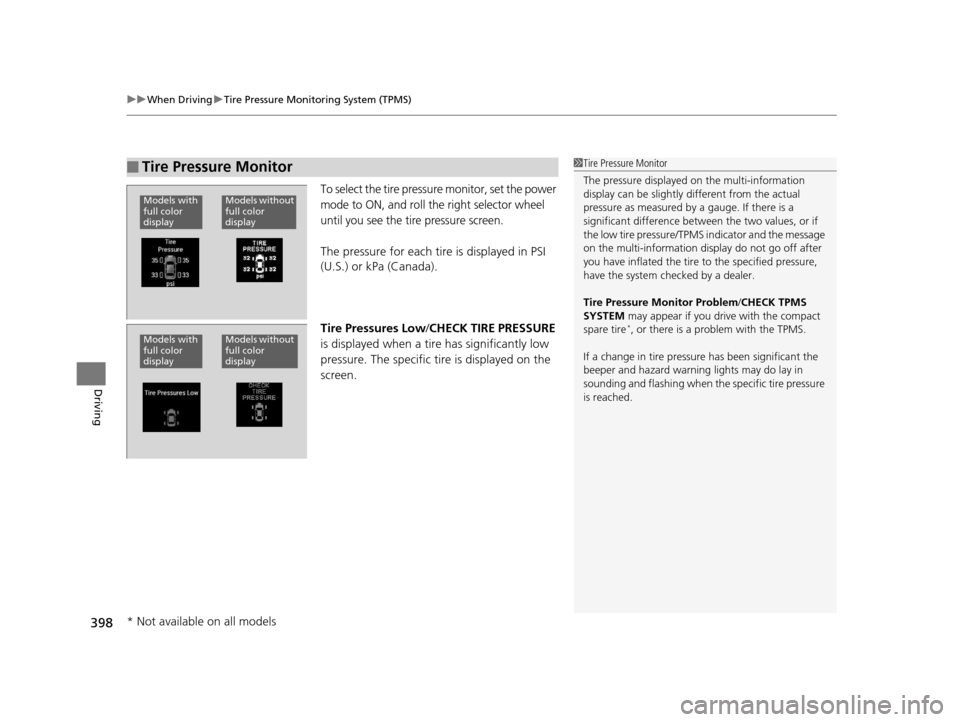
To select the tire pressure monitor, set the power
mode to ON, and roll the right selector wheel
until you see the tire pressure screen.
The pressure for each tire is displayed in PSI
(U.S.) or kPa (Canada).
Tire Pressures Low /CHECK TIRE PRESSURE
is displayed when a tire has significantly low
pressure. The specific tire is displayed on the
screen.
■Tire Pressure Monitor1 Tire Pressure Monitor
The pressure displayed on the multi-information
display can be slightly different from the actual
pressure as measured by a gauge. If there is a
significant di fference between the two values, or if
the low tire pressure/TPMS indicator and the message
on the multi-information di splay do not go off after
you have inflated the tire to the specified pressure,
have the system checked by a dealer.
Tire Pressure Monitor Problem /CHECK TPMS
SYSTEM may appear if you drive with the compact
spare tire
*, or there is a problem with the TPMS.
If a change in tire pressure has been significant the
beeper and hazard warning lights may do lay in
sounding and flashing when th e specific tire pressure
is reached.
Models without
full color
displayModels with
full color
display
Models without
full color
displayModels with
full color
display
* Not available on all models
16 ACURA TLX-31TZ36100.book 398 ページ 2015年8月26日 水曜日 午後1時54分
Page 426 of 553
425
Driving
Multi-View Rear Camera
About Your Multi-View Rear Camera
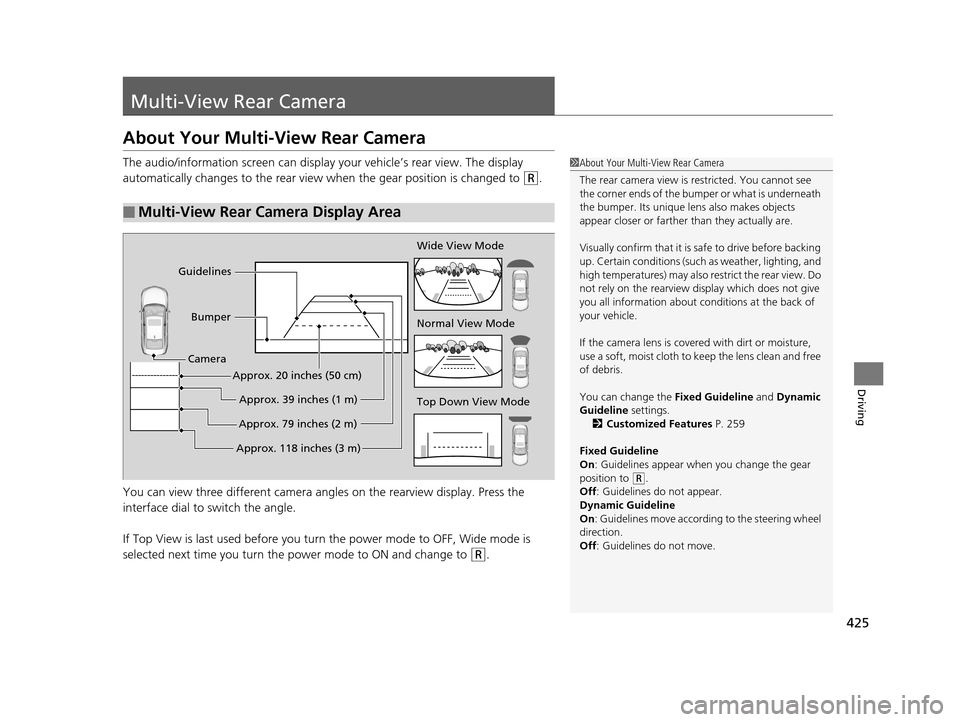
The audio/information screen can display your vehicle’s rear view. The display
automatically changes to the rear view when the gear position is changed to
(R.
You can view three differen t camera angles on the rearview display. Press the
interface dial to switch the angle.
If Top View is last used before you turn the power mode to OFF, Wide mode is
selected next time you turn the power mode to ON and change to
(R.
■Multi-View Rear Camera Display Area
1About Your Multi-View Rear Camera
The rear camera view is restricted. You cannot see
the corner ends of the bum per or what is underneath
the bumper. Its unique le ns also makes objects
appear closer or farther than they actually are.
Visually confirm that it is safe to drive before backing
up. Certain conditions (such as weather, lighting, and
high temperatures) may also re strict the rear view. Do
not rely on the rearview display which does not give
you all information about conditions at the back of
your vehicle.
If the camera lens is cove red with dirt or moisture,
use a soft, moist cloth to keep the lens clean and free
of debris.
You can change the Fixed Guideline and Dynamic
Guideline settings. 2 Customized Features P. 259
Fixed Guideline
On : Guidelines appear when you change the gear
position to
( R.
Off : Guidelines do not appear.
Dynamic Guideline
On : Guidelines move according to the steering wheel
direction.
Off : Guidelines do not move.
Top Down View Mode Normal View Mode Wide View Mode
Guidelines
Bumper
Camera
Approx. 118 inches (3 m)Approx. 79 inches (2 m)Approx. 39 inches (1 m)
Approx. 20 inches (50 cm)
16 ACURA TLX-31TZ36100.book 425 ページ 2015年8月26日 水曜日 午後1時54分
Page 484 of 553

483Continued
Handling the Unexpected
If a Tire Goes Flat
Temporarily Repairing a Flat Tire
If the tire has a large cut or is otherwise severely damaged, you will need to have the
vehicle towed. If the tire only has a small puncture, from a nail for instance, you can
use the temporary tire repair kit so that you can drive to the nearest service station
for a more permanent repair.
If a tire goes flat while driving, grasp the steering wheel firmly, and brake gradually
to reduce speed. Then stop in a safe place.
1. Park the vehicle on a firm, level, and n on-slippery surface and apply the parking
brake.
2. Change the gear position to
(P.
3. Turn on the hazard warning lights an d set the power mode to VEHICLE OFF
(LOCK).
1 Temporarily Repairing a Flat Tire
The kit should not be used in the following situations.
Instead, contact a dealer or a roadside assistant to
have the vehicle towed.
•The tire sealant has expired.
•More than one tire is punctured.•The puncture or cut is larger than 3/16 inch (4 mm).
•The tire side wall is da maged or the puncture is
outside the contact area.
•Damage has been caused by driving with the tire
extremely under inflated.
•The tire bead is no longer seated.
•The rim is damaged.
Do not remove a nail or screw that punctured the
tire. If you remove it from the tire, you may not be
able to repair the puncture using the kit.
NOTICE
Do not use a puncture-repairing agent other than the
one provided in the kit that came with your vehicle. If
a different agent is used, you may permanently
damage the tire pressure sensor.
When the puncture is:Kit Use
Smaller than 3/16 inch (4 mm)Yes
Larger than 3/16 inch (4 mm)No
Contact
Area
16 ACURA TLX-31TZ36100.book 483 ページ 2015年8月26日 水曜日 午後1時54分
Page 496 of 553

495
uuIf a Tire Goes Flat uChanging a Flat Tire
Continued
Handling the Unexpected
Changing a Flat Tire
If a tire goes flat while driving, grasp the steering wheel firmly, and brake gradually
to reduce speed. Then, stop in a safe plac e. Replace the flat tire with a compact
spare tire. Go to a dealer as soon as possib le to have the full-size tire repaired or
replaced.
1. Park the vehicle on firm, level, and no n-slippery and apply the parking brake.
2. Change the gear position to
(P.
3. Turn on the hazard warning lights an d set the power mode to VEHICLE OFF
(LOCK).
Vehicles with optional spare tire
1 Changing a Flat Tire
Periodically check the tire pressure of the compact
spare. It should be set to the specified pressure.
Specified Pressure: 60 psi (420 kPa, 4.2 kgf/cm
2)
When driving with the compact spare tire, keep the
vehicle speed under 50 mph (80 km/h). Replace with
a full-size tire as soon as possible.
The compact spare tire and wheel in your vehicle are
specifically for this model. Do not use them with
another vehicle. Do not us e another type of compact
spare tire or wheel with your vehicle.
Do not mount tire chains on a compact spare tire.
If a chain-mounted front tire goes flat, remove one of
the full-size rear tires and replace it with the compact
spare tire. Remove the flat front tire and replace it
with the full-size tire that was removed from the rear.
Mount the tire chains on the front tire.
Do not use a puncture-repairi ng agent on a flat tire,
as it can damage the tire pressure sensor.
16 ACURA TLX-31TZ36100.book 495 ページ 2015年8月26日 水曜日 午後1時54分
Page 505 of 553
504
uuEngine Does Not Start uEmergency Engine Stop
Handling the Unexpected
Emergency Engine Stop
The ENGINE START/STOP button may be used to st op the engine due to an
emergency situation even while driving. If you must stop the engine, do either of the
following operations:
• Press and hold the ENGINE START/STOP button for about two seconds.
• Firmly press the ENGINE START/STOP button twice.
The steering wheel will not lock. However, because turning off the engine disables
the power assist the engine provides to the steering and braking systems, it will
require significantly more physical effort an d time to steer and slow the vehicle. Use
both feet on the brake pedal to slow down the vehicle and stop immediately in a
safe place.
The power mode is in ACCESSORY when the engine is stopped.
To change the mode to VEHICLE OF F, change the gear position to
(P after the
vehicle comes to a complete stop.
1 Emergency Engine Stop
Do not press the button while driving unless it is
absolutely necessary for th e engine to be switched
off.
16 ACURA TLX-31TZ36100.book 504 ページ 2015年8月26日 水曜日 午後1時54分
Page 515 of 553

514
uuIndicator, Coming On/Blinking uIf the Electric Power Steering (EPS) System Indicator Comes On
Handling the Unexpected
If the Electric Power Steeri ng (EPS) System Indicator
Comes On
■Reasons for the indicator to come on
• Comes on if there is a problem with the EPS system.
• If you depress the accelerator pedal repeatedly to increase the engine
speed while the engine is idling, the indicator comes on, and
sometimes the steering wheel becomes harder to operate.
■What to do when the indicator comes on
Stop the vehicle in a safe place and restart the engine.
If the indicator comes on and stays on, immediately have your vehicle
inspected by a dealer.
If the Electric Parking Brake System Indicator Comes On
■Reasons for the indicator to come on
Comes on if there is a problem with the electric parking brake system.
■What to do when the indicator comes on
Avoid using the parking brake and immediately get your vehicle
inspected at a dealer.
■What to do when the electric parking brake indicator comes on
or blinks at the same time
Release the parking brake.
2 Parking Brake P. 401
•If the electric parking brake indicator remains on or blinks even after
releasing the parking brake, immedi ately stop the vehicle in a safe
place and call a dealer.
u To Prevent your vehicle from moving , change the gear position to
(P.
• If only the electric parking brake indicator goes off, immediately get
your vehicle inspected at a dealer.
1If the Electric Parking Brake System Indicator Comes On
If you apply parking brak e, it may not release.
If the electric parking bra ke indicator also turns on,
the parking brake is still applied.
When the electric parking br ake indicator blinks at
the same time as the electric parking brake system
indicator, the system must be checked. The parking
brake may not operate under these conditions.
16 ACURA TLX-31TZ36100.book 514 ページ 2015年8月26日 水曜日 午後1時54分
Page 530 of 553
529
uuSpecifications u
Continued
Information
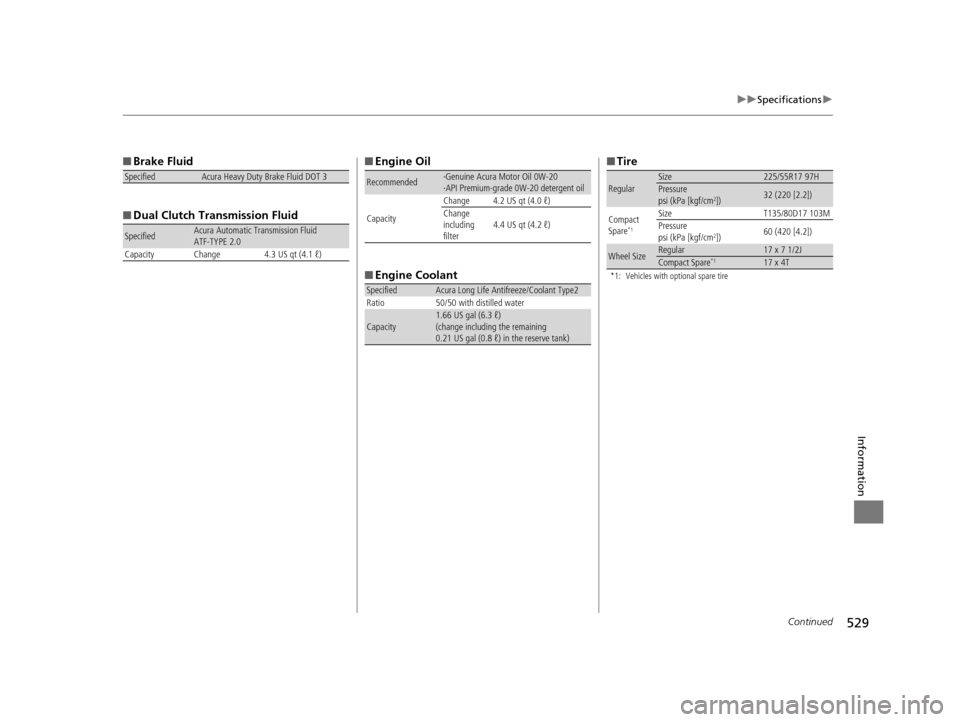
■Brake Fluid
■ Dual Clutch Transmission Fluid
SpecifiedAcura Heavy Duty Brake Fluid DOT 3
SpecifiedAcura Automatic Transmission Fluid
ATF-TYPE 2.0
Capacity Change 4.3 US qt (4.1 ℓ)
■ Engine Oil
■ Engine Coolant
Recommended·Genuine Acura Motor Oil 0W-20
·API Premium-grade 0W-20 detergent oil
Capacity Change 4.2 US qt (4.0 ℓ)
Change
including
filter
4.4 US qt (4.2 ℓ)
SpecifiedAcura Long Life Antifreeze/Coolant Type2
Ratio 50/50 with distilled water
Capacity1.66 US gal (6.3 ℓ)
(change including the remaining
0.21 US gal (0.8 ℓ) in the reserve tank)
■ Tire
*1: Vehicles with optional spare tire
RegularSize225/55R17 97HPressure
psi (kPa [kgf/cm2])32 (220 [2.2])
Compact
Spare*1
SizeT135/80D17 103M
Pressure
psi (kPa [kgf/cm
2]) 60 (420 [4.2])
Wheel SizeRegular17 x 7 1/2JCompact Spare*117 x 4T
16 ACURA TLX-31TZ36100.book 529 ページ 2015年8月26日 水曜日 午後1時54分
Page 532 of 553
531
uuSpecifications u
Information
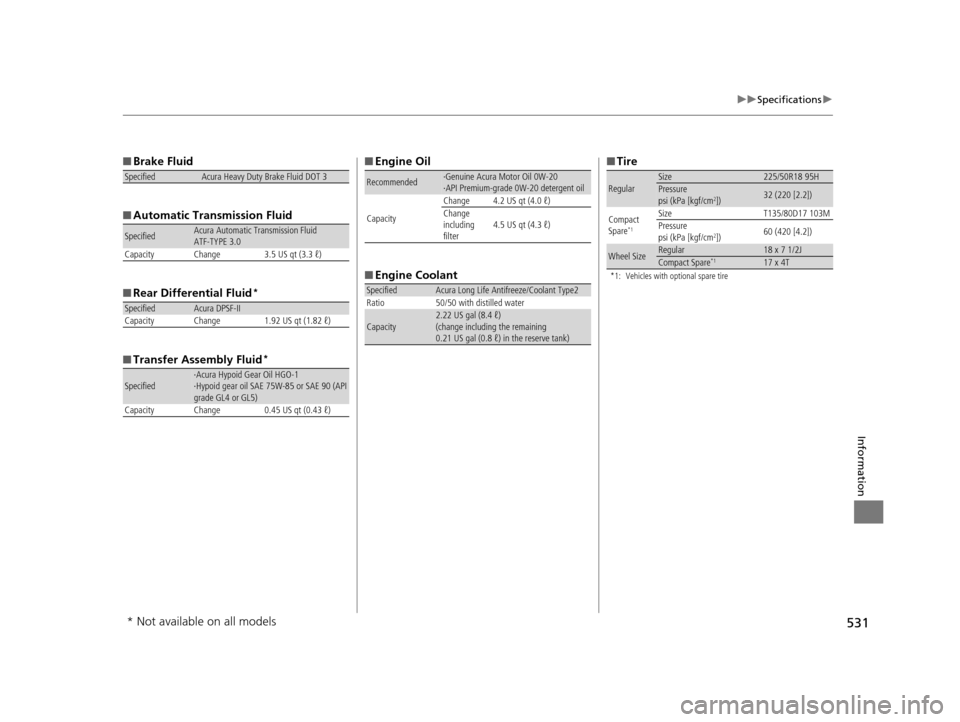
■Brake Fluid
■ Automatic Transmission Fluid
■ Rear Differential Fluid
*
■Transfer Assembly Fluid*
SpecifiedAcura Heavy Duty Brake Fluid DOT 3
SpecifiedAcura Automatic Transmission Fluid
ATF-TYPE 3.0
Capacity Change 3.5 US qt (3.3 ℓ)
SpecifiedAcura DPSF-II
Capacity Change 1.92 US qt (1.82 ℓ)
Specified·Acura Hypoid Gear Oil HGO-1
·Hypoid gear oil SAE 75W-85 or SAE 90 (API
grade GL4 or GL5)
Capacity Change 0.45 US qt (0.43 ℓ)
■ Engine Oil
■ Engine Coolant
Recommended·Genuine Acura Motor Oil 0W-20
·API Premium-grade 0W-20 detergent oil
Capacity Change 4.2 US qt (4.0 ℓ)
Change
including
filter
4.5 US qt (4.3 ℓ)
SpecifiedAcura Long Life Antifreeze/Coolant Type2
Ratio 50/50 with distilled water
Capacity2.22 US gal (8.4 ℓ)
(change including the remaining
0.21 US gal (0.8 ℓ) in the reserve tank)
■ Tire
*1: Vehicles with optional spare tire
RegularSize225/50R18 95HPressure
psi (kPa [kgf/cm2])32 (220 [2.2])
Compact
Spare*1
SizeT135/80D17 103M
Pressure
psi (kPa [kgf/cm
2]) 60 (420 [4.2])
Wheel SizeRegular18 x 7 1/2JCompact Spare*117 x 4T
* Not available on all models
16 ACURA TLX-31TZ36100.book 531 ページ 2015年8月26日 水曜日 午後1時54分