trunk Acura TLX 2016 Owner's Guide
[x] Cancel search | Manufacturer: ACURA, Model Year: 2016, Model line: TLX, Model: Acura TLX 2016Pages: 553, PDF Size: 31.29 MB
Page 156 of 553

155Continued
Controls
Security System
Immobilizer System
The immobilizer system prevents a key that has not been pre-registered from
starting the engine. Each key contains electronic transmitters that use electronic
signals to verify the key.
Pay attention to the follo wing when pressing the ENGINE START/STOP button:
• Do not allow objects that emit strong radio waves near the ENGINE START/
STOP button.
• Make sure the key is not covered by or touching a metal object.
• Do not bring a key from another vehicle’s immobilizer system with the keyless
access remote.
Security System Alarm
The security system alarm activates when the trunk, hood or doors are forcibly
opened. The alarm does not go off if the trunk or doors are opened with the key,
remote transmitter or keyless access system.
However, the alarm goes off when a door is opened with the key, then the shift
lever
* is moved out of (P or the hood is opened before the power mode is set to
ON.
■When the security system alarm activates
The horn sounds intermittently and all of the exterior lights flash.
■To deactivate the security system alarm
Unlock the vehicle using the remote transmitter or keyless access system. The
system, along with the horn and flashing lights, is deactivated.
1 Immobilizer System
NOTICE
Leaving the keyless access re mote in the vehicle can
result in theft or accident al movement of the vehicle.
Always take the key with you whenever you leave the
vehicle unattended.
Do not alter the system or add other devices to it.
Doing so may damage the system and make your
vehicle inoperable.
1 Security System Alarm
The security alarm continues for a maximum of two
minutes until the security system deactivates.
* Not available on all models
16 ACURA TLX-31TZ36100.book 155 ページ 2015年8月26日 水曜日 午後1時54分
Page 157 of 553

uuSecurity System uSecurity System Alarm
156
Controls
■Setting the security system alarm
The security system alarm automatically sets when the following conditions have
been met:
• The power mode is set to VEHICLE OFF (LOCK).
• The hood and trunk are closed.
• All doors are locked from ou tside with the key, remote transmitter or keyless
access system.
■When the security system alarm sets
The security system indicator in the in strument panel blinks. When the blinking
interval changes after about 15 sec onds, the security system is set.
■To cancel the security system alarm
The security system is canceled when th e vehicle is unlocked using the remote
transmitter, or you grab any door handle while carrying the keyless access remote,
or the power mode is set to ON. The securi ty system indicator goes off at the same
time.
1 Security System Alarm
Do not set the security system alarm when someone
is in the vehicle or a window is open. The system can
accidentally activate when:
•Unlocking the door with the lock tab.•Opening the trunk with the trunk release or the
emergency trunk opener.
•Moving the shift lever* out of ( P.•Opening the hood with the hood release.
If the battery goes dead after you have set the
security system alarm, the security alarm may go off
once the battery is re charged or replaced.
If this occurs, deactivate the security system alarm by
unlocking a door using the remote transmitter or
keyless access system.
Do not attempt to alter th is system or add another
device to it.
* Not available on all models
16 ACURA TLX-31TZ36100.book 156 ページ 2015年8月26日 水曜日 午後1時54分
Page 186 of 553

185
uuAdjusting the Seats uRear Seats
Controls
Rear Seats
1. Remove the center shoulder belt from the
guide.
2. Pull the release lever in the trunk to release
the lock.
3. Fold the seat-back down.
If the rear head restraints get caught on the
front seat-backs, remove the head restraints.
2Removing and Reinstalling the Head
Restraints P. 183
■60/40 Split Folding Down the Rear Seats160/40 Split Folding Down the Rear Seats
The rear seat-backs can be folded down to
accommodate bulkier items in the trunk.
Never drive with a seat-back folded down and the
trunk lid open. 2 Exhaust Gas Hazard P. 66
To lock the seat-back upri ght, push it backwards until
it locks.
When returning a seat-back to it’s original position,
push it firmly back. Also, m ake sure all rear shoulder
belts are positioned in front of the seat-back, and the
center shoulder belt is re -positioned in the guide.
Make sure that the folded seat-back does not press
against the front passenger seat, as this can cause the
weight sensors in the front passenger seat to work
improperly. 2 Passenger Airbag Off Indicator P. 52
Also make sure all items in the trunk or items
extending through the opening into the rear
seats are properly secured. Loose items can fly
forward if you have to brake hard.
The front seat(s) must be far enough forward so they
do not interfere with the rear seats as they fold
down.
Center
Shoulder Belt
Guide
Release
Lever
16 ACURA TLX-31TZ36100.book 185 ページ 2015年8月26日 水曜日 午後1時54分
Page 320 of 553
Continued319
uuBefore Driving uDriving Preparation
Driving
• Store or secure all items on board properly.
u Carrying too much cargo, or improperly storing it, can affect your vehicle’s
handling, stability, sto pping distance, and tires, and make it unsafe.
2Maximum Load Limit P. 321
•Do not pile items higher than the seat height.
u They can block your view and may be thrown forward in the event of sudden
braking.
• Do not place anything in the front seat footwells. Make sure to secure the floor
mat.
u An object or unsecured floor mat can in terfere with your brake and accelerator
pedal operation while driving.
• If you have any animals on board, do not let them move around in the vehicle.
u They may interfere with driv ing and a crash could occur.
• Securely close and lock all doors and the trunk.
2 Locking/Unlocking the Doors from the Inside P. 148
•Adjust your seating position properly.
u Adjust the head restraint, too.
2Adjusting the Seats P. 180
2 Adjusting the Head Restraints P. 182
•Adjust the mirrors and steering wh eel properly for your driving.
u Adjust them while sitting in the proper driving position.
2 Adjusting the Mirrors P. 177
2 Adjusting the Steering Wheel P. 176
■Interior Checks1Interior Checks
The headlight aim is set by the factory, and does not
need to be adjusted. Howeve r, if you regularly carry
heavy items in the trunk ha ve the aiming readjusted
at a dealer or by a qualified technician.
16 ACURA TLX-31TZ36100.book 319 ページ 2015年8月26日 水曜日 午後1時54分
Page 328 of 553

Continued327
uuWhen Driving uStarting the Engine
Driving
You can remotely start the engine usin g the two-way keyless access remote from
extended distances.
■To start the engine
The engine runs for up to 10 minu tes without you starting the vehicle.
To extend the run time for another 10 mi nutes during the first run, press the
button, then press an d hold the button.
u The amber LED blinks, then the green LED comes back on if a 10-minute
extension request was transmitted successfully.
After pressing the (lock) button, wait for the green LED to blink. This indicates that
the all the doors and the trunk are locked.
■Remote Engine Start with Vehicle Feedback*1 Remote Engine Start with Vehicle Feedback*
If there are buildings an d obstacles between your
vehicle and the remote, th e range will be reduced.
This distance may vary by external electrical
interference.
The engine may not start by the remote engine start
if:
•You have disabled a remo te engine start setting
using the multi-information display.
•The power mode is not in VEHICLE OFF (LOCK).
•The gear is in a position other than ( P.
•The hood is open, or any door or the trunk is
unlocked.
•You have already used the remote twice to start
the engine.
•Another registered keyless access remote is in the
vehicle.
•There is any antenna failure.•Door is unlocked with the built-in key.
3WARNING
Engine exhaust contains toxic carbon
monoxide.
Breathing carbon monoxide can kill you or
cause unconsciousness.
Never use the remote engine starter when
the vehicle is parked in a garage or other
area with limited ventilation.
With the doors locked, Press the button,
then press and hold the button.
Amber LED: Blinks when any button is pressed.
Continues to blink
during a vehicle
self check until the
engine starts. Go within the range,
and try again.
Green LED: Comes on while
the engine is running. Red LED: Blinks when the
remote is out of the keyless
access system range.
* Not available on all models
16 ACURA TLX-31TZ36100.book 327 ページ 2015年8月26日 水曜日 午後1時54分
Page 329 of 553
uuWhen Driving uStarting the Engine
328
Driving
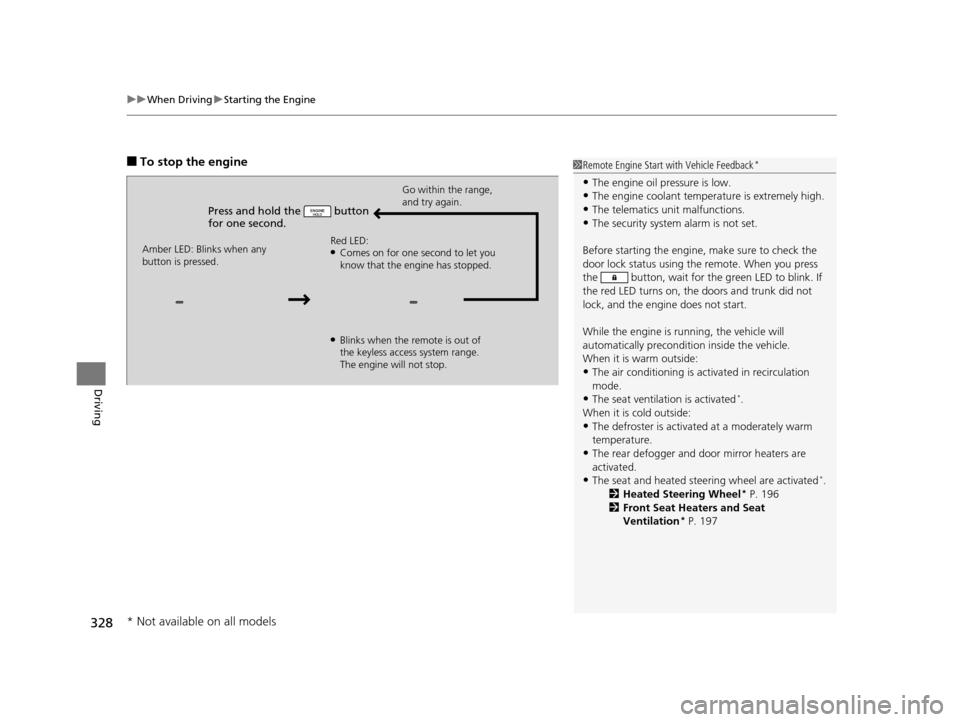
■To stop the engine
Press and hold the button
for one second.
Go within the range,
and try again.
Amber LED: Blinks when any
button is pressed. Red LED:
●Comes on for one second to let you
know that the engine has stopped.
●Blinks when the remote is out of
the keyless access system range.
The engine will not stop.
1
Remote Engine Start with Vehicle Feedback*
•The engine oil pressure is low.•The engine coolant temper ature is extremely high.
•The telematics unit malfunctions.
•The security system alarm is not set.
Before starting the engine, make sure to check the
door lock status using the remote. When you press
the button, wait for the green LED to blink. If
the red LED turns on, the doors and trunk did not
lock, and the engine does not start.
While the engine is running, the vehicle will
automatically preconditi on inside the vehicle.
When it is warm outside:
•The air conditioning is acti vated in recirculation
mode.
•The seat ventilation is activated*.
When it is cold outside:
•The defroster is activated at a moderately warm
temperature.
•The rear defogger and door mirror heaters are
activated.
•The seat and heated steering wheel are activated*.
2 Heated Steering Wheel* P. 196
2 Front Seat Heaters and Seat
Ventilation
* P. 197
* Not available on all models
16 ACURA TLX-31TZ36100.book 328 ページ 2015年8月26日 水曜日 午後1時54分
Page 361 of 553
uuWhen Driving uAdaptive Cruise Control (ACC) with Low Speed Follow (LSF)*
360
Driving
The system may automatically shut off and the ACC indicator will come on under
certain conditions. Some examples of th ese conditions are listed below. Other
conditions may reduce some of the ACC functions.
2 Front Sensor Camera* P. 353
■Environmental conditions
• Driving in bad weather (rain, fog, snow, etc.).
■Roadway conditions
• Driving on a snowy or wet roadway (obscured lane marking, vehicle tracks,
reflected lights, road spray, high contrast).
■Vehicle conditions
• The outside of the windshie ld is blocked by dirt, mud, leaves, wet snow, etc.
• An abnormal tire or wheel condition (Wrong sized, varied size or construction,
improperly inflated, compact spare tire
*, etc.).
• The camera temperature gets too hot.
• The parking brake is applied.
• When the front grille is dirty.
• When the front of the vehicle tilts up due to heavy cargo in the trunk or rear seats.
• When tire chains are installed.
■ACC with LSF Conditions and Limitations1ACC with LSF Conditions and Limitations
The radar sensor for ACC with LSF is shared with the
Collision Mitigati on Braking System
TM (CMBSTM).
2 Collision Mitigation Braking SystemTM
(CMBSTM)* P. 409
You can read about handling information for the
camera equipped with this system. 2 Front Sensor Camera
* P. 353
* Not available on all models
16 ACURA TLX-31TZ36100.book 360 ページ 2015年8月26日 水曜日 午後1時54分
Page 454 of 553
453
Maintenance
Replacing Light Bulbs
Headlights
Headlights are LED type. Have an authorized Acura dealer inspect and replace the
light assembly.
Fog Lights*
Fog lights are LED type. Have an authorized Acura dealer inspect and replace the
light assembly.
Front Side Marker/Parking Lights
Front side marker/parking lights are LED type. Have an authorized Acura dealer
inspect and replace the light assembly.
Side Turn Signal/Emer gency Indicator Lights
Side turn signal lights are LED type. Have an authorized Acura dealer inspect and
replace the light assembly.
1 Headlights
The headlight aim is set by the factory, and does not
need to be adjusted. Howeve r, if you regularly carry
heavy items in the trunk, have the aiming readjusted
at a dealer or by a qualified technician.
* Not available on all models
16 ACURA TLX-31TZ36100.book 453 ページ 2015年8月26日 水曜日 午後1時54分
Page 482 of 553
481
Handling the Unexpected
This chapter explains how to handle unexpected troubles.
ToolsTypes of Tools .................................. 482
If a Tire Goes Flat Temporarily Repairi ng a Flat Tire....... 483
Changing a Flat Tire ......................... 495
Engine Does Not Start Checking the Engine ........................ 502
If the Keyless Access Remote Battery is Weak ............................................. 503
Emergency Engine Stop ................... 504
Jump Starting .................................... 505
Shift Lever Does Not Move .............. 509Overheating
How to Handle Overheating............. 510
Indicator, Coming On/Blinking
If the Low Oil Pressure Indicator Comes On .. 512If the Charging System Indicator Comes On ................................................. 512
If the Malfunction Indicator Lamp Comes On or Blinks ................................... 513
If the Brake System Indicator (Red) Comes On .. 513If the Electric Power Steering (EPS) System Indicator Comes On ........................... 514
If the Electric Parking Brake System Indicator Comes On ....................... 514 If the Low Tire Pressure/TPMS Indicator
Comes On or Blinks ....................... 515
If the Transmission Indicator Blinks along with the Warning Message.............. 516
Fuses Fuse Locations ................................. 517
Inspecting and Changing Fuses ........ 521
Emergency Towing ........................... 522
When You Cannot Unlock the Fuel Fill Door ................................................. 523When You Cannot Open the Trunk ..... 524RefuelingRefueling From a Portable Fuel Container ... 525
16 ACURA TLX-31TZ36100.book 481 ページ 2015年8月26日 水曜日 午後1時54分
Page 483 of 553
482
Handling the Unexpected
Tools
Types of Tools
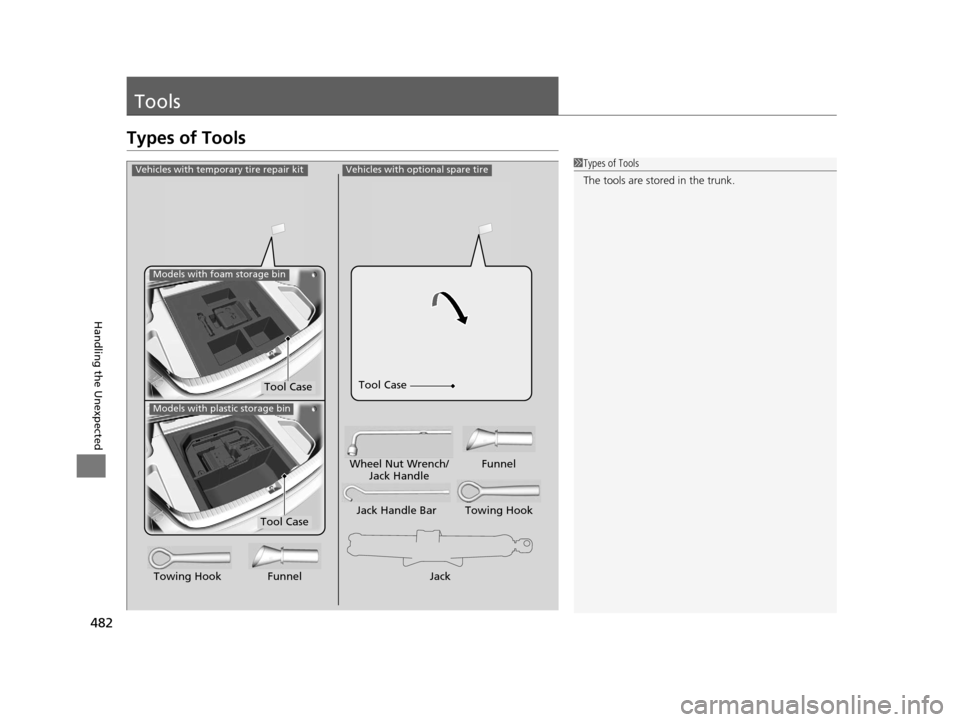
1Types of Tools
The tools are stored in the trunk.Vehicles with optional spare tire
Jack
Jack Handle Bar Towing Hook
Wheel Nut Wrench/
Jack Handle Funnel
Towing Hook Funnel
Tool Case
Vehicles with temporary tire repair kit
Tool Case
Models with foam storage bin
Models with plastic storage bin
Tool Case
16 ACURA TLX-31TZ36100.book 482 ページ 2015年8月26日 水曜日 午後1時54分