ECU Acura TLX 2016 Owner's Guide
[x] Cancel search | Manufacturer: ACURA, Model Year: 2016, Model line: TLX, Model: Acura TLX 2016Pages: 553, PDF Size: 31.29 MB
Page 271 of 553

270
uuCustomized Features u
Features
*1:Default SettingSetup
Group Customizable Features Descri
ption Selectable Settings
Vehicle
Settings Door
SetupAuto Door Lock
Changes the setting for the automatic locking
feature. With Vehicle
Speed
*1/
Shift from P/
Off
Auto Door Unlock Changes the setting for when the doors unlock
automatically. All Doors When
Driver’s Door
Opens
*1/
All Doors
When Shifted to
Park /All Doors When
Ignition Switched
Off /Off
Key And Remote Unlock
Mode Sets up either the driver
’s door or all doors to
unlock on the first push of the remote or built-in
key. Driver Door
*1/
All
Doors
Keyless Lock Answer Back LOCK/UNLOCK- The exterior lights flash.
LOCK (2nd push)- The beeper sounds.
On
*1/
Off
Security Relock Timer Changes the time it takes for the doors to relock
and the security system to set after you unlock
the vehicle without opening any door. 90seconds/
60seconds/
30seconds
*1
IDS
Setup
Preferred IDS Mode Changes the IDS mode setting for when you set
the power mode to ON. Last Used*1/
Econ /
Normal /Sport
16 ACURA TLX-31TZ36100.book 270 ページ 2015年8月26日 水曜日 午後1時54分
Page 274 of 553
273
uuCustomized Features u
Continued
Features
*1:Default SettingSetup
Group Customizable Features Description Selectable Settings
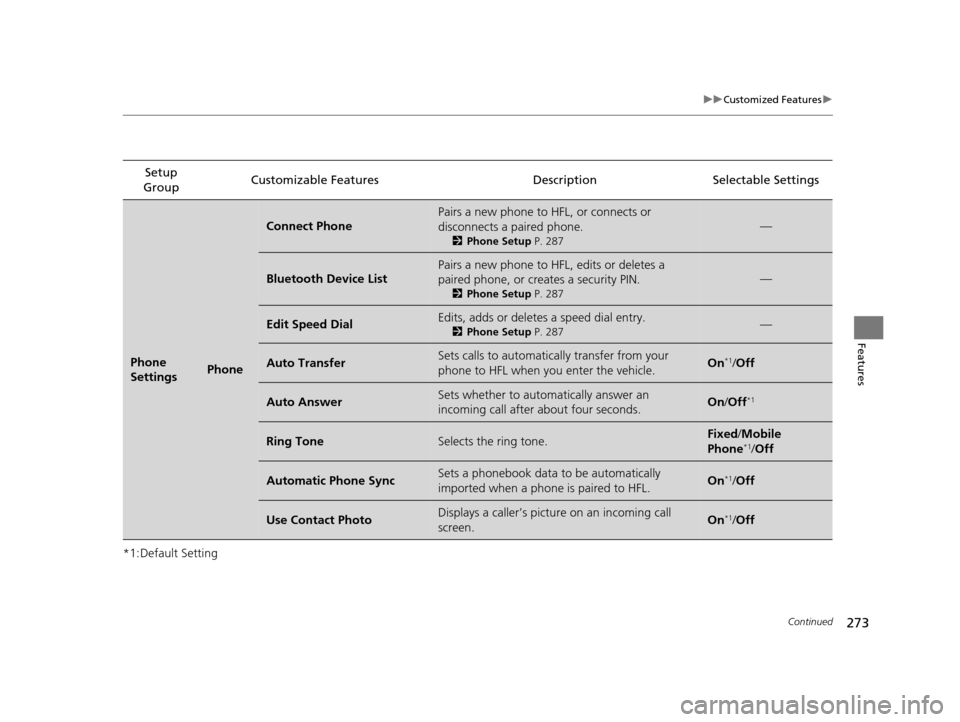
Phone
SettingsPhone
Connect Phone
Pairs a new phone to HFL, or connects or
disconnects a paired phone.
2
Phone Setup P. 287
—
Bluetooth Device List
Pairs a new phone to HFL, edits or deletes a
paired phone, or creates a security PIN.
2Phone Setup P. 287
—
Edit Speed DialEdits, adds or deletes a speed dial entry.
2Phone Setup P. 287—
Auto TransferSets calls to automatically transfer from your
phone to HFL when you enter the vehicle.On*1/Off
Auto AnswerSets whether to automatically answer an
incoming call after about four seconds.On /Off*1
Ring ToneSelects the ring tone.Fixed /Mobile
Phone*1/ Off
Automatic Phone SyncSets a phonebook data to be automatically
imported when a phone is paired to HFL.On*1/Off
Use Contact PhotoDisplays a caller’s picture on an incoming call
screen.On*1/Off
16 ACURA TLX-31TZ36100.book 273 ページ 2015年8月26日 水曜日 午後1時54分
Page 278 of 553
277
Features
HomeLink® Universal Transceiver
The HomeLink ® Universal Transceiver can be programmed to operate up to three
remote controlled devices around your home, such as garage doors, lighting, or
home security systems.
Refer to the safety information that came wi th your garage door opener to test that
the safety features are functioning properly. If you do not have the safety
information, contact the manufacturer.
Before programming HomeLink, make sure that people and objects are out of the
way of the garage or gate to prevent potential injury or damage.
When programming a garage door opener, pa rk just outside the garage door’s path.
■Important Safety Precautions
1HomeLink ® Universal Transceiver
Before programming HomeLi nk to operate a garage
door opener, confirm that the opener has an external
entrapment protection system, such as an “electronic
eye,” or other safety and re verse stop features. If it
does not, HomeLink may not be able to operate it.
16 ACURA TLX-31TZ36100.book 277 ページ 2015年8月26日 水曜日 午後1時54分
Page 283 of 553

282
uuBluetooth ® HandsFreeLink ®u HFL Menus
Features
HFL Menus
The power mode must be in ACCESSORY or ON to use HFL.
■Phone Settings screen
1.Press the SETTINGS button.
2. Rotate to select Phone Settings, then
press .
1 HFL Menus
To use HFL, you must first pair your Bluetooth-
compatible cell phone to th e system while the vehicle
is parked.
Some functions are limited while driving. A message
appears on the screen when the vehicle is moving
and the operation is canceled.
PhoneConnect Phone
Bluetooth
Device List
(Existing
entry list)Replace This Device
Add Bluetooth Device
Disconnect a paired phone from the system.Connect a phone to the system.
*1: Appears only when a pho ne is connected to HFL.Disconnect
(Existing entry list)
Pair a phone to the system.
Edit PIN Create a security PIN for a paired phone.
Replace a previously paired phone with a
new phone.
Delete This DeviceDelete a previously paired phone.
Add Bluetooth DevicePair a phone to the system.
16 ACURA TLX-31TZ36100.book 282 ページ 2015年8月26日 水曜日 午後1時54分
Page 291 of 553
uuBluetooth ® HandsFreeLink ®u HFL Menus
290
Features
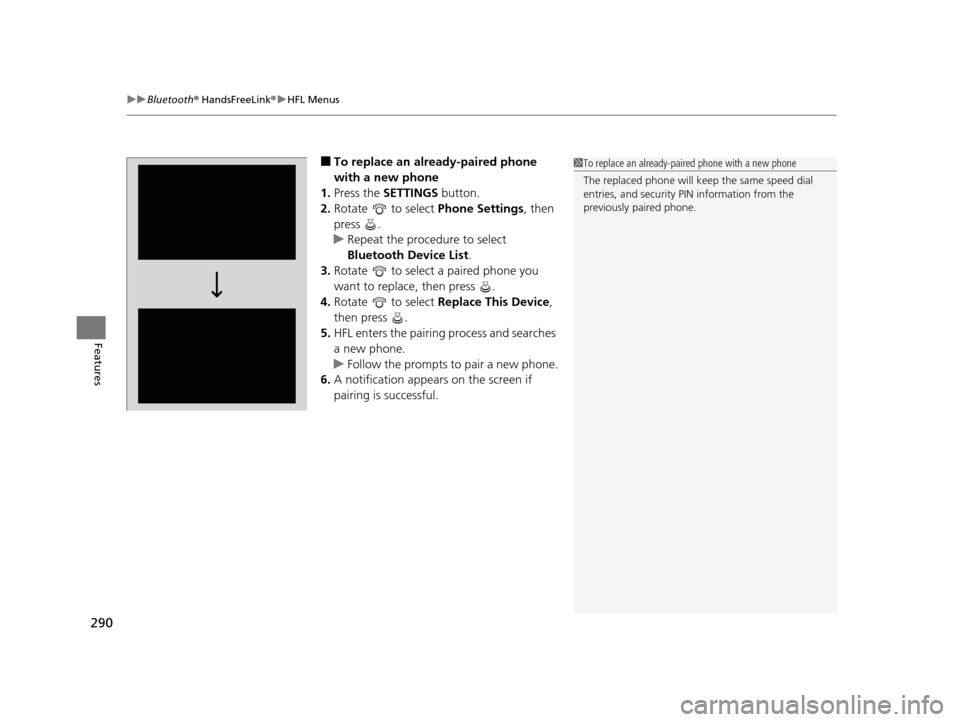
■To replace an already-paired phone
with a new phone
1. Press the SETTINGS button.
2. Rotate to select Phone Settings, then
press .
u Repeat the procedure to select
Bluetooth Device List.
3. Rotate to select a paired phone you
want to replace, then press .
4. Rotate to select Replace This Device,
then press .
5. HFL enters the pairing process and searches
a new phone.
u Follow the prompts to pair a new phone.
6. A notification appears on the screen if
pairing is successful.1To replace an already-pair ed phone with a new phone
The replaced phone will keep the same speed dial
entries, and security PIN information from the
previously paired phone.
16 ACURA TLX-31TZ36100.book 290 ページ 2015年8月26日 水曜日 午後1時54分
Page 295 of 553
uuBluetooth ® HandsFreeLink ®u HFL Menus
294
Features
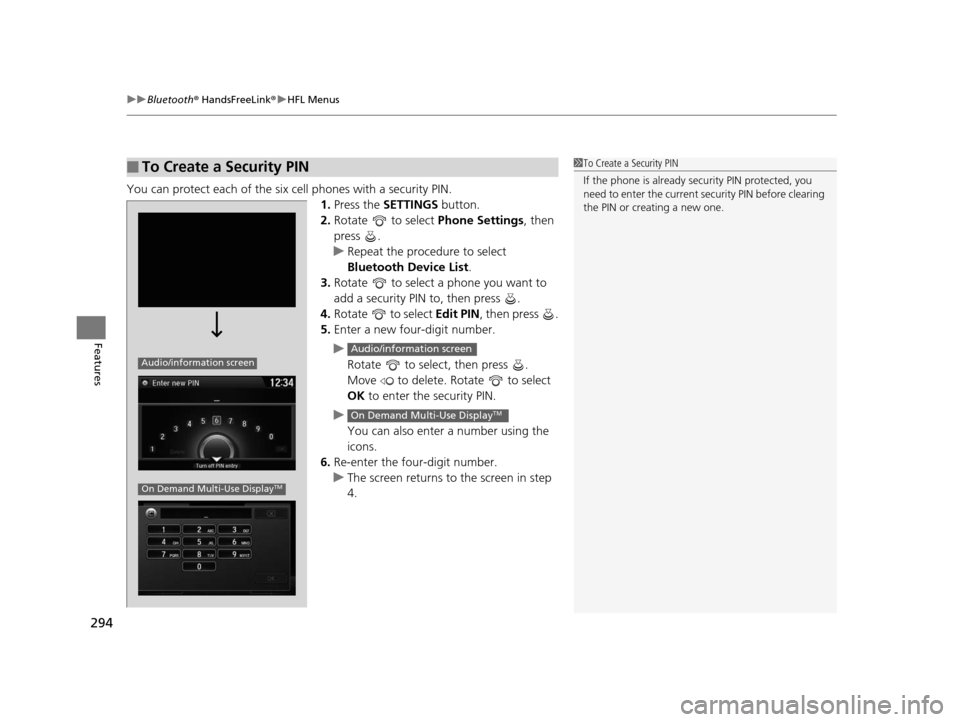
You can protect each of the six cell phones with a security PIN.
1.Press the SETTINGS button.
2. Rotate to select Phone Settings, then
press .
u Repeat the procedure to select
Bluetooth Device List.
3. Rotate to select a phone you want to
add a security PIN to, then press .
4. Rotate to select Edit PIN, then press .
5. Enter a new four-digit number.
u Rotate to select, then press .
Move to delete. Rotate to select
OK to enter the security PIN.
u You can also enter a number using the
icons.
6. Re-enter the four-digit number.
u The screen returns to the screen in step
4.
■To Create a Security PIN1 To Create a Security PIN
If the phone is already secu rity PIN protected, you
need to enter the current security PIN before clearing
the PIN or creating a new one.
Audio/information screen
On Demand Multi-Use DisplayTM
Audio/information screen
On Demand Multi-Use DisplayTM
16 ACURA TLX-31TZ36100.book 294 ページ 2015年8月26日 水曜日 午後1時54分
Page 319 of 553
318
Driving
Before Driving
Driving Preparation
Check the following items before you start driving.
• Make sure there are no obstructions on th e windows, door mirrors, exterior
lights, or other parts of the vehicle.
u Remove any frost, snow, or ice.
u Remove any snow on the roof, as this can slip down and obstruct your field of
vision while driving. If frozen solid , remove ice once it has softened.
u When removing ice from around the wheel s, be sure not to damage the wheel
or wheel components.
• Make sure the hood is securely closed.
u If the hood opens while driving, your front view will be blocked.
• Make sure the tires are in good condition.
u Check air pressures, and check for damage and excessive wear.
2Checking and Maintaining Tires P. 462
•Make sure there are no people or ob jects behind or around the vehicle.
u There are blind spots from the inside.
■Exterior Checks1Exterior Checks
NOTICE
When doors are frozen s hut, use warm water around
the door edges to melt any ice. Do not try to force
them open, as this can damage the rubber trim
around the doors. When done, wipe dry to avoid
further freezing.
Do not pour warm water into the key cylinder.
You will be unable to insert the key if the water
freezes in the hole.
Heat from the engine and exhaust can ignite
flammable material s left under the hood, causing a
fire. If you’ve parked y our vehicle for an extended
period, inspect and remove any debris that may have
collected, such as dried grass and leaves that have
fallen or have been carried in for use as a nest by a
small animal.
Also check under the hood fo r leftover flammable
materials after you or so meone else has performed
maintenance on your vehicle.
16 ACURA TLX-31TZ36100.book 318 ページ 2015年8月26日 水曜日 午後1時54分
Page 320 of 553
Continued319
uuBefore Driving uDriving Preparation
Driving
• Store or secure all items on board properly.
u Carrying too much cargo, or improperly storing it, can affect your vehicle’s
handling, stability, sto pping distance, and tires, and make it unsafe.
2Maximum Load Limit P. 321
•Do not pile items higher than the seat height.
u They can block your view and may be thrown forward in the event of sudden
braking.
• Do not place anything in the front seat footwells. Make sure to secure the floor
mat.
u An object or unsecured floor mat can in terfere with your brake and accelerator
pedal operation while driving.
• If you have any animals on board, do not let them move around in the vehicle.
u They may interfere with driv ing and a crash could occur.
• Securely close and lock all doors and the trunk.
2 Locking/Unlocking the Doors from the Inside P. 148
•Adjust your seating position properly.
u Adjust the head restraint, too.
2Adjusting the Seats P. 180
2 Adjusting the Head Restraints P. 182
•Adjust the mirrors and steering wh eel properly for your driving.
u Adjust them while sitting in the proper driving position.
2 Adjusting the Mirrors P. 177
2 Adjusting the Steering Wheel P. 176
■Interior Checks1Interior Checks
The headlight aim is set by the factory, and does not
need to be adjusted. Howeve r, if you regularly carry
heavy items in the trunk ha ve the aiming readjusted
at a dealer or by a qualified technician.
16 ACURA TLX-31TZ36100.book 319 ページ 2015年8月26日 水曜日 午後1時54分
Page 329 of 553
uuWhen Driving uStarting the Engine
328
Driving
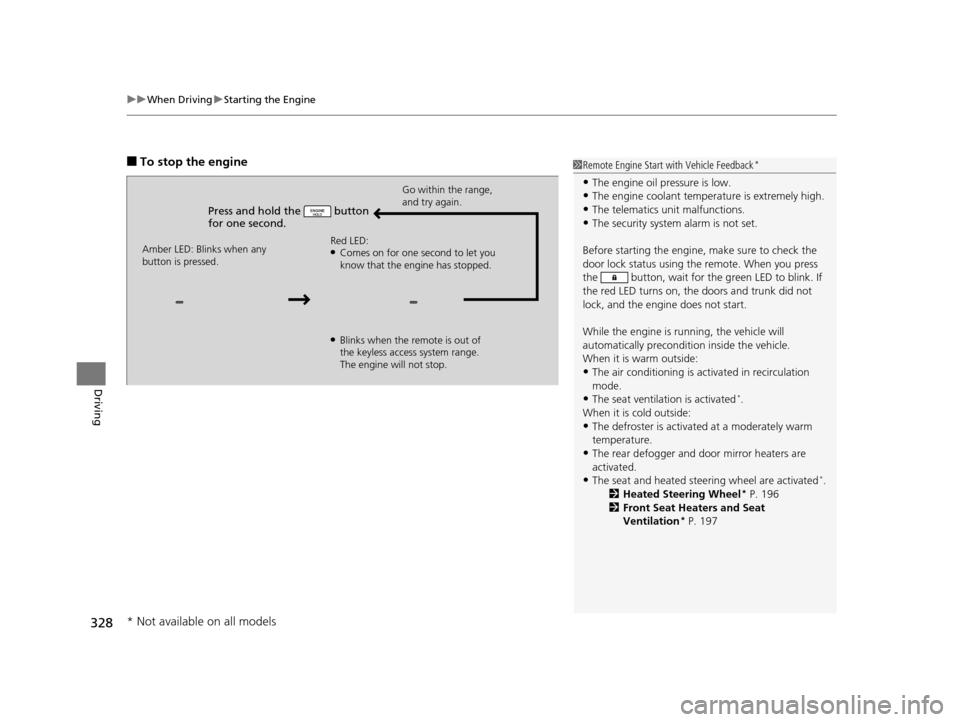
■To stop the engine
Press and hold the button
for one second.
Go within the range,
and try again.
Amber LED: Blinks when any
button is pressed. Red LED:
●Comes on for one second to let you
know that the engine has stopped.
●Blinks when the remote is out of
the keyless access system range.
The engine will not stop.
1
Remote Engine Start with Vehicle Feedback*
•The engine oil pressure is low.•The engine coolant temper ature is extremely high.
•The telematics unit malfunctions.
•The security system alarm is not set.
Before starting the engine, make sure to check the
door lock status using the remote. When you press
the button, wait for the green LED to blink. If
the red LED turns on, the doors and trunk did not
lock, and the engine does not start.
While the engine is running, the vehicle will
automatically preconditi on inside the vehicle.
When it is warm outside:
•The air conditioning is acti vated in recirculation
mode.
•The seat ventilation is activated*.
When it is cold outside:
•The defroster is activated at a moderately warm
temperature.
•The rear defogger and door mirror heaters are
activated.
•The seat and heated steering wheel are activated*.
2 Heated Steering Wheel* P. 196
2 Front Seat Heaters and Seat
Ventilation
* P. 197
* Not available on all models
16 ACURA TLX-31TZ36100.book 328 ページ 2015年8月26日 水曜日 午後1時54分
Page 402 of 553
401Continued
Driving
Braking
Brake System
Use the parking brake to keep the vehicle stationary when parked. You can
manually apply and release, or automatically release it.
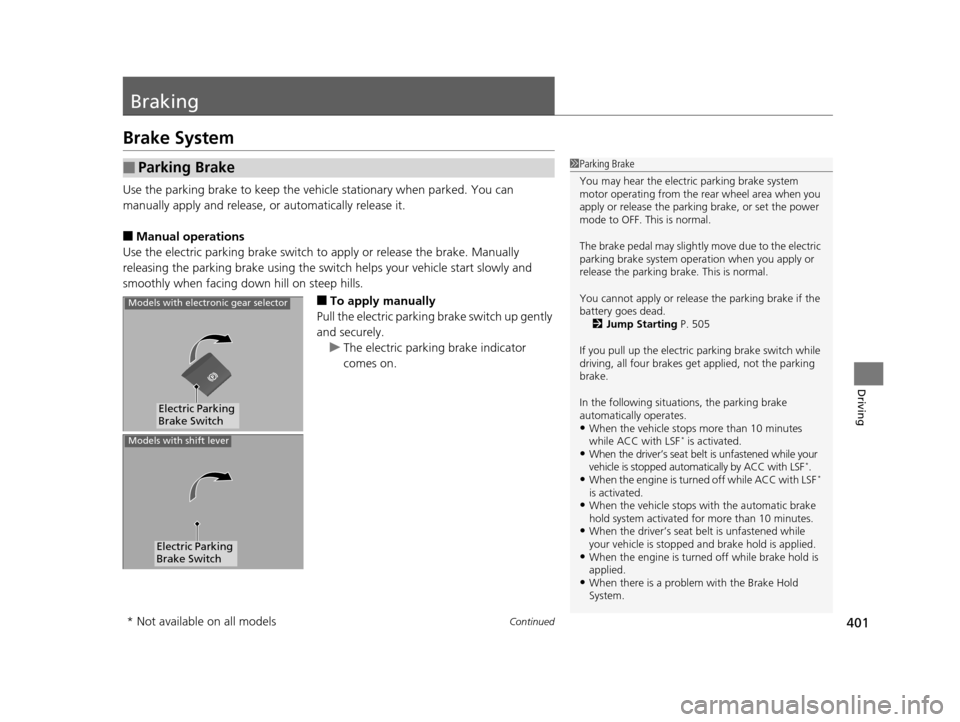
■Manual operations
Use the electric parking brake switch to apply or release the brake. Manually
releasing the parking brake using the swit ch helps your vehicle start slowly and
smoothly when facing down hill on steep hills.
■To apply manually
Pull the electric parking brake switch up gently
and securely. u The electric parking brake indicator
comes on.
■Parking Brake1Parking Brake
You may hear the electric parking brake system
motor operating from the re ar wheel area when you
apply or release the parki ng brake, or set the power
mode to OFF. This is normal.
The brake pedal may slightly move due to the electric
parking brake system opera tion when you apply or
release the parking br ake. This is normal.
You cannot apply or release the parking brake if the
battery goes dead.
2 Jump Starting P. 505
If you pull up the electric parking brake switch while
driving, all four brakes get applied, not the parking
brake.
In the following situations, the parking brake
automatically operates.
•When the vehicle stops more than 10 minutes
while ACC with LSF* is activated.•When the driver’s seat belt is unfastened while your
vehicle is stopped automatically by ACC with LSF*.•When the engine is turned off while ACC with LSF*
is activated.
•When the vehicle stops with the automatic brake
hold system activated for more than 10 minutes.
•When the driver’s seat belt is unfastened while
your vehicle is stopped and brake hold is applied.
•When the engine is turned off while brake hold is
applied.
•When there is a problem with the Brake Hold
System.
Electric Parking
Brake Switch
Models with electronic gear selector
Electric Parking
Brake Switch
Models with shift lever
* Not available on all models
16 ACURA TLX-31TZ36100.book 401 ページ 2015年8月26日 水曜日 午後1時54分