reset Acura TLX 2016 Owner's Manual
[x] Cancel search | Manufacturer: ACURA, Model Year: 2016, Model line: TLX, Model: Acura TLX 2016Pages: 553, PDF Size: 31.29 MB
Page 17 of 553

16
Quick Reference Guide
Features (P209)
Audio System (P215) Image shown is for models without navigation system. For na vigation system operation
() See the Navigation System Manual
*1:Icons that appear on the screen vary by the source selected.
Audio/Information Screen
Interface Dial/ENTER Button
(Power) Button
CD Slot
(CD Eject) Button
SETTINGS Button
VOL
(Volume) Knob
BACK Button
MENU Button
AUDIO
Button
INFO
Button
On Demand Multi-Use Display
TM
PHONE
Button
(Tune Down) Icon
*1
(Skip/Seek) Icon*1
Audio Source*1
(Skip/Seek) Icon*1
Presets*1
(Tune Up) Icon*1
More*1
(Day/Night) Button
Shortcuts*1
16 ACURA TLX-31TZ36100.book 16 ページ 2015年8月26日 水曜日 午後1時54分
Page 18 of 553

17
Quick Reference Guide
Audio Remote Controls
(P214)
●SOURCE Button
Press to change the audio mode: FM/AM/
SiriusXM ®/CD/USB/iPod/Bluetooth® Audio/
Pandora ®
*/AhaTM */AUX.
● Left Selector Wheel
Roll to adjust the volume up/down.
Radio: Move to a side to change the
preset station.
Move to a side and hold to select
the next or previous strong station.
CD/USB device: Move to a side to skip to the
beginning of the next song or
return to the beginning of the
current song.
Move to a side and hold to change
a folder.
Left Selector Wheel
SOURCE Button
* Not available on all models
16 ACURA TLX-31TZ36100.book 17 ページ 2015年8月26日 水曜日 午後1時54分
Page 124 of 553
Continued123
uuGauges and Multi-Information Display uMulti-Information Display
Instrument Panel
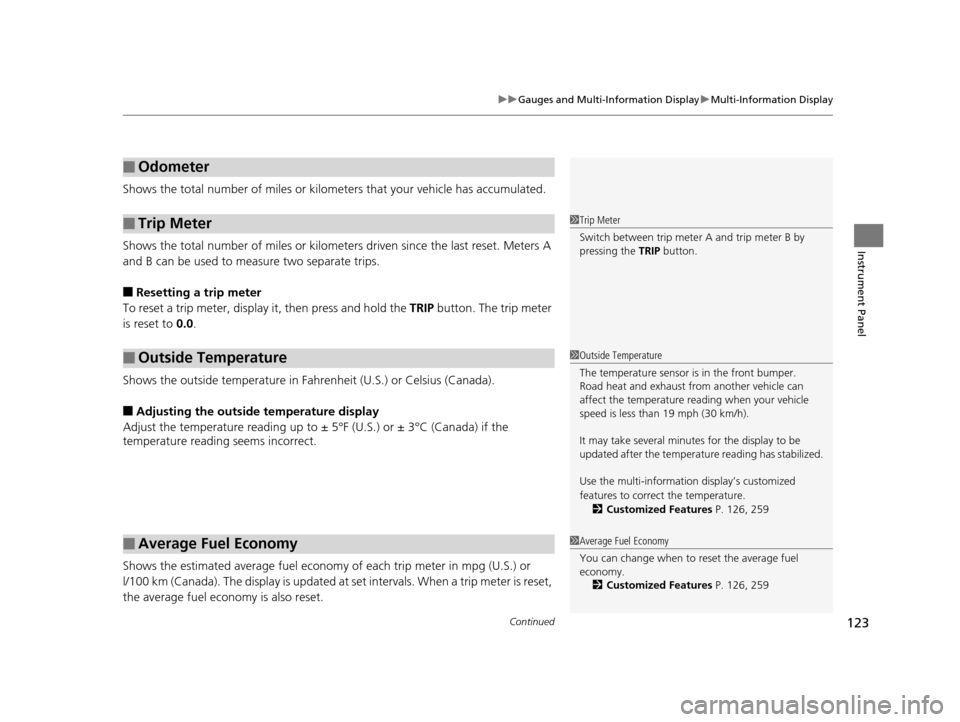
Shows the total number of miles or kilome ters that your vehicle has accumulated.
Shows the total number of miles or kilomete rs driven since the last reset. Meters A
and B can be used to measure two separate trips.
■Resetting a trip meter
To reset a trip meter, display it, then press and hold the TRIP button. The trip meter
is reset to 0.0.
Shows the outside temperature in Fahr enheit (U.S.) or Celsius (Canada).
■Adjusting the outside temperature display
Adjust the temperature reading up to ± 5°F (U.S.) or ± 3°C (Canada) if the
temperature reading seems incorrect.
Shows the estimated average fuel econom y of each trip meter in mpg (U.S.) or
l/100 km (Canada). The display is updated at set intervals. When a trip meter is reset,
the average fuel economy is also reset.
■Odometer
■Trip Meter
■Outside Temperature
■Average Fuel Economy
1 Trip Meter
Switch between trip meter A and trip meter B by
pressing the TRIP button.
1Outside Temperature
The temperature sensor is in the front bumper.
Road heat and exhaust fr om another vehicle can
affect the temperature reading when your vehicle
speed is less than 19 mph (30 km/h).
It may take several minutes for the display to be
updated after the temperature reading has stabilized.
Use the multi-information display’s customized
features to correct the temperature.
2 Customized Features P. 126, 259
1Average Fuel Economy
You can change when to reset the average fuel
economy.
2 Customized Features P. 126, 259
16 ACURA TLX-31TZ36100.book 123 ページ 2015年8月26日 水曜日 午後1時54分
Page 125 of 553

uuGauges and Multi-Information Display uMulti-Information Display
124
Instrument Panel
Shows the instant fuel economy as a bar gr aph in mpg (U.S.) or l/100 km (Canada).
Shows the estimated distance you can travel on the remaining power and fuel. This
distance is estimated from the fuel economy of your previous trips.
Shows the time elapsed since the Trip A or Trip B was reset.
Shows the average speed in mph (U.S.) or km /h (Canada) since the Trip A or Trip B
was reset.
Shows you turn-by-turn driving directions to your destination linked with the
navigation system.
2 Refer to the Navigation System Manual
■Instant Fuel Economy
■Range
■Elapsed Time
■Average Speed
■Turn-by-Turn Directions*
1Elapsed Time
You can change when to reset the elapsed time.
2 Customized Features P. 126, 259
1Average Speed
You can change when to reset the average speed.
2 Customized Features P. 126, 259
1Turn-by-Turn Directions*
The multi-information disp lay shows a compass when
the route guidance is not used.
You can select whether the turn-by-turn display
comes on or not during the route guidance. 2 Customized Features P. 126, 259
* Not available on all models
16 ACURA TLX-31TZ36100.book 124 ページ 2015年8月26日 水曜日 午後1時54分
Page 128 of 553
127
uuGauges and Multi-Information Display uMulti-Information Display
Continued
Instrument Panel
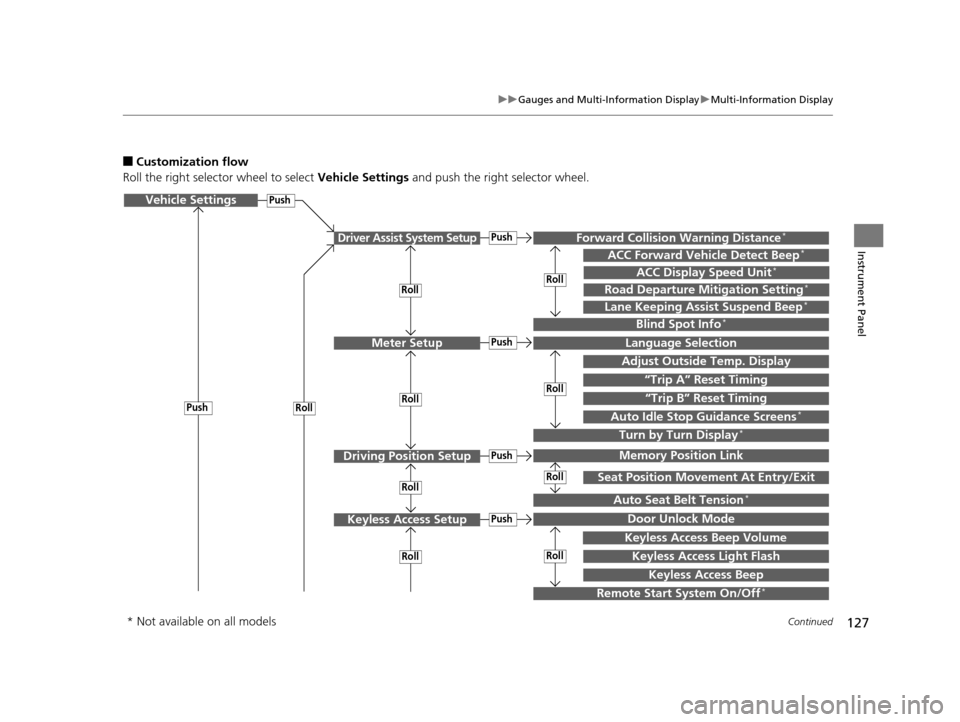
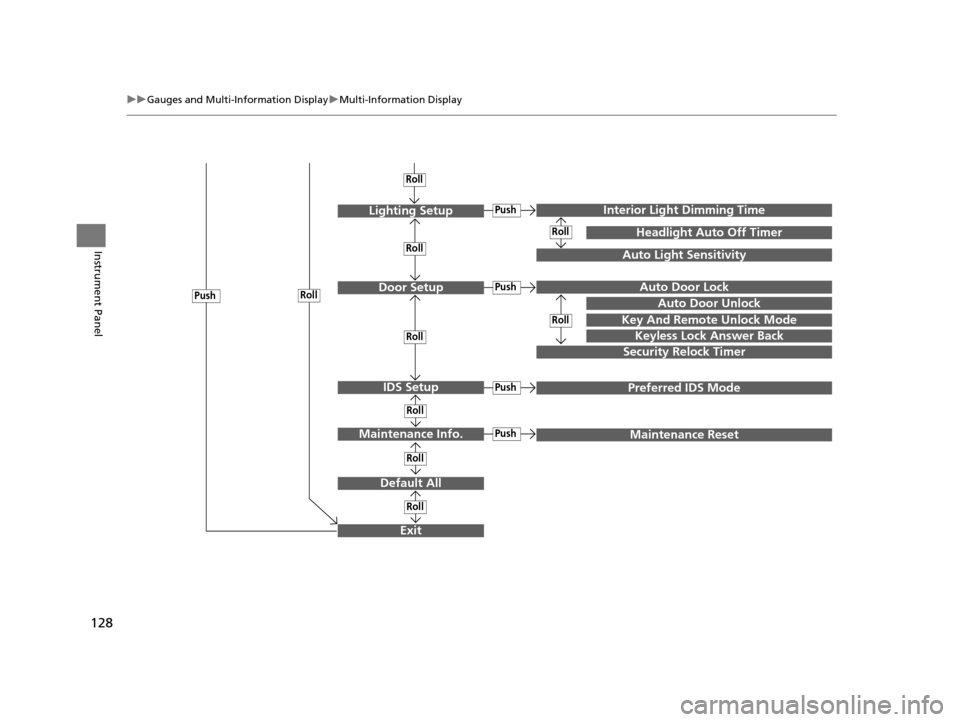
■Customization flow
Roll the right selector wheel to select Vehicle Settings and push the right selector wheel.
Vehicle Settings
“Trip A” Reset Timing
Language Selection
Adjust Outside Temp. Display
Memory Position Link
Door Unlock Mode
Keyless Access Light Flash
Driver Assist System Setup
Meter Setup
Driving Position Setup
Keyless Access Setup
“Trip B” Reset Timing
Turn by Turn Display*
Forward Collision Warning Distance*
ACC Forward Vehicle Detect Beep*
Push
Push
Push
Lane Keeping Assist Suspend Beep*
Blind Spot Info*
Seat Position Movement At Entry/Exit
Auto Seat Belt Tension*
Roll
Keyless Access Beep
Push
Roll
Push
Push
Roll
Roll
Roll
Roll
Roll
Roll
ACC Display Speed Unit*
Road Departure Mitigation Setting*
Remote Start System On/Off*
Keyless Access Beep Volume
Auto Idle Stop Guidance Screens*
Roll
* Not available on all models
16 ACURA TLX-31TZ36100.book 127 ページ 2015年8月26日 水曜日 午後1時54分
Page 129 of 553
128
uuGauges and Multi-Information Display uMulti-Information Display
Instrument Panel
Exit
Door Setup
Maintenance Info.
Default All
Lighting Setup
Key And Remote Unlock Mode
Auto Door Lock
Auto Door Unlock
Keyless Lock Answer Back
Security Relock Timer
Interior Ligh t Dimming Time
Headlight Auto Off Timer
Auto Light Sensitivity
Push
Push
Roll
Roll
Roll
IDS SetupPushPreferred IDS Mode
Push
PushMaintenance Reset
Roll
Roll
Roll
Roll
Roll
Roll
16 ACURA TLX-31TZ36100.book 128 ページ 2015年8月26日 水曜日 午後1時54分
Page 131 of 553
130
uuGauges and Multi-Information Display uMulti-Information Display
Instrument Panel
*1:Default SettingSetup Group Customizabl
e Features Description Selectable Settings
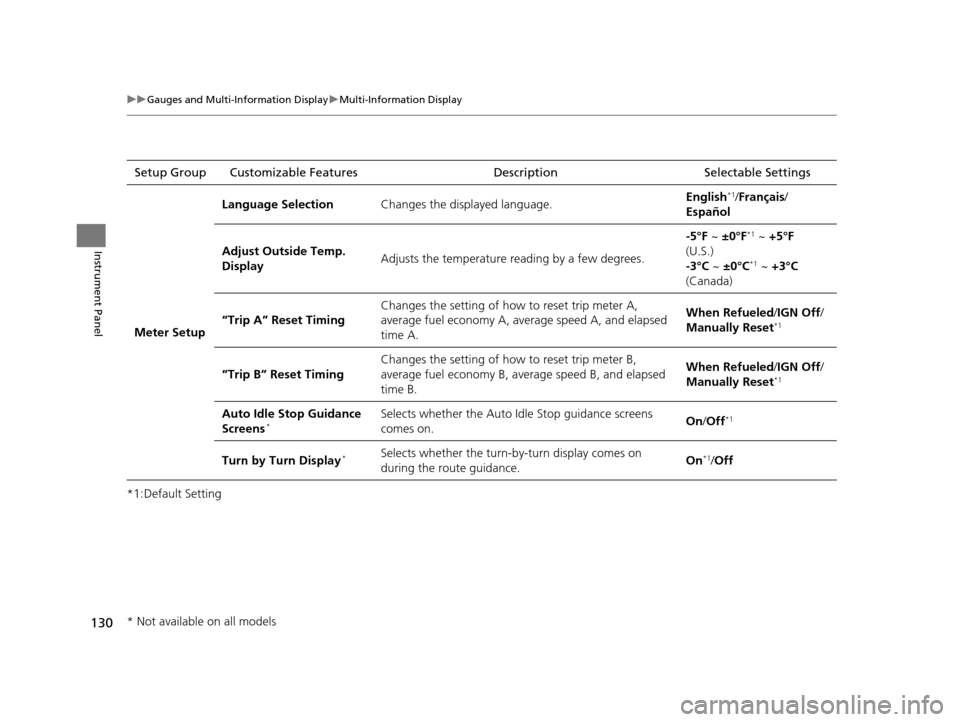
Meter Setup Language Selection
Changes the displayed language. English
*1/
Français /
Español
Adjust Outside Temp.
Display Adjusts the temperature reading by a few degrees. -5°F ~
±0°F
*1 ~ +5°F
(U.S.)
-3°C ~ ±0°C
*1 ~ +3°C
(Canada)
“Trip A” Reset Timing Changes the setting of how to reset trip meter A,
average fuel economy A, average speed A, and elapsed
time A. When Refueled
/IGN Off/
Manually Reset
*1
“Trip B” Reset Timing Changes the setting of how to reset trip meter B,
average fuel economy B, av
erage speed B, and elapsed
time B. When Refueled
/IGN Off/
Manually Reset*1
Auto Idle Stop Guidance
Screens*Selects whether the Auto Idle Stop guidance screens
comes on. On
/Off*1
Turn by Turn Display*Selects whether the turn-b y-turn display comes on
during the route guidance. On*1/
Off
* Not available on all models
16 ACURA TLX-31TZ36100.book 130 ページ 2015年8月26日 水曜日 午後1時54分
Page 134 of 553
133
uuGauges and Multi-Information Display uMulti-Information Display
Continued
Instrument Panel
*1: Default SettingSetup Group Customizable Features
Description Selectable Settings
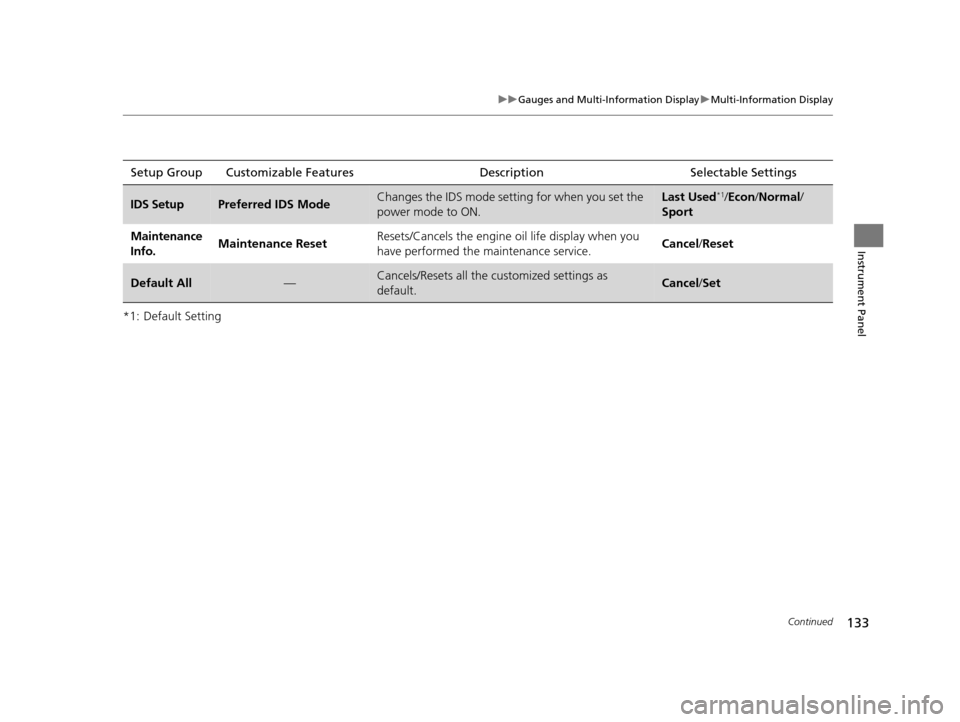
IDS SetupPreferred IDS ModeChanges the IDS mode setting for when you set the
power mode to ON.Last Used*1/ Econ /Normal /
Sport
Maintenance
Info. Maintenance Reset
Resets/Cancels the engine oil life display when you
have performed the maintenance service. Cancel
/Reset
Default All—Cancels/Resets all the customized settings as
default.Cancel /Set
16 ACURA TLX-31TZ36100.book 133 ページ 2015年8月26日 水曜日 午後1時54分
Page 135 of 553
134
uuGauges and Multi-Information Display uMulti-Information Display
Instrument Panel
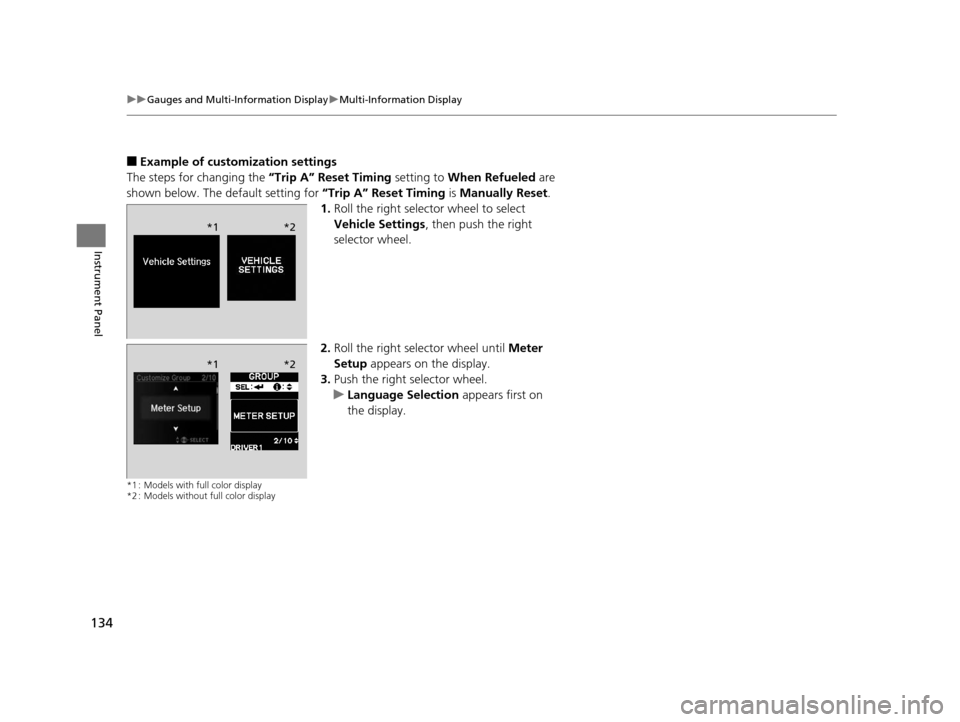
■Example of customization settings
The steps for changing the “Trip A” Reset Timing setting to When Refueled are
shown below. The default setting for “Trip A” Reset Timing is Manually Reset .
1. Roll the right selector wheel to select
Vehicle Settings , then push the right
selector wheel.
2. Roll the right selector wheel until Meter
Setup appears on the display.
3. Push the right selector wheel.
u Language Selection appears first on
the display.
*1 : Models with full color display
*2 : Models without full color display
*1 *2
*1*2
16 ACURA TLX-31TZ36100.book 134 ページ 2015年8月26日 水曜日 午後1時54分
Page 136 of 553
135
uuGauges and Multi-Information Display uMulti-Information Display
Instrument Panel
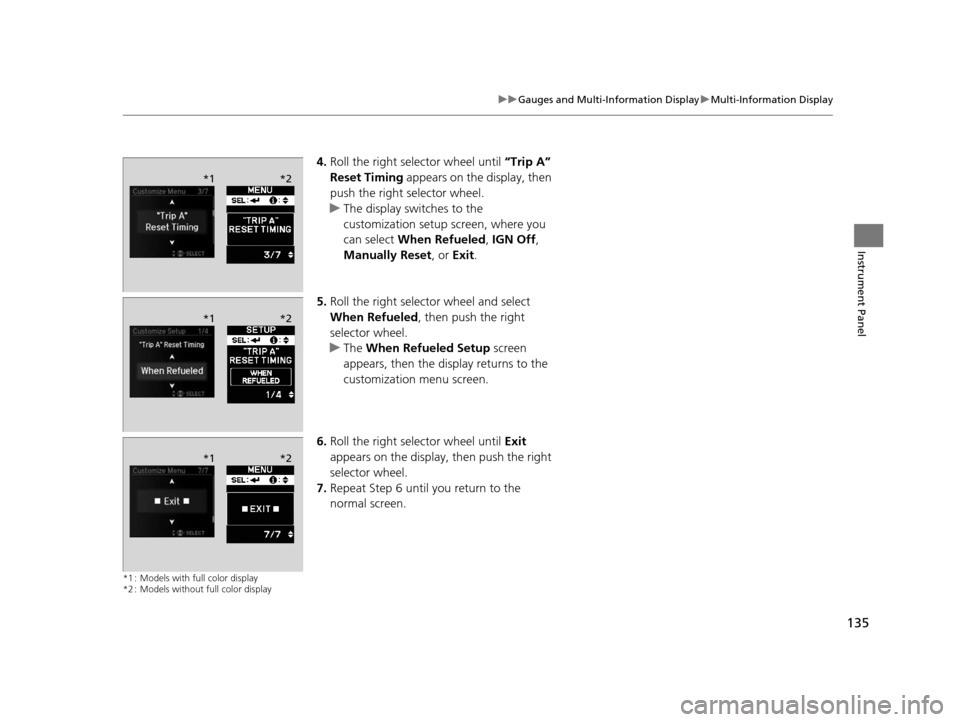
4. Roll the right selector wheel until “Trip A”
Reset Timing appears on the display, then
push the right selector wheel.
u The display swit ches to the
customization setup screen, where you
can select When Refueled , IGN Off,
Manually Reset , or Exit .
5. Roll the right selector wheel and select
When Refueled , then push the right
selector wheel.
u The When Refueled Setup screen
appears, then the di splay returns to the
customization menu screen.
6. Roll the right selector wheel until Exit
appears on the display, then push the right
selector wheel.
7. Repeat Step 6 until you return to the
normal screen.
*1 : Models with full color display
*2 : Models without full color display
*1 *2
*1*2
*1*2
16 ACURA TLX-31TZ36100.book 135 ページ 2015年8月26日 水曜日 午後1時54分