Transmission Acura TLX 2018 User Guide
[x] Cancel search | Manufacturer: ACURA, Model Year: 2018, Model line: TLX, Model: Acura TLX 2018Pages: 589, PDF Size: 35.45 MB
Page 103 of 589
102
uuIndicators uMulti-Information Display Warn ing and Information Messages
Instrument Panel
*1:Models with electronic gear selector
*2:Models with shift lever
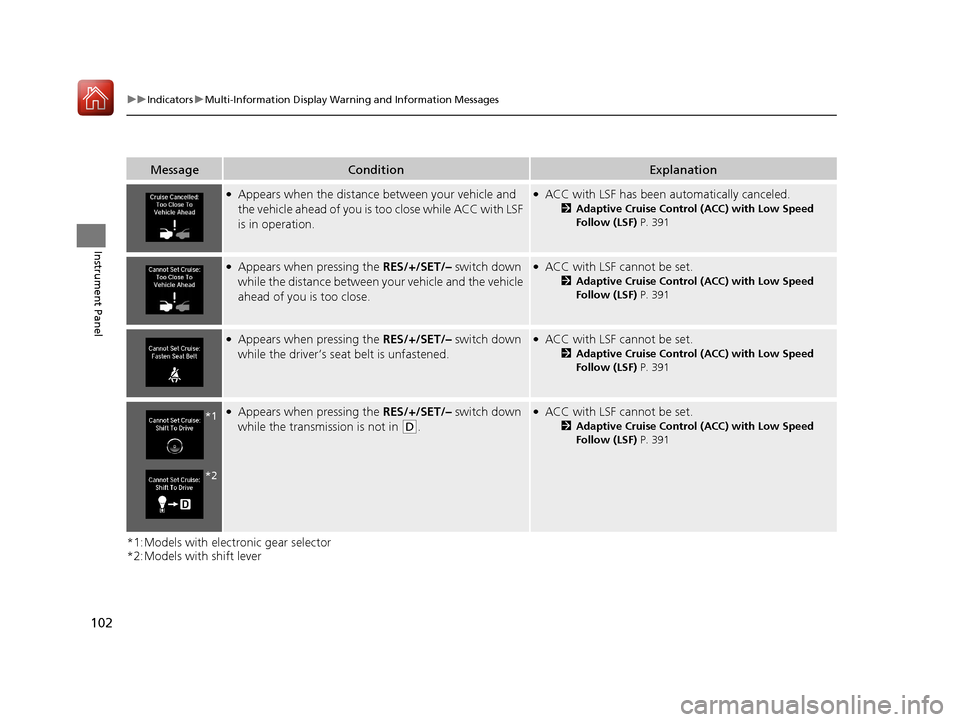
MessageConditionExplanation
●Appears when the distance between your vehicle and
the vehicle ahead of you is too close while ACC with LSF
is in operation.●ACC with LSF has been automatically canceled.
2Adaptive Cruise Control (ACC) with Low Speed
Follow (LSF) P. 391
●Appears when pressing the RES/+/SET/– switch down
while the distance between your vehicle and the vehicle
ahead of you is too close.●ACC with LSF cannot be set.
2 Adaptive Cruise Control (ACC) with Low Speed
Follow (LSF) P. 391
●Appears when pressing the RES/+/SET/– switch down
while the driver’s seat belt is unfastened.●ACC with LSF cannot be set.
2 Adaptive Cruise Control (ACC) with Low Speed
Follow (LSF) P. 391
●Appears when pressing the RES/+/SET/– switch down
while the transmission is not in
(D.
●ACC with LSF cannot be set.
2 Adaptive Cruise Control (ACC) with Low Speed
Follow (LSF) P. 391*1
*2
18 ACURA TLX-31TZ36300.book 102 ページ 2017年2月21日 火曜日 午後2時32分
Page 110 of 589
109
uuIndicators uMulti-Information Display Warning and Information Messages
Continued
Instrument Panel
MessageConditionExplanation
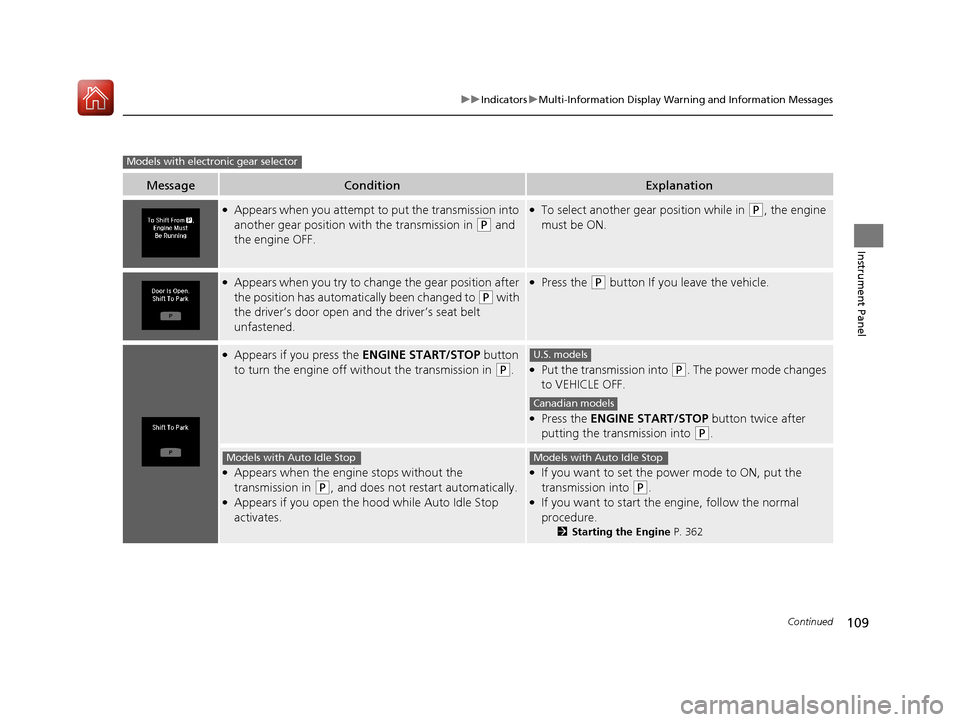
●Appears when you attempt to put the transmission into
another gear position wi th the transmission in
(P and
the engine OFF.
●To select another gear position while in (P, the engine
must be ON.
●Appears when you try to chan ge the gear position after
the position has automati cally been changed to
(P with
the driver’s door open and the driver’s seat belt
unfastened.
●Press the (P button If you leave the vehicle.
●Appears if you press the ENGINE START/STOP button
to turn the engine off wi thout the transmission in
(P.●Put the transmission into (P. The power mode changes
to VEHICLE OFF.
●Press the ENGINE START/STOP button twice after
putting the transmission into
(P.
●Appears when the engine stops without the
transmission in
(P, and does not restart automatically.●Appears if you open the hood while Auto Idle Stop
activates.
●If you want to set the power mode to ON, put the
transmission into
(P.●If you want to start the engine, follow the normal
procedure.
2 Starting the Engine P. 362
Models with electronic gear selector
U.S. models
Canadian models
Models with Auto Idle StopModels with Auto Idle Stop
18 ACURA TLX-31TZ36300.book 109 ページ 2017年2月21日 火曜日 午後2時32分
Page 111 of 589

110
uuIndicators uMulti-Information Display Warn ing and Information Messages
Instrument Panel
MessageConditionExplanation
●Appears for a few seconds if you have not pressed the
(N button long enough to initiate Neutral-Hold mode.2If you want to keep the transmission in (N
position [car wash mode] P. 374
●Appears when you press and hold (N button for more
than 2 seconds.●Disappears when you set the g ear position to other than
(N.
2If you want to keep the transmission in (N
position [car wash mode] P. 374
●Appears when you press the (P button but it is not
engaged due to low ATF temperature.●Depress the brake pedal until this message disappear.
18 ACURA TLX-31TZ36300.book 110 ページ 2017年2月21日 火曜日 午後2時32分
Page 112 of 589

111
uuIndicators uMulti-Information Display Warning and Information Messages
Continued
Instrument Panel
MessageConditionExplanation
●Appears if you press the ENGINE START/STOP button
to turn the engine off wi thout the shift lever in
(P.●Move the shift lever to (P. The power mode changes to
VEHICLE OFF.
●Press the ENGINE START/STOP button twice after
moving the shift lever to
(P.
●Appears if the driver’s door is open and you try to shift
to a position other than
(P.
●Moving the shift lever to (P If you leave the vehicle.
●Appears when the transmission system temperature is
too high. The vehicle no longer moves.●Immediately stop in a safe place and shift to (P.●Let the engine idle until the message disappears.
Models with shift lever
U.S. models
Canadian models
18 ACURA TLX-31TZ36300.book 111 ページ 2017年2月21日 火曜日 午後2時32分
Page 121 of 589

uuGauges and Multi-Information Display uMulti-Information Display
120
Instrument Panel
Use the multi-information display to customize certain features.
■How to customize
Select the Vehicle Settings screen by rolling the right selector wheel while the
power mode is in ON, and the vehicle is at a complete stop.
Push the right selector wheel.
■Customized Features1 Customized Features
To customize other features , roll the right selector
wheel.
2 List of customizable options P. 123
2 Example of customization settings P. 128
Customization is possible when you see the driver’s
ID ( Driver 1 or Driver 2) on the screen.
The driver’s ID indicates which remote transmitter
you have used to unlock the driver’s door. The
customized settings are recalled every time you
unlock the driver’s door with that remote.
Put the transmission into
( P before you attempt to
change any customized setting.
Customizing is also available from the information
screen.
You cannot have Vehicle Settings displayed on the
multi-information display while the information
screen shows the same menu. 2 Customized Features P. 292
Right Selector Wheel
Roll: Changes the
customize menus and
items.
Push : Enters the selected
item.
Multi-information
Display: Goes to
Vehicle Settings .
18 ACURA TLX-31TZ36300.book 120 ページ 2017年2月21日 火曜日 午後2時32分
Page 152 of 589

151Continued
Controls
Security System
Immobilizer System
The immobilizer system prevents a key that has not been pre-registered from
starting the engine. Each key contains electronic transmitters that use electronic
signals to verify the key.
Pay attention to the follo wing when pressing the ENGINE START/STOP button:
• Do not allow objects that emit strong radio waves near the ENGINE START/
STOP button.
• Make sure the key is not covered by or touching a metal object.
• Do not bring a key from another vehicle’s immobilizer system near the ENGINE
START/STOP button.
• Do not put the key near magnetic items. Electronic devices, such as televisions
and audio systems emit strong magnetic fields. Note that even a key chain can
become magnetic.
Security System Alarm
The security system alarm activates when the trunk, hood or doors are forcibly
opened. The alarm does not activate if the trunk or doors are opened with the key,
remote transmitter or keyless access system.
However, the alarm activates if a door is opened with the key and then the
transmission is taken out of
(P or the hood is opened before the power mode is set
to ON.
However, the alarm activates if a door is op ened with the key and then the hood is
opened before the power mode is set to ON.
■When the security system alarm activates
The horn sounds intermittently and some exterior lights flash.
1Immobilizer System
NOTICE
Leaving the key in the vehicl e can result in theft or
accidental movement of the vehicle.
Always take the key with you whenever you leave the
vehicle unattended.
Do not alter the system or add other devices to it.
Doing so may damage the system and make your
vehicle inoperable.
1 Security System Alarm
Do not alter the system or add other devices to it.
Doing so may damage the system and make your
vehicle inoperable.
The security alarm continues for a maximum of two
minutes until the security system alarm deactivates.
Models with shift lever
Models with electronic gear selector
18 ACURA TLX-31TZ36300.book 151 ページ 2017年2月21日 火曜日 午後2時32分
Page 153 of 589
uuSecurity System uSecurity System Alarm
152
Controls
■To deactivate the security system alarm
Unlock the vehicle using the key, remote tra nsmitter or keyless access system. The
system, along with the horn and flashing lights, is deactivated.
■Setting the security system alarm
The security system alarm automatically sets when the following conditions have
been met:
• The power mode is set to VEHICLE OFF (LOCK).
• The hood is closed.
• All doors and the trunk are locked from outside with the key, remote transmitter
or keyless access system.
■When the security system alarm sets
The security system alarm indicator in the instrument panel blinks. When the
blinking interval changes after about 15 seconds, the security system alarm is set.
■To cancel the security system alarm
The security system alarm is canceled when the vehicle is unlocked using the remote
transmitter or keyless access system, or the power mode is set to ON. The security
system alarm indicator goe s off at the same time.
1Security System Alarm
Do not set the security system alarm when someone
is in the vehicle or a window is open. The system can
accidentally activate when:
•Unlocking the door with the lock tab.•Opening the trunk with the trunk opener or the
emergency trunk opener.
•Opening the hood with the hood release.
•Taking the transmission out of ( P.
If the battery goes dead after you have set the
security system alarm, the security alarm may go off
once the battery is re charged or replaced.
If this occurs, deactivate the security system alarm by
unlocking a door using the key, remote transmitter or
keyless access system.
Models with shift lever
18 ACURA TLX-31TZ36300.book 152 ページ 2017年2月21日 火曜日 午後2時32分
Page 158 of 589
157Continued
Controls
Operating the Switches Around the Steering Wheel
ENGINE START/STOP Button
*1:Canadian models
■Changing the Power Mode1ENGINE START/STOP Button
ENGINE START/STOP Button Operating Range
You can start the engine when the keyless access
remote is inside the vehicle.
The engine may also run if the keyless access remote
is close to the door or window, even if it is outside the
vehicle.
ON mode:
Indicator in the button is of f, if the engine is running.
If the battery of the keyless access remote is getting
low, the engine may not start when you press the
ENGINE START/STOP button. If the engine does not
start, refer to the following link. 2 If the Keyless Access Remote Battery is
Weak P. 540
Do not leave the power mode in ACCESSORY or ON
when you get out.
Operating Range
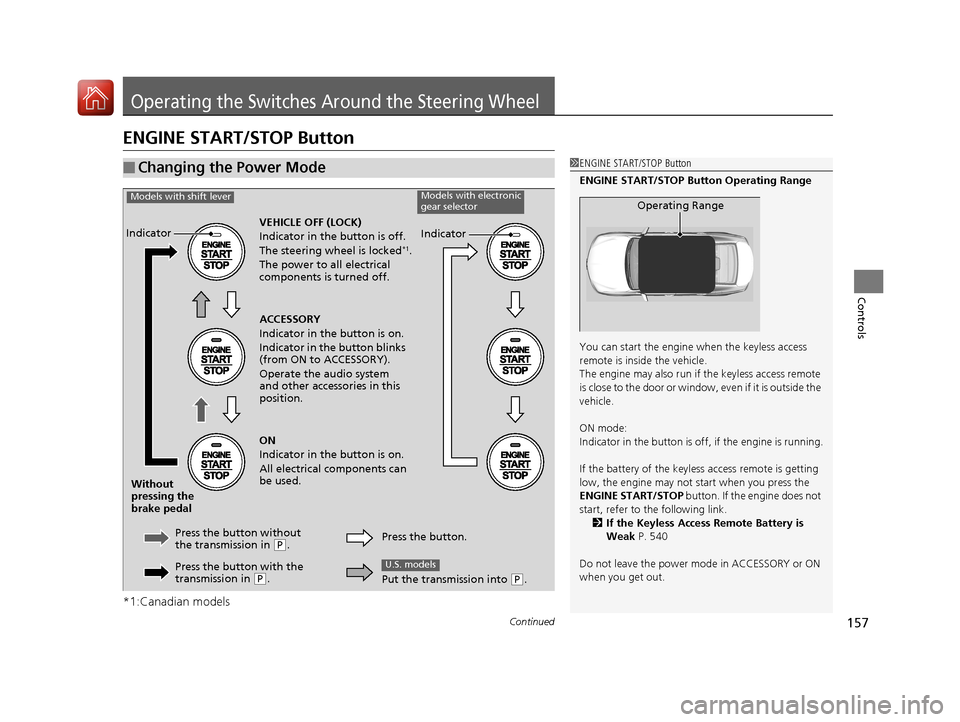
VEHICLE OFF (LOCK)
Indicator in th e button is off.
The steering wheel is locked
*1.
The power to all electrical
components is turned off.
Press the button without
the transmission in
( P.
Without
pressing the
brake pedal ACCESSORY
Indicator in the button is on.
Indicator in the button blinks
(from ON to ACCESSORY).
Operate the audio system
and other accessories in this
position.
ON
Indicator in the button is on.
All electrical components can
be used.
Indicator
Indicator
Models with shift leverModels with electronic
gear selector
Press the button with the
transmission in (P. Press the button.
Put the transmission into (
P.
U.S. models
18 ACURA TLX-31TZ36300.book 157 ページ 2017年2月21日 火曜日 午後2時32分
Page 159 of 589
158
uuOperating the Switches Around the Steering Wheel uENGINE START/STOP Button
Controls
If you leave the vehicle for 30 to 60 minutes with the transmission in (P and the
power mode in ACCESSORY, the vehicle automa tically goes into the mode similar to
VEHICLE OFF (LOCK) to avoid draining the battery.
When in this mode:
The steering wheel does not lock.
You cannot lock or unlock doors with th e remote transmitter or the keyless access
system.
Press the ENGINE START/STOP button twice to switch the mode to VEHICLE OFF
(LOCK).
If you open the driver’s doo r when the power mode is set to ACCESSORY, a warning
beep sounds.
■Automatic Power Off
■Power Mode Reminder
Canadian models
18 ACURA TLX-31TZ36300.book 158 ページ 2017年2月21日 火曜日 午後2時32分
Page 162 of 589
161
uuOperating the Switches Around the Steering Wheel uLight Switches
Continued
Controls
Light Switches
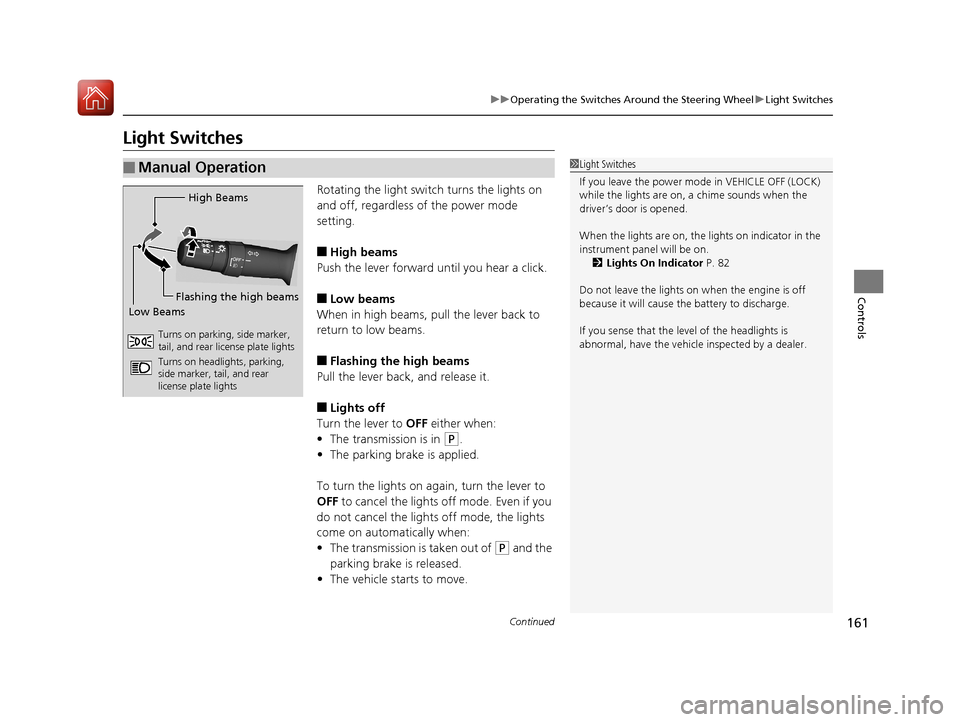
Rotating the light switch turns the lights on
and off, regardless of the power mode
setting.
■High beams
Push the lever forward until you hear a click.
■Low beams
When in high beams, pull the lever back to
return to low beams.
■Flashing the high beams
Pull the lever back, and release it.
■Lights off
Turn the lever to OFF either when:
• The transmission is in
(P.
• The parking brake is applied.
To turn the light s on again, turn the lever to
OFF to cancel the lights off mode. Even if you
do not cancel the lights off mode, the lights
come on automatically when:
• The transmission is taken out of
(P and the
parking brake is released.
• The vehicle starts to move.
■Manual Operation1Light Switches
If you leave the power mode in VEHICLE OFF (LOCK)
while the lights are on, a chime sounds when the
driver’s door is opened.
When the lights are on, the lights on indicator in the
instrument pane l will be on.
2 Lights On Indicator P. 82
Do not leave the lights on when the engine is off
because it will cause the battery to discharge.
If you sense that the le vel of the headlights is
abnormal, have the vehicl e inspected by a dealer.
High Beams
Flashing the high beams
Low Beams
Turns on parking, side marker,
tail, and rear license plate lights
Turns on headlights, parking,
side marker, tail, and rear
license plate lights
18 ACURA TLX-31TZ36300.book 161 ページ 2017年2月21日 火曜日 午後2時32分