clock Acura TLX 2018 User Guide
[x] Cancel search | Manufacturer: ACURA, Model Year: 2018, Model line: TLX, Model: Acura TLX 2018Pages: 589, PDF Size: 35.45 MB
Page 307 of 589

306
uuCustomized Features u
Features
*1:Default SettingSetup
Group Customizable Features Descri
ption Selectable Settings
Clock
Settings Default
Cancels/Resets all customized items in the
Clock
Settings group as default. Yes
/No
Clock/Wallpaper
Type Clock
Changes the clock display type. Analog
/Digital
*1/
Small Digital /Off
Wallpaper
●Changes the wallpaper type.●Imports an image file for a new wallpaper.●Deletes an image file for a wallpaper.
2 Wallpaper Setup P. 226
Blank /Galaxy*1/
Metallic /Options...
Clock Adjustment Adjusts Clock.
2
Clock P. 132—
Clock Format Selects the digital clock display from 12H to 24H. 12H
*1/24H
Clock Reset Resets the clock settings to the factory default. Yes/No
18 ACURA TLX-31TZ36300.book 306 ページ 2017年2月21日 火曜日 午後2時32分
Page 309 of 589

308
uuCustomized Features u
Features
*1:Default SettingSetup
Group Customizable Features Descri
ption Selectable Settings
System
SettingsOthers
LanguageChanges the display language.English*1/Français /
Español
Operation Restriction Tips*Alerts you when manual control of the system is
disabled to prevent distraction while driving. Only
voice commands are available.
On*1/ Off
Header Clock DisplaySelects whether the clock display comes on.On*1/Off
Factory Data ResetResets all the settings to their factory default.
2 Defaulting All the Settings P. 313—
Smartphone
Settings
Default Cancels/Resets all cust
omized items in the
Smartphone Settings group as default. Yes
/No
Apple CarPlay Device List Sets up the Apple CarPlay connection. —
Android Auto Device List Sets up the Android Auto connection. —
Smartphone Volume Adjusts the volume of the smartphone function. 1~8
*1~11
Version Shows software version of Apple CarPlay and
Android Auto unit. —
* Not available on all models
18 ACURA TLX-31TZ36300.book 308 ページ 2017年2月21日 火曜日 午後2時32分
Page 486 of 589
485
uuMaintenance Under the Hood uEngine Coolant
Maintenance
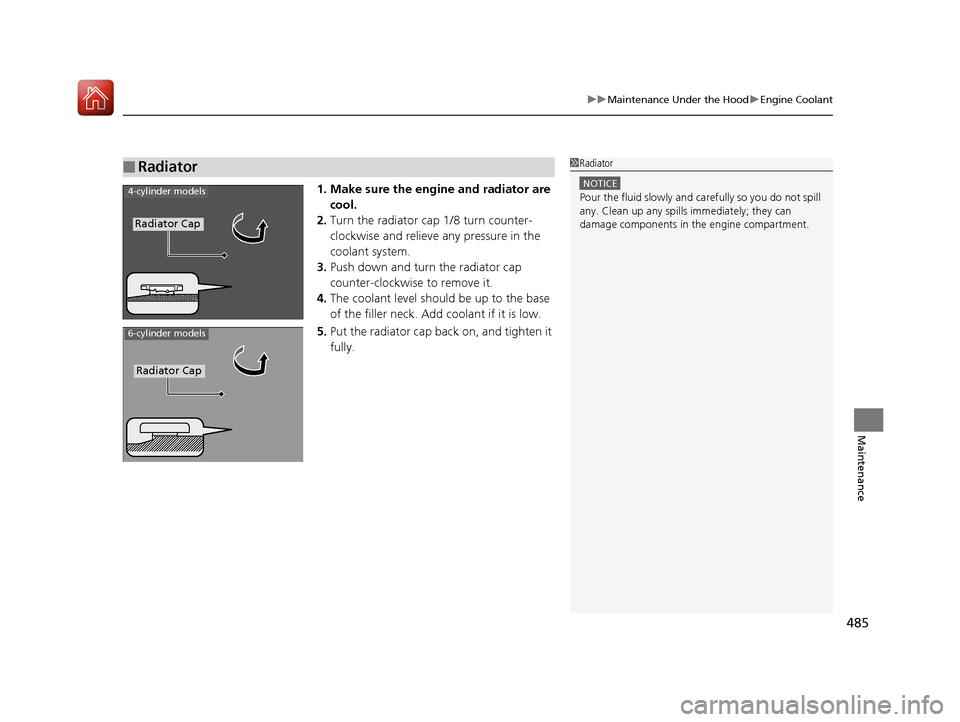
1. Make sure the engine and radiator are
cool.
2. Turn the radiator cap 1/8 turn counter-
clockwise and relieve any pressure in the
coolant system.
3. Push down and turn the radiator cap
counter-clockwise to remove it.
4. The coolant level should be up to the base
of the filler neck. Add coolant if it is low.
5. Put the radiator cap back on, and tighten it
fully.
■Radiator1Radiator
NOTICE
Pour the fluid slowly and ca refully so you do not spill
any. Clean up any spills immediately; they can
damage components in the engine compartment.4-cylinder models
Radiator Cap
6-cylinder models
Radiator Cap
18 ACURA TLX-31TZ36300.book 485 ページ 2017年2月21日 火曜日 午後2時32分
Page 491 of 589
490
uuReplacing Light Bulbs uBrake and Taillight/Rear Side Marker Lights
Maintenance
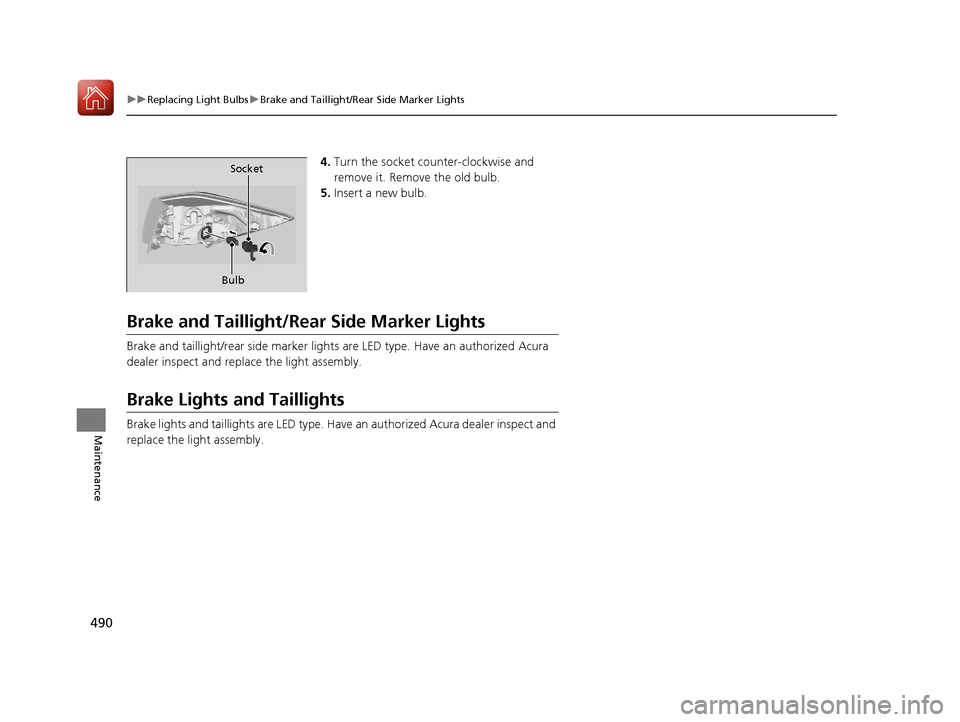
4. Turn the socket counter-clockwise and
remove it. Remove the old bulb.
5. Insert a new bulb.
Brake and Taillight/Rea r Side Marker Lights
Brake and taillight/rear side marker lights are LED type. Have an authorized Acura
dealer inspect and replace the light assembly.
Brake Lights and Taillights
Brake lights and taillights are LED type. Have an authorized Acura dealer inspect and
replace the light assembly.
Bulb Socket
18 ACURA TLX-31TZ36300.book 490 ページ 2017年2月21日 火曜日 午後2時32分
Page 492 of 589
491
uuReplacing Light Bulbs uBack-Up Light Bulbs
Maintenance
Back-Up Light Bulbs
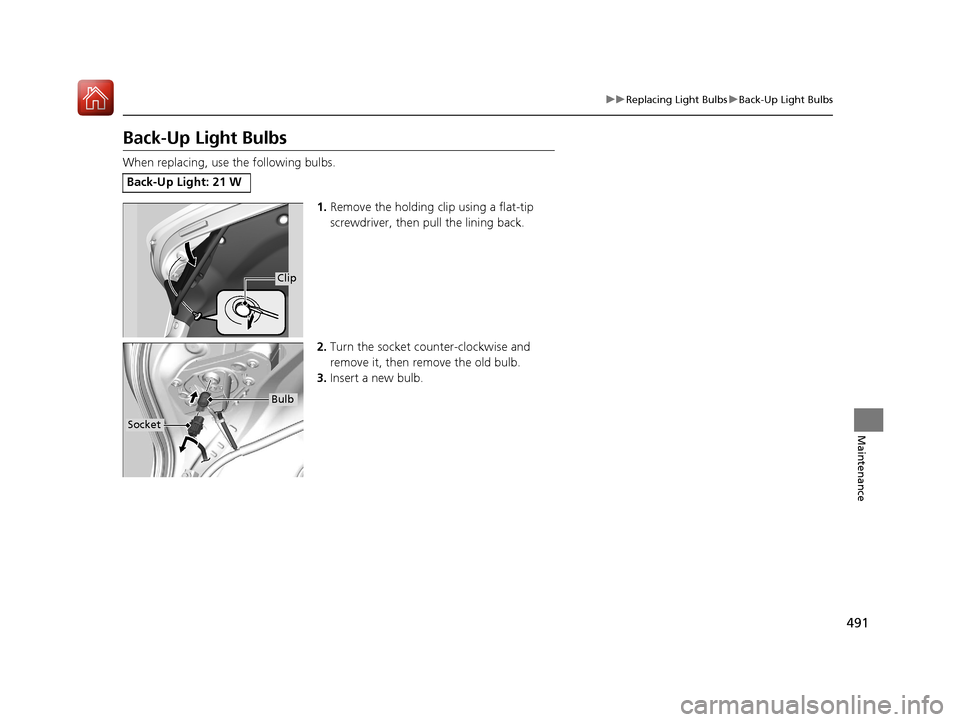
When replacing, use the following bulbs.
1.Remove the holding clip using a flat-tip
screwdriver, then pull the lining back.
2. Turn the socket counter-clockwise and
remove it, then remove the old bulb.
3. Insert a new bulb.
Back-Up Light: 21 W
Clip
Socket
Bulb
18 ACURA TLX-31TZ36300.book 491 ページ 2017年2月21日 火曜日 午後2時32分
Page 505 of 589

504
Maintenance
Battery
Checking the Battery
The condition of the battery is monitored by a
sensor located on the negative terminal of the
battery. If there is a problem with this sensor,
the multi-information display will display a
warning message. If this happens, have you
vehicle inspected by a dealer.
Check the battery terminal s for corrosion monthly.
If your vehicle’s battery is disconnected or goes dead:
• The audio system is disabled.
2 Reactivating the audio system P. 216
•The clock resets.
2 Clock P. 132
•The navigation system* is disabled.
2 Refer to the Navigation System Manual
1Battery
WARNING: Battery post, terminals,
and related accessories contain lead
and lead compounds.
Wash your hands after handling.
When you find corrosion, cl ean the battery terminals
by applying a baking powder and water solution.
Clean the terminals with a damp towel. Cloth/towel
dry the battery. Coat the terminals with grease to
help prevent future corrosion.
When replacing the battery, the replacement must be
of the same specifications.
Consult a dealer for more information.
3WARNING
The battery gives off explosive hydrogen
gas during normal operation.
A spark or flame can cause the battery to
explode with enough force to kill or
seriously hurt you.
When conducting any battery
maintenance, wear prot ective clothing and
a face shield, or have a skilled technician do
it.
4-cylinder models
Battery
6-cylinder models
Battery
* Not available on all models
18 ACURA TLX-31TZ36300.book 504 ページ 2017年2月21日 火曜日 午後2時32分
Page 522 of 589
521
uuIf a Tire Goes Flat uTemporarily Repairing a Flat Tire
Continued
Handling the Unexpected
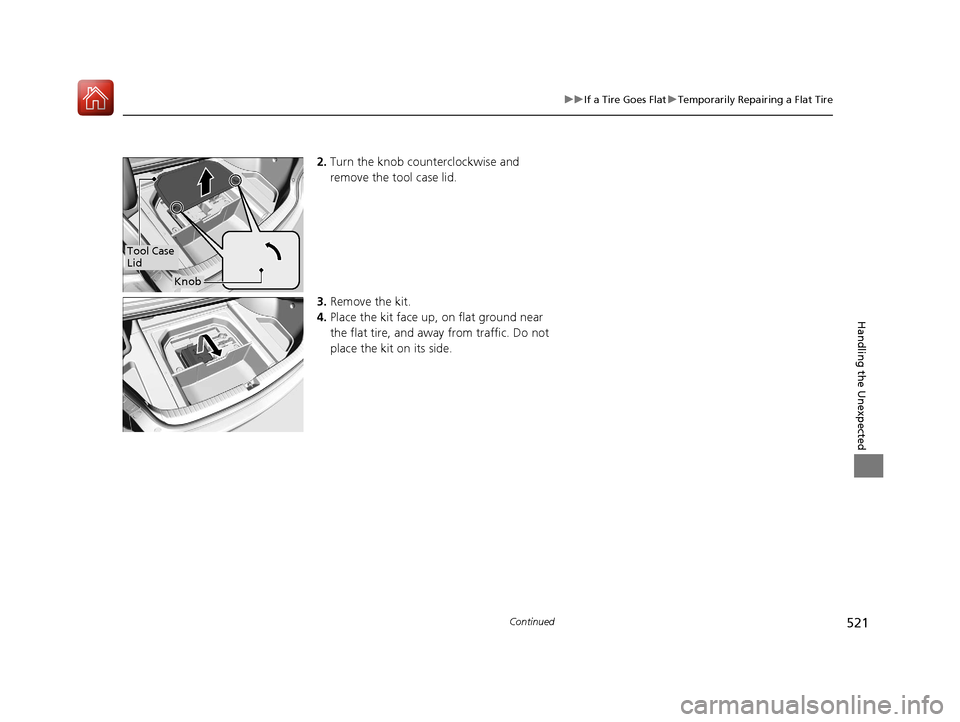
2. Turn the knob counterclockwise and
remove the tool case lid.
3. Remove the kit.
4. Place the kit face up, on flat ground near
the flat tire, and away from traffic. Do not
place the kit on its side.
Tool Case
Lid
Knob
18 ACURA TLX-31TZ36300.book 521 ページ 2017年2月21日 火曜日 午後2時32分
Page 536 of 589
Continued535
uuIf a Tire Goes Flat uChanging a Flat Tire
Handling the Unexpected
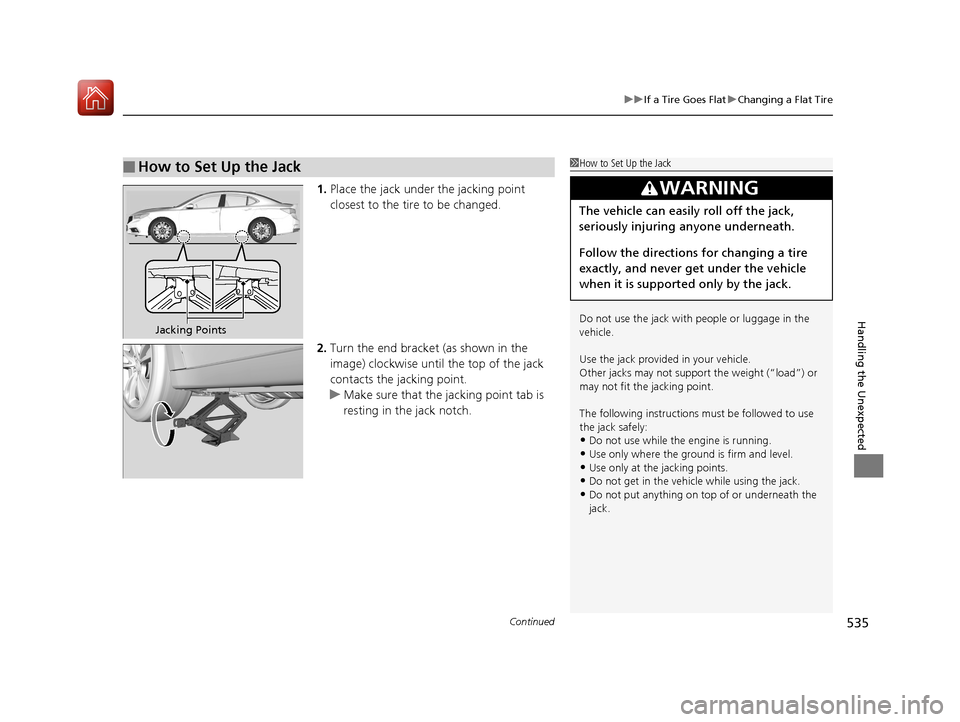
1. Place the jack under the jacking point
closest to the tire to be changed.
2. Turn the end bracket (as shown in the
image) clockwise until the top of the jack
contacts the jacking point.
u Make sure that the jacking point tab is
resting in the jack notch.
■How to Set Up the Jack1How to Set Up the Jack
Do not use the jack with people or luggage in the
vehicle.
Use the jack provided in your vehicle.
Other jacks may not support the weight (“load”) or
may not fit the jacking point.
The following instructions must be followed to use
the jack safely:
•Do not use while the engine is running.
•Use only where the ground is firm and level.
•Use only at the jacking points.•Do not get in the vehicl e while using the jack.
•Do not put anything on top of or underneath the
jack.
3WARNING
The vehicle can easily roll off the jack,
seriously injuring anyone underneath.
Follow the directions for changing a tire
exactly, and never get under the vehicle
when it is supported only by the jack.
Jacking Points
18 ACURA TLX-31TZ36300.book 535 ページ 2017年2月21日 火曜日 午後2時32分
Page 581 of 589
580
Index
B
BatteryCharging (Battery) ................................... 505
Charging System Indicator ................. 75, 549
Jump Starting .......................................... 542
Maintenance (Checking the Battery) ........ 504
Belts (Seat) .................................................. 34
Beverage Holders ...................................... 194
Blind Spot Information (BSI) System ........ 421
Bluetooth ® Audio ..................................... 255
Bluetooth ® HandsFreeLink ®..................... 317
Booster Seats (For Children) ....................... 68
Brake System ............................................. 429
Anti-lock Brake System (ABS) ................... 435
Automatic Brake Hold.............................. 433
Brake Assist System ................................. 436
Fluid ........................................................ 487
Foot Brake ............................................... 432
Parking Brake .......................................... 429
Brake System (Amber) Indicator .................................................... 72
Brake System (Red)
Indicator ............................................ 72, 550
Brightness Control (Instrument Panel) .... 171
BSI (Blind Spot Information) System ........ 421
Bulb Replacement ..................................... 488
Back-Up Lights......................................... 491
Brake/Taillights ........................................ 490
Brake/Taillights and Rear Side Marker
Lights..................................................... 490
Fog Lights ................................................ 488 Front Side Marker/Parking Lights ............. 488
Headlights ............................................... 488
High-Mount Brake Light .......................... 492
Puddle Lights........................................... 492
Rear License Plate Lights .......................... 492
Rear Turn Signal Lights ............................ 489
Side Turn Signal/Emergency Indicator
Lights .................................................... 488
Bulb Specifications ................................... 566
C
Carbon Monoxide Gas ............................... 69
Carrying Cargo ................................. 357, 359
CD Player ................................................... 244
Center Pocket ........................................... 193
Certification Label .................................... 568
Changing Bulbs ........................................ 488
Charging System Indicator ................. 75, 549
Child Safety ................................................. 56
Childproof Door Locks............................. 146
Child Seat .................................................... 56
Booster Seats ............................................ 68
Child Seat for Infants................................. 58
Child Seat for Small Children ..................... 59
Installing a Child Seat with a Lap/Shoulder Seat Belt .................................................. 63
Larger Children ......................................... 67
Rear-facing Child Seat ............................... 58
Selecting a Child Seat ................................ 60
Using a Tether ........................................... 65 Childproof Door Locks
............................. 146
Cleaning the Exterior ............................... 511
Cleaning the Interior ............................... 509
Client Service Information ....................... 577
Climate Control System ........................... 204
Changing the Mode................................ 207
Defrosting the Windshield and Windows .............................................. 210
Dust and Pollen Filter .............................. 508
Sensors ................................................... 211
Synchronized Mode ................................ 208
Using Automatic Climate Control............ 204
Clock ......................................................... 132
CMBSTM (Collision Mitigation Braking
SystemTM) ................................................ 437
Coat Hooks ............................................... 199
Collision Mitigation Braking System
TM
(CMBSTM) ................................................. 437
Compact Spare Tire (Optional) ....... 532, 567
Compass .................................................... 352
Console Compartment ............................. 192
Controls .................................................... 131
Coolant (Engine) ...................................... 484
Adding to the Radiator ........................... 485
Adding to the Reserve Tank .................... 484
Overheating ............................................ 547
Creeping (Automatic Transmission) ........ 370
Creeping (Dual Clutch Transmission) ...... 370
Cross Traffic Monitor ............................... 452
Cup Holders .............................................. 194
Customized Features ....................... 120, 292
18 ACURA TLX-31TZ36300.book 580 ページ 2017年2月21日 火曜日 午後2時32分
Page 586 of 589
585
Index
P
Paddle Shifters (Sequential Mode)......... 377
Paddle Shifters (Sequential Shift Mode) ..................................................... 381
Panic Mode ............................................... 153
Parking ..................................................... 446
Parking Brake ........................................... 429
Parking Sensor System ............................. 448
Passenger Airbag Off Indicator ................. 54
Passing Indicators ..................................... 161
Power Windows ....................................... 154
Precautions While Driving ....................... 369
Rain ........................................................ 369
Pregnant Women ....................................... 39
Puncture (Tire) ......................................... 519
R
Radiator.................................................... 485
Radio (AM/FM) ......................................... 230
Radio (SiriusXM ®)..................................... 233
Radio Data System (RDS) ......................... 231
Range ........................................................ 118
RDS (Radio Data System) ......................... 231
Readiness Codes (Emissions Testing) ...... 572
Rear Defogger/Heated Door Mirror Button ..................................................... 172
Rear Seats ................................................. 186
Seat Heaters ........................................... 203
Rearview Mirror ....................................... 176 Refueling
................................................... 460
Fuel Gauge .............................................. 113
Gasoline .......................................... 460, 566
Low Fuel Indicator ..................................... 78
Regulations ............................... 427, 498, 569
Remote Engine Start with Vehicle Feedback ................................................. 365
Remote Transmitter ................................. 141
Maintenance (Replacing) ......................... 506
Replacement Battery ............................................ 506, 507
Bulbs ....................................................... 488
Fuses ............................... 555, 556, 557, 558
Tires ........................................................ 501
Wiper Blade Rubber ................................. 493
Reporting Safety Defects ......................... 571
Resetting a Trip Meter ............................. 117
Reverse Tilt Door Mirror .......................... 177
Right Selector Wheel ........................ 115, 120
Road Departure Mitigation (RDM) .......... 405
On and Off .............................................. 407
S
Safe Driving ................................................ 29
Safety Labels ............................................... 70
Safety Message ............................................. 1
Seat Belts ..................................................... 34
Adjusting the Shoulder Anchor .................. 38
Automatic Seat Belt Tensioners .................. 36
Checking ................................................... 40 Fastening .................................................. 37
Installing a Child Seat
with a Lap/Shoulder
Seat Belt .................................................. 63
Pregnant Women ...................................... 39
Reminder ............................................ 35, 78
Warning Indicator ............................... 35, 78
Seat Heaters ...................................... 202, 203
Seats .......................................................... 179
Adjusting ................................................ 179
Driver’s Seat Lumbar Support .................. 179
Front Seats .............................................. 179
Rear Seats ............................................... 186
Seat Heaters .................................... 202, 203
Seat Ventilation ....................................... 202
Thigh support.......................................... 180
Security System ......................................... 151
Immobilizer System Indicator ..................... 83
Security System Alarm Indicator................. 83
Select Button ............................................ 371
Operation................................................ 372
Select Lever ......................................... 20, 378
Operation.......................................... 20, 379
Releasing................................................. 546
Won’t Move ............................................ 546
Selecting a Child Seat ................................. 60
Sequential Mode ...................................... 376
Sequential Mode Operation .................... 377
Sequential Shift Mode ............................. 380
Sequential Shift Mode Operation ........... 381
Setting the Clock ...................................... 132
18 ACURA TLX-31TZ36300.book 585 ページ 2017年2月21日 火曜日 午後2時32分