AC system Acura TLX 2018 Owner's Manual
[x] Cancel search | Manufacturer: ACURA, Model Year: 2018, Model line: TLX, Model: Acura TLX 2018Pages: 589, PDF Size: 35.45 MB
Page 349 of 589
uuBluetooth ® HandsFreeLink ®u HFL Menus
348
Features
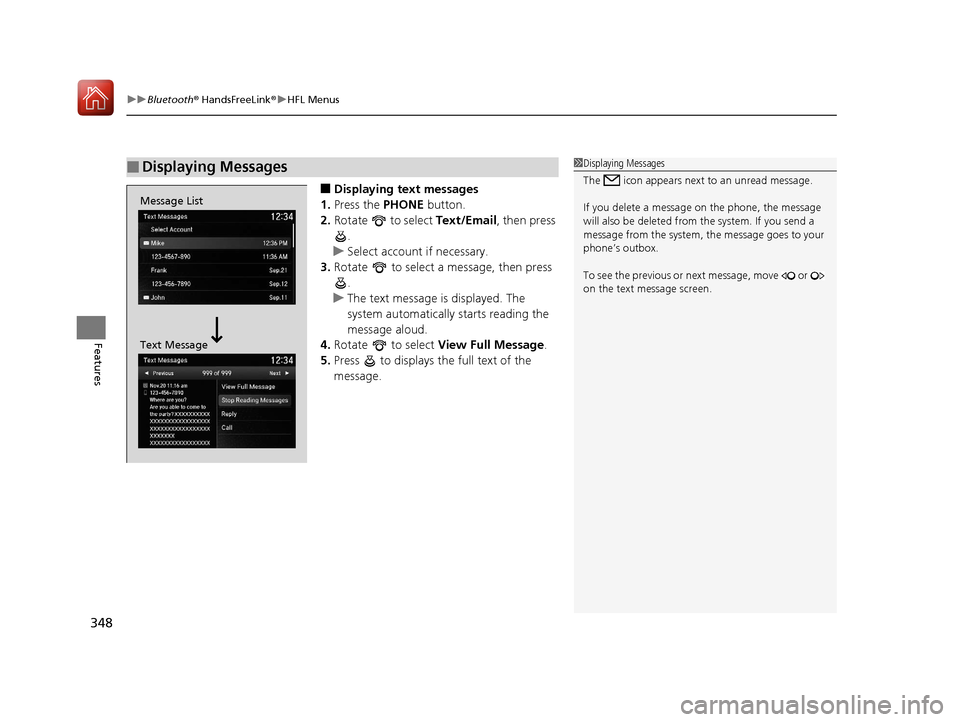
■Displaying text messages
1. Press the PHONE button.
2. Rotate to select Text/Email, then press
.
u Select account if necessary.
3. Rotate to select a message, then press
.
u The text message is displayed. The
system automatically starts reading the
message aloud.
4. Rotate to select View Full Message .
5. Press to displays the full text of the
message.
■Displaying Messages1Displaying Messages
The icon appears next to an unread message.
If you delete a message on the phone, the message
will also be dele ted from the system. If you send a
message from the system, the message goes to your
phone’s outbox.
To see the previous or ne xt message, move or
on the text message screen.
Message List
Text Message
18 ACURA TLX-31TZ36300.book 348 ページ 2017年2月21日 火曜日 午後2時32分
Page 350 of 589
Continued349
uuBluetooth ® HandsFreeLink ®u HFL Menus
Features
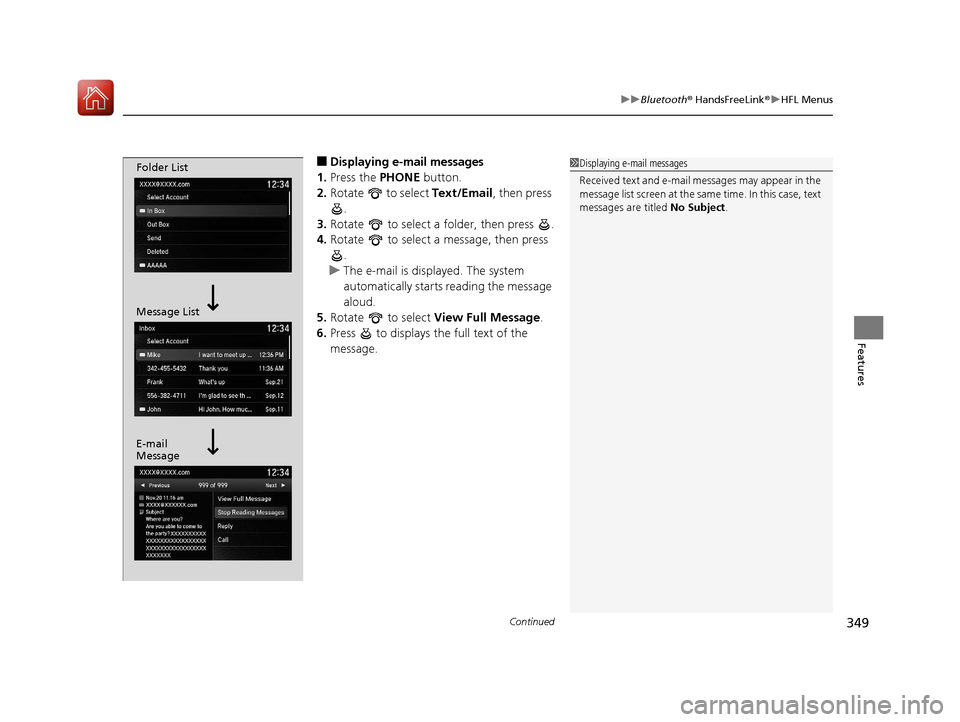
■Displaying e-mail messages
1. Press the PHONE button.
2. Rotate to select Text/Email , then press
.
3. Rotate to select a folder, then press .
4. Rotate to select a message, then press
.
u The e-mail is displayed. The system
automatically starts reading the message
aloud.
5. Rotate to select View Full Message .
6. Press to displays the full text of the
message.1Displaying e-mail messages
Received text and e-mail messages may appear in the
message list screen at the same time. In this case, text
messages are titled No Subject.Folder List
Message List
E-mail
Message
18 ACURA TLX-31TZ36300.book 349 ページ 2017年2月21日 火曜日 午後2時32分
Page 351 of 589
uuBluetooth ® HandsFreeLink ®u HFL Menus
350
Features
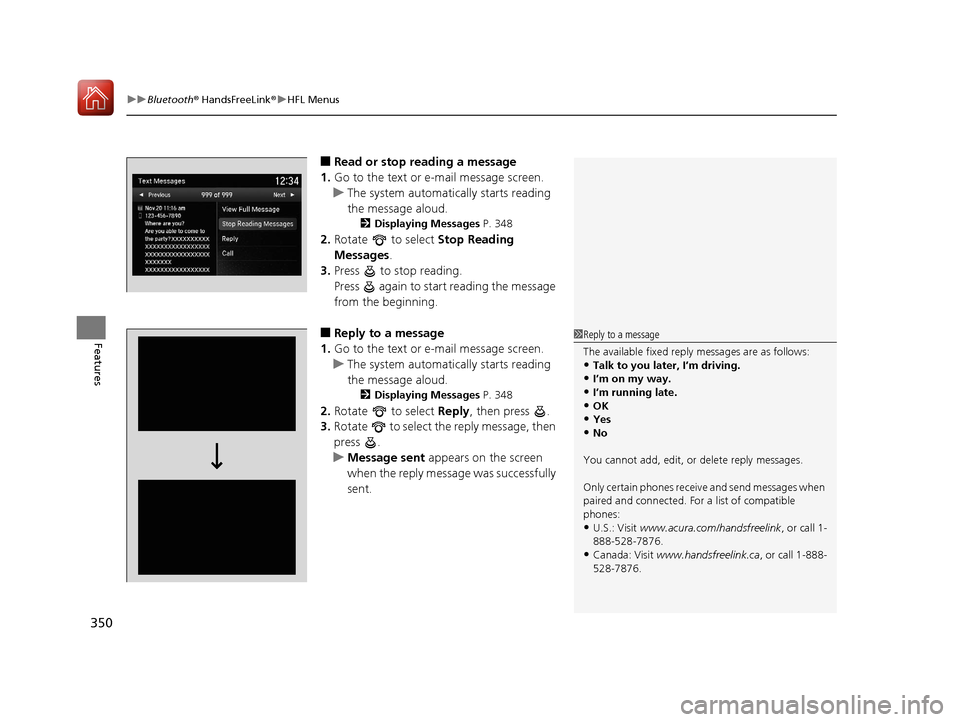
■Read or stop re ading a message
1. Go to the text or e-mail message screen.
u The system automatically starts reading
the message aloud.
2 Displaying Messages P. 348
2.Rotate to select Stop Reading
Messages.
3. Press to stop reading.
Press again to start reading the message
from the beginning.
■Reply to a message
1. Go to the text or e-mail message screen.
u The system automatically starts reading
the message aloud.
2 Displaying Messages P. 348
2.Rotate to select Reply, then press .
3. Rotate to select the reply message, then
press .
u Message sent appears on the screen
when the reply message was successfully
sent.
1 Reply to a message
The available fixed reply messages are as follows:
•Talk to you later, I’m driving.
•I’m on my way.•I’m running late.
•OK
•Yes•No
You cannot add, edit, or delete reply messages.
Only certain phones receiv e and send messages when
paired and connected. For a list of compatible
phones:
•U.S.: Visit www.acura.com/handsfreelink , or call 1-
888-528-7876.
•Canada: Visit www.handsfreelink.ca , or call 1-888-
528-7876.
18 ACURA TLX-31TZ36300.book 350 ページ 2017年2月21日 火曜日 午後2時32分
Page 352 of 589

351
uuBluetooth ® HandsFreeLink ®u HFL Menus
Features
■Making a call to a sender
1. Go to the text message screen.
u The system automatically starts reading
the message aloud.
2 Displaying text messages P. 348
2.Rotate to select Call, then press .
18 ACURA TLX-31TZ36300.book 351 ページ 2017年2月21日 火曜日 午後2時32分
Page 353 of 589
352
Features
Compass*
When you set the power mode to ON, the compass self-calibrates, and the compass
display appears.
Compass Calibration
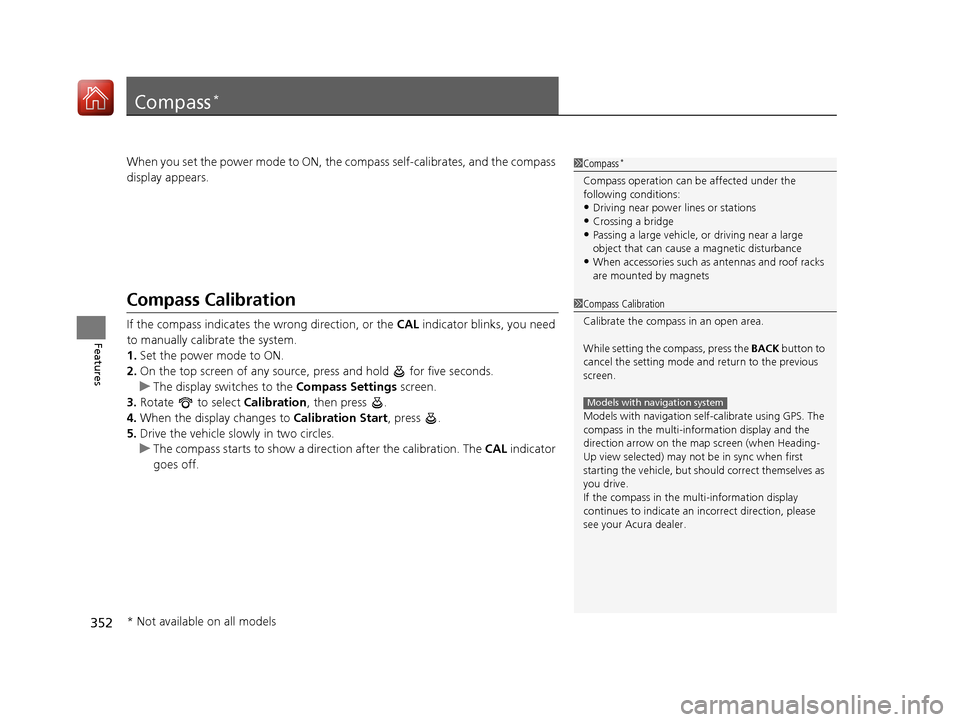
If the compass indicates the wrong direction, or the CAL indicator blinks, you need
to manually calibrate the system.
1. Set the power mode to ON.
2. On the top screen of any source, press and hold for five seconds.
u The display switches to the Compass Settings screen.
3. Rotate to select Calibration, then press .
4. When the display changes to Calibration Start, press .
5. Drive the vehicle slowly in two circles.
u The compass starts to show a dire ction after the calibration. The CAL indicator
goes off.
1 Compass*
Compass operation can be affected under the
following conditions:
•Driving near power lines or stations•Crossing a bridge
•Passing a large vehicle, or driving near a large
object that can cause a magnetic disturbance
•When accessories such as antennas and roof racks
are mounted by magnets
1 Compass Calibration
Calibrate the compass in an open area.
While setting the compass, press the BACK button to
cancel the setting mode a nd return to the previous
screen.
Models with navigation self -calibrate using GPS. The
compass in the multi-information display and the
direction arrow on the ma p screen (when Heading-
Up view selected) may not be in sync when first
starting the vehicle, but should correct themselves as
you drive.
If the compass in the multi-information display
continues to indicate an in correct direction, please
see your Acura dealer.
Models with navigation system
* Not available on all models
18 ACURA TLX-31TZ36300.book 352 ページ 2017年2月21日 火曜日 午後2時32分
Page 354 of 589
353
uuCompass*uCompass Zone Selection
Features
Compass Zone Selection
1. Set the power mode to ON.
2. On the top screen of any source, press and hold for five seconds.
u The display switches to the Compass Settings screen.
3. Rotate to select Zone Adjust, then press .
u The display shows the current zone number the system is set to.
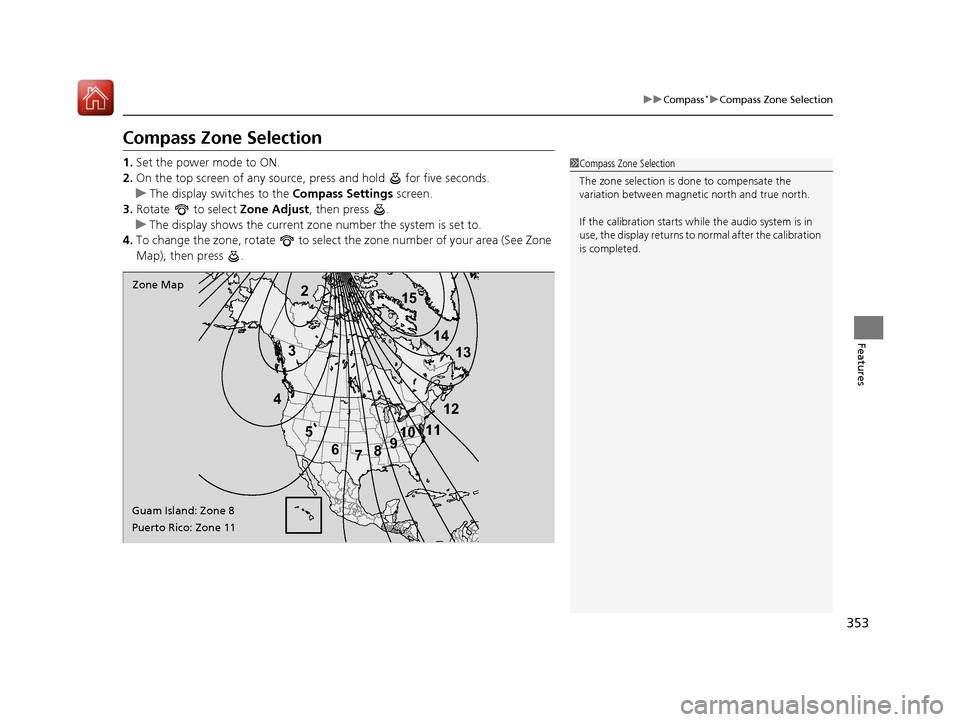
4. To change the zone, rotate to select the zone number of your area (See Zone
Map), then press .
2
3
4 5678910
111213
14
15Zone Map
Guam Island: Zone 8
Puerto Rico: Zone 11
1 Compass Zone Selection
The zone selection is done to compensate the
variation between magneti c north and true north.
If the calibration starts while the audio system is in
use, the display returns to normal after the calibration
is completed.
18 ACURA TLX-31TZ36300.book 353 ページ 2017年2月21日 火曜日 午後2時32分
Page 356 of 589
355
Driving
This chapter discusses driving and refueling.
Before Driving................................... 356
Towing a Trailer ................................ 361
When Driving
Starting the Engine .......................... 362
Precautions While Driving................. 369
Automatic Transmission
*................. 370
Dual Clutch Transmission*............... 370
Shifting ............................................ 371
Shifting ............................................ 378
Auto Idle Stop
*................................ 382
Integrated Dynamics System............. 388
Models with electronic gear selector
Models with shift lever
Front Sensor Camera ....................... 389
Adaptive Cruise Control (ACC) with Low Speed Follow (LSF) ......................... 391
Road Departure Mitigation (RDM) System ... 405Lane Keeping Assist System (LKAS) .. 410Vehicle Stability Assist (VSA ®), aka Electronic
Stability Control (ESC), System ............. 418
Agile Handling Assist ....................... 420
Precision All-Wheel SteerTM (P-AWS ®)
System*......................................... 420
Blind spot inform ation (BSI) System*.... 421
Super Handling-All Wheel DriveTM (SH-
AWD® )*......................................... 424 Tire Pressure Monitoring System (TPMS)
with Tire Fill Assist.......................... 425
Tire Pressure Monitoring System (TPMS) -
Required Federal Explanation ......... 427
Braking .............................................. 429
Parking Your Vehicle ........................ 446
Multi-View Rear Camera
*................ 457
Surround View Camera System*..... 459
Refueling ........................................... 460
Fuel Economy and CO
2 Emissions .... 463
* Not available on all models
18 ACURA TLX-31TZ36300.book 355 ページ 2017年2月21日 火曜日 午後2時32分
Page 363 of 589
362
Driving
When Driving
Starting the Engine
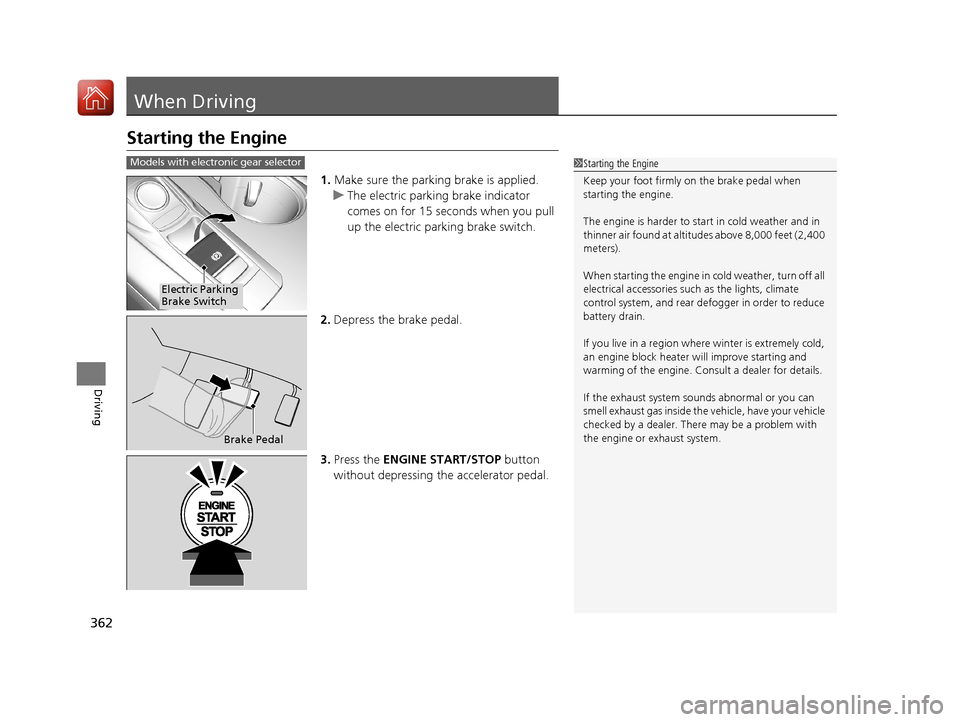
1.Make sure the parking brake is applied.
u The electric parking brake indicator
comes on for 15 seconds when you pull
up the electric parking brake switch.
2. Depress the brake pedal.
3. Press the ENGINE START/STOP button
without depressing the accelerator pedal.
1 Starting the Engine
Keep your foot firmly on the brake pedal when
starting the engine.
The engine is harder to st art in cold weather and in
thinner air found at altitudes above 8,000 feet (2,400
meters).
When starting the engine in cold weather, turn off all
electrical accessories such as the lights, climate
control system, and rear de fogger in order to reduce
battery drain.
If you live in a region where winter is extremely cold,
an engine block heater will improve starting and
warming of the engine. Cons ult a dealer for details.
If the exhaust system sounds abnormal or you can
smell exhaust gas inside the vehicle, have your vehicle
checked by a dealer. There may be a problem with
the engine or exhaust system.Models with electronic gear selector
Electric Parking
Brake Switch
Brake Pedal
18 ACURA TLX-31TZ36300.book 362 ページ 2017年2月21日 火曜日 午後2時32分
Page 364 of 589

Continued363
uuWhen Driving uStarting the Engine
Driving
1. Make sure the parkin g brake is applied.
u The electric parking brake indicator
comes on for 15 seconds when you pull
up the electric parking brake switch.
2. Check that the transmission is in
(P, then
depress the brake pedal.
u Although it is possible to start the vehicle
in
(N, it is safer to start it in (P.
3. Press the ENGINE START/STOP button
without depressing the accelerator pedal.
1 Starting the Engine
The immobilizer system pr otects your vehicle from
theft.
If an improperly c oded device is used, the engine’s
fuel system is disabled. 2 Immobilizer System P. 151
Bring the keyless access remote close to the ENGINE
START/STOP button if the batte ry in the keyless
access remote is weak. 2 If the Keyless Access Remote Battery is
Weak P. 540
The engine may not start if the keyless access remote
is subjected to strong radio waves.Models with shift lever
Electric Parking
Brake Switch
Brake Pedal
18 ACURA TLX-31TZ36300.book 363 ページ 2017年2月21日 火曜日 午後2時32分
Page 366 of 589
Continued365
uuWhen Driving uStarting the Engine
Driving
You can remotely start the engine usin g the two-way keyless access remote from
extended distances.
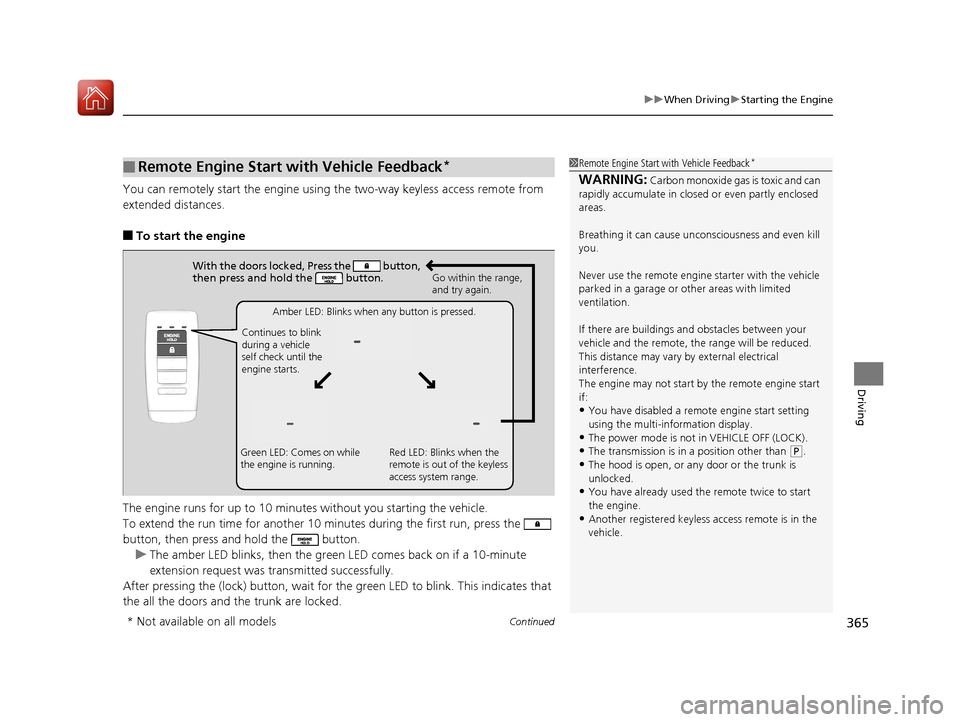
■To start the engine
The engine runs for up to 10 minu tes without you starting the vehicle.
To extend the run time for another 10 mi nutes during the first run, press the
button, then press an d hold the button.
u The amber LED blinks, then the green LED comes back on if a 10-minute
extension request was transmitted successfully.
After pressing the (lock) button, wait for the green LED to blink. This indicates that
the all the doors and the trunk are locked.
■Remote Engine Start with Vehicle Feedback*1 Remote Engine Start with Vehicle Feedback*
WARNING: Carbon monoxide gas is toxic and can
rapidly accumulate in closed or even partly enclosed
areas.
Breathing it can cause unc onsciousness and even kill
you.
Never use the remote engine starter with the vehicle
parked in a garage or other areas with limited
ventilation.
If there are buildings an d obstacles between your
vehicle and the remote, th e range will be reduced.
This distance may vary by external electrical
interference.
The engine may not start by the remote engine start
if:
•You have disabled a remo te engine start setting
using the multi-information display.
•The power mode is not in VEHICLE OFF (LOCK).•The transmission is in a position other than ( P.
•The hood is open, or any door or the trunk is
unlocked.
•You have already used the remote twice to start
the engine.
•Another registered keyless access remote is in the
vehicle.
With the doors locked, Press the button,
then press and hold the button.
Amber LED: Blinks when any button is pressed.
Continues to blink
during a vehicle
self check until the
engine starts. Go within the range,
and try again.
Green LED: Comes on while
the engine is running. Red LED: Blinks when the
remote is out of the keyless
access system range.
* Not available on all models
18 ACURA TLX-31TZ36300.book 365 ページ 2017年2月21日 火曜日 午後2時32分