parking Acura TLX 2018 Owner's Guide
[x] Cancel search | Manufacturer: ACURA, Model Year: 2018, Model line: TLX, Model: Acura TLX 2018Pages: 589, PDF Size: 35.45 MB
Page 356 of 589
355
Driving
This chapter discusses driving and refueling.
Before Driving................................... 356
Towing a Trailer ................................ 361
When Driving
Starting the Engine .......................... 362
Precautions While Driving................. 369
Automatic Transmission
*................. 370
Dual Clutch Transmission*............... 370
Shifting ............................................ 371
Shifting ............................................ 378
Auto Idle Stop
*................................ 382
Integrated Dynamics System............. 388
Models with electronic gear selector
Models with shift lever
Front Sensor Camera ....................... 389
Adaptive Cruise Control (ACC) with Low Speed Follow (LSF) ......................... 391
Road Departure Mitigation (RDM) System ... 405Lane Keeping Assist System (LKAS) .. 410Vehicle Stability Assist (VSA ®), aka Electronic
Stability Control (ESC), System ............. 418
Agile Handling Assist ....................... 420
Precision All-Wheel SteerTM (P-AWS ®)
System*......................................... 420
Blind spot inform ation (BSI) System*.... 421
Super Handling-All Wheel DriveTM (SH-
AWD® )*......................................... 424 Tire Pressure Monitoring System (TPMS)
with Tire Fill Assist.......................... 425
Tire Pressure Monitoring System (TPMS) -
Required Federal Explanation ......... 427
Braking .............................................. 429
Parking Your Vehicle ........................ 446
Multi-View Rear Camera
*................ 457
Surround View Camera System*..... 459
Refueling ........................................... 460
Fuel Economy and CO
2 Emissions .... 463
* Not available on all models
18 ACURA TLX-31TZ36300.book 355 ページ 2017年2月21日 火曜日 午後2時32分
Page 363 of 589
362
Driving
When Driving
Starting the Engine
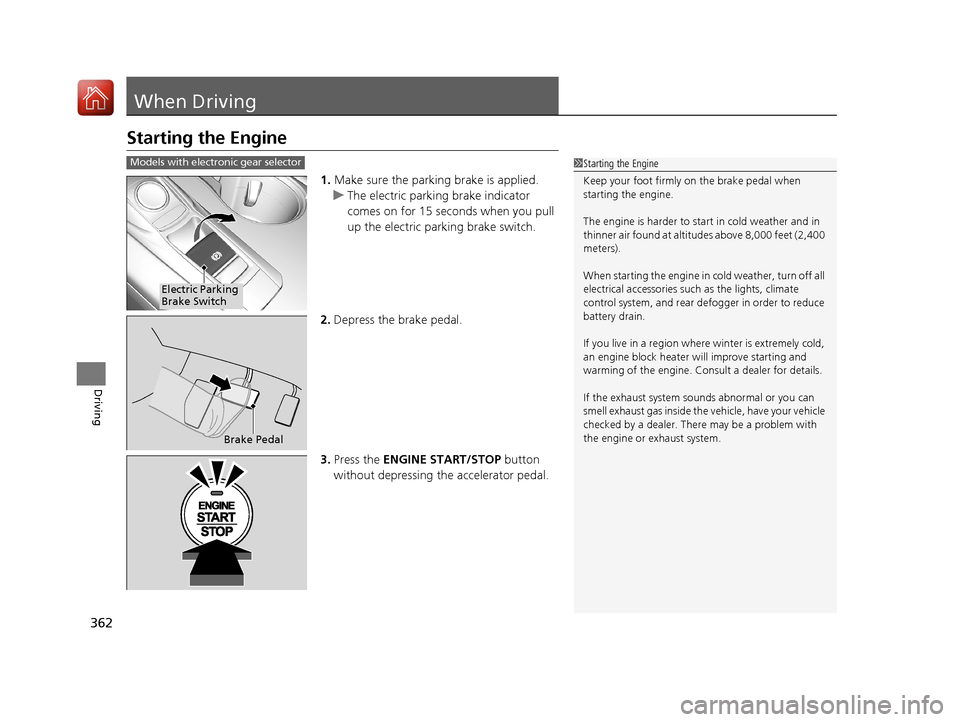
1.Make sure the parking brake is applied.
u The electric parking brake indicator
comes on for 15 seconds when you pull
up the electric parking brake switch.
2. Depress the brake pedal.
3. Press the ENGINE START/STOP button
without depressing the accelerator pedal.
1 Starting the Engine
Keep your foot firmly on the brake pedal when
starting the engine.
The engine is harder to st art in cold weather and in
thinner air found at altitudes above 8,000 feet (2,400
meters).
When starting the engine in cold weather, turn off all
electrical accessories such as the lights, climate
control system, and rear de fogger in order to reduce
battery drain.
If you live in a region where winter is extremely cold,
an engine block heater will improve starting and
warming of the engine. Cons ult a dealer for details.
If the exhaust system sounds abnormal or you can
smell exhaust gas inside the vehicle, have your vehicle
checked by a dealer. There may be a problem with
the engine or exhaust system.Models with electronic gear selector
Electric Parking
Brake Switch
Brake Pedal
18 ACURA TLX-31TZ36300.book 362 ページ 2017年2月21日 火曜日 午後2時32分
Page 364 of 589

Continued363
uuWhen Driving uStarting the Engine
Driving
1. Make sure the parkin g brake is applied.
u The electric parking brake indicator
comes on for 15 seconds when you pull
up the electric parking brake switch.
2. Check that the transmission is in
(P, then
depress the brake pedal.
u Although it is possible to start the vehicle
in
(N, it is safer to start it in (P.
3. Press the ENGINE START/STOP button
without depressing the accelerator pedal.
1 Starting the Engine
The immobilizer system pr otects your vehicle from
theft.
If an improperly c oded device is used, the engine’s
fuel system is disabled. 2 Immobilizer System P. 151
Bring the keyless access remote close to the ENGINE
START/STOP button if the batte ry in the keyless
access remote is weak. 2 If the Keyless Access Remote Battery is
Weak P. 540
The engine may not start if the keyless access remote
is subjected to strong radio waves.Models with shift lever
Electric Parking
Brake Switch
Brake Pedal
18 ACURA TLX-31TZ36300.book 363 ページ 2017年2月21日 火曜日 午後2時32分
Page 368 of 589

Continued367
uuWhen Driving uStarting the Engine
Driving
1. While depressing the brake pedal, press the ENGINE START/STOP button.
2. Keeping your right foot on the brake pedal, change the gear position to
(D
button. Select
(R when reversing.
3. With the parking brake applied, release the brake pedal and gently depress the
accelerator pedal.
u Make sure the electric parkin g brake indicator goes off.
2Parking Brake P. 429
2 If the Transmission System Indicator Blinks along with the Warning
Message P. 554
■Starting to Drive1Starting to Drive
You can also release the parking brake by pressing
the electric parking brake sw itch while depressing the
brake pedal.
When facing downhill, you can start your vehicle
more smoothly by manually releasing it with the
electric parking brake switch than by releasing it with
the accelerator pedal.
The engine stops when the gear position is changed
from
( P before the ENGINE START/STOP button is
pressed. Follow the step 1 when starting to drive.
When the engine was started using the two-way
keyless access remote*
When the engine was started using the two-way keyless access remote*
When the engine was started in any case
* Not available on all models
18 ACURA TLX-31TZ36300.book 367 ページ 2017年2月21日 火曜日 午後2時32分
Page 369 of 589
uuWhen Driving uStarting the Engine
368
Driving
■Hill Start Assist System
Hill start assist keeps the brake engaged br iefly to help prevent the vehicle from
rolling on inclines as you move your fo ot from the brake pedal to the accelerator.
Change the gear position to
(D when facing uphill, or (R when facing downhill,
then release the brake pedal.
1 Hill Start Assist System
Hill start assist may not prevent the vehicle from
rolling downhill on a very steep or slippe ry slope, and
does not operate on small inclines.
Hill start assist is not a replacement for the parking
brake.
Hill start assist will operate even when VSA ® is
switched off.
18 ACURA TLX-31TZ36300.book 368 ページ 2017年2月21日 火曜日 午後2時32分
Page 372 of 589
371
uuWhen Driving uShifting
Continued
Driving
Shifting
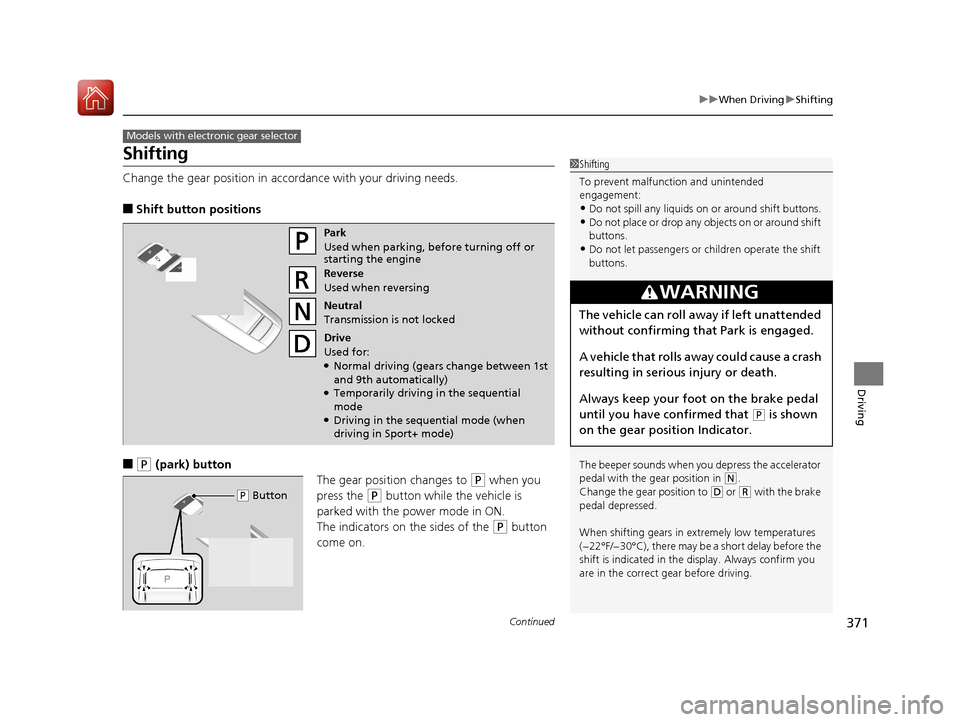
Change the gear position in accordance with your driving needs.
■Shift button positions
■(P (park) button
The gear position changes to
(P when you
press the
(P button while the vehicle is
parked with the power mode in ON.
The indicators on the sides of the
(P button
come on.
Models with electronic gear selector
1 Shifting
To prevent malfunc tion and unintended
engagement:
•Do not spill any liquids on or around shift buttons.
•Do not place or drop any objects on or around shift
buttons.
•Do not let passengers or ch ildren operate the shift
buttons.
The beeper sounds when you depress the accelerator
pedal with the gear position in
( N.
Change the gear position to
( D or (R with the brake
pedal depressed.
When shifting gears in extremely low temperatures
(−22°F/−30°C), there may be a short delay before the
shift is indicated in the di splay. Always confirm you
are in the correct gear before driving.
3WARNING
The vehicle can roll aw ay if left unattended
without confirming th at Park is engaged.
A vehicle that rolls away could cause a crash
resulting in serious injury or death.
Always keep your foot on the brake pedal
until you have confirmed that
( P is shown
on the gear position Indicator.
Park
Used when parking, before turning off or
starting the engine
Reverse
Used when reversing
Neutral
Transmission is not locked
Drive
Used for:
●Normal driving (gears change between 1st
and 9th automatically)
●Temporarily driving in the sequential
mode
●Driving in the sequential mode (when
driving in Sport+ mode)
( P Button
18 ACURA TLX-31TZ36300.book 371 ページ 2017年2月21日 火曜日 午後2時32分
Page 379 of 589
378
uuWhen Driving uShifting
Driving
Shifting
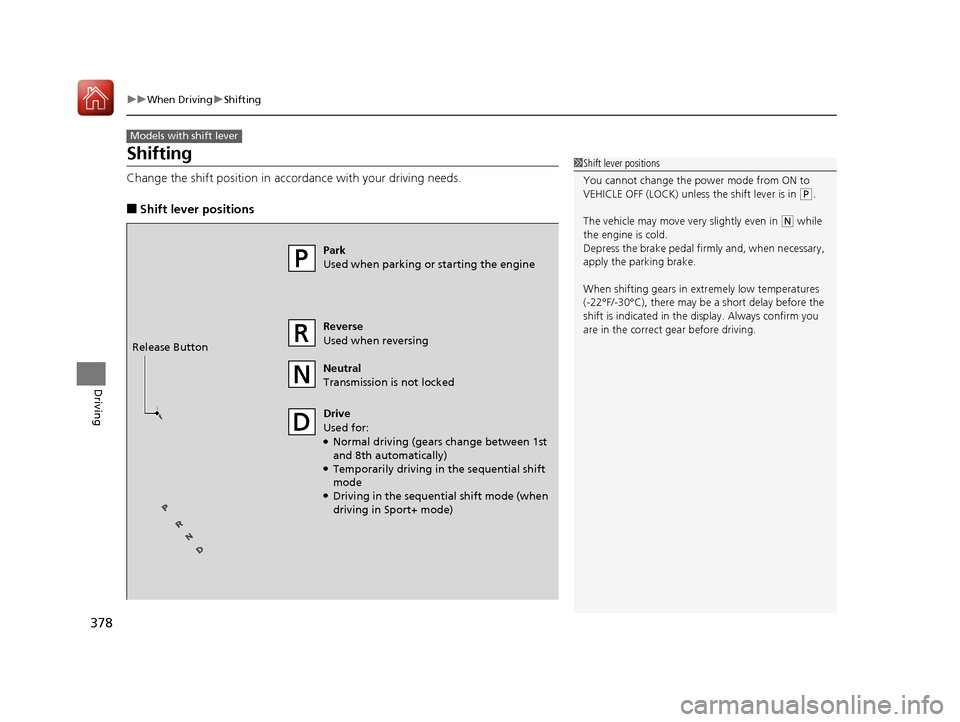
Change the shift position in accordance with your driving needs.
■Shift lever positions
Models with shift lever
1Shift lever positions
You cannot change the pow er mode from ON to
VEHICLE OFF (LOCK) unless the shift lever is in
( P.
The vehicle may move ve ry slightly even in
(N while
the engine is cold.
Depress the brake pe dal firmly and, when necessary,
apply the parking brake.
When shifting gears in extremely low temperatures
(-22°F/-30°C), there may be a short delay before the
shift is indicated in the di splay. Always confirm you
are in the correct gear before driving.
Park
Used when parking or starting the engine
Reverse
Used when reversing
Neutral
Transmission is not locked
Drive
Used for:
●Normal driving (gears change between 1st
and 8th automatically)
●Temporarily driving in the sequential shift
mode
●Driving in the sequential shift mode (when
driving in Sport+ mode)
Release Button
18 ACURA TLX-31TZ36300.book 378 ページ 2017年2月21日 火曜日 午後2時32分
Page 388 of 589
387
uuWhen Driving uAuto Idle Stop*
Driving
■The engine restarts even if the automatic brake hold system is activated
when:
• The automatic brake hold system is canc eled and the electric parking brake is
applied automatically.
The automatic brake hold system has a problem.
Briefly keeps the brake applied after releasin g the brake pedal to restart the engine.
This can keep your vehicle from unexpe ctedly moving while on an incline.
■Starting Assist Brake Function
18 ACURA TLX-31TZ36300.book 387 ページ 2017年2月21日 火曜日 午後2時32分
Page 393 of 589
uuWhen Driving uAdaptive Cruise Control (ACC) with Low Speed Follow (LSF)
392
Driving
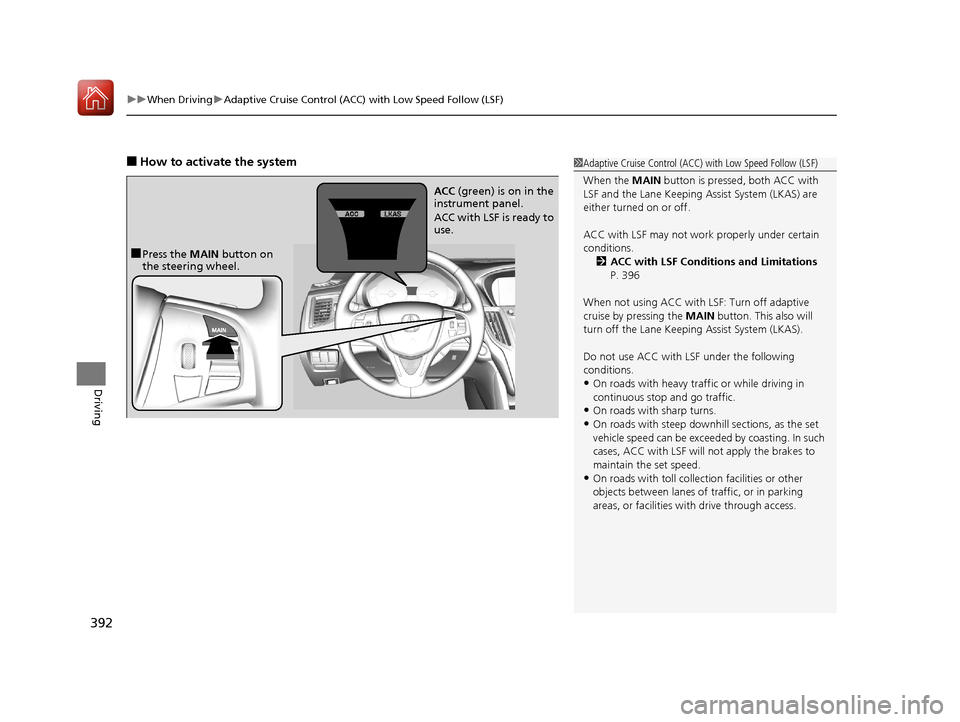
■How to activate the system1Adaptive Cruise Control (ACC) with Low Speed Follow (LSF)
When the MAIN button is pressed, both ACC with
LSF and the Lane Keeping Assist System (LKAS) are
either turned on or off.
ACC with LSF may not work properly under certain
conditions. 2 ACC with LSF Conditions and Limitations
P. 396
When not using ACC with LSF: Turn off adaptive
cruise by pressing the MAIN button. This also will
turn off the Lane Keeping Assist System (LKAS).
Do not use ACC with LSF under the following
conditions.
•On roads with heavy traf fic or while driving in
continuous stop and go traffic.
•On roads with sharp turns.
•On roads with steep downhill sections, as the set
vehicle speed can be exceeded by coasting. In such
cases, ACC with LSF will not apply the brakes to
maintain the set speed.
•On roads with toll collection facilities or other
objects between lanes of traffic, or in parking
areas, or faci lities with driv e through access.
■Press the MAIN button on
the steering wheel. ACC
(green) is on in the
instrument panel.
ACC with LSF is ready to
use.
18 ACURA TLX-31TZ36300.book 392 ページ 2017年2月21日 火曜日 午後2時32分
Page 397 of 589
uuWhen Driving uAdaptive Cruise Control (ACC) with Low Speed Follow (LSF)
396
Driving
The system may automatically shut off and the ACC indicator will come on under
certain conditions. Some examples of th ese conditions are listed below. Other
conditions may reduce some of the ACC functions.
2 Front Sensor Camera P. 389
■Environmental conditions
Driving in bad weather (r ain, fog, snow, etc.).
■Roadway conditions
Driving on a snowy or wet roadway (obscure d lane marking, vehicle tracks, reflected
lights, road spray, high contrast).
■Vehicle conditions
• The outside of the windshie ld is blocked by dirt, mud, leaves, wet snow, etc.
• An abnormal tire or wheel condition (Wrong sized, varied size or construction,
improperly inflated, compact spare tire
*, etc.).
• The camera temperature gets too high.
• The parking brake is applied.
• When the front grille is dirty.
• The vehicle is tilted due to a heav y load or suspension modifications.
• When tire chains are installed.
■ACC with LSF Conditions and Limitations1ACC with LSF Conditions and Limitations
The radar sensor for ACC with LSF is shared with the
Collision Mitigati on Braking System
TM (CMBSTM).
2 Collision Mitigation Braking SystemTM
(CMBSTM) P. 437
You can read about handling information for the
camera equipped with this system. 2 Front Sensor Camera P. 389
Always keep the radar sensor cover clean.
Never use chemical solvents or polishing powder for
cleaning the sensor cover. Clean it with water or a
mild detergent.
Do not put a sticker on the radar sensor cover or
replace the radar sensor cover.
If you need the radar sensor to be repaired, or
removed, or the radar se nsor cover is strongly
impacted, turn off the system by pressing the MAIN
button and take your vehicle to a dealer.
Have your vehicle checked by a dealer if you find any
unusual behavior of the system (e.g., the warning
message appears too frequently).
* Not available on all models
18 ACURA TLX-31TZ36300.book 396 ページ 2017年2月21日 火曜日 午後2時32分