warning Acura TLX 2018 Workshop Manual
[x] Cancel search | Manufacturer: ACURA, Model Year: 2018, Model line: TLX, Model: Acura TLX 2018Pages: 589, PDF Size: 35.45 MB
Page 301 of 589
300
uuCustomized Features u
Features
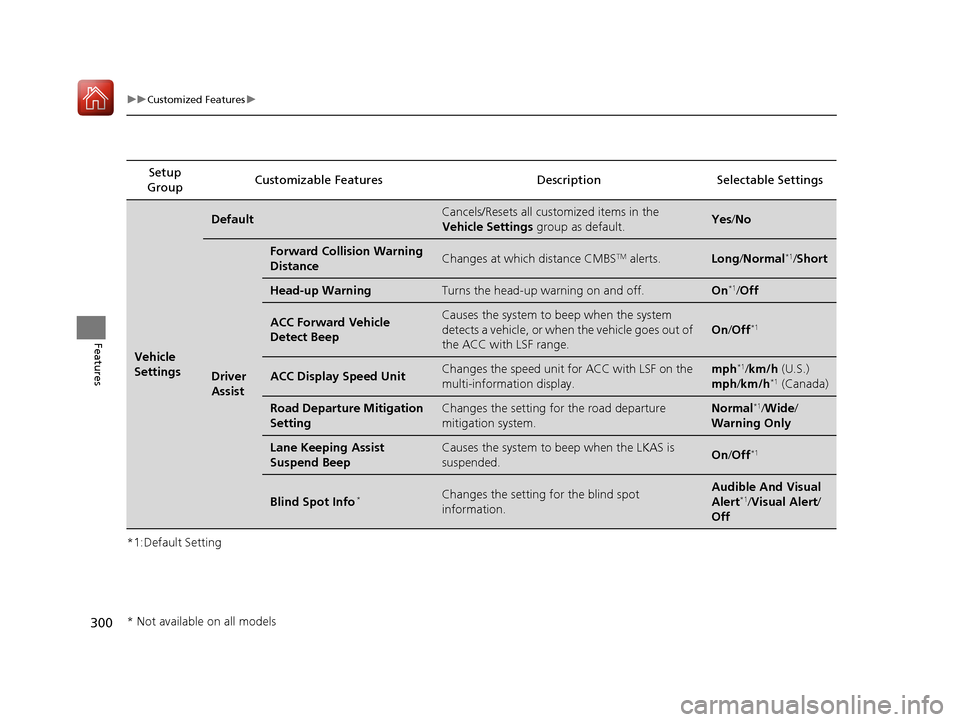
*1:Default SettingSetup
Group Customizable Features Descri
ption Selectable Settings
Vehicle
Settings
DefaultCancels/Resets all customized items in the
Vehicle Settings group as default.Yes/No
Driver
Assist
Forward Collision Warning
DistanceChanges at which distance CMBSTM alerts.Long /Normal*1/ Short
Head-up WarningTurns the head-up warning on and off.On*1/Off
ACC Forward Vehicle
Detect BeepCauses the system to beep when the system
detects a vehicle, or when the vehicle goes out of
the ACC with LSF range.
On /Off*1
ACC Display Speed UnitChanges the speed unit for ACC with LSF on the
multi-information display.mph*1/km/h (U.S.)
mph /km/h*1 (Canada)
Road Departure Mitigation
SettingChanges the setting for the road departure
mitigation system.Normal*1/Wide /
Warning Only
Lane Keeping Assist
Suspend BeepCauses the system to b eep when the LKAS is
suspended.On /Off*1
Blind Spot Info*Changes the setting for the blind spot
information.Audible And Visual
Alert*1/Visual Alert /
Off
* Not available on all models
18 ACURA TLX-31TZ36300.book 300 ページ 2017年2月21日 火曜日 午後2時32分
Page 360 of 589
359
uuBefore Driving uMaximum Load Limit
Continued
Driving
Maximum Load Limit
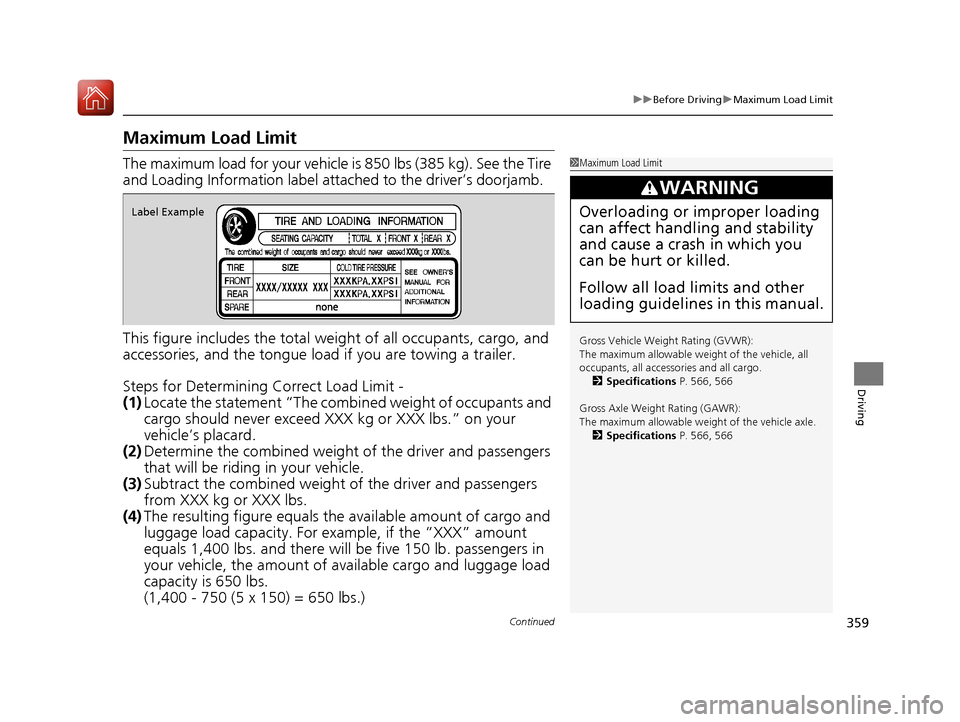
The maximum load for your vehicle is 850 lbs (385 kg). See the Tire
and Loading Information label atta ched to the driver’s doorjamb.
This figure includes the total weig ht of all occupants, cargo, and
accessories, and the tongue load if you are towing a trailer.
Steps for Determining Correct Load Limit -
(1) Locate the statement “The comb ined weight of occupants and
cargo should never exceed XXX kg or XXX lbs.” on your
vehicle’s placard.
(2) Determine the combined weight of the driver and passengers
that will be riding in your vehicle.
(3) Subtract the combined weight of the driver and passengers
from XXX kg or XXX lbs.
(4) The resulting figure equals the available amount of cargo and
luggage load capacity. For example, if the “XXX” amount
equals 1,400 lbs. and there will be five 150 lb. passengers in
your vehicle, the am ount of available cargo and luggage load
capacity is 650 lbs.
(1,400 - 750 (5 x 150) = 650 lbs.)1 Maximum Load Limit
Gross Vehicle Weight Rating (GVWR):
The maximum allowable weight of the vehicle, all
occupants, all accesso ries and all cargo.
2 Specifications P. 566, 566
Gross Axle Weight Rating (GAWR):
The maximum allowable weight of the vehicle axle. 2 Specifications P. 566, 566
3WARNING
Overloading or improper loading
can affect handling and stability
and cause a crash in which you
can be hurt or killed.
Follow all load limits and other
loading guidelines in this manual.Label Example
18 ACURA TLX-31TZ36300.book 359 ページ 2017年2月21日 火曜日 午後2時32分
Page 366 of 589
Continued365
uuWhen Driving uStarting the Engine
Driving
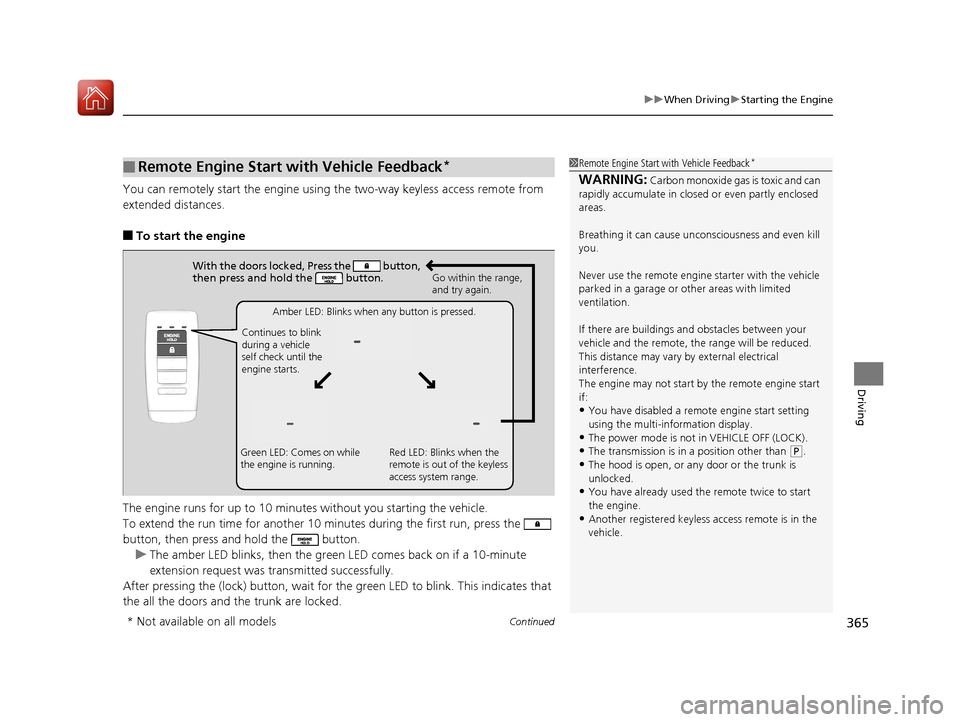
You can remotely start the engine usin g the two-way keyless access remote from
extended distances.
■To start the engine
The engine runs for up to 10 minu tes without you starting the vehicle.
To extend the run time for another 10 mi nutes during the first run, press the
button, then press an d hold the button.
u The amber LED blinks, then the green LED comes back on if a 10-minute
extension request was transmitted successfully.
After pressing the (lock) button, wait for the green LED to blink. This indicates that
the all the doors and the trunk are locked.
■Remote Engine Start with Vehicle Feedback*1 Remote Engine Start with Vehicle Feedback*
WARNING: Carbon monoxide gas is toxic and can
rapidly accumulate in closed or even partly enclosed
areas.
Breathing it can cause unc onsciousness and even kill
you.
Never use the remote engine starter with the vehicle
parked in a garage or other areas with limited
ventilation.
If there are buildings an d obstacles between your
vehicle and the remote, th e range will be reduced.
This distance may vary by external electrical
interference.
The engine may not start by the remote engine start
if:
•You have disabled a remo te engine start setting
using the multi-information display.
•The power mode is not in VEHICLE OFF (LOCK).•The transmission is in a position other than ( P.
•The hood is open, or any door or the trunk is
unlocked.
•You have already used the remote twice to start
the engine.
•Another registered keyless access remote is in the
vehicle.
With the doors locked, Press the button,
then press and hold the button.
Amber LED: Blinks when any button is pressed.
Continues to blink
during a vehicle
self check until the
engine starts. Go within the range,
and try again.
Green LED: Comes on while
the engine is running. Red LED: Blinks when the
remote is out of the keyless
access system range.
* Not available on all models
18 ACURA TLX-31TZ36300.book 365 ページ 2017年2月21日 火曜日 午後2時32分
Page 368 of 589

Continued367
uuWhen Driving uStarting the Engine
Driving
1. While depressing the brake pedal, press the ENGINE START/STOP button.
2. Keeping your right foot on the brake pedal, change the gear position to
(D
button. Select
(R when reversing.
3. With the parking brake applied, release the brake pedal and gently depress the
accelerator pedal.
u Make sure the electric parkin g brake indicator goes off.
2Parking Brake P. 429
2 If the Transmission System Indicator Blinks along with the Warning
Message P. 554
■Starting to Drive1Starting to Drive
You can also release the parking brake by pressing
the electric parking brake sw itch while depressing the
brake pedal.
When facing downhill, you can start your vehicle
more smoothly by manually releasing it with the
electric parking brake switch than by releasing it with
the accelerator pedal.
The engine stops when the gear position is changed
from
( P before the ENGINE START/STOP button is
pressed. Follow the step 1 when starting to drive.
When the engine was started using the two-way
keyless access remote*
When the engine was started using the two-way keyless access remote*
When the engine was started in any case
* Not available on all models
18 ACURA TLX-31TZ36300.book 367 ページ 2017年2月21日 火曜日 午後2時32分
Page 372 of 589
371
uuWhen Driving uShifting
Continued
Driving
Shifting
Change the gear position in accordance with your driving needs.
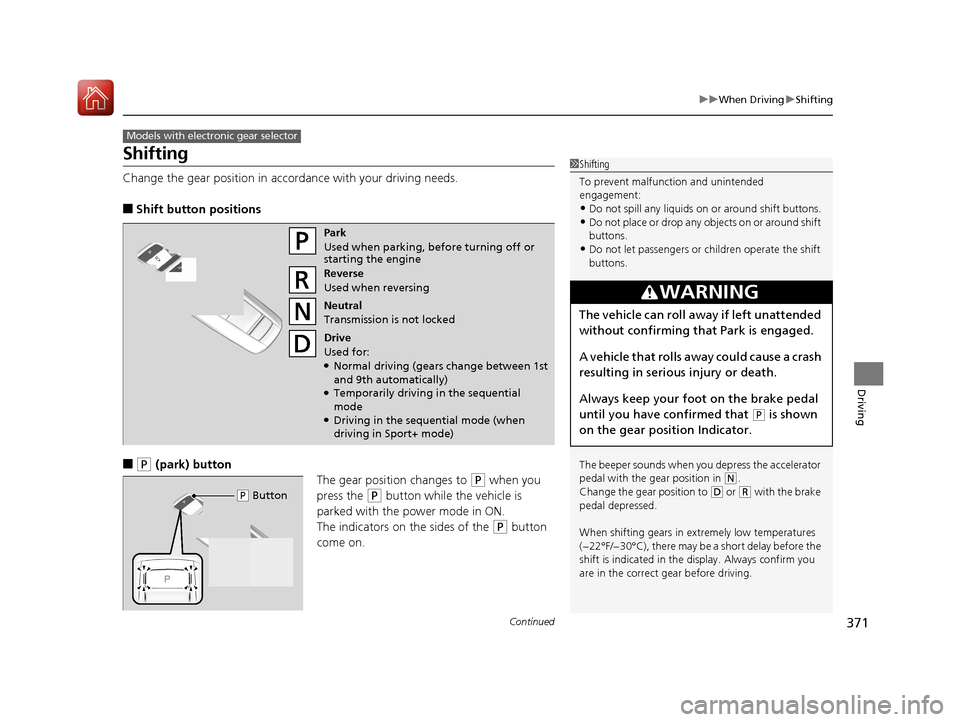
■Shift button positions
■(P (park) button
The gear position changes to
(P when you
press the
(P button while the vehicle is
parked with the power mode in ON.
The indicators on the sides of the
(P button
come on.
Models with electronic gear selector
1 Shifting
To prevent malfunc tion and unintended
engagement:
•Do not spill any liquids on or around shift buttons.
•Do not place or drop any objects on or around shift
buttons.
•Do not let passengers or ch ildren operate the shift
buttons.
The beeper sounds when you depress the accelerator
pedal with the gear position in
( N.
Change the gear position to
( D or (R with the brake
pedal depressed.
When shifting gears in extremely low temperatures
(−22°F/−30°C), there may be a short delay before the
shift is indicated in the di splay. Always confirm you
are in the correct gear before driving.
3WARNING
The vehicle can roll aw ay if left unattended
without confirming th at Park is engaged.
A vehicle that rolls away could cause a crash
resulting in serious injury or death.
Always keep your foot on the brake pedal
until you have confirmed that
( P is shown
on the gear position Indicator.
Park
Used when parking, before turning off or
starting the engine
Reverse
Used when reversing
Neutral
Transmission is not locked
Drive
Used for:
●Normal driving (gears change between 1st
and 9th automatically)
●Temporarily driving in the sequential
mode
●Driving in the sequential mode (when
driving in Sport+ mode)
( P Button
18 ACURA TLX-31TZ36300.book 371 ページ 2017年2月21日 火曜日 午後2時32分
Page 392 of 589
391
uuWhen Driving uAdaptive Cruise Control (ACC) with Low Speed Follow (LSF)
Continued
Driving
Adaptive Cruise Control (ACC) with Low Speed
Follow (LSF)
Helps maintain a constant vehicle speed an d a set following-interval behind a vehicle
detected ahead of yours and, if the detect ed vehicle comes to a stop, can decelerate
and stop your ve hicle, without yo u having to keep your foot on the brake or the
accelerator.
When ACC with LSF slows your vehicle by applying the brakes, your vehicle’s brake
lights will illuminate.
1 Adaptive Cruise Control (ACC) with Low Speed Follow (LSF)
Important Reminder
As with any system, there are limits to ACC with LSF.
Use the brake pedal whenever necessary, and always
keep a safe interval between your vehicle and other
vehicles.
3WARNING
Improper use of ACC wi th LSF can lead to a
crash.
Use ACC with LSF only when driving on
expressways or freeways and in good
weather conditions.
3WARNING
ACC with LSF has limited braking capability
and may not stop your vehicle in time to
avoid a collision with a vehicle that quickly
stops in front of you.
Always be prepared to apply the brake
pedal if the conditions require.
When to use
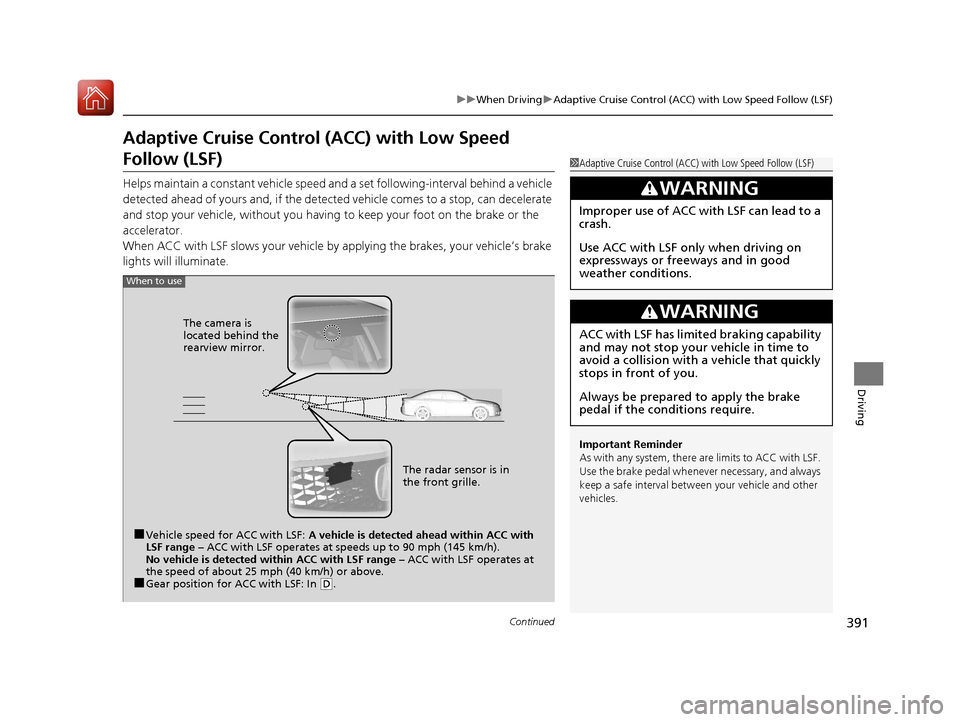
■Vehicle speed for ACC with LSF: A vehicle is detected ahead within ACC with
LSF range – ACC with LSF operates at speeds up to 90 mph (145 km/h).
No vehicle is detected within ACC with LSF range – ACC with LSF operates at
the speed of about 25 mph (40 km/h) or above.
■Gear position for ACC with LSF: In ( D. The radar sensor is in
the front grille.
The camera is
located behind the
rearview mirror.
18 ACURA TLX-31TZ36300.book 391 ページ 2017年2月21日 火曜日 午後2時32分
Page 395 of 589
uuWhen Driving uAdaptive Cruise Control (ACC) with Low Speed Follow (LSF)
394
Driving
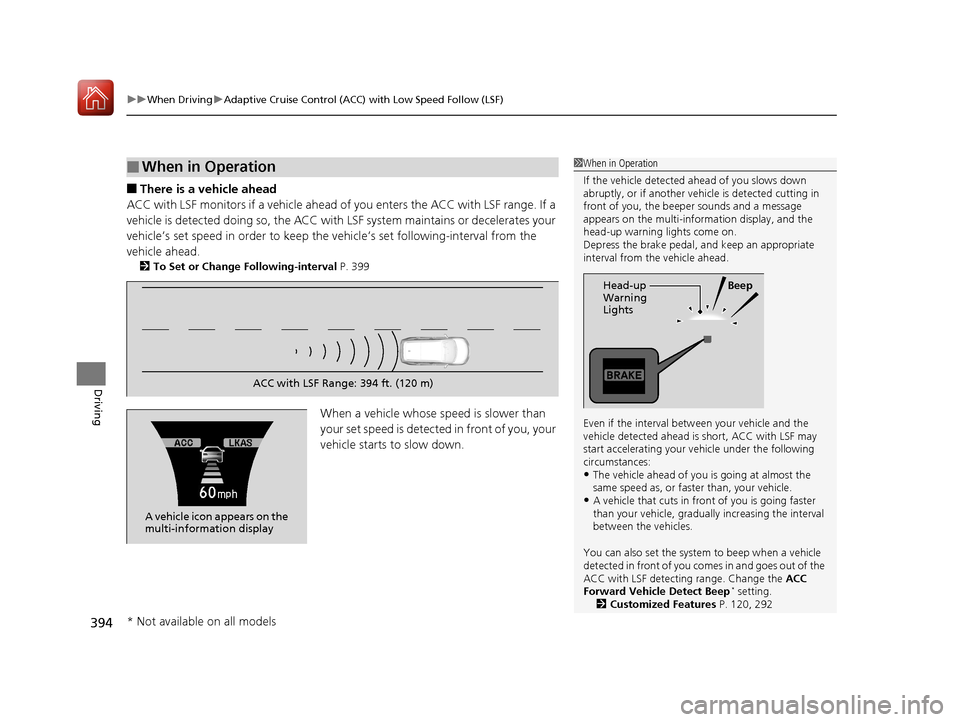
■There is a vehicle ahead
ACC with LSF monitors if a vehicle ahead of you enters the ACC with LSF range. If a
vehicle is detected doing so, the ACC with LSF system maintains or decelerates your
vehicle’s set speed in order to keep the vehicle’s set following-interval from the
vehicle ahead.
2 To Set or Change Following-interval P. 399
When a vehicle whose speed is slower than
your set speed is detected in front of you, your
vehicle starts to slow down.
■When in Operation1 When in Operation
If the vehicle detected ahead of you slows down
abruptly, or if a nother vehicle is de tected cutting in
front of you, the beep er sounds and a message
appears on the multi-inform ation display, and the
head-up warning lights come on.
Depress the brake pedal, and keep an appropriate
interval from the vehicle ahead.
Even if the interval betw een your vehicle and the
vehicle detected ahead is short, ACC with LSF may
start accelerating your vehicle under the following
circumstances:
•The vehicle ahead of you is going at almost the
same speed as, or faster than, your vehicle.
•A vehicle that cuts in front of you is going faster
than your vehicle, gradua lly increasing the interval
between the vehicles.
You can also set the system to beep when a vehicle
detected in front of you co mes in and goes out of the
ACC with LSF detecting range. Change the ACC
Forward Vehicle Detect Beep
* setting.
2 Customized Features P. 120, 292
BeepHead-up
Warning
Lights
ACC with LSF Range: 394 ft. (120 m)
A vehicle icon appears on the
multi-information display
* Not available on all models
18 ACURA TLX-31TZ36300.book 394 ページ 2017年2月21日 火曜日 午後2時32分
Page 396 of 589
Continued395
uuWhen Driving uAdaptive Cruise Control (ACC) with Low Speed Follow (LSF)
Driving
■There is no vehicle ahead
Your vehicle maintains the set speed without
having to keep your foot on the brake or
accelerator pedal.
If there previously was a vehicle detected
ahead that kept your vehicle from traveling at
the set speed, ACC with LSF accelerates your
vehicle to the set speed, and then maintains it.
■When you depress the accelerator pedal
You can temporarily increase the vehicle speed . In this case, there is no audible or
visual alert even if a vehicl e is in the ACC with LSF range.
ACC with LSF stays on unless you cancel it . Once you release the accelerator pedal,
the system resumes the set speed.
There are times when the vehicle speed will decrease when the accelerator pedal is
lightly applied.
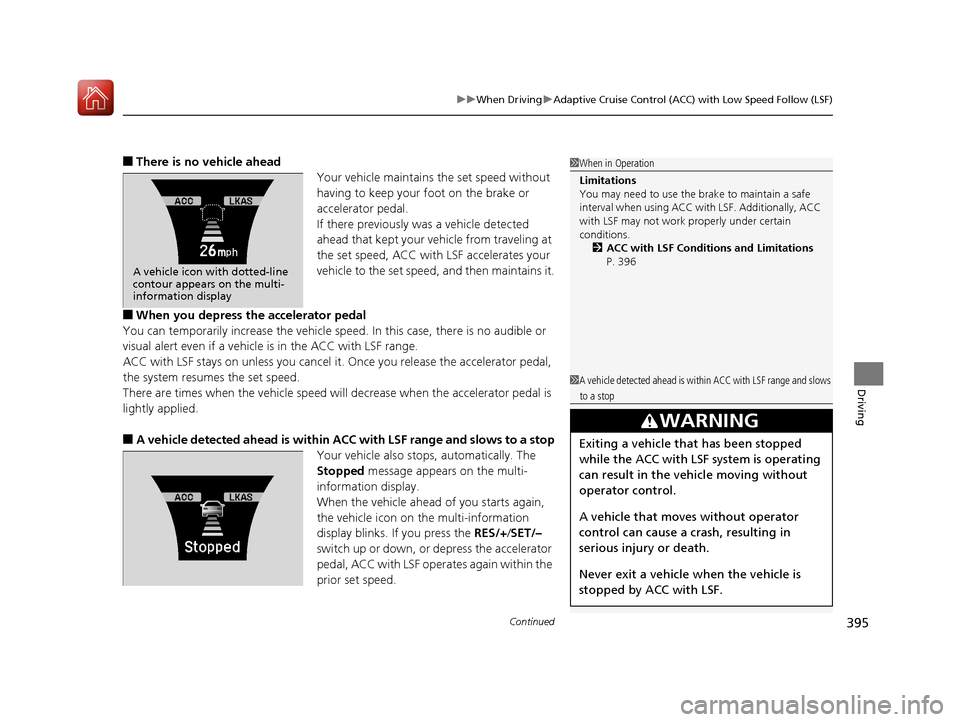
■A vehicle detected ahead is within ACC with LSF range and slows to a stop
Your vehicle also stops, automatically. The
Stopped message appears on the multi-
information display.
When the vehicle ahead of you starts again,
the vehicle icon on the multi-information
display blinks. If you press the RES/+/SET/–
switch up or down, or depress the accelerator
pedal, ACC with LSF operates again within the
prior set speed.
A vehicle icon with dotted-line
contour appears on the multi-
information display
1 When in Operation
Limitations
You may need to use the brake to maintain a safe
interval when using ACC wi th LSF. Additionally, ACC
with LSF may not work properly under certain
conditions. 2 ACC with LSF Conditions and Limitations
P. 396
1 A vehicle detected ahead is with in ACC with LSF range and slows
to a stop
3WARNING
Exiting a vehicle that has been stopped
while the ACC with LSF system is operating
can result in the vehicle moving without
operator control.
A vehicle that moves without operator
control can cause a crash, resulting in
serious injury or death.
Never exit a vehicle when the vehicle is
stopped by ACC with LSF.
18 ACURA TLX-31TZ36300.book 395 ページ 2017年2月21日 火曜日 午後2時32分
Page 397 of 589
uuWhen Driving uAdaptive Cruise Control (ACC) with Low Speed Follow (LSF)
396
Driving
The system may automatically shut off and the ACC indicator will come on under
certain conditions. Some examples of th ese conditions are listed below. Other
conditions may reduce some of the ACC functions.
2 Front Sensor Camera P. 389
■Environmental conditions
Driving in bad weather (r ain, fog, snow, etc.).
■Roadway conditions
Driving on a snowy or wet roadway (obscure d lane marking, vehicle tracks, reflected
lights, road spray, high contrast).
■Vehicle conditions
• The outside of the windshie ld is blocked by dirt, mud, leaves, wet snow, etc.
• An abnormal tire or wheel condition (Wrong sized, varied size or construction,
improperly inflated, compact spare tire
*, etc.).
• The camera temperature gets too high.
• The parking brake is applied.
• When the front grille is dirty.
• The vehicle is tilted due to a heav y load or suspension modifications.
• When tire chains are installed.
■ACC with LSF Conditions and Limitations1ACC with LSF Conditions and Limitations
The radar sensor for ACC with LSF is shared with the
Collision Mitigati on Braking System
TM (CMBSTM).
2 Collision Mitigation Braking SystemTM
(CMBSTM) P. 437
You can read about handling information for the
camera equipped with this system. 2 Front Sensor Camera P. 389
Always keep the radar sensor cover clean.
Never use chemical solvents or polishing powder for
cleaning the sensor cover. Clean it with water or a
mild detergent.
Do not put a sticker on the radar sensor cover or
replace the radar sensor cover.
If you need the radar sensor to be repaired, or
removed, or the radar se nsor cover is strongly
impacted, turn off the system by pressing the MAIN
button and take your vehicle to a dealer.
Have your vehicle checked by a dealer if you find any
unusual behavior of the system (e.g., the warning
message appears too frequently).
* Not available on all models
18 ACURA TLX-31TZ36300.book 396 ページ 2017年2月21日 火曜日 午後2時32分
Page 408 of 589
Continued407
uuWhen Driving uRoad Departure Mitigation (RDM) System
Driving
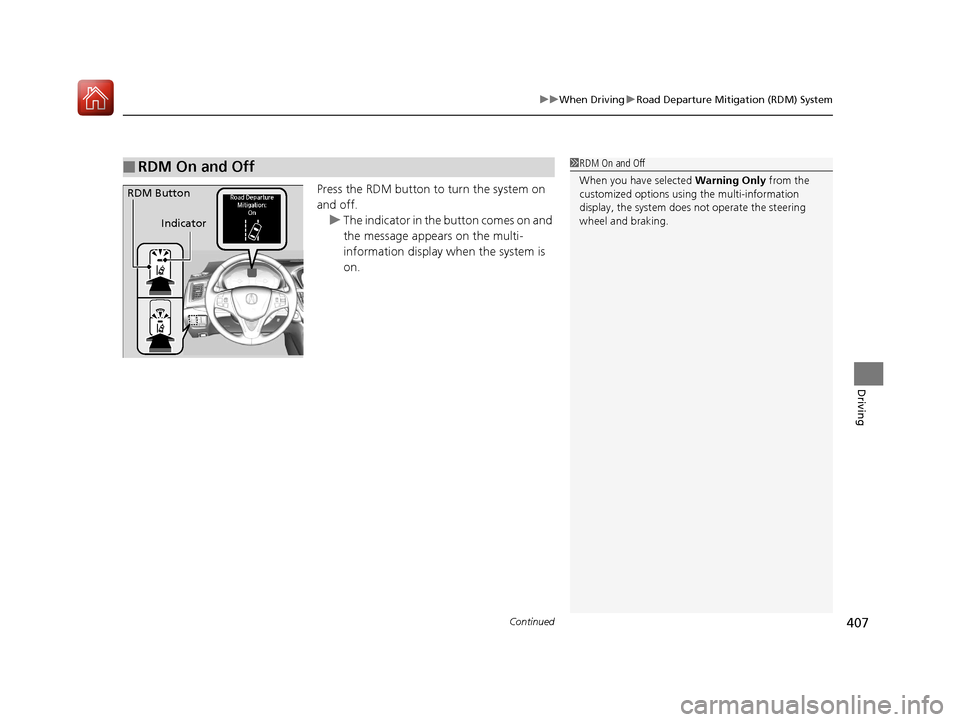
Press the RDM button to turn the system on
and off.
u The indicator in the button comes on and
the message appears on the multi-
information display when the system is
on.
■RDM On and Off1 RDM On and Off
When you have selected Warning Only from the
customized options usi ng the multi-information
display, the system does not operate the steering
wheel and braking.
RDM Button
Indicator
18 ACURA TLX-31TZ36300.book 407 ページ 2017年2月21日 火曜日 午後2時32分