back up light Acura TLX 2018 Owner's Manual
[x] Cancel search | Manufacturer: ACURA, Model Year: 2018, Model line: TLX, Model: Acura TLX 2018Pages: 589, PDF Size: 35.45 MB
Page 9 of 589
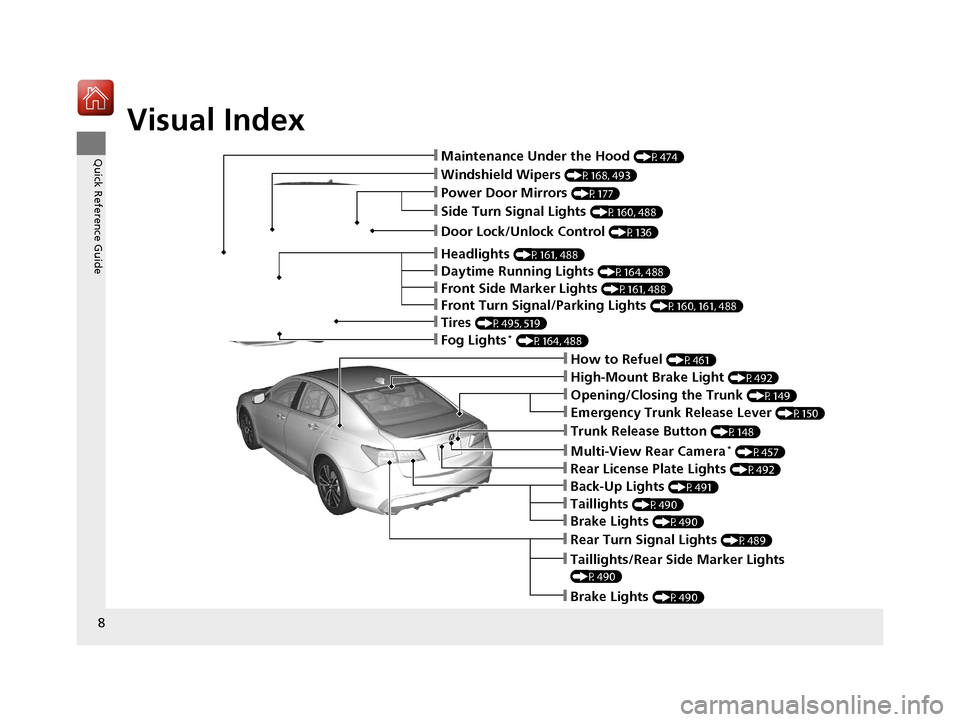
Visual Index
8
Quick Reference Guide❙Maintenance Under the Hood (P474)
❙Windshield Wipers (P168, 493)
❙Tires (P495, 519)
❙Door Lock/Unlock Control (P136)
❙Power Door Mirrors (P177)
❙Headlights (P161, 488)
❙How to Refuel (P461)
❙High-Mount Brake Light (P492)
❙Emergency Trunk Release Lever (P150)
❙Opening/Closing the Trunk (P149)
❙Multi-View Rear Camera* (P457)
❙Taillights/Rear Side Marker Lights
(P490)
❙Brake Lights (P490)
❙Rear Turn Signal Lights (P489)
❙Back-Up Lights (P491)
❙Rear License Plate Lights (P492)
❙Fog Lights* (P164, 488)
❙Trunk Release Button (P148)
❙Front Turn Signal/Parking Lights (P160, 161, 488)
❙Side Turn Signal Lights (P160, 488)
❙Daytime Running Lights (P164, 488)
❙Front Side Marker Lights (P161, 488)
❙Taillights (P490)
❙Brake Lights (P490)
18 ACURA TLX-31TZ36300.book 8 ページ 2017年2月21日 火曜日 午後2時32分
Page 100 of 589
99
uuIndicators uMulti-Information Display Warning and Information Messages
Continued
Instrument Panel
MessageConditionExplanation
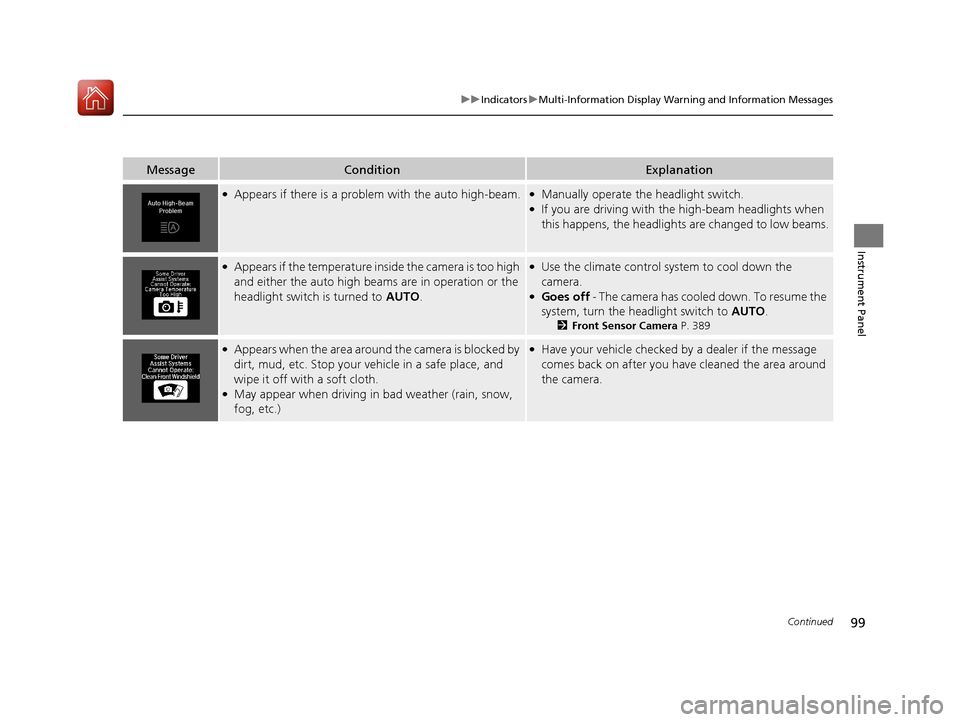
●Appears if there is a problem with the auto high-beam.●Manually operate the headlight switch.●If you are driving with the high-beam headlights when
this happens, the headlights are changed to low beams.
●Appears if the temperature inside the camera is too high
and either the auto high beam s are in operation or the
headlight switch is turned to AUTO .●Use the climate control system to cool down the
camera.
●Goes off - The camera has cooled down. To resume the
system, turn the headlight switch to AUTO.
2Front Sensor Camera P. 389
●Appears when the area around the camera is blocked by
dirt, mud, etc. Stop your ve hicle in a safe place, and
wipe it off with a soft cloth.
●May appear when driving in bad weather (rain, snow,
fog, etc.)
●Have your vehicle checked by a dealer if the message
comes back on after you have cleaned the area around
the camera.
18 ACURA TLX-31TZ36300.book 99 ページ 2017年2月21日 火曜日 午後2時32分
Page 123 of 589

122
uuGauges and Multi-Information Display uMulti-Information Display
Instrument Panel
Door Setup
Maintenance Info.
Default All
Lighting Setup
Key And Remote Unlock Mode
Auto Door Lock
Auto Door Unlock
Keyless Lock Answer Back
Auto Folding Door Mirror*
Interior Ligh t Dimming Time
Headlight Auto Off Timer
Auto Light Sensitivity
Push
Push
Roll
Roll
Roll
Dynamic Mode SetupPushPreferred Dynamic Mode
Push
PushMaintenance Reset
Roll
Roll
Roll
Roll
Roll
Roll
Security Relock Timer
Wireless Charger Setup*PushWireless Charging
Roll
Exit
* Not available on all models
18 ACURA TLX-31TZ36300.book 122 ページ 2017年2月21日 火曜日 午後2時32分
Page 127 of 589
126
uuGauges and Multi-Information Display uMulti-Information Display
Instrument Panel
*1: Default SettingSetup Group Customizable Features Description Selectable Settings
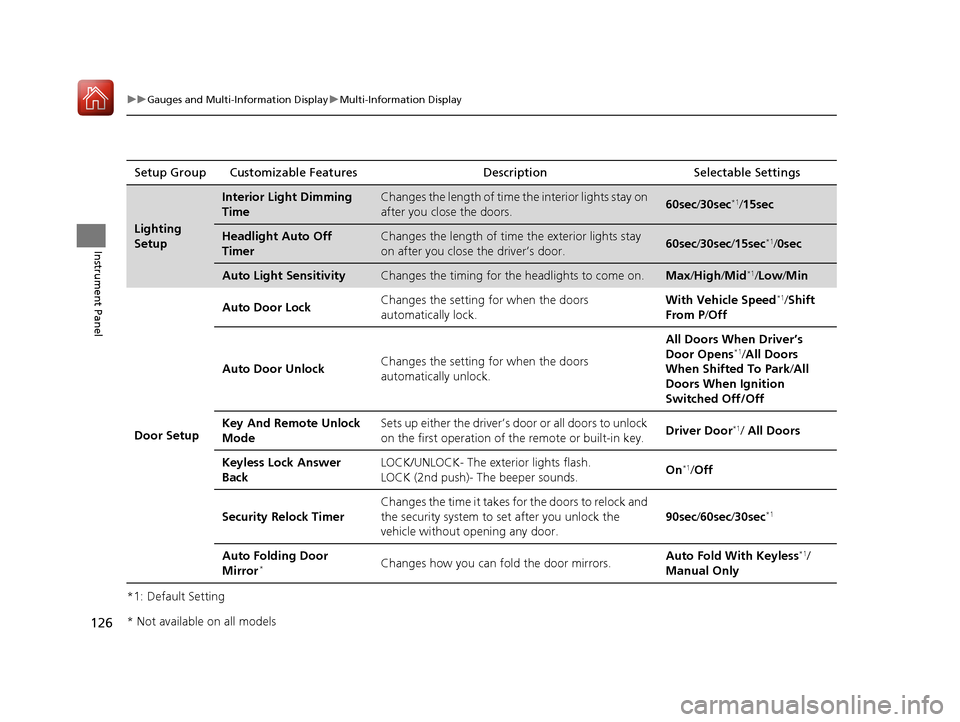
Lighting
Setup
Interior Light Dimming
TimeChanges the length of time
the interior lights stay on
after you close the doors.60sec /30sec*1/15sec
Headlight Auto Off
TimerChanges the length of time the exterior lights stay
on after you close the driver’s door.60sec /30sec /15sec*1/ 0sec
Auto Light SensitivityChanges the timing for the headlights to come on.Max/High /Mid*1/Low/ Min
Door Setup Auto Door Lock
Changes the setting for when the doors
automatically lock. With Vehicle Speed
*1/
Shift
From P /Off
Auto Door Unlock Changes the setting for when the doors
automatically unlock. All Doors When Driver’s
Door Opens
*1/
All Doors
When Shifted To Park /All
Doors When Ignition
Switched Off/Off
Key And Remote Unlock
Mode Sets up either the driver’s door or all doors to unlock
on the first operation of the remote or built-in key.
Driver Door
*1/ All Doors
Keyless Lock Answer
Back LOCK/UNLOCK- The exte
rior lights flash.
LOCK (2nd push)- The beeper sounds. On
*1/
Off
Security Relock Timer Changes the time it takes for the doors to relock and
the security system to set after you unlock the
vehicle without opening any door.
90sec
/60sec /30sec
*1
Auto Folding Door
Mirror*Changes how you can fold the door mirrors. Auto Fold With Keyless*1/
Manual Only
* Not available on all models
18 ACURA TLX-31TZ36300.book 126 ページ 2017年2月21日 火曜日 午後2時32分
Page 134 of 589

133Continued
Controls
Locking and Unlocking the Doors
Key Types and Functions
This vehicle comes with the following keys:
Use the keys to start and stop the engine, and
to lock and unlock all the doors and trunk.
You can also use the remote transmitter to
lock and unlock the doors and trunk.1Key Types and Functions
All the keys have an immobilizer system. The
immobilizer system helps to protect against vehicle
theft. 2 Immobilizer System P. 151
Follow the advice below to prevent damage to the
keys:
•Do not leave the keys in direct sunlight, or in
locations with high temperature or high humidity.
•Do not drop the keys or set heavy objects on them.•Keep the keys away from liquids, dust and sand.
•Do not take the keys apart except for replacing the
battery.
If the circuits in the keys are damaged, the engine
may not start, and the remote transmitter may not
work.
If the keys do not work properly, have them
inspected by a dealer.
You can remotely start the engine using the two-way
keyless access remote. 2 Remote Engine Start with Vehicle
Feedback
* P. 365
Models with two-way keyless access remote
Models without two-way keyless
access remote
Models with two-way keyless
access remote
* Not available on all models
18 ACURA TLX-31TZ36300.book 133 ページ 2017年2月21日 火曜日 午後2時32分
Page 157 of 589

156
Controls
Opening and Closing the Moonroof
You can only operate the moonroof when the power mode is in ON. Use the switch
in the front of the ceiling to open and close the moonroof.
■Automatic operation
To open: Pull the switch back firmly.
To close: Push the switch forward firmly.
The moonroof will automa tically open or close
all the way. To stop the moonroof midway,
push the switch briefly.
■Manual operation
To open: Pull the switch back lightly, and
hold it until the desired position is reached.
To close: Push the switch forward lightly, and
hold it until the desired position is reached.
■Tilting the moonroof up
To tilt: Push on the center of the moonroof
switch.
To close: Push the switch forward firmly, then
release.
■Opening/Closing the Moonroof1 Opening/Closing the Moonroof
NOTICE
Opening the moonroof in below freezing
temperature or when it is covered with snow or ice
can damage the moonr oof panel or motor.
The power moonroof can be operated for up to 10
minutes after you set the power mode to VEHICLE
OFF (LOCK).
Opening either front door cancels this function.
When resistance is detected, the auto reverse
function causes the moonroof to change directions,
then stop. Auto reverse stops sensing when the
moonroof is almost closed to ensure that it fully
closes. Make sure that al l objects, including fingers,
are clear of the moonroof.
You can use the remote transmitter or the key to
operate the moonroof. 2 Opening the Windows and Moonroof with
the Remote P. 155
2 Opening/Closing the Windows and
Moonroof with the Key P. 155
3WARNING
Opening or closing the moonroof on
someone’s hands or fingers can cause
serious injury.
Make sure all hands and fingers are clear of
the moonroof before opening or closing it.
Close
Open
Tilt
18 ACURA TLX-31TZ36300.book 156 ページ 2017年2月21日 火曜日 午後2時32分
Page 162 of 589
161
uuOperating the Switches Around the Steering Wheel uLight Switches
Continued
Controls
Light Switches
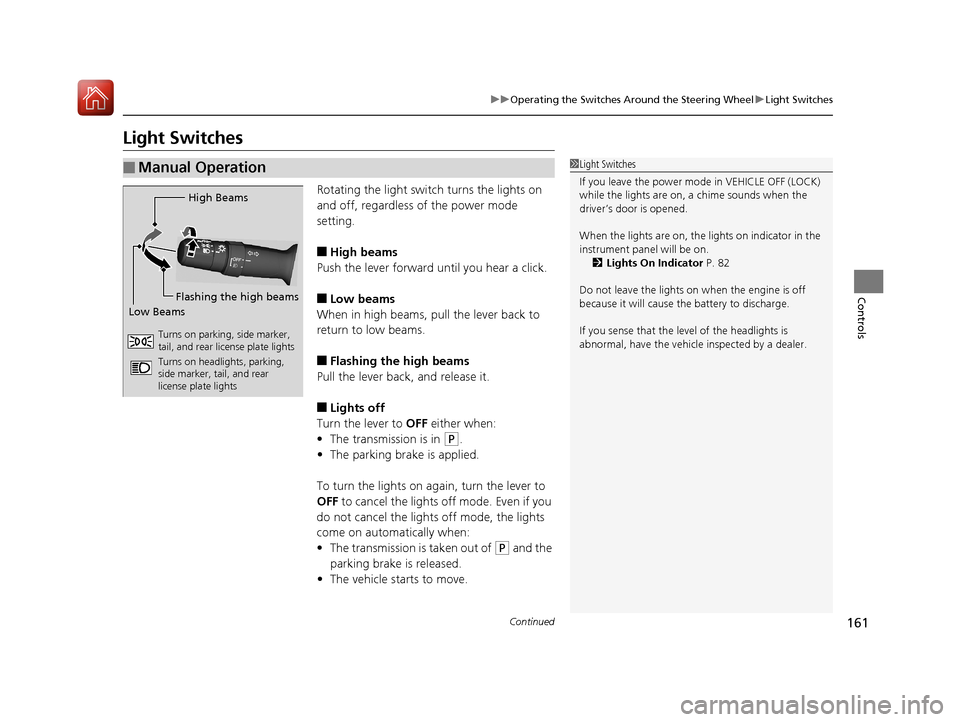
Rotating the light switch turns the lights on
and off, regardless of the power mode
setting.
■High beams
Push the lever forward until you hear a click.
■Low beams
When in high beams, pull the lever back to
return to low beams.
■Flashing the high beams
Pull the lever back, and release it.
■Lights off
Turn the lever to OFF either when:
• The transmission is in
(P.
• The parking brake is applied.
To turn the light s on again, turn the lever to
OFF to cancel the lights off mode. Even if you
do not cancel the lights off mode, the lights
come on automatically when:
• The transmission is taken out of
(P and the
parking brake is released.
• The vehicle starts to move.
■Manual Operation1Light Switches
If you leave the power mode in VEHICLE OFF (LOCK)
while the lights are on, a chime sounds when the
driver’s door is opened.
When the lights are on, the lights on indicator in the
instrument pane l will be on.
2 Lights On Indicator P. 82
Do not leave the lights on when the engine is off
because it will cause the battery to discharge.
If you sense that the le vel of the headlights is
abnormal, have the vehicl e inspected by a dealer.
High Beams
Flashing the high beams
Low Beams
Turns on parking, side marker,
tail, and rear license plate lights
Turns on headlights, parking,
side marker, tail, and rear
license plate lights
18 ACURA TLX-31TZ36300.book 161 ページ 2017年2月21日 火曜日 午後2時32分
Page 167 of 589
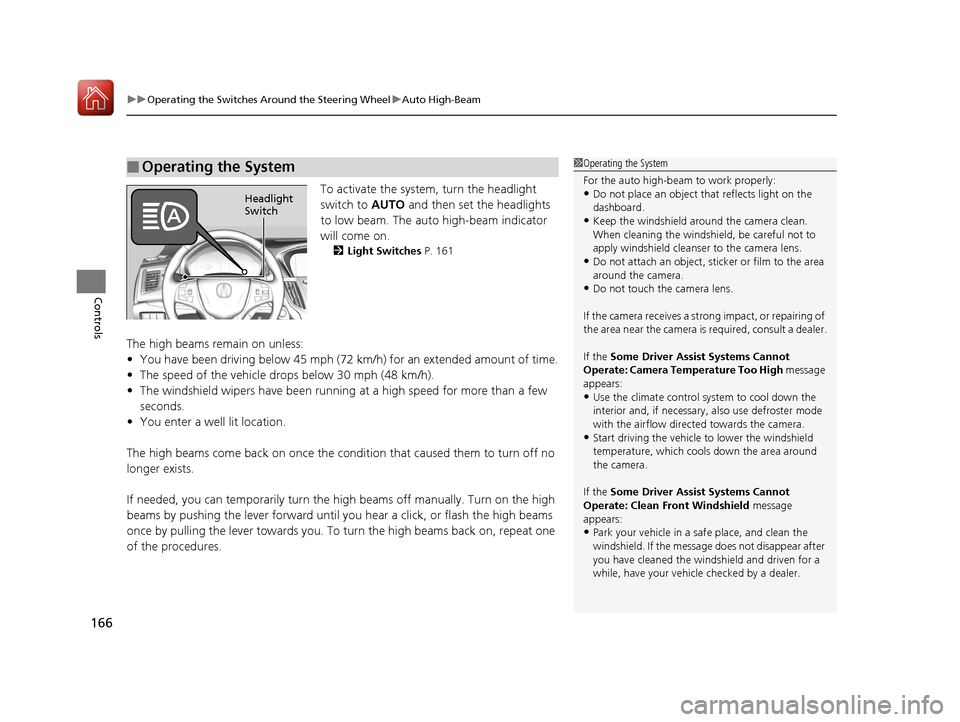
uuOperating the Switches Around the Steering Wheel uAuto High-Beam
166
Controls
To activate the system, turn the headlight
switch to AUTO and then set the headlights
to low beam. The auto high-beam indicator
will come on.
2 Light Switches P. 161
The high beams remain on unless:
•You have been driving below 45 mph (72 km/h) for an extended amount of time.
• The speed of the vehicle drops below 30 mph (48 km/h).
• The windshield wipers have been running at a high speed for more than a few
seconds.
• You enter a well lit location.
The high beams come back on once the condition that caused them to turn off no
longer exists.
If needed, you can temporarily turn the high beams off manually. Turn on the high
beams by pushing the lever forward until yo u hear a click, or flash the high beams
once by pulling the lever towards you. To turn the high beams back on, repeat one
of the procedures.
■Operating the System1 Operating the System
For the auto high-beam to work properly:
•Do not place an object that reflects light on the
dashboard.
•Keep the windshield around the camera clean.
When cleaning the windshield, be careful not to
apply windshield cleanser to the camera lens.
•Do not attach an object, sticker or film to the area
around the camera.
•Do not touch the camera lens.
If the camera receives a st rong impact, or repairing of
the area near the camera is required, consult a dealer.
If the Some Driver Assist Systems Cannot
Operate: Camera Temperature Too High message
appears:
•Use the climate control system to cool down the
interior and, if necessary, also use defroster mode
with the airflow directed towards the camera.
•Start driving the vehicle to lower the windshield
temperature, which cool s down the area around
the camera.
If the Some Driver Assist Systems Cannot
Operate: Clean Front Windshield message
appears:
•Park your vehicle in a sa fe place, and clean the
windshield. If the message does not disappear after
you have cleaned the winds hield and driven for a
while, have your vehicle checked by a dealer.
Headlight
Switch
18 ACURA TLX-31TZ36300.book 166 ページ 2017年2月21日 火曜日 午後2時32分
Page 198 of 589

Continued197
uuInterior Lights/Interior Convenience Items uInterior Convenience Items
Controls
■When charging does not start
Perform one of the solutions in the following table.
IndicatorCauseSolution
Slow Blink
There is an obstacle(s) between
the charging area and the
device.Remove the
obstacle(s).
The device is not within the
charging area. Move the device to the
center of the charging
area where is
located.
Fast BlinkThe wireless charger is faulty.
Turn the vehicle off
and back on. If the
indicator still blinks,
contact a dealer.
1
Wireless Charger*
This system consumes a lot of power. Do not use the
system for a long time when the engine is not
running. This may weaken the battery, making it
difficult to start the engine.
When using the wireless charger, check the user’s
manual that came with th e compatible device you
want to charge.
NOTICE
Do not place any magneti c recording media or
precision machines within the charging area while
charging.
The data on your cards such as credit cards can be
lost because of the magneti c effect. Also precision
machines such as watches can go wrong.
Page 208 of 589

Continued207
uuClimate Control System uUsing Automatic Climate Control
Controls
■Switching the vent mode
Select a desired vent mode icon, or Mode
Auto: The system automatically selects the
vent mode most suitable to the ambient
environment.
Vent mode
: Dashboard vents and back of the center
console
: Dashboard and floor vents, and back of
the center console : Floor vents
: Floor and defroster vents
■A/C on and off
1.Select A/C.
2. Select On or Off .
1Switching the vent mode
While the climate control system is in auto, Mode
Auto is highlighted.
18 ACURA TLX-31TZ36300.book 207 ページ 2017年2月21日 火曜日 午後2時32分