language Acura TLX 2018 Owner's Manual
[x] Cancel search | Manufacturer: ACURA, Model Year: 2018, Model line: TLX, Model: Acura TLX 2018Pages: 589, PDF Size: 35.45 MB
Page 122 of 589

121
uuGauges and Multi-Information Display uMulti-Information Display
Continued
Instrument Panel
■Customization flow
Roll the right selector wheel to select Vehicle Settings and push the right selector wheel.
Vehicle Settings
“Trip A” Reset Timing
Language Selection
Adjust Outside Temp. Display
Memory Position Link
Door Unlock Mode
Keyless Access Light Flash
Driver Assist System Setup
Meter Setup
Driving Position Setup
Keyless Access Setup
“Trip B” Reset Timing
Turn by Turn Display*
Forward Collision Warning Distance
ACC Forward Vehicle Detect Beep
Push
Push
Push
Lane Keeping Assist Suspend Beep
Blind Spot Info*
Remote Start System On/Off*
Seat Position Movement At Entry/Exit
Roll
Keyless Access Beep
Push
Roll
Push
Push
Roll
Roll
Roll
Roll
Roll
Roll
ACC Display Speed Unit
Road Departure Mitigation Setting
Walk Away Auto Lock
Auto Engine Idle Stop Guidance Screens*Reverse Alert Tone*
Roll
* Not available on all models
18 ACURA TLX-31TZ36300.book 121 ページ 2017年2月21日 火曜日 午後2時32分
Page 125 of 589

124
uuGauges and Multi-Information Display uMulti-Information Display
Instrument Panel
*1:Default SettingSetup Group Customizabl
e Features Description Selectable Settings
Meter Setup Language Selection
Changes the displayed language. English
*1/
Français /
Español
Adjust Outside Temp.
Display Adjusts the temperature reading by a few degrees. -5°F ~
±0°F
*1 ~ +5°F
(U.S.)
-3°C ~ ±0°C
*1 ~ +3°C
(Canada)
“Trip A” Reset Timing Changes the setting of how to reset trip meter A,
average fuel economy A, average speed A, and elapsed
time A. When Refueled
/IGN Off/
Manually Reset
*1
“Trip B” Reset Timing Changes the setting of how to reset trip meter B,
average fuel economy B, av
erage speed B, and elapsed
time B. When Refueled
/IGN Off/
Manually Reset*1
Reverse Alert Tone*Causes the beeper to sound once when the change the
gear position to
(R. On*1/
Off
Auto Engine Idle Stop
Guidance Screens
*Selects whether the Auto Idle Stop guidance screens
comes on. On
/Off*1
Turn by Turn Display*Selects whether the turn-b y-turn display comes on
during the route guidance. On*1/
Off
* Not available on all models
18 ACURA TLX-31TZ36300.book 124 ページ 2017年2月21日 火曜日 午後2時32分
Page 129 of 589

128
uuGauges and Multi-Information Display uMulti-Information Display
Instrument Panel
■Example of customization settings
The steps for changing the “Trip A” Reset Timing setting to When Refueled are
shown below. The default setting for “Trip A” Reset Timing is Manually Reset .
1. Roll the right selector wheel to select
Vehicle Settings , then push the right
selector wheel.
2. Roll the right selector wheel until Meter
Setup appears on the display.
3. Push the right selector wheel.
u Language Selection appears first on
the display.
18 ACURA TLX-31TZ36300.book 128 ページ 2017年2月21日 火曜日 午後2時32分
Page 295 of 589
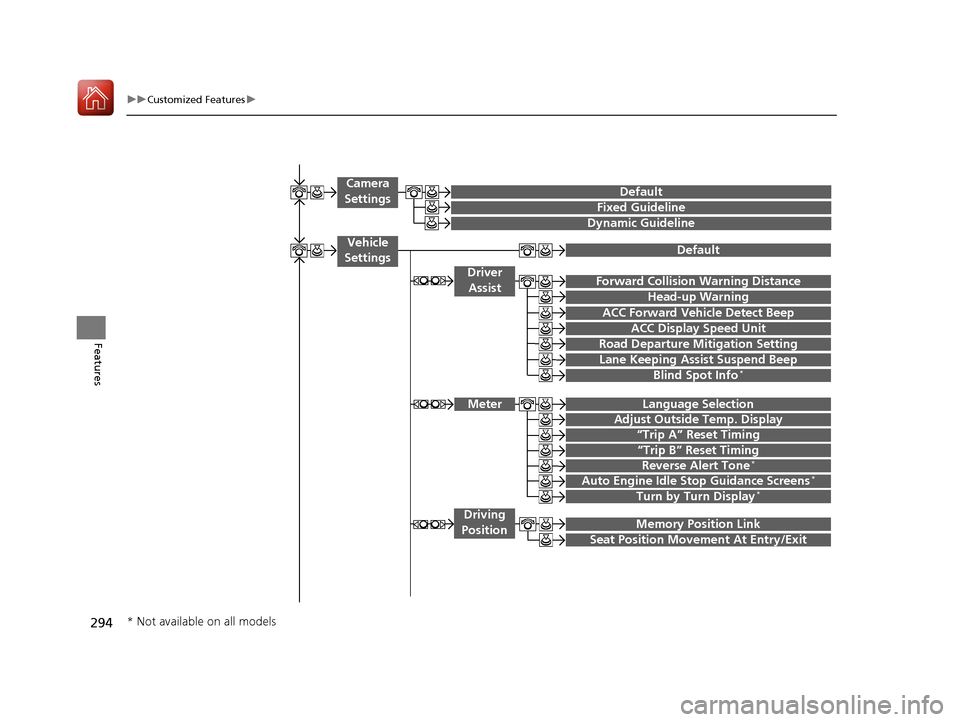
294
uuCustomized Features u
Features
“Trip A” Reset Timing
“Trip B” Reset Timing
Language Selection
Adjust Outside Temp. Display
Forward Collision Warning Distance
ACC Forward Vehicle Detect Beep
Turn by Turn Display*
Default
Meter
Driver
Assist
Lane Keeping Assist Suspend Beep
Blind Spot Info*
Driving
Position
Road Departure Mi tigation Setting
ACC Display Speed Unit
Memory Position Link
Auto Engine Idle Stop Guidance Screens*
Seat Position Movement At Entry/Exit
Reverse Alert Tone*
Vehicle
Settings
Fixed Guideline
Dynamic Guideline
Camera
SettingsDefault
Head-up Warning
* Not available on all models
18 ACURA TLX-31TZ36300.book 294 ページ 2017年2月21日 火曜日 午後2時32分
Page 297 of 589
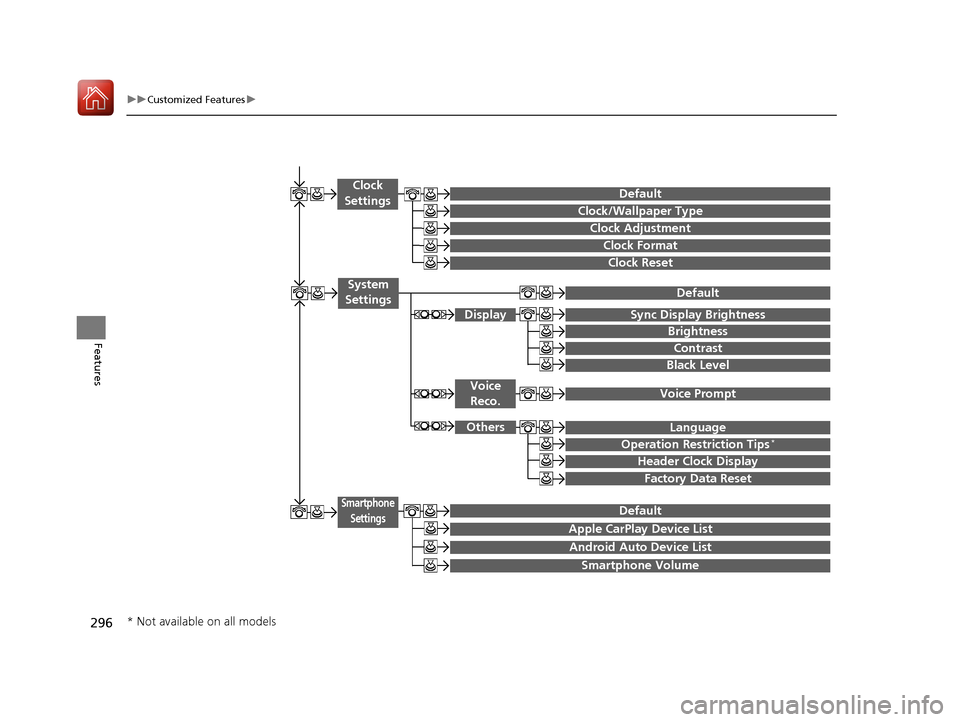
296
uuCustomized Features u
Features
Clock Reset
Clock/Wallpaper Type
Clock Adjustment
Clock
Settings
Clock Format
Default
Voice Prompt
Brightness
Contrast
Black Level
Default
Display
System
Settings
Voice Reco.
Sync Display Brightness
Factory Data Reset
Header Clock Display
Language
Operation Restriction Tips*
Others
Default
Apple CarPlay Device List
Android Auto Device List
Smartphone
Settings
Smartphone Volume
* Not available on all models
18 ACURA TLX-31TZ36300.book 296 ページ 2017年2月21日 火曜日 午後2時32分
Page 302 of 589
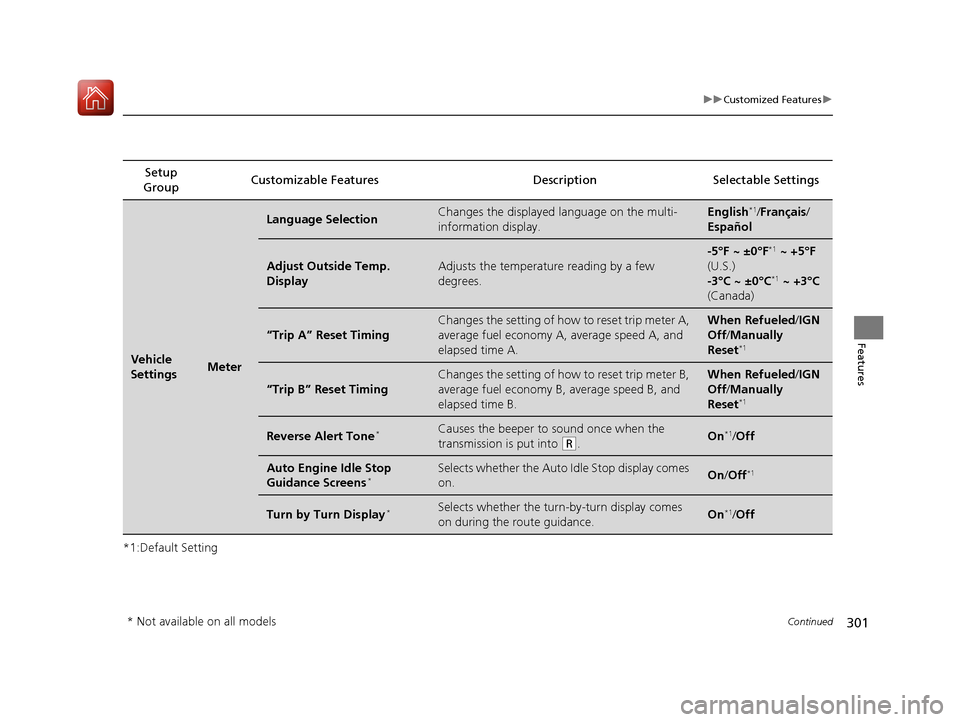
301
uuCustomized Features u
Continued
Features
*1:Default SettingSetup
Group Customizable Features Description Selectable Settings
Vehicle
SettingsMeter
Language SelectionChanges the displayed language on the multi-
information display.English*1/
Français /
Español
Adjust Outside Temp.
DisplayAdjusts the temperature reading by a few
degrees.
-5°F ~ ±0°F*1 ~ +5°F
(U.S.)
-3°C ~ ±0°C
*1 ~ +3°C
(Canada)
“Trip A” Reset Timing
Changes the setting of how to reset trip meter A,
average fuel economy A, average speed A, and
elapsed time A.When Refueled /IGN
Off /Manually
Reset
*1
“Trip B” Reset Timing
Changes the setting of how to reset trip meter B,
average fuel economy B, average speed B, and
elapsed time B.When Refueled /IGN
Off /Manually
Reset
*1
Reverse Alert Tone*Causes the beeper to sound once when the
transmission is put into
(R.On*1/ Off
Auto Engine Idle Stop
Guidance Screens*Selects whether the Auto Idle Stop display comes
on.On /Off*1
Turn by Turn Display*Selects whether the turn-by-turn display comes
on during the route guidance.On*1/Off
* Not available on all models
18 ACURA TLX-31TZ36300.book 301 ページ 2017年2月21日 火曜日 午後2時32分
Page 309 of 589

308
uuCustomized Features u
Features
*1:Default SettingSetup
Group Customizable Features Descri
ption Selectable Settings
System
SettingsOthers
LanguageChanges the display language.English*1/Français /
Español
Operation Restriction Tips*Alerts you when manual control of the system is
disabled to prevent distraction while driving. Only
voice commands are available.
On*1/ Off
Header Clock DisplaySelects whether the clock display comes on.On*1/Off
Factory Data ResetResets all the settings to their factory default.
2 Defaulting All the Settings P. 313—
Smartphone
Settings
Default Cancels/Resets all cust
omized items in the
Smartphone Settings group as default. Yes
/No
Apple CarPlay Device List Sets up the Apple CarPlay connection. —
Android Auto Device List Sets up the Android Auto connection. —
Smartphone Volume Adjusts the volume of the smartphone function. 1~8
*1~11
Version Shows software version of Apple CarPlay and
Android Auto unit. —
* Not available on all models
18 ACURA TLX-31TZ36300.book 308 ページ 2017年2月21日 火曜日 午後2時32分
Page 319 of 589
uuBluetooth ® HandsFreeLink ®u Using HFL
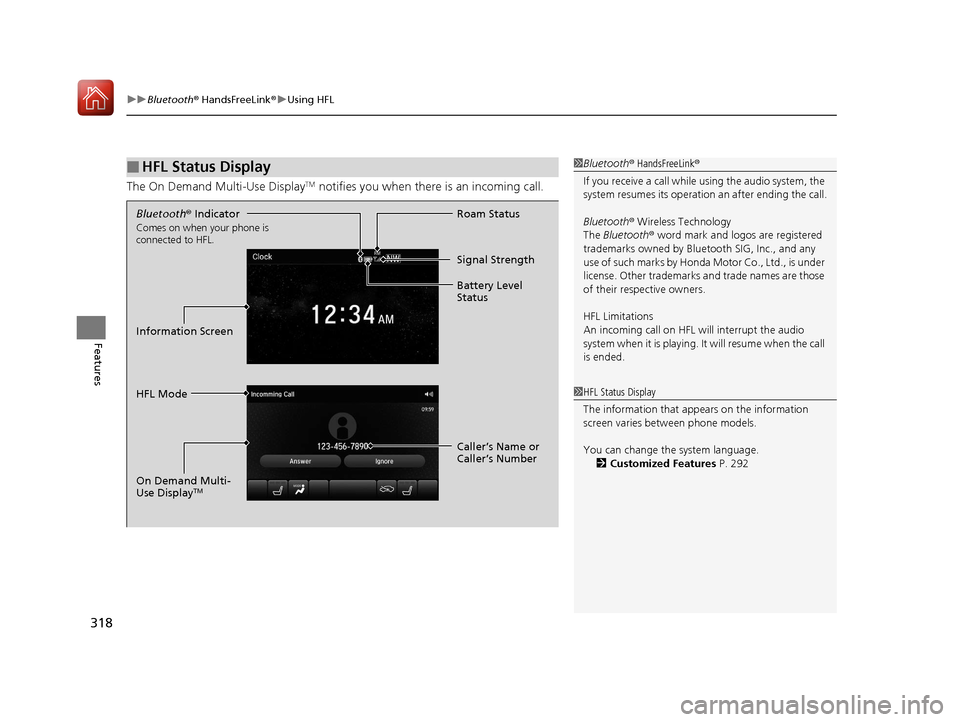
318
Features
The On Demand Multi-Use DisplayTM notifies you when there is an incoming call.
■HFL Status Display1Bluetooth ® HandsFreeLink ®
If you receive a call while using the audio system, the
system resumes its operation an after ending the call.
Bluetooth ® Wireless Technology
The Bluetooth ® word mark and logos are registered
trademarks owned by Blue tooth SIG, Inc., and any
use of such marks by Honda Motor Co., Ltd., is under
license. Other trademarks and trade names are those
of their respective owners.
HFL Limitations
An incoming call on HFL will interrupt the audio
s y s te m wh e n it is p la y i n g . It wi ll re s u m e w h en t h e c a l l
is ended.
1 HFL Status Display
The information that a ppears on the information
screen varies between phone models.
You can change the system language. 2 Customized Features P. 292
Bluetooth® Indicator
Comes on when your phone is
connected to HFL.
Signal Strength
HFL Mode Roam Status
Information Screen Battery Level
Status
Caller’s Name or
Caller’s Number
On Demand Multi-
Use Display
TM
18 ACURA TLX-31TZ36300.book 318 ページ 2017年2月21日 火曜日 午後2時32分
Page 584 of 589

583
Index
Auto High-Beam ....................................... 82
Auto Idle Stop (Green) .............................. 89
Auto Idle Stop System (Amber) ................. 89
Automatic Brake Hold ....................... 74, 433
Automatic Brake Hold System ........... 74, 433
Blind Spot Information (BSI) ...................... 88
Brake System (Amber) ............................... 72
Brake System (Red) ........................... 72, 550
Charging System............................... 75, 549
Collision Mitigation Braking System
TM
(CMBSTM) .......................................... 90, 91
Door and Trunk Open ............................... 33
ECON (Econ mode) ................................... 85
Electric Parking Brake ................................ 73
Electric Parking Brake System ............ 73, 552
Electric Power Steering (EPS) System ............................................ 79, 551
Fog Lights ................................................. 82
Gear Position ............................................ 75
High Beam ................................................ 82
Immobilizer System ................................... 83
Keyless Access System............................... 83
Lane Keeping Assist System (LKAS) ... 87, 412
Lights On .................................................. 82
Low Fuel ................................................... 78
Low Oil Pressure ............................... 74, 549
Low Tire Pressure/TPMS ............ 81, 425, 427
M (sequential mode) I ndicator/Sequential
Mode Gear Selection............................... 78
Malfunction Indicator Lamp .............. 75, 550 Precision All-Wheel Steer
TM (P-AWS
®)
System..................................................... 85
Road Departure Mitigation (RDM) .............. 84
Seat Belt Reminder .............................. 35, 78
Security System Alarm ............................... 83
Shift Lever Position .................................... 75
SPORT (Sport mode) .................................. 85
Super Handling-All Wheel Drive
TM
(SH-AWD ®) .............................................. 89
Supplemental Restraint System ............ 53, 79
System Message ........................................ 81
Transmission System ............................ 76, 77
Turn Signal ................................................ 82
Vehicle Stability Assist (VSA ®)
System............................................. 80, 418
VSA ® OFF .......................................... 80, 419
Information ............................................... 565
Information Screen ................................... 223
Instant Fuel Economy ............................... 118
Instrument Panel ........................................ 71
Brightness Control ................................... 171
Integrated Dynamics System .................... 388
Dynamic Mode Button ............................. 388
Interface Dial ............................................ 219
Interior Lights ........................................... 188
Interior Rearview Mirror .......................... 176
Internet Radio ........................................... 250
iPhone ............................................... 250, 276
iPod ................................................... 247, 276
J
Jack (Wheel Nut Wrench) ........................ 535
Jump Starting ........................................... 542
K
Key Number Tag ....................................... 135
Keyless Access System .............................. 136
Keyless Lockout Prevention ..................... 142
Keys ........................................................... 133
Lockout Prevention.................................. 142
Number Tag ............................................ 135
Rear Door Won’t Open............................ 146
Remote Transmitter ................................. 141
Two-way Keyless Access Remote ..... 143, 365
Types and Functions ................................ 133
Kickdown (Automatic Transmission) ....... 370
Kickdown (Dual Clutch Transmission) ..... 370
L
Lane Keeping Assist System (LKAS)......... 410
Language (HFL) ........................................ 318
LATCH (Child Seats) .................................... 61
Legal Information on Apple CarPlay/ Android Auto .......................................... 289
18 ACURA TLX-31TZ36300.book 583 ページ 2017年2月21日 火曜日 午後2時32分