change time Acura TLX 2020 Owner's Guide
[x] Cancel search | Manufacturer: ACURA, Model Year: 2020, Model line: TLX, Model: Acura TLX 2020Pages: 589, PDF Size: 32.88 MB
Page 305 of 589

304
uuCustomized Features u
Features
*1:Default SettingSetup
Group Customizable Features Descri
ption Selectable Settings
Vehicle
SettingsDoor
Auto Door LockChanges the setting for when the doors
automatically lock.With Vehicle
Speed*1/Shift from P/
Off
Auto Door UnlockChanges the setting for when the doors unlock
automatically.
All Doors When
Driver’s Door
Opens
*1/ All Doors
When Shifted to
Park /All Doors When
Ignition Switched
Off /Off
Key And Remote Unlock
ModeSets up either the driver’s door or all doors to
unlock on the first push of the remote or built-in
key.Driver Door*1/ All
Doors
Keyless Lock Answer BackLOCK/UNLOCK- The exterior lights flash.
LOCK (2nd push)- The beeper sounds.On*1/ Off
Security Relock Timer
Changes the time it takes for the doors to relock
and the security system to set after you unlock
the vehicle without opening any door.90seconds/
60seconds/
30seconds
*1
Auto Folding Door Mirror*Changes how you can fold the door mirrors.
Auto Fold With
Keyless*1/Manual
Only
* Not available on all models
20 ACURA TLX-31TZ36500.book 304 ページ 2019年2月7日 木曜日 午後2時2分
Page 313 of 589
312
uuCustomized Features u
Features
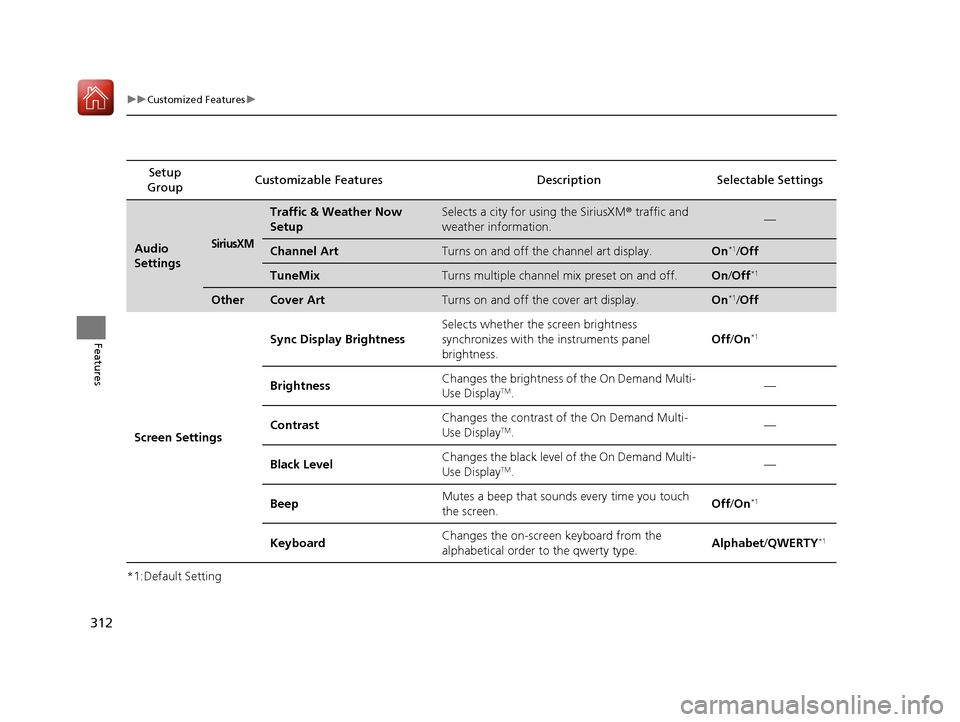
*1:Default SettingSetup
Group Customizable Features Descri
ption Selectable Settings
Audio
SettingsSiriusXM
Traffic & Weather Now
SetupSelects a city for using the SiriusXM® traffic and
weather information.—
Channel ArtTurns on and off the channel art display.On*1/ Off
TuneMixTurns multiple channel mix preset on and off.On /Off*1
OtherCover ArtTurns on and off the cover art display.On*1/Off
Screen Settings Sync Display Brightness
Selects whether the screen brightness
synchronizes with the instruments panel
brightness. Off
/On
*1
Brightness Changes the brightness of the On Demand Multi-
Use DisplayTM. —
Contrast Changes the contrast of the On Demand Multi-
Use Display
TM.
—
Black Level Changes the black level of the On Demand Multi-
Use Display
TM. —
Beep Mutes a beep that sounds every time you touch
the screen. Off
/On
*1
Keyboard Changes the on-screen keyboard from the
alphabetical order to the qwerty type.
Alphabet
/QWERTY*1
20 ACURA TLX-31TZ36500.book 312 ページ 2019年2月7日 木曜日 午後2時2分
Page 328 of 589
Continued327
uuBluetooth ® HandsFreeLink ®u HFL Menus
Features
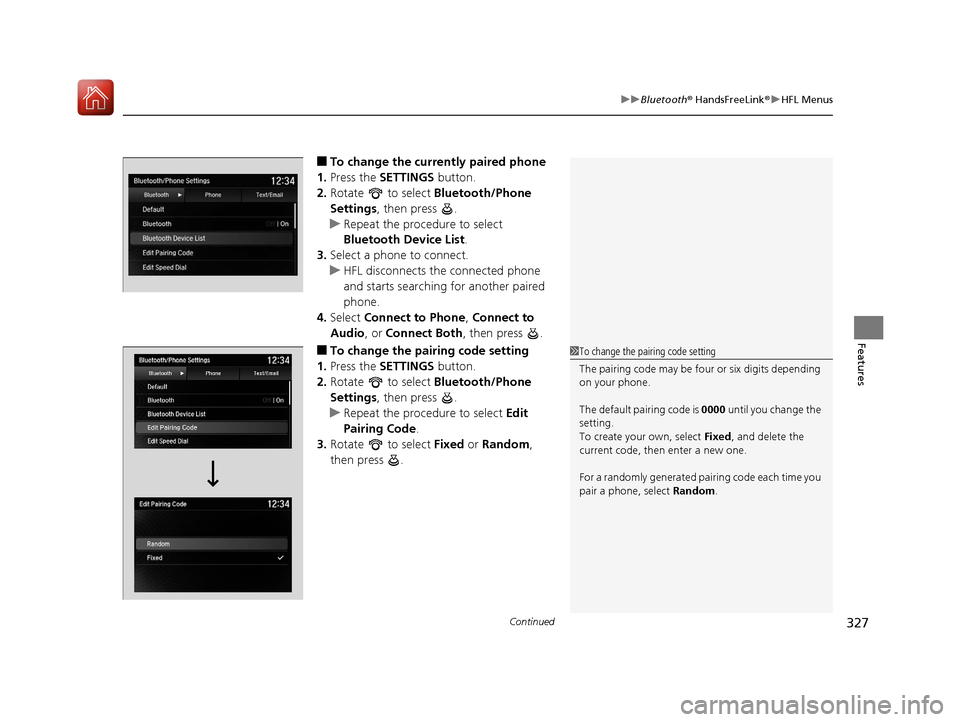
■To change the currently paired phone
1. Press the SETTINGS button.
2. Rotate to select Bluetooth/Phone
Settings , then press .
u Repeat the procedure to select
Bluetooth Device List .
3. Select a phone to connect.
u HFL disconnects the connected phone
and starts searching for another paired
phone.
4. Select Connect to Phone , Connect to
Audio , or Connect Both , then press .
■To change the pairing code setting
1. Press the SETTINGS button.
2. Rotate to select Bluetooth/Phone
Settings , then press .
u Repeat the procedure to select Edit
Pairing Code .
3. Rotate to select Fixed or Random ,
then press .1 To change the pairing code setting
The pairing code may be fo ur or six digits depending
on your phone.
The default pair ing code is 0000 until you change the
setting.
To create your own, select Fixed, and delete the
current code, then enter a new one.
For a randomly generated pa iring code each time you
pair a phone, select Random.
20 ACURA TLX-31TZ36500.book 327 ページ 2019年2月7日 木曜日 午後2時2分
Page 395 of 589

uuWhen Driving uAdaptive Cruise Control (ACC) with Low Speed Follow
394
Driving
■There is no vehicle ahead
Your vehicle maintains the set speed without
having to keep your foot on the brake or
accelerator pedal.
If there previously was a vehicle detected
ahead that kept your vehicle from traveling at
the set speed, ACC with Low Speed Follow
accelerates your vehicle to the set speed, and
then maintains it.
■When you depress the accelerator pedal
You can temporarily increase th e vehicle speed. In this case, there is no audible or
visual alert even if a vehicle is in the ACC with Low Speed Follow range.
ACC with Low Speed Follow stays on unless you cancel it. Once you release the
accelerator pedal, the system resumes the set speed.
There are times when the vehicle speed will decrease when the accelerator pedal is
lightly applied.
A vehicle icon with dotted-line
contour appears on the multi-
information display
1 When in Operation
You can also set the system to beep when a vehicle
detected in front of you co mes in and goes out of the
ACC with Low Speed Follow detecting range.
Change the ACC Forward Vehicle Detect Beep
setting.
2 Customized Features P. 120, 292
Limitations
You may need to use the brake to maintain a safe
interval when using ACC with Low Speed Follow.
Additionally, ACC with Lo w Speed Follow may not
work properly under certain conditions.
2 ACC with Low Speed Follow Conditions
and Limitations P. 396
20 ACURA TLX-31TZ36500.book 394 ページ 2019年2月7日 木曜日 午後2時2分
Page 400 of 589
399
uuWhen Driving uAdaptive Cruise Control (ACC) with Low Speed Follow
Continued
Driving
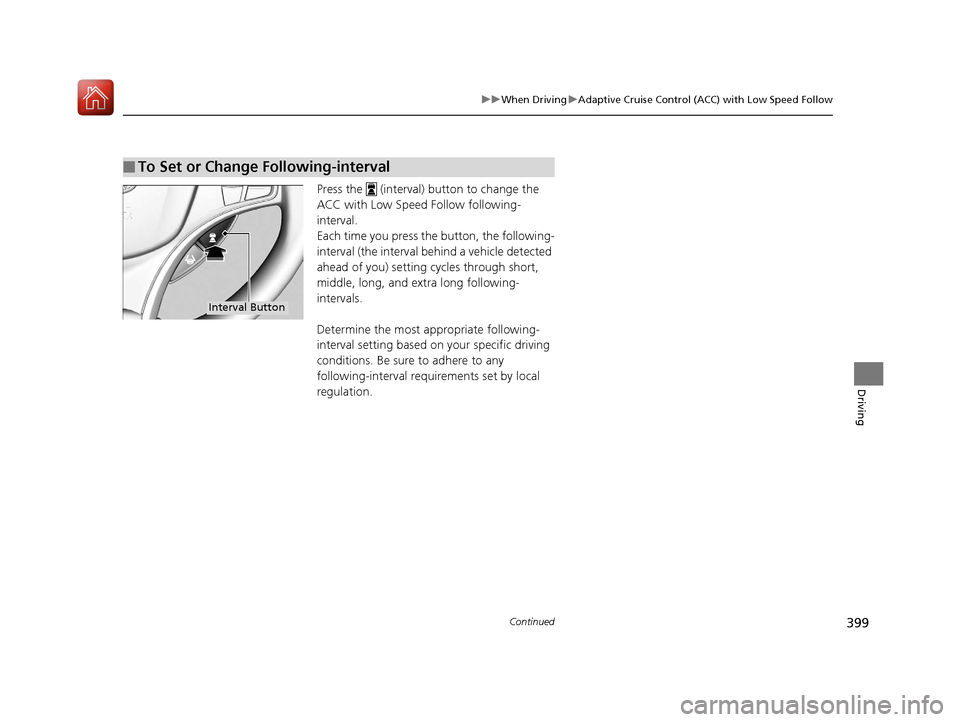
Press the (interval) button to change the
ACC with Low Speed Follow following-
interval.
Each time you press th e button, the following-
interval (the interval behind a vehicle detected
ahead of you) setting cycles through short,
middle, long, and extra long following-
intervals.
Determine the most appropriate following-
interval setting based on your specific driving
conditions. Be sure to adhere to any
following-interval requirements set by local
regulation.
■To Set or Change Following-interval
Interval Button
20 ACURA TLX-31TZ36500.book 399 ページ 2019年2月7日 木曜日 午後2時2分
Page 414 of 589

Continued413
uuWhen Driving uLane Keeping Assist System (LKAS)
Driving
3. Keep your vehicle near the center of the
lane while driving.
u The dotted outer lines change to solid
ones once the system starts operating
after detecting the left and right lane
markings.
To cancel the LKAS:
Press the MAIN or LKAS button.
The LKAS is turned off every time you stop the
engine, even if you turned it on the last time
you drove the vehicle.
■To Cancel1 To Cancel
Pressing the MAIN button also turns ACC with Low
Speed Follow on and off.
MAIN Button
LKAS Button
20 ACURA TLX-31TZ36500.book 413 ページ 2019年2月7日 木曜日 午後2時2分
Page 423 of 589

uuWhen Driving uBlind spot information System*
422
Driving
■When the system detects a vehicle
Blind spot information System Alert Indicator:
Located near the pillar on both sides.
Comes on when:
•A vehicle enters the alert zone from behind
to overtake you with a speed difference of
no more than 31 mph (50 km/h) from your
vehicle.
• You pass a vehicle with a speed difference
of no more than 12 mph (20 km/h).
Blinks and a beeper sounds when:
You move the turn signal lever in the direction
of the detected vehicle. The beeper sounds
three times.1 Blind spot information System*
The system is for your convenience only. Even if an
object is within the alert zone, the following
situations may occur.
•The blind spot informatio n system alert indicator
may not come on due to obstruction (splashes,
etc.) even without the Blind Spot Info Not
Available multi-information display appearing.
•The blind spot informatio n system alert indicator
may come on even with the message appearing.
You can turn off the audible al ert, or all the blind spot
information system alert using the information screen
or multi-information display. 2 Customized Features P. 120, 292
Blind spot information sy stem may be adversely
affected when:
•Objects (guard rails, poles, trees, etc,.) are
detected.
•An object that does not re flect radio waves well,
such as a motorcycle, is in the alert zone.
•Driving on a curved road.
•A vehicle is moving from a far lane to the adjacent
lane.
•The system picks up external electrical interference.
•The rear bumper or the sensors have been
improperly repaired or the rear bumper has been
deformed.
•The orientation of the sensors has been changed.•In bad weather (Heavy rain, snow, and fog).
The system does not operate when in
( R.
Comes On
Blinks
* Not available on all models
20 ACURA TLX-31TZ36500.book 422 ページ 2019年2月7日 木曜日 午後2時2分
Page 459 of 589

458
uuMulti-View Rear Camera*uAbout Your Multi-View Rear Camera
Driving
You can view three different camera mo des on the rearview display. Press the
interface dial to switch the mode. : Wide view mode
: Normal view mode
: Top down view mode
• If the last used viewing mode was Wide or Normal view mode, the same mode is
selected the next time you put the transmission into
(R.
• If Top down view mode was last used be fore you turned the power mode to OFF,
Wide View mode is selected next time you set the power mode to ON and put the
transmission into
(R.
• If Top down view mode was last used more than 10 seconds after you change
from
(R, Wide View mode is selected the next time you put the transmission into
(R.
20 ACURA TLX-31TZ36500.book 458 ページ 2019年2月7日 木曜日 午後2時2分
Page 470 of 589
469
Maintenance
Maintenance MinderTM
If the engine oil life is less than 15%, you will see the Maintenance Minder messages
appear on the multi-information display ev ery time you set the power mode to ON.
The messages notify you when to change the engine oil, or when to bring your
vehicle to a dealer for indicated maintenance services.
20 ACURA TLX-31TZ36500.book 469 ページ 2019年2月7日 木曜日 午後2時2分
Page 542 of 589

541
uuEngine Does Not Start uEmergency Engine Stop
Handling the Unexpected
Emergency Engine Stop
The ENGINE START/STOP button may be used to stop the engine due to an
emergency situation even while driving. If you must stop the engine, do either of the
following operations:
• Press and hold the ENGINE START/STOP button for about two seconds.
• Firmly press the ENGINE START/STOP button three times.
The steering wheel will not lock. However, because turning off the engine disables
the power assist the engine provides to the steering and braking systems, it will
require significantly more physical effort an d time to steer and slow the vehicle. Use
both feet on the brake pedal to slow down the vehicle and stop immediately in a
safe place.
The gear position auto matically changes to
(P after the vehicle comes to a complete
stop. Then, the power mode changes to VEHICLE OFF.
The gear position auto matically changes to
(P after the vehicle comes to a complete
stop. Then press the ENGINE START/STOP button twice without depressing the
brake pedal to change the mode VEHICLE OFF.
The power mode is in ACCESSORY when the engine is stopped.
To change the mode to VEHICLE OF F, move the shift position to
(P after the vehicle
comes to a complete stop.
Then press the ENGINE START/STOP button twice without depressing the brake
pedal.
1 Emergency Engine Stop
Do not press the ENGINE START/STOP button while
driving unless it is absolute ly necessary for the engine
to be turned off.
If you press the ENGINE START/STOP button while
driving, the beeper sounds.
Automatic transmission models with electronic gear selector for U.S. models
Automatic transmission models with elec tronic gear selector for Canadian models
Automatic transmission models with shift lever for U.S. models
Automatic transmission models with shift lever for Canadian models
20 ACURA TLX-31TZ36500.book 541 ページ 2019年2月7日 木曜日 午後2時2分