dead battery Acura TLX 2020 Owner's Manual
[x] Cancel search | Manufacturer: ACURA, Model Year: 2020, Model line: TLX, Model: Acura TLX 2020Pages: 589, PDF Size: 32.88 MB
Page 25 of 589
24
Quick Reference Guide
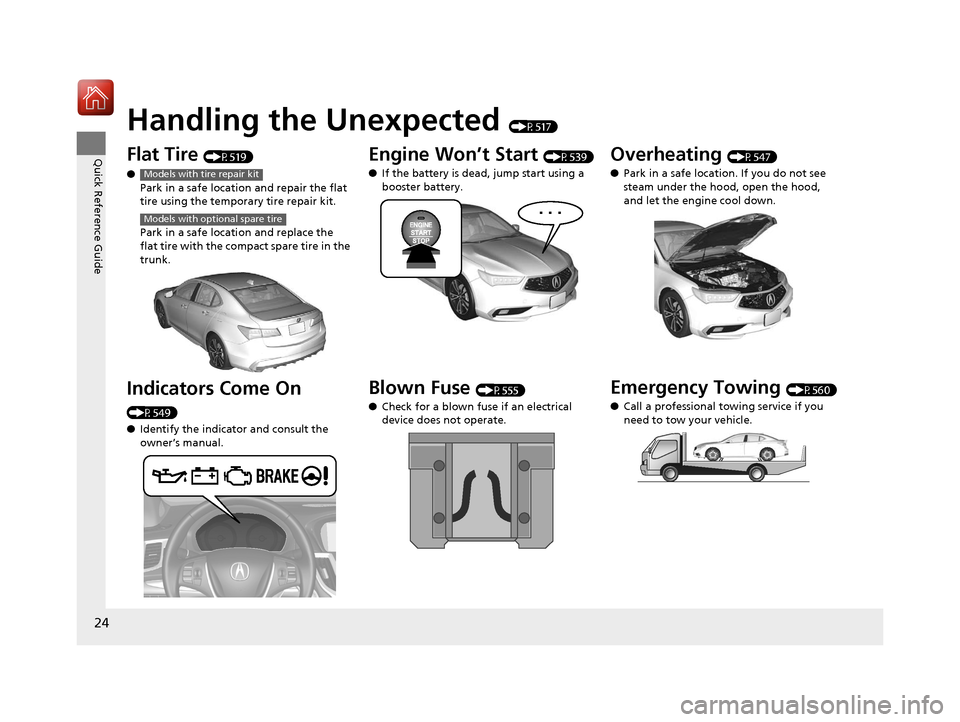
Handling the Unexpected (P517)
Flat Tire (P519)
● Park in a safe location and repair the flat
tire using the temporary tire repair kit.
Park in a safe location and replace the
flat tire with the compact spare tire in the
trunk.
Indicators Come On
(P549)
●Identify the indicator and consult the
owner’s manual.
Models with tire repair kit
Models with optional spare tire
Engine Won’t Start (P539)
● If the battery is dead, jump start using a
booster battery.
Blown Fuse (P555)
● Check for a blown fuse if an electrical
device does not operate.
Overheating (P547)
● Park in a safe location. If you do not see
steam under the hood, open the hood,
and let the engine cool down.
Emergency Towing (P560)
● Call a professional towing service if you
need to tow your vehicle.
20 ACURA TLX-31TZ36500.book 24 ページ 2019年2月7日 木曜日 午後2時2分
Page 142 of 589
Continued141
uuLocking and Unlocking the Doors uLocking/Unlocking the Doors from the Outside
Controls
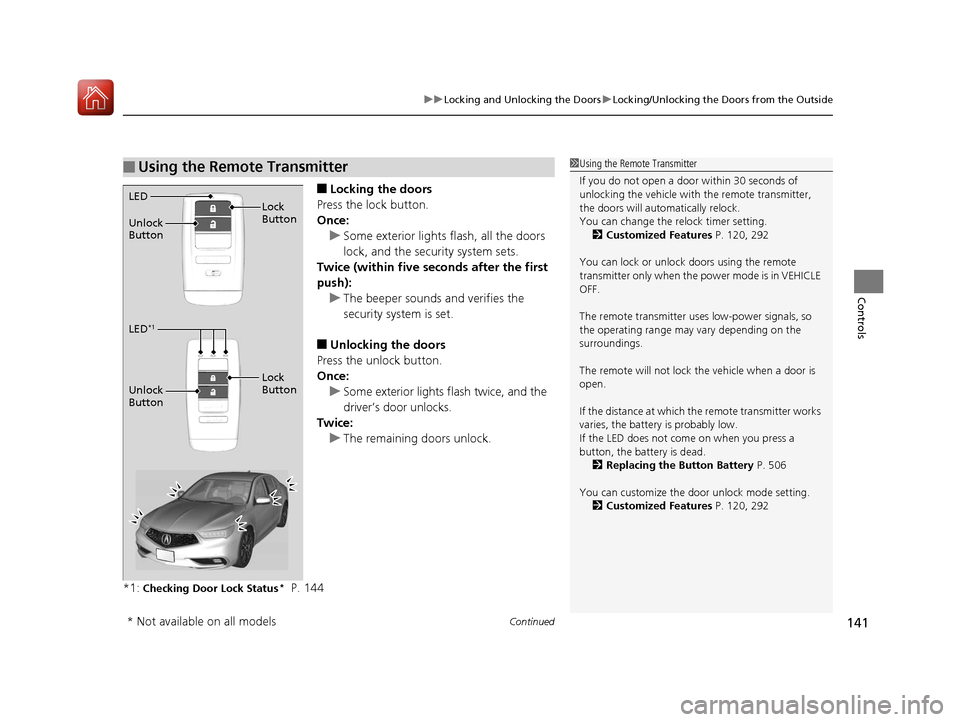
■Locking the doors
Press the lock button.
Once: u Some exterior lights flash, all the doors
lock, and the security system sets.
Twice (within five se conds after the first
push): u The beeper sounds and verifies the
security system is set.
■Unlocking the doors
Press the unlock button.
Once: u Some exterior lights flash twice, and the
driver’s door unlocks.
Twice: u The remaining doors unlock.
*1:
Checking Door Lock Status* P. 144
■Using the Remote Transmitter1 Using the Remote Transmitter
If you do not open a door within 30 seconds of
unlocking the vehicle with the remote transmitter,
the doors will automatically relock.
You can change the relock timer setting. 2 Customized Features P. 120, 292
You can lock or unlock doors using the remote
transmitter only when the power mode is in VEHICLE
OFF.
The remote transmitter us es low-power signals, so
the operating range may vary depending on the
surroundings.
The remote will not lock th e vehicle when a door is
open.
If the distance at which the remote transmitter works
varies, the batter y is probably low.
If the LED does not come on when you press a
button, the battery is dead.
2 Replacing the Button Battery P. 506
You can customize the door unlock mode setting. 2 Customized Features P. 120, 292
LED
Unlock
Button Lock
Button
LED*1
Unlock
Button
Lock
Button
* Not available on all models
20 ACURA TLX-31TZ36500.book 141 ページ 2019年2月7日 木曜日 午後2時2分
Page 154 of 589
Continued153
uuSecurity System uSecurity System Alarm
Controls
■To deactivate the security system alarm
Unlock the vehicle using the key, remote tra nsmitter or keyless access system, or set
the power mode to ON. The system, along with the horn and flashing lights, is
deactivated.
■Setting the security system alarm
The security system alarm automatically sets when the following conditions have
been met:
• The power mode is set to VEHICLE OFF (LOCK).
• The hood is closed.
• All doors and the trunk are locked from ou tside with the key, remote transmitter
or keyless access system.
■When the security system alarm sets
The security system alarm in dicator in the instrument panel blinks and the blinking
interval changes after about 15 seconds.
■To cancel the security system alarm
The security system alarm is canceled when the vehicle is unlocked using the remote
transmitter or keyless access system, or when the power mode is set to ON. The
security system alarm indicato r goes off at the same time.
1Security System Alarm
Do not set the security system alarm when someone
is in the vehicle or a window is open. The system can
accidentally activate when:
•Unlocking the door with the lock tab.•Opening the trunk with the trunk opener or the
emergency trunk opener.
•Opening the hood with the hood release.
•Taking the transmission out of ( P.
If the battery goes dead after you have set the
security system alarm, the security alarm may go off
once the battery is re charged or replaced.
If this occurs, deactivate the security system alarm by
unlocking a door using the key, remote transmitter or
keyless access system.
Models with shift lever
20 ACURA TLX-31TZ36500.book 153 ページ 2019年2月7日 木曜日 午後2時2分
Page 217 of 589
216
uuAudio System uAuxiliary Input Jack
Features
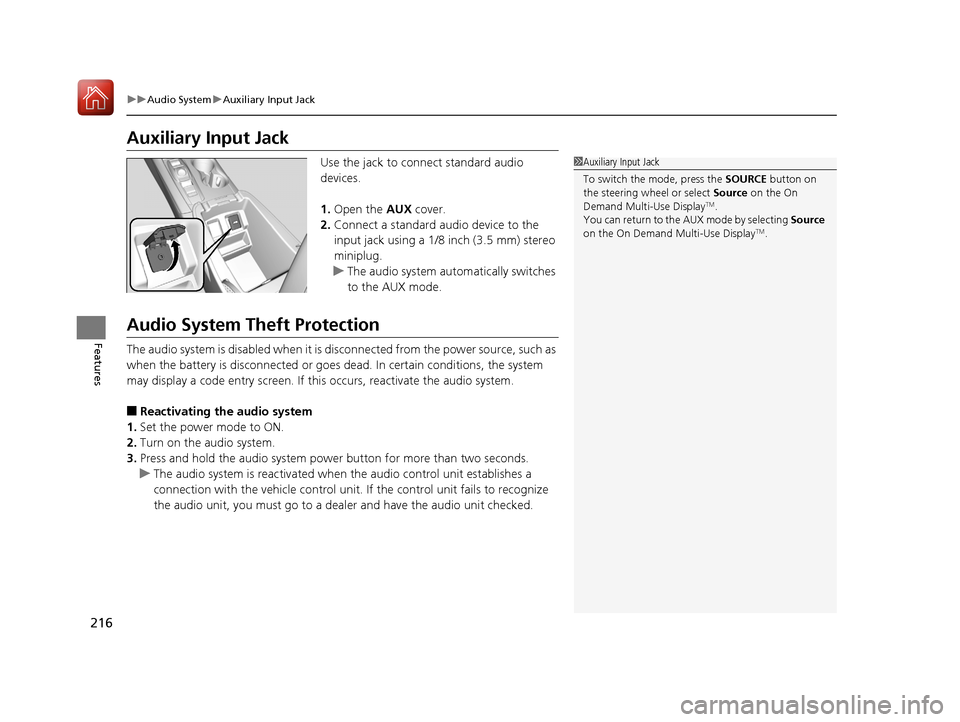
Auxiliary Input Jack
Use the jack to connect standard audio
devices.
1. Open the AUX cover.
2. Connect a standard audio device to the
input jack using a 1/8 inch (3.5 mm) stereo
miniplug.
u The audio system automatically switches
to the AUX mode.
Audio System Theft Protection
The audio system is disabled when it is di sconnected from the power source, such as
when the battery is disconnected or goes dead. In certain conditions, the system
may display a code entry screen. If this occurs, reactivate the audio system.
■Reactivating th e audio system
1. Set the power mode to ON.
2. Turn on the audio system.
3. Press and hold the audio system power button for more than two seconds.
u The audio system is reac tivated when the audio co ntrol unit establishes a
connection with the vehicle control unit. If the control unit fails to recognize
the audio unit, you must go to a dealer and have the audio unit checked.
1 Auxiliary Input Jack
To switch the mode, press the SOURCE button on
the steering wheel or select Source on the On
Demand Multi-Use Display
TM.
You can return to the AUX mode by selecting Source
on the On Demand Multi-Use Display
TM.
20 ACURA TLX-31TZ36500.book 216 ページ 2019年2月7日 木曜日 午後2時2分
Page 430 of 589
429Continued
Driving
Braking
Brake System
Use the parking brake to keep the vehicle stationary when parked. When the
parking brake is applied, you can manu ally or automatically release it.
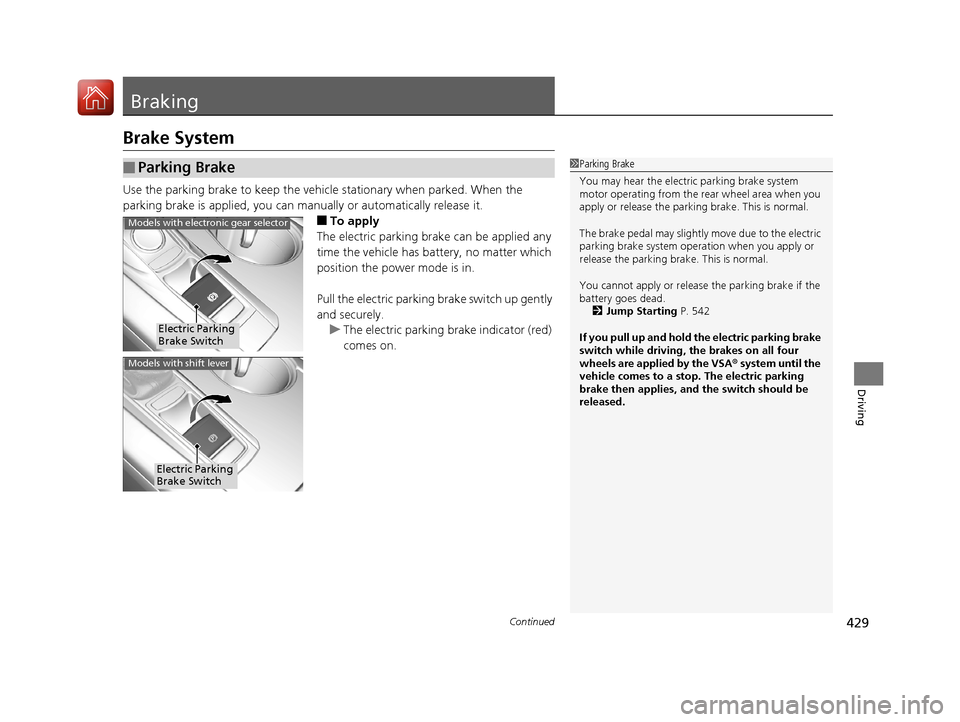
■To apply
The electric parking brake can be applied any
time the vehicle has battery, no matter which
position the power mode is in.
Pull the electric parking brake switch up gently
and securely. u The electric parking brake indicator (red)
comes on.
■Parking Brake1Parking Brake
You may hear the electric parking brake system
motor operating from the re ar wheel area when you
apply or release the parking brake. This is normal.
The brake pedal may slightly move due to the electric
parking brake system opera tion when you apply or
release the parking br ake. This is normal.
You cannot apply or release the parking brake if the
battery goes dead. 2 Jump Starting P. 542
If you pull up and hold the electric parking brake
switch while driving, the brakes on all four
wheels are applied by the VSA ® system until the
vehicle comes to a stop. The electric parking
brake then applies, and the switch should be
released.
Electric Parking
Brake Switch
Models with electronic gear selector
Electric Parking
Brake Switch
Models with shift lever
20 ACURA TLX-31TZ36500.book 429 ページ 2019年2月7日 木曜日 午後2時2分
Page 505 of 589
504
Maintenance
Battery
Checking the Battery
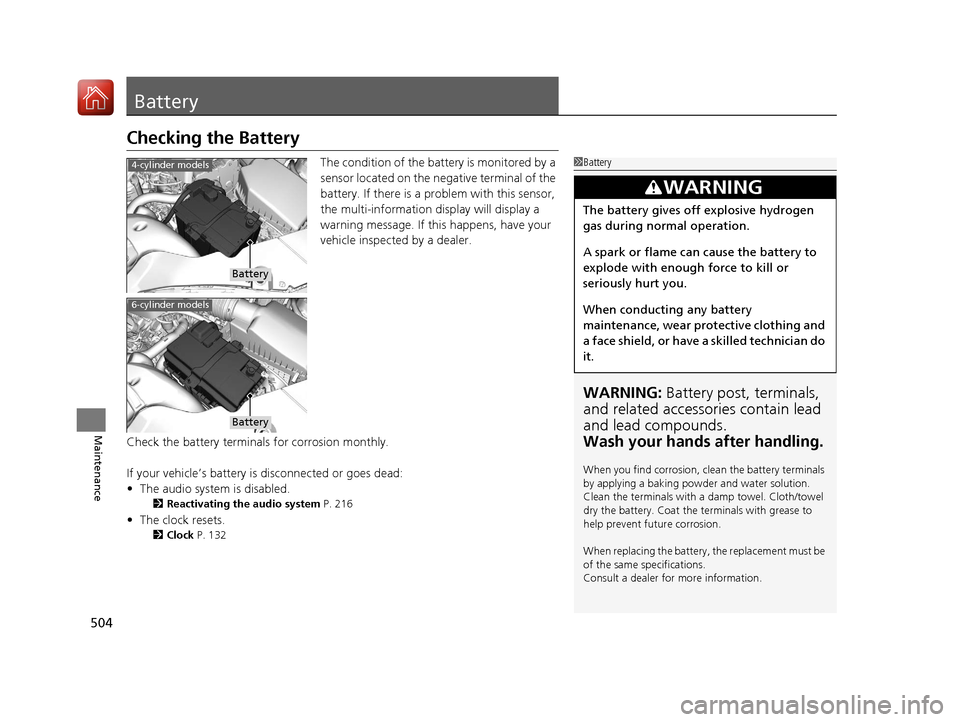
The condition of the battery is monitored by a
sensor located on the negative terminal of the
battery. If there is a problem with this sensor,
the multi-information display will display a
warning message. If this happens, have your
vehicle inspected by a dealer.
Check the battery termina ls for corrosion monthly.
If your vehicle’s battery is disconnected or goes dead:
• The audio system is disabled.
2 Reactivating the audio system P. 216
•The clock resets.
2 Clock P. 132
1Battery
WARNING: Battery post, terminals,
and related accessories contain lead
and lead compounds.
Wash your hands after handling.
When you find corrosion, cl ean the battery terminals
by applying a baking powder and water solution.
Clean the terminals with a damp towel. Cloth/towel
dry the battery. Coat the terminals with grease to
help prevent future corrosion.
When replacing the battery, the replacement must be
of the same specifications.
Consult a dealer for more information.
3WARNING
The battery gives off explosive hydrogen
gas during normal operation.
A spark or flame can cause the battery to
explode with enough force to kill or
seriously hurt you.
When conducting any battery
maintenance, wear prot ective clothing and
a face shield, or have a skilled technician do
it.
4-cylinder models
Battery
6-cylinder models
Battery
20 ACURA TLX-31TZ36500.book 504 ページ 2019年2月7日 木曜日 午後2時2分
Page 540 of 589
539
Handling the Unexpected
Engine Does Not Start
Checking the Engine
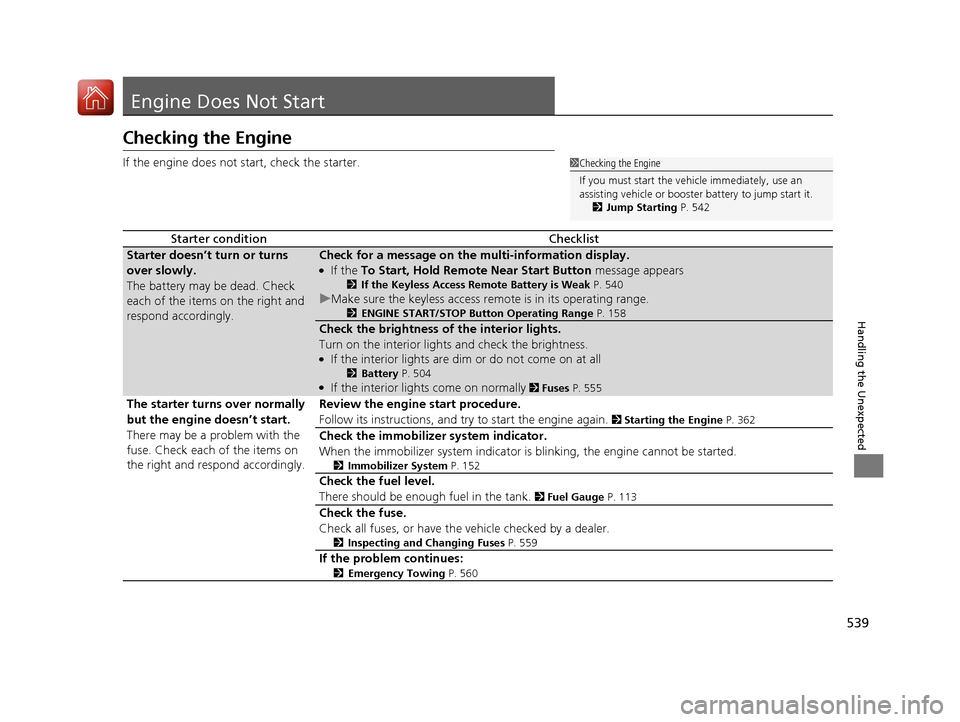
If the engine does not start, check the starter.
Starter conditionChecklist
Starter doesn’t turn or turns
over slowly.
The battery may be dead. Check
each of the items on the right and
respond accordingly.Check for a message on the multi-information display.
●If the To Start, Hold Remote Near Start Button message appears
2If the Keyless Access Remote Battery is Weak P. 540
uMake sure the keyless access remote is in its operating range.
2ENGINE START/STOP Button Operating Range P. 158
Check the brightness of the interior lights.
Turn on the interior lights and check the brightness.
●If the interior lights are dim or do not come on at all
2Battery P. 504●If the interior lights come on normally 2 Fuses P. 555
The starter turns over normally
but the engine doesn’t start.
There may be a problem with the
fuse. Check each of the items on
the right and respond accordingly. Review the engine start procedure.
Follow its instructions, and try
to start the engine again.
2 Starting the Engine P. 362
Check the immobilizer system indicator.
When the immobilizer system indicator is blinking, the engine cannot be started.
2Immobilizer System P. 152
Check the fuel level.
There should be enough fuel in the tank.
2 Fuel Gauge P. 113
Check the fuse.
Check all fuses, or have the vehicle checked by a dealer.
2 Inspecting and Changing Fuses P. 559
If the problem continues:
2Emergency Towing P. 560
1Checking the Engine
If you must start the vehi cle immediately, use an
assisting vehicle or booster battery to jump start it.
2 Jump Starting P. 542
20 ACURA TLX-31TZ36500.book 539 ページ 2019年2月7日 木曜日 午後2時2分
Page 572 of 589

571Continued
Information
Emissions Testing
Testing of Readiness Codes
Your vehicle has readiness code as part of the onboard self diagnostic system. Some
States use these codes for testing to ve rify whether your vehicle’s emissions
components are working properly.
The codes may not be read properly if testing is performed just after the battery has
gone dead or been disconnected.
To check if they are set, set the power m ode to ON, without starting the engine. The
malfunction indicator lamp will come on for several seconds. If it then goes off, the
readiness codes are set. If it blinks fi ve times, the readiness codes are not set.
If you are required to have your vehicle te sted before the readiness codes are ready,
prepare the vehicle for retest ing by doing the following:
1. Fill the gas tank to approximately 3/4 full.
2. Park the vehicle and leave the engine off for 6 hours or more.
3. Make sure the ambient temperature is between 40°F and 95°F (4°C and 35°C).
4. Start the engine without touching the ac celerator pedal, and let it idle for 20
seconds.
5. Keep the vehicle in
(P.
Increase the engine speed to 2,000 rpm, and hold it there for about 3 minutes.
6. Let the engine idle with your foot off the accelerator for 20 seconds.
1Testing of Readiness Codes
The readiness codes are erased when the battery is
disconnected, and set again only after several days of
driving under a variety of conditions.
If a testing facility determines that the readiness
codes are not set, you may be requested to return at
a later date to complete the test.
If the testing facility determines the readiness codes
are still not set, see a dealer.
20 ACURA TLX-31TZ36500.book 571 ページ 2019年2月7日 木曜日 午後2時2分
Page 581 of 589
580
Index
D
Daytime Running Lights........................... 165
Dead Battery ............................................. 542
Defrosting the Windshield and Windows .................................................. 211
Devices that Emit Radio Waves ................ 569
Dimming Headlights ............................................... 162
Rearview Mirror ....................................... 177
Dipstick (Engine Oil) ................................. 478
Directional Signals (Turn Signal) .............. 161
Door Mirrors ............................................. 178
Doors ......................................................... 133
Auto Door Locking .................................. 148
Auto Door Unlocking ............................... 148
Door Open Indicator .................................. 33
Door Open Message .................................. 97
Keys ........................................................ 133
Locking/Unlocking the Doors from the
Inside ............................................... 13, 145
Locking/Unlocking the Doors from the Outside .................................................. 136
Lockout Prevention System ...................... 143
DOT Tire Quality Grading ........................ 498
Driver’s Knee Airbag .................................. 48
Driving ....................................................... 355
Automatic Transmission ........................... 370
Braking .................................................... 429
Dual Clutch Transmission ......................... 370
Shifting Gear ................................... 371, 378
Starting the Engine .................................. 362 Driving Position Memory System
............ 174
Dual Clutch Transmission ......................... 370
Creeping ................................................. 370
Fluid ........................................................ 486
Kickdown ................................................ 370
Operating the Shift Lever................... 20, 379
Shift Lever Does Not Move ...................... 546
Shifting ................................................... 378
Dust and Pollen Filter ............................... 508
E
ECON (Econ mode) Indicator ..................... 85
Elapsed Time ............................................. 118
Electric Parking Brake Indicator.................................................... 73
Electric Parking Brake System Indicator............................................ 73, 552
Electric Power Steering (EPS) System Indicator............................................ 79, 551
Electronic Stability Control (ESC) ............. 418
Emergency ................................................ 560
Emissions Testing (Readiness Codes) ....... 571
Engine ....................................................... 568
Coolant ................................................... 484
Jump Starting .......................................... 542
Oil ........................................................... 477
Remote Engine Start................................ 365
Starting ................................................... 362
Engine Coolant ......................................... 484
Adding to the Radiator ............................ 485 Adding to the Reserve Tank .................... 484
Overheating ............................................ 547
Temperature Gauge ................................ 113
Engine Oil ................................................. 477
Adding ................................................... 480
Checking ................................................ 478
Displaying Oil Life ................................... 470
Low Oil Pressure Indicator ................. 74, 549
Recommended Engine Oil ....................... 477
ENGINE START/STOP Button .................... 158
EPS (Electric Power Steering) System ........ 79
Exhaust Gas Hazard (Carbon Monoxide) .. 69
Exterior Care (Cleaning) .......................... 511
Exterior Mirrors ........................................ 178
F
Features.................................................... 213
Filters Dust and Pollen....................................... 508
Oil .......................................................... 481
Flat Tire ..................................................... 519
Floor Mats ................................................ 510
Fluids
Automatic Transmission .......................... 486
Brake ...................................................... 487
Dual Clutch Transmission ........................ 486
Engine Coolant ....................................... 484
Windshield Washer ................................. 487
Fog Lights ................................................. 165
Foot Brake ................................................ 432
20 ACURA TLX-31TZ36500.book 580 ページ 2019年2月7日 木曜日 午後2時2分