glass Acura TLX 2020 Owner's Manual
[x] Cancel search | Manufacturer: ACURA, Model Year: 2020, Model line: TLX, Model: Acura TLX 2020Pages: 589, PDF Size: 32.88 MB
Page 8 of 589
7
Quick Reference Guide
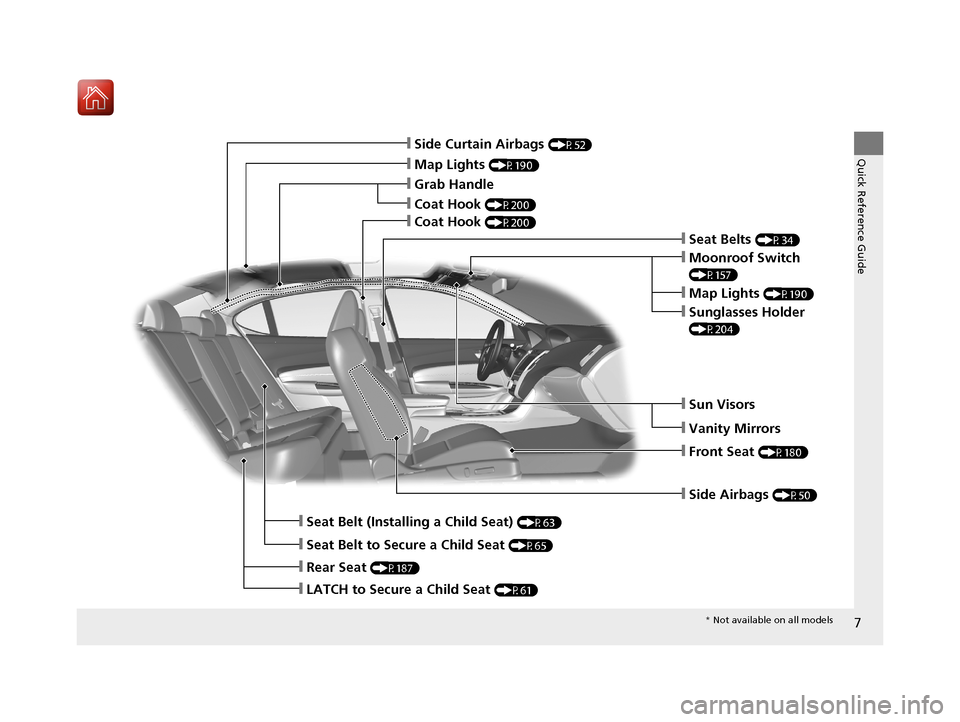
❙Side Airbags (P50)
❙Map Lights (P190)
❙Side Curtain Airbags (P52)
❙Seat Belts (P34)
❙Seat Belt to Secure a Child Seat (P65)
❙LATCH to Secure a Child Seat (P61)
❙Seat Belt (Installing a Child Seat) (P63)
❙Rear Seat (P187)
❙Front Seat (P180)
❙Coat Hook (P200)
❙Grab Handle
❙Moonroof Switch
(P157)
❙Map Lights (P190)
❙Sunglasses Holder
(P204)
❙Sun Visors
❙Vanity Mirrors
❙Coat Hook (P200)
* Not available on all models
20 ACURA TLX-31TZ36500.book 7 ページ 2019年2月7日 木曜日 午後2時2分
Page 138 of 589
Continued137
uuLocking and Unlocking the Doors uLocking/Unlocking the Doors from the Outside
Controls
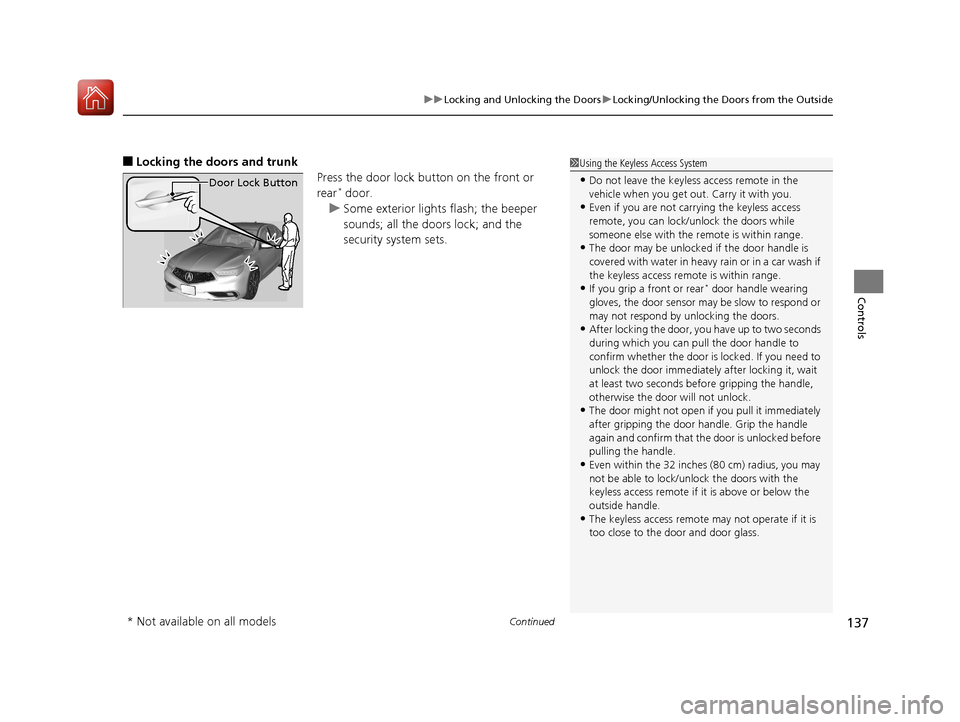
■Locking the doors and trunk
Press the door lock button on the front or
rear
* door.
u Some exterior lights flash; the beeper
sounds; all the doors lock; and the
security system sets.
1Using the Keyless Access System
•Do not leave the keyless access remote in the
vehicle when you get out . Carry it with you.
•Even if you are not carrying the keyless access
remote, you can lock/unlock the doors while
someone else with the remote is within range.
•The door may be unlocked if the door handle is
covered with water in heavy rain or in a car wash if
the keyless access remote is within range.
•If you grip a front or rear* door handle wearing
gloves, the door sensor ma y be slow to respond or
may not respond by unlocking the doors.
•After locking the door, you have up to two seconds
during which you can pull the door handle to
confirm whether the door is locked. If you need to
unlock the door immediately after locking it, wait
at least two seconds befo re gripping the handle,
otherwise the door will not unlock.
•The door might not open if you pull it immediately
after gripping the door handle. Grip the handle
again and confirm that th e door is unlocked before
pulling the handle.
•Even within the 32 inches (80 cm) radius, you may
not be able to lock/unl ock the doors with the
keyless access remote if it is above or below the
outside handle.
•The keyless access remote may not operate if it is
too close to the door and door glass.
Door Lock Button
* Not available on all models
20 ACURA TLX-31TZ36500.book 137 ページ 2019年2月7日 木曜日 午後2時2分
Page 205 of 589
uuInterior Lights/Interior Convenience Items uInterior Convenience Items
204
Controls
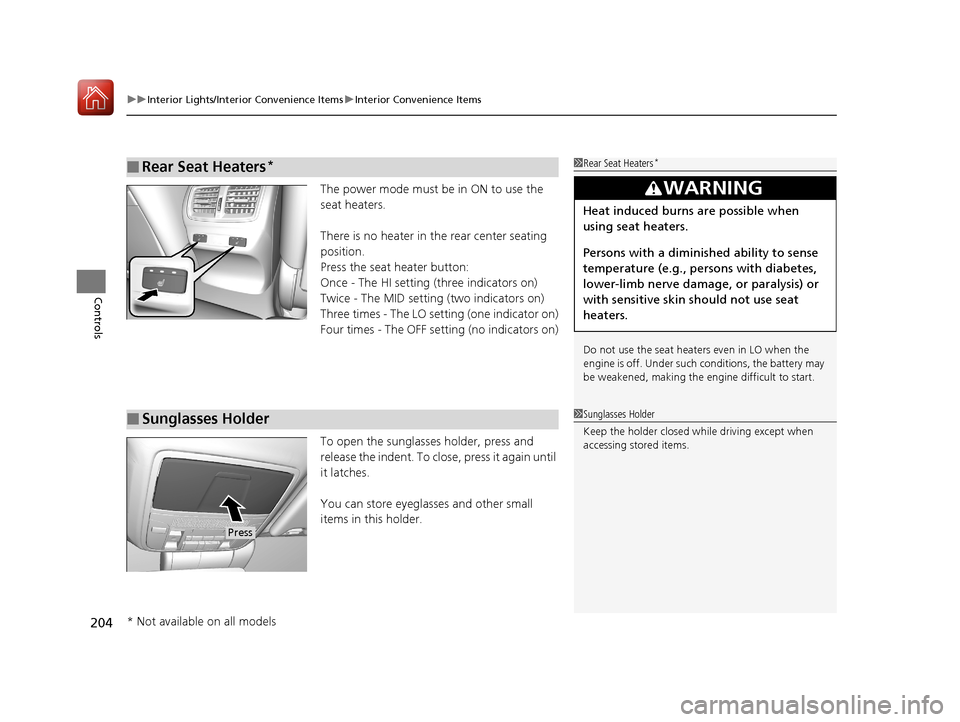
The power mode must be in ON to use the
seat heaters.
There is no heater in the rear center seating
position.
Press the seat heater button:
Once - The HI setting (three indicators on)
Twice - The MID setting (two indicators on)
Three times - The LO setting (one indicator on)
Four times - The OFF se tting (no indicators on)
To open the sunglasses holder, press and
release the indent. To close, press it again until
it latches.
You can store eyeglasses and other small
items in this holder.
■Rear Seat Heaters*1 Rear Seat Heaters*
Do not use the seat heaters even in LO when the
engine is off. Under such conditions, the battery may
be weakened, making the engine difficult to start.
3WARNING
Heat induced burns are possible when
using seat heaters.
Persons with a diminished ability to sense
temperature (e.g., persons with diabetes,
lower-limb nerve damage, or paralysis) or
with sensitive skin should not use seat
heaters.
■Sunglasses Holder1Sunglasses Holder
Keep the holder closed wh ile driving except when
accessing stored items.
Press
* Not available on all models
20 ACURA TLX-31TZ36500.book 204 ページ 2019年2月7日 木曜日 午後2時2分
Page 215 of 589
214
Features
Audio System
About Your Audio System
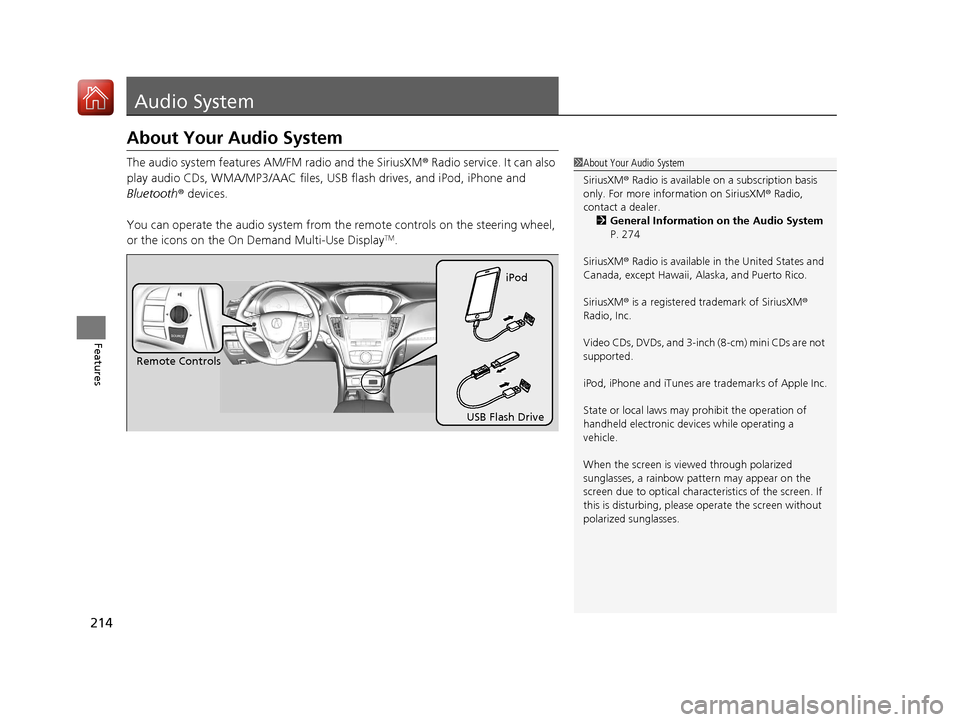
The audio system features AM/FM radio and the SiriusXM® Radio service. It can also
play audio CDs, WMA/MP3/AAC files, USB flash drives, and iPod, iPhone and
Bluetooth ® devices.
You can operate the audio system from th e remote controls on the steering wheel,
or the icons on the On Demand Multi-Use Display
TM.
1 About Your Audio System
SiriusXM ® Radio is available on a subscription basis
only. For more information on SiriusXM ® Radio,
contact a dealer.
2 General Information on the Audio System
P. 274
SiriusXM ® Radio is available in the United States and
Canada, except Ha waii, Alaska, and Puerto Rico.
SiriusXM ® is a registered trademark of SiriusXM ®
Radio, Inc.
Video CDs, DVDs, and 3-inch (8-cm) mini CDs are not
supported.
iPod, iPhone and iTunes are trademarks of Apple Inc.
State or local laws may prohibit the operation of
handheld electronic devices while operating a
vehicle.
When the screen is vi ewed through polarized
sunglasses, a rainbow pa ttern may appear on the
screen due to optical characteristics of the screen. If
this is disturbing, please operate the screen without
polarized sunglasses.
Remote Controls iPod
USB Flash Drive
20 ACURA TLX-31TZ36500.book 214 ページ 2019年2月7日 木曜日 午後2時2分
Page 494 of 589
493Continued
Maintenance
Checking and Maintaining Wiper Blades
Checking Wiper Blades
If the wiper blade rubber has deteriorated, it will leave streaks and the hard surfaces
of the blade may scratch the window glass.
Changing the Wiper Blade Rubber
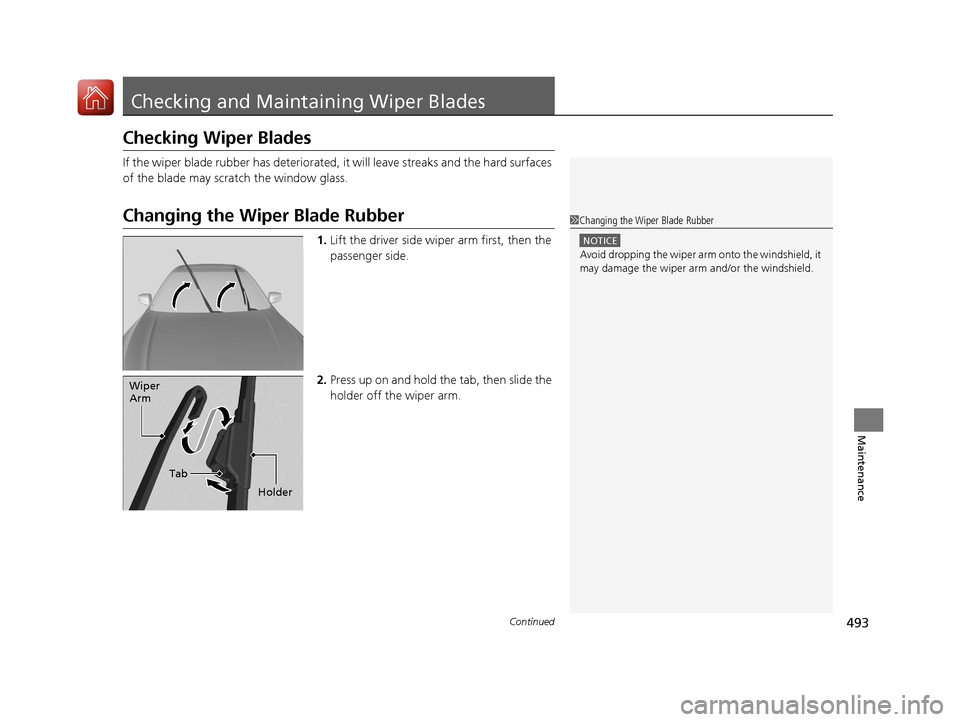
1. Lift the driver side wiper arm first, then the
passenger side.
2. Press up on and hold the tab, then slide the
holder off the wiper arm.
1Changing the Wiper Blade Rubber
NOTICE
Avoid dropping the wiper arm onto the windshield, it
may damage the wiper arm and/or the windshield.
Tab
Wiper
Arm
Holder
20 ACURA TLX-31TZ36500.book 493 ページ 2019年2月7日 木曜日 午後2時2分
Page 511 of 589

uuCleaning uInterior Care
510
Maintenance
Wipe using a glass cleaner.
The front and rear floor mats hook over floor
anchors, which keep them from sliding
forward. To remove a mat for cleaning, turn
the anchor knobs to the unlock position.
When reinstalling the mat after cleaning, turn
the knobs to the lock position.
Do not put additional floor mats on top of
the anchored mats.
To properly clean leather:
1. Use a vacuum or soft dry cloth first to remove any dirt or dust.
2. Clean the leather with a soft cloth dampen ed with a solution comprised of 90%
water and 10% neutral soap.
3. Wipe away any soap residu e with a clean damp cloth.
4. Wipe away residual water and allow leather to air dry in the shade.
■Cleaning the Window
■Floor Mats
1Cleaning the Window
Wires are mounted to the in side of the rear window.
Wipe along the same direct ion as the wires with a
soft cloth so as not to damage them.
Be careful not to spill fluids, such as water or glass
cleaner, on or around the co ver of both the front
sensor camera and the rainfall/light sensor
*.
2 Automatic Operation (automatic lighting
control) P. 163
2 Automatic Intermittent Wipers
* P. 170
2 Front Sensor Camera P. 388
1Floor Mats
If you use any floor mats that were not originally
provided with your vehicle, make sure they are
designed for your specific ve hicle, fit correctly, and
are securely anchored by the floor anchors.
Position the rear seat floor mat properly. If they are
not properly positioned, th e floor mat can interfere
with the front seat functions.Unlock
Lock
■Maintaining Genuine Leather1 Maintaining Genuine Leather
It is important to clean or wipe away dirt or dust as
soon as possible. Spills can soak into leather resulting
in stains. Dirt or dust ca n cause abrasions in the
leather. In addition, pl ease note that some dark
colored clothing can rub onto the leather seats
resulting in discol oration or stains.
* Not available on all models
20 ACURA TLX-31TZ36500.book 510 ページ 2019年2月7日 木曜日 午後2時2分
Page 513 of 589
uuCleaning uExterior Care
512
Maintenance
A good coat of automotive body wax helps protect your vehicle’s paint from the
elements. Wax will wear off over time and expose your vehicle’s paint to the
elements, so reapply as necessary.
If you get gasoline, oil, engine coolant, or battery fluid on resin coated parts, they
may be stained or the coating may peel. Prom ptly wipe it away using a soft cloth and
clean water.
Wipe using a glass cleaner.
Aluminum is susceptible to deterioration caused by salt and other road
contaminants. When necessary, as early as possible use a sponge and mild detergent
to wipe away these contaminants. Do no t use a stiff brush or harsh chemicals
(including some commercial wheel cleaners). These can damage the protective finish
on aluminum alloy wheels, resulting in corrosion. Depending on the type of finish,
the wheels also may lose their luster or appear burnished. To avoid water stains,
wipe the wheels dry with a cloth while they are still wet.
■Applying Wax
■Maintaining the Bumpers and Other Resin Coated Parts
■Cleaning the Window
■Maintaining Aluminum Wheels
1 Applying Wax
NOTICE
Chemical solvents and st rong cleaners can damage
the paint, metal, and plasti c on your vehicle. Wipe
away spills immediately.
1 Maintaining the Bumpers an d Other Resin Coated Parts
Ask a dealer about the correct coating material when
you want to repair the painted surface of the parts
made of resin.
20 ACURA TLX-31TZ36500.book 512 ページ 2019年2月7日 木曜日 午後2時2分
Page 582 of 589
581
Index
Front Airbags (SRS).................................... 44
Front Seat Heaters and Ventilation ........ 203
Front Seats ................................................ 180
Adjusting ................................................ 180
Front Sensor Camera ............................... 388
Fuel ..................................................... 21, 460
Economy................................................. 463
Gauge .................................................... 113
Instant Fuel Economy .............................. 118
Low Fuel Indicator..................................... 78
Range ..................................................... 118
Recommendation............................ 460, 566
Refueling ................................................ 460
Fuel Economy ........................................... 463
Fuel Fill Door ...................................... 21, 461
Fuses ......................................................... 555
Inspecting and Changing ........................ 559
Locations ........................ 555, 556, 557, 558
G
Gasoline (Fuel) Economy................................................. 463
Gauge .................................................... 113
Information............................................. 460
Instant Fuel Economy .............................. 118
Low Fuel Indicator..................................... 78
Refueling ................................................ 460
Gauges ...................................................... 113
Gear Position Indicator ...................... 75, 372 Gear Shift Lever Positions
Dual Clutch Transmission ......................... 378
Gear Shift Positions Automatic Transmission ........................... 371
Glass (care) ........................................ 510, 512
Glove Box .................................................. 192
H
Handling the Unexpected ........................ 517
HandsFreeLink ® (HFL) ............................... 317
Auto Answer ........................................... 333
Automatic Import of Cellular Phonebook
and Call History ..................................... 335
Automatic Transferring ............................ 333
Displaying Messages ................................ 348
HFL Buttons ............................................. 317
HFL Menus .............................................. 320
HFL Status Display ................................... 318
Limitations for Manua l Operation ............ 319
Making a Call .......................................... 339
Options During a Call .............................. 345
Phone Setup ............................................ 325
Receiving a Call ....................................... 344
Receiving a Text/E-mail Message .............. 346
Ring Tone ................................................ 334
Selecting a Text/E-mail Message
Account................................................. 347
Speed Dial ............................................... 336
To Create a Security PIN .......................... 332
To Set Up a Text/E-mail Message Option .. 330 Use Contact Photo .................................. 334
Hazard Warning Button .............................. 4
Head Restraints ........................................ 183
Headlight Washers ................................... 171
Headlights ................................................. 162
Aiming .................................................... 488
Auto High-Beam System.......................... 166
Automatic Operation............................... 163
Dimming ......................................... 162, 165
Operating................................................ 162
Heated Steering Wheel ............................ 202
Heaters (Seat) ................................... 203, 204
HFL (HandsFreeLink ®)............................... 317
High Beam Indicator .................................. 82
Hill Start Assist System ............................. 368
HomeLink ® Universal Transceiver ............ 314
Honda App License Agreement .............. 277
I
Identification Numbers............................ 568
Vehicle Identification Number (VIN), Engine Number and Transmission
Number ............................................... 568
Illumination Control ................................. 172
Immobilizer System .................................. 152
Indicator.................................................... 83
20 ACURA TLX-31TZ36500.book 581 ページ 2019年2月7日 木曜日 午後2時2分