fog light ACURA TLX 2022 User Guide
[x] Cancel search | Manufacturer: ACURA, Model Year: 2022, Model line: TLX, Model: ACURA TLX 2022Pages: 656, PDF Size: 26.43 MB
Page 427 of 656

Continued425
uuAcuraWatchTMuCollision Mitigation Braking SystemTM (CMBSTM)
Driving
The system may automatically shut off and the safety support indicator (amber) will
come on under certain conditions. Some examples of these conditions are listed
below. Other conditions may reduce some of the CMBS
TM functions.
2 Front Sensor Camera P. 482
2 Radar Sensor P. 484
■Environmental conditions
• Driving in bad weather (rain, fog, snow, etc.).
• Sudden changes between light and dark, such as an entrance or exit of a tunnel.
• There is little contrast between objects and the background.
• Driving into low sunlight (e.g., at dawn or dusk).
• Strong light is reflec ted onto the roadway.
• Driving in the shadows of trees, buildings, etc.
• Roadway objects or structures are misinterpreted as vehicles and pedestrians.
• Reflections on the interi or of the windshield.
• Driving at night or in a dark condition such as a tunnel.
■Roadway conditions
• Driving on a snowy or wet roadway (obs cured lane marking, vehicle tracks,
reflected lights, road spray, high contrast).
• Driving on curvy, winding, or undulating roads.
• The road is hilly or the vehicle is approaching the crest of a hill.
■CMBSTM Conditions and Limitations1CMBSTM Conditions and Limitations
Have your vehicle checked by a dealer if you find any
unusual behavior of the system (e.g., the warning
message appears too frequently).
22 ACURA TLX-31TGV6100.book 425 \b
Page 428 of 656

426
uuAcuraWatchTMuCollision Mitigation Braking SystemTM (CMBSTM)
Driving
■Vehicle conditions
• Headlight lenses are dirty or the headlights are not properly adjusted.
• The outside of the windshie ld is blocked by dirt, mud, leaves, wet snow, etc.
• The inside of the windshield is fogged.
• An abnormal tire or wheel condition (incorre ct sizes, varied sizes or construction,
improperly inflated, compact spare tire
*, etc.).
• When tire chains are installed.
• The vehicle is tilted due to a heav y load or suspension modifications.
• The camera temperature gets too high.
• Driving with the parking brake applied.
• When the radar sensor behind the emblem gets dirty.
* Not available on all models
22 ACURA TLX-31TGV6100.book 426 \b
Page 440 of 656

uuAcuraWatchTMuAdaptive Cruise Control (ACC) with Low Speed Follow
438
Driving
The system may automatically shut off under certain conditions. Some examples of
these conditions are listed below. Other conditions may reduce some of the ACC
with Low Speed Follow functions.
2 Front Sensor Camera P. 482
2 Radar Sensor P. 484
■Environmental conditions
Driving in bad weather (r ain, fog, snow, etc.).
■Roadway conditions
Driving on a snowy or wet roadway (obscure d lane marking, vehicle tracks, reflected
lights, road spray, high contrast).
■Vehicle conditions
• The outside of the windshie ld is blocked by dirt, mud, leaves, wet snow, etc.
• An abnormal tire or wheel condition (incorre ct sizes, varied sizes or construction,
improperly inflated, compact spare tire
*, etc.).
• The camera temperature gets too high.
• The parking brake is applied.
• The front grille is dirty.
• The vehicle is tilted due to a heav y load or suspension modifications.
• Tire chains are installed.
■ACC with Low Speed Follow Conditions and Limitations1ACC with Low Speed Follow Conditions and Limitations
If you need the radar sensor to be repaired, or
removed, or the radar se nsor cover is strongly
impacted, turn off the system by pressing the
button and take your vehicle to a dealer.
Have your vehicle checked by a dealer if you find any
unusual behavior of the system (e.g., the warning
message appears too frequently).
* Not available on all models
22 ACURA TLX-31TGV6100.book 438 \b
Page 458 of 656
456
uuAcuraWatchTMuLane Keeping Assist System (LKAS)
Driving
The system may not detect lane markings and therefore may not keep the vehicle in
the middle of a lane under certain conditions, including the following:
■Environmental conditions
• Driving in bad weather (rain, fog, snow, etc.).
• Sudden changes between light and dark, such as an entrance or exit of a tunnel.
• There is little contrast between la ne lines and the roadway surface.
• Driving into low sunlight (e.g., at dawn or dusk).
• Strong light is reflected onto the roadway.
• Driving in the shadows of trees, buildings, etc.
• Shadows of adjacent objects are parallel to lane markings.
• Roadway objects or structures are misinterpreted as lane markers.
• Reflections on the interi or of the windshield.
• Driving at night or in a dark condition such as a tunnel.
■LKAS Conditions and Limitations
22 ACURA TLX-31TGV6100.book 456 \b
Page 460 of 656
458
uuAcuraWatchTMuLane Keeping Assist System (LKAS)
Driving
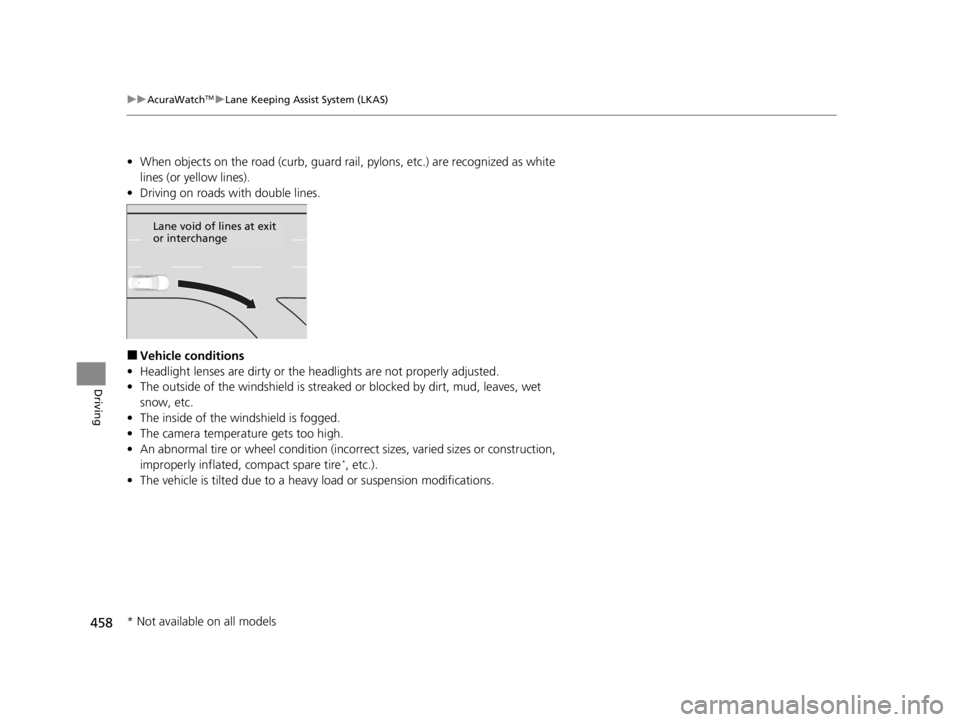
• When objects on the road (curb, guard rail, pylons, etc.) are recognized as white
lines (or yellow lines).
• Driving on roads with double lines.
■Vehicle conditions
• Headlight lenses are dirty or the headlights are not properly adjusted.
• The outside of the windshield is streake d or blocked by dirt, mud, leaves, wet
snow, etc.
• The inside of the windshield is fogged.
• The camera temperature gets too high.
• An abnormal tire or wheel condition (incorre ct sizes, varied sizes or construction,
improperly inflated, compact spare tire
*, etc.).
• The vehicle is tilted due to a heav y load or suspension modifications.
Lane void of lines at exit
or interchange
* Not available on all models
22 ACURA TLX-31TGV6100.book 458 \b
Page 463 of 656
Continued461
uuAcuraWatchTMuTraffic Jam Assist
Driving
Traffic Jam Assist is activated when a ll of the following circumstances exist:
• LKAS is active.
• ACC with Low Speed Follow is active.
• The vehicle speed is between 0 and 45mph (0 and 72km/h) and there is a vehicle
detected traveling ahead.
• The lane in which you are driving has detectable lane markers on both sides, and
your vehicle is in the center of the lane.
• You are driving on a straight or slightly curved road.
• The driver is grippi ng the steering wheel.
Do not use Traffic Jam Assist in any of the following situations:
• You are traveling on a road with sharp curves.
u The system may not allow your vehicle to respond in a manner best suited for
the road conditions.
• You are entering a toll booth, inte rchange, service area, or parking area.
u If the vehicle ahead disappears from the travel path of your vehicle, your
vehicle may suddenly accelera te to resume the set speed.
• You are driving in adverse weat her (rain, fog, snow, etc.).
u The system may not be able to correctly determine the interval between your
vehicle and the one ahead.
• The surface of the road is slippery, for ex ample, it is icy or covered with snow.
u The tires may slip, causing you to lose control of the vehicle.
• You are driving in a HOV lane and motorcycles are passing you to the side, or you
are required to keep your vehicle to the right or the left of the lane.
u The system may not be able to co rrectly determine the vehicle ahead.
■Traffic Jam Assist Activation1Traffic Jam Assist Activation
Refer to the following pa ge for proper handling of
the Adaptive Cruise Control with Low Speed Follow:
2 Adaptive Cruise Control (ACC) with Low
Speed Follow P. 431
Refer to the following pa ge for proper handling of
the Lane Keeping Assist System (LKAS): 2 Lane Keeping Assist System (LKAS) P. 450
Refer to the following page for steering buttons and
displays:
2 Operation Switches for the ACC with Low
Speed Follow/LKAS/Traffic Jam Assist
P. 417
22 ACURA TLX-31TGV6100.book 461 \b
Page 468 of 656

466
uuAcuraWatchTMuTraffic Jam Assist
Driving
■When Traffic Jam Assist may au tomatically be canceled when:
It is possible that under any of the following circumstances, broken lines
representing traffic lane lines will appear in the multi-information display, a buzzer
will sound, and Traffic Jam Assist will be canceled.
• The temperature of the camera is too high.
• The camera behind the rearview mirror, or the area around the camera, including
the windshield, is dirty.
Under the following circumstances, some features of Traffic Jam Assist may not
work.
■Vehicle conditions
• The front grille is dirty.
• Headlight lenses are dirty or the headlights are not properly adjusted.
• The outside of the windshield is streake d or blocked by dirt, mud, leaves, wet
snow, etc.
• The inside of the wind shield is fogged up.
• Your vehicle is fitted with tires or wheels of differing size, type, or structure, or the
tires are not properly inflated.
• The vehicle is tilted due to a heav y load or suspension modifications.
• The interval between your vehicle and th e detected vehicle ahead of you is too
short.
• Snow chains are inst alled on the tires.
■Traffic Jam Assist: Conditions and limitations
22 ACURA TLX-31TGV6100.book 466 \b
Page 469 of 656

467
uuAcuraWatchTMuTraffic Jam Assist
Continued
Driving
■Environmental conditions
• Bad weather (rain, fog, snow, etc.).
• You are driving into low sunlight (e.g., at dawn or dusk).
• Strong light is reflected onto your vehicle or the roadway.
• Brightness in the immediate are suddenl y changes between light and dark, such
as at the entrance or exit of a tunnel.
• The road has puddles or the surface of th e road is shiny due to recent rainfall.
• Shadows are cast across the lane lines (e .g., trees, buildings, guardrails, vehicle,
etc.).
• Spray or snow coming off the vehicle ahead.
• Driving at night or in a dark condition such as a tunnel.
■Roadway conditions
Certain features of the road can interfere with proper camera operation. Here are
some examples:
• The lines are not very distinguisha ble from the surface of the road.
• The section of the road has lane res trictions or temporarily marked lanes.
• The lines are faded, removed lines remain visible next to newer lines (duplicate
lines), or the road is marked with tire tracks.
Faded lines Duplicate lines Tire tracks
22 ACURA TLX-31TGV6100.book 467 \b
Page 476 of 656

uuAcuraWatchTMuRoad Departure Mitigation (RDM) System
474
Driving
The system may not properly detect lane markings and the position of your vehicle
under certain conditions. Some examples of these conditions are listed below.
■Environmental conditions
• Driving in bad weather (rain, fog, snow, etc.).
• Sudden changes between light and dark, such as an entrance or exit of a tunnel.
• There is little contrast between la ne lines and the roadway surface.
• Driving into low sunlight (e.g., at dawn or dusk).
• Strong light is reflected onto the roadway.
• Driving in the shadows of trees, buildings, etc.
• Shadows of adjacent objects are parallel to lane markings.
• Roadway objects or structures are misinterpreted as lane markers.
• Reflections on the interi or of the windshield.
• Driving at night or in a dark condition such as a tunnel.
■RDM Conditions and Limitations1RDM On and Off
The vehicle stability assist
TM (VSA ®) system, vehicle
stability assistTM (VSA ®) OFF, adaptive cruise control
(ACC) with low speed follow, and safety support
indicators may come on in amber along with a
message in the multi-information display when you
set the power mode to ON after reconnecting a
battery.
Drive a short distance at more than 12 mph (20
km/h).
Each indicator should go off. If any do not, have your
vehicle checked by a dealer.
22 ACURA TLX-31TGV6100.book 474 \b
Page 477 of 656

475
uuAcuraWatchTMuRoad Departure Mitigation (RDM) System
Driving
■Roadway conditions
• Driving on a snowy or wet roadway (obs cured lane marking, vehicle tracks,
reflected lights, road spray, high contrast).
• Driving on a road with temporary lane markings.
• Faint, multiple, or varied lane markings are visible on the roadway due to road
repairs or old lane markings.
• The roadway has merging, split, or crossing lines (e.g., such as at an intersection
or crosswalk).
• The lane markings are extremely narrow, wide, or changing.
• The vehicle in front of you is driving near the lane lines.
• The road is hilly or the vehicle is approaching the crest of a hill.
• Driving on rough or unpaved roads, or over bumpy surfaces.
• When objects on the road (curb, guard rail, pylons, etc.) are recognized as white
lines (or yellow lines).
• Driving on roads with double lines.
■Vehicle conditions
• Headlight lenses are dirty or the h eadlights are not properly adjusted.
• The outside of the windshield is streaked or blocked by dirt, mud, leaves, wet
snow, etc.
• The inside of the windshield is fogged.
• The camera temperature gets too high.
• An abnormal tire or wheel condition (inco rrect sizes, varied sizes or construction,
improperly inflated, compact spare tire
*, etc.).
• The vehicle is tilted due to a heavy load or suspension modifications.
• When tire chains are installed.
* Not available on all models
22 ACURA TLX-31TGV6100.book 475 \b