lane assist ACURA TLX 2022 User Guide
[x] Cancel search | Manufacturer: ACURA, Model Year: 2022, Model line: TLX, Model: ACURA TLX 2022Pages: 656, PDF Size: 26.43 MB
Page 317 of 656

315
uuCustomized Features u
Continued
Features
*1:Default SettingSetup Group
Customizable Features DescriptionSelectable Settings
Vehicle Driver Assist
System
SetupForward Collision Warning
Distance
Changes Collision Mitigation Braking
System (CMBS
TM) alert distance.Long
/Normal
*1/
Short
ACC Forward Vehicle Detect
Beep Causes the system to beep when the
system detects a vehicle, or when the
vehicle goes out of the ACC with Low
Speed Follow range.
On
/Off
*1
Road Departure Mitigation
Setting Changes the setting for the road
departure mitigation system. Normal*1/
Wide /
Warning Only /
Narrow
Lane Keeping Assist Suspend
Beep Causes the system to beep when Lane
Keeping Assist System (LKAS) is
suspended.
On
/Off
*1
Blind Spot Information*Changes the setting for the blind spot
information. Audible and Visual
Alert*1/
Visual Alert
Driver Attention Monitor Changes the setting for the driver
attention monitor. Off
,
Tactile Alert ,
Tactile/Audible
Alert
*1
* Not available on all models
22 ACURA TLX-31TGV6100.book 315 \b
Page 369 of 656
367
Driving
This chapter discusses driving and refueling.
Before Driving................................... 368
Towing a Trailer ................................ 373
When Driving
Starting the Engine .......................... 374
Precautions While Driving................. 380
Automatic Transmission ................... 381
Shifting ............................................ 382
Integrated Dynamics System............. 391
Auto Idle Stop .................................. 398
Vehicle Stability AssistTM (VSA® ), aka
Electronic Stability Control (ESC),
System ........................................ 405
Agile Handling Assist ....................... 407 Super Handling-All Wheel Drive
TM (SH-
AWD® )*......................................... 408
Tire Pressure Monitoring System (TPMS)
with Tire Fill Assist .......................... 409
Tire Pressure Monitoring System (TPMS) - Required Federal Explanation ........... 411
Blind spot information System
*........ 413
AcuraWatchTM................................... 416
Collision Mitigati on Braking SystemTM
(CMBSTM) ....................................... 420
Adaptive Cruise Control (ACC) with Low Speed Follow ................................. 431
Lane Keeping Assist System (LKAS) .. 450 Traffic Jam Assist ............................. 459
Road Departure Mi
tigation (RDM)
System ........................................ 471
Traffic Sign Recognition System ....... 476
Front Sensor Camera ....................... 482
Radar Sensor ................................... 484
Braking .............................................. 485
Parking Your Vehicle ........................ 494
Multi-View Rear Camera
*................ 505
Surround View Camera System*..... 507
Refueling ........................................... 515
Fuel Economy and CO
2 Emissions .... 518
Turbo Engine Vehicle ....................... 519
* Not available on all models
22 ACURA TLX-31TGV6100.book 367 \b
Page 415 of 656

413
uuWhen Driving uBlind spot information System*
Continued
Driving
Blind spot information System*
Is designed to detect vehicles in specified alert zones adjacent to your vehicle,
particularly in harder to see areas commonly known as “blind spots.”
When the system detects vehicles approaching from behind in adjacent lanes, the
appropriate indicator comes on for a few se conds, providing assistance when you
change lanes.
■How the system works
1 Blind spot information System*
Important Safety Reminder
Like all assistance systems, blind spot information
system has limitations. Over reliance on blind spot
information system may result in a collision.
The blind spot information system alert indicator may
not come on under the following conditions:
•A vehicle does not stay in the alert zone for more
than two seconds.
•A vehicle is parked in a side lane.
•The speed difference betw een your vehicle and the
vehicle you are passing is greater than 6 mph (10
km/h).
•An object not detected by the radar sensors
approaches or passes your vehicle.
•A vehicle running in the adjacent lane is a
motorcycle or other small vehicle.
3WARNING
Failure to visually confirm that it is safe to
change lanes before doing so may result in
a crash and serious injury or death.
Do not rely only on the blind spot
information system wh en changing lanes.
Always look in your mi rrors, to either side
of your vehicle, and behind you for other
vehicles before changing lanes.
●The transmission is in ( D or
(S.●Your vehicle speed is
between 20 mph (32 km/h)
and 100 mph (160 km/h)
Alert zone range
A: Approx. 1.6 ft. (0.5 m)
B: Approx. 10 ft. (3 m)
C: Approx. 10 ft. (3 m) Radar Sensors:
underneath the
rear bumper
corners
Alert Zone
A
B
C
* Not available on all models
22 ACURA TLX-31TGV6100.book 413 \b
Page 418 of 656

416
Driving
AcuraWatchTM
AcuraWatchTM is a driver support system which employs the use of two distinctly
different kinds of sensors, a radar sens or located behind the emblem and a front
sensor camera mounted to the interior side of the windshield, behind the rearview
mirror.
AcuraWatch
TM has following functions.
■The functions whic h do not require switch operations to activate
• Collision Mitigation Braking SystemTM (CMBSTM) 2 P. 420
• Road Departure Mitigation (RDM) System 2 P. 471
• Traffic Sign Recognition System 2 P. 476
■The functions wh ich require switch op erations to activate
• Adaptive Cruise Control ( ACC) with Low Speed Follow
2 P. 431
• Lane Keeping Assist System (LKAS) 2 P. 450
• Traffic Jam Assist 2 P. 459
22 ACURA TLX-31TGV6100.book 416 \b
Page 420 of 656

418
uuAcuraWatchTMu
Driving
You can see the current state of ACC with
Low Speed Follow, LKAS and Traffic Jam
Assist.
When both of
a and b indicates, Traffic Jam
Assist is ready to be activated.
You can have the head-up display show you the current state of each function.
2 Head-Up Display* P. 112
■Multi-Information Display Content
6
aIndicates that ACC with Low Speed Fo llow is ready to be activated.
• Green: The system is on.
• White: The system is standby.
• Amber: There is a problem with the system.
bIndicates that LKAS is ready to be activated.
•Green: The system is on.
• White: The system is standby.
• Amber: There is a problem with the system.
cIndicates that LKAS is acti vated and whether or not traff ic lane lines are detected.
• Solid lane outlines: The system is on.
• Lane outlines: The sy stem is in standby.
dIndicates whether or not ACC with Low Sp eed Follow detected the vehicle ahead.
eShows vehicle set speed in ACC with Low Speed Follow.
fShows set vehicle interval in ACC with Low Speed Follow.
Models with Head-up display
* Not available on all models
22 ACURA TLX-31TGV6100.book 418 \b
Page 421 of 656

419
uuAcuraWatchTMu
Driving
To activate ACC with Low Speed Follow, LKAS, and Traffic Jam Assi st, carry out the following steps:
■How to Operate the Buttons on the Steering Wheel
Press the Button
Button
RES/J/SET/−
Switch
LKAS Button
ACC with Low Speed
Follow
The vehicle icon,
interval bars and set
speed appear on the
multi-information
display.Press the
LKAS
Button
Press the
RES/+
/SET/−
Switch down
Press the LKAS
Button
Traffic Jam Assist
Keep your vehicle near the center of the lane while
driving.
Keep vehicle speed under 45mph (72 km/h).
Lane outlines appear on the
multi-information display.
Traffic Jam Assist is ready to
use. The lane outlines change
to solid ones once the
system starts operating
after detecting the left
and right lane markings.
LKAS
Keep your vehicle near the center of the lane while driving.
Keep vehicle speed over 45mph (72 km/h).
Lane outlines appear on
the multi-information
display. LKAS is
activated. The lane outlines change to
solid ones once the system starts
operating after detecting the
left and right lane markings.
Press the button, and then press
the
RES/+ /SET/− Switch down
(white)
(white)
(green)
(green)
22 ACURA TLX-31TGV6100.book 419 \b
Page 452 of 656

450
uuAcuraWatchTMuLane Keeping Assist System (LKAS)
Driving
Lane Keeping Assist System (LKAS)
Provides steering input to help keep the vehicle in the middle of a detected lane and
provides tactile and visual alerts if the ve hicle is detected drifting out of its lane.1Lane Keeping Assist System (LKAS)
Important Safety Reminders
The LKAS is for your convenience only. It is not a
substitute for your vehicle control. The system does
not work if you take y our hands off the steering
wheel or fail to steer the vehicle.
Do not place objects on the instrument panel.
Objects may reflect on th e windshield and prevent
correct detection of the traffic lanes.
The LKAS only alerts you when lane drift is detected
without a turn signal in use. The LKAS may not detect
all lane markings or lane departures; accuracy will
vary based on weather, speed, and lane marker
condition. It is always your responsibility to safely
operate the vehicle an d avoid collisions.
The LKAS is convenient when it is used on freeways.
The LKAS may not work properly or may work
improperly under the certain conditions:
2 LKAS Conditions and Limitations P. 456
You can read about handling information for the
camera equipped with this system. 2 Front Sensor Camera P. 482
The LKAS may not function as designed while driving
in frequent stop and go traf fic, or on roads with
sharp curves.
■Steering input assist
When you operate the turn signals to chan ge lanes, the system is suspended, and
resumes after the signals are off.
If you make a lane change without operat ing the turn signals, the LKAS alerts
activate, and torque is applied to the steering.
■Front Sensor
Camera
Monitors the lane
lines
The system applies torque to the steering to keep the vehicle between the left and
right lane lines. The applied torque beco
mes stronger as the vehicle gets closer to
either of the lane lines.■Tactile and visual alerts
Rapid vibrations on the steering
wheel and a warning display alert
you that the vehicle is drifting out
of a detected lane.
22 ACURA TLX-31TGV6100.book 450 \b
Page 453 of 656
Continued451
uuAcuraWatchTMuLane Keeping Assist System (LKAS)
Driving
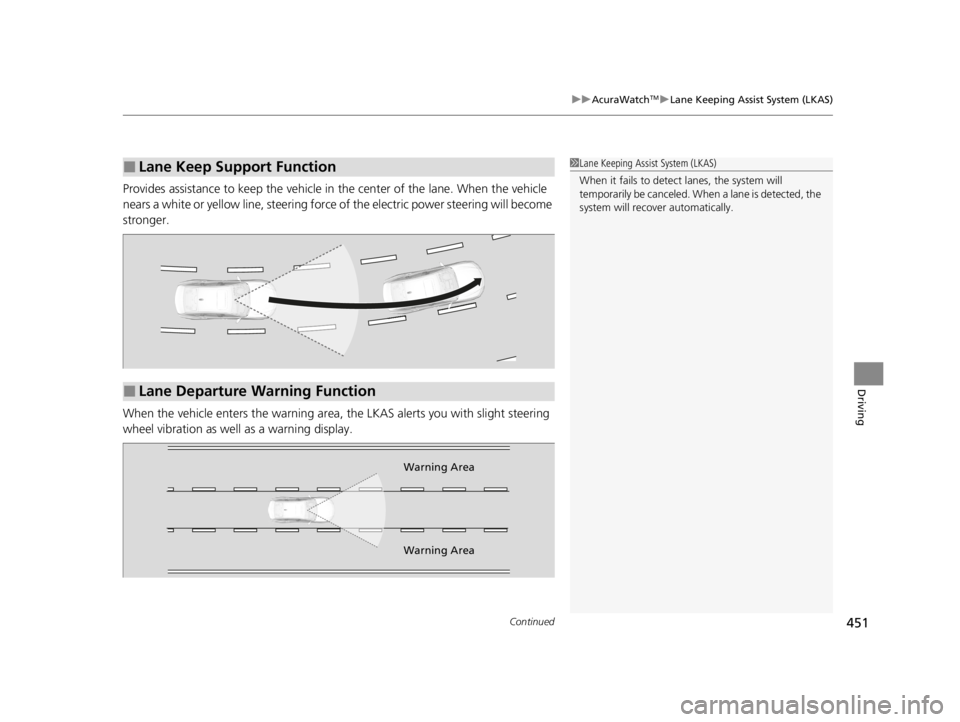
Provides assistance to keep the vehicle in the center of the lane. When the vehicle
nears a white or yellow line, steering force of the electric power steering will become
stronger.
When the vehicle enters the warning area, the LKAS alerts you with slight steering
wheel vibration as well as a warning display.
■Lane Keep Support Function1 Lane Keeping Assist System (LKAS)
When it fails to detect lanes, the system will
temporarily be canceled. When a lane is detected, the
system will recover automatically.
■Lane Departure Warning Function
Warning Area
Warning Area
22 ACURA TLX-31TGV6100.book 451 \b
Page 454 of 656
uuAcuraWatchTMuLane Keeping Assist System (LKAS)
452
Driving
The system can be used when the following conditions are met.
• The lane in which you are driving has dete ctable lane markers on both sides, and
your vehicle is in the center of the lane.
• The vehicle is traveling between about 45 and 90 mph (72 and 145 km/h).
• You are driving on a straight or slightly curved road.
• The turn signals are off.
• The brake pedal is not depressed.
• The wipers are not in continuous high speed operation.
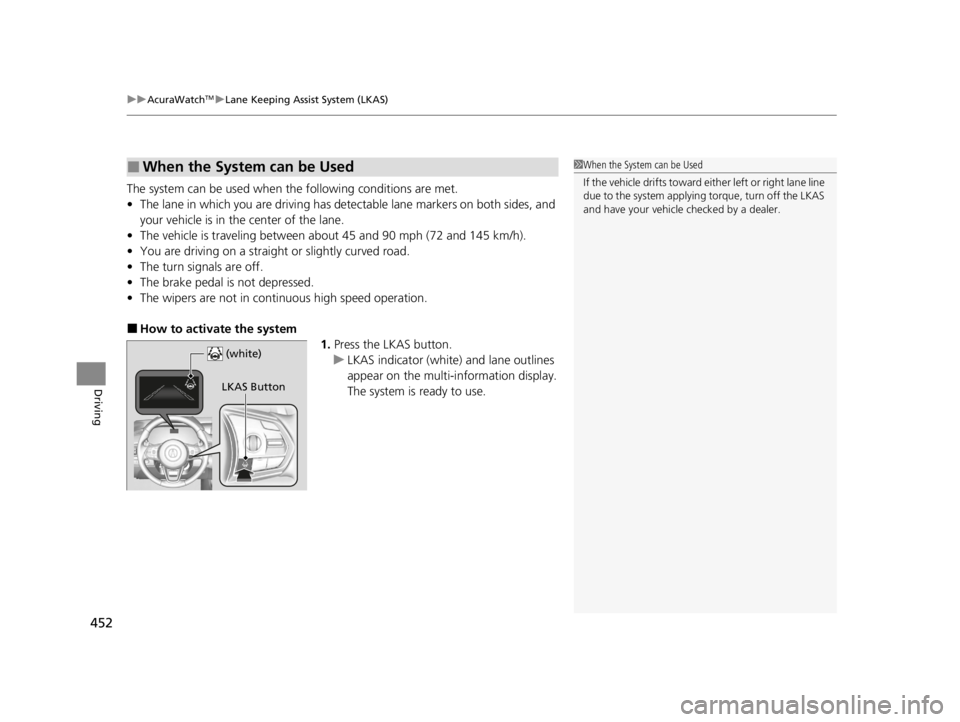
■How to activate the system
1.Press the LKAS button.
u LKAS indicator (white) and lane outlines
appear on the multi-information display.
The system is ready to use.
■When the System can be Used1When the System can be Used
If the vehicle drifts toward ei ther left or right lane line
due to the system applying torque, turn off the LKAS
and have your vehicle checked by a dealer.
LKAS Button
(white)
22 ACURA TLX-31TGV6100.book 452 \b
Page 455 of 656

453
uuAcuraWatchTMuLane Keeping Assist System (LKAS)
Continued
Driving
2. Keep your vehicle near the center of the
lane while driving.
u The LKAS indicator changes from white
to green and the lane outlines change to
solid ones once the system starts
operating after detecting the left and
right lane markings.
Press the LKAS button.
The LKAS is turned off every time you stop the
engine, even if you turned it on the last time
you drove the vehicle. (green) is on.
■To Cancel
LKAS Button
22 ACURA TLX-31TGV6100.book 453 \b