light ACURA TLX 2022 User Guide
[x] Cancel search | Manufacturer: ACURA, Model Year: 2022, Model line: TLX, Model: ACURA TLX 2022Pages: 656, PDF Size: 26.43 MB
Page 60 of 656

uuAirbags uAirbag System Indicators
58
Safe Driving■When the passenger airbag off
indicator comes on
The indicator comes on to alert you that the
passenger’s airbag has b een turned off. This
occurs if the seat is empty or when the weight
sensors determine that a small child or infant
is on the passenger seat.
Children age 12 or under should always ri de properly restrained in a back seat.
2Child Safety P. 61
If the indicator is on in the event of a cr ash, the passenger’s airbag will not deploy.
The passenger’s knee airbag will not deploy, either.
■Passenger Airbag Off Indicator1 Passenger Airbag Off Indicator
To ensure the passenger is detected properly, confirm
that:
•The occupant is sitting in an upright position,
wearing the seat belt prope rly and the seat-back is
not excessively reclined.
•The occupant is not leaning against the door or
center console.
•The occupant’s feet are plac ed on the floor in front
of them.
•There are no objects ha nging from the front
passenger’s seat.
•Only small, lightweight objects are in the seat-back
pocket.
•No liquid has been spille d on or under the seat.
•There is no child seat or other object pressing
against the rear of the seat or seat-back.
•There is no rear passenger pushing or pulling on
the back of the front passenger’s seat.
•There are no objects placed under or beside the
front passenger’s seat . Improperly positioned
objects can interfere with the advanced airbag
sensors.
•The floor mat behind the front passenger’s seat is
set in the correct position evenly on the floor. An
improperly placed mat can interfere with the
advanced airbag sensors.
•The head restraint is not contacting the roof.
U.S. Canada
22 ACURA TLX-31TGV6100.book 58 \b
Page 81 of 656
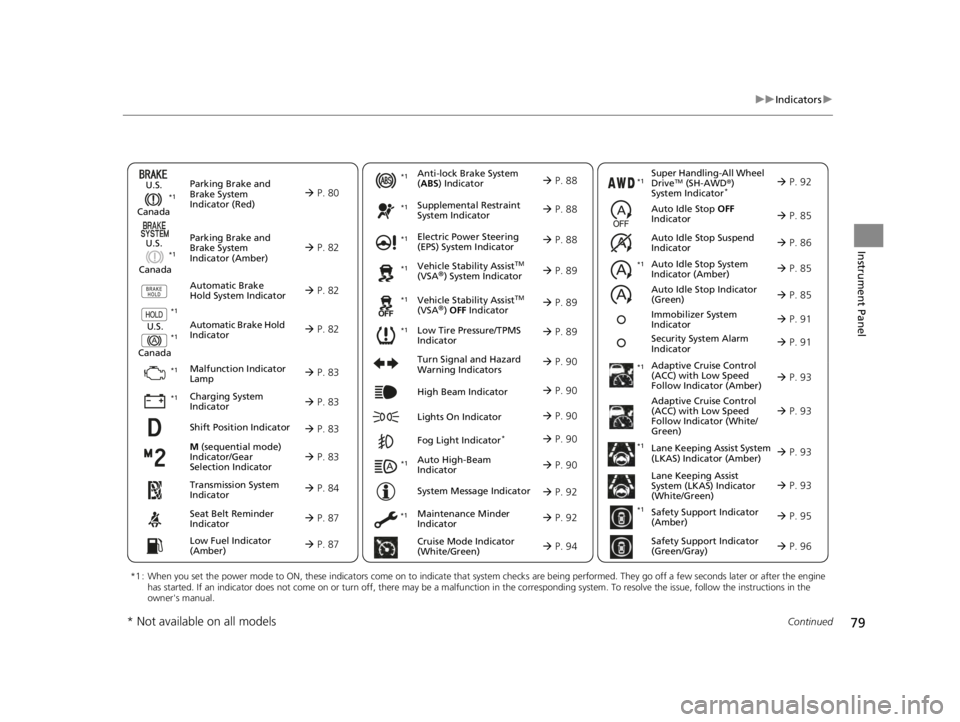
79
uuIndicators u
Continued
Instrument Panel
M (sequential mode)
Indicator/Gear
Selection Indicator P. 83
Parking Brake and
Brake System
Indicator (Red)
Parking Brake and
Brake System
Indicator (Amber)
U.S.
Canada
U.S.
Canada Automatic Brake
Hold System Indicator
Automatic Brake Hold
IndicatorU.S.
Canada
*1 : When you set the power mode to ON, these indicators come on to indicate that system checks are being performed. They go off a few seconds later or after the engine
has started. If an indicator does not come on or turn off, ther e may be a malfunction in the corresponding system. To resolve the issue, follow the instructions in the
owner's manual.
P. 80*1
Malfunction Indicator
Lamp
Charging System
Indicator
Anti-lock Brake System
(ABS ) Indicator
Seat Belt Reminder
Indicator
Low Fuel Indicator
(Amber)
Vehicle Stability AssistTM
(VSA®) System Indicator
Vehicle Stability Assist
TM
(VSA®) OFF Indicator
Supplemental Restraint
System Indicator
Auto High-Beam
Indicator
Low Tire Pressure/TPMS
Indicator Electric Power Steering
(EPS) System Indicator
Turn Signal and Hazard
Warning Indicators
Lights On Indicator High Beam Indicator
Fog Light Indicator*
Maintenance Minder
Indicator
System Message Indicator
Super Handling-All Wheel
DriveTM (SH-AWD
®)
System Indicator*
Adaptive Cruise Control
(ACC) with Low Speed
Follow Indicator (Amber)
Lane Keeping Assist System
(LKAS) Indicator (Amber)
Safety Support Indicator
(Green/Gray)
P. 82
P. 82
P. 82
P. 83
P. 83*1 *1
P. 89
*1
*1
Shift Position Indicator P. 83
Transmission System
Indicator P. 84
Auto Idle Stop System
Indicator (Amber)
P. 85
P. 87
P. 87
P. 88
P. 88
P. 90
P. 89
*1
*1
*1
P. 89
*1 P. 88
P. 90
P. 93
*1
P. 90
P. 90
P. 92
P. 90
Immobilizer System
Indicator P. 91
Security System Alarm
Indicator P. 91
P. 92
P. 92
P. 93
P. 96
*1
Adaptive Cruise Control
(ACC) with Low Speed
Follow Indicator (White/
Green) P. 93
*1
Lane Keeping Assist
System (LKAS) Indicator
(White/Green) P. 93
*1 *1
*1 *1
Safety Support Indicator
(Amber)
P. 95
*1
Cruise Mode Indicator
(White/Green) P. 94
Auto Idle Stop OFF
Indicator P. 85
Auto Idle Stop Suspend
Indicator P. 86
*1
*1
Auto Idle Stop Indicator
(Green)
P. 85
* Not available on all models
22 ACURA TLX-31TGV6100.book 79 \b
Page 92 of 656

90
uuIndicators u
Instrument Panel
IndicatorNameOn/BlinkingExplanation
Turn Signal and
Hazard Warning
Indicators•Blinks when you oper ate the turn signal
lever.
• Blink along with all turn signals when you
press the hazard warning button.•Does not blink or blinks rapidly - Have your
vehicle checked by a dealer.
High Beam
Indicator• Comes on when the high beam headlights
are on.—
Lights On
Indicator•Comes on when the parking, tail, and other
external lights are on.2 Light Switches P. 150
Fog Light
Indicator*
•Comes on when the fog lights are on.2 Fog Lights* P. 153
Auto High-Beam
Indicator•Comes on when all the operating conditions
of the auto high-beam are met.2 Auto High-Beam P. 154
* Not available on all models
22 ACURA TLX-31TGV6100.book 90 \b
Page 95 of 656

93
uuIndicators u
Continued
Instrument Panel
IndicatorNameOn/BlinkingExplanation
Adaptive Cruise
Control (ACC)
with Low Speed
Follow Indicator
(Amber)
●Comes on if there is a problem with ACC
with Low Speed Follow.●Comes on while driving - Have your vehicle
checked by a dealer.
●Indicator may come on temporarily when the
Maximum Load Limit is exceeded.
●ACC with Low Speed Follow has been
automatically canceled.
●Make sure the total load is within the Maximum
Load Limit.
2 Maximum Load Limit P. 371●Stays on constantly - Have your vehicle checked
by a dealer.
●Comes on if the ACC is deactivated
temporarily after the battery has been
disconnected, then re-connected.●Drive a short distance at more than 12 mph (20
km/h). The indicator should go off. If it does not,
have your vehicle checked by a dealer.
Adaptive Cruise
Control (ACC)
with Low Speed
Follow Indicator
(White/Green)●Lights up in white when you press the
button.
●Lights up in green when you press the
RES/+ button or SET/- button.2Adaptive Cruise Control (ACC) with Low
Speed Follow P. 431
Lane Keeping
Assist System
(LKAS) Indicator
(Amber)●Comes on if there is a problem with the
LKAS.●Stays on constantly - Have your vehicle checked
by a dealer.
Lane Keeping
Assist System
(LKAS) Indicator
(White/Green)●Lights up in white when you press the LKAS
button.
●Lights up in green when the LKAS is in
operation.2 Lane Keeping Assist System (LKAS) P. 450
22 ACURA TLX-31TGV6100.book 93 \b
Page 96 of 656

94
uuIndicators u
Instrument Panel
IndicatorNameOn/BlinkingExplanation
Cruise Mode
Indicator (White/
Green)●Lights up in white when you change to
cruise mode.
●Lights up in green when you have set a
speed for cruise control.
2 To Switch ACC with Low Speed Follow to
Cruise Control P. 446
Safety Support
Indicator (Amber)
●Comes on if there is a problem with RDM,
CMBSTM, or blind spot information system*.
●Stays on constantly - Have your vehicle checked
by a dealer.
●Indicator may come on temporarily when the
Maximum Load Limi t is exceeded.●Make sure the total load is within the Maximum
Load Limit.
2 Maximum Load Limit P. 371●Stays on constantly - Have your vehicle checked
by a dealer.
●Comes on if the RDM and CMBSTM are
deactivated temporarily after the battery has
been disconnected and then re-connected.●Drive a short distance at more than 12 mph (20
km/h). The indicator should go off. If it does not,
have your vehicle checked by a dealer.
* Not available on all models
22 ACURA TLX-31TGV6100.book 94 \b
Page 98 of 656

96
uuIndicators u
Instrument Panel
IndicatorNameOn/BlinkingExplanation
Safety Support
Indicator (Amber)
●Comes on when mud, snow, or ice has
accumulated in the vicinity of the blind spot
information system sensor.
●Comes on when the temperature of the
blind spot information system sensor is high.
●Comes on while driving - Something may be
interfering with the bli nd spot information system
sensor. Check the vicinity of the blind spot
information system sensor and remove any
obstacles.
●The system will return to normal when the
temperature cools down.
2 Blind spot information System* P. 413
Safety Support
Indicator (Green/
Gray)
●Lights up in green when RDM, CMBSTM, and
blind spot information system* are on.●Lights up in green and gray when RDM,
CMBSTM, or blind spot information system*,
or any two of these systems are off.
●Lights up in gray when RDM, CMBSTM, and
blind spot information system* are off.
2 RDM On and Off P. 473
2 CMBSTM On and Off P. 424
2 Blind spot information System On and Off
P. 415
Models with blind spot information system
* Not available on all models
22 ACURA TLX-31TGV6100.book 96 \b
Page 110 of 656
uuGauges and Multi-Information Display uMulti-Information Display
108
Instrument Panel
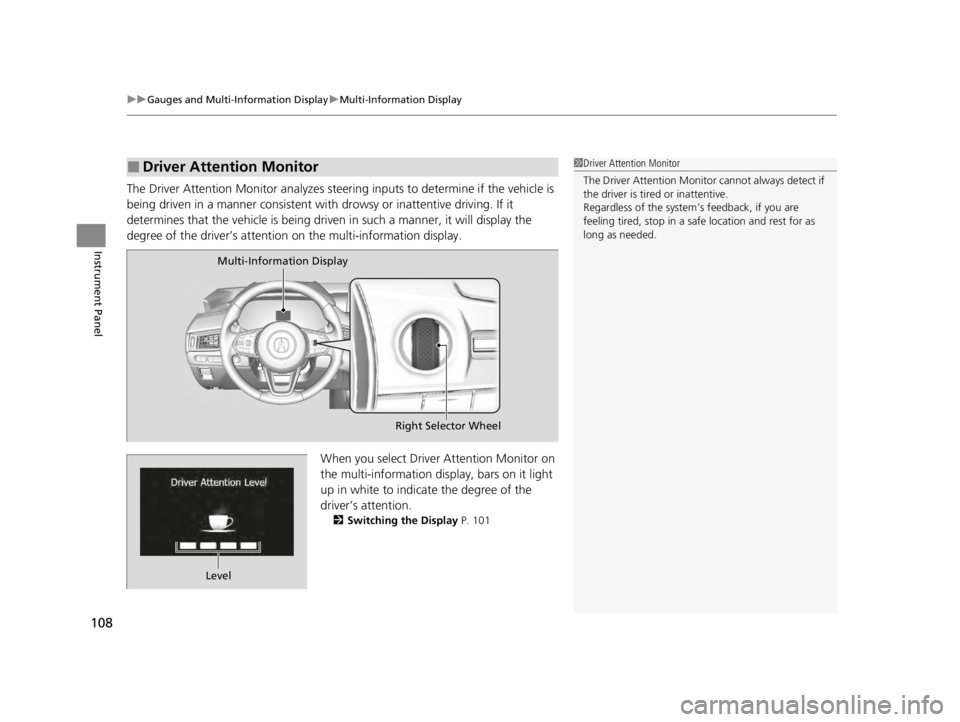
The Driver Attention Monitor analyzes steer ing inputs to determine if the vehicle is
being driven in a manner consistent with drowsy or inattentive driving. If it
determines that the vehicle is being driven in such a manner, it will display the
degree of the driver’s attention on the multi-information display.
When you select Driver Attention Monitor on
the multi-information display, bars on it light
up in white to indicate the degree of the
driver’s attention.
2Switching the Display P. 101
■Driver Attention Monitor1Driver Attention Monitor
The Driver Attenti on Monitor cannot always detect if
the driver is tired or inattentive.
Regardless of the system’s feedback, if you are
feeling tired, stop in a safe location and rest for as
long as needed.
Multi-Information Display
Right Selector Wheel
Level
22 ACURA TLX-31TGV6100.book 108 \b
Page 111 of 656
109
uuGauges and Multi-Information Display uMulti-Information Display
Continued
Instrument Panel
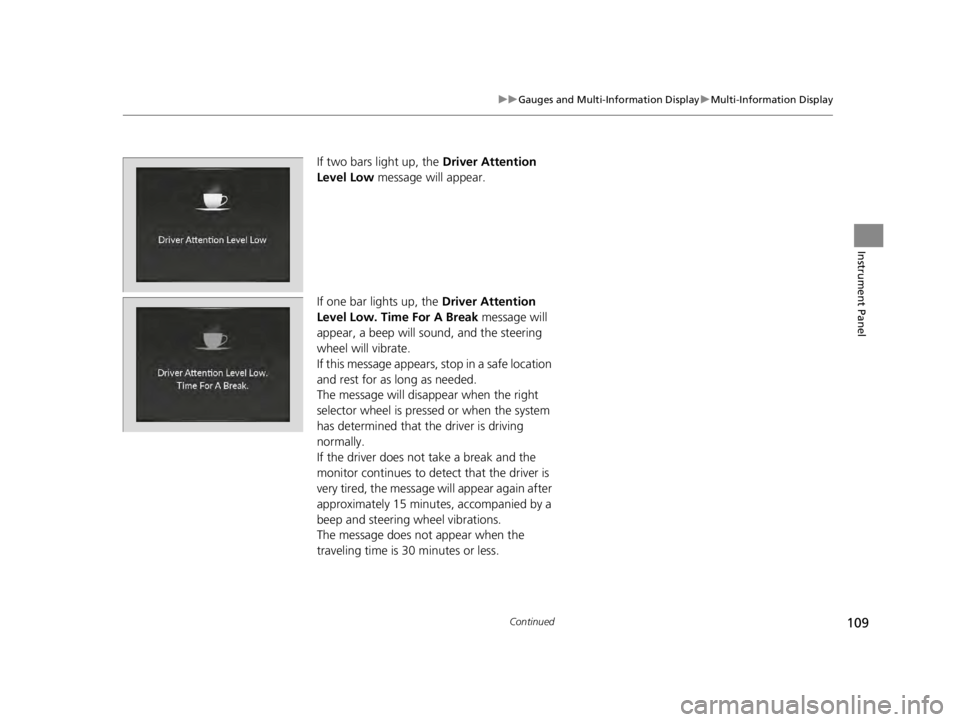
If two bars light up, the Driver Attention
Level Low message will appear.
If one bar lights up, the Driver Attention
Level Low. Time For A Break message will
appear, a beep will sound, and the steering
wheel will vibrate.
If this message appears, stop in a safe location
and rest for as long as needed.
The message will disappear when the right
selector wheel is presse d or when the system
has determined that the driver is driving
normally.
If the driver does not take a break and the
monitor continues to detect that the driver is
very tired, the message will appear again after
approximately 15 minutes, accompanied by a
beep and steering wheel vibrations.
The message does not appear when the
traveling time is 30 minutes or less.
22 ACURA TLX-31TGV6100.book 109 \b
Page 115 of 656
113
uuGauges and Multi-Information Display uHead-Up Display*
Continued
Instrument Panel
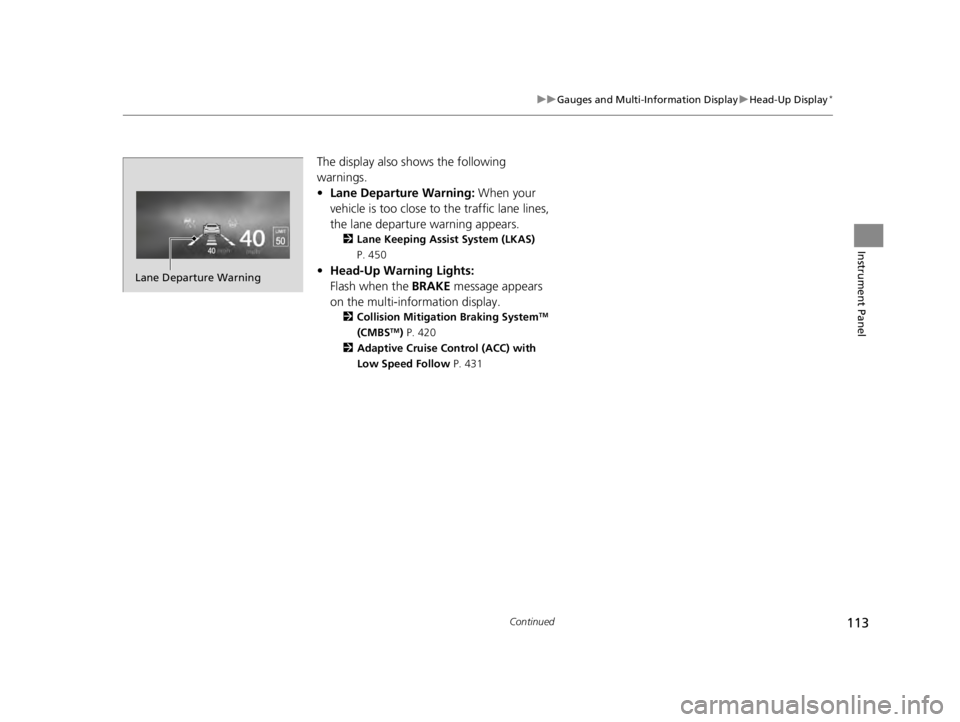
The display also shows the following
warnings.
• Lane Departure Warning: When your
vehicle is too close to the traffic lane lines,
the lane departure warning appears.
2 Lane Keeping Assist System (LKAS)
P. 450
• Head-Up Warning Lights:
Flash when the BRAKE message appears
on the multi-information display.
2 Collision Mitigation Braking SystemTM
(CMBSTM) P. 420
2 Adaptive Cruise Control (ACC) with
Low Speed Follow P. 431
Lane Departure Warning
22 ACURA TLX-31TGV6100.book 113 \b
Page 119 of 656
117
Controls
This chapter explains how to operate the various controls necessary for driving.
Clock.................................................. 118
Locking and Unlocking the Doors
Key .................................................. 120
Low Keyless Remote Signal Strength ... 122
Locking/Unlocking the Doors from the Outside .......................................... 123
Locking/Unlocking the Doors from the Inside ............................................. 132
Childproof Door Locks ..................... 134
Auto Door Locking/Unlocking .......... 135
Opening and Closing the Trunk ....... 136
Security System ................................ 139
Immobilizer System .......................... 139
Security System Alarm ...................... 139 Windows
........................................... 142
Moonroof .......................................... 145
Operating the Switches Around the Steering Wheel ENGINE START/STOP Button............. 146
Turn Signals ..................................... 149
Light Switches.................................. 150
Fog Lights
*...................................... 153
Daytime Running Lights ................... 153
Auto High-Beam .............................. 154
Wipers and Washers ........................ 157
Brightness Control ........................... 159
Rear Defogger/Heated Door Mirror Button .. 161Driving Position Memory System ...... 162 Adjusting the Steering Wheel .......... 164
Mirrors ............................................... 165
Interior Rearview Mirror ................... 165
Power Door Mirrors ......................... 166
Seats .................................................. 168
Front Seats ...................................... 168
Interior Convenience Items .............. 180
Interior Lights .................................. 180
Storage Items .................................. 182
Climate Control System Using Automatic Climate Control .... 197
Automatic Climate Control Sensors ... 201
* Not available on all models
22 ACURA TLX-31TGV6100.book 117 \b