automatic transmission ACURA TLX 2022 Owner's Manual
[x] Cancel search | Manufacturer: ACURA, Model Year: 2022, Model line: TLX, Model: ACURA TLX 2022Pages: 656, PDF Size: 26.43 MB
Page 406 of 656

uuWhen Driving uAuto Idle Stop
404
Driving
■The engine restarts even if the brake pedal is depressed*1 when:
• The Auto Idle Stop OFF button is pressed.
• The steering wheel is operated.
• The transmission is put into
(R or (S, or taken out of (N and put into (D.
u If you put the transmission into
(P after the Auto Idle Stop activates, the Auto
Idle Stop continues to operate. In this case, the engine restarts when you
depress the brake pedal.
• The battery charge becomes low.
• The accelerator pedal is depressed.
• The driver’s seat belt is unlatched.
• is ON (indicator on).
• The climate control system is in us e, and the difference between the set
temperature and actual interior temperature becomes significant.
• The climate control system is bein g used to dehumidify the interior.
• The Integrated Dynamics System mode is changed to SPORT or SPORT+
* mode.
• The Auto Idle Stop is set to off on INDIVIDUAL Setting screen.
2Customizing the INDIVIDUAL Settings P. 396
•The vehicle ahead of you starts again when your vehicle stops automatically with
ACC with Low Speed Follow.
Briefly keeps the brake applied after releasi ng the brake pedal to restart the engine.
This can keep your vehicle from unexpectedly moving while on an incline.
■Starting Assist Brake Function
1 The engine restarts even if the brake pedal is depressed*1 when:
*1: With the automatic brake hold system activated,
you can release the brake pedal while Auto Idle Stop
is in operation.
If the automatic brake hold system has been turned
off, or if there is a problem with the system, the
engine will restart automatically when you release
the brake pedal. 2 Automatic Brake Hold P. 490
* Not available on all models
22 ACURA TLX-31TGV6100.book 404 \b
Page 489 of 656

Continued487
uuBraking uBrake System
Driving
■Automatic parking brake feature operation
If the automatic parking brake feature has been activated:
• The parking brake is applied automatically when you set the power mode to
VEHICLE OFF.
• To confirm that the parking brake is applied, check if the Parking Brake and Brake
System indicator (red) is on.
2 Activating and deactivating the automatic parking brake feature P. 488
■To release automatically
Depressing the accelerator pedal releases the parking brake.
Use the accelerator pedal to release the brake when you are starting the vehicle
facing uphill, or in a traffic jam.
Gently depress the accelerator pedal.
When on a hill, it may require more
accelerator input to release.u The parking brake and brake system
indicator goes off.
You can release the parking brake automatically when:
• You are wearing the driver’s seat belt.
• The engine is running.
• The transmission is not in
(P or (N.
1Parking Brake
If the parking brake cannot be released
automatically, release it manually.
When the vehicle is travel ing uphill, the accelerator
pedal may need to be pressed farther to
automatically release the electric parking brake.
The parking brake cannot be released automatically
while the following indicators are on:
•Malfunction indicator lamp•Transmission system indicator
The parking brake may not be released automatically
while the following indicators are on:
•Electric parking brak e system indicator
•VSA® system indicator•ABS indicator
•Supplemental restraint system indicator
Accelerator Pedal
22 ACURA TLX-31TGV6100.book 487 \b
Page 490 of 656

uuBraking uBrake System
488
Driving
■Activating and deactivating the au tomatic parking brake feature
With the power mode in ON, carry out the following steps to either activate or
deactivate the automatic parking brake feature.
1. Put the transmission into
(P.
2. Without depressing the brake pedal, press and release the parking brake switch.
u Check that the Parking Brake and Brake System indicator (red) has come on.
3. Press and hold the parking brake switch. When you hear a beeping sound, release
the switch and within 3 seconds press and hold the switch again.
4. When you hear a sound indicating that the procedure is completed, release the
switch.
u Two beeps indicates that the feature has been activated.
u One beep indicates that the feature has been deactivated.
u When you have completed activating the feature, the parking brake will
remain applied after you turn off the engine.
u To confirm that the parking brake is ap plied, check if the Parking Brake and
Brake System indicator (red) is on.
If you need to temporarily deactivate the feature while putting your vehicle through
a conveyor type car wash, you can follow the procedure explained below.
1. Depress the brake pedal and bring the vehicle to a stop.
2. Set the power mode to VEHICLE OFF and then within 2 seconds pull up the
parking brake switch.
u Activation and deactivation settings fo r the feature will not be affected.
u Before temporarily deactivating the feat ure, make sure to first turn off both
ACC with Low Speed Follow and th e automatic brake hold system.
u To confirm that the parking brake is ap plied, check if the Parking Brake and
Brake System indicator (red) is on.
1 Parking Brake
In cold climates, the parking brake may freeze in
place if applied.
When parking the vehicle, chock the wheels and
make sure the automatic parking brake feature is
deactivated.
Also, when putting your vehicle through a conveyor-
type car wash or when ha ving your vehicle towed,
deactivate the automatic parking brake feature and
leave the parking brake released.
22 ACURA TLX-31TGV6100.book 488 \b
Page 492 of 656

uuBraking uBrake System
490
Driving
Keeps the brake applied after releasing the brake pedal until the accelerator pedal is
pressed. You can use this system while the vehicle is temporarily stopped, like at
traffic lights and in heavy traffic.
■Automatic Brake Hold1Automatic Brake Hold
3WARNING
Activating the automatic brake hold system
on steep hills or slippery roads may still
allow the vehicle to move if you remove
your foot from the brake pedal.
If a vehicle unexpectedly moves, it may
cause a crash resulting in serious injury or
death.
Never activate the automatic brake hold
system or rely on it to keep a vehicle from
moving when stopped on a steep hill or
slippery roads.
3WARNING
Using the automatic brake hold system to
park the vehicle may result in the vehicle
unexpectedly moving.
If a vehicle moves unexpectedly, it may
cause a crash, resulting in serious injury or
death.
Never leave the vehicle when braking is
temporarily kept by automatic brake hold
and always park the vehicle by putting the
transmission in
( P and applying the parking
brake.
■Turning on the system
Fasten your seat belt
properly, then start the
engine. Press the
automatic brake hold
button.
●The automatic brake
hold system indicator
comes on. The system
is turned on.
■Activating the system
Depress the brake pedal
to come to a complete
stop. The transmission
must not be in
( P or (R.●The automatic brake
hold indicator comes
on. Braking is kept for
up to 10 minutes.
●Release the brake
pedal after the
automatic brake hold
indicator comes on.
■Canceling the system
Depress the accelerator
pedal while the
transmission is in a
position other than
( P
or ( N. The system is
canceled and the vehicle
starts to move.
●The automatic brake
hold indicator goes
off. The system
continues to be on.
Accelerator
Pedal
Brake PedalAutomatic Brake
Hold Button
Comes
On
Comes On
OnOn
U.S.
Canada Comes
On
Comes
On
On
U.S.
Canada
22 ACURA TLX-31TGV6100.book 490 \b
Page 493 of 656
491
uuBraking uBrake System
Driving
■The system automatically cancels when:
• You engage the parking brake.
• You depress the brake pedal a nd put the transmission into
(P or (R.
■The system automatically cancels and the parking brake is applied when:
• Braking is kept for more than 10 minutes.
• The driver’s seat belt is unfastened.
• The engine is turned off.
• There is a problem with automatic brake hold system.
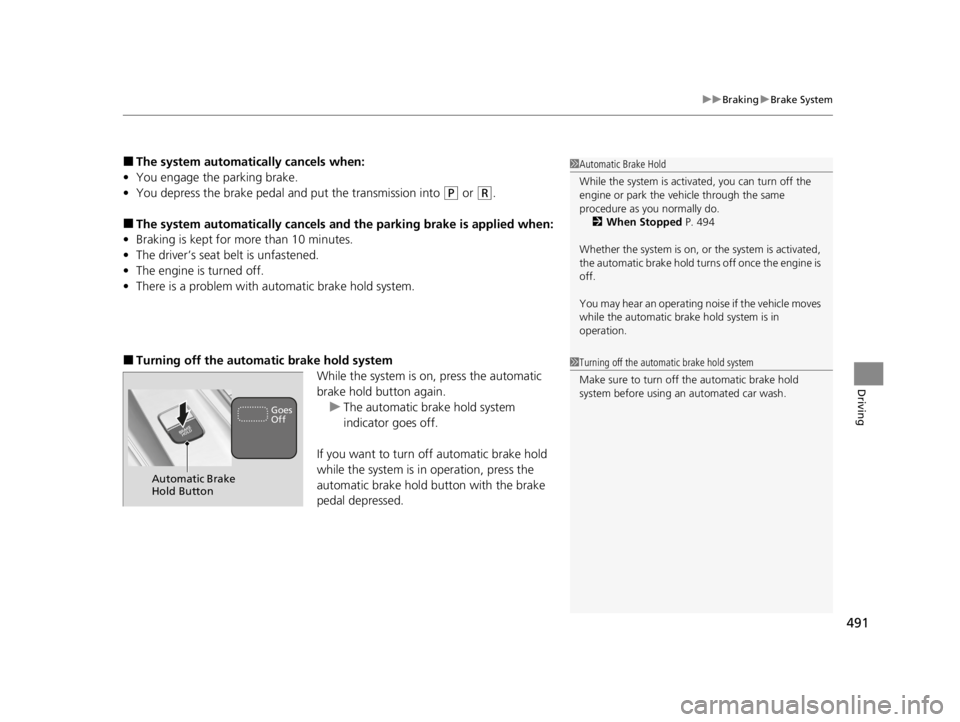
■Turning off the automa tic brake hold system
While the system is on, press the automatic
brake hold button again.u The automatic brake hold system
indicator goes off.
If you want to turn off automatic brake hold
while the system is in operation, press the
automatic brake hold button with the brake
pedal depressed.
1 Automatic Brake Hold
While the system is activated, you can turn off the
engine or park the ve hicle through the same
procedure as you normally do. 2 When Stopped P. 494
Whether the system is on, or the system is activated,
the automatic brake hold turn s off once the engine is
off.
You may hear an operating noi se if the vehicle moves
while the automatic brake hold system is in
operation.
1 Turning off the automatic brake hold system
Make sure to turn off the automatic brake hold
system before using an automated car wash.
Automatic Brake
Hold Button
Goes
Off
22 ACURA TLX-31TGV6100.book 491 \b
Page 507 of 656
505Continued
Driving
Multi-View Rear Camera*
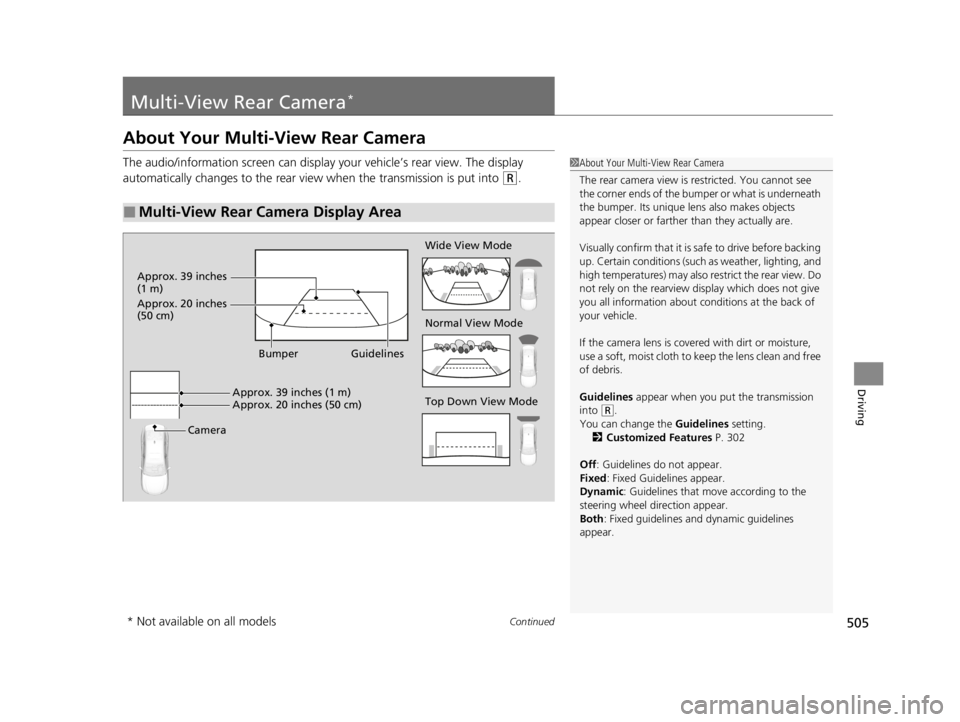
About Your Multi-View Rear Camera
The audio/information screen can display your vehicle’s rear view. The display
automatically changes to the rear view when the transmission is put into
(R.
■Multi-View Rear Camera Display Area
1About Your Multi-View Rear Camera
The rear camera view is restricted. You cannot see
the corner ends of the bumper or what is underneath
the bumper. Its unique le ns also makes objects
appear closer or farther than they actually are.
Visually confirm that it is safe to drive before backing
up. Certain conditions (such as weather, lighting, and
high temperatures) may also restrict the rear view. Do
not rely on the rearview display which does not give
you all information about conditions at the back of
your vehicle.
If the camera lens is cove red with dirt or moisture,
use a soft, moist cloth to keep the lens clean and free
of debris.
Guidelines appear when you put the transmission
into
( R.
You can change the Guidelines setting. 2 Customized Features P. 302
Off : Guidelines do not appear.
Fixed: Fixed Guidelines appear.
Dynamic: Guidelines that move according to the
steering wheel direction appear.
Both : Fixed guidelines and dynamic guidelines
appear.Top Down View Mode Normal View Mode Wide View Mode
Guidelines
Bumper
Camera Approx. 39 inches (1 m)
Approx. 20 inches (50 cm)
Approx. 39 inches
(1 m)
Approx. 20 inches
(50 cm)
* Not available on all models
22 ACURA TLX-31TGV6100.book 505 \b
Page 550 of 656
548
uuMaintenance Under the Hood uTransmission Fluid
Maintenance
Transmission Fluid
Have a dealer check the fluid level and replace if necessary.
Do not attempt to check or change th e automatic transmission fluid yourself.
■Automatic Transmission Fluid
Specified fluid: Acura ATF-type 2.0
1Automatic Transmission Fluid
NOTICE
Do not mix Acura ATF-type 2.0 with other
transmission fluids.
Using a transmission fluid other than Acura ATF-type
2.0 may adversely affect the operation and durability
of your vehicle’s transm ission, and damage the
transmission.
Any damage caused by using a transmission fluid that
is not equivalent to Acura ATF-type 2.0 is not covered
by Acura’s new vehicl e limited warranty.
22 ACURA TLX-31TGV6100.book 548 \b
Page 575 of 656

573
uuCleaning uExterior Care
Continued
Maintenance
Exterior Care
Dust off the vehicle body afte r you drive. Regularly inspect your vehicle for scratches
on painted surfaces. A scratch on a painted surface can result in body rust. If you
find a scratch, promptly repair it.
Wash the vehicle regularly. Wash more fr equently when driving in the following
conditions:
• If driving on roads with road salt.
• If driving in coastal areas.
• If tar, soot, bird droppings, insects, or tree sap are stuck to painted surfaces.
• If driving in conditions that cause buildup of mud, snow, ice or other debris on the
left side inner fender vent.
• Make sure to follow the instructions indicated on the automated car wash.
• Fold in the door mirrors.
• For models equipped with automatic intermittent wipers, turn the wipers off.
• Keep sufficient distance between the cleaning nozzle and the vehicle body.
• Take particular care around the windows. Standing too close may cause water to
enter the vehicle interior.
• Do not spray high pressure water direct ly into the engine compartment. Instead,
use low pressure water and a mild detergent.
■Washing the Vehicle
■Using an Automated Car Wash
■Using High Pressure Cleaners
1 Washing the Vehicle
Do not spray water into the air intake vents. It can
cause a malfunction.
Do not spray water onto the fuel fill door directly. A
high-pressure spray ma y cause it to open.
Do not spray water onto the capless unit when the
fuel fill door is open. It ca n cause damage to the fuel
system or engine.
If you need to lift the wiper arms away from the
windshield, first set the wiper arms to the
maintenance position.
2 Changing the Wiper Blade Rubber P. 552
Air Intake Vents
1Using an Automated Car Wash
When using an automated car wash that pulls the
vehicle through with a c onveyor, make sure the
transmission in
( N position.
2 If you want to keep the transmission in
(N
position [car wash mode] P. 387
22 ACURA TLX-31TGV6100.book 573 \b
Page 636 of 656

634
Information
Identification Numbers
Vehicle Identification Number (VIN), Engine Number,
and Transmission Number
Your vehicle has a 17-digit vehicle identifi cation number (VIN) used to register your
vehicle for warranty purposes, and for licensing and insuring your vehicle.
The locations of your vehicle’s VIN, engine number, and transmission number are
shown as follows.
1 Vehicle Identification Number (VIN), Engine Number, and
Transmission Number
The interior vehicle identification number (VIN) is
located under the cover.
Cover*
Vehicle Identification Numbers
Engine Number
Automatic
Transmission
Number Certification Label/Vehicle Identification Number2.0 L engine models
Vehicle Identification Numbers
Certification Label/Vehicle Identification Number
3.0 L engine models
Engine Number
Automatic
Transmission
Number
* Not available on all models
22 ACURA TLX-31TGV6100.book 634 \b
Page 647 of 656

Index
645
Index
Index
A
ABS (Anti-lock Brake System).................. 492
Accessories and Modifications ................ 576
Accessory Power Sockets ......................... 189
AcuraLink® .............................................. 358
AcuraWatch
TM.................................... 23, 416
Adaptive Cruise Control (ACC) with Low Speed Follow ............................ 93, 431
Adding the Coolant ................................. 547
Additives Coolant .......................................... 544, 546
Engine Oil ............................................... 536
Washer ................................................... 549
Additives, Engine Oil ............................... 536
Adjusting Armrest .................................................. 179
Front Seats.............................................. 168
Head Restraints ....................................... 174
Mirrors.................................................... 165
Steering Wheel ....................................... 164
Agile Handling Assist ............................... 407
Air Conditioning System (Climate Control
System) .................................................... 197
Defrosting the Windshield and Windows .............................................. 199
Dust and Pollen Filter .............................. 570
Sensors ................................................... 201
Synchronized Mode ................................ 200
Air Pressure ...................................... 556, 633
Airbags ....................................................... 43
Advanced Airbags ..................................... 49 Airbag Care ............................................... 60
Driver’s Knee Airbag .................................. 51
Event Data Recorder .................................... 0
Front Airbags (SRS) .................................... 46
Indicator .............................................. 57, 88
Passenger Airbag Off Indicator .................. 58
Sensors ...................................................... 43
Side Airbags .............................................. 54
Side Curtain Airbags .................................. 56
AM/FM Radio ............................................ 238
Android Auto ............................................ 272
Anti-lock Brake System (ABS) .................. 492
Indicator .................................................... 88
Apple CarPlay ........................................... 268
Armrest ..................................................... 179
AT&T Hotspot ........................................... 266
Audio Remote Controls ............................ 208
Audio System ............................................ 204
Adjusting the Sound ................................ 233
Audio/Information Screen ........................ 214
Auxiliary Input Jack .................................. 206
Display Setup ........................................... 234
Error Messages ........................................ 276
General Information ................................ 279
Home Screen ........................................... 218
How to Update Wirelessly ........................ 227
How to Update with a USB Device ........... 231
How to use Siri Eyes Free ......................... 267
iPod ......................................................... 255
Limitations for Manua l Operation ............ 234
MP3/WMA/AAC ...................................... 258 Reactivating ............................................ 207
Remote Controls ..................................... 208
Security Code .......................................... 207
Status Area ............................................. 223
System Updates....................................... 227
Theft Protection ...................................... 207
True Touchpad Interface.......................... 211
USB Flash Drives .............................. 258, 281
USB Ports ................................................ 205
Audio/Information Screen ....................... 214
Authorized Manuals ................................ 643
Auto Door Locking/Unlocking ................. 135
Auto High-Beam ....................................... 154
Indicator.................................................... 90
Auto Idle Stop .......................................... 398
OFF Button .............................................. 400
Automatic Brake Hold ............................. 490
Indicator............................................ 82, 490
Automatic Folding Door Mirror .............. 167
Automatic Lighting .................................. 151
Automatic Transmission ........................... 381
Creeping ................................................. 381
Kickdown ................................................ 381
Operating the Shift Button ................ 20, 384
Shifting ................................................... 382
Auxiliary Input Jack .................................. 206
Average Fuel Economy ............................ 103
22 ACURA TLX-31TGV6100.book 645 \b