ECU ACURA TLX 2022 Service Manual
[x] Cancel search | Manufacturer: ACURA, Model Year: 2022, Model line: TLX, Model: ACURA TLX 2022Pages: 656, PDF Size: 26.43 MB
Page 370 of 656

368
Driving
Before Driving
Driving Preparation
Check the following items before you start driving.
• Make sure there are no obstructions on the windows, door mirrors, exterior
lights, or other parts of the vehicle.
u Remove any frost, snow, or ice.
u Remove any snow on the roof, as this can slip down and obstruct your field of
vision while driving. If frozen solid , remove ice once it has softened.
u When removing ice from around the wheels, be sure not to damage the wheel
or wheel components.
• Make sure the hood is securely closed.
u If the hood opens while driving, your front view will be blocked.
• Make sure the tires are in good condition.
u Check air pressures, and check for damage and excessive wear.
2Checking and Maintaining Tires P. 555
•Make sure there are no people or ob jects behind or around the vehicle.
u There are blind spots from the inside.
■Exterior Checks1Exterior Checks
NOTICE
When doors are frozen s hut, use warm water around
the door edges to melt any ice. Do not try to force
them open, as this can damage the rubber trim
around the doors. When done, wipe dry to avoid
further freezing.
Do not pour warm water into the key cylinder.
You will be unable to insert the key if the water
freezes in the hole.
Heat from the engine and exhaust can ignite
flammable material s left under the hood, causing a
fire. If you’ve parked y our vehicle for an extended
period, inspect and remove any debris that may have
collected, such as dried grass and leaves that have
fallen or have been carried in for use as a nest by a
small animal. Also, check under the hood for leftover
flammable materials after you or someone else has
performed maintenance on your vehicle.
22 ACURA TLX-31TGV6100.book 368 \b
Page 371 of 656
Continued369
uuBefore Driving uDriving Preparation
Driving
• Store or secure all items on board properly.
u Carrying too much cargo, or improperly storing it, can affect your vehicle’s
handling, stability, sto pping distance, and tires, and make it unsafe.
2Maximum Load Limit P. 371
•Do not pile items higher than the seat height.
u They can block your view and may be thrown forward in the event of sudden
braking.
• Do not place anything in the front seat footwells. Make sure to secure the floor
mat.
u An object or unsecured floor mat can in terfere with your brake and accelerator
pedal operation while driving.
• If you have any animals on board, do not let them move around in the vehicle.
u They may interfere with driving and a crash could occur.
• Securely close and lock all doors and the trunk.
2 Locking/Unlocking the Doors from the Inside P. 132
•Adjust your seating position properly.
u Adjust the head restraint, too.
2Seats P. 168
2 Adjusting the Head Restraint Positions P. 174
•Adjust the mirrors and steering wheel properly.
u Adjust them while sitting in the proper driving position.
2 Adjusting the Steering Wheel P. 164
2 Mirrors P. 165
■Interior Checks1Interior Checks
The headlight aim is set by the factory, and does not
need to be adjusted. Howeve r, if you regularly carry
heavy items in the trunk ha ve the aiming readjusted
at a dealer or by a qualified technician.
22 ACURA TLX-31TGV6100.book 369 \b
Page 379 of 656
Continued377
uuWhen Driving uStarting the Engine
Driving
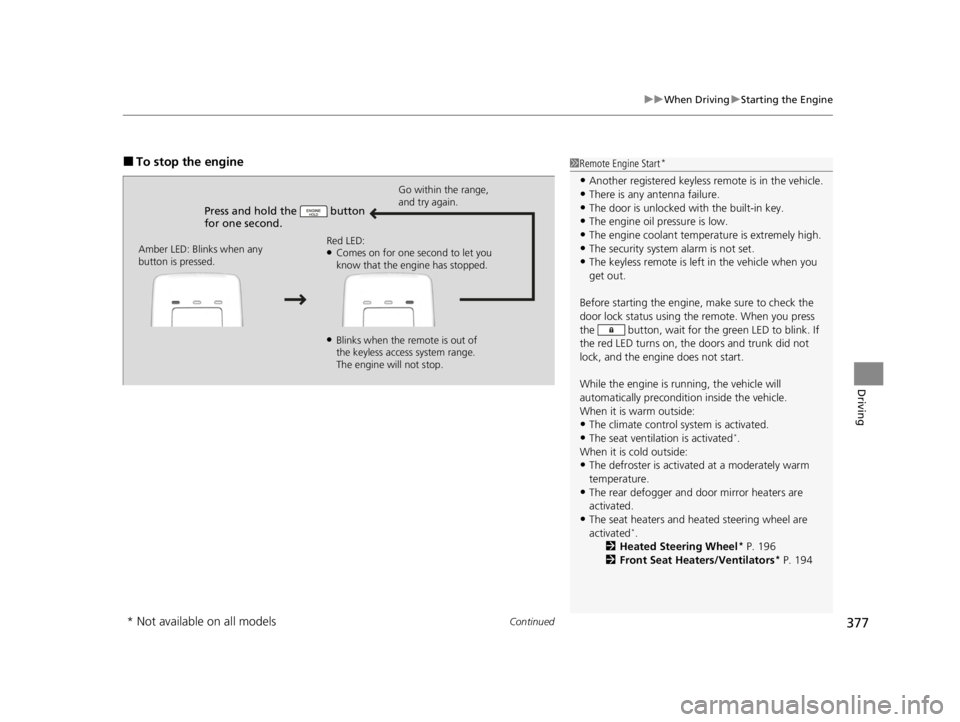
■To stop the engine
Press and hold the button
for one second.
Go within the range,
and try again.
Amber LED: Blinks when any
button is pressed. Red LED:
●Comes on for one second to let you
know that the engine has stopped.
●Blinks when the remote is out of
the keyless access system range.
The engine will not stop.
1
Remote Engine Start*
•Another registered keyless remote is in the vehicle.
•There is any antenna failure.
•The door is unlocked with the built-in key.•The engine oil pressure is low.
•The engine coolant temper ature is extremely high.
•The security system alarm is not set.•The keyless remote is left in the vehicle when you
get out.
Before starting the engine, make sure to check the
door lock status using the remote. When you press
the button, wait for the green LED to blink. If
the red LED turns on, the doors and trunk did not
lock, and the engine does not start.
While the engine is running, the vehicle will
automatically preconditi on inside the vehicle.
When it is warm outside:
•The climate control system is activated.
•The seat ventilation is activated*.
When it is cold outside:
•The defroster is activated at a moderately warm
temperature.
•The rear defogger and door mirror heaters are
activated.
•The seat heaters and heated steering wheel are
activated*.
2 Heated Steering Wheel* P. 196
2 Front Seat Heaters/Ventilators* P. 194
* Not available on all models
22 ACURA TLX-31TGV6100.book 377 \b
Page 461 of 656

459
uuAcuraWatchTMuTraffic Jam Assist
Continued
Driving
Traffic Jam Assist
The traffic jam assist system uses a radar sensor mounted inside the front grille and
a camera mounted to the upper portion of the windshield to detect and monitor left
and right white (yellow) traffic lane lines as well as any vehicle ahead. Based on
inputs from the radar sensor and camera, the system can adjust the speed of your
vehicle to maintain a set interval between your vehicle and the one detected ahead.
It also can apply steering torque to keep yo ur vehicle in the center of the detected
lane when you are driving in heavy traffic.
■How Traffic Jam Assist works
If you are in heavy traffic and Adaptive Cruise Contro l with Low Speed Follow is
active, the traffic jam assist system, upon detecting the traffic lane lines and a vehicle
ahead, will apply steering torque to help keep your vehicle in the center of the lane.
The system adjusts the speed of your vehicl e to maintain a set interval between your
vehicle and the one detected ahead.
1 Traffic Jam Assist
3WARNING
Improper reliance on Traffic Jam Assist can
cause a crash resulting in injury or death.
Always maintain full control over your
vehicle even when this system is active. and
only use when on ex pressways or freeways.
Traffic Jam Assist is not an autonomous
driving system.
3WARNING
Failure to securely park vehicle when
stopped while Adaptive Cruise Control with
Low Speed Follow is active can allow the
vehicle to roll away, resulting in a crash
causing injury or death.
Never stop the vehicle and exit it without
placing it in Park an d setting the parking
brake.
22 ACURA TLX-31TGV6100.book 459 \b
Page 487 of 656

485Continued
Driving
Braking
Brake System
Use the parking brake to keep the vehicle stationary when parked. When the
parking brake is applied, you can manu ally or automatically release it.
■To apply
The electric parking brake can be applied any
time the vehicle has battery, no matter which
position the power mode is in.
Press the electric parking brake switch gently
and securely. u The indicator in the switch comes on.
u The parking brake and brake system
indicator comes on.
■Parking Brake1Brake System
When you depress the brak e pedal, you may hear a
whirring sound from the engine compartment. This is
because the brake system is in operation, and it is
normal.
1 Parking Brake
You may hear the electric parking brake system
motor operating from the re ar wheel area when you
apply or release the parking brake. This is normal.
The brake pedal may slightly move due to the electric
parking brake system opera tion when you apply or
release the parking br ake. This is normal.
You cannot apply or release the parking brake if the
battery goes dead. 2 If the Battery Is Dead P. 606
If you press and hold the electric parking brake
switch while driving, the brakes on all four
wheels are applied by the electric servo brake
system until the vehicle comes to a stop. The
electric parking brake then applies, and the
switch should be released.
Electric Parking
Brake Switch
22 ACURA TLX-31TGV6100.book 485 \b
Page 536 of 656

534
uuMaintenance Under the Hood uOpening the Hood
Maintenance
Opening the Hood
1. Park the vehicle on a level surface, and set
the parking brake.
2. Pull the hood release handle under the
driver’s side lower corner of the dashboard.
u The hood will pop up slightly.
3. Push the hood latch lever (located under
the front edge of the hood to the center) to
the side and raise the hood. Once you have
raised the hood slightly, you can release the
lever.
4. Lift the hood up most of the way.
u The hydraulic supports will lift it up the
rest of the way and hold it up.
When closing, lower it to approximately 12
inches (30 cm), then pr ess down firmly with
your hands.1 Opening the Hood
NOTICE
Do not open the hood when the wiper arms are
raised. The hood will strike the wipers, resulting in
possible damage to the hood and/or the wipers.
NOTICE
Do not press the engine cover forcibly. This may
damage the engine cover and component parts.
When closing the hood, check that the hood is
securely latchedM
If the hood latch lever moves stiffly, or if you can
open the hood without lifti ng the lever, the latch
mechanism should be cl eaned and lubricatedM
Do not open the hood while the Auto Idle Stop
function is activated.
Pull
Hood Release Handle
Lever
22 ACURA TLX-31TGV6100.book 534 \b
Page 541 of 656

539
uuMaintenance Under the Hood uAdding Engine Oil
Maintenance
Adding Engine Oil
1. Unscrew and remove the engine oil fill cap.
2. Add oil slowly.
3. Reinstall the engine oil fill cap, and tighten
it securely.
4. Wait for three minutes and recheck the
engine oil dipstick.1Adding Engine Oil
NOTICE
Do not fill the engine oil above the upper mark.
Overfilling the engine oil may result in leaks and
engine damage.
If any oil spills, wipe it away immediately. Spilled oil
may damage the engine compartment componentsM
Engine Oil Fill Cap
2.0 L engine models
3.0 L engine models
Engine Oil Fill Cap
22 ACURA TLX-31TGV6100.book 539 \b
Page 544 of 656

542
uuMaintenance Under the Hood uChanging the Engine Oil and Oil Filter
Maintenance
5. Remove the oil filter and dispose of the
remaining oil.
6. Check that the filter ga sket is not stuck to
the engine contact surface.
u If it is stuck, you must detach it.
7. Wipe away dirt and dust adhering to the
contact surface of the engine block, and
install a new oil filter.
u Apply a light coat of new engine oil to
the filter gasket.
8. Put a new washer on the drain bolt, then
reinstall the drain bolt.
u Tightening torque:
30 lbf∙ft (40 N∙m, 4.0 kgf∙m)
9. Pour the recommended engine oil into the
engine.
u Engine oil change capacity (including
filter):
5.0 US qt (4.8 L)
5.5 US qt (5.2 L)
10. Reinstall the engine oi l fill cap securely and
start the engine.
11. Run the engine for a few minutes, and
then check that there is no leak from the
drain bolt or oil filter.
Oil Filter
2.0 L engine models
3.0 L engine models
Oil Filter
2.0 L engine models
3.0 L engine models
22 ACURA TLX-31TGV6100.book 542 \b
Page 574 of 656
uuCleaning uInterior Care
572
Maintenance
Wipe using a glass cleaner.
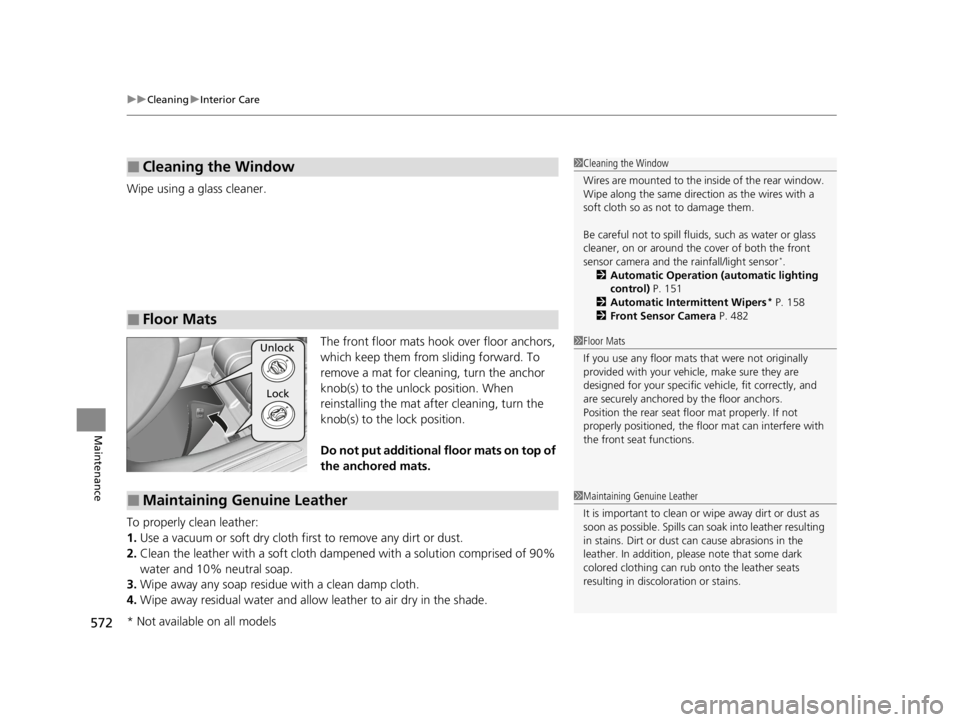
The front floor mats hook over floor anchors,
which keep them from sliding forward. To
remove a mat for cleaning, turn the anchor
knob(s) to the unlock position. When
reinstalling the mat after cleaning, turn the
knob(s) to the lock position.
Do not put additional floor mats on top of
the anchored mats.
To properly clean leather:
1. Use a vacuum or soft dry cloth first to remove any dirt or dust.
2. Clean the leather with a soft cloth dampen ed with a solution comprised of 90%
water and 10% neutral soap.
3. Wipe away any soap residu e with a clean damp cloth.
4. Wipe away residual water and allow leather to air dry in the shade.
■Cleaning the Window
■Floor Mats
1Cleaning the Window
Wires are mounted to the in side of the rear window.
Wipe along the same direct ion as the wires with a
soft cloth so as not to damage them.
Be careful not to spill fluids, such as water or glass
cleaner, on or around the co ver of both the front
sensor camera and the rainfall/light sensor
*.
2 Automatic Operation (automatic lighting
control) P. 151
2 Automatic Intermittent Wipers
* P. 158
2 Front Sensor Camera P. 482
1Floor Mats
If you use any floor mats that were not originally
provided with your vehicle, make sure they are
designed for your specific ve hicle, fit correctly, and
are securely anchored by the floor anchors.
Position the rear seat fl oor mat properly. If not
properly positioned, the fl oor mat can interfere with
the front seat functions.Unlock
Lock
■Maintaining Genuine Leather1 Maintaining Genuine Leather
It is important to clean or wipe away dirt or dust as
soon as possible. Spills can soak into leather resulting
in stains. Dirt or dust ca n cause abrasions in the
leather. In addition, pl ease note that some dark
colored clothing can rub onto the leather seats
resulting in discol oration or stains.
* Not available on all models
22 ACURA TLX-31TGV6100.book 572 \b
Page 603 of 656

Continued601
uuIf a Tire Goes Flat uChanging a Flat Tire
Handling the Unexpected
5. Lower the vehicle and remove the jack.
Tighten the wheel nuts in the order
indicated in the image. Go around,
tightening the nuts, two to three times in
this order.
Wheel nut torque:
94 lbf∙ft (127 N∙m, 13 kgf∙m)
1. Put the flat tire in the storage bag provided
with your vehicle.
u The storage bag is in the spare tire tub.
2. Knot the top of the storage bag.
3. Securely put the wheel nut wrench and jack
handle bar back in the tool case. Store the
case and jack in the trunk.
■Storing the Flat Tire1Storing the Flat Tire
3WARNING
Loose items can fly around the interior in a
crash and can seriously injure the
occupants.
Store the wheel, jack, and tools securely
before driving.
22 ACURA TLX-31TGV6100.book 601 \b