instrument panel ACURA TLX 2022 Service Manual
[x] Cancel search | Manufacturer: ACURA, Model Year: 2022, Model line: TLX, Model: ACURA TLX 2022Pages: 656, PDF Size: 26.43 MB
Page 113 of 656
111
uuGauges and Multi-Information Display uMulti-Information Display
Instrument Panel
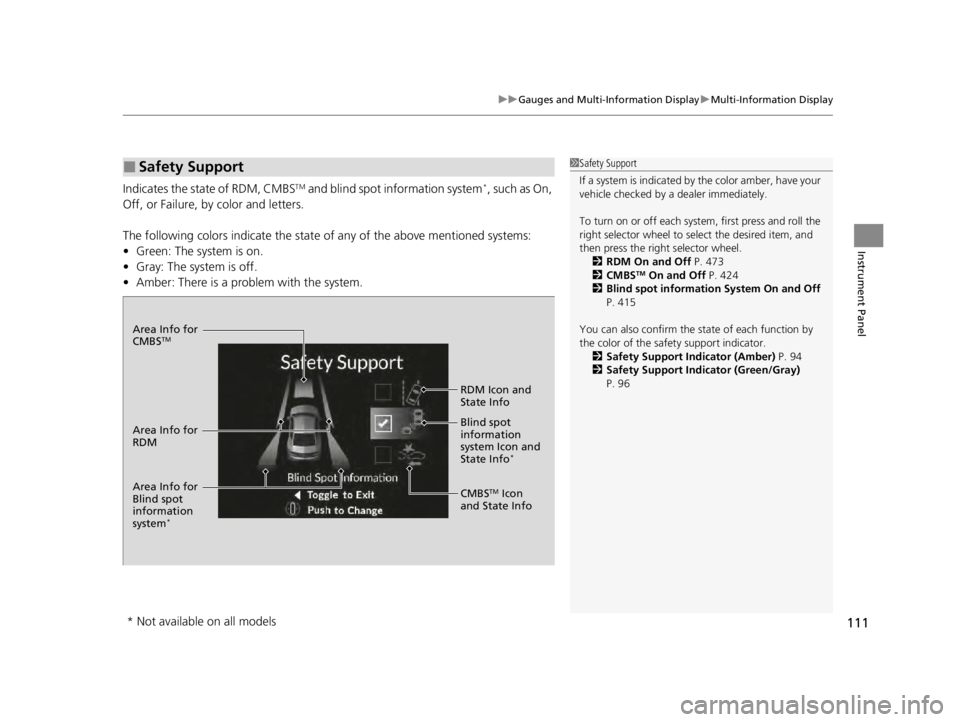
Indicates the state of RDM, CMBSTM and blind spot information system*, such as On,
Off, or Failure, by color and letters.
The following colors indica te the state of any of the above mentioned systems:
• Green: The system is on.
• Gray: The system is off.
• Amber: There is a problem with the system.
■Safety Support1Safety Support
If a system is indicated by the color amber, have your
vehicle checked by a dealer immediately.
To turn on or off each system, first press and roll the
right selector wheel to select the desired item, and
then press the right selector wheel.
2 RDM On and Off P. 473
2 CMBS
TM On and Off P. 424
2 Blind spot information System On and Off
P. 415
You can also confirm the st ate of each function by
the color of the safe ty support indicator.
2 Safety Support Indicator (Amber) P. 94
2 Safety Support Indicator (Green/Gray)
P. 96
Area Info for
CMBSTM
CMBSTM Icon
and State Info RDM Icon and
State Info
Area Info for
RDM Blind spot
information
sy
stem Icon and
State In fo
*
Area Info for
Blind spot
information
system
*
* Not available on all models
22 ACURA TLX-31TGV6100.book 111 \b
Page 114 of 656
112
uuGauges and Multi-Information Display uHead-Up Display*
Instrument Panel
Head-Up Display*
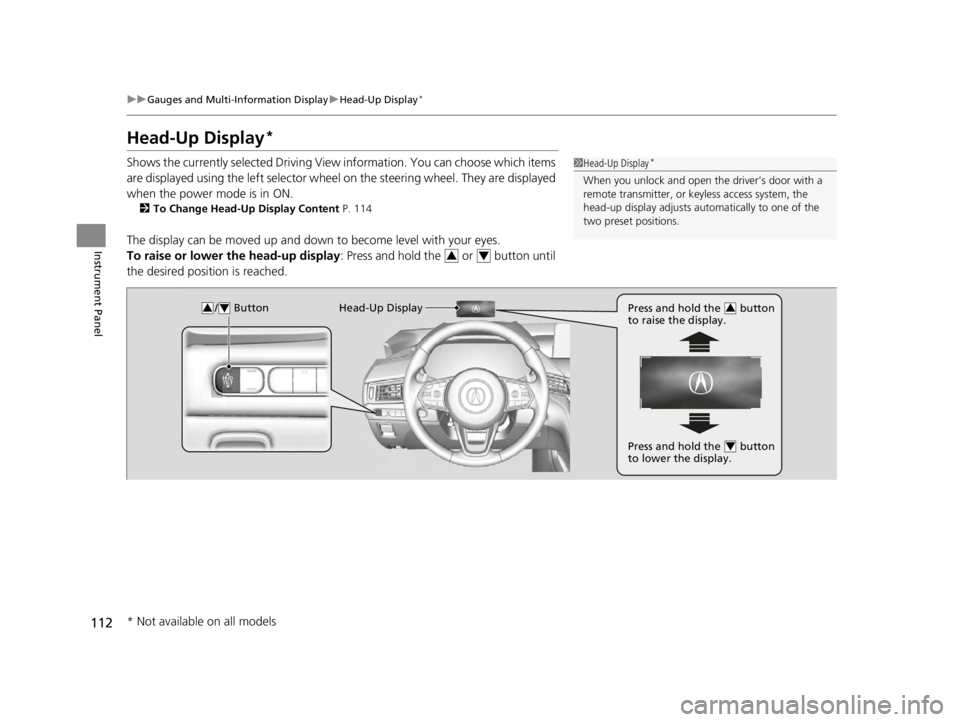
Shows the currently selected Driving View information. You can choose which items
are displayed using the left selector wheel on the steering wheel. They are displayed
when the power mode is in ON.
2 To Change Head-Up Display Content P. 114
The display can be moved up and down to become level with your eyes.
To raise or lower the head-up display : Press and hold the or button until
the desired position is reached.
1 Head-Up Display*
When you unlock and open the driver’s door with a
remote transmitter, or keyless access system, the
head-up display adjusts auto matically to one of the
two preset positions.
34
/ Button34Head-Up Display Press and hold the button
to raise the display.3
Press and hold the button
to lower the display.4
* Not available on all models
22 ACURA TLX-31TGV6100.book 112 \b
Page 115 of 656
113
uuGauges and Multi-Information Display uHead-Up Display*
Continued
Instrument Panel
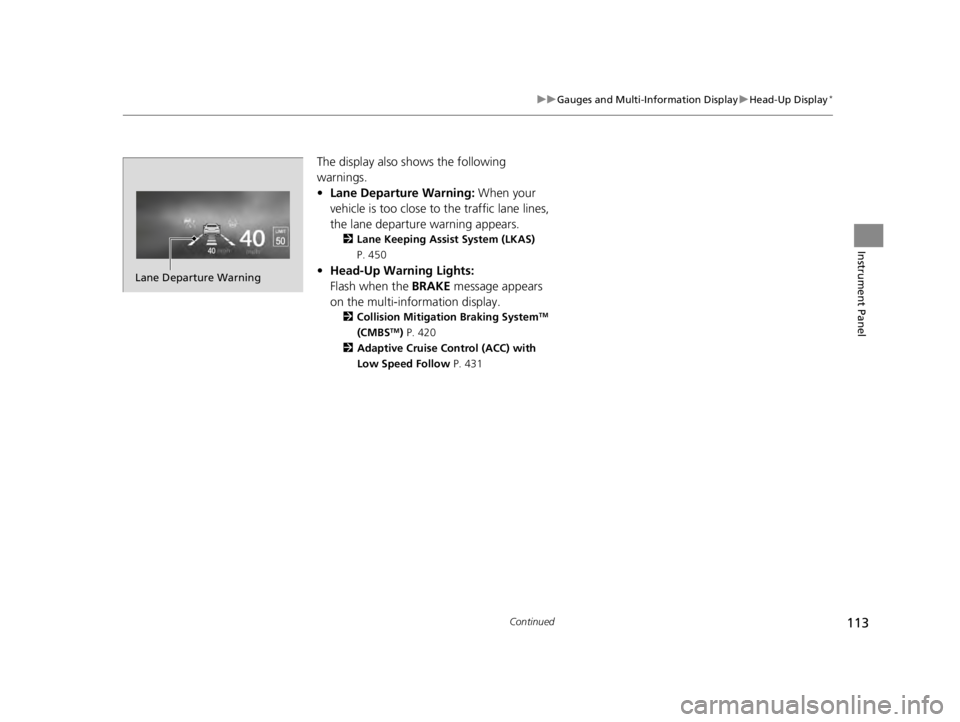
The display also shows the following
warnings.
• Lane Departure Warning: When your
vehicle is too close to the traffic lane lines,
the lane departure warning appears.
2 Lane Keeping Assist System (LKAS)
P. 450
• Head-Up Warning Lights:
Flash when the BRAKE message appears
on the multi-information display.
2 Collision Mitigation Braking SystemTM
(CMBSTM) P. 420
2 Adaptive Cruise Control (ACC) with
Low Speed Follow P. 431
Lane Departure Warning
22 ACURA TLX-31TGV6100.book 113 \b
Page 116 of 656
114
uuGauges and Multi-Information Display uHead-Up Display*
Instrument Panel
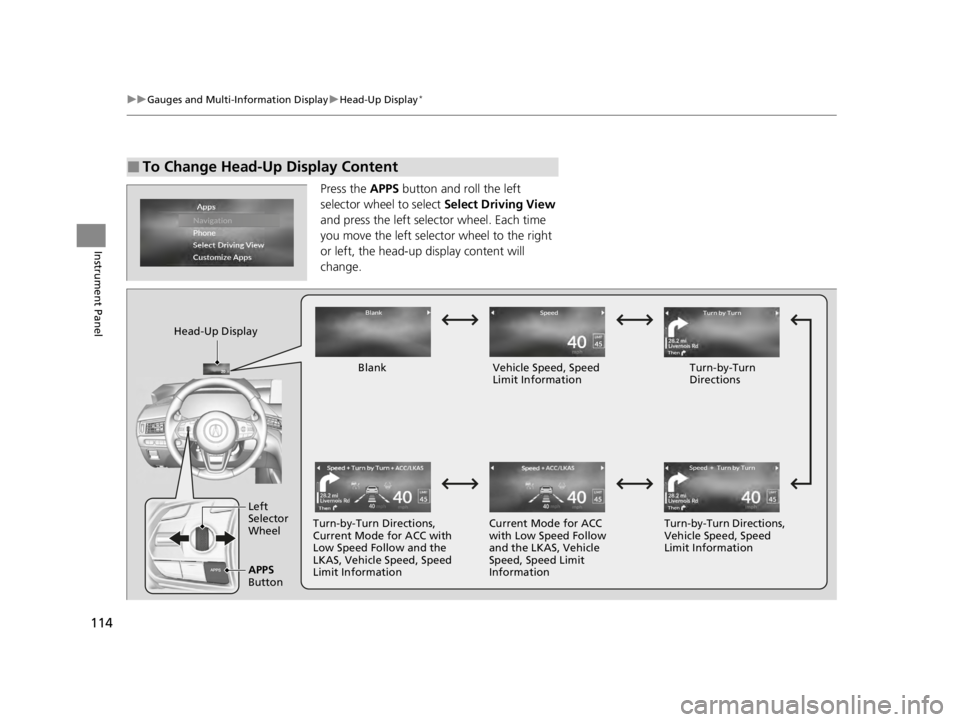
Press the APPS button and roll the left
selector wheel to select Select Driving View
and press the left selector wheel. Each time
you move the left selector wheel to the right
or left, the head-up display content will
change.
■To Change Head-Up Display Content
Head-Up Display
BlankVehicle Speed, Speed
Limit Information Turn-by-Turn
Directions
Turn-by-Turn Directions,
Current Mode for ACC with
Low Speed Follow and the
LKAS, Vehicle Speed, Speed
Limit Information Current Mode for ACC
with Low Speed Follow
and the LKAS, Vehicle
Speed, Speed Limit
InformationTurn-by-Turn Directions,
Vehicle Speed, Speed
Limit Information
Left
Selector
Wheel
APPS
Button
22 ACURA TLX-31TGV6100.book 114 \b
Page 117 of 656
115
uuGauges and Multi-Information Display uHead-Up Display*
Instrument Panel
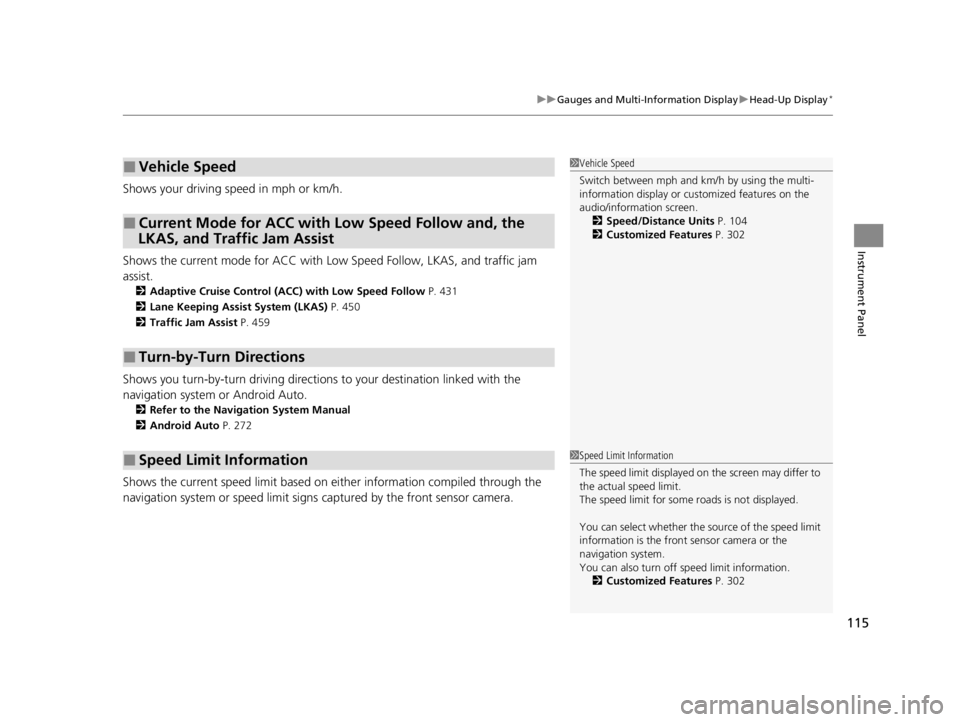
Shows your driving speed in mph or km/h.
Shows the current mode for ACC with Low Speed Follow, LKAS, and traffic jam
assistM
2 Adaptive Cruise Control (ACC) with Low Speed Follow P. 431
2 Lane Keeping Assist System (LKAS) P. 450
2 Traffic Jam Assist P. 459
Shows you turn-by-turn driv ing directions to your destination linked with the
navigation system or Android Auto.
2 Refer to the Navigation System Manual
2 Android Auto P. 272
Shows the current speed limit based on either information compiled through the
navigation system or speed limit signs captured by the front sensor camera.
■Vehicle Speed
■Current Mode for ACC with Low Speed Follow and, the
LKAS, and Traffic Jam Assist
■Turn-by-Turn Directions
■Speed Limit Information
1 Vehicle Speed
Switch between mph and km/h by using the multi-
information display or customized features on the
audio/information screen.
2 Speed/Distance Units P. 104
2 Customized Features P. 302
1Speed Limit Information
The speed limit disp layed on the screen may differ to
the actual speed limit.
The speed limit for some roads is not displayed.
You can select whether the source of the speed limit
information is the front sensor camera or the
navigation system.
You can also turn off speed limit information. 2 Customized Features P. 302
22 ACURA TLX-31TGV6100.book 115 \b
Page 142 of 656

uuSecurity System uSecurity System Alarm
140
Controls
■To deactivate the security system alarm
Unlock the vehicle using the key, remote transmitter or keyless access system, or set
the power mode to ON. The system, along with the horn and flashing lights, is
deactivated.
■Setting the security system alarm
The security system alarm automatically sets when the following conditions have
been met:
• The power mode is set to VEHICLE OFF.
• The hood is closed.
• All doors and the trunk are locked from outside with the key, remote transmitter
or keyless access system.
■When the security system alarm sets
The security system alarm indicator in the instrument panel blinks and the blinking
interval changes after about 15 seconds.
■To cancel the security system alarm
The security system alarm is canceled when the vehicle is unlocked using the remote
transmitter or keyless access system, or wh en the power mode is set to ON. The
security system alarm indicator goes off at the same time.
1 Security System Alarm
Do not set the security system alarm when someone
is in the vehicle or a window is open. The system can
accidentally activate when:
•Unlocking the door with the lock tab.•Opening the trunk with the trunk opener or the
emergency trunk opener.
•Opening the hood with the hood release.
If the battery goes dead after you have set the
security system alarm, the security alarm may go off
once the battery is re charged or replaced.
If this occurs, deactivate the security system alarm by
unlocking a door using the key, remote transmitter or
keyless access system.
22 ACURA TLX-31TGV6100.book 140 \b
Page 150 of 656

uuOperating the Switches Around the Steering Wheel uENGINE START/STOP Button
148
Controls
When the power mode is set to any mode
other than OFF and you remove the keyless
remote from the vehicle and shut the door, an
alarm will sound. If th e alarm continues to
sound, place the keyless remote in another
location.
■When the power mode is in
ACCESSORY
The alarm will sound from outside the vehicle.
■When the power mode is in ON
An alarm will sound both inside and outside
the vehicle. In addition, a warning indicator
will appear on the instrument panel.
■Keyless Remote Reminder1 Keyless Remote Reminder
When the keyless remote is within the system’s
operational range, and the driv er’s door is closed, the
warning function cancels.
If the keyless remote is taken out of the vehicle after
the engine has been st arted, you can no longer
change the ENGINE START/STOP button mode or
restart the engine. Always make sure if the remote is
in your vehicle when you operate the ENGINE
START/STOP button.
Removing the keyless remote from the vehicle
through a window does not activate the warning
buzzer.
Do not put the keyless remo te on the dashboard or in
the glove box. It may cause the warning buzzer to go
off. Under some other cond itions that can prevent
the vehicle from locating the remote, the warning
buzzer may also go off even if the remote is within
the system’s operational range.
22 ACURA TLX-31TGV6100.book 148 \b
Page 151 of 656

149
uuOperating the Switches Around the Steering Wheel uTurn Signals
Controls
Turn Signals
The turn signals can be used when the power
mode is in ON.
■(A): Turn signal
Push the lever up or down based on the
direction you want to turn, and the turn signal
will blink.
■(B): One-touc h turn signal
When you lightly push the lever up or down
and release it, the turn signal will blink 3
times.
1 (A): Turn signal
The turn signal indicator on the instrument panel will
blink when the external turn signal blinks.
2 Indicators P. 78
(A)
(B)
(B)
(A)
22 ACURA TLX-31TGV6100.book 149 \b
Page 154 of 656

uuOperating the Switches Around the Steering Wheel uLight Switches
152
Controls
The headlights automatically come on when the wipers are used several times within
a certain number of intervals wi th the headlight switch in AUTO.
The headlights automatically go off a few minutes later if the wipers are stopped.
The headlights, all other exterior lights, an d the instrument panel lights turn off 15
seconds after you set the power mode to VE HICLE OFF (LOCK), take the remote with
you, and close the driver's door.
If you set the power mode to VEHICLE OFF (LOCK) with the headlight switch on, but
do not open the door, the li ghts turn off after 10 minutes (3 minutes, if the switch
is in the AUTO position).
The lights turn on again when you unlock or open the driver’s door. If you unlock
the door, but do not open it within 15 seconds, the lights go off. If you open the
driver’s door, you will hear a reminder chime alerting you that the lights are on.
■Headlight Integration with Wipers
■Automatic Lighting Off Feature
1Automatic Operation (aut omatic lighting control)
You can adjust the auto li ght sensitivity as follows:
2 Customized Features P. 302
SettingThe exterior lights come on
when the ambient light is at
Max
High
Mid
Low
Min
U.S. models
Bright
Dark
1 Headlight Integration with Wipers
This feature activates while the headlights are off in
AUTO .
The instrument panel br ightness does not change
when the headlights come on.
At dark ambient light leve ls, the automatic lighting
control feature turns on the headlights, regardless of
the number of wiper sweeps.
1 Automatic Lighting Off Feature
You can change the headli ght auto off timer setting.
2 Customized Features P. 302
22 ACURA TLX-31TGV6100.book 152 \b
Page 161 of 656

159
uuOperating the Switches Around the Steering Wheel uBrightness Control
Continued
Controls
Brightness Control
When the power mode is in ON, you can use
the
(+ or (- button to adjust instrument
panel brightness.
Brighten: Press the
(+ button.
Dim: Press the
(- button.
You will hear a beep when the brightness
reaches minimum or maximum. Several
seconds after adjusting the brightness, you
will be returned to the previous display.
■Brightness level indicator
The brightness level is shown on the display
while you are adjusting it.
■Adjusting the Instrument Panel Brightness1 Brightness Control
The brightness of the in strument panel will be
reduced when the following conditions:
•The power mode is in ON.
•The light switch is in any position other than off
and it is da rk outside.
The brightness can be set differently for when the
exterior lights are on, and when they are off.( +/(- Button
Models with Head-Up Display
(+/(- Button
Models without Head-Up Display
22 ACURA TLX-31TGV6100.book 159 \b