warning ACURA TLX 2022 Service Manual
[x] Cancel search | Manufacturer: ACURA, Model Year: 2022, Model line: TLX, Model: ACURA TLX 2022Pages: 656, PDF Size: 26.43 MB
Page 307 of 656

305
uuCustomized Features u
Continued
Features
Memory Position Link
“Trip B” Reset Timing
Seat Position Movement at Entry/Exit
Adjust Outside Temp Display
“Trip A” Reset Timing
Meter Setup
Vehicle
Driving Position Setup
Reverse Shift Position Beep
Adjust Alarm Volume
Turn by Turn Display
Speed Limit Information
Road Departure Mitigation Setting
Forward Collision Warning Distance
ACC Forward Vehicle Detect Beep
Lane Keeping Assist Suspend Beep
Blind Spot Information*
Driver Assist System
Setup
Night Mode
Day Mode
BrightnessDisplay
Contrast
Black Level
More Settings
Display Off
Driver Attention Monitor
* Not available on all models
22 ACURA TLX-31TGV6100.book 305 \b
Page 317 of 656

315
uuCustomized Features u
Continued
Features
*1:Default SettingSetup Group
Customizable Features DescriptionSelectable Settings
Vehicle Driver Assist
System
SetupForward Collision Warning
Distance
Changes Collision Mitigation Braking
System (CMBS
TM) alert distance.Long
/Normal
*1/
Short
ACC Forward Vehicle Detect
Beep Causes the system to beep when the
system detects a vehicle, or when the
vehicle goes out of the ACC with Low
Speed Follow range.
On
/Off
*1
Road Departure Mitigation
Setting Changes the setting for the road
departure mitigation system. Normal*1/
Wide /
Warning Only /
Narrow
Lane Keeping Assist Suspend
Beep Causes the system to beep when Lane
Keeping Assist System (LKAS) is
suspended.
On
/Off
*1
Blind Spot Information*Changes the setting for the blind spot
information. Audible and Visual
Alert*1/
Visual Alert
Driver Attention Monitor Changes the setting for the driver
attention monitor. Off
,
Tactile Alert ,
Tactile/Audible
Alert
*1
* Not available on all models
22 ACURA TLX-31TGV6100.book 315 \b
Page 318 of 656

316
uuCustomized Features u
Features
*1:Default SettingSetup Group Customizable Features Description Selectable Settings
Vehicle Meter Setup Adjust Outside Temp Display
Adjusts the temperature reading by a
few degrees. −5°F ~
±0°F
*1 ~ 5°F
(U.S.)
−3°C ~ ±0°C
*1 ~ 3°C
(Canada)
“Trip A” Reset Timing Changes the setting of how to reset
trip meter A and average fuel economy
A. With Refuel
/IGN
Off /Manually
Reset
*1
“Trip B” Reset Timing Changes the setting of how to reset
trip meter B and average fuel economy
B. With Refuel
/IGN
Off /Manually
Reset*1
Reverse Shift Position Beep Causes the beeper to sound once
when the transmission is put into (R.On*1/
Off
Adjust Alarm Volume Changes the alarm volume, such as
buzzers, warnings, turn signal sound,
and so on. High
/Mid
*1/Low
Turn by Turn Display Selects whether the turn-by-turn
display comes on during the route
guidance. On
*1/
Off
22 ACURA TLX-31TGV6100.book 316 \b
Page 373 of 656
371
uuBefore Driving uMaximum Load Limit
Continued
Driving
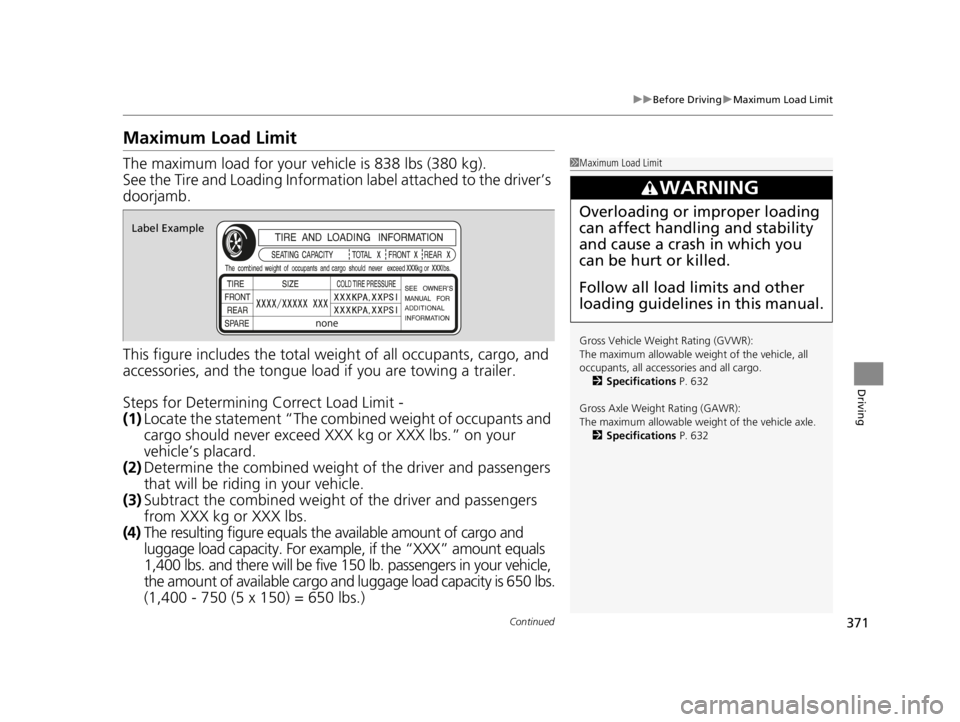
Maximum Load Limit
The maximum load for your ve hicle is 838 lbs (380 kg).
See the Tire and Loading Information label attached to the driver’s
doorjamb.
This figure includes the total weig ht of all occupants, cargo, and
accessories, and the tongue load if you are towing a trailer.
Steps for Determining Correct Load Limit -
(1) Locate the statement “The combined weight of occupants and
cargo should never exceed XXX kg or XXX lbs.” on your
vehicle’s placard.
(2) Determine the combined weight of the driver and passengers
that will be riding in your vehicle.
(3) Subtract the combined weight of the driver and passengers
from XXX kg or XXX lbs.
(4) The resulting figure equals the available amount of cargo and
luggage load capacity. For exampl e, if the “XXX” amount equals
1,400 lbs. and there will be five 150 lb. passengers in your vehicle,
the amount of available cargo and luggage load capacity is 650 lbs.
(1,400 - 750 (5 x 150) = 650 lbs.)1 Maximum Load Limit
Gross Vehicle Weight Rating (GVWR):
The maximum allowable weight of the vehicle, all
occupants, all accesso ries and all cargo.
2 Specifications P. 632
Gross Axle Weight Rating (GAWR):
The maximum allowable weight of the vehicle axle. 2 Specifications P. 632
3WARNING
Overloading or improper loading
can affect handling and stability
and cause a crash in which you
can be hurt or killed.
Follow all load limits and other
loading guidelines in this manual.
Label Example
22 ACURA TLX-31TGV6100.book 371 \b
Page 378 of 656

uuWhen Driving uStarting the Engine
376
Driving
You can remotely start the engine using the two-way keyless remote from extended
distances.
■To start the engine
The engine runs for up to 10 minutes without you starting the vehicle.
To extend the run time for another 10 minutes during the first run, press the
button, then press and hold the button.
u The amber LED blinks, then the green LED comes back on if a 10-minute
extension request was transmitted successfully.
After pressing the button, wait for the gr een LED to blink. This indicates that
the all the doors and the trunk are locked.
■Remote Engine Start*1 Remote Engine Start*
The remote engine start may violate local laws.
Before using the remote e ngine start, check your
local laws.
If there are buildings an d obstacles between your
vehicle and the remote, th e range will be reduced.
This distance may vary by external electrical
interference.
The engine may not start by the remote engine start if:
•You have disabled a remote engine start setting
using the audio/information screen.
2Customized Features P. 302
•The power mode is not in VEHICLE OFF (LOCK).•The transmission is in a position other than (P.
•The hood is open, or any door or the trunk is
unlocked.
•You have already used the remote twice to start
the engine.
3WARNING
Carbon monoxide ga s is toxic and can
rapidly accumulate in closed or even partly
enclosed areas.
Breathing it can cause unconsciousness and
even kill you.
Never use the remote engine starter with
the vehicle parked in a garage or other
areas with limited ventilation.
Press the button, th en press and hold
the button.
Amber LED: Blinks when any button is pressed.
Continues to blink
during a vehicle
self check until the
engine starts. Go within the range,
and try again.
Green LED: Comes on while
the engine is running. Red LED: Blinks when the
remote is out of the keyless
access system range.
* Not available on all models
22 ACURA TLX-31TGV6100.book 376 \b
Page 384 of 656

382
uuWhen Driving uShifting
Driving
Shifting
Change the gear position in acco rdance with your driving needs.
■Shift button positions
1Shifting
To prevent malfunc tion and unintended
engagement:
•Do not spill any liquids on or around shift buttons.
•Do not place or drop any objects on or around shift
buttons.
•Do not let passengers or ch ildren operate the shift
buttons.
The beeper sounds and the message appears on the
multi-information display when you depress the
accelerator pedal with the gear position in
( N.
Change the gear position to
( D or (R with the brake
pedal depressed.
3WARNING
The vehicle can roll aw ay if left unattended
without confirming that Park is engaged.
A vehicle that rolls away could cause a crash
resulting in seriou s injury or death.
Always keep your foot on the brake pedal
until you have confirmed that
( P is shown
on the gear position indicator.
Park
Used when parking, before turning off or
starting the engine
Reverse
Used when reversing
Neutral
Transmission is not locked
Drive/S Position
Each time you press the button, the
mode switches between Drive and S Position
mode.
Used for:
●Normal driving (gears change between
1st and 10th automatically)
●Temporarily driving in the sequential
mode
●Automatically changing gears between
1st and 8th (8th gear is used only at high
speed)
●Driving in the sequential mode
D/S
Drive
S Position
22 ACURA TLX-31TGV6100.book 382 \b
Page 415 of 656

413
uuWhen Driving uBlind spot information System*
Continued
Driving
Blind spot information System*
Is designed to detect vehicles in specified alert zones adjacent to your vehicle,
particularly in harder to see areas commonly known as “blind spots.”
When the system detects vehicles approaching from behind in adjacent lanes, the
appropriate indicator comes on for a few se conds, providing assistance when you
change lanes.
■How the system works
1 Blind spot information System*
Important Safety Reminder
Like all assistance systems, blind spot information
system has limitations. Over reliance on blind spot
information system may result in a collision.
The blind spot information system alert indicator may
not come on under the following conditions:
•A vehicle does not stay in the alert zone for more
than two seconds.
•A vehicle is parked in a side lane.
•The speed difference betw een your vehicle and the
vehicle you are passing is greater than 6 mph (10
km/h).
•An object not detected by the radar sensors
approaches or passes your vehicle.
•A vehicle running in the adjacent lane is a
motorcycle or other small vehicle.
3WARNING
Failure to visually confirm that it is safe to
change lanes before doing so may result in
a crash and serious injury or death.
Do not rely only on the blind spot
information system wh en changing lanes.
Always look in your mi rrors, to either side
of your vehicle, and behind you for other
vehicles before changing lanes.
●The transmission is in ( D or
(S.●Your vehicle speed is
between 20 mph (32 km/h)
and 100 mph (160 km/h)
Alert zone range
A: Approx. 1.6 ft. (0.5 m)
B: Approx. 10 ft. (3 m)
C: Approx. 10 ft. (3 m) Radar Sensors:
underneath the
rear bumper
corners
Alert Zone
A
B
C
* Not available on all models
22 ACURA TLX-31TGV6100.book 413 \b
Page 424 of 656

uuAcuraWatchTMuCollision Mitigation Braking SystemTM (CMBSTM)
422
Driving
■When the system activates
You can change the distance ( Long/Normal /Short ) between vehicles at which the
system’s earliest collision alert will co me on through audio/information screen
setting options.
2 Customized Features P. 302
1When the system activates
The camera in the CMBS
TM is also designed to detect
pedestrians.
However, this pedestrian detection feature may not
activate or may not detect a pedestrian in front of
your vehicle under certain conditions.
Refer to the ones indicating the pedestrian detection
limitations from the list. 2 CMBS
TM Conditions and Limitations P. 425
The head-up warning uses a lens located at the front
end of the dashboard.
Do not cover the lens or spill any liquid on it.
Models with Head-up display
Lens
The system provides visual and audible al erts of a possible collision, and stops if
the collision is avoided.
u Take appropriate action to prevent a collision (apply the brakes, change
lanes, etc.)
Beep
Head-up Warning Lights
*
Visual Alerts
Audible Alert
* Not available on all models
22 ACURA TLX-31TGV6100.book 422 \b
Page 425 of 656

423
uuAcuraWatchTMuCollision Mitigation Braking SystemTM (CMBSTM)
Continued
Driving
The system has three alert stages for a possible collis ion. However, depending on circumstances, the CMBSTM may not go through all of
the stages before initiating the last stage.
■Collision Alert Stages
Distance between vehicles
CMBSTM
The radar sensor detects a vehicleAudible & Visual WARNINGSBraking
Stage oneThere is a risk of a collision
with the vehicle ahead of you.
When in Long, visual and audible alerts
come on at a longer distance from a
vehicle ahead than in Normal setting, and
in Short, at a shorter distance than in
Normal .
—
Stage two
The risk of a collision has
increased, time to respond is
reduced.
Visual and audible alerts.
Lightly applied
Stage three The CMBSTM determines that a
collision is unavoidable.Forcefully applied
Your Vehicle Vehicle
Ahead
Normal
Short
Long
Your
Vehicle Vehicle
Ahead
Your
Vehicle
Vehicle
Ahead
22 ACURA TLX-31TGV6100.book 423 \b
Page 427 of 656

Continued425
uuAcuraWatchTMuCollision Mitigation Braking SystemTM (CMBSTM)
Driving
The system may automatically shut off and the safety support indicator (amber) will
come on under certain conditions. Some examples of these conditions are listed
below. Other conditions may reduce some of the CMBS
TM functions.
2 Front Sensor Camera P. 482
2 Radar Sensor P. 484
■Environmental conditions
• Driving in bad weather (rain, fog, snow, etc.).
• Sudden changes between light and dark, such as an entrance or exit of a tunnel.
• There is little contrast between objects and the background.
• Driving into low sunlight (e.g., at dawn or dusk).
• Strong light is reflec ted onto the roadway.
• Driving in the shadows of trees, buildings, etc.
• Roadway objects or structures are misinterpreted as vehicles and pedestrians.
• Reflections on the interi or of the windshield.
• Driving at night or in a dark condition such as a tunnel.
■Roadway conditions
• Driving on a snowy or wet roadway (obs cured lane marking, vehicle tracks,
reflected lights, road spray, high contrast).
• Driving on curvy, winding, or undulating roads.
• The road is hilly or the vehicle is approaching the crest of a hill.
■CMBSTM Conditions and Limitations1CMBSTM Conditions and Limitations
Have your vehicle checked by a dealer if you find any
unusual behavior of the system (e.g., the warning
message appears too frequently).
22 ACURA TLX-31TGV6100.book 425 \b