immobilizer ACURA TLX 2022 Owners Manual
[x] Cancel search | Manufacturer: ACURA, Model Year: 2022, Model line: TLX, Model: ACURA TLX 2022Pages: 656, PDF Size: 26.43 MB
Page 15 of 656
13
Quick Reference Guide
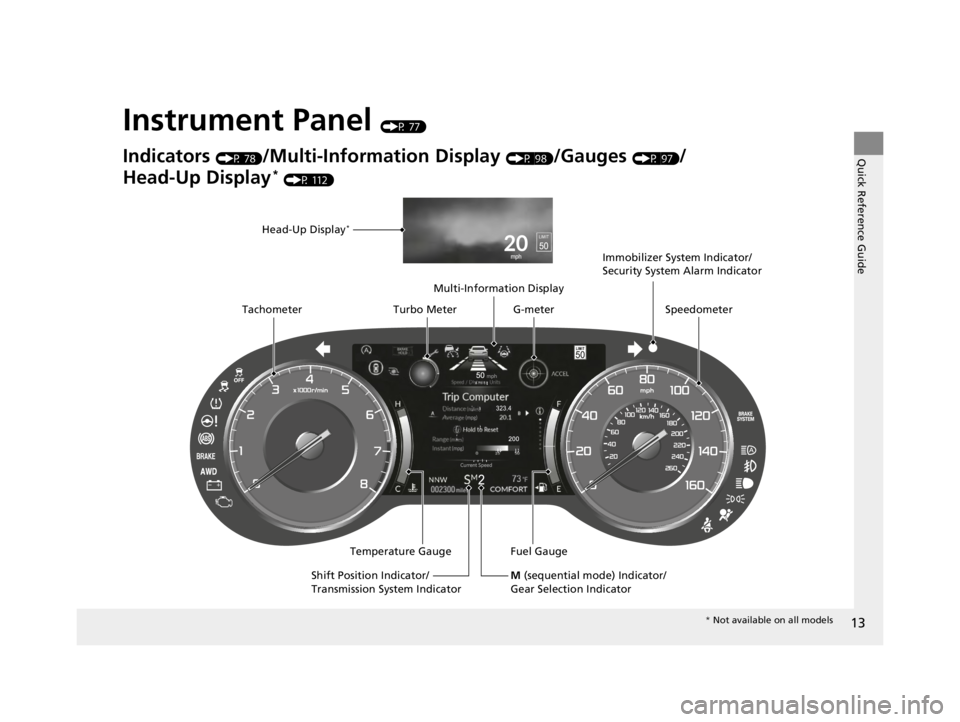
Instrument Panel (P 77)
Indicators (P 78)/Multi-Information Display (P 98)/Gauges (P 97)/
Head-Up Display
* (P 112)
Speedometer
Fuel Gauge
Multi-Information Display
Temperature Gauge
Tachometer
Head-Up Display
*
Immobilizer System Indicator/
Security System Alarm Indicator
Shift Position Indicator/
Transmission System Indicator Turbo Meter
M (sequential mode) Indicator/
Gear Selection Indicator
G-meter
* Not available on all models
22 ACURA TLX-31TGV6100.book 13 \b
Page 81 of 656
79
uuIndicators u
Continued
Instrument Panel
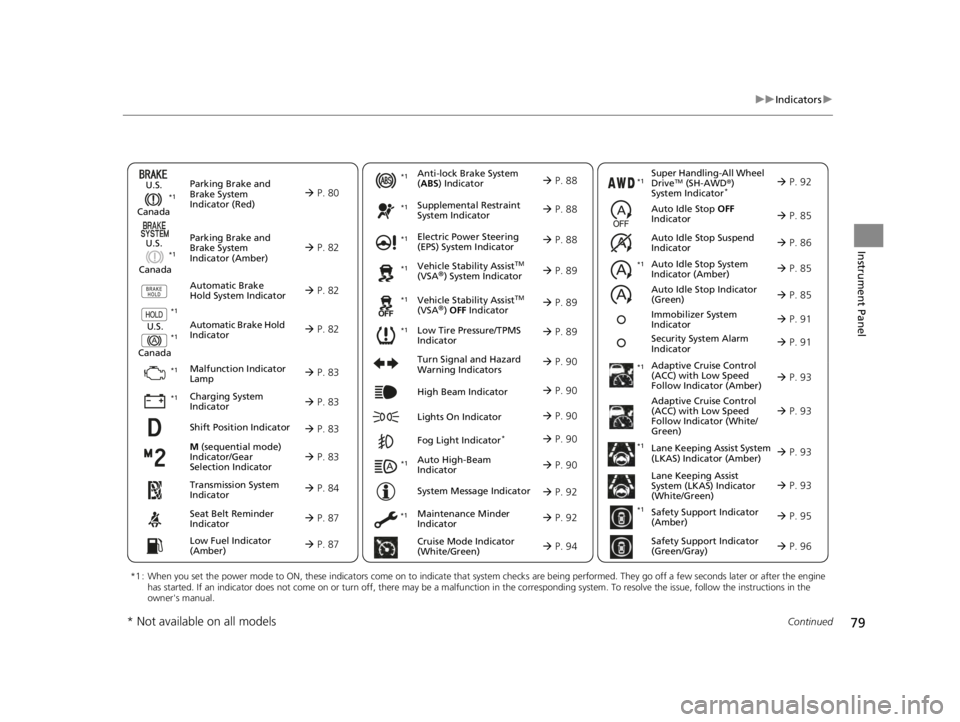
M (sequential mode)
Indicator/Gear
Selection Indicator P. 83
Parking Brake and
Brake System
Indicator (Red)
Parking Brake and
Brake System
Indicator (Amber)
U.S.
Canada
U.S.
Canada Automatic Brake
Hold System Indicator
Automatic Brake Hold
IndicatorU.S.
Canada
*1 : When you set the power mode to ON, these indicators come on to indicate that system checks are being performed. They go off a few seconds later or after the engine
has started. If an indicator does not come on or turn off, ther e may be a malfunction in the corresponding system. To resolve the issue, follow the instructions in the
owner's manual.
P. 80*1
Malfunction Indicator
Lamp
Charging System
Indicator
Anti-lock Brake System
(ABS ) Indicator
Seat Belt Reminder
Indicator
Low Fuel Indicator
(Amber)
Vehicle Stability AssistTM
(VSA®) System Indicator
Vehicle Stability Assist
TM
(VSA®) OFF Indicator
Supplemental Restraint
System Indicator
Auto High-Beam
Indicator
Low Tire Pressure/TPMS
Indicator Electric Power Steering
(EPS) System Indicator
Turn Signal and Hazard
Warning Indicators
Lights On Indicator High Beam Indicator
Fog Light Indicator*
Maintenance Minder
Indicator
System Message Indicator
Super Handling-All Wheel
DriveTM (SH-AWD
®)
System Indicator*
Adaptive Cruise Control
(ACC) with Low Speed
Follow Indicator (Amber)
Lane Keeping Assist System
(LKAS) Indicator (Amber)
Safety Support Indicator
(Green/Gray)
P. 82
P. 82
P. 82
P. 83
P. 83*1 *1
P. 89
*1
*1
Shift Position Indicator P. 83
Transmission System
Indicator P. 84
Auto Idle Stop System
Indicator (Amber)
P. 85
P. 87
P. 87
P. 88
P. 88
P. 90
P. 89
*1
*1
*1
P. 89
*1 P. 88
P. 90
P. 93
*1
P. 90
P. 90
P. 92
P. 90
Immobilizer System
Indicator P. 91
Security System Alarm
Indicator P. 91
P. 92
P. 92
P. 93
P. 96
*1
Adaptive Cruise Control
(ACC) with Low Speed
Follow Indicator (White/
Green) P. 93
*1
Lane Keeping Assist
System (LKAS) Indicator
(White/Green) P. 93
*1 *1
*1 *1
Safety Support Indicator
(Amber)
P. 95
*1
Cruise Mode Indicator
(White/Green) P. 94
Auto Idle Stop OFF
Indicator P. 85
Auto Idle Stop Suspend
Indicator P. 86
*1
*1
Auto Idle Stop Indicator
(Green)
P. 85
* Not available on all models
22 ACURA TLX-31TGV6100.book 79 \b
Page 93 of 656

91
uuIndicators u
Continued
Instrument Panel
IndicatorNameOn/BlinkingExplanation
Immobilizer
System Indicator
●Blinks if the immobilizer system cannot
recognize the key information.•Blinks - You cannot start the engine. Set the
power mode to VEHICLE OFF, then select the ON
mode again.
Depress and hold the brake pedal before setting
the power mode to ON.
• Repeatedly blinks - The system may be
malfunctioning. Have your vehicle checked by a
dealer.
• Do not attempt to alter this system or add other
devices to it. Electrical problems can occur.
Security System
Alarm Indicator
●Blinks when the security system alarm has
been set.
2 Security System Alarm P. 139
IndicatorCanadian models
Indicator
22 ACURA TLX-31TGV6100.book 91 \b
Page 119 of 656
117
Controls
This chapter explains how to operate the various controls necessary for driving.
Clock.................................................. 118
Locking and Unlocking the Doors
Key .................................................. 120
Low Keyless Remote Signal Strength ... 122
Locking/Unlocking the Doors from the Outside .......................................... 123
Locking/Unlocking the Doors from the Inside ............................................. 132
Childproof Door Locks ..................... 134
Auto Door Locking/Unlocking .......... 135
Opening and Closing the Trunk ....... 136
Security System ................................ 139
Immobilizer System .......................... 139
Security System Alarm ...................... 139 Windows
........................................... 142
Moonroof .......................................... 145
Operating the Switches Around the Steering Wheel ENGINE START/STOP Button............. 146
Turn Signals ..................................... 149
Light Switches.................................. 150
Fog Lights
*...................................... 153
Daytime Running Lights ................... 153
Auto High-Beam .............................. 154
Wipers and Washers ........................ 157
Brightness Control ........................... 159
Rear Defogger/Heated Door Mirror Button .. 161Driving Position Memory System ...... 162 Adjusting the Steering Wheel .......... 164
Mirrors ............................................... 165
Interior Rearview Mirror ................... 165
Power Door Mirrors ......................... 166
Seats .................................................. 168
Front Seats ...................................... 168
Interior Convenience Items .............. 180
Interior Lights .................................. 180
Storage Items .................................. 182
Climate Control System Using Automatic Climate Control .... 197
Automatic Climate Control Sensors ... 201
* Not available on all models
22 ACURA TLX-31TGV6100.book 117 \b
Page 122 of 656

120
Controls
Locking and Unlocking the Doors
Key
This vehicle comes with the following keys:Use the keys to start and stop the engine, and
to lock and unlock all the doors, fuel fill door
and to open the trunk.1Key
All the keys have an immobilizer system. The
immobilizer system helps to protect against vehicle
theft. 2 Immobilizer System P. 139
Follow the advice below to prevent damage to the
keys:
•Do not leave the keys in direct sunlight, or in
locations with high temperature or high humidity.
•Do not drop the keys or set heavy objects on them.•Keep the keys away from liquids, dust and sand.
•Do not take the keys apart except for replacing the
battery.
If the circuits in the keys are damaged, the engine
may not start, and the remote transmitter may not
work.
If the keys do not work properly, have them
inspected by a dealer.
You can remotely start the engine using the two-way
keyless remote. 2 Remote Engine Start
* P. 376
Models with two-way keyless remote
Models without two-way keyless
remote
Models with two-way keyless
remote
* Not available on all models
22 ACURA TLX-31TGV6100.book 120 \b
Page 141 of 656
139Continued
Controls
Security System
Immobilizer System
This system prevents a key that has not been preregistered from starting the engine.
Pay attention to the follo wing when pressing the ENGINE START/STOP button:
• Do not allow objects that emit strong radio waves near the ENGINE START/
STOP button.
• Make sure the key is not covered by or touching a metal object.
• Do not bring a key from another vehicle’s immobilizer system near the ENGINE
START/STOP button.
• Do not put the key near magnetic items. Electronic devices, such as televisions
and audio systems emit strong magnetic fields. Note that even a key chain can
become magnetic.
Security System Alarm
The security system alarm activates when the trunk, hood or doors are forcibly
opened. The alarm does not activate if the trunk or doors are opened with the key,
remote transmitter or keyless access system.
However, the alarm activates if a door is opened with the key and then the hood is
opened before the power mode is set to ON.
■When the security system alarm activates
The horn sounds intermittently and some exterior lights flash.
1Immobilizer System
NOTICE
Leaving the key in the vehicl e can result in theft or
accidental movement of the vehicleM
Always take the key with you whenever you leave the
vehicle unattendedM
Do not alter the system or add other devices to itM
Doing so may damage the system and make your
vehicle inoperableM
Apply and hold the brake pedal before turning the
vehicle on the first time after the battery has been
disconnectedM
Canadian models
1 Security System Alarm
Do not alter the system or add other devices to it.
Doing so may damage the system and make your
vehicle inoperable.
The security system alarm continues for a maximum
of two minutes until the security system alarm
deactivates.
22 ACURA TLX-31TGV6100.book 139 \b
Page 377 of 656

Continued375
uuWhen Driving uStarting the Engine
Driving
1Starting the Engine
Do not hold the ENGINE START/STOP button to
start the engine.
If the engine does not start, wait at least 30 seconds
before starting the engine again.
The immobilizer system pr otects your vehicle from
theft.
If an improperly c oded device is used, the engine’s
fuel system is disabled. 2 Immobilizer System P. 139
22 ACURA TLX-31TGV6100.book 375 \b
Page 568 of 656

uuBattery uChecking the Battery
566
Maintenance
If your vehicle’s battery is disconnected or goes dead:
• The audio system is disabled.
2 Reactivating the audio system P. 207
•The clock resets.
2 Clock P. 118
•The immobilizer system needs to be reset.
2 Immobilizer System Indicator P. 91
1Battery
The battery installed in this vehicle is specifically
designed for a model with Auto Idle Stop. Using a
battery other than this spec ified type may shorten the
battery life, and prevent Auto Idle Stop from
activating. If you need to replace the battery, make
sure to select the specified type and size. Ask a dealer
for more details.
Canadian models only
22 ACURA TLX-31TGV6100.book 566 \b
Page 605 of 656

603
Handling the Unexpected
Engine Does Not Start
Checking the Engine
If the engine does not start, check the starter.
Starter conditionChecklist
Starter doesn’t turn or turns
over slowly.
The battery may be dead. Check
each of the items on the right and
respond accordingly.Check for a message on the multi-information display.
●If the To Start, Hold Remote Near Start Button message appears
2If the Keyless Remote Battery is Weak P. 604
uMake sure the keyless remote is in its operating range.
2ENGINE START/STOP Button Operating Range P. 146
Check the brightness of the interior lights.
Turn on the interior lights and check the brightness.
●If the interior lights do not come on at all
2Battery P. 564●If the interior lights come on normally 2 Fuses P. 620
The starter turns over normally
but the engine doesn’t start.
There may be a problem with a
fuse. Check each of the items on
the right and respond accordingly. Review the engine start procedure.
Follow its instructions, and try
to start the engine again.
2 Starting the Engine P. 374
Check the immobilize r system indicator.
When the immobilizer system indicator is blinking, the engine cannot be started.
2 Immobilizer System P. 139
Check the fuel level.
There should be enough fuel in the tank.
2 Fuel Gauge P. 97
Check the fuses.
Check all fuses, or have the vehicle checked by a dealer.
2 Inspecting and Changing Fuses P. 626
If the problem continues:
2Emergency Towing P. 627
1Checking the Engine
If you must start the vehi cle immediately, use an
assisting vehicle or booster battery to jump start it.
2 If the Battery Is Dead P. 606
22 ACURA TLX-31TGV6100.book 603 \b
Page 650 of 656

648
Index
Fuses.......................................................... 620
Inspecting and Changing ......................... 626
Locations ................................................. 620
G
Gasoline (Fuel)
Economy ................................................. 518
Gauge ....................................................... 97
Information ............................................. 515
Instant Fuel Economy ............................... 103
Low Fuel Indicator ..................................... 87
Refueling ................................................. 515
Gauges ......................................................... 97
Glass (care) ........................................ 572, 574
Glove Box .................................................. 182
H
Handling the Unexpected ........................ 579
HandsFreeLink® (HFL)............................... 329
Automatic Import of Cellular Phonebook
and Call History ..................................... 340
Automatic Transferring ............................ 339
Displaying Messages ................................ 352
Favorite Contacts ..................................... 341
HFL Buttons ............................................. 329
HFL Menus .............................................. 333
HFL Status Display.................................... 331
In Case of Emergency .............................. 362
Limitations for Manua l Operation ............ 332 Making a Call .......................................... 342
Options During a Call .............................. 346
Phone Setup............................................ 335
Receiving a Call ....................................... 345
Receiving a Text Message ........................ 350
Ringtone ................................................. 339
Selecting a Phone .................................... 351
To Set Up a Text Message Options .......... 349
Hazard Warning Button .............................. 6
HD Radio
TM................................................ 241
Head Restraints ........................................ 174
Headlights ................................................. 150
Aiming .................................................... 550
Auto High-Beam System.......................... 154
Automatic Operation............................... 151
Dimming ......................................... 150, 153
Operating................................................ 150
Head-Up Display ....................................... 112
Heated Steering Wheel ............................ 196
Heaters (Seat) ................................... 194, 195
HFL (HandsFreeLink ®)............................... 329
High Beam Indicator .................................. 90
Hill Start Assist System ............................. 379
HomeLink ® Universal Transceiver ............ 326
Honda App License Agreement .............. 282
I
Identification Numbers............................ 634
Vehicle Identification Number (VIN), Engine Number and Transmission
Number .............................................. 634
Illumination Control ................................ 159
Immobilizer System .................................. 139
Indicator ................................................... 91
Indicators .................................................... 78
Adaptive Cruise Control (ACC) with Low Speed Follow (Amber) ............................. 93
Adaptive Cruise Control (ACC) with Low Speed Follow (White/Green) .................... 93
Anti-lock Brake System (ABS) .................... 88
Auto High-Beam ....................................... 90
Auto Idle Stop (Green) .............................. 85
Auto Idle Stop OFF .................................... 85
Auto Idle Stop Suspend............................. 86
Auto Idle Stop System (Amber) ................. 85
Automatic Brake Hold ....................... 82, 490
Automatic Brake Hold System ........... 82, 490
Charging System............................... 83, 613
Cruise Mode Indicator (White/Green) ........ 94
Door and Trunk Open ............................... 35
Electric Power Steering (EPS)
System ............................................ 88, 616
Engine Oil Pressure Low Warning ............ 612
Fog Light .................................................. 90
High Beam ................................................ 90
Immobilizer System ................................... 91
22 ACURA TLX-31TGV6100.book 648 \b