warning lights ACURA TLX 2022 Owners Manual
[x] Cancel search | Manufacturer: ACURA, Model Year: 2022, Model line: TLX, Model: ACURA TLX 2022Pages: 656, PDF Size: 26.43 MB
Page 81 of 656
79
uuIndicators u
Continued
Instrument Panel
M (sequential mode)
Indicator/Gear
Selection Indicator P. 83
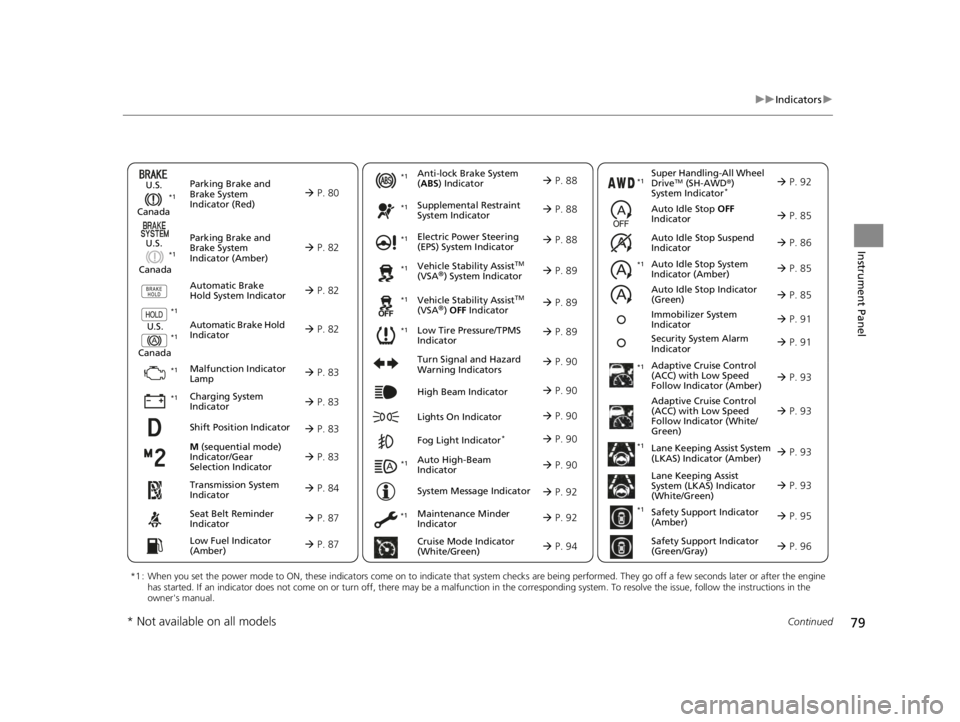
Parking Brake and
Brake System
Indicator (Red)
Parking Brake and
Brake System
Indicator (Amber)
U.S.
Canada
U.S.
Canada Automatic Brake
Hold System Indicator
Automatic Brake Hold
IndicatorU.S.
Canada
*1 : When you set the power mode to ON, these indicators come on to indicate that system checks are being performed. They go off a few seconds later or after the engine
has started. If an indicator does not come on or turn off, ther e may be a malfunction in the corresponding system. To resolve the issue, follow the instructions in the
owner's manual.
P. 80*1
Malfunction Indicator
Lamp
Charging System
Indicator
Anti-lock Brake System
(ABS ) Indicator
Seat Belt Reminder
Indicator
Low Fuel Indicator
(Amber)
Vehicle Stability AssistTM
(VSA®) System Indicator
Vehicle Stability Assist
TM
(VSA®) OFF Indicator
Supplemental Restraint
System Indicator
Auto High-Beam
Indicator
Low Tire Pressure/TPMS
Indicator Electric Power Steering
(EPS) System Indicator
Turn Signal and Hazard
Warning Indicators
Lights On Indicator High Beam Indicator
Fog Light Indicator*
Maintenance Minder
Indicator
System Message Indicator
Super Handling-All Wheel
DriveTM (SH-AWD
®)
System Indicator*
Adaptive Cruise Control
(ACC) with Low Speed
Follow Indicator (Amber)
Lane Keeping Assist System
(LKAS) Indicator (Amber)
Safety Support Indicator
(Green/Gray)
P. 82
P. 82
P. 82
P. 83
P. 83*1 *1
P. 89
*1
*1
Shift Position Indicator P. 83
Transmission System
Indicator P. 84
Auto Idle Stop System
Indicator (Amber)
P. 85
P. 87
P. 87
P. 88
P. 88
P. 90
P. 89
*1
*1
*1
P. 89
*1 P. 88
P. 90
P. 93
*1
P. 90
P. 90
P. 92
P. 90
Immobilizer System
Indicator P. 91
Security System Alarm
Indicator P. 91
P. 92
P. 92
P. 93
P. 96
*1
Adaptive Cruise Control
(ACC) with Low Speed
Follow Indicator (White/
Green) P. 93
*1
Lane Keeping Assist
System (LKAS) Indicator
(White/Green) P. 93
*1 *1
*1 *1
Safety Support Indicator
(Amber)
P. 95
*1
Cruise Mode Indicator
(White/Green) P. 94
Auto Idle Stop OFF
Indicator P. 85
Auto Idle Stop Suspend
Indicator P. 86
*1
*1
Auto Idle Stop Indicator
(Green)
P. 85
* Not available on all models
22 ACURA TLX-31TGV6100.book 79 \b
Page 92 of 656

90
uuIndicators u
Instrument Panel
IndicatorNameOn/BlinkingExplanation
Turn Signal and
Hazard Warning
Indicators•Blinks when you oper ate the turn signal
lever.
• Blink along with all turn signals when you
press the hazard warning button.•Does not blink or blinks rapidly - Have your
vehicle checked by a dealer.
High Beam
Indicator• Comes on when the high beam headlights
are on.—
Lights On
Indicator•Comes on when the parking, tail, and other
external lights are on.2 Light Switches P. 150
Fog Light
Indicator*
•Comes on when the fog lights are on.2 Fog Lights* P. 153
Auto High-Beam
Indicator•Comes on when all the operating conditions
of the auto high-beam are met.2 Auto High-Beam P. 154
* Not available on all models
22 ACURA TLX-31TGV6100.book 90 \b
Page 115 of 656
113
uuGauges and Multi-Information Display uHead-Up Display*
Continued
Instrument Panel
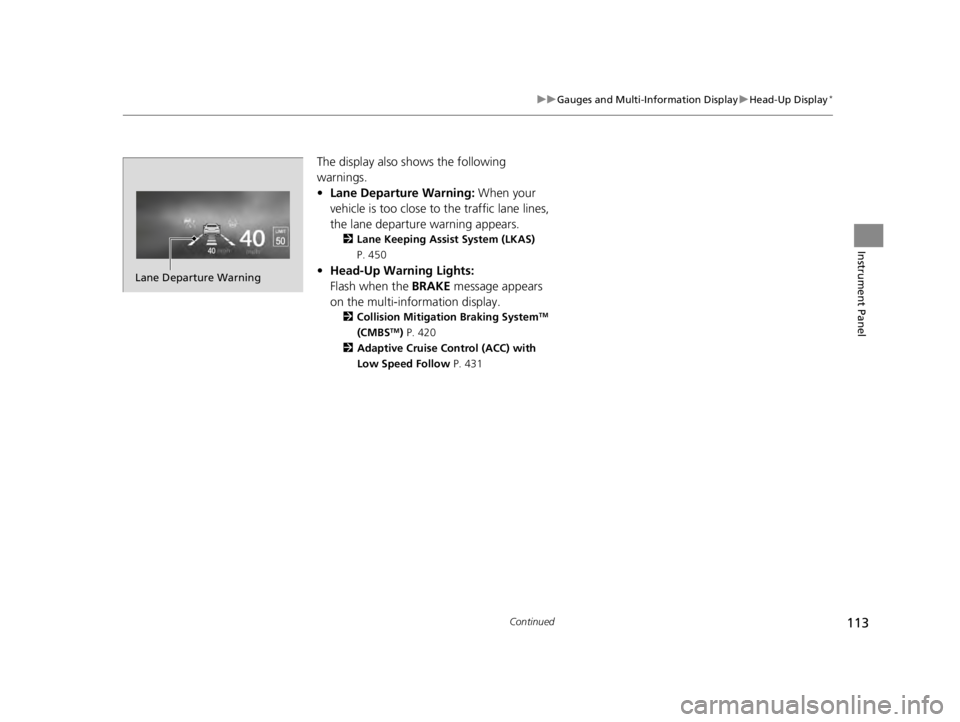
The display also shows the following
warnings.
• Lane Departure Warning: When your
vehicle is too close to the traffic lane lines,
the lane departure warning appears.
2 Lane Keeping Assist System (LKAS)
P. 450
• Head-Up Warning Lights:
Flash when the BRAKE message appears
on the multi-information display.
2 Collision Mitigation Braking SystemTM
(CMBSTM) P. 420
2 Adaptive Cruise Control (ACC) with
Low Speed Follow P. 431
Lane Departure Warning
22 ACURA TLX-31TGV6100.book 113 \b
Page 184 of 656

182
uuInterior Convenience Items uStorage Items
Controls
Storage Items
Pull the handle to open the glove box. You
can lock the glove box with the built-in key.
■Glove Box1Glove Box
The glove box light comes on when the parking lights
are on.
3WARNING
An open glove box can cause serious injury
to your passenger in a crash, even if the
passenger is wearing the seat belt.
Always keep the glove box closed while
driving.
To Lock
Glove Box
Handle
22 ACURA TLX-31TGV6100.book 182 \b
Page 424 of 656

uuAcuraWatchTMuCollision Mitigation Braking SystemTM (CMBSTM)
422
Driving
■When the system activates
You can change the distance ( Long/Normal /Short ) between vehicles at which the
system’s earliest collision alert will co me on through audio/information screen
setting options.
2 Customized Features P. 302
1When the system activates
The camera in the CMBS
TM is also designed to detect
pedestrians.
However, this pedestrian detection feature may not
activate or may not detect a pedestrian in front of
your vehicle under certain conditions.
Refer to the ones indicating the pedestrian detection
limitations from the list. 2 CMBS
TM Conditions and Limitations P. 425
The head-up warning uses a lens located at the front
end of the dashboard.
Do not cover the lens or spill any liquid on it.
Models with Head-up display
Lens
The system provides visual and audible al erts of a possible collision, and stops if
the collision is avoided.
u Take appropriate action to prevent a collision (apply the brakes, change
lanes, etc.)
Beep
Head-up Warning Lights
*
Visual Alerts
Audible Alert
* Not available on all models
22 ACURA TLX-31TGV6100.book 422 \b
Page 427 of 656

Continued425
uuAcuraWatchTMuCollision Mitigation Braking SystemTM (CMBSTM)
Driving
The system may automatically shut off and the safety support indicator (amber) will
come on under certain conditions. Some examples of these conditions are listed
below. Other conditions may reduce some of the CMBS
TM functions.
2 Front Sensor Camera P. 482
2 Radar Sensor P. 484
■Environmental conditions
• Driving in bad weather (rain, fog, snow, etc.).
• Sudden changes between light and dark, such as an entrance or exit of a tunnel.
• There is little contrast between objects and the background.
• Driving into low sunlight (e.g., at dawn or dusk).
• Strong light is reflec ted onto the roadway.
• Driving in the shadows of trees, buildings, etc.
• Roadway objects or structures are misinterpreted as vehicles and pedestrians.
• Reflections on the interi or of the windshield.
• Driving at night or in a dark condition such as a tunnel.
■Roadway conditions
• Driving on a snowy or wet roadway (obs cured lane marking, vehicle tracks,
reflected lights, road spray, high contrast).
• Driving on curvy, winding, or undulating roads.
• The road is hilly or the vehicle is approaching the crest of a hill.
■CMBSTM Conditions and Limitations1CMBSTM Conditions and Limitations
Have your vehicle checked by a dealer if you find any
unusual behavior of the system (e.g., the warning
message appears too frequently).
22 ACURA TLX-31TGV6100.book 425 \b
Page 433 of 656

431
uuAcuraWatchTMuAdaptive Cruise Control (ACC) with Low Speed Follow
Continued
Driving
Adaptive Cruise Control (ACC) with Low Speed
Follow
Helps maintain a constant vehicle speed and a set following-interval behind a vehicle
detected ahead of yours and, if the detect ed vehicle comes to a stop, can decelerate
and stop your ve hicle, without you having to keep your foot on the brake or the
accelerator.
When ACC with Low Speed Follo w slows your vehicle by applying the brakes, your
vehicle’s brake lights will illuminate.
1 Adaptive Cruise Control (ACC) with Low Speed Follow
Important Reminder
As with any system, there are limits to ACC with Low
Speed Follow. Use the brake pedal whenever
necessary, and always keep a safe interval between
your vehicle and other vehicles.
For directions on the prop er handling of the radar
sensor, refer to the following page.
2 Radar Sensor P. 484
3WARNING
Improper use of ACC with Low Speed
Follow can lead to a crash.
Use ACC with Low Speed Follow only when
driving on expressways or freeways and in
good road and weather conditions.
3WARNING
ACC with Low Speed Follow has limited
braking capability and may not stop your
vehicle in time to avoid a collision with a
vehicle that quickly stops in front of you.
Always be prepared to apply the brake
pedal if the conditions require.
■Vehicle speed for ACC wi th Low Speed Follow: A vehicle is detected ahead
within ACC with Low Speed Follow range – ACC with Low Speed Follow
operates at speeds up to 90 mph (145 km/h).
No vehicle is detected within ACC with Low Speed Follow range – ACC with
Low Speed Follow operates at the speed of about 25 mph (40 km/h) or above.
■Gear position for ACC wi th Low Speed Follow: In (D or (S.
The radar sensor is
behind the emblem.
The camera is
located behind the
rearview mirror.
When to use
22 ACURA TLX-31TGV6100.book 431 \b
Page 437 of 656

Continued435
uuAcuraWatchTMuAdaptive Cruise Control (ACC) with Low Speed Follow
Driving
■There is a vehicle ahead
ACC with Low Speed Follow m onitors if a vehicle ahead of you enters the ACC with
Low Speed Follow range. If a vehicle is de tected doing so, the ACC with Low Speed
Follow system maintains or decelerates your vehicle’s set speed in order to keep the
vehicle’s set following-interval from the vehicle ahead.
2 To Set or Change Following-interval P. 442
When a vehicle whose speed is slower than
your set speed is detected in front of you, your
vehicle starts to slow down.
■When in Operation1 When in Operation
If the vehicle detected ahead of you slows down
abruptly, or if a nother vehicle is de tected cutting in
front of you, a beeper so unds and a message appears
on the multi-information display, and the head-up
warning lights
* come on.
Depress the brake pedal, and keep an appropriate
interval from the vehicle ahead.
BeepHead-up
Warning
Lights
*
ACC with Low Speed Follow Range: 394 ft. (120 m)
A vehicle icon appears on the
multi-information display
* Not available on all models
22 ACURA TLX-31TGV6100.book 435 \b
Page 440 of 656

uuAcuraWatchTMuAdaptive Cruise Control (ACC) with Low Speed Follow
438
Driving
The system may automatically shut off under certain conditions. Some examples of
these conditions are listed below. Other conditions may reduce some of the ACC
with Low Speed Follow functions.
2 Front Sensor Camera P. 482
2 Radar Sensor P. 484
■Environmental conditions
Driving in bad weather (r ain, fog, snow, etc.).
■Roadway conditions
Driving on a snowy or wet roadway (obscure d lane marking, vehicle tracks, reflected
lights, road spray, high contrast).
■Vehicle conditions
• The outside of the windshie ld is blocked by dirt, mud, leaves, wet snow, etc.
• An abnormal tire or wheel condition (incorre ct sizes, varied sizes or construction,
improperly inflated, compact spare tire
*, etc.).
• The camera temperature gets too high.
• The parking brake is applied.
• The front grille is dirty.
• The vehicle is tilted due to a heav y load or suspension modifications.
• Tire chains are installed.
■ACC with Low Speed Follow Conditions and Limitations1ACC with Low Speed Follow Conditions and Limitations
If you need the radar sensor to be repaired, or
removed, or the radar se nsor cover is strongly
impacted, turn off the system by pressing the
button and take your vehicle to a dealer.
Have your vehicle checked by a dealer if you find any
unusual behavior of the system (e.g., the warning
message appears too frequently).
* Not available on all models
22 ACURA TLX-31TGV6100.book 438 \b
Page 492 of 656

uuBraking uBrake System
490
Driving
Keeps the brake applied after releasing the brake pedal until the accelerator pedal is
pressed. You can use this system while the vehicle is temporarily stopped, like at
traffic lights and in heavy traffic.
■Automatic Brake Hold1Automatic Brake Hold
3WARNING
Activating the automatic brake hold system
on steep hills or slippery roads may still
allow the vehicle to move if you remove
your foot from the brake pedal.
If a vehicle unexpectedly moves, it may
cause a crash resulting in serious injury or
death.
Never activate the automatic brake hold
system or rely on it to keep a vehicle from
moving when stopped on a steep hill or
slippery roads.
3WARNING
Using the automatic brake hold system to
park the vehicle may result in the vehicle
unexpectedly moving.
If a vehicle moves unexpectedly, it may
cause a crash, resulting in serious injury or
death.
Never leave the vehicle when braking is
temporarily kept by automatic brake hold
and always park the vehicle by putting the
transmission in
( P and applying the parking
brake.
■Turning on the system
Fasten your seat belt
properly, then start the
engine. Press the
automatic brake hold
button.
●The automatic brake
hold system indicator
comes on. The system
is turned on.
■Activating the system
Depress the brake pedal
to come to a complete
stop. The transmission
must not be in
( P or (R.●The automatic brake
hold indicator comes
on. Braking is kept for
up to 10 minutes.
●Release the brake
pedal after the
automatic brake hold
indicator comes on.
■Canceling the system
Depress the accelerator
pedal while the
transmission is in a
position other than
( P
or ( N. The system is
canceled and the vehicle
starts to move.
●The automatic brake
hold indicator goes
off. The system
continues to be on.
Accelerator
Pedal
Brake PedalAutomatic Brake
Hold Button
Comes
On
Comes On
OnOn
U.S.
Canada Comes
On
Comes
On
On
U.S.
Canada
22 ACURA TLX-31TGV6100.book 490 \b