automatic transmission ACURA TLX 2023 Owner's Manual
[x] Cancel search | Manufacturer: ACURA, Model Year: 2023, Model line: TLX, Model: ACURA TLX 2023Pages: 658, PDF Size: 21.27 MB
Page 405 of 658

403
uuWhen Driving uAuto Idle Stop
Driving
■The engine restarts even if the brake pedal is depressed*1 when:
• The Auto Idle Stop OFF button is pressed.
• The steering wheel is operated.
• The transmission is put into
(R or (S, or taken out of (N and put into (D.
u If you put the tra nsmission into
(P after the Auto Idle Stop activates, the Auto
Idle Stop continues to operate. In this case, the engine restarts when you
depress the brake pedal.
• The pressure on the brake pedal is reduced and the vehicle starts moving while
stopped on an incline.
• The battery charge becomes low.
• The accelerator pedal is depressed.
• The driver’s seat belt is unlatched.
• is ON (indicator on).
• The climate control system is in use, and the difference between the set
temperature and actual interior temperature becomes significant.
• The climate control system is being used to dehumidify the interior.
• The Integrated Dynamics Sy stem mode is changed to SPORT or SPORT+
* mode.
• The Auto Idle Stop is set to off on INDIVIDUAL settings screen.
2Customizing the INDIVIDUAL Settings P. 395
•The vehicle ahead of you starts again when your vehicle stops automatically with
ACC with Low Speed Follow.
Briefly keeps the brake applied after releasin g the brake pedal to restart the engine.
This can keep your vehicle from unexpe ctedly moving while on an incline.
■Starting Assist Brake Function
1The engine restarts even if the brake pedal is depressed*1 when:
*1: With the automatic brake hold system activated,
you can release the brake pe dal while Auto Idle Stop
is in operation.
If the automatic brake hold system has been turned
off, or if there is a problem with the system, the
engine will restart automatically when you release
the brake pedal. 2 Automatic Brake Hold P. 489
* Not available on all models
23 ACURA TLX-31TGV6200.book 403 ページ 2022年8月4日 木曜日 午後1時59分
Page 488 of 658

uuBraking uBrake System
486
Driving
■Automatic parking brake feature operation
If the automatic parking brake feature has been activated:
• The parking brake is applied automatica lly when you set the power mode to
VEHICLE OFF.
• To confirm that the parking brake is appl ied, check if the Parking Brake and Brake
System indicator (red) is on.
2 Activating and deactivating the automatic parking brake feature P. 487
■To release automatically
Depressing the accelerator pedal releases the parking brake.
Use the accelerator pedal to release the brake when you are starting the vehicle
facing uphill, or in a traffic jam.
Gently depress the accelerator pedal.
When on a hill, it may require more
accelerator input to release.u The parking brake and brake system
indicator goes off.
You can release the parki ng brake automatically when:
• You are wearing the driver’s seat belt.
• The engine is running.
• The transmission is not in
(P or (N.
1Parking Brake
If the parking brake cannot be released
automatically, release it manually.
When the vehicle is travel ing uphill, the accelerator
pedal may need to be pressed farther to
automatically release the electric parking brake.
The parking brake cannot be released automatically
while the following indicators are on:
•Malfunction indicator lamp•Transmission system indicator
The parking brake may not be released automatically
while the following indicators are on:
•Parking brake and brake system indicator (amber)
•VSA® system indicator•ABS indicator
•Supplemental restraint system indicator
Accelerator Pedal
23 ACURA TLX-31TGV6200.book 486 ページ 2022年8月4日 木曜日 午後1時59分
Page 489 of 658

Continued487
uuBraking uBrake System
Driving
■Activating and deactivating the automatic parking brake feature
With the power mode in ON, carry out the following steps to either activate or
deactivate the automatic parking brake feature.
1. Put the transmission into
(P.
2. Without depressing the brake pedal, pres s and release the parking brake switch.
u Check that the Parking Brake and Brake System indicator (red) has come on.
3. Press and hold the parking brake switch. When you hear a beeping sound, release
the switch and within 3 seconds press and hold the switch again.
4. When you hear a sound indicating that the procedure is completed, release the
switch.
u Two beeps indicates that the feature has been activated.
u One beep indicates that the feature has been deactivated.
u When you have completed activating the feature, the parking brake will
remain applied after you turn off the engine.
u To confirm that the parkin g brake is applied, check if the Parking Brake and
Brake System indicator (red) is on.
If you need to temporarily deactivate the feature while putting your vehicle through
a conveyor type car wash or when having your vehicle towed. You can follow the
procedure explained below.
1. Depress the brake pedal and bring the vehicle to a stop.
2. Set the power mode to VEHICLE OFF and then within 2 seconds pull up the
parking brake switch.
u Activation and deactivation settings for the feature will not be affected.
u Before temporarily deactivating the feat ure, make sure to first turn off both
ACC with Low Speed Follow and the automatic brake hold system.
u To confirm that the parkin g brake is applied, check if the Parking Brake and
Brake System indicator (red) is on.
1 Parking Brake
In cold climates, the parking brake may freeze in
place if applied.
When parking the vehicle, chock the wheels and
make sure the automatic parking brake feature is
deactivated.
Also, when putting your vehicle through a conveyor-
type car wash or when ha ving your vehicle towed,
deactivate the automatic parking brake feature and
leave the parking brake released.
23 ACURA TLX-31TGV6200.book 487 ページ 2022年8月4日 木曜日 午後1時59分
Page 491 of 658

Continued489
uuBraking uBrake System
Driving
Keeps the brake applied after releasing the brake pedal until the accelerator pedal is
pressed. You can use this system while th e vehicle is temporarily stopped, like at
traffic lights and in heavy traffic.
■Automatic Brake Hold1 Automatic Brake Hold
3WARNING
Activating the automatic brake hold system
on steep hills or slippery roads may still
allow the vehicle to move if you remove
your foot from the brake pedal.
If a vehicle unexpectedly moves, it may
cause a crash resulting in serious injury or
death.
Never activate the automatic brake hold
system or rely on it to keep a vehicle from
moving when stopped on a steep hill or
slippery roads.
3WARNING
Using the automatic brake hold system to
park the vehicle may result in the vehicle
unexpectedly moving.
If a vehicle moves unexpectedly, it may
cause a crash, resulting in serious injury or
death.
Never leave the vehicle when braking is
temporarily kept by automatic brake hold
and always park the vehicle by putting the
transmission in
( P and applying the parking
brake.
■Turning on the system
Fasten your seat belt
properly, then start the
engine. Press the
automatic brake hold
button.
●The automatic brake
hold system indicator
comes on. The system
is turned on.
■Activating the system
Depress the brake pedal
to come to a complete
stop. The transmission
must not be in
( P or (R.●The automatic brake
hold indicator comes
on. Braking is kept for
up to 10 minutes.
●Release the brake
pedal after the
automatic brake hold
indicator comes on.
■Canceling the system
Depress the accelerator
pedal while the
transmission is in a
position other than
( P
or ( N. The system is
canceled and the vehicle
starts to move.
●The automatic brake
hold indicator goes
off. The system
continues to be on.
Accelerator
Pedal
Brake PedalAutomatic Brake
Hold Button
Comes
On
Comes On
OnOn
U.S.
Canada Comes
On
Comes
On
On
U.S.
Canada
23 ACURA TLX-31TGV6200.book 489 ページ 2022年8月4日 木曜日 午後1時59分
Page 492 of 658

uuBraking uBrake System
490
Driving
■The system automatically cancels when:
• You engage the parking brake.
• You depress the brake pedal and put the transmission into
(P or (R.
■The system automatically cancels and the parking brake is applied when:
• Braking is kept for more than 10 minutes.
• The driver’s seat belt is unfastened.
• The engine is turned off.
• There is a problem with au tomatic brake hold system.
1Automatic Brake Hold
While the system is activated, you can turn off the
engine or park the ve hicle through the same
procedure as you normally do. 2 When Stopped P. 494
Whether the system is on, or the system is activated,
the automatic brake hold turn s off once the engine is
off.
You may hear an operating noi se if the vehicle moves
while the automatic brake hold system is in
operation.
3WARNING
When using the automatic brake hold,
keep your foot on the brake pedal until the
automatic brake hold indicator comes on.
If the vehicle unexpectedly moves, it may
cause a crash resulting in serious injury or
death.
Release your foot from the brake pedal
after the automatic brake hold indicator
comes on.
23 ACURA TLX-31TGV6200.book 490 ページ 2022年8月4日 木曜日 午後1時59分
Page 507 of 658

505Continued
Driving
Multi-View Rear Camera*
About Your Multi-View Rear Camera
The audio/information screen can display your vehicle’s rear view.
The display automatically changes to the rear view when the transmission is put into
(R.
■Multi-View Rear Camera Display Area
1About Your Multi-View Rear Camera
The rear camera view is restricted. You cannot see
the corner ends of the bumper or what is underneath
the bumper. Its unique le ns also makes objects
appear closer or farther than they actually are.
Visually confirm that it is safe to drive before backing
up. Certain conditions (such as weather, lighting, and
high temperatures) may also restrict the rear view. Do
not rely on the rearview display which does not give
you all information about conditions at the back of
your vehicle.
If the camera lens is cove red with dirt or moisture,
use a soft, moist cloth to keep the lens clean and free
of debris.
Guidelines appear when you put the transmission
into
( R.
You can change the Guidelines setting. 2 Customized Features P. 302
Off : Guidelines do not appear.
Fixed: Fixed Guidelines appear.
Dynamic: Guidelines that move according to the
steering wheel direction appear.
Both : Fixed guidelines and dynamic guidelines
appear.Top Down View Mode Normal View Mode Wide View Mode
Guidelines
Bumper
Camera Approx. 39 inches (1 m)
Approx. 20 inches (50 cm)
Approx. 39 inches
(1 m)
Approx. 20 inches
(50 cm)
* Not available on all models
23 ACURA TLX-31TGV6200.book 505 ページ 2022年8月4日 木曜日 午後1時59分
Page 550 of 658

548
uuMaintenance Under the Hood uTransmission Fluid
Maintenance
Transmission Fluid
Have a dealer check the fluid level and replace if necessary.
Do not attempt to check or change th e automatic transmission fluid yourself.
■Automatic Transmission Fluid
Specified fluid: Acura ATF-type 2.0
1Automatic Transmission Fluid
NOTICE
Do not mix Acura ATF-type 2.0 with other
transmission fluids.
Using a transmission fluid other than Acura ATF-type
2.0 may adversely affect the operation and durability
of your vehicle’s transm ission, and damage the
transmission.
Any damage caused by using a transmission fluid that
is not equivalent to Acura ATF-type 2.0 is not covered
by Acura’s new vehicl e limited warranty.
23 ACURA TLX-31TGV6200.book 548 ページ 2022年8月4日 木曜日 午後1時59分
Page 577 of 658
Continued575
uuCleaning uExterior Care
Maintenance
• Make sure to follow the instructions indicated on the automated car wash.
• Fold in the door mirrors.
• For models equipped with automatic inte rmittent wipers, turn the wipers off.
• Do not use an automated car wash.
• Keep sufficient distance between the cleaning nozzle and the vehicle body.
• Take particular care around the windows. Standing too close may cause water to
enter the vehicle interior.
• Do not spray high pressure water directly into the engine compartment. Instead,
use low pressure water and a mild detergent.
• Do not spray water directly onto the ca mera or the area around it. Water may
enter the lens and cause th e camera to malfunction.
■Using an Automated Car Wash
■Using High Pressure Cleaners
1Using an Automated Car Wash
When using an automated car wash that pulls the
vehicle through with a conveyor, make sure the
transmission in
( N position.
2 If you want to keep the transmission in
(N
position [car wash mode] P. 386
NOTICE
Never run the vehicle through a conveyor-style car
wash or use any type of motorized cleaning device.
Doing so could damage the vehicle and the paint.
Always wash the vehicle by hand with a mild car
wash detergent and plenty of water.
Models with PMC emblem on the console
Models with PMC emblem on the console
23 ACURA TLX-31TGV6200.book 575 ページ 2022年8月4日 木曜日 午後1時59分
Page 621 of 658
619
uuIndicator, Coming On/BlinkinguIf the Brake System Indicator (Red) Comes On or Blinks at the Same Time When the Brake System Indicator (Amber) Comes On
Handling the Unexpected
If the Brake System Indicator (Red) Comes On or
Blinks at the Same Time When the Brake System
Indicator (Amber) Comes On
■If the brake system indicator (red) comes on or blinks at the
same time when the brake syst em indicator (amber) comes on,
release the parking brake ma nually or automatically
2Parking Brake P. 484
•If the brake system indicator (red) co ntinuously comes on or blinks at
the same time when the brake sy stem indicator (amber) comes on,
stop the vehicle in a safe place an d have it inspected by a dealer
immediately.
u To prevent the vehicle from movi ng, put the transmission into
(P.
• If only the brake system indicator (red) is turned off, avoid using the
parking brake and have your vehicle checked by a dealer immediately.
1If the Brake System Indicator (Red) Comes On or Blinks at the Same
Time When the Brake System Indicator (Amber) Comes On
If you apply the parking br ake, you may not be able
to release it.
If the brake system indicator (red) and the brake
system indicator (amber) come on at the same time,
the parking brake is working.
If the brake system indicator (red) blinks at the same
time when the brake system indicator (amber) comes
on, the parking brake may not work because it is
checking the system.
If you repeatedly operate the electric parking brake in
a short period of time, the brake stops operating to
prevent heating of the system and the indicator
blinks.
It returns to its original state in approximately 1
minute.U.S.
Canada
(Red)
U.S.
Canada
(Amber)
23 ACURA TLX-31TGV6200.book 619 ページ 2022年8月4日 木曜日 午後1時59分
Page 638 of 658
636
Information
Identification Numbers
Vehicle Identification Number (VIN), Engine Number,
and Transmission Number
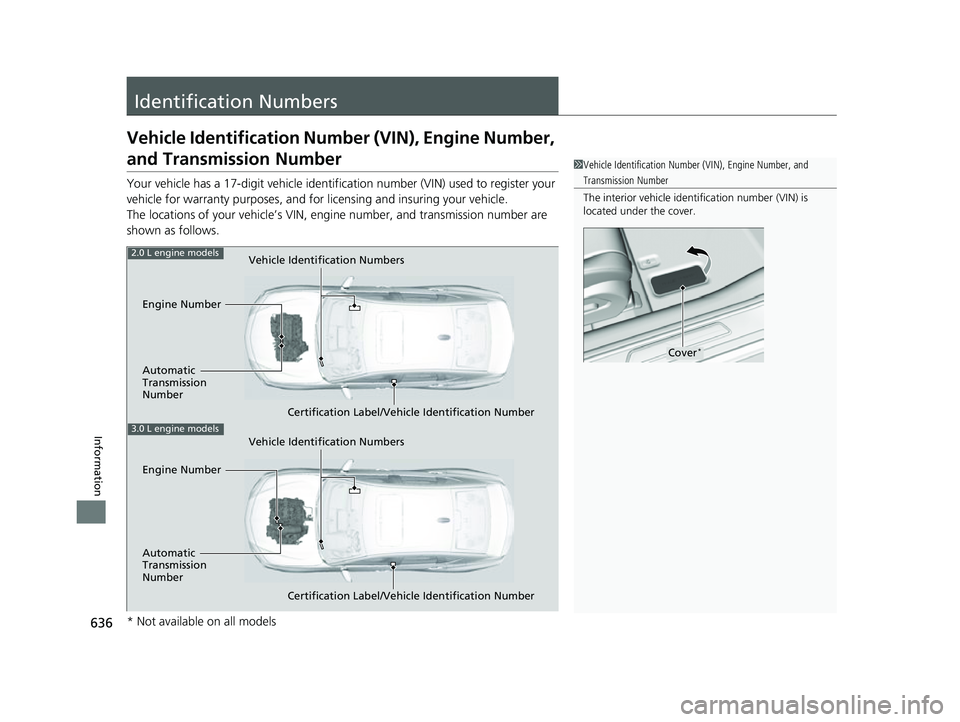
Your vehicle has a 17-digit vehicle identification number (V IN) used to register your
vehicle for warranty purposes, and for licensing and insuring your vehicle.
The locations of your vehicle’s VIN, en gine number, and transmission number are
shown as follows.
1 Vehicle Identification Number (VIN), Engine Number, and
Transmission Number
The interior vehicle identification number (VIN) is
located under the cover.
Cover*
Vehicle Identification Numbers
Engine Number
Automatic
Transmission
Number Certification Label/Vehicle Identification Number2.0 L engine models
Vehicle Identification Numbers
Certification Label/Vehicle Identification Number
3.0 L engine models
Engine Number
Automatic
Transmission
Number
* Not available on all models
23 ACURA TLX-31TGV6200.book 636 ページ 2022年8月4日 木曜日 午後1時59分