steering ACURA TLX 2023 Manual PDF
[x] Cancel search | Manufacturer: ACURA, Model Year: 2023, Model line: TLX, Model: ACURA TLX 2023Pages: 658, PDF Size: 21.27 MB
Page 461 of 658
Continued459
uuAcuraWatchTMuTraffic Jam Assist
Driving
When the driver takes direct control of steering, the steering assist function is
temporarily canceled.
The torque applied to steering may not be noticeable when the driver has direct
control of steering, or when the surfa ce of the road is rough or uneven.
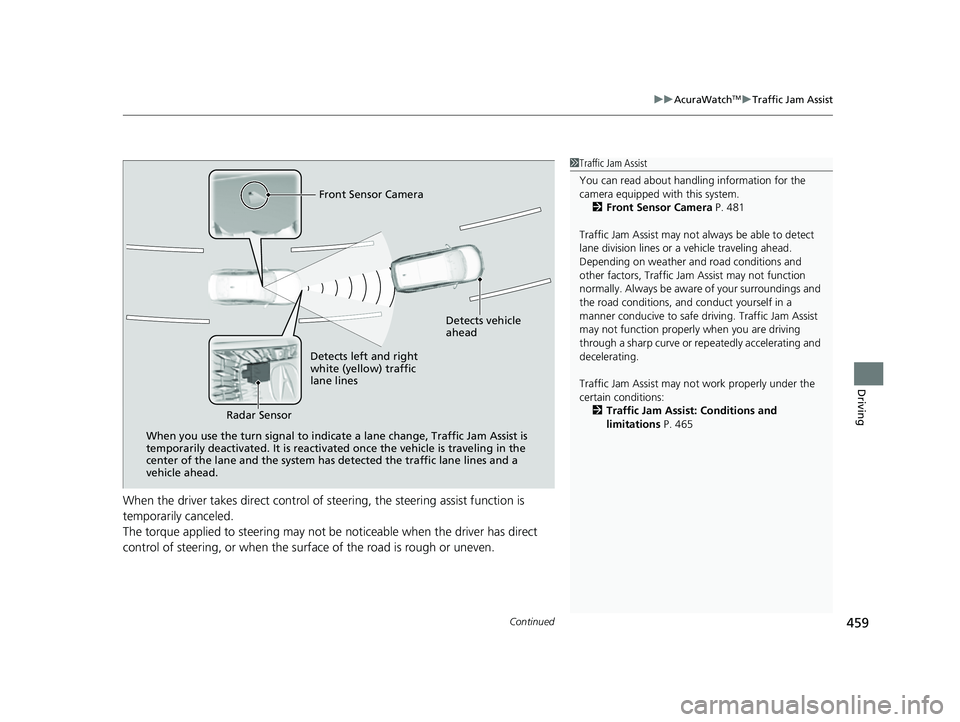
Front Sensor Camera
Detects vehicle
ahead
Detects left and right
white (yellow) traffic
lane lines
Radar Sensor
When you use the turn signal to indica te a lane change, Traffic Jam Assist is
temporarily deactivated. It is reactivated once the vehicle is traveling in the
center of the lane and the system has detected the traffic lane lines and a
vehicle ahead.
1 Traffic Jam Assist
You can read about handling information for the
camera equipped with this system.
2 Front Sensor Camera P. 481
Traffic Jam Assist may not always be able to detect
lane division lines or a vehicle traveling ahead.
Depending on weather and road conditions and
other factors, Traffic Jam Assist may not function
normally. Always be awar e of your surroundings and
the road conditions, and conduct yourself in a
manner conducive to safe driv ing. Traffic Jam Assist
may not function properly when you are driving
through a sharp curve or re peatedly accelerating and
decelerating.
Traffic Jam Assist may not work properly under the
certain conditions:
2 Traffic Jam Assist: Conditions and
limitations P. 465
23 ACURA TLX-31TGV6200.book 459 ページ 2022年8月4日 木曜日 午後1時59分
Page 462 of 658

uuAcuraWatchTMuTraffic Jam Assist
460
Driving
Traffic Jam Assist is activated when a ll of the following circumstances exist:
• LKAS is active.
• ACC with Low Speed Fo llow is active.
• The vehicle speed is between 0 and 45mph (0 and 72km/h) and there is a vehicle
detected traveling ahead.
• The lane in which you are driving has dete ctable lane markers on both sides, and
your vehicle is in the center of the lane.
• You are driving on a straight or slightly curved road.
• The driver is gripping the steering wheel.
Do not use Traffic Jam Assist in any of the following situations:
• You are traveling on a ro ad with sharp curves.
u The system may not allow your vehicle to respond in a manner best suited for
the road conditions.
• You are entering a toll booth, interchange, service area, or parking area.
u If the vehicle ahead disappears from th e travel path of your vehicle, your
vehicle may suddenly accelerate to resume the set speed.
• You are driving in adverse weat her (rain, fog, snow, etc.).
u The system may not be able to correctly determine the interval between your
vehicle and the one ahead.
• The surface of the road is slippery, for ex ample, it is icy or covered with snow.
u The tires may slip, causing you to lose control of the vehicle.
• You are driving in a HOV lane and motorcycles are passing you to the side, or you
are required to keep your vehicle to the right or the left of the lane.
u The system may not be able to co rrectly determine the vehicle ahead.
■Traffic Jam Assist Activation1Traffic Jam Assist Activation
Refer to the following pa ge for proper handling of
the Adaptive Cruise Control with Low Speed Follow:
2 Adaptive Cruise Control (ACC) with Low
Speed Follow P. 430
Refer to the following pa ge for proper handling of
the Lane Keeping Assist System (LKAS): 2 Lane Keeping Assist System (LKAS) P. 449
Refer to the following page for steering buttons and
displays:
2 Operation Switches for the ACC with Low
Speed Follow/Lane Keeping Assist System
(LKAS)/Traffic Jam Assist P. 416
23 ACURA TLX-31TGV6200.book 460 ページ 2022年8月4日 木曜日 午後1時59分
Page 463 of 658
Continued461
uuAcuraWatchTMuTraffic Jam Assist
Driving
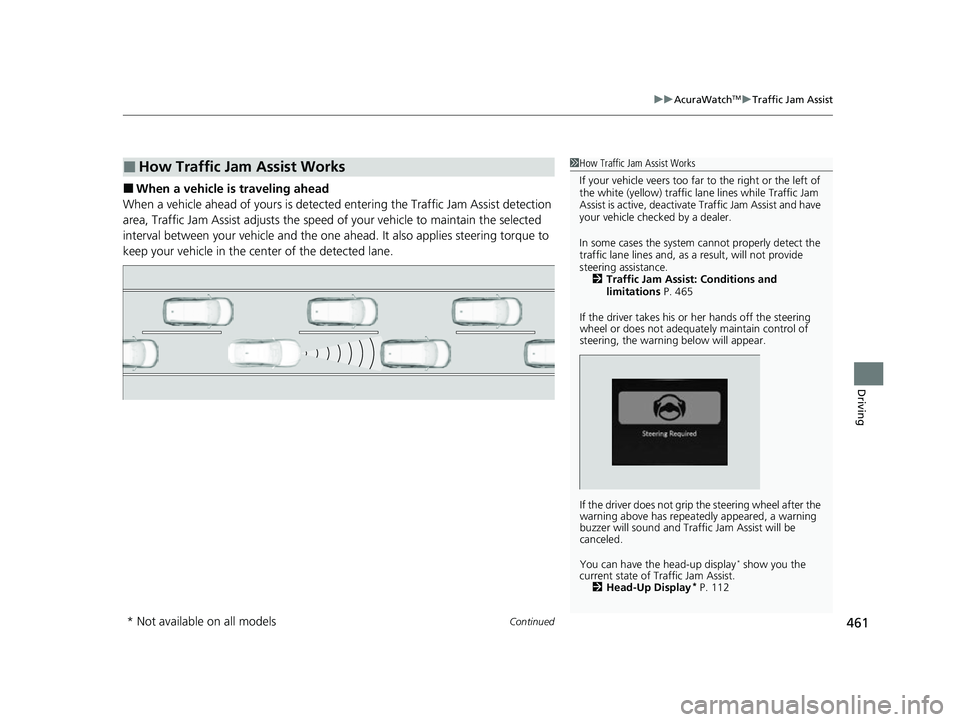
■When a vehicle is traveling ahead
When a vehicle ahead of yours is detected entering the Traffic Jam Assist detection
area, Traffic Jam Assist adjusts the speed of your vehicle to maintain the selected
interval between your vehicle and the one ah ead. It also applies steering torque to
keep your vehicle in the ce nter of the detected lane.
■How Traffic Jam Assist Works1How Traffic Jam Assist Works
If your vehicle veers too far to the right or the left of
the white (yellow) traffic lane lines while Traffic Jam
Assist is active, deactivate Traffic Jam Assist and have
your vehicle checked by a dealer.
In some cases the system cannot properly detect the
traffic lane lines and, as a result, will not provide
steering assistance. 2 Traffic Jam Assist: Conditions and
limitations P. 465
If the driver takes his or her hands off the steering
wheel or does not adequate ly maintain control of
steering, the warning below will appear.
If the driver does not grip the steering wheel after the
warning above has repeatedly appeared, a warning
buzzer will sound and Traffi c Jam Assist will be
canceled.
You can have the head-up display
* show you the
current state of Traffic Jam Assist. 2 Head-Up Display
* P. 112
* Not available on all models
23 ACURA TLX-31TGV6200.book 461 ページ 2022年8月4日 木曜日 午後1時59分
Page 465 of 658
Continued463
uuAcuraWatchTMuTraffic Jam Assist
Driving
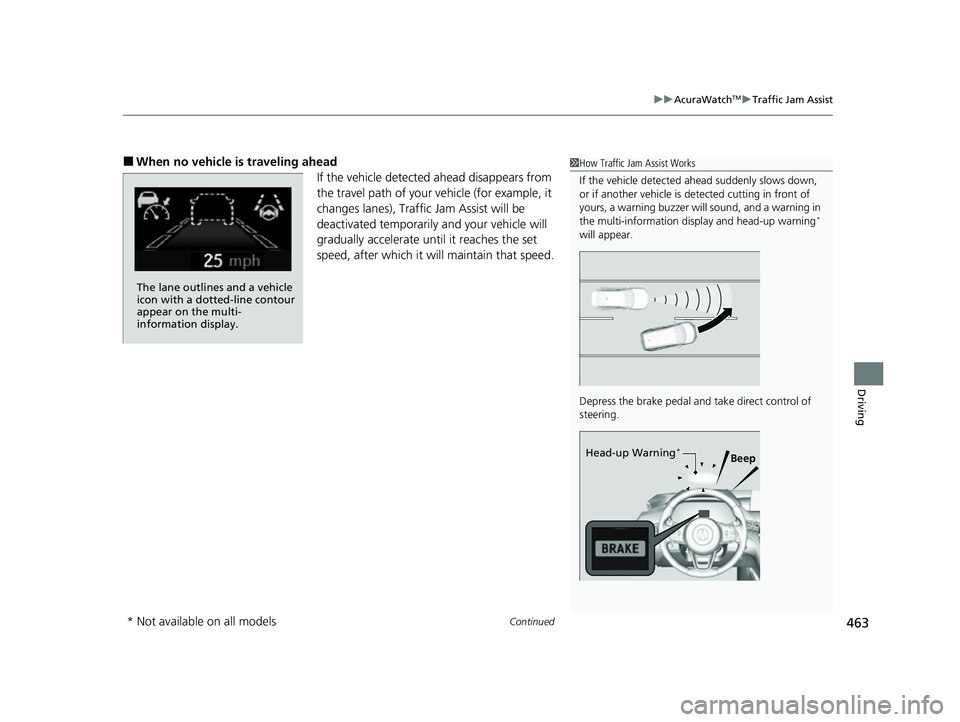
■When no vehicle is traveling ahead
If the vehicle detected ahead disappears from
the travel path of your vehicle (for example, it
changes lanes), Traffic Jam Assist will be
deactivated temporarily and your vehicle will
gradually accelerate until it reaches the set
speed, after which it will maintain that speed.1 How Traffic Jam Assist Works
If the vehicle detected ahead suddenly slows down,
or if another vehicle is de tected cutting in front of
yours, a warning buzzer will sound, and a warning in
the multi-information disp lay and head-up warning
*
will appear.
Depress the brake pedal and take direct control of
steering.
Beep
Head-up Warning*
The lane outlines and a vehicle
icon with a dotted-line contour
appear on the multi-
information display.
* Not available on all models
23 ACURA TLX-31TGV6200.book 463 ページ 2022年8月4日 木曜日 午後1時59分
Page 466 of 658
uuAcuraWatchTMuTraffic Jam Assist
464
Driving
To cancel Traffic Jam Assist, yo u can do any of the following:
• Press the button.
• Press the LKAS button.
• When the ACC with Low Speed Follow is deactivated.
■When Traffic Jam Assist may au tomatically be suspended when:
The system is temporarily canceled automatically under the following circumstances.
• The system fails to detect lane lines.
• The vehicle ahead of you cannot be detected.
• The steering wheel is turned quickly.
• You fail to steer the vehicle.
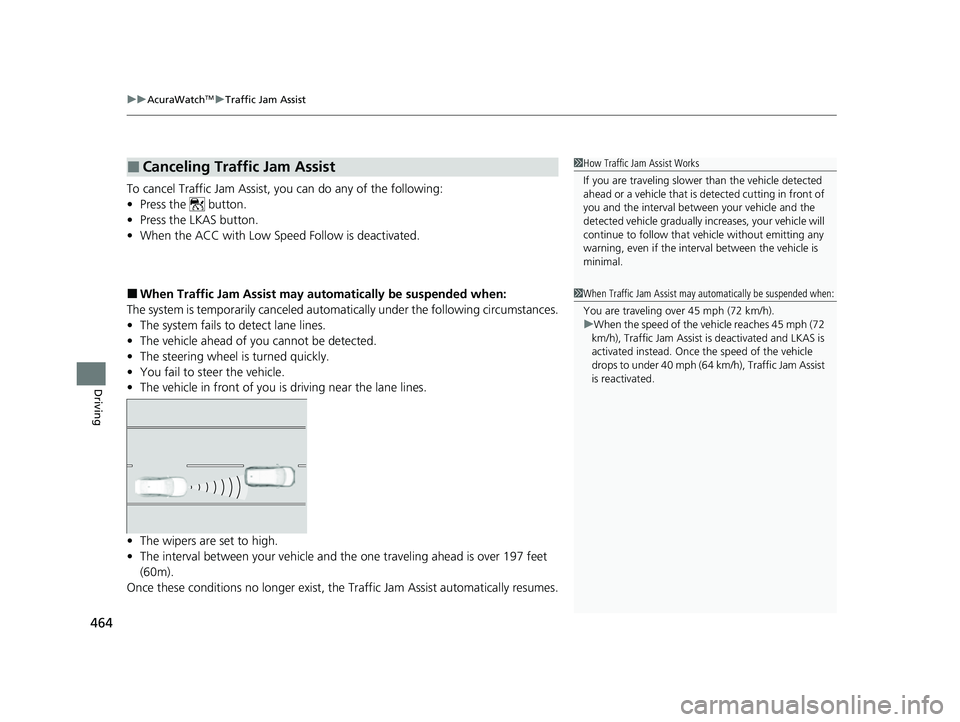
• The vehicle in front of you is driving near the lane lines.
• The wipers are set to high.
• The interval between your vehicle and th e one traveling ahead is over 197 feet
(60m).
Once these conditions no longer exist, the Traffic Jam Assist automatically resumes.
■Canceling Traffic Jam Assist1How Traffic Jam Assist Works
If you are traveling slower than the vehicle detected
ahead or a vehicle that is de tected cutting in front of
you and the interval betw een your vehicle and the
detected vehicle gradually increases, your vehicle will
continue to follow that vehicle without emitting any
warning, even if the interv al between the vehicle is
minimal.
1 When Traffic Jam Assist may automatically be suspended when:
You are traveling over 45 mph (72 km/h).
u When the speed of the vehicle reaches 45 mph (72
km/h), Traffic Jam Assist is deactivated and LKAS is
activated instead. Once the speed of the vehicle
drops to under 40 mph (64 km/h), Traffic Jam Assist
is reactivated.
23 ACURA TLX-31TGV6200.book 464 ページ 2022年8月4日 木曜日 午後1時59分
Page 472 of 658

470
uuAcuraWatchTMuRoad Departure Mitigation System
Driving
Road Departure Mitigation System
Alerts and helps to assist you when the system detects a possibility of your vehicle
unintentionally crossing over detected la ne markings and/or leaving the roadway
altogether.
The front camera behind the rearview mirror
monitors left and right lane markings (in white
or yellow). If your vehicle is getting too close to
detected lane markings without a turn signal
activated, the system, in addition to a visual
alert, applies steering torque and alerts you
with rapid vibrations on the steering wheel, to
help you remain within the detected lane.
2 Customized Features P. 302
As a visual alert, the Lane Departure
message appears on the multi-information
display.
If the system determines that its steering input
is insufficient to keep your vehicle on the
roadway, it may apply braking. u Braking is applied only when the lane
markings are solid continuous lines.
The system cancels assisting operations when you turn th e steering wheel to avoid
crossing over detected lane markings.
If the system operates several times without detecting driver response, the system
beeps to alert you.
■How the System Works
1 Road Departure Mitigation System
Important Safety Reminder
Like all assistance systems, the Road Departure
Mitigation system has limitations.
Overreliance on the Road Departure Mitigation
system may result in a collision. It is always your
responsibility to keep the ve hicle within your driving
lane.
The Road Departure Mitigation system only alerts you
when lane drift is detected without a turn signal in
use. The Road Departure Mitigation system may not
detect all lane markings or lane or roadway
departures; accuracy will vary based on weather,
speed and lane marker condi tion. It is always your
responsibility to sa fely operate the vehicle and avoid
collisions.
You can read about handling information for the
camera equipped with this system. 2 Front Sensor Camera P. 481
The Road Departure Mitigati on system may not work
properly or may work im properly under the certain
conditions:
2 Road Departure Mitigation Conditions and
Limitations P. 473
There are times when you may not notice the Road
Departure Mitigation functions due to your operation
of the vehicle, or road surface conditions.
23 ACURA TLX-31TGV6200.book 470 ページ 2022年8月4日 木曜日 午後1時59分
Page 473 of 658

Continued471
uuAcuraWatchTMuRoad Departure Mitigation System
Driving
The system activates when all of the following conditions are met:
• The vehicle is traveling between about 45 and 90 mph (72 and 145 km/h).
• The vehicle is on a straight or slightly curved road.
• The turn signals are off.
• The brake pedal is not depressed.
• The wipers are not in contin uous high speed operation.
• The system makes a determination that th e driver is not actively accelerating,
braking, or steering.
■How the System Activates1 How the System Activates
The Road Departure Mi tigation system may
automatically shut off and the safety support
indicator (amber) co mes and stays on.
2 Indicators P. 78
Road Departure Mi tigation system function can be
impacted when the vehicle is:
•Not driven within a traffic lane.
•Driven on the inside edge of a curve, or outside of
a lane.
•Driven in a narrow lane.
23 ACURA TLX-31TGV6200.book 471 ページ 2022年8月4日 木曜日 午後1時59分
Page 474 of 658

uuAcuraWatchTMuRoad Departure Mitigation System
472
Driving
When you turn the Road Departure Mitigation
on and off, do the following.
1. Press the safety support switch.
2. Roll the right selector wheel to the
symbol and push it.
u The message appears on the multi-
information display when the system
turns on or off.
u A check mark appears in the box and the
color of the symbol changes green
when the system is on. The check mark
disappears and the color of the
symbol changes gray when the system is
off.
The Road Departure Mitigation is in the
previously selected on (checked) or off
(unchecked) setting each time you start the
engine.
■Road Departure Mitigation On and Off1 Road Departure Mitigation On and Off
When you have selected Warning Only from the
customized options using the audio/information
screen, the system does not operate the steering
wheel and braking. 2 Customized Features P. 302
You can change the settin gs for the Road Departure
Mitigation system.
If LKAS is off, the message below may appear if the
system has determined that there is a possibility of
your vehicle crossing over detected lane markings.
2 Customized Features P. 302
In the following case, a beeper sounds, a message
related to the ACC with Low Speed Follow appears
on the multi-information display, and the braking
function controlled by the Road Departure Mitigation
system is canceled.
•The vehicle has repeatedly applied the brakes to
maintain the set speed (for example, you are
descending a long slope).
Right Selector Wheel
Safety Support Switch
23 ACURA TLX-31TGV6200.book 472 ページ 2022年8月4日 木曜日 午後1時59分
Page 490 of 658

uuBraking uBrake System
488
Driving
Your vehicle is equipped with disc brakes at all four wh eels. The brake assist system
increases the stopping force when you depress the brake pedal hard in an
emergency situation. The an ti-lock brake system (ABS) helps you retain steering
control when braking very hard.
2 Brake Assist System P. 493
2 Anti-lock Brake System (ABS) P. 492
■Brake squeal
To satisfy the performance under a wide range of driving conditions, a high
performance braking system is equipped on your vehicle. You may hear the brake
squeal under certain conditions, such as vehicle speed, deceleration, humidity, and
so on. This is not a malfunction.
■Foot Brake1 Foot Brake
Check the brakes after driving through deep water,
or if there is a buildup of road surface water. If
necessary, dry the brakes by lightly depressing the
pedal several times.
If you hear a continuous me tallic friction sound when
applying the brakes, this is caused by the brake wear
indicator rubbing on the brake rotor and indicates
that the brake pads need to be replaced. Have the
vehicle checked by a deal er. If you hear only an
occasional squeak or squeal when you initially apply
the brake pedal, this may be normal and caused by
high frequency vibration of the brake pads against
the rotating brake disc.
Constantly using the brake pedal while going down a
long hill builds up heat, which reduces the brake
effectiveness. Apply engine braking by taking your
foot off the accelerator pe dal and downshifting to a
lower gear.
Do not rest your foot on the brake pedal while
driving, as it will lightly apply the brakes and cause
them to lose effectiveness over time and reduce pad
life. It will also conf use drivers behind you.
3.0 L engine models
23 ACURA TLX-31TGV6200.book 488 ページ 2022年8月4日 木曜日 午後1時59分
Page 494 of 658

492
uuBraking uAnti-lock Brake System (ABS)
Driving
Anti-lock Brake System (ABS)
Helps prevent the wheels from locking up, an d helps you retain steering control by
pumping the brakes rapidly, much faster than you can.
The electronic brake distribution (EBD) system, which is part of the ABS, also
balances the front-to-rear braking distri bution according to vehicle loading.
You should never pump the brake pedal. Let the ABS work for you by always
keeping firm, steady pressure on the brake pe dal. This is sometimes referred to as
“stomp and steer.”
■ABS operation
The brake pedal may pulsate slightly when the ABS is working. Depress the brake
pedal and keep holding the pedal firmly do wn. On dry pavement, you will need to
press on the brake pedal very hard before the ABS activates. However, you may feel
the ABS activate immediately if yo u are trying to stop on snow or ice.
ABS may activate when you depress the brake pedal when driving on:
• Wet or snow covered roads.
• Roads paved with stone.
• Roads with uneven surfaces, such as potholes, cracks, manholes, etc.
When the vehicle speed goes unde r 6 mph (10 km/h), the ABS stops.
■ABS1Anti-lock Brake System (ABS)
NOTICE
The ABS may not function correctly if you use a tire of
the incorrect size or type.
If the ABS indicator comes on while driving, there
may be a problem with the system.
While normal braking will not be affected, there is a
possibility that the ABS wi ll not be operating. Have
your vehicle checked by a dealer immediately.
The ABS is not designed for the purpose of reducing
the time or distance it takes for a vehicle to stop: It is
designed to limit brake lo ckup which can lead to
skidding and loss of steering control.
In the following cases, yo ur vehicle may need more
distance to stop than a vehicle without the ABS:
•You are driving on rough or uneven road surfaces,
such as gravel or snow.
•The tires are equipped with tire chains.
The following may be observed with the ABS system:
•Motor sounds coming from the engine
compartment when the brakes are applied, or
when system checks are being performed after the
engine has been started and while the vehicle
accelerates.
•Brake pedal and/or the vehicle body vibration when
ABS activates.
These vibrations and sou nds are normal to ABS
systems and are no cause for concern.
23 ACURA TLX-31TGV6200.book 492 ページ 2022年8月4日 木曜日 午後1時59分