cruise control ACURA TLX 2023 Owners Manual
[x] Cancel search | Manufacturer: ACURA, Model Year: 2023, Model line: TLX, Model: ACURA TLX 2023Pages: 658, PDF Size: 21.27 MB
Page 9 of 658
7
Quick Reference Guide
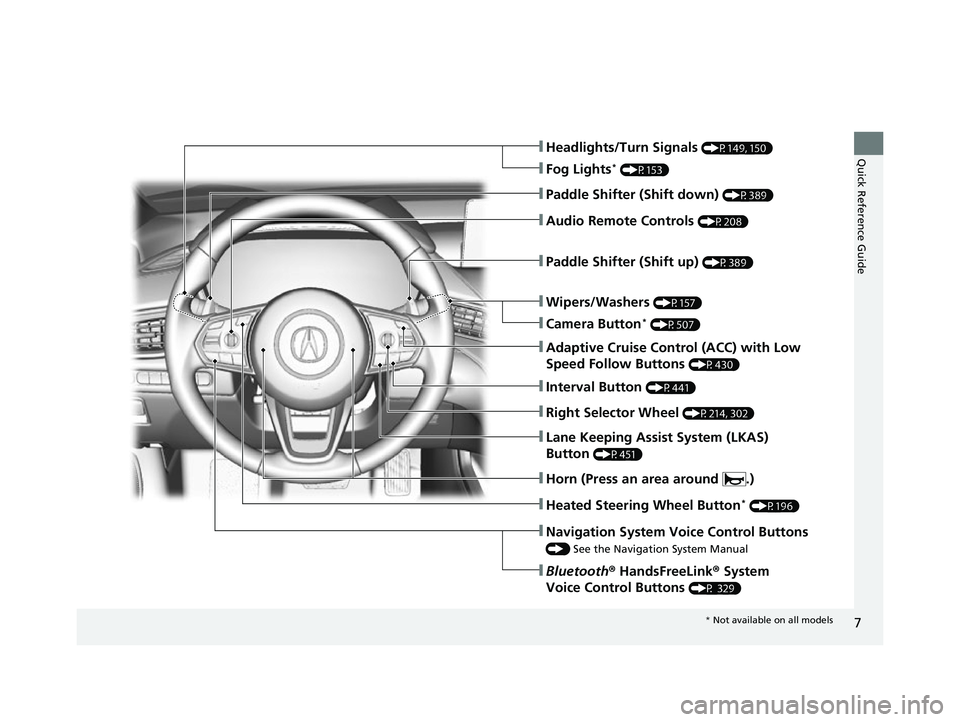
❚Wipers/Washers (P157)
❚Headlights/Turn Signals (P149, 150)
❚Paddle Shifter (Shift down) (P389)
❚Paddle Shifter (Shift up) (P389)
❚Navigation System Voice Control Buttons
() See the Navigation System Manual
❚Bluetooth ® HandsFreeLink ® System
Voice Control Buttons
(P 329)
❚Lane Keeping Assist System (LKAS)
Button
(P451)
❚Heated Steering Wheel Button* (P196)
❚Audio Remote Controls (P208)
❚Fog Lights* (P153)
❚Adaptive Cruise Control (ACC) with Low
Speed Follow Buttons
(P430)
❚Interval Button (P441)
❚Right Selector Wheel (P214, 302)
❚Horn (Press an area around .)
❚Camera Button* (P507)
* Not available on all models
23 ACURA TLX-31TGV6200.book 7 ページ 2022年8月4日 木曜日 午後1時59分
Page 25 of 658
23
Quick Reference Guide
AcuraWatchTM (P415)
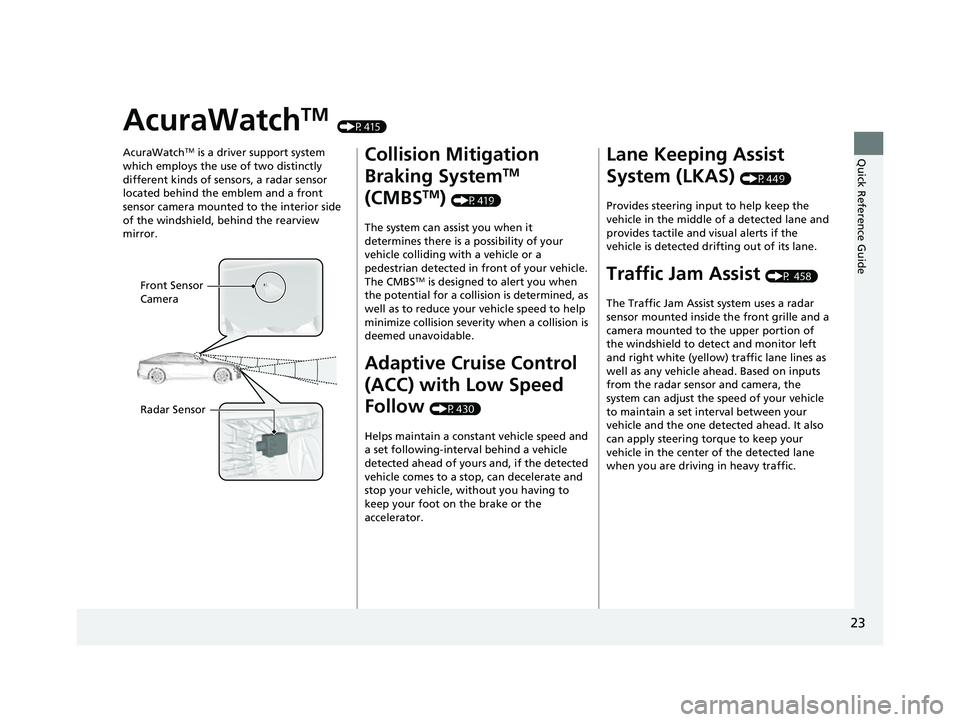
AcuraWatch
TM is a driver support system
which employs the use of two distinctly
different kinds of sensors, a radar sensor
located behind the emblem and a front
sensor camera mounted to the interior side
of the windshield, behind the rearview
mirror.
Front Sensor
Camera
Radar Sensor
Collision Mitigation
Braking System
TM
(CMBS
TM) (P419)
The system can assist you when it
determines there is a possibility of your
vehicle colliding with a vehicle or a
pedestrian detected in front of your vehicle.
The CMBS
TM is designed to alert you when
the potential for a collision is determined, as
well as to reduce your vehicle speed to help
minimize collision severity when a collision is
deemed unavoidable.
Adaptive Cruise Control
(ACC) with Low Speed
Follow
(P430)
Helps maintain a constant vehicle speed and
a set following-interval behind a vehicle
detected ahead of yours and, if the detected
vehicle comes to a stop, can decelerate and
stop your vehicle, without you having to
keep your foot on the brake or the
accelerator.
Lane Keeping Assist
System (LKAS)
(P449)
Provides steering input to help keep the
vehicle in the middle of a detected lane and
provides tactile and visual alerts if the
vehicle is detected drifting out of its lane.
Traffic Jam Assist (P 458)
The Traffic Jam Assist system uses a radar
sensor mounted inside the front grille and a
camera mounted to the upper portion of
the windshield to detect and monitor left
and right white (yellow) traffic lane lines as
well as any vehicle ahead. Based on inputs
from the radar sensor and camera, the
system can adjust the speed of your vehicle
to maintain a set interval between your
vehicle and the one detected ahead. It also
can apply steering torque to keep your
vehicle in the center of the detected lane
when you are driving in heavy traffic.
23 ACURA TLX-31TGV6200.book 23 ページ 2022年8月4日 木曜日 午後1時59分
Page 81 of 658

79
uuIndicators u
Continued
Instrument Panel
M (sequential mode)
Indicator/Gear
Selection Indicator P. 83
Parking Brake and
Brake System
Indicator (Red)
Parking Brake and
Brake System
Indicator (Amber)
U.S.
Canada
U.S.
Canada Automatic Brake
Hold System Indicator
Automatic Brake Hold
IndicatorU.S.
Canada
*1 : When you set the power mode to ON, these indicators come on to indicate that system checks are being perf ormed. They go off a few seconds later or after the engine
has started. If an indicator does not come on or turn off, th ere may be a malfunction in the corresponding system. To resolve the issue, follow the instructions in the
owner's manual.
P. 80*1
Malfunction Indicator
Lamp
Charging System
Indicator
Anti-lock Brake System
(ABS ) Indicator
Seat Belt Reminder
Indicator
Low Fuel Indicator
(Amber)
Vehicle Stability AssistTM
(VSA®) System Indicator
Vehicle Stability Assist
TM
(VSA®) OFF Indicator
Supplemental Restraint
System Indicator
Auto High-Beam
Indicator
Low Tire Pressure/TPMS
Indicator Electric Power Steering
(EPS) System Indicator
Turn Signal and Hazard
Warning Indicators
Lights On Indicator
Maintenance Minder
Indicator
System Message Indicator
Super Handling-All Wheel
DriveTM (SH-AWD
®)
System Indicator*
Adaptive Cruise Control
(ACC) with Low Speed
Follow Indicator (Amber)
Lane Keeping Assist System
(LKAS) Indicator (Amber)
Safety Support Indicator
(Green/Gray)
P. 82
P. 82
P. 82
P. 83
P. 83*1 *1
P. 89
*1
*1
Shift Position Indicator P. 83
Transmission System
Indicator P. 84
Auto Idle Stop System
Indicator (Amber)
P. 85
P. 87
P. 87
P. 88
P. 88
P. 90
P. 89
*1
*1
*1
P. 89
*1 P. 88
P. 93
*1
P. 90
P. 92
P. 90
Immobilizer System
Indicator P. 91
Security System Alarm
Indicator P. 91
P. 92
P. 92
P. 93
P. 96
*1
Adaptive Cruise Control
(ACC) with Low Speed
Follow Indicator (White/
Green) P. 93
*1
Lane Keeping Assist
System (LKAS) Indicator
(White/Green) P. 93
*1 *1
*1 *1
Safety Support Indicator
(Amber)
P. 95
*1
Cruise Mode Indicator
(White/Green) P. 94
Auto Idle Stop OFF
Indicator P. 85
Auto Idle Stop Suspend
Indicator P. 86
*1
*1
Auto Idle Stop Indicator
(Green)
P. 85
*1
*1
High Beam Indicator P. 90
Fog Light Indicator* P. 90
* Not available on all models
23 ACURA TLX-31TGV6200.book 79 ページ 2022年8月4日 木曜日 午後1時59分
Page 95 of 658
93
uuIndicators u
Continued
Instrument Panel
IndicatorNameOn/BlinkingExplanation
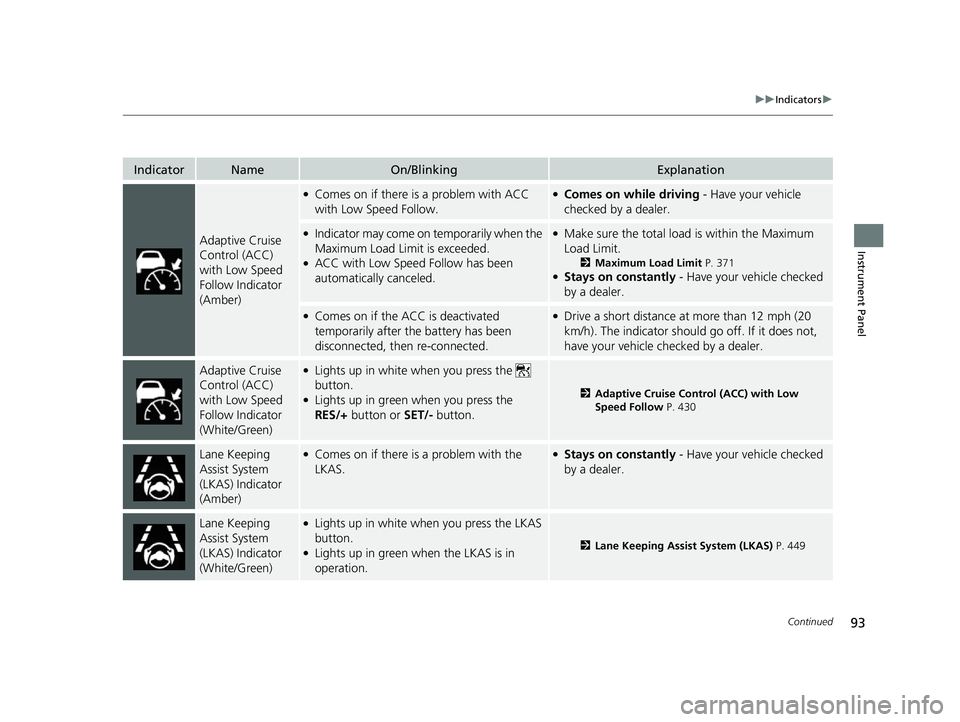
Adaptive Cruise
Control (ACC)
with Low Speed
Follow Indicator
(Amber)
●Comes on if there is a problem with ACC
with Low Speed Follow.●Comes on while driving - Have your vehicle
checked by a dealer.
●Indicator may come on temporarily when the
Maximum Load Limit is exceeded.
●ACC with Low Speed Follow has been
automatically canceled.
●Make sure the total load is within the Maximum
Load Limit.
2 Maximum Load Limit P. 371●Stays on constantly - Have your vehicle checked
by a dealer.
●Comes on if the ACC is deactivated
temporarily after the battery has been
disconnected, then re-connected.●Drive a short distance at more than 12 mph (20
km/h). The indicator should go off. If it does not,
have your vehicle checked by a dealer.
Adaptive Cruise
Control (ACC)
with Low Speed
Follow Indicator
(White/Green)●Lights up in white when you press the
button.
●Lights up in green when you press the
RES/+ button or SET/- button.2Adaptive Cruise Control (ACC) with Low
Speed Follow P. 430
Lane Keeping
Assist System
(LKAS) Indicator
(Amber)●Comes on if there is a problem with the
LKAS.●Stays on constantly - Have your vehicle checked
by a dealer.
Lane Keeping
Assist System
(LKAS) Indicator
(White/Green)●Lights up in white when you press the LKAS
button.
●Lights up in green when the LKAS is in
operation.2 Lane Keeping Assist System (LKAS) P. 449
23 ACURA TLX-31TGV6200.book 93 ページ 2022年8月4日 木曜日 午後1時59分
Page 96 of 658

94
uuIndicators u
Instrument Panel
IndicatorNameOn/BlinkingExplanation
Cruise Mode
Indicator (White/
Green)●Lights up in white when you change to
cruise mode.
●Lights up in green when you have set a
speed for cruise control.
2 To Switch ACC with Low Speed Follow to
Cruise Control P. 445
Safety Support
Indicator (Amber)
●Comes on if there is a problem with the
Road Departure Mitigation system, CMBSTM,
or blind spot information system*.
●Stays on constantly - Have your vehicle checked
by a dealer.
●Indicator may come on temporarily when the
Maximum Load Limi t is exceeded.●Make sure the total load is within the Maximum
Load Limit.
2 Maximum Load Limit P. 371●Stays on constantly - Have your vehicle checked
by a dealer.
●Comes on if the Road Departure Mitigation
system and CMBSTM are deactivated
temporarily after the battery has been
disconnected and then re-connected.
●Drive a short distance at more than 12 mph (20
km/h). The indicator should go off. If it does not,
have your vehicle checked by a dealer.
* Not available on all models
23 ACURA TLX-31TGV6200.book 94 ページ 2022年8月4日 木曜日 午後1時59分
Page 102 of 658

100
uuGauges and Displays uMulti-Information Display
Instrument Panel
Shows the current mode for ACC with Lo w Speed Follow, LKAS, and Traffic Jam
Assist.
2 Adaptive Cruise Control (ACC) with Low Speed Follow P. 430
2 Lane Keeping Assist System (LKAS) P. 449
2 Traffic Jam Assist P. 458
■Current Mode for ACC with Low Speed Follow, the LKAS,
and Traffic Jam Assist
23 ACURA TLX-31TGV6200.book 100 ページ 2022年8月4日 木曜日 午後1時59分
Page 115 of 658

113
uuGauges and Displays uHead-Up Display*
Continued
Instrument Panel
The display also shows the following
warnings.
• Lane Departure Warning: When your
vehicle is too close to the traffic lane lines,
the lane departure warning appears.
2 Lane Keeping Assist System (LKAS)
P. 449
• Head-Up Warning Lights:
Flash when the BRAKE message appears
on the multi-information display.
2 Collision Mitigation Braking SystemTM
(CMBSTM) P. 419
2 Adaptive Cruise Control (ACC) with
Low Speed Follow P. 430
Lane Departure Warning
23 ACURA TLX-31TGV6200.book 113 ページ 2022年8月4日 木曜日 午後1時59分
Page 117 of 658

115
uuGauges and Displays uHead-Up Display*
Instrument Panel
Shows your driving speed in mph or km/h.
Shows the current mode for ACC with Low Speed Follow, LKAS, and Traffic Jam
AssistM
2 Adaptive Cruise Control (ACC) with Low Speed Follow P. 430
2 Lane Keeping Assist System (LKAS) P. 449
2 Traffic Jam Assist P. 458
Shows you turn-by-turn driv ing directions to your destination linked with the
navigation system or Android Auto.
2 Refer to the Navigation System Manual
2 Android AutoTM P. 272
Shows the current speed limit based on either information compiled through the
navigation system or speed limit signs captured by the front sensor camera.
■Vehicle Speed
■Current Mode for ACC with Low Speed Follow and, the
LKAS, and Traffic Jam Assist
■Turn-by-Turn Directions
■Speed Limit Information
1 Vehicle Speed
Switch between mph and km/h by using the multi-
information display or customized features on the
audio/information screen.
2 Speed/Distance Units P. 104
2 Customized Features P. 302
1Turn-by-Turn Directions
Turn-by-turn directions may not be available for all
apps.
1Speed Limit Information
The speed limit displayed on the screen may differ to
the actual speed limit.
The speed limit for some roads is not displayed.
You can select whether the source of the speed limit
information is the front sensor camera or the
navigation system.
You can also turn off speed limit information. 2 Customized Features P. 302
23 ACURA TLX-31TGV6200.book 115 ページ 2022年8月4日 木曜日 午後1時59分
Page 369 of 658

367
Driving
This chapter discusses driving and refueling.
Before Driving................................... 368
Towing a Trailer ................................ 373
When Driving
Starting the Engine .......................... 374
Precautions While Driving................. 379
Automatic Transmission ................... 380
Shifting ............................................ 381
Acura Integrated Dynamics System... 390
Auto Idle Stop .................................. 397
Vehicle Stability AssistTM (VSA® ), aka
Electronic Stability Control (ESC),
System ........................................ 404
Agile Handling Assist ....................... 406 Super Handling-All Wheel Drive
TM (SH-
AWD® )*......................................... 407
Tire Pressure Monitoring System (TPMS)
with Tire Fill Assist .......................... 408
Tire Pressure Monitoring System (TPMS) - Required Federal Explanation ........... 410
Blind Spot Information System
*....... 412
AcuraWatchTM................................... 415
Collision Mitigati on Braking SystemTM
(CMBSTM) ....................................... 419
Adaptive Cruise Control (ACC) with Low Speed Follow ................................. 430
Lane Keeping Assist System (LKAS) .. 449 Traffic Jam Assist ............................. 458
Road Departure Miti
gation System... 470
Traffic Sign Recognition System ....... 475
Front Sensor Camera ....................... 481
Radar Sensor ................................... 483
Braking .............................................. 484
Parking Your Vehicle ........................ 494
Multi-View Rear Camera
*................ 505
Surround View Camera System*..... 507
Refueling ........................................... 515
Fuel Economy and CO
2 Emissions .... 518
Turbo Engine Vehicle ....................... 519
* Not available on all models
23 ACURA TLX-31TGV6200.book 367 ページ 2022年8月4日 木曜日 午後1時59分
Page 406 of 658

404
uuWhen Driving uVehicle Stability AssistTM (VSA ®), aka Electronic Stability Control (ESC), System
Driving
Vehicle Stability AssistTM (VSA ®), aka Electronic
Stability Control (ESC), System
VSA ® helps to stabilize the vehicle during cornering if the vehicle turns more or less
than what was intended. It also assists in maintaining traction on slippery surfaces.
It does so by regulating engine output and selectively applying the brakes.
When VSA® activates, you may notice that the
engine does not respond to the accelerator.
You may also notice some noise from the
hydraulic brake system. You will also see the
indicator blink.
■VSA ® Operation
1 Vehicle Stability AssistTM (VSA ®), aka Electronic Stability Control
(ESC), System
The VSA ® may not function properl y if tire type and
size are mixed. Make sure to use the same size and
type of tire, and the air pressures as specified.
When the VSA ® system indicator comes on and stays
on while driving, there may be a problem with the
system. While this may not interfere with normal
driving, have your vehi cle checked by a dealer
immediately.
VSA ® cannot enhance stability in all driving situations
and does not control the entire braking system. You
still need to drive and corner at speeds appropriate
for the conditions and always leave a sufficient
margin of safety.
The main function of the VSA ® system is generally
known as Electronic Stab ility Control (ESC). The
system also includes a traction control function.
The vehicle stability assist
TM (VSA ®) system, vehicle
stability assistTM (VSA ®) OFF, adaptive cruise control
(ACC) with low speed follow, and safety support
indicators may come on in amber along with a
message in the multi-information display when you
set the power mode to ON after reconnecting a
battery.
Drive a short distance at more than 12 mph (20
km/h).
Each indicator should go off. If any do not, have your
vehicle checked by a dealer.
VSA ® System Indicator
23 ACURA TLX-31TGV6200.book 404 ページ 2022年8月4日 木曜日 午後1時59分