light ACURA TLX 2023 Owners Manual
[x] Cancel search | Manufacturer: ACURA, Model Year: 2023, Model line: TLX, Model: ACURA TLX 2023Pages: 658, PDF Size: 21.27 MB
Page 7 of 658
Contents
Child Safety P. 61Exhaust Gas Hazard P. 75Safety Labels P. 76
Opening and Closing the Trunk P. 136 Security System P. 139
Operating the Switches Around the Steering Wheel P. 146 Mirrors P. 165
Climate Control System P. 197
Audio Error Messages P. 276 General Information on the Audio System P. 279
Bluetooth ® HandsFreeLink ® P. 329 AcuraLink ® P. 358
When Driving P. 374 AcuraWatchTM P. 415Braking P. 484
Surround View Camera System* P. 507 Refueling P. 515 Fuel Economy and CO2 Emissions P. 518
Maintenance Under the Hood P. 532 Replacing Light Bulbs P. 550
Checking and Maintaining Tires P. 555 Battery P. 564 Remote Transmitter Care P. 568
Cleaning P. 571 Accessories and Modifications P. 578
Engine Does Not Start P. 605If the Battery Is Dead P. 608Overheating P. 611
Emergency Towing P. 629 If You Cannot Unlock the Fuel Fill Door P. 630
Refueling P. 632
Devices that Emit Radio Waves P. 637 Reporting Safety Defects P. 638
Authorized Manuals P. 645 Client Service Information P. 646
Quick Reference GuideP. 6
Safe DrivingP. 31
Instrument PanelP. 77
ControlsP. 117
FeaturesP. 203
DrivingP. 367
MaintenanceP. 521
Handling the UnexpectedP. 581
InformationP. 633
IndexP. 647
23 ACURA TLX-31TGV6200.book 5 ページ 2022年8月4日 木曜日 午後1時59分
Page 9 of 658
7
Quick Reference Guide
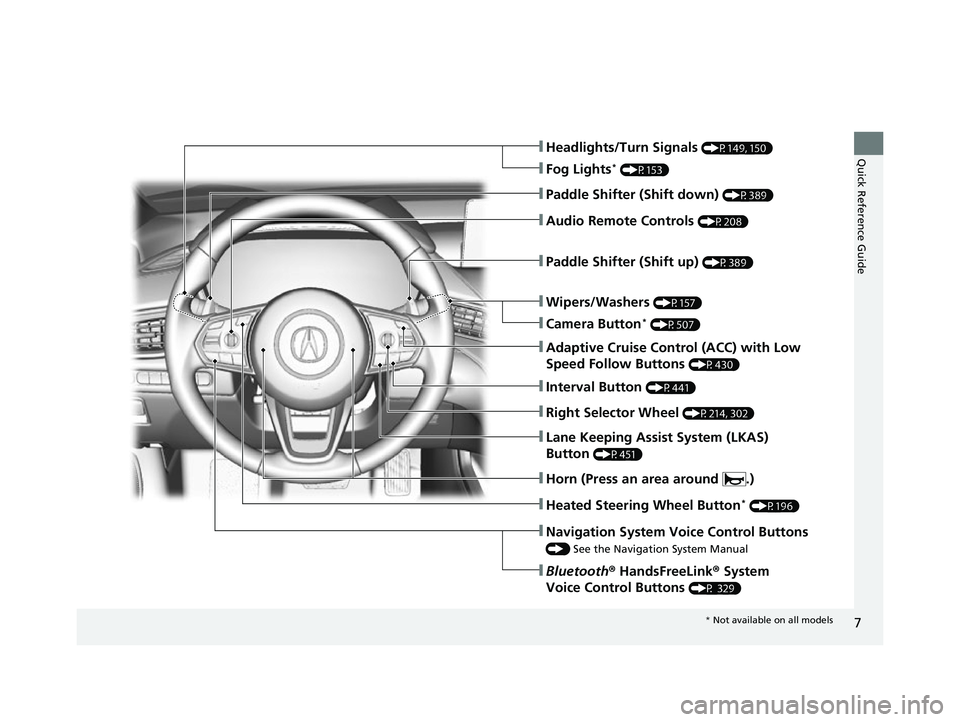
❚Wipers/Washers (P157)
❚Headlights/Turn Signals (P149, 150)
❚Paddle Shifter (Shift down) (P389)
❚Paddle Shifter (Shift up) (P389)
❚Navigation System Voice Control Buttons
() See the Navigation System Manual
❚Bluetooth ® HandsFreeLink ® System
Voice Control Buttons
(P 329)
❚Lane Keeping Assist System (LKAS)
Button
(P451)
❚Heated Steering Wheel Button* (P196)
❚Audio Remote Controls (P208)
❚Fog Lights* (P153)
❚Adaptive Cruise Control (ACC) with Low
Speed Follow Buttons
(P430)
❚Interval Button (P441)
❚Right Selector Wheel (P214, 302)
❚Horn (Press an area around .)
❚Camera Button* (P507)
* Not available on all models
23 ACURA TLX-31TGV6200.book 7 ページ 2022年8月4日 木曜日 午後1時59分
Page 11 of 658

9
Quick Reference Guide❚Map Lights (P181)
❚Side Curtain Airbags (P56)
❚Seat Belts (P36)
❚Front Seat (P168)
❚Moonroof Switch
(P145)
❚Map Lights (P181)
❚Sunglasses Holder
(P188)
❚Seat Belt (Installing a Child Seat) (P69)
❚Rear Seat (P178)
❚Rear Fuse Box (P626)
❚Seat Belt to Secure a Child Seat (P71)
❚LATCH to Secure a Child Seat (P66)
❚Accessory Power
Socket
(P189)
❚Sun Visors
❚Vanity Mirrors
❚Side Airbags (P54)
❚Grab Handle
❚Coat Hook (P186)
* Not available on all models
23 ACURA TLX-31TGV6200.book 9 ページ 2022年8月4日 木曜日 午後1時59分
Page 12 of 658
Visual Index
10
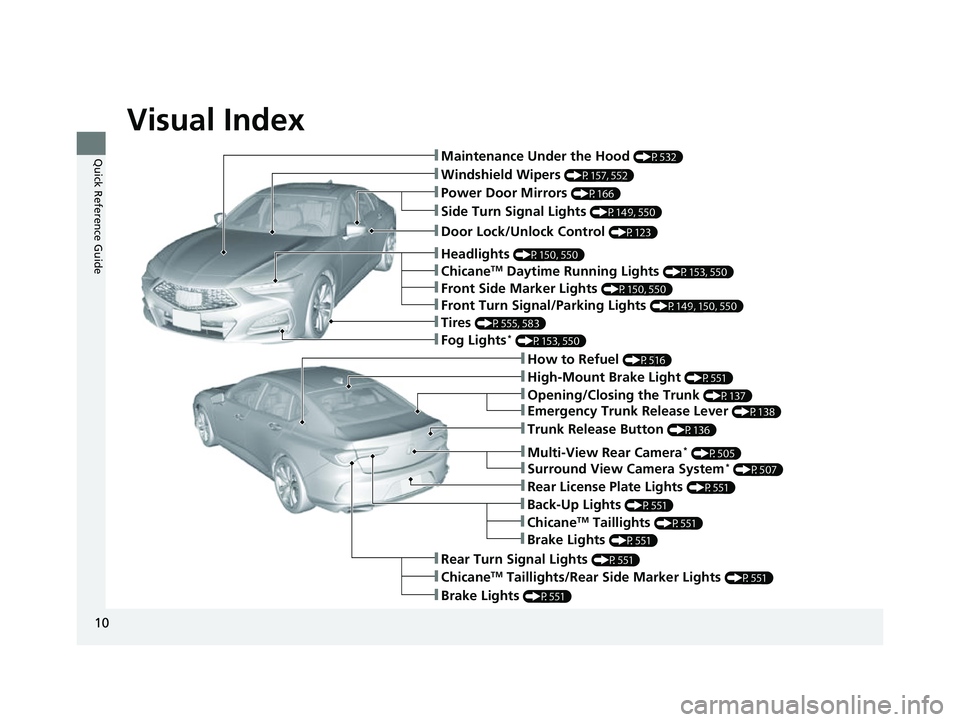
Quick Reference Guide❚Maintenance Under the Hood (P532)
❚Windshield Wipers (P157, 552)
❚Tires (P555, 583)
❚Door Lock/Unlock Control (P123)
❚Power Door Mirrors (P166)
❚Headlights (P150, 550)
❚How to Refuel (P516)
❚High-Mount Brake Light (P551)
❚Emergency Trunk Release Lever (P138)
❚Opening/Closing the Trunk (P137)
❚ChicaneTM Taillights/Rear Side Marker Lights (P551)
❚Brake Lights (P551)
❚Rear Turn Signal Lights (P551)
❚Back-Up Lights (P551)
❚Rear License Plate Lights (P551)
❚Fog Lights* (P153, 550)
❚Trunk Release Button (P136)
❚Front Turn Signal/Parking Lights (P149, 150, 550)
❚Side Turn Signal Lights (P149, 550)
❚ChicaneTM Daytime Running Lights (P153, 550)
❚Front Side Marker Lights (P150, 550)
❚ChicaneTM Taillights (P551)
❚Brake Lights (P551)
❚Multi-View Rear Camera* (P505)
❚Surround View Camera System* (P507)
23 ACURA TLX-31TGV6200.book 10 ページ 2022年8月4日 木曜日 午後1時59分
Page 16 of 658

14
Quick Reference Guide
Controls (P 117)
Clock (P118)
The clock is automatically updated through
the audio system.ENGINE START/STOP
Button
(P146)
Press the button to change the vehicle’s
power mode.
Turn Signals (P149)
Lights (P150)
Turn Signal Control Lever
Right
Left
Light Control Switches
Low Beam High Beam
Flashing
23 ACURA TLX-31TGV6200.book 14 ページ 2022年8月4日 木曜日 午後1時59分
Page 18 of 658

16
Quick Reference Guide
Trunk (P136)
●Press and hold the trunk opener on the
driver’s door to unlock and open the
trunk.
●Press the trunk release button on the
right side trunk lid light to unlock and
open the trunk.
●Press and hold the trunk release button
on the remote to unlock and open the
trunk.
Trunk Opener
Power Door Mirrors
(P166)
●With the power mode in ON, move the
selector switch to L or R.
●Push the appropriate edge of the
adjustment switch to adjust the mirror.
●Press the folding button* to fold the door
mirrors in or out.
Adjustment Switch Selector Switch
Folding Button
*
Power Windows (P142)
●With the power mode in ON, open and
close the power windows.
●If the power window lock button is in the
off position, each passenger’s window
can be opened and closed with its own
switch.
●If the power window lock button is in the
on position (indicator on), each
passenger’s window switch is disabled.
Power Window Lock Button
Window SwitchIndicator
23 ACURA TLX-31TGV6200.book 16 ページ 2022年8月4日 木曜日 午後1時59分
Page 24 of 658

22
Quick Reference Guide
CMBSTM On and Off
(P423)
●When a possible frontal collision is likely
unavoidable, the CMBSTM can reduce the
vehicle speed and the severity of the
collision.
●The CMBSTM is turned on every time you
start the engine.
●To turn the CMBSTM on or off, use the
safety support switch.
VSA ® On and Off (P405)
●The Vehicle Stability AssistTM (VSA® )
system helps stabilize the vehicle during
cornering and helps maintain traction
while accelerating on loose or slippery
road surfaces.
●VSA ® comes on automatically every time
you start the engine.
●To partially disable or fully restore VSA ®
function, press and hold the (VSA ®
OFF ) button until you hear a beep.
Tire Pressure Monitoring System (TPMS) with Tire
Fill Assist
(P408, 620)
●The TPMS monitors tire pressure.●TPMS is turned on automatically every time you start the engine.●TPMS fill assist provides audible and visual guidance during tire pressure adjustment.
Refueling (P515)
aUnlock the driver’s door.
(P132)
bPress on the edge of
the fuel fill door to
make it pop up
slightly.
cAfter refueling, wait
for about five
seconds before
removing the filler
nozzle.
Fuel recommendation: Unleaded premium gasoline, pump octane number 91 or
higher
Fuel tank capacity: 15.9 US gal (60 L)
Wait for five seconds
23 ACURA TLX-31TGV6200.book 22 ページ 2022年8月4日 木曜日 午後1時59分
Page 27 of 658
25
Quick Reference Guide
Maintenance (P521)
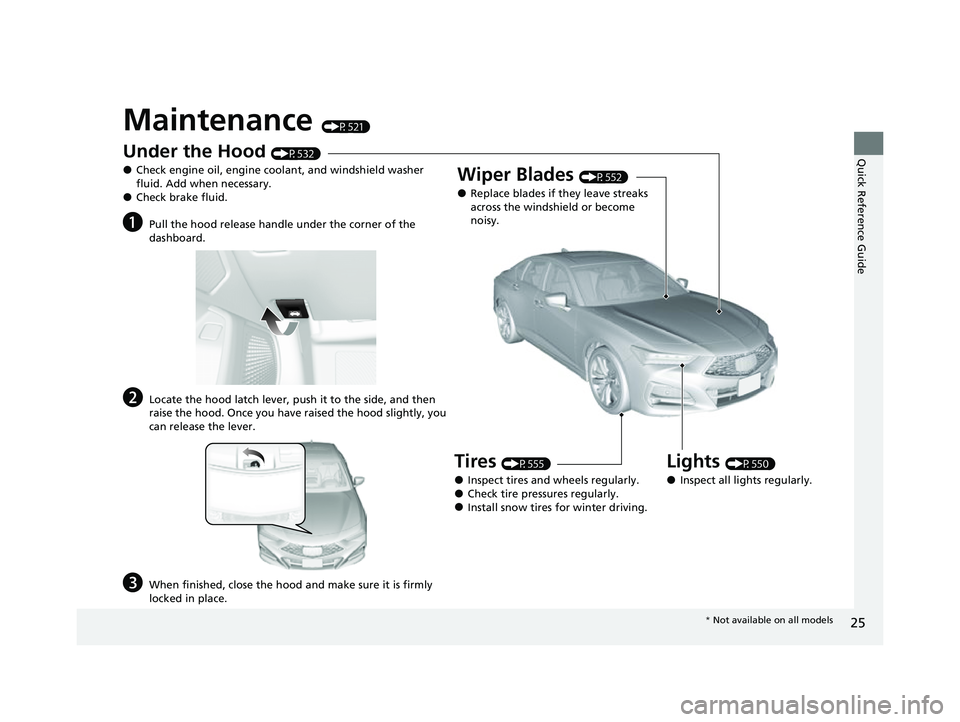
Under the Hood (P532)
●Check engine oil, engine coolant, and windshield washer
fluid. Add when necessary.
●Check brake fluid.
aPull the hood release handle under the corner of the
dashboard.
bLocate the hood latch lever, push it to the side, and then
raise the hood. Once you have raised the hood slightly, you
can release the lever.
cWhen finished, close the hood and make sure it is firmly
locked in place.
Lights (P550)
●Inspect all lights regularly.
Wiper Blades (P552)
●Replace blades if they leave streaks
across the windshield or become
noisy.
Tires (P555)
●Inspect tires and wheels regularly.●Check tire pressures regularly.●Install snow tires for winter driving.
* Not available on all models
23 ACURA TLX-31TGV6200.book 25 ページ 2022年8月4日 木曜日 午後1時59分
Page 29 of 658
27
Quick Reference Guide
What to Do If
Why does the brake pedal
pulsate slightly when
applying the brakes?This can occur when the ABS activates and does not indicate a
problem. Apply firm, steady pressure on the brake pedal. Never
pump the brake pedal.
2Anti-lock Brake System (ABS) (P492)
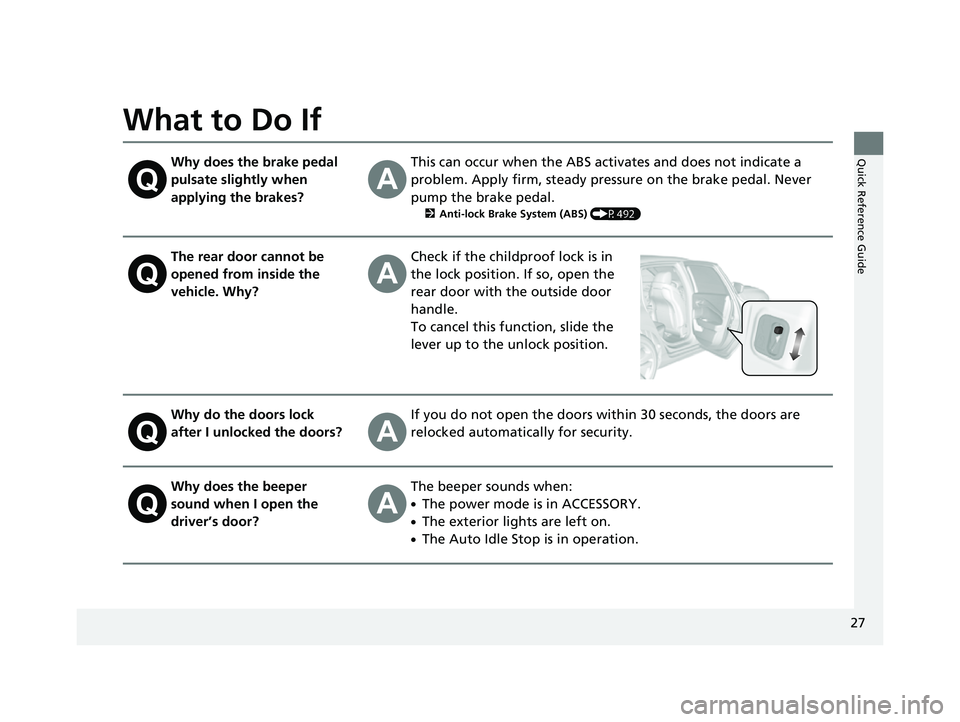
The rear door cannot be
opened from inside the
vehicle. Why?Check if the childproof lock is in
the lock position. If so, open the
rear door with the outside door
handle.
To cancel this function, slide the
lever up to the unlock position.
Why do the doors lock
after I unlocked the doors?If you do not open the doors within 30 seconds, the doors are
relocked automatically for security.
Why does the beeper
sound when I open the
driver’s door?The beeper sounds when:
●The power mode is in ACCESSORY.
●The exterior lights are left on.
●The Auto Idle Stop is in operation.
23 ACURA TLX-31TGV6200.book 27 ページ 2022年8月4日 木曜日 午後1時59分
Page 51 of 658

Continued49
uuAirbags uFront Airbags (SRS)
Safe DrivingThe airbags have advanced features to help reduce the likelihood of airbag related
injuries to smaller occupants. The driver’s advanced airbag system includes a
seat position sensor.
Based on information from this sensor and the
severity of the impact, the advanced airbag
system determines the optimal deployment of
the driver’s airbag.
The front passenger’s ad vanced airbag system
has weight sensors. The sensors are used for
occupant classification to activate or
deactivate the front passenger’s airbag.
For adult size occupant s, the system will
automatically activate the front passenger’s
airbag. If a small adult sits in the front
passenger seat and the system does not
recognize him/her as an adult, see
2 Passenger Airbag Off Indicator P. 58
■Advanced Airbags1Advanced Airbags
If there is a problem with the driver’s seat position
sensor or the passenger’s s eat weight sensors, the
SRS indicator will come on, and in the event of a
crash, the airbag will deploy (regardless of the driver’s
seating position or passenger’s occupant
classification) with a force corresponding to the
severity of the impact. 2 Supplemental Restraint System (SRS)
Indicator P. 57
For the advanced front airbags to work properly,
confirm that:
•The occupant is sitting in an upright position,
wearing the seat belt prope rly and the seat-back is
not excessively reclined.
•The occupant is not leaning against the door or
center console.
•The occupant’s feet are plac ed on the floor in front
of them.
•There are no objects ha nging from the front
passenger’s seat.
•Only small, lightweight objects are in the seat-back
pocket.
•The steering wheel and passenger’s side dashboard
are not obstructed by any object.
•No liquid has been spille d on or under the seat.
Driver’s
Seat
Position
Sensor
Passenger’s
Seat
Weight
Sensors
23 ACURA TLX-31TGV6200.book 49 ページ 2022年8月4日 木曜日 午後1時59分