change time Acura TSX 2012 Navigation Manual
[x] Cancel search | Manufacturer: ACURA, Model Year: 2012, Model line: TSX, Model: Acura TSX 2012Pages: 253, PDF Size: 22.15 MB
Page 178 of 253
176
Bluetooth® HandsFreeLink®
Pairing a Phone
Bluetooth ® HandsFreeLink®
Pairing a PhoneHINFO/PHONE button
Cellular Phone
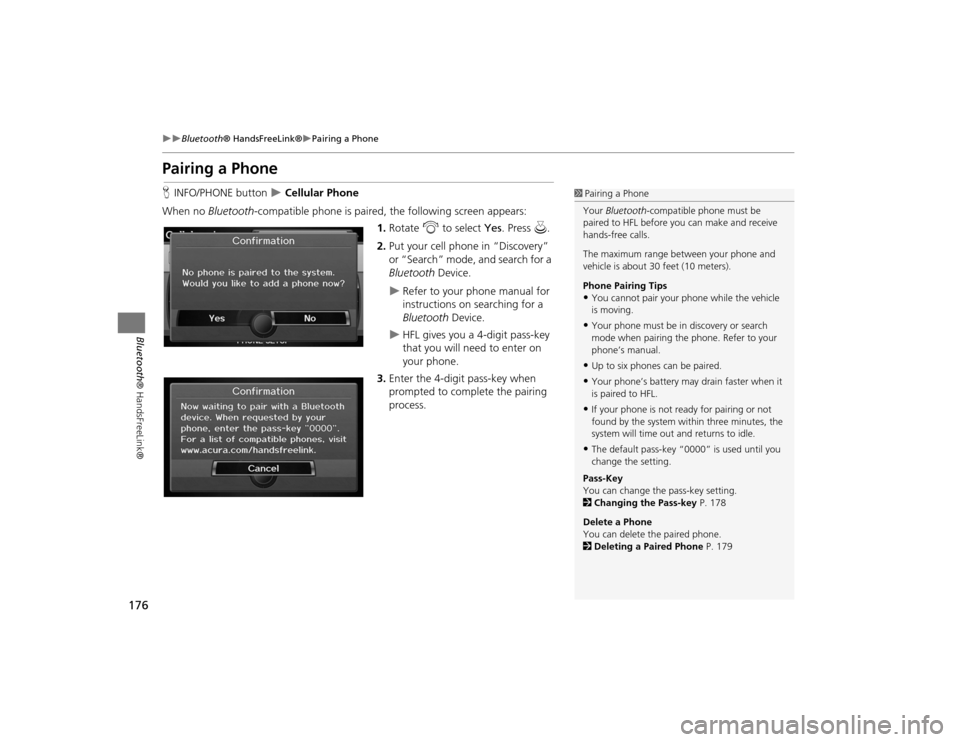
When no Bluetooth -compatible phone is paired, the following screen appears:
1. Rotate i to select Yes . Press u.
2. Put your cell phone in “Discovery”
or “Search” mode, and search for a
Bluetooth Device.
Refer to your phone manual for
instructions on searching for a
Bluetooth Device.
HFL gives you a 4-digit pass-key
that you will need to enter on
your phone.
3. Enter the 4-digit pass-key when
prompted to complete the pairing
process.
1Pairing a Phone
Your Bluetooth -compatible phone must be
paired to HFL before you can make and receive
hands-free calls.
The maximum range be tween your phone and
vehicle is about 30 feet (10 meters).
Phone Pairing Tips•You cannot pair your phone while the vehicle
is moving.•Your phone must be in discovery or search
mode when pairing the phone. Refer to your
phone’s manual.•Up to six phones can be paired.•Your phone’s battery may drain faster when it
is paired to HFL.•If your phone is not r eady for pairing or not
found by the system within three minutes, the
system will time out and returns to idle.•The default pass-key “0000” is used until you
change the setting.
Pass-Key
You can change the pass-key setting.
2 Changing the Pass-key P. 178
Delete a Phone
You can delete the paired phone.
2 Deleting a Paired Phone P. 179
TSX_KA-31TL1820.book 176 ページ 2011年6月24日 金曜日 午後3時43分
Page 202 of 253
200Other Features
CalendarHINFO/PHONE button
Other
Calendar
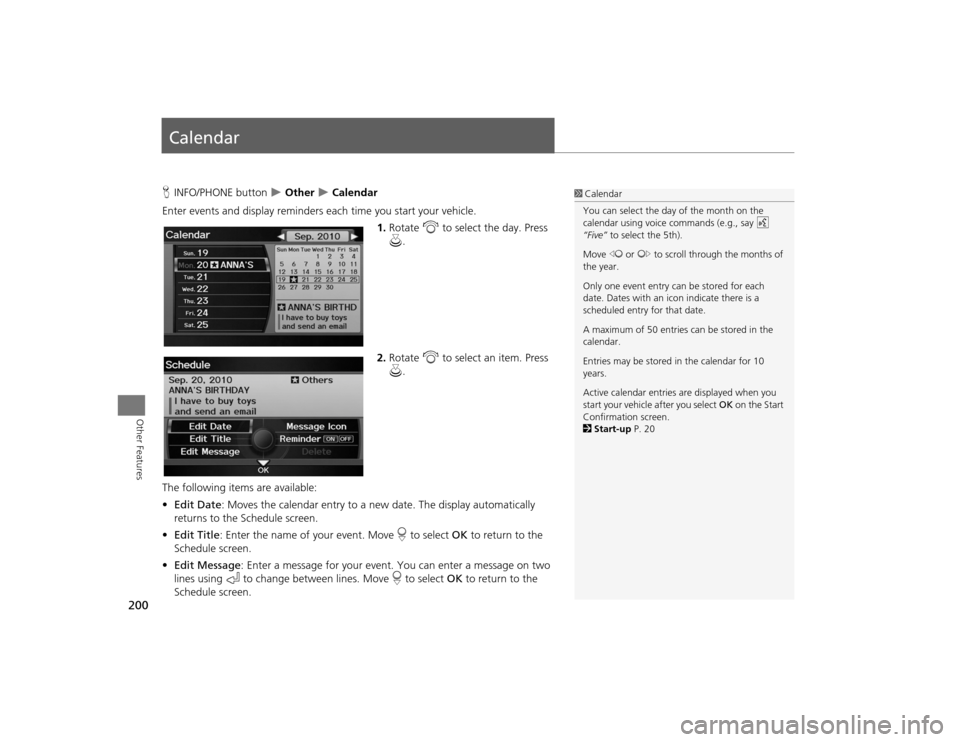
Enter events and display reminders each time you start your vehicle.
1.Rotate i to select the day. Press
u .
2. Rotate i to select an item. Press
u .
The following item s are available:
• Edit Date : Moves the calendar entry to a ne w date. The display automatically
returns to the Schedule screen.
• Edit Title : Enter the name of your event. Move r to select OK to return to the
Schedule screen.
• Edit Message : Enter a message for your event. You can enter a message on two
lines using k to change between lines. Move r to select OK to return to the
Schedule screen.
1 Calendar
You can select the day of the month on the
calendar using voice commands (e.g., say d
“Five” to select the 5th).
Move w or y to scroll through the months of
the year.
Only one event entry can be stored for each
date. Dates with an icon indicate there is a
scheduled entry for that date.
A maximum of 50 entries can be stored in the
calendar.
Entries may be stored in the calendar for 10
years.
Active calendar entries are displayed when you
start your vehicle after you select OK on the Start
Confirmation screen.
2 Start-up P. 20
TSX_KA-31TL1820.book 200 ページ 2011年6月24日 金曜日 午後3時43分
Page 213 of 253
211
Troubleshooting
Map, Voice, Entering Destinations
Troubleshooting
The navigation system pronunciation of street names
in the guidance command or destination address
sounds strange.
The basic guidance phrases use a studio- recorded voice, but street names are
pronounced using a machine-generated voice. Consequently, the name may be
mispronounced or sound strange at times.
The screen is bright when I drive at night.
1. Check that the nighttime dashboard brig htness control is not set to maximum.
2. Press the INFO/PHONE button. Select Setup > Other > Color > Map Color . Set the
Night color to Black for the best contrast. 2 Switching Display Mode Manually
P. 29
The screen is dark when I drive during the day.
Press the INFO/PHONE button. Select Setup > Other > Color > Map Color . Set the
Day color to White for the best contrast. 2 Switching Display Mode Manually
P. 29
How do I change or remove my PIN?
1. Press the INFO/PHONE button. Select Setup > Personal Information > PIN Numer
> GO Home 1 PIN or GO Home 2 PIN or Address Book PIN .
2. Enter your existing PIN. Yo u then have the choice to change or remove the PIN. 2PIN Numbers
P. 42
I have forgotten my PIN. How do I reset the PIN for
Home or the PIN for personal addresses (DRIVER 1 or
DRIVER 2)?
Your dealer must reset the PIN for you.
Why is CALL grayed out on the Calculate Route
screen?
Your phone is not paired to Bluetooth® HandsFreeLink® or, if paired, your phone is in
use.
Problem
Solution
TSX_KA-31TL1820.book 211 ページ 2011年6月24日 金曜日 午後3時43分
Page 215 of 253
213
Troubleshooting
Guidance, Routing
Troubleshooting
Guidance, Routing
Problem
Solution
The navigation system does not route me the same
way I would go or the same way as other mapping
systems.
The navigation system attempts to generate the optimal route. You can change the
route preferences used when calculating a route. 2Changing the Route Preference
P. 91
The navigation system wants to route me around
potential traffic problems. How do I stop these pop-up
messages?
Press the INFO/PHONE button. Select Setup > Other > Routing & Guidance , and set
Traffic Rerouting to OFF . 2Traffic Rerouting
P. 52
The street I’m on is not shown on the map screen.
The mapping database is constantly undergoing revision. You can access the most
recent information on the internet. 2Map Coverage
P. 227
The vehicle position icon is not following the road and
the “GPS icon” text in th e upper left hand corner of
the screen is white or missing.
• Check that the GPS antenna (located in the dashboard) is not blocked. For best reception, remove items from the dashboard, such as radar detectors, cell phones,
or loose articles.
• Metallic tinting or other aftermarket devi ces can interfere with the GPS reception.
Please consult your dealer. 2 GPS System
P. 224
The blue highlighted route and voice guidance
stopped or turned into a blue/pink dashed line before I
got to my destination.
Your route has entered an unverified area. 2Unverified Area Routing
P. 50
How do I stop the map from rotating as I drive along?
Press the MAP/GUID E button. Select Map Information > North-up, or say d
“Display north-up” to change the map orientation.
Sometimes, I cannot select between the North-up and
Heading-up map orientations.
The Heading-up map orientation can only be shown in the lower scales (1/20 - 1 mile
scales). 2Map Scale and Functions
P. 111
The “time to destination” display sometimes increases
even though I am getting closer to my destination.
If your speed reduces due to slower traffic, the navigation system updates the “time to
destination” based on your actual road speed to give you a better estimate of arrival
time.
Continued
TSX_KA-31TL1820.book 213 ページ 2011年6月24日 金曜日 午後3時43分
Page 218 of 253

216
Troubleshooting
Miscellaneous Questions
Troubleshooting
Miscellaneous Questions
Problem
Solution
My clock frequently changes forward and backward by
one hour.
The clock setting is automatically updated based on your GPS location. If you live and
work on the boundary between two time zones, you can turn off this feature. 2Clock Adjustment
P. 58
The clock changes even when I am not driving near a
time zone boundary.
The time zone boundaries are only approximated in the navigation system. Depending
on the geography of the time zone boundary, the switch to a different zone can be
erratic. 2Clock Adjustment
P. 58
My state does not observe daylight saving time. How
do I turn off this feature?
Press the INFO/PHONE button. Select Setup > Other > Clock Adjustment , and set
Auto Daylight to OFF . 2Clock Adjustment
P. 58
Daylight saving time has started, but the navigation
system did not change time even though Auto
Daylight is set to ON.
The automatic daylight saving time feat ure does not work in regions where the
daylight saving time system has not been adopted.
The navigation system automatic daylight time feature
is not switching the navigation system clock on the
correct dates.
Press the INFO/PHONE button. Select Setup > Other > Clock Adjustment , and set
Auto Daylight to ON . Note that the automatic daylight saving time feature does not
work in regions where the daylight saving time system has not been adopted. 2 Clock Adjustment
P. 58
The navigation system clock switched by one hour for
no apparent reason.
You may be driving near a time zone boundary. 2Clock Adjustment
P. 58
My battery was disconnected or went dead, and the
navigation system is asking for a code.
Your vehicle comes with a card that included the 5-digit security code and serial
number. You should keep this card in a safe place outside your vehicle. If you cannot
find it, see your dealer.
How do I change the interface language?
Press the INFO/PHONE button. Select Setup > Other > Language , and set the
language to English, Français , or Español .
TSX_KA-31TL1820.book 216 ページ 2011年6月24日 金曜日 午後3時43分
Page 230 of 253
228
Client Assistance
Traffic Information
Reference Information
Traffic InformationContinuously updated traffic information is
available in major metropolitan areas
across the 48 contiguous states and some
cities in Canada. A list of coverage areas is
available online.
To find traffic information:
1.Visit www.acura.com/realtimetraffic .
2. Select Real-Time Traffic on the TL.
3. Click AcuraLink Real-Time Traffic.
Operation in Alaska,
Hawaii, Canada, and Puerto RicoNavigation-equipped vehicles delivered to
Alaska, Hawaii, Canada, and Puerto Rico
are equipped with XM hardware, but XM
broadcasting is not available. There are
certain functions that rely on XM satellite
signal coverage which are not available,
including but not limited to AcuraLink and
traffic/weather-related services.
Unavailable menu options will appear gray
on the LCD display.
All roads displayed on the map screens are
verified roads. Information in this manual
relating to “unverified” roads or areas is
not applicable.■XM® Radio■Map Coverage
Entering a destination address or place/
landmark on another island may result in a
screen caution message. This is because
there are no ferry routes between islands
in the database.
If Street Name Guidance is set to ON, the
street names will not be read out by voice
guidance. This may change in a future data
update.Shipping a Vehicle to the U.S. MainlandTo receive XM audio, traffic, or weather
information, you must call XM and set up
an account at (800) 852-9696.
To receive AcuraLink quick tips, contact
Acura Client Services at (800) 382-2238,
and ask them to activate your AcuraLink
unit.■ Address and Place Entry
Screens■Puerto Rico
TSX_KA-31TL1820.book 228 ページ 2011年6月24日 金曜日 午後3時43分
Page 236 of 253
234
Legal Information
As required by the FCC
Reference Information
rights. Under no circumstances will
Gracenote become liable for any payment
to you for any information that you
provide. You agree that Gracenote, Inc.
may enforce its rights under this
Agreement against you directly in its own
name.
The Gracenote service uses a unique
identifier to track qu eries for statistical
purposes. The purpose of a randomly
assigned numeric identifier is to allow the
Gracenote service to count queries without
knowing anything about who you are. For
more information, see the web page for
the Gracenote Privacy Policy for the
Gracenote service.
The Gracenote Software and each item of
Gracenote Data are licensed to you “AS
IS.”
Gracenote makes no representations or
warranties, express or implied, regarding
the accuracy of any Gracenote Data from
in the Gracenote Servers. Gracenote
reserves the right to delete data from the
Gracenote Servers or to change data
categories for any cause that Gracenote
deems sufficient. No warranty is made that
the Gracenote Software or Gracenote
Servers are error-free or that functioning of Gracenote Software or Gracenote Servers
will be uninterrupted.
Gracenote is not obligated to provide you
with new enhanced or additional data
types or categories that Gracenote may
provide in the future and is free to
discontinue its services at any time.
GRACENOTE DISCLAIMS ALL
WARRANTIES EXPRESS
OR IMPLIED,
INCLUDING, BUT NOT LIMITED TO,
IMPLIED WARRANTIES OF
MERCHANTABILITY, FITNESS FOR A
PARTICULAR PURPOSE, TITLE, AND NON-
INFRINGEMENT. GRACENOTE DOES NOT
WARRANT THE RESULTS THAT WILL BE
OBTAINED BY YOUR USE OF THE
GRACENOTE SOFTWARE OR ANY
GRACENOTE SERVER. IN NO CASE WILL
GRACENOTE BE LIABLE FOR ANY
CONSEQUENTIAL OR INCIDENTAL
DAMAGES OR FOR ANY LOST PROFITS OR
LOST REVENUES.
copyright © 2000 to present Gracenote
As required by the FCC1) This device complies with Part 15 of the
FCC Rules and Canadian RSS-210/RSS-
Gen. Operation is subject to the following
two conditions: (1) this device may not
cause harmful interference, and (2) this
device must accept any interference
received, including interference that may
cause undesired operation.
2) The FCC requires the user to be notified
that any changes or modifications made to
this device that are not expressly approved
by the party respon sible for compliance
may void the user’s authority to operate
the equipment.
3) This product emits radio frequency
energy, but the radiated output power of
this device is far below the FCC and IC
radio frequency exposure limits. This
equipment complies with FCC and IC RF
radiation exposure limi ts set forth for an
uncontrolled environm ent. Nevertheless,
the device should be used in such a
manner that the potential for human
contact with the antenna during normal
operation is minimized.
TSX_KA-31TL1820_08.fm 234 ページ 2011年6月27日 月曜日 午後12時17分
Page 249 of 253
247Index
IndexSymbolsK (Back) Button
.................................... 5
, 22
a (Display Mode) Button
...................... 29
j (Hang-Up) Button
................................ 188
h (Pick-Up) Button
.......................... 188
, 189
8 (Sound) Button
............................. 6
, 170
d (Talk) Button
...................................... 5
, 22
AA.SEL (Auto Select)
.................................... 137
A.SEL/SCAN Bar
.............................................. 6
Acura Client Services
................................. 226
AcuraLink/Messages
.................................... 63
Add to Address Book
.......................... 90
, 132
Add to Dest. List
..........90
, 126
, 130
, 131
, 132
Add to Playlist
............................................ 155
Address
Editing Address Book
................................. 39
Editing Avoid Area
..................................... 54
Setting Destination
..................................... 70
Address BookEditing Address Book
................................. 37
Setting Destination
..................................... 75
Address Book PIN
........................................ 42
Adjust Time
.................................................. 59
Advanced (Place Category)
........................ 80
Audio
........................................................... 133
Basic Operation
............................................ 6
Control Display
............................................. 7
Remote Control
........................................ 171
Sound Setup
............................................. 170
Voice Commands List
............................... 239
AUDIO Button
................................................ 7
Audio Menu
Bluetooth ® Audio
....................................169
Disc
...........................................................146
FM/AM Radio
............................................137
HDD
..........................................................150
iPod®
........................................................161
USB Flash drive
.........................................166
XM® Radio
...............................................141
Auto Daylight
............................................... 58
Auto Reading
............................................... 63
Auto Service (Place Category)
....................80
Auto Time Zone
...........................................58
AUX
Input Jack
..................................................135
Voice Commands List
...............................241
AUX Button
........................... 6
, 160
, 165
, 168
Avoid Streets
..............................................122
BBanking (Place Category)
...........................80
Basic Settings
................................................ 26
Black Level
.................................................... 24
Bluetooth® Audio
Playing
......................................................168
Voice Commands List
...............................241
Bluetooth ® HandsFreeLink®
...................173
Editing User Name/PIN
..............................184
Importing Phonebook
...............................181
Making a Call
...........................................185
Pairing a Phone
.........................................176
Receiving a Call
.........................................188
Setting Speed Dials
...................................182
Brightness
...............................................24
, 29
CCalculator
................................................... 202
Calendar
..................................................... 200
Call
AcuraLink/Messages
................................ 196
Calculate Route Screen
...................... 90
, 132
Call History
................................................. 187
Call Your Dealer
........................................ 197
Cancel Route
.............................................. 122
Category
Editing Address Book
................................. 39
Place Category List
................................... 246
Setting Destination
.................................... 80
CATEGORY Bar
.............................................. 6
Category Scan
............................................ 141
CD Recording
............................................. 153
Cellular Phone
Voice Commands List
.............................. 241
CH (Channel) Button
................................ 172
Change Language
....................................... 20
Change Route Preference
.......................... 91
Change State
............................................... 71
Channel List
............................................... 141
Channel Scan
............................................. 141
City
................................................................ 72
City Vicinity
Setting Destination
.................................... 81
Viewing Weather
..................................... 115
Clear Personal Data
.................................... 66
Clock Adjustment
........................................ 58
Adjust Time
................................................ 59
Auto Daylight
............................................. 58
Auto Time Zone
......................................... 58
Resetting
.................................................... 59
TSX_KA-31TL1820.book 247 ページ 2011年6月24日 金曜日 午後3時43分