oil Acura TSX 2012 Owner's Manual
[x] Cancel search | Manufacturer: ACURA, Model Year: 2012, Model line: TSX, Model: Acura TSX 2012Pages: 324, PDF Size: 9.45 MB
Page 9 of 324
8Quick Reference Guide
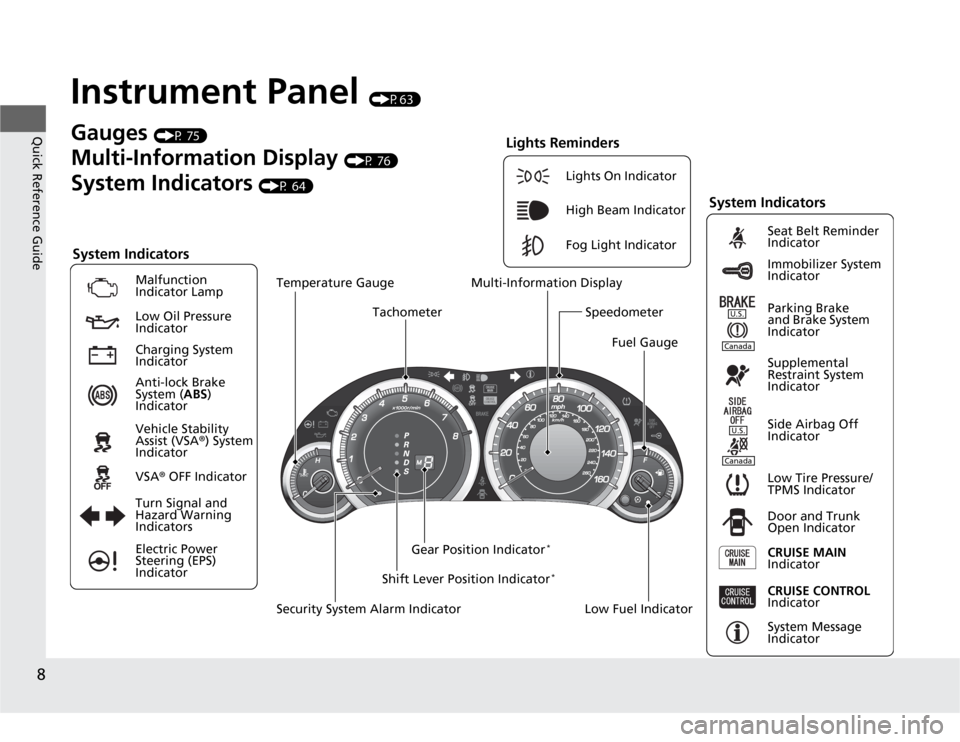
Instrument Panel
(P63)
System Indicators
Malfunction
Indicator Lamp
Low Oil Pressure
Indicator
Anti-lock Brake
System (ABS)
Indicator
Vehicle Stability
Assist (VSA®) System
Indicator
VSA® OFF Indicator
Low Tire Pressure/
TPMS Indicator
Electric Power
Steering (EPS)
IndicatorLights On Indicator
High Beam Indicator
Fog Light Indicator
Immobilizer System
Indicator Seat Belt Reminder
Indicator
System Indicators
System Message
Indicator Parking Brake
and Brake System
Indicator
Supplemental
Restraint System
Indicator
Side Airbag Off
Indicator
Door and Trunk
Open Indicator
CRUISE MAIN
Indicator Tachometer
Low Fuel Indicator Security System Alarm IndicatorShift Lever Position Indicator
*
Gauges
(P 75)
Multi-Information Display
(P 76)
System Indicators
(P 64)
Turn Signal and
Hazard Warning
Indicators
Gear Position Indicator
*
Charging System
Indicator
CRUISE CONTROL
Indicator
Lights Reminders
Multi-Information Display
Speedometer
Fuel Gauge Temperature Gauge
U.S.CanadaU.S.Canada
Page 16 of 324
15Quick Reference Guide
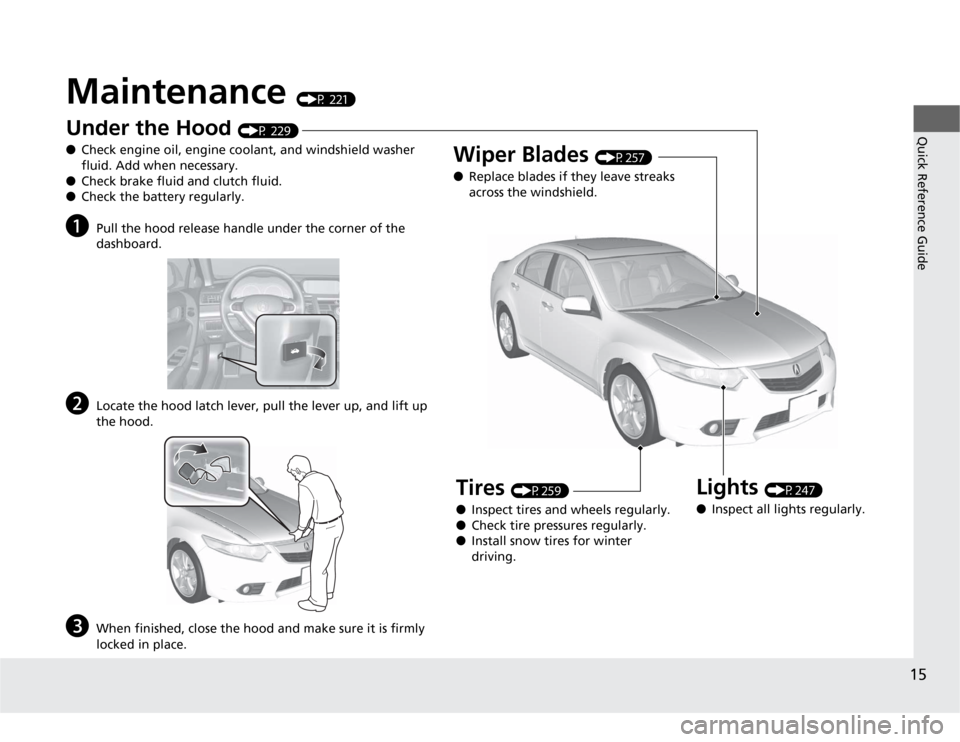
Maintenance
(P 221)
U
n
d
er t
h
e
H
oo
d
(P 229)
●Check engine oil, engine coolant, and windshield washer
fluid. Add when necessary.
●Check brake fluid and clutch fluid.
●Check the battery regularly.
a
Pull the hood release handle under the corner of the
dashboard.
b
Locate the hood latch lever, pull the lever up, and lift up
the hood.
c
When finished, close the hood and make sure it is firmly
locked in place.
Lights
(P247)
●Inspect all lights regularly.
Wiper Blades
(P257)
●Replace blades if they leave streaks
across the windshield.
Tires
(P259)
●Inspect tires and wheels regularly.
●Check tire pressures regularly.
●Install snow tires for winter
driving.
Page 61 of 324
60Safe Driving
Exhaust Gas HazardCarbon Monoxide GasThe engine exhaust from this vehicle contains carbon monoxide, a colorless,
odorless, and highly toxic gas. As long as you properly maintain your vehicle, carbon
monoxide gas will not get into the interior.■
Have the exhaust system inspected for leaks whenever
•The exhaust system is making an unusual noise.
•The exhaust system may have been damaged.
•The vehicle is raised for an oil change.
When you operate a vehicle with the trunk open, airflow can pull exhaust gas into
the interior and create a hazardous condition. If you must drive with the trunk open,
open all the windows and set the climate control system as shown below.
1.Select the fresh air mode.
2.Select the mode.
3.Set the fan speed to high.
4.Set the temperature control to a comfortable setting.
Adjust the climate control system in the same manner if you sit in your parked
vehicle with the engine running.
1Carbon Monoxide Gas
An enclosed area such as a garage can quickly fill up
with carbon monoxide gas.
Do not run the engine with the garage door closed.
Even when the garage door is open, drive out of the
garage immediately after starting the engine.
3
WARNING
Carbon monoxide gas is toxic.
Breathing it can cause unconsciousness and
even kill you.
Avoid any enclosed areas or activities that
expose you to carbon monoxide.
Page 65 of 324
64Instrument Panel
IndicatorsIndicator
Name
On/Blinking
Explanation
Message
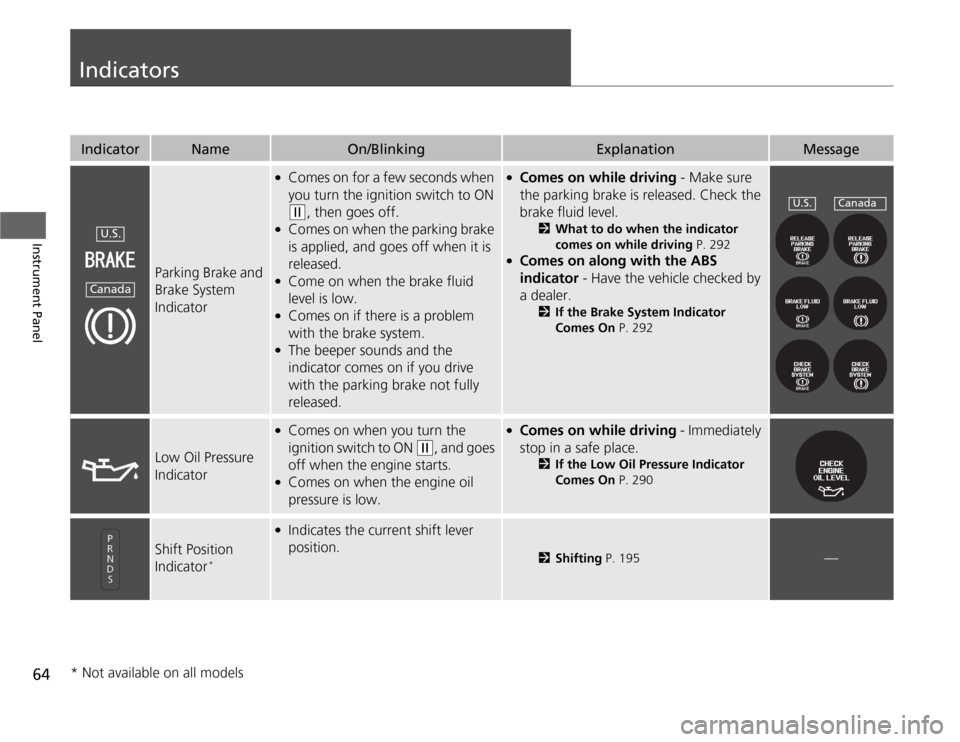
Parking Brake and
Brake System
Indicator
●
Comes on for a few seconds when
you turn the ignition switch to ON (w
, then goes off.
●
Comes on when the parking brake
is applied, and goes off when it is
released.
●
Come on when the brake fluid
level is low.
●
Comes on if there is a problem
with the brake system.
●
The beeper sounds and the
indicator comes on if you drive
with the parking brake not fully
released.
●
Comes on while driving - Make sure
the parking brake is released. Check the
brake fluid level.
2What to do when the indicator
comes on while driving P. 292
●
Comes on along with the ABS
indicator - Have the vehicle checked by
a dealer.
2If the Brake System Indicator
Comes On P. 292
Low Oil Pressure
Indicator
●
Comes on when you turn the
ignition switch to ON
(w
, and goes
off when the engine starts.
●
Comes on when the engine oil
pressure is low.
●
Comes on while driving - Immediately
stop in a safe place.
2If the Low Oil Pressure Indicator
Comes On P. 290
Shift Position
Indicator
*
●
Indicates the current shift lever
position.
2Shifting P. 195
—
U.S.Canada
U.S.
Canada
* Not available on all models
Page 77 of 324
76
uuGauges and Multi-Information DisplayuMulti-Information Display
Instrument Panel
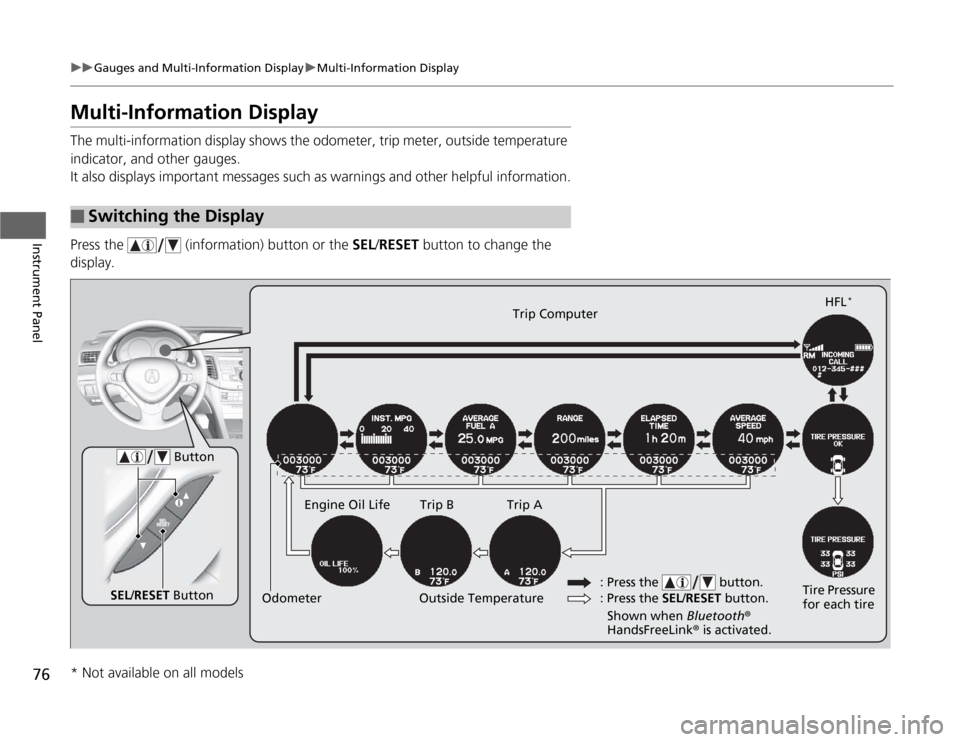
Multi-Information DisplayThe multi-information display shows the odometer, trip meter, outside temperature
indicator, and other gauges.
It also displays important messages such as warnings and other helpful information.
Press the (information) button or the SEL/RESET button to change the
display.■
Switching the Display
SEL/RESET ButtonTire Pressure
for each tireHFL
*
Trip Computer
Trip B Engine Oil Life Trip A
Outside Temperature Odometer
Button
: Press the SEL/RESET button. : Press the button.Shown when Bluetooth®
HandsFreeLink® is activated.
* Not available on all models
Page 80 of 324
Continued
79
uuGauges and Multi-Information DisplayuMulti-Information Display
Instrument Panel
The elapsed time display shows the time during one drive cycle.
The display shows the average speed in mph (U.S.) or km/h (Canada) since the last
time Trip A was reset.
Shows the remaining oil life and Maintenance Minder
TM.
2Maintenance Minder
TM P. 225
Shows each tire’s pressure.
2TPMS (Tire Pressure Monitoring System) P. 206
Shows your paired cell phone’s information.
2Bluetooth® HandsFreeLink® P. 167
■
Elapsed Time
■
Average Speed
■
Engine Oil Life
■
Tire Pressure Monitor
■
Bluetooth® HandsFreeLink®
1Elapsed Time
You can change the elapsed time reset criteria.
2Customized Features P. 80
Page 215 of 324
214Driving
Parking Your VehicleWhen Stopped1.Always use the parking brake when you park your vehicle.
2.Make sure the parking brake is set firmly, or your vehicle may roll if parked on an
incline.Parking1.Depress the brake pedal firmly with the shift lever in
(D
.
2.Apply the parking brake while holding the brake pedal down.
3.Move the shift lever to
(P
.
4.Turn off the engine.
1Parking Your Vehicle
Do not park your vehicle near flammable objects,
such as dry grass, oil, or timber.
Heat from the exhaust can cause a fire.1When Stopped
NOTICEThe following can damage the transmission:•Depressing the accelerator and brake pedals
simultaneously.•Holding the vehicle in place when facing uphill by
depressing the accelerator pedal.•Moving the shift lever into
(P
before the vehicle
stops completely.
Automatic transmission models
1Parking
Raise the wiper arms when snow is expected.
Automatic transmission models
Page 219 of 324
218Driving
Fuel EconomyImproving Fuel EconomyFuel economy depends on several conditions, including driving conditions, your
driving habits, the condition of your vehicle, and loading. Depending on these and
other conditions, you may or may not achieve the rated fuel economy of this vehicle.
You can optimize your fuel economy with proper maintenance of your vehicle.
Always maintain your vehicle in accordance with the messages displayed on the
multi-information display.
•Use the recommended viscosity engine oil, displaying the API Certification Seal.
•Maintain the specified tire pressure.
•Do not load the vehicle with excess cargo.
•Keep your vehicle clean. A buildup of snow or mud on your vehicle’s underside
adds weight and increases wind resistance.■
Maintenance and Fuel Economy
1Improving Fuel Economy
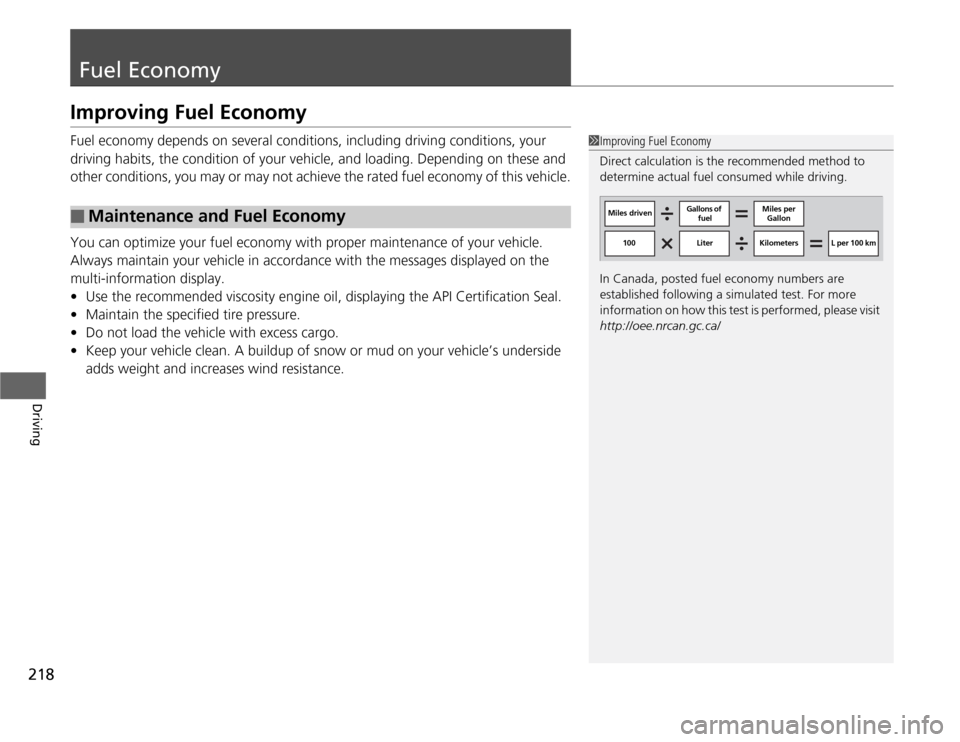
Direct calculation is the recommended method to
determine actual fuel consumed while driving.
In Canada, posted fuel economy numbers are
established following a simulated test. For more
information on how this test is performed, please visit
http://oee.nrcan.gc.ca/
Miles drivenGallons of
fuelMiles per
Gallon
100 Liter Kilometers L per 100 km
Page 222 of 324
221
Maintenance
This chapter discusses basic maintenance.
Before Performing Maintenance
Inspection and Maintenance ............ 222
Safety When Performing Maintenance...223Parts and Fluids Used in Maintenance
Service ........................................... 224
Maintenance Minder
TM
..................... 225
Maintenance Under the Hood
Maintenance Items Under the Hood .. 229
Opening the Hood ........................... 231
Recommended Engine Oil ................ 234
Oil Check ......................................... 235
Adding Engine Oil ............................ 237Engine Coolant ................................ 240
Transmission Fluid ............................ 242
Brake/Clutch Fluid ............................ 244
Refilling Window Washer Fluid......... 246
Replacing Light Bulbs....................... 247
Checking and Maintaining Wiper
Blades.......................................... 257Checking and Maintaining Tires
Checking Tires ................................. 259
Tire and Loading Information Label .. 260
Tire Labeling .................................... 260
DOT Tire Quality Grading (U.S. Vehicles) ..262
Wear Indicators ............................... 264
Tire Service Life ................................ 264
Tire and Wheel Replacement ........... 265
Tire Rotation .................................... 266
Winter Tires ..................................... 267
Battery............................................... 268
Remote Transmitter Care................. 269
Replacing the Battery ....................... 269
Climate Control System Maintenance
.. 270
Cleaning
Interior Care .................................... 271
Exterior Care.................................... 273
Page 223 of 324
222Maintenance
Before Performing MaintenanceInspection and MaintenanceFor your safety, perform all listed inspections and maintenance to keep your vehicle
in good condition. If you become aware of any abnormality (noise, smell, insufficient
brake fluid, oil residue on the ground, etc.), have your vehicle inspected by a dealer.
(Note, however, that service at a dealer is not mandatory to keep your warranties in
effect.) Refer to the separate maintenance booklet for detailed maintenance and
inspection information.■
Daily inspections
Perform inspections before long distance trips, when washing the vehicle, or when
refueling.
■
Periodic inspections
•Check the automatic transmission fluid level monthly.
2Automatic Transmission Fluid P. 242
•Check the brake fluid level monthly.
2Brake/Clutch Fluid P. 244
•Check the tire pressure monthly. Examine the tread for wear and foreign objects.
2Checking and Maintaining Tires P. 259
•Check the operation of the exterior lights monthly.
2Replacing Light Bulbs P. 247
•Check the condition of the wiper blades at least every six months.
2Checking and Maintaining Wiper Blades P. 257
■
Types of Inspection and Maintenance
1Inspection and Maintenance
Maintenance, replacement, or repair of
emissions control devices and systems may be
done by any automotive repair establishment or
individuals using parts that are “certified” to
EPA standards.
According to state and federal regulations, failure to
perform maintenance on the maintenance main
items marked with # will not void your emissions
warranties. However, all maintenance services should
be performed in accordance with the intervals
indicated by the multi-information display.
2Maintenance Service Items P. 227
If you want to perform complex maintenance tasks
that require more skills and tools, purchase the
service manual.
2Authorized Manuals P. 315
If you want to perform maintenance yourself, make
sure that you have the necessary tools and skills first.
After performing maintenance, update the records in
the separate maintenance booklet.
U.S. models